Short answer
The best data recovery software under $50 is DMDE Express at $20 for one personal rescue, or DMDE Standard at $48 if you want to own it. Both run on Windows, macOS, Linux and DOS. Independent testers put DMDE's recovery level with the leading tools, and its free edition already saves 4,000 files per folder.
If DMDE's technical interface puts you off, Raise Data Recovery ($34.95) is the easiest guided wizard and reads Mac and Linux drives. Hasleo Data Recovery Professional ($49) is the simple Windows pick that also allows business use. DataNumen Data Recovery ($49.95) is the one to choose only if its free scan finds files the others missed. Every price here is paid once, with no auto-renewal.
At a glance
| Fact | DMDE Express / Standard | Raise Data Recovery | Hasleo Professional | DataNumen Data Recovery |
|---|
| Price at checkout | $20 (1 year) / $48 (perpetual) | $34.95, lifetime license | $49, lifetime upgrades | $49.95, one-time |
| Runs on | Windows, macOS, Linux, DOS | Windows, macOS, Linux | Windows | Windows |
| Save for free | 4,000 files per folder, unlimited repeats, no subfolders | Files up to 256 KB each (raw finds any size) | 2 GB in the separate Free edition | ✗ Scan and list only |
| Mac and Linux file systems | ✓ APFS, HFS+, Ext2/3/4, Btrfs | ✓ APFS, HFS+, Ext2/3/4, XFS and more | HFS+ only | ✓ APFS, HFS+, Ext2/3/4 |
| Lost partition tools | ✓ Finds and re-inserts partitions | Finds lost partitions in a scan | Deep Scan for lost and RAW partitions | Recovers from lost partitions |
| Disk imaging for failing drives | ✓ | ✗ | ✗ | Scans an existing disk image |
| Free updates | For the license term / lifetime | 30 days | Lifetime | 1 month |
| Ease of use | Technical | 4-step wizard | Simple, 3 recovery modes | Simple, plain window |
How we picked
- We started from the data recovery programs listed on this site and kept the ones whose full license costs under $50 at checkout, paid once rather than monthly.
- For each one we read the vendor's product, order, edition and FAQ pages, checked the current version and downloaded the installer to note its size.
- We compared what each free edition or trial actually lets you save, because at this price that decides whether you need to pay at all.
- We gathered independent tests (TechRadar, Digital Trends, Data Recovery Digest) and user reviews, including the complaints.
- What we checked: DMDE Express at $20, DMDE Standard at $48, Raise Data Recovery at $34.95 and Hasleo Data Recovery Professional at $49 on the order page, DataNumen Data Recovery at $49.95 on its order page, and the installer sizes of all four from the vendors' download links, on November 12, 2026.
We compared prices, free limits and features, and didn't run our own recovery test on a damaged drive. The recovery results quoted here come from the reviewers who did.
DMDE Express and DMDE Standard: the most recovery for the money
DMDE Express (1-Year) - 1 OS Family and DMDE Standard
- Price: Express $20 for one year of personal use. Standard $48, perpetual, with lifetime updates and internal business use.
- Runs on: Windows, macOS, Linux or DOS (one OS family per license), without installation
- Free edition: up to 4,000 files from one folder per recovery, as often as you like
- Best for: formatted drives, lost partitions and RAW drives, by someone willing to learn a technical tool
DMDE Express is the cheapest full data recovery license here, and DMDE is the strongest engine in the group. Digital Trends tested it on a hard drive and concluded: "HDD performance was as good as the leading data recovery software, but at a budget price." TechRadar gave it 4 out of 5 and called it "one of the most value-for-money data recovery software solutions we have tested."
What sets DMDE apart at this price is the toolkit. Even the free edition includes a partition manager that can put a deleted partition back, a RAID constructor for RAID 0, 1, 4, 5, 6 and JBOD, and disk imaging that handles bad sectors, so you can copy a failing drive and recover from the copy. Raise and Hasleo don't image drives at all. It reads Windows, Mac and Linux file systems whatever system it runs on.
The two licenses differ in term and use, not features. Express lasts a year and is for personal files only. Standard never expires and covers your company's own drives. By a third year, Express bought again would cost $60, so Standard is the better buy if you'll keep it. Our DMDE edition comparison goes through all four editions in detail.
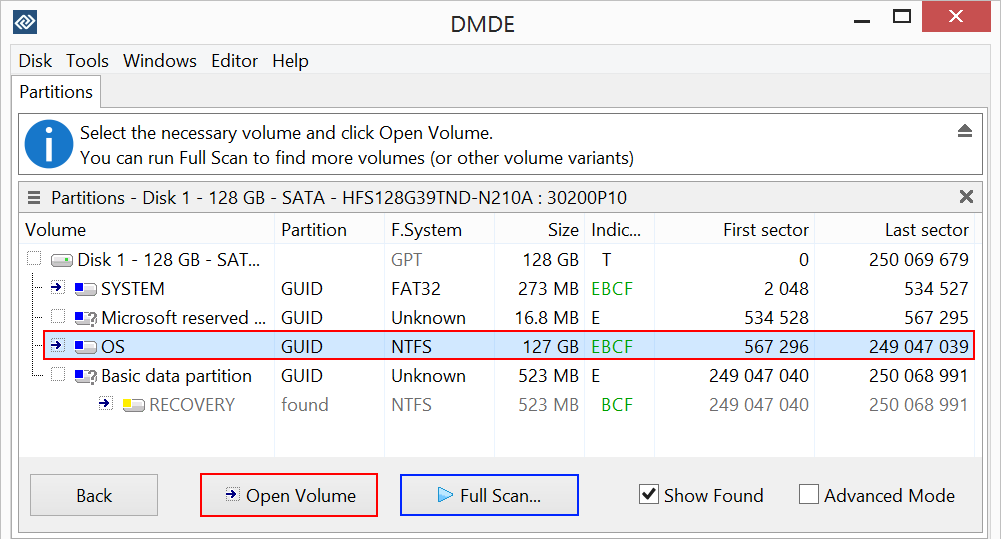
DMDE's Partitions window for a 128 GB disk: the NTFS OS partition is selected, and a deleted RECOVERY partition is listed below it as "found", ready to open or restore.
What we like
- The lowest price for unlimited recovery: $20
- Free edition with no size cap, only a per-folder limit
- Partition undelete, RAID constructor and disk imaging, even free
- Runs on four operating systems, reads all their file systems
Watch out for
- A dated, technical interface with a real learning curve
- Express expires after a year and excludes business use
- Activated licenses aren't refunded if the recovery fails
- Support by email only
What reviewers and users say about DMDE
TechRadar (Krishi Chowdhary, 4 out of 5): "At an annual cost of $20, you get advanced scanning features that support all common and even customizable file formats across systems like Windows, macOS, Linux, and DOS." Reasons to avoid: "Old-looking interface" and "Steep learning curve".
Digital Trends (Alan Truly, November 2024): "DMDE offers an excellent free data recovery app with a low-cost upgrade to unlock more features, making this a great choice for tech-savvy users to restore lost files." Cons: "Not as user-friendly as competitors" and "Support is via email".
dmde.com shows 4.8 out of 5 from 161 user reviews. José Ramírez (5 stars, August 2026): "The free edition reconstructed the original ExFAT folder structure and allowed me to recover nearly everything, including many original folder names."
Ana (4 stars, June 2026): "I accidentally deleted a folder on my external drive and this program recovered it. I gave it four stars though since the images it recovered weren't able to be opened."
Download DMDE Free EditionBuy DMDE Express ($20)Buy DMDE Standard ($48)
Raise Data Recovery: the easiest wizard, and Mac and Linux too
Raise Data Recovery
- Price: $34.95 at checkout for a lifetime Personal license with 30 days of free updates
- Runs on: Windows XP SP3 to 11, macOS 11 and later (Intel and Apple Silicon), Linux. One license activates on any of them.
- Trial: no time limit. Files found by a file system scan save only up to 256 KB each. Raw finds save at any size.
- Best for: home users who want to be guided, especially with a Mac or Linux drive
Raise Data Recovery is the friendliest program in this list. It comes from SysDev Laboratories, the company behind the UFS Explorer tools that recovery labs use, and wraps that engine in four screens: choose the drive, scan, tick the files, choose where to save. A help panel explains each step, and the save screen colors each drive by whether your selection fits, steering you away from the drive you're recovering.
Raise reads the widest set of file systems here: NTFS, exFAT, FAT and ReFS, HFS+ and APFS, and Ext2 to Ext4, XFS, JFS, ReiserFS and UFS. It also assembles Windows dynamic disks, Apple Software RAID, Linux LVM and mdadm arrays automatically, which covers the drives from many home NAS boxes.
Its limits: the license is personal and non-commercial, there's no disk imaging, and the $34.95 license gets updates for 30 days. On Macs with Apple Silicon or a T2 chip it recovers external drives only, not the built-in one.
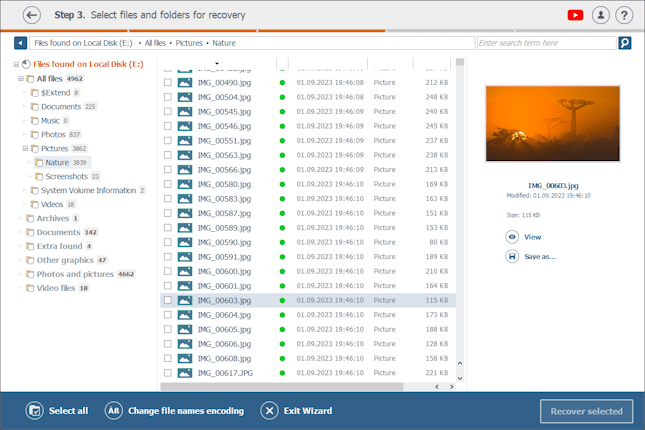
Raise Data Recovery's step 3: found files in their original folders and in type folders (Documents, Photos, Video files), with a photo previewed on the right and Recover selected at the bottom.
What we like
- A wizard that's hard to get wrong
- One license works on Windows, macOS or Linux
- The broadest file system support in this list
Watch out for
- The trial saves only small files from a normal scan
- No disk imaging or drive health checks
- Updates stop after 30 days on the $34.95 license
What reviewers say about Raise Data Recovery
Data Recovery Digest, which tests recovery programs on prepared drives, summed it up as "A program with an excellent wizard interface (first/second best), average localization and demo restrictions, a very good file previewer, average recovery features (except its file system set), and the second-best score for file recovery performance."
Its weak points: "Insufficient localization support (only 9 interface languages), no disk imaging support, poor file search and mark capabilities, and no S.M.A.R.T. monitoring." Raise shows 4.2 out of 5 from 83 ratings on its own site.
Download Raise Data Recovery TrialBuy Raise Data Recovery ($34.95)
Hasleo Data Recovery Professional: simple Windows recovery, business use included
Hasleo Data Recovery Professional
- Price: $49 at checkout, once, for 1 PC, with lifetime free upgrades
- Runs on: Windows 11, 10, 8, 7, Vista, XP and Windows Server 2003 or later
- Free: a separate Free edition saves 2 GB for home users. The Professional trial saves several files.
- Best for: a Windows PC user who wants a simple program, or a small office
Hasleo Data Recovery Professional is the straightforward Windows choice. You pick one of three modes (Deleted File Recovery, Deep Scan Recovery for formatted and RAW partitions, or BitLocker), choose the drive and scan. Results appear in a File Explorer-style tree with type filters and a preview pane. Professional also builds a WinPE boot disk for a PC that won't start, and lets you export a long scan and reload it later.
Hasleo and DMDE Standard are the two picks here licensed for business use, and both include lifetime upgrades. Hasleo is the simpler program of the two. The trade-offs are scope: Windows only, HFS+ but no APFS or Linux file systems, no disk imaging, and BitLocker recovery needs the pricier Ultimate edition.

Hasleo Data Recovery after a scan: 1,556 files found on an NTFS partition, the Photo folder ticked, a preview on the right, and the Export and Recover buttons at the bottom.
What we like
- Simple three-mode workflow
- Business use and lifetime upgrades for $49
- WinPE boot disk and saved scans
Watch out for
- Windows only, no APFS or Ext support
- Little independent testing to judge its recovery rate
- The Professional trial saves only a few files
What users say about Hasleo Data Recovery
Hasleo has little independent coverage, and its own forum shows both sides. One buyer reported a failure (masmox, September 2026): "I recovered the data (videos, documents, etc.—none of which were encrypted or otherwise blocked); however, I subsequently discovered that all the recovered files were 0 bytes in size and therefore unusable." Hasleo's reply: "we'll refund you as soon as possible."
Another user who hit a licensing problem still wrote (ricardogroto, September 2026): "Honestly, all your software is great."
Download Hasleo Data Recovery TrialBuy Hasleo Data Recovery Professional ($49)
DataNumen Data Recovery: see every file before you pay
DataNumen Data Recovery
- Price: $49.95 on the order page, one-time (the vendor's list price is $59.95)
- Runs on: Windows, as a 32-bit program, with administrator rights
- Free version: scans and lists every recoverable file and folder, with picture previews, but saves nothing
- Best for: a second opinion when another tool's scan came up short
DataNumen Data Recovery scans a drive, a whole disk or a disk image file, rebuilds what it can of the folder tree and searches for more than 430 file types by their content. It reads NTFS, FAT16, FAT32, ext2 to ext4, HFS+ and APFS. The free version runs the full scan and shows you everything it found, so you know before paying whether your files are there.
It's last in this list for reasons you should know. The free version can't save a single file, where DMDE and Hasleo let you recover real data for nothing. Upgrades are free for one month only. It's a 32-bit program, and its documentation lags: the product page still shows version 4.0 while the download is 5.0, dated July 9, 2026. Files found by content come back with generic names such as File5.JPG.
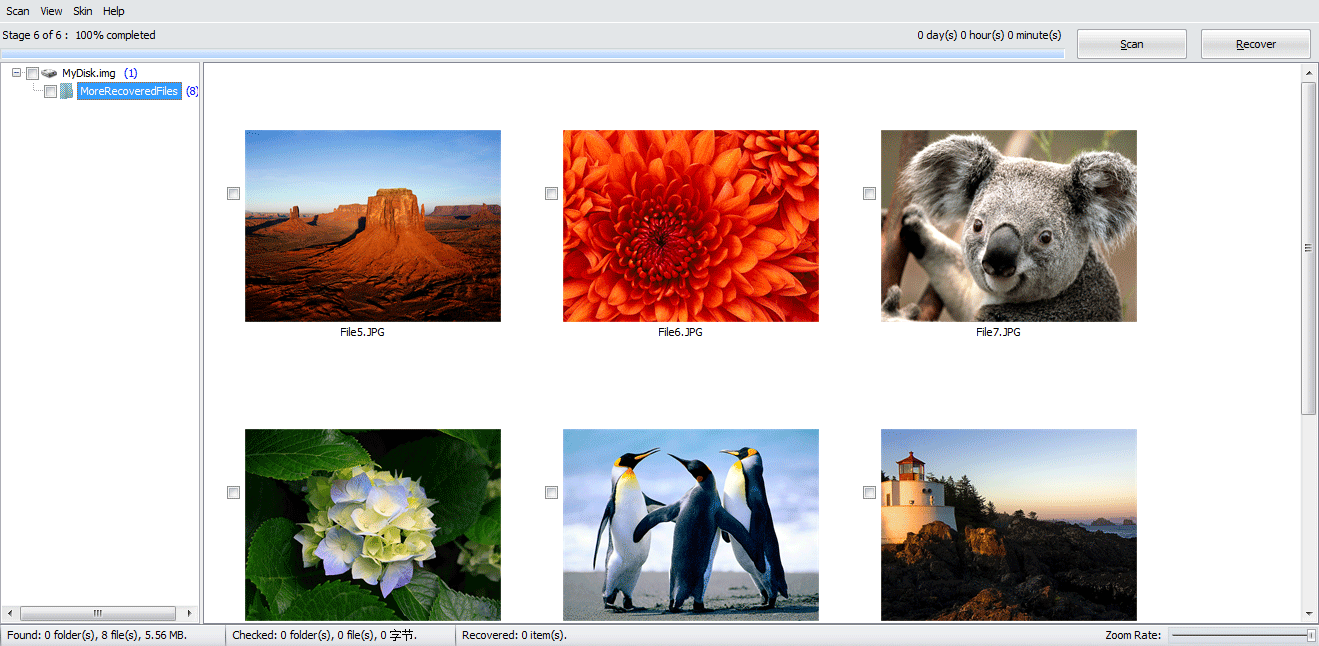
DataNumen Data Recovery (an older version shown) after scanning a disk image: six photos found by content in the MoreRecoveredFiles folder, named File5.JPG, File6.JPG and so on, with the Scan and Recover buttons at the top.
What we like
- Full scan and file list free, before you pay
- 430+ file types found by content
- Reads Mac and Linux file systems on Windows
Watch out for
- Free version saves nothing
- One month of free upgrades
- Few independent reviews
What users say about DataNumen Data Recovery
DataNumen's site shows a single customer quote for this product. Ms. Mascha Fujimoto, March 16, 2021: "Your product was the best and did the most! But I don't think anything can recover the data I lost. It recovered what I already had, which was more than previous products, but none of the 3.5 weeks of data that was missing."
G2 lists four reviews averaging 3.0 out of 5. Reviewers praise how simple it is and how well it finds deleted files, and the main complaint is paying again for later versions.
Download DataNumen Data Recovery[[BTN blue|https://store.payproglobal.com/checkout?products[1][id]=104018&products[1][agreement-id]=16460|Buy DataNumen Data Recovery ($49.95)]]
Prices and download sizes side by side
Price for one license, paid once (USD)
DMDE Express (1 year)$20.00
Raise Data Recovery$34.95
DMDE Standard (perpetual)$48.00
Hasleo Data Recovery Professional$49.00
DataNumen Data Recovery$49.95
Order page prices checked on November 12, 2026.
Windows download size (MB)
DMDE (zip, runs without installing)2.5 MB
Hasleo Data Recovery (trial installer)16.1 MB
DataNumen Data Recovery (installer)17.7 MB
Raise Data Recovery (installer)17.9 MB
File sizes from the vendors' download links on November 12, 2026. A smaller download matters when you have to run the tool from a USB stick on a PC whose drive you mustn't write to.
Which should you choose?
| Your situation | Pick | Why |
|---|
| One formatted, RAW or lost-partition drive, and the lowest price | DMDE Express | Full recovery with folders for $20, strongest engine here |
| You want a recovery tool you own for good | DMDE Standard | Perpetual with lifetime updates, $48 |
| You want a guided wizard, not a technical tool | Raise Data Recovery | Four clear steps, $34.95 |
| A Mac or Linux drive, or the disks from a home NAS | Raise Data Recovery | Widest file system support and automatic software RAID assembly |
| A Windows PC at a small business | Hasleo Professional | Business use allowed, lifetime upgrades, simpler than DMDE Standard |
| A few deleted files, small total size | Hasleo Free or DMDE Free | 2 GB, or 4,000 files per folder, for nothing |
| The drive is getting slower or throwing errors | DMDE | Copies the drive to an image first, handling bad sectors |
| Another tool missed your files | DataNumen (free scan) | Check its free file list before paying anything |
Who should skip each one. Skip DMDE if you want a modern, guided interface. Skip Raise if you recover data at work, since its license is personal. Skip Hasleo if the drive came from a Mac with APFS or from a Linux machine. Skip DataNumen unless its free scan shows files the others missed, because the others let you save some data free and DataNumen doesn't. And if you'd rather spend more for a more polished program, our best data recovery software roundup covers the higher-priced options.
What commonly goes wrong
- Paying before checking. Every program here shows what it can recover before you pay. A file that won't preview or open in the free version won't open after buying either.
- Installing onto the damaged drive. Install or run the tool from another drive, and save recovered files to another drive, or you overwrite what you're trying to get back. DMDE avoids the first problem by running without installation.
- Scanning a dying drive for hours. If it clicks, isn't detected, or keeps freezing, switch it off and go to a recovery lab. Software can't fix hardware.
- Expecting SSD miracles. On an SSD with TRIM, deleted files are often erased by the drive within moments. Digital Trends found deleted SSD files by name with DMDE, but none were recoverable.
- Losing names on deep scans. Files found only by their content come back without names or folders in every one of these tools. Plan time for sorting.
For step-by-step help, see our guides on recovering a lost partition or RAW drive with DMDE and recovering data from an external hard drive.
FAQs
What is the best cheap data recovery software?
DMDE Express is the best cheap data recovery software: $20 for a year of unlimited recovery, with an engine testers rank alongside the leading tools. Raise Data Recovery ($34.95) is the best cheap choice if you want a simple wizard.
Is there free data recovery software that actually saves files?
Yes. DMDE's free edition saves up to 4,000 files from one folder per recovery, as many times as you like, and Hasleo's Free edition saves up to 2 GB for home users. Raise's trial saves only small files from a normal scan, and DataNumen's free version saves nothing.
Are these one-time purchases or subscriptions?
All five licenses are paid once with no auto-renewal. DMDE Express is the exception in length: it's a one-year license, bought once, that doesn't renew. Raise, Hasleo, DataNumen and DMDE Standard are lifetime licenses, though Raise and DataNumen include only 30 days or one month of free updates.
Which cheap recovery tool works on a Mac?
DMDE and Raise Data Recovery both have macOS versions. Raise's single license activates on Windows, macOS or Linux, while a DMDE 1 OS Family license is fixed to the first system you activate it on. Hasleo and DataNumen are Windows only.
Can cheap data recovery software recover a formatted drive?
Yes. All four programs recover files from a quick-formatted drive, by rebuilding the old file system or finding files by their content. A full format on Windows Vista and later writes zeros over the drive, and then no software can recover it.
Can I get a refund if the recovery doesn't work?
It depends on the vendor. DMDE doesn't refund activated licenses because a recovery failed, only unactivated ones within 30 days. Hasleo refunds within 30 days for technical problems support can't solve. DataNumen has a 30-day guarantee if the full version recovers less than the free scan showed. Test with the free version first in every case.
Do I need RAID recovery software for a NAS?
Not always. Raise Data Recovery assembles Linux mdadm and LVM arrays, which many home NAS boxes use, and DMDE's RAID constructor rebuilds RAID 0, 1, 4, 5, 6 and JBOD manually. For a damaged array with lost settings, a dedicated RAID tool is the safer choice.