Short answer
For most people who deleted files, formatted the wrong drive or have a Windows PC that won't boot, Stellar Data Recovery Professional is the best all-round pick: $79.99 a year, partition and BitLocker recovery, and a bootable rescue USB. If the files were on a NAS or RAID array (Synology, QNAP, Drobo, a dead RAID controller), you need UFS Explorer RAID Recovery instead, a one-time $145.36 license that rebuilds the array from the bare drives. EaseUS Data Recovery Wizard Professional is the alternative to try first if your loss is small: its free edition recovers up to 2 GB.
All three let you scan and preview for free, so the rule is the same whichever you choose: run the free scan first, and pay only if your files show up in the preview.
At a glance
|
Stellar Data Recovery Professional |
UFS Explorer RAID Recovery |
EaseUS Data Recovery Wizard Pro |
| Best for |
Deleted files, lost partitions, unbootable PCs |
Failed NAS boxes and RAID arrays |
Small losses (free up to 2 GB), everyday recovery |
| Price |
$79.99 per year, 1 PC, renews yearly |
$145.36 once, 1 PC, perpetual (360 days of updates) |
$69.95 for 1 month, $99.95 for 1 year, $149.95 lifetime |
| Free version |
Scan and preview, saving needs a license |
No time limit, saves files up to 768 KB each |
Free edition recovers up to 2 GB |
| Windows |
11, 10, 8.1, 8 (64-bit only), Server 2016-2022 |
7 SP1 and later, 32- or 64-bit, ARM builds |
11, 10, 8, 7, Server 2003-2025 |
| RAID / NAS rebuild |
✗ (Stellar's Technician edition only) |
✓ RAID 0-7, nested levels, SHR, BeyondRAID, RAID-Z |
NAS recovery listed among Pro features |
| Bootable rescue for a dead PC |
✓ USB recovery drive |
✗ (connect the drives to a working PC) |
Crashed-PC recovery with a WinPE USB advertised |
| BitLocker drives |
✓ |
✓ (also APFS encryption) |
✓ |
| Refunds |
Claims within 30 days of a first purchase, with conditions |
Only for software errors SysDev can't fix within 7 days |
30-day money-back guarantee |
How we picked
- We started from the data recovery tools listed on Ivertech and kept the ones that are current, sold today and cover a distinct need: everyday PC recovery, RAID and NAS recovery, and a low-cost first try.
- We read each vendor's product, pricing, specification and refund pages, and each user manual where one exists.
- We checked the prices at checkout rather than copying list prices, because they differ: UFS Explorer's store lists $149.95, while the checkout behind our Buy Now button charges $145.36.
- We read independent reviews (TechRadar, KitGuru, Comparitech, Trustpilot, recovery-technician forums) and left out "reviews" published by competing recovery companies.
What we checked: the checkout prices of Stellar Data Recovery Professional ($79.99) and UFS Explorer RAID Recovery ($145.36), and EaseUS's Windows prices on its own store, on October 11, 2026. Stellar's installer reports version 12.6.0.0 and UFS Explorer's 10.22.0.7932.
Before you install anything
Stop using the drive you lost files from. Every new file written there can overwrite what you want back, and that includes installing recovery software. Install the program on a different drive, and save recovered files to a third location. If a drive clicks, slows down or shows SMART warnings, make a disk image first and scan the image. And if a drive isn't detected at all, no software can help: that's a job for a recovery lab.
Stellar Data Recovery Professional: the best all-rounder for Windows PCs
Stellar Data Recovery Professional (formerly Stellar Phoenix) recovers deleted and lost files from hard drives, SSDs, USB sticks, memory cards and scratched CDs, DVDs and Blu-ray discs, and it goes well past simple undelete.
- Price: $79.99 a year for one PC, renewing automatically
- Version: 12.6.0.0, for 64-bit Windows 11, 10, 8.1 and 8 and Windows Server 2016-2022
- File systems: NTFS, FAT16, FAT32, exFAT and ReFS
- Best for: anyone whose problem might be a deleted folder, a vanished partition, a RAW or BitLocker drive, or a PC that won't start

Stellar's Recover From screen, from its user manual: connected drives, physical disks and common locations such as Desktop and Documents, with the Deep Scan switch at the bottom. The manual's screenshots carry the Premium edition's title bar, and Professional uses the same screens.
Stellar Data Recovery Professional covers nearly every way data goes missing in one sidebar. A Quick Scan handles everyday deletions; a Deep Scan searches sector by sector for file signatures after a format or file system corruption. "Can't Find Drive" searches a whole disk for partitions that disappeared after a bad resize or deletion. Give it the password or recovery key and it scans BitLocker drives. And if Windows won't boot, you build a recovery USB on another computer, boot the broken PC from it and copy your files off.
Stellar Data Recovery Professional also protects you from the worst mistake in recovery: hammering a failing drive with scan after scan. Create Image copies a dying disk to an image file so all the scanning happens on the copy, and a Drive Monitor reads SMART data so you can see a drive's health before you start.

Scan results in the dark theme (from Stellar's user manual): photos sorted into folders by format, a file list with sizes and dates, and a preview of a recovered JPG.
What we like
- Partition search, BitLocker, RAW drives and a bootable rescue USB in one product
- Preview photos, videos and documents before you pay
- Disk imaging and SMART monitoring for failing drives
- Photo Repair and Video Repair for damaged photos and videos, included since Stellar dropped its Premium edition in October 2026
- Pause, resume and save long scans
Watch out for
- Deep Scans on big drives are slow, a point every reviewer makes
- A yearly subscription that renews automatically
- 64-bit Windows only
- No RAID support in this edition
What reviewers say about Stellar Data Recovery Professional
TechRadar (4 out of 5), Krishi Chowdhary: "Stellar Data Recovery is a reliable data recovery tool that recovers most file types across various storage devices. It offers useful features like disk imaging, encrypted drive support, and low resource usage. Although slower scans and minor usability issues hold it back, it still provides solid value for everyday recovery needs and remains a dependable choice overall."
KitGuru (8 out of 10), Simon Crisp, on an older version: "Stellar Data Recovery is an easy to use, but powerful data recovery tool and offers retrieval options from the more basic for home use to advanced for business users." His cons: "Deep scans take some time." and "Subscriptions are a little pricey."
Trustpilot: 4.8 out of 5 from 5,561 reviews (covering all Stellar products). The one-star reviews are mostly about files that came back but wouldn't open, very long scans, and licensing, which is exactly why the free preview matters: a file that previews correctly is one you can save.
Download Stellar Free TrialBuy Stellar Data Recovery
UFS Explorer RAID Recovery: the one to use when a NAS or RAID array fails
UFS Explorer RAID Recovery from SysDev Laboratories rebuilds a failed RAID array or NAS volume on a Windows PC from the bare drives, then recovers the files on it. It never writes to the original disks.
- Price: $145.36 at checkout for a perpetual Personal license on one PC, with 360 days of free updates (not for commercial use)
- Version: 10.22, for Windows 7 SP1 and later, 32- or 64-bit, with separate ARM builds
- RAID levels: 0, 1, 1E, 3, 5, 6, 7 and nested 10, 50, 51, 60, 61, plus Synology SHR, Drobo BeyondRAID, Btrfs-RAID and ZFS RAID-Z
- Best for: a Synology, QNAP, Drobo or Buffalo box that says "volume crashed", or a server whose RAID controller died
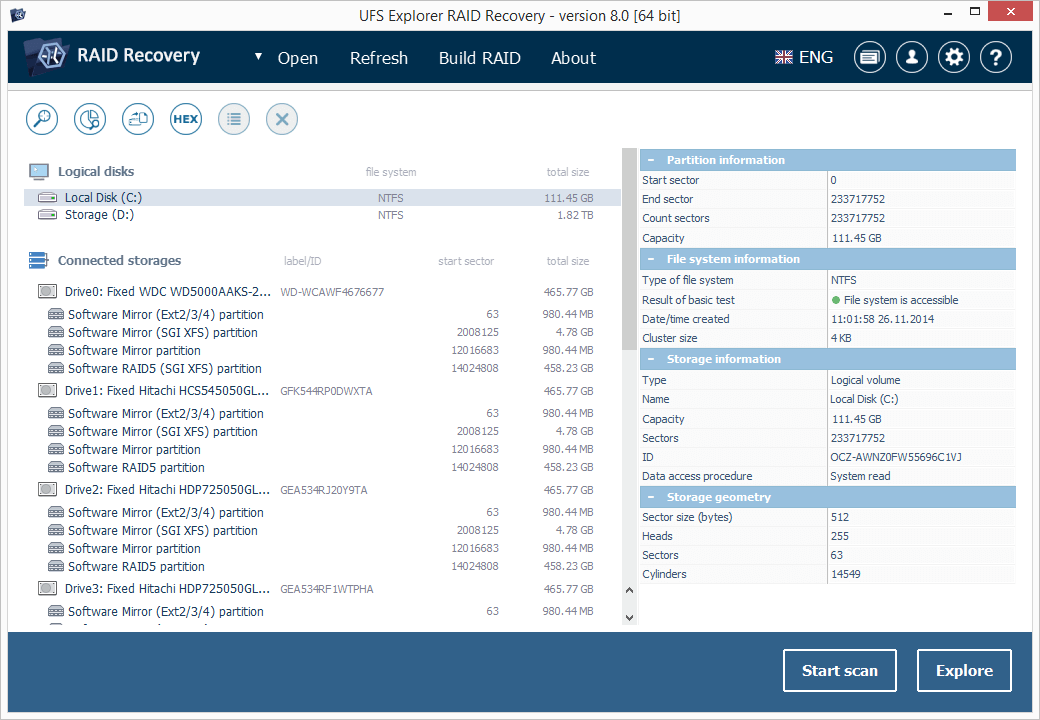
The main window from SysDev's product page (version 8, older than the current 10.22): four connected drives from a Linux NAS, each with Software Mirror and Software RAID5 partitions, and partition details on the right.
UFS Explorer RAID Recovery reads the RAID metadata that NAS boxes and controllers write on each drive, so it can put the array back together by itself even when the original box is dead. It recognizes layouts from more than 50 NAS makers and understands Linux mdadm and LVM, Windows Storage Spaces and Dynamic Disks, and Apple Software RAID. That's the job ordinary recovery software can't do: a RAID spreads every file across all its drives in stripes, so any one disk on its own holds only fragments.
When the metadata is gone, UFS Explorer RAID Recovery's RAID Builder lets you enter the array yourself: level, drive order, stripe size and offset, with a placeholder for a missing drive. You see the result instantly and can try different settings as often as you like, because everything happens on a virtual copy. For drives with bad sectors, a multi-pass imager records a bad-sector map, and the software then rebuilds the unreadable blocks from parity or mirror copies.
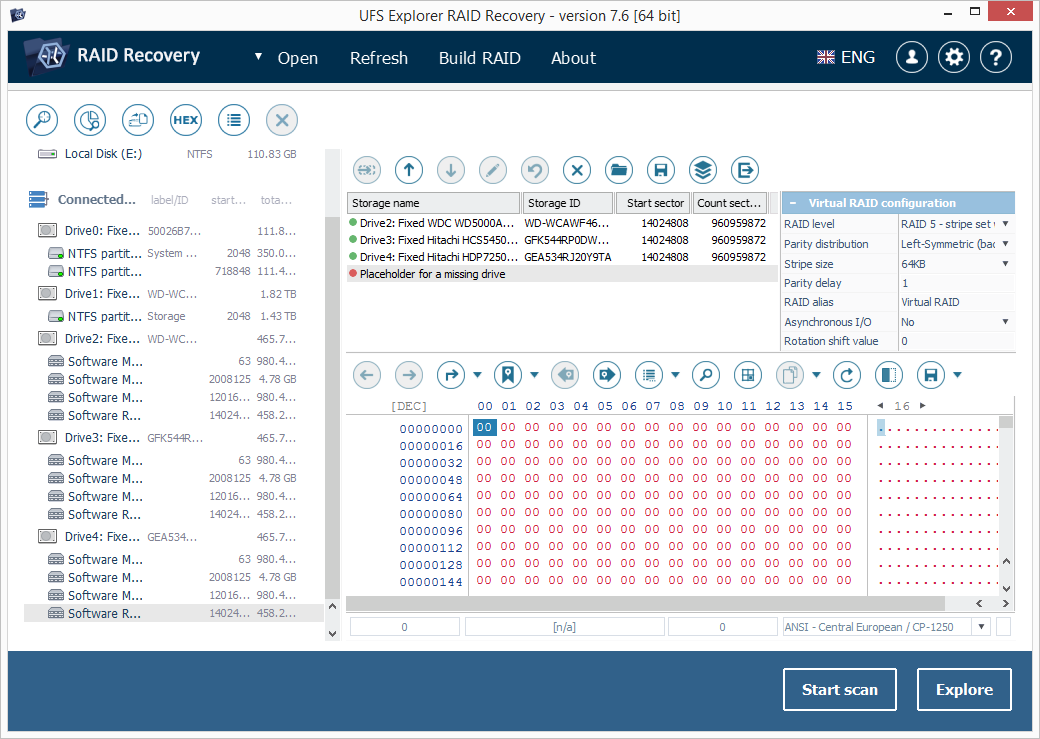
The RAID Builder in the user manual (version 7.6, an older interface): three member partitions plus a placeholder for a missing drive, the array set to RAID 5 with a 64 KB stripe, and a hex view of the assembled volume.
What we like
- Rebuilds arrays from Synology, QNAP, Drobo, Buffalo and dozens more
- Manual RAID Builder for arrays with lost metadata
- Parity-based rebuilding of bad sectors
- Perpetual license, and the trial assembles and previews everything
Watch out for
- Strict refunds: only for software errors SysDev can't fix within 7 days
- Badly damaged arrays with unknown settings need real expertise
- Older-looking interface and few independent reviews
- Personal license isn't for commercial use
What users say about UFS Explorer RAID Recovery
Independent reviews of the RAID edition are scarce. SysDev's own testimonials page (hand-picked, so read it as such) includes Romano CIBIEN: "I lost a RAID5 array on my Buffalo NAS. Just a couple of minutes ago, I bought UFS Explorer, followed the online manual step-by-step and within 5 minutes I got my data back." and Scott Pynn: "I tried software from several other vendors, but only yours was able to correctly rebuild the re-initialized RAID-5 array and the ext3 filesystem, and then recover the lost files."
Recovery technicians on the HDD Guru forums are more cautious. When a home user was told to try it on a corrupted Buffalo RAID 5, northwind replied: "It isn't as simple as "plug the disks into a machine and run ufs and there you go"." and added that "someone with knowledge must identify disk order, parity, block size etc." when an array can't be detected automatically.
Download UFS Explorer Free TrialBuy UFS Explorer RAID Recovery
EaseUS Data Recovery Wizard Professional: try it free when the loss is small
EaseUS Data Recovery Wizard is one of the best-known recovery tools for Windows, and its free edition is the main reason it's on this list.
- Price: free edition up to 2 GB; Pro is $69.95 for one month, $99.95 for one year or $149.95 for a lifetime license with upgrades, each for one PC with no renewal fees
- Version: 20.1.0, for Windows 11, 10, 8 and 7 and Windows Server 2003-2025
- File systems: NTFS, exFAT, FAT12/16/32, ext2, ext3, HFS+ and ReFS, with ZFS support added in version 20.1.0
- Best for: a handful of deleted documents or photos, or anyone who wants a one-month license for a single rescue
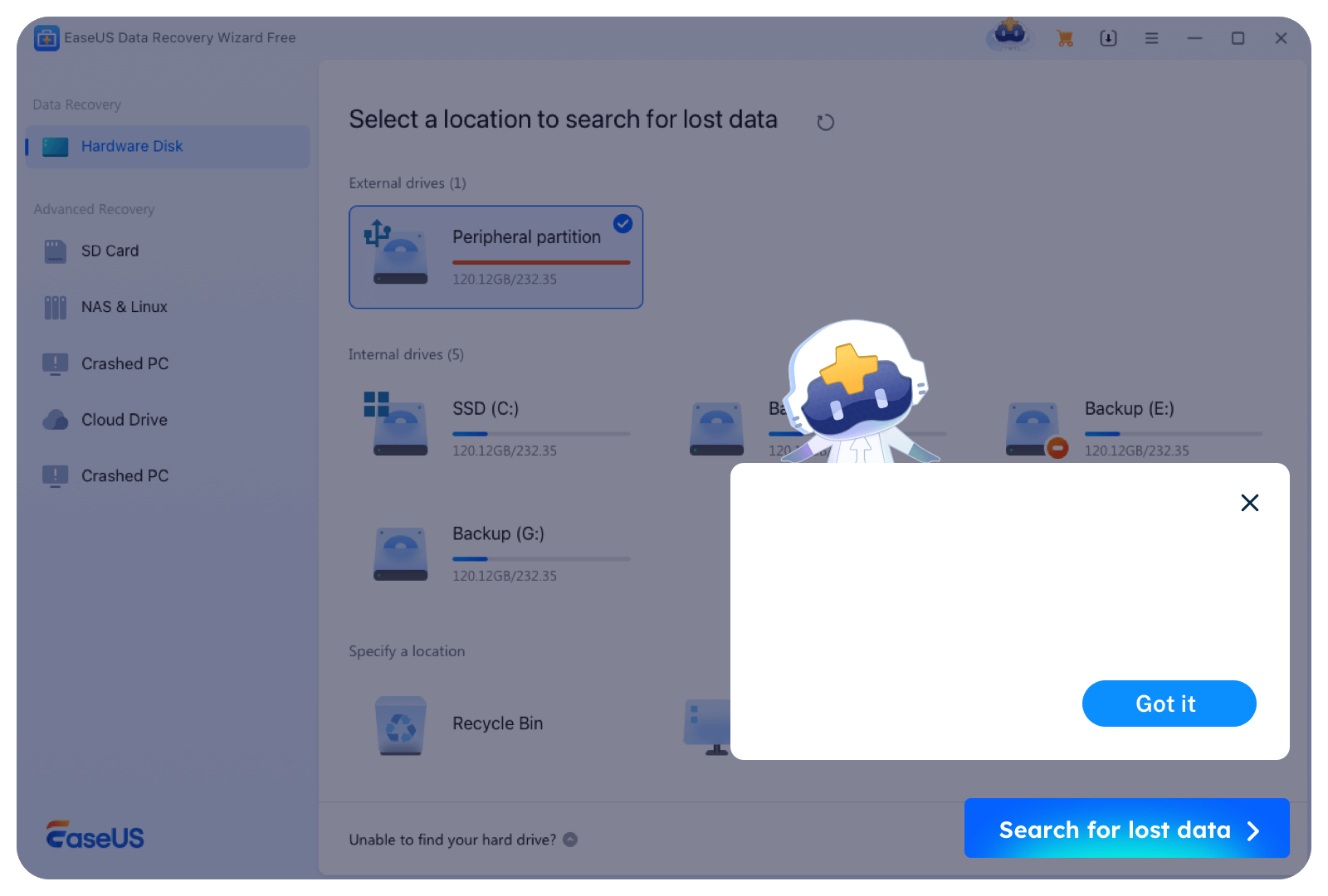
EaseUS Data Recovery Wizard Free's "Select a location" screen, taken from EaseUS's own page with its tutorial pop-up on top: external and internal drives, the Recycle Bin, and SD Card, NAS & Linux, Crashed PC and Cloud Drive in the sidebar.
EaseUS Data Recovery Wizard's free edition recovers up to 2 GB, which TechRadar notes is more than Stellar's free plan allows. For a few deleted Word files or a folder of phone photos, that may be all you need, and it costs nothing to find out. The same three-step flow (pick a location, scan, preview and recover) carries over to the paid edition.
EaseUS Data Recovery Wizard Pro's licensing is the most flexible of the three. A one-month license at $69.95 suits a single emergency with no renewal to cancel, and the $149.95 lifetime license avoids a subscription altogether. EaseUS's Pro feature list also includes BitLocker recovery, NAS recovery, recovery from a crashed PC with a bootable WinPE USB, and repair of corrupted videos, photos and Office documents. Every order comes with a 30-day money-back guarantee.
What we like
- Recover up to 2 GB free
- One-month, one-year or lifetime licenses, none auto-renewing
- Supports 32-bit Windows and Windows 7
- 30-day money-back guarantee
Watch out for
- The most expensive one-year price of the three
- No Buy Now through Ivertech: you buy from EaseUS directly
- For a true RAID rebuild, UFS Explorer's tools go much deeper
What reviewers say about EaseUS Data Recovery Wizard
EaseUS's own page quotes CNET: "Easeus Data Recovery Wizard Free Edition is a capable performer, even with the 2GB limit." It also notes that EaseUS was shortlisted in G2's list of data recovery software leaders.
Price for one PC, first year
What one year of use on one PC costs with each tool's most common license. Stellar renews yearly; UFS Explorer's license is perpetual, so its price covers every year after too.
Stellar Data Recovery Professional (1 year)$79.99
EaseUS Data Recovery Wizard Pro (1 year)$99.95
UFS Explorer RAID Recovery (perpetual)$145.36
Stellar and UFS Explorer: checkout prices on October 11, 2026. EaseUS: Windows prices on EaseUS's store on the same day.
Which should you choose?
- You deleted files or formatted a drive on a Windows PC: Stellar Data Recovery Professional. If the loss is under 2 GB, try EaseUS's free edition first.
- A partition vanished, or a drive shows as RAW or is BitLocker-encrypted: Stellar Data Recovery Professional.
- Windows won't boot and the files are on the system drive: Stellar Data Recovery Professional's bootable USB.
- A Synology, QNAP, Drobo or other NAS says the volume crashed: UFS Explorer RAID Recovery, after you take the drives out and before the NAS tries to rebuild.
- A RAID controller died or was reinitialized: UFS Explorer RAID Recovery, with its RAID Builder.
- You need one rescue and don't want a subscription: EaseUS Data Recovery Wizard Pro's one-month license, or UFS Explorer's perpetual license for arrays.
- The drive isn't detected, or clicks and won't spin: none of these. Power it off and call a recovery lab.
FAQs
Can data recovery software recover files from an SSD?
Data recovery software can sometimes recover files from an SSD, but often less than from a hard drive. With TRIM turned on, Windows tells the SSD to clear deleted blocks on its own, so scan as soon as you notice the loss, and stop writing to the drive.
Is recovered data guaranteed with Stellar, UFS Explorer or EaseUS?
No recovery tool can guarantee results. Files that have been overwritten, and drives with physical damage, are the usual reasons data can't be saved. That's why all three let you scan and preview first: a file that opens in the preview can be recovered.
Can Stellar Data Recovery Professional recover a RAID array?
Stellar Data Recovery Professional can't rebuild RAID arrays. Stellar's Technician edition adds RAID 0, 5 and 6 recovery, at $99.99 on Stellar's store in October 2026. For NAS boxes and other RAID levels, UFS Explorer RAID Recovery covers far more layouts.
Do I need UFS Explorer RAID Recovery for a single external drive?
You don't need the RAID edition for a single drive. UFS Explorer RAID Recovery includes everything in SysDev's Standard Recovery for single disks, but if you have no array to rebuild, a general tool like Stellar Data Recovery Professional or EaseUS Data Recovery Wizard is the simpler and cheaper choice.
Should I let my NAS rebuild the array before recovering files?
Don't let a NAS rebuild or initialize a crashed array before you recover the files. A rebuild with a wrong drive or a failing disk can overwrite the data you need. Take the drives out, label their order, and work from them (or from images of them) with UFS Explorer RAID Recovery.
Which of these works on 32-bit Windows or Windows 7?
EaseUS Data Recovery Wizard and UFS Explorer RAID Recovery both run on Windows 7 and on 32-bit Windows. Stellar Data Recovery Professional needs 64-bit Windows 8 or later.
Can I get a refund if the software doesn't find my files?
Refund rules differ a lot. EaseUS offers a 30-day money-back guarantee. Stellar accepts refund claims within 30 days of a first purchase, but not for renewals, special offers or buyers who skipped the trial. SysDev refunds UFS Explorer only for software errors it can't fix within 7 days. In every case, the free scan is your real protection.
Is there a Mac version of these tools?
All three companies sell separate Mac editions, and the Windows licenses here don't activate on a Mac. UFS Explorer's licenses cover one operating system each.