UFS Explorer RAID Recovery for Windows: Get Your Files Back from a Dead NAS or Broken RAID Array
The NAS in the closet beeps, the web interface says "volume crashed", and the shared folder holding years of family photos or the office's project files is gone. Or a RAID controller dies and its replacement wants to initialize the disks. Each drive on its own is useless, because a RAID spreads every file across all of them in stripes. Normal recovery software, which looks at one disk at a time, sees nothing but fragments.
UFS Explorer RAID Recovery from SysDev Laboratories is built for exactly this. You take the drives out of the NAS or server, connect them to a Windows PC, and it puts the array back together virtually, reading the RAID metadata the NAS wrote on each disk. Then you browse or scan the rebuilt volume and copy your files to a safe drive. It recognizes Synology, QNAP, Drobo, Buffalo and dozens of other NAS layouts, and it never writes to the original disks.
Quick facts
- Version: 10.22
- Developer: SysDev Laboratories
- Runs on: Windows 7 SP1 and later, 32-bit or 64-bit, with separate ARM builds. Mac and Linux versions need their own license.
- RAID levels: 0, 1, 1E, 3, 5, 6, 7 and nested 10, 50, 51, 60, 61, plus Synology SHR, Drobo BeyondRAID, Btrfs-RAID and ZFS RAID-Z
- License: Personal license, perpetual, for one computer, with 360 days of free updates. Not for commercial use.
- Price: $149.95 USD on the vendor's store (the checkout price can vary slightly by region)
- Free trial: no time limit. RAID assembly, scanning and preview all work, but it only saves files up to 768 KB.
Before you buy: the trial is your only safety net
SysDev's refund policy is strict. A refund is possible only if you tested the trial first and the paid version then fails because of a software error that SysDev can't fix within 7 days. Buying the wrong edition gets a license swap, not a refund, and "it was too hard to use" isn't covered. So run the trial on your actual drives, make sure the array assembles and your files show up in the preview, and only then pay.
Two more things before you start: never let the NAS rebuild or initialize the array, and if any drive clicks, slows down or shows SMART warnings, image it first. Experienced recovery technicians also point out that a badly damaged array with unknown parameters can need real expertise. This tool gives you the instruments, not a guarantee.
Download Free TrialBuy Now
Overview
RAID Recovery sits one step above UFS Explorer Standard Recovery in SysDev's product line. It includes everything Standard does for single disks (undelete, formatted and RAW drive recovery, signature scans, BitLocker and APFS decryption, virtual machine disks) and adds a full RAID layer on top: automatic array detection, a manual RAID Builder, and adaptive reconstruction for drives with bad sectors.
The main window lists your logical disks and every connected drive with its partitions, while a panel on the right shows the selected item's file system, size and geometry. From there you open an assembled array, or build one yourself, then Explore it like a normal drive or Start scan to dig for lost data.
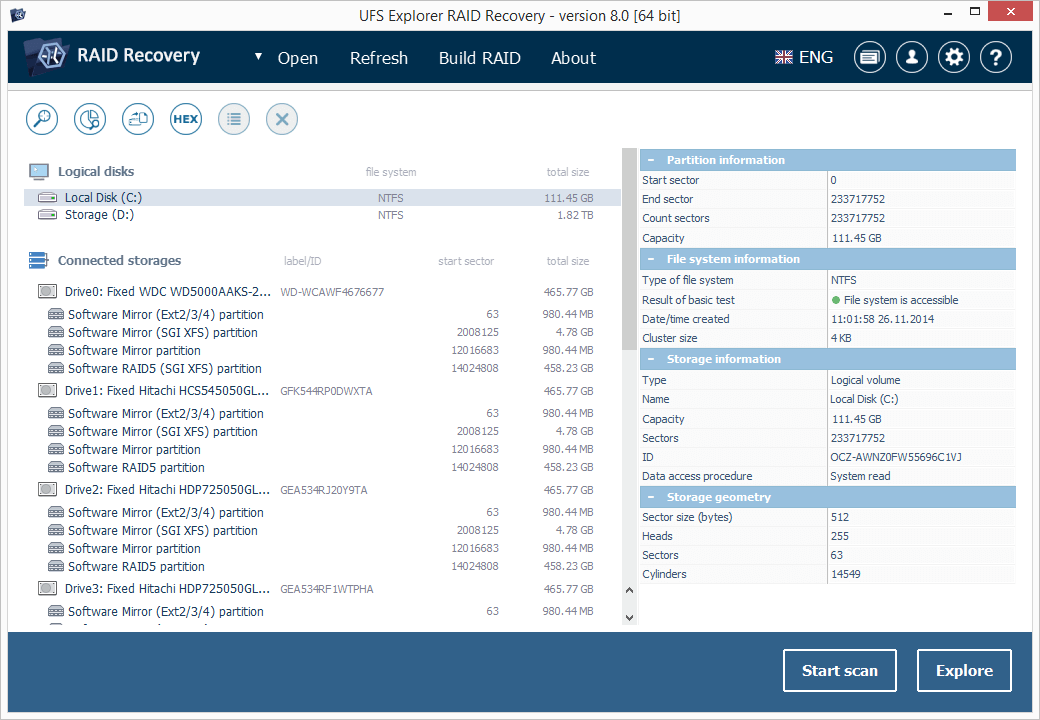
The main window from the product page (version 8, an older release than the current 10.22): four connected drives, each holding Software Mirror and Software RAID5 partitions from a Linux NAS, with partition, file system and storage details on the right and the Start scan and Explore buttons at the bottom.
Features
Automatic array assembly from the disks alone
Hardware controllers and NAS boxes store their RAID settings on the member drives. The software reads that metadata and rebuilds the volume by itself, with no NAS or controller needed, even if the original box is dead. It understands DDF1 metadata (LSI, Dell, Intel), Silicon Image, JMicron, 3ware and Intel Matrix controllers, Linux mdadm and LVM, Windows Storage Spaces and Dynamic Disks, and Apple Software RAID and Fusion Drive.
NAS layouts from more than 50 vendors
Synology (including Synology Hybrid RAID), QNAP, Drobo, Buffalo TeraStation and LinkStation, Asustor, TerraMaster, WD, Netgear ReadyNAS, Iomega/LenovoEMC, Seagate Business NAS and Thecus are all recognized. Drobo's BeyondRAID doesn't follow any standard pattern, so it gets a dedicated assistant tool. ZFS RAID-Z (Z1, Z2 and Z3) and Btrfs-RAID are supported too.
RAID Builder for when the metadata is gone
If the array was reinitialized, the controller replaced or the metadata damaged, automatic detection has nothing to read. The RAID Builder lets you enter the RAID level, drive order, stripe size and start offset yourself, with a placeholder for a missing drive, and shows the result instantly so you can check it before a full scan. Configurations can be saved and reloaded, and unusual layouts can be described in RDL or Runtime VIM descriptor files.
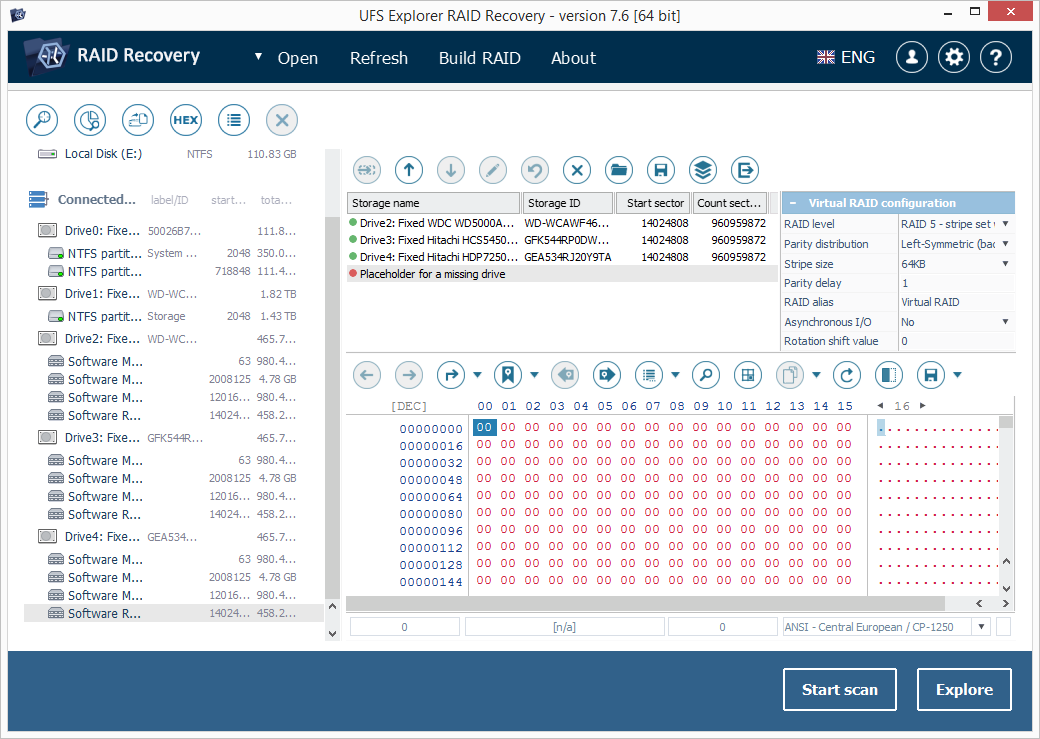
The RAID Builder in the user manual (version 7.6, an older interface): three member partitions plus a "Placeholder for a missing drive", the virtual RAID configuration set to RAID 5 with left-symmetric parity and a 64 KB stripe, and a hex view of the assembled volume below.
Adaptive reconstruction for drives with bad sectors
Real failures are rarely clean. More often a member drive is partly readable, with bad spots scattered across it. The built-in multi-pass disk imager lets you set read timeout, block size, direction and retries per drive, and records a bad-sector map as it goes. When the array is assembled from those images, the software uses parity (RAID 5, 6 and nested levels) or mirror copies (RAID 1, 10) to rebuild the unreadable blocks instead of leaving holes in your files. Maps from ACE Lab and DeepSpar hardware can be imported as well.
Browse, scan and recover from the rebuilt volume
Once the array is up, you get the full Standard Recovery toolkit: Quick and deep scans, IntelliRAW signature-based search for files whose folder records are gone, pause and resume of long scans, and saved scan results. It reads NTFS, ReFS, APFS, HFS+, Ext2/3/4, XFS, Btrfs, ZFS, UFS, FAT and exFAT, and opens VMware, Hyper-V, VirtualBox, QEMU and Parallels virtual disks.
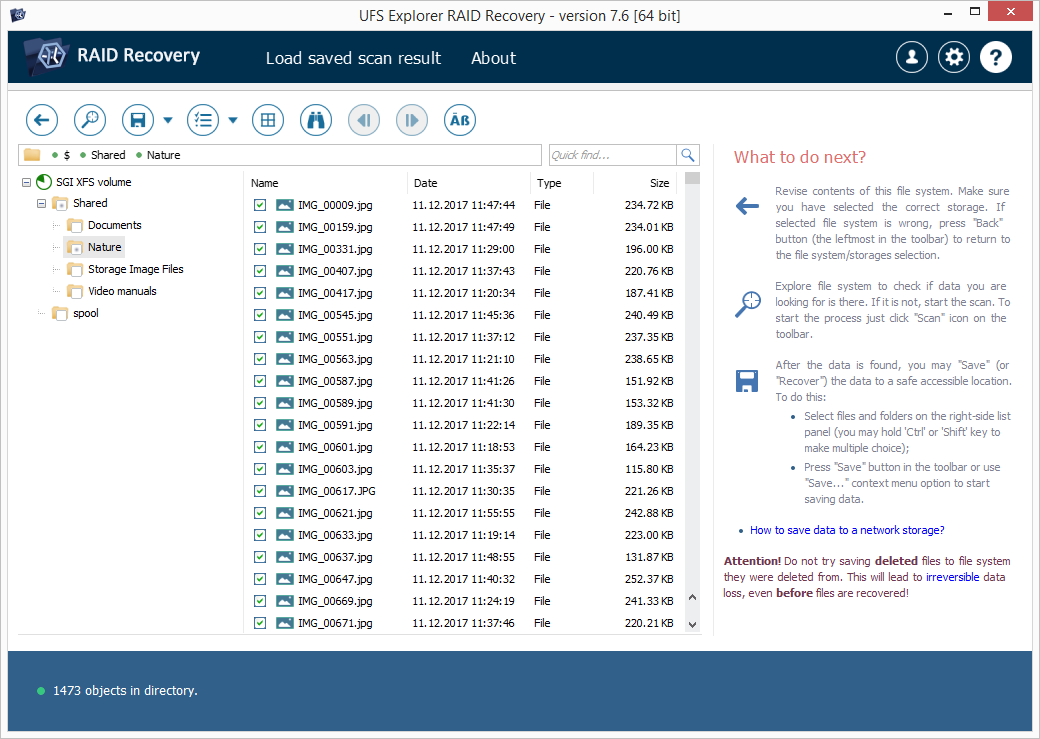
Browsing an SGI XFS volume from a NAS in the user manual (version 7.6): a Shared folder tree on the left, a list of JPG photos with dates and sizes in the middle, and "What to do next?" guidance on saving the files on the right.
Benefits
The big one is cost. A lab quote for a failed NAS often runs to four figures: customer stories on the vendor's site mention quotes from $1,300 to around $6,000. If your drives are physically healthy, or at least readable enough to image, this lets you do the same logical reconstruction yourself for the price of a license.
It's also safe by design. Everything happens on a virtual copy of the array: nothing is written to the original disks, and you can try different RAID parameters as many times as you like. And because it can work from disk images, a failing drive only has to survive one careful read.
Real-World Uses
- The Synology that says "volume crashed". You pull the drives, connect them to a Windows PC, and the SHR volume assembles from its metadata. You copy the shared folders to a new external drive.
- A RAID 5 with one dead disk and one dying disk. You image the weak drive with the multi-pass imager, assemble the array from the images with the bad-sector maps attached, and let parity fill in the damaged blocks.
- The server whose controller was replaced and reinitialized. The metadata is gone, so you use the RAID Builder to try stripe sizes and drive orders until the volume's folder tree appears.
- A wrong-way backup that wiped a NAS. A mistaken sync deletes the NAS contents. You rebuild the array and scan it for deleted files.
- A Drobo that no longer powers on. The BeyondRAID assistant reassembles the pack without the Drobo hardware.
Who It's For
This edition suits technically comfortable home users, small offices and IT staff facing a failed NAS or RAID. You should be happy pulling drives, connecting them to a PC (several SATA ports or USB adapters help), and reading terms like stripe size and parity. If your data sits on one ordinary drive, the much cheaper Standard Recovery is enough. Professional recovery services and companies need a Commercial or Corporate license, and drives spread across a network are a job for UFS Explorer Network RAID.
Usage Guide
- Power off the NAS or server and don't let it rebuild. Label each drive with its bay number, then remove them.
- Install the trial on your PC. Download it and install it on a drive that has nothing to do with the array. Setup asks for a language, the license agreement and a folder.
- Connect the drives and image any weak ones. Check each drive's health, and create a disk image of any drive with errors, keeping its bad-sector map.
- Open the drives or images. In most cases the array assembles automatically. If not, click Build RAID, add the members in order, and set the level, stripe size and offset.
- Explore or scan. Open the assembled volume and check that your folders appear. If files are deleted or the file system is damaged, click Start scan.
- Activate and copy. Enter your registration code under Software Activation and License, select your files, and save them to a separate drive, never back to the array.
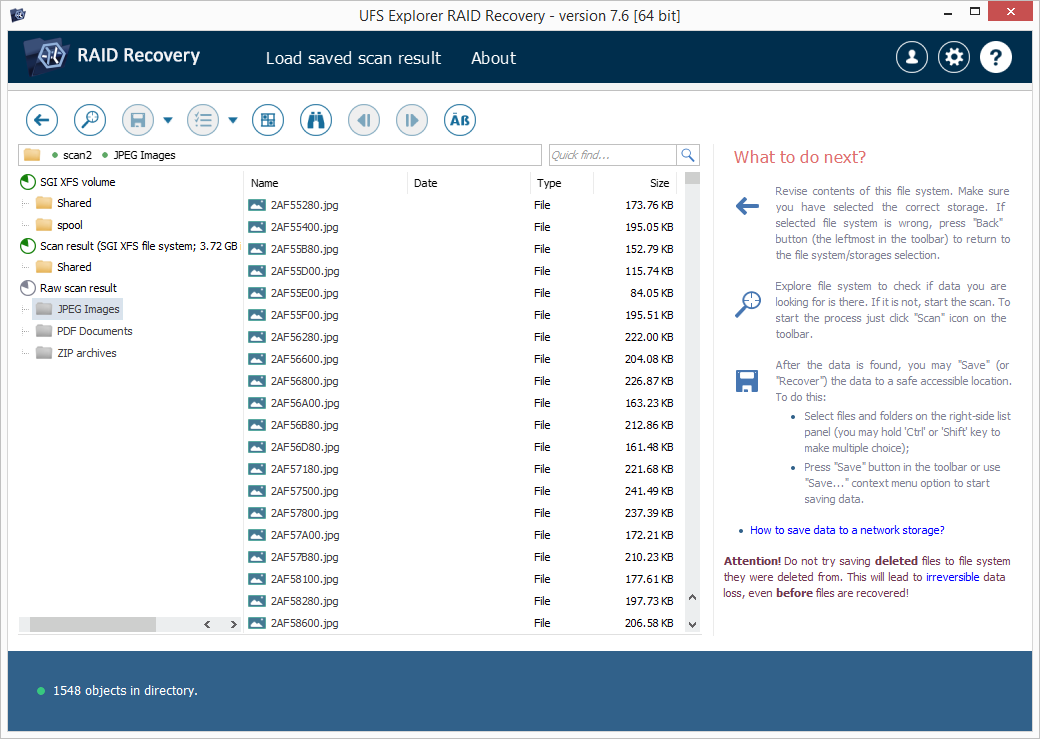
Scan results in the user manual (version 7.6): the original SGI XFS volume, a "Scan result" folder, and a "Raw scan result" with JPEG images, PDF documents and ZIP archives found by file signature, here showing 1,548 recovered JPGs.
Tips
- Use the trial to prove the array. Small files up to 768 KB save for free, so copy out a few documents or photos and open them. If they're intact, your RAID parameters are right.
- Most NAS units use 64 KB or 128 KB stripes, according to the vendor. Start there when you have to build an array by hand.
- Raw scan results lose names and folders. Files found by signature come back with generated names, so browse the rebuilt file system first and scan only if your files aren't there.
- Plan your target space. Recovered data from a multi-terabyte NAS needs an equally large destination drive.
What Users Say
Independent reviews of the RAID edition are scarce, and most of the detailed write-ups online come from sites run by competing recovery tools, so they aren't quoted here. What's left is the vendor's own customer stories and discussions among professional recovery technicians, which are older but candid.
RAID and NAS stories from the vendor's testimonials page
These are published by SysDev, so treat them as hand-picked. They cover UFS Explorer generally, not this edition only.
- Romano CIBIEN: "I lost a RAID5 array on my Buffalo NAS. Just a couple of minutes ago, I bought UFS Explorer, followed the online manual step-by-step and within 5 minutes I got my data back."
- Scott Pynn: "I tried software from several other vendors, but only yours was able to correctly rebuild the re-initialized RAID-5 array and the ext3 filesystem, and then recover the lost files."
- Sparky, Neologic Systems: "I had a corrupted XFS RAID 1 volume. I spent 3 days trying to unravel the data. I tried 11 different file recovery tools under Windows and Linux. But no other tool could even find a partition map. Your product had it totally figured out within 5 minutes."
- Graham Cant: "My Buffalo Linkstation would not boot and after finding your software I was able to recover all my files to another drive."
- Alfonso Batalla, Artist: "Around 1tb of photographs were lost when OS-X Raid 0 dissapeared from my system." He writes that local professionals "were only able to recover file names but no files at all", and that with UFS Explorer "It found all my files."
- Ran: "Your product worked very well, took a *long* time, but in the end it was worth it!"
Recovery professionals on the HDD Guru forums
The HDD Guru forums are where data recovery technicians talk shop, and their views are more mixed. These posts are several years old and refer to older versions.
When a home user with a corrupted Buffalo RAID 5 said Buffalo's support had told them to try UFS Explorer, northwind replied: "I believe Buffalo's suggestion was a little irresponsible. It isn't as simple as "plug the disks into a machine and run ufs and there you go"." and added that "someone with knowledge must identify disk order, parity, block size etc." when the array can't be detected automatically.
In a thread about the best Windows recovery software, one technician recommended "UFS Explorer Professional Recovery" based on their experience, while data-medics wrote: "UFSExploder is good for some of the odd filesystem's like HFS, but is annoying and crashes all the time. Not much use for just NTFS and FAT filesystems." Another member said they try several tools, UFS among them, on the same case "to see which one provides the best result."
The recurring themes
Praised: it rebuilds arrays and NAS volumes that other tools can't even see, especially Linux-based NAS file systems like XFS and Ext, and it can save the cost of a lab. Criticized: long scans, an interface aimed at technicians, occasional crashes in older versions, and the fact that a badly damaged array still needs knowledge of RAID parameters. The trial lets you find out which camp your case falls into before you pay.
Comparisons
RAID Recovery vs. Standard Recovery vs. Network RAID
- Standard Recovery (from $69.95) handles single drives, memory cards and disk images, and can open simple spanned volumes with intact metadata. It has no RAID Builder, no NAS recognition and no adaptive reconstruction, and its trial saves files only up to 256 KB.
- RAID Recovery (from $149.95) adds all of the RAID tools, LVM thin provisioning support and a 768 KB trial save limit.
- Network RAID adds iSCSI target and initiator functions, so drives in different machines on a local network can be combined.
- The Professional family (Professional Recovery and Technician) adds forensic tools and broader storage support for recovery businesses.
Editions and Pricing
The license sold here is the Personal license for Windows. It's perpetual for one computer, includes 360 days of free updates, and is delivered as a registration code by email. On the vendor's store it costs $149.95. A Commercial license for corporate and commercial use is $259.95, and a Corporate license for up to 10 computers is $469.95. Each license covers one operating system, so running it on macOS or Linux as well needs a separate license.
FAQs
Do I need the original NAS or RAID controller?
No. The software reads the RAID information stored on the drives themselves, so it works even if the NAS or controller is broken or gone.
How many drives can I connect, and how?
All members need to be visible to one PC, through SATA ports, USB adapters or docking stations, or as disk images. For a 4-bay or larger NAS, a multi-bay USB dock makes this much easier.
Can I recover from a RAID 5 with a drive missing?
Yes. RAID 5 survives one missing member and RAID 6 survives two, and the software rebuilds the missing data from parity.
What happens after the 360 days of updates?
The license is perpetual, so the software keeps working. Versions released after your 360-day update period need a license upgrade under SysDev's upgrade policy.
Can I use the Personal license to recover data for customers?
No. The Personal license excludes commercial use. Recovery work for paying clients needs the Commercial license or the Professional family.
Will it work on a Windows on ARM laptop?
Yes. SysDev offers separate 64-bit and 32-bit ARM builds for Windows 10 and 11 on ARM.
Can it decrypt an encrypted NAS volume?
It handles BitLocker, BitLocker To Go and Apple APFS encryption, including encrypted RAID and Fusion Drive volumes, when you provide the password or key.
System Requirements
- Operating system: Windows 7 SP1 or later, 32-bit or 64-bit, with Windows 10/11 or Windows Server 2025 recommended. ARM builds for Windows 10/11 on ARM.
- Memory: 32 MB minimum, 8 GB recommended for RAID work
- Processor: 4 logical cores and a 64-bit OS recommended
- Disk space: 30 MB for the program, plus a separate drive large enough for the recovered files
Conclusion
UFS Explorer RAID Recovery is a specialist's tool at a home-user price: it rebuilds RAID arrays and NAS volumes from bare drives, copes with Synology SHR, Drobo, ZFS and Btrfs layouts that general recovery software ignores, and can work around failing disks with bad-sector maps and parity. It isn't a one-click wizard, its interface is built for people who know what a stripe size is, and its refund policy leaves no room for second thoughts. But for a crashed NAS full of irreplaceable files, it can be the difference between a license fee and a lab bill. Let the free trial assemble your array and save a few small files first. If they open, you know it will work.
Download Free TrialBuy Now