Recovery Explorer RAID for Linux: Get Files Back from a Broken RAID or Dead NAS
A RAID array is supposed to protect your data, until the controller dies, a second disk fails during a rebuild, or a NAS box refuses to boot. Then the files are still sitting on the drives, but split into stripes and parity blocks that no single disk can read on its own. Plug one into another machine and you see gibberish, or nothing at all.
Recovery Explorer RAID from SysDev Laboratories puts the puzzle back together in software. Connect the member disks (or their images) to a Linux machine, let it detect the RAID layout, and it rebuilds a virtual copy of the array so you can browse and copy your files off, without writing anything to the original drives.
Quick facts
- Version: 10.22
- Developer: SysDev Laboratories
- Runs on: modern Linux distributions, 64-bit or 32-bit x86. Windows and macOS editions are sold separately.
- Rebuilds: RAID 0, 1, 3, 4, 5, 6, nested levels like RAID 10, 50 and 60, and NAS layouts from Synology, QNAP, WD My Cloud, Asustor, TerraMaster, Buffalo and others
- Also recovers from: single hard drives, USB flash drives, memory cards, disk images and virtual disks
- Price: $94.95 USD, Personal license, perpetual use with 360 days of free updates
- Free trial: full scanning and preview, but it only copies files up to 768 KB
- Download size: about 19 MB
Before you buy: run the trial on your actual array
The trial does everything except save files larger than 768 KB, so you can check that it detects your RAID and that your files show up, with readable previews, before paying. Two limits to know: on HFS+ and Ext2/3/4 volumes only some recovered files keep their original names, and recovery of deleted files from UFS/UFS2 is very limited. If your storage is encrypted, SysDev points you to Recovery Explorer Professional instead.
Overview
The main window lists every connected storage device and partition, including virtual RAID volumes the program has assembled, with details about each one on the right: file system, capacity and whether the file system is readable. From there you can Explore an accessible volume directly, Start scan to dig for deleted and lost files, or switch to the Wizard mode for a step-by-step recovery.
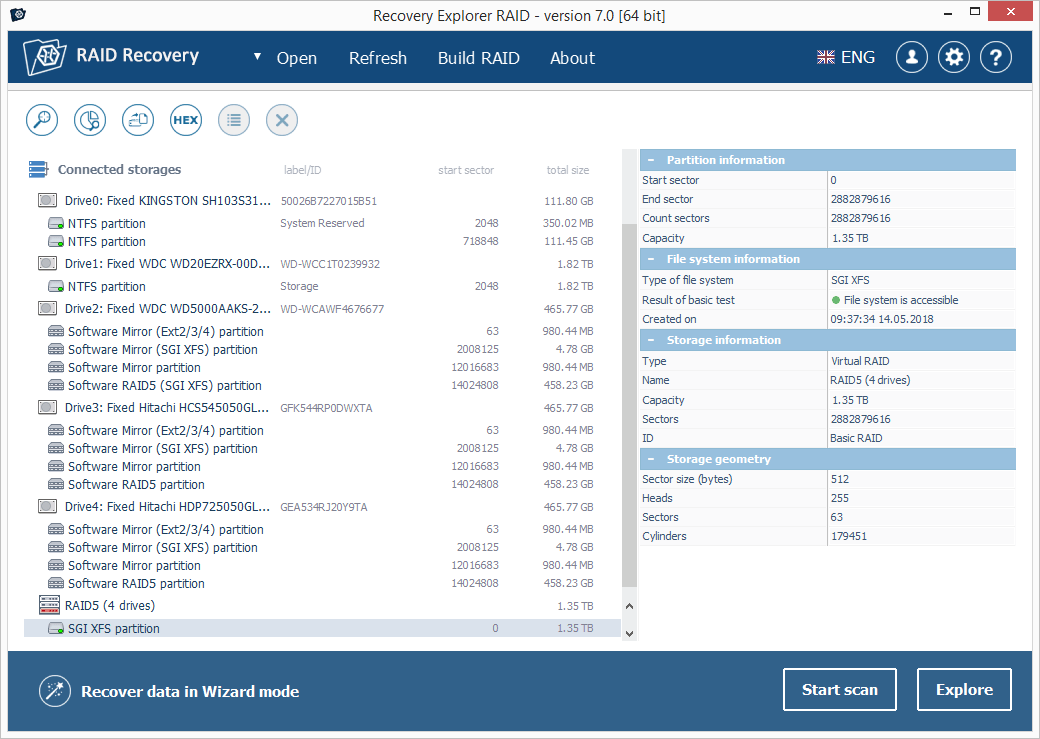
The main window (version 7.0 on Windows, from SysDev's product page): five physical drives with their software RAID partitions, an assembled RAID5 (4 drives) volume with an SGI XFS partition selected, and its partition, file system and storage details on the right.
SysDev built it for non-experts facing RAID data loss, balancing automation with control. Its bigger sibling, UFS Explorer RAID Recovery, targets professionals who need more manual tools.
Features
Automatic RAID detection and reassembly
The program recognizes and rebuilds common software and hardware RAID schemes on its own, including mdadm, LVM, Apple Software RAID, APFS Fusion Drive, Windows Dynamic Disks, Intel Matrix and OpenBSD softraid. It handles standard levels, nested levels such as RAID 10, 50, 50E and 60, Btrfs-RAID, Synology Hybrid RAID and Microsoft Storage Spaces, and it can work with a member disk missing.
Manual RAID building when the metadata is gone
If the array's configuration was wiped or never existed in readable form, you can define it yourself: pick the disks and their order, RAID level, parity distribution, stripe size and parity delay, and add a placeholder for a missing drive. Content analysis on the disks helps you work out the right parameters, and a hex view lets you check the result. Configurations can be saved and edited, and unusual layouts can be described in SysDev's RAID Definition Language.
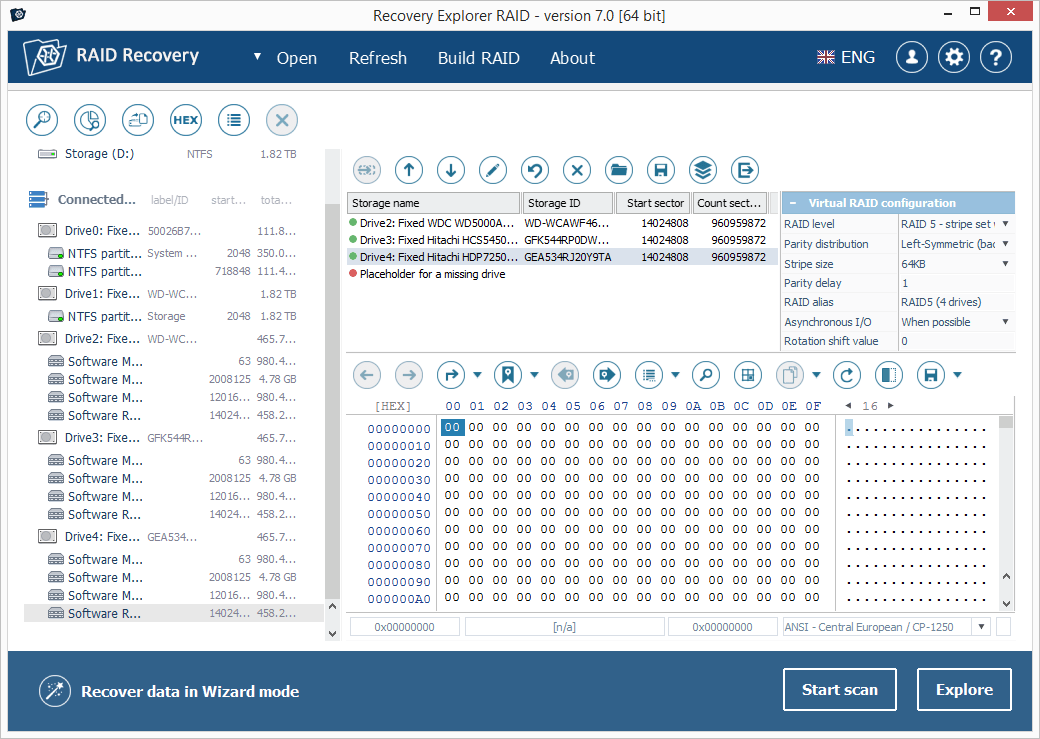
Building a RAID manually (version 7.0 on Windows): three member drives plus a placeholder for a missing drive, a virtual RAID configuration set to RAID 5 with left-symmetric parity and a 64KB stripe, and a hex view below.
Broad file system and disk image support
It reads Windows (NTFS, ReFS, FAT, exFAT), macOS (HFS+, APFS) and Linux (Ext2/3/4, XFS, Btrfs, ReiserFS, JFS, UFS variants) file systems. Besides physical disks, it opens disk images and virtual disks from VMware (VMDK), Hyper-V (VHD/VHDX), QEMU/XEN (QCOW/QCOW2), VirtualBox (VDI), Parallels, Apple DMG and sparsebundle, and R-Studio's RDR format, and can even assemble a RAID from images.
Deep scanning you can pause and resume
A full scan detects lost partitions, aligns them automatically, and reconstructs folder structures. When file system records are gone, IntelliRAW finds files by their known content, with custom rules you can add. You can preview intermediate results while it runs, pause and resume, and save the scan results to come back to later.
Preview, filter and save
Found files appear in a familiar folder tree with names, dates, types and sizes. Click one for an on-the-spot preview of images, documents, videos and archives, and the program marks which files look intact. Search and filter, then save your selection, or everything matching a filter, to a different drive.
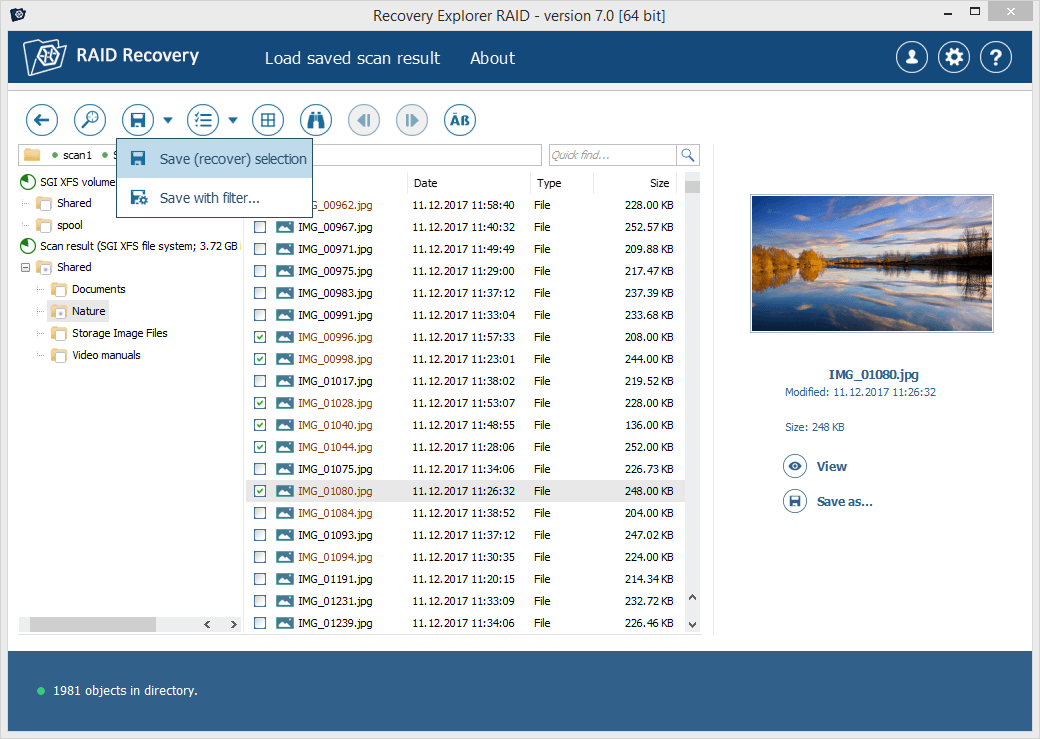
Scan results from an SGI XFS volume (version 7.0 on Windows): a folder tree, a list of JPG files with some ticked, a preview of the selected photo, and the menu to save the selection or save with a filter.
Extra tools for tricky cases
A built-in disk imager lets you copy a failing drive before working on it. There's a S.M.A.R.T. monitor to check drive health, a hexadecimal viewer for disks, partitions and files, an optional dark theme, and a zoomable interface.
Benefits
The main benefit is doing it yourself. Many RAID failures are logical problems (a dead controller, lost configuration, a NAS that won't boot) where the data is still intact on the disks, and those are exactly the cases this program is built for.
It's also non-destructive. The array is rebuilt virtually and files are copied elsewhere, so the original disks are never written to. You can try different RAID parameters until the files come out right.
Running it on Linux is a natural fit for NAS recovery, since many NAS boxes use Linux file systems such as Ext4, XFS and Btrfs that Windows can't read natively.
Real-World Uses
- A dead Synology or QNAP box. Pull the disks, connect them to a Linux PC, and let the program reassemble the array and its Btrfs or Ext4 volume.
- A failed hardware RAID controller. Connect the member disks directly and rebuild the array in software, even without the original controller.
- A RAID 5 with a missing disk. Assemble the array with a placeholder and recover what the parity allows.
- Accidental deletion or formatting on an mdadm array or LVM volume. Scan the assembled volume for lost files.
- Virtual machine disks. Open VMDK or VHDX images and pull files out of a broken VM.
Who It's For
It suits home users and small businesses with NAS devices, Linux administrators running software RAID, and IT generalists who need to recover a failed array without sending it to a lab. The wizard mode helps if you've never done RAID recovery. Data recovery specialists who need the deepest manual control may prefer SysDev's professional UFS Explorer line.
Usage Guide
- Connect the disks. Attach all the RAID member disks (or disk images) to your Linux computer. Don't initialize, format or rebuild them.
- Install. Extract the downloaded archive and run the installer script. It launches SysDev's Software Manager with administrator rights (through gksudo, kdesudo or sudo) to install the program.
- Launch and let it detect. Open Recovery Explorer RAID. Supported RAID schemes are usually detected and assembled automatically and appear in the storage list.
- Build the RAID if needed. If the array isn't detected, use Build RAID to add the member disks and set the RAID level, order, stripe size and parity.
- Explore or scan. Open the volume directly with Explore, or run Start scan for deleted or lost files. Wizard mode guides you through these steps instead.
- Preview and save. Check files in the preview, select what you need, and save it to a separate drive.
Tips for RAID recovery
- Image failing disks first. If any member disk is making noises or reporting errors, copy it with the built-in imager and work from the image.
- Never save recovered files onto the array's own disks. Use a separate drive with enough space.
- Save your scan results. Big arrays take a long time to scan, and a saved scan lets you continue later without starting over.
Comparisons
Recovery Explorer Standard vs. RAID vs. Professional
Standard covers typical data loss on simple, single-disk storage. RAID adds everything for multi-disk arrays and NAS devices while keeping single-disk recovery. Professional adds encrypted storage support and advanced analysis tools.
Recovery Explorer RAID vs. UFS Explorer RAID Recovery
Both come from SysDev. Recovery Explorer RAID is aimed at non-expert users with a simpler workflow, while UFS Explorer RAID Recovery offers more control and professional-level features.
Linux vs. Windows and macOS
This listing is the Linux edition. SysDev also makes Windows (XP SP3 and later) and macOS (11 and later, including Apple Silicon) editions, each sold separately.
Editions and Pricing
The license sold here is the Personal license for Linux at $94.95 USD. It's a perpetual license with 360 days of free software updates. SysDev also sells Commercial ($209.95) and Corporate ($349.95) licenses, each granting its own rights of use.
FAQs
Can I use the Personal license at work?
The Personal, Commercial and Corporate licenses each grant specific rights of use. If you're recovering data for a business or for clients, check SysDev's licensing terms and choose the Commercial or Corporate license.
What happens after the 360 days of updates?
The program keeps working indefinitely. You just stop receiving free updates. SysDev's upgrade policy offers discounts for moving to a newer or more advanced version.
Does it need all the disks from the array?
Not always. Redundant RAID levels such as RAID 5 can be assembled with a missing member, using a placeholder in place of the absent drive. For RAID 0, every disk is needed.
Which Linux distributions does it support?
Most modern distributions. The program needs the standard libraries ld-linux.so.3, libstdc++.so.6, libX11.so.6 and libpthread.so.0, and a graphical desktop.
Will it write anything to my disks?
Recovery works on a virtual reconstruction of the array and saves files to a location you choose, so the original disks aren't modified. Keep it that way by never choosing them as the save destination.
System Requirements
- Operating system: a modern Linux distribution with a graphical desktop
- Libraries: ld-linux.so.3, libstdc++.so.6, libX11.so.6, libpthread.so.0
- CPU: x86-64 (AMD64) or 32-bit x86
- Access: administrator (root) rights to install and read raw disks
- Storage: a separate drive with enough free space for the recovered files
Conclusion
Recovery Explorer RAID for Linux makes RAID and NAS recovery approachable: it detects and rebuilds a wide range of arrays automatically, lets you build them by hand when the metadata is gone, and recovers from single disks and virtual disks too. It does all of this without touching the original drives.
It's a sensible first step when an array fails, before you consider a recovery lab. Run the trial against your disks, confirm your files appear and preview correctly, and you'll know before you buy whether it can get your data back.