UFS Explorer Network RAID: Recover a RAID Whose Drives Sit in Different Computers
UFS Explorer Network RAID is a $229.95 Windows data recovery program from SysDev Laboratories that assembles a RAID or NAS volume from member drives spread across several computers on your local network and recovers the files from it. Everything UFS Explorer RAID Recovery does is included; the extra is network access to remote drives, through SysDev's Network Agent, iSCSI and a native UDP protocol.
The problem it solves is physical. A 16- or 24-drive array won't fit on one workstation's SATA or HBA ports, the drives from a Linux NAS behave better on a Linux machine, or a recovery rig with special hardware sits in another room. Instead of moving every disk to one PC, each machine shares the drives it holds, and one licensed copy puts the array together.
Quick facts
- Version: 10.23, released October 29, 2026
- Developer: SysDev Laboratories; Network RAID is the top edition of its Classic UFS Explorer family
- This license: Windows Personal license; Linux and macOS builds exist and are licensed separately
- Price: $229.95 on the order page, the same as SysDev's list price
- License terms: perpetual, with 360 days of free updates; the order is set up to renew the update period every 12 months
- Licensing quirk: only the copy that saves the recovered files needs a license; machines that only share drives run unlicensed
- Trial: no time limit; saves files up to 768 KB each, and its built-in iSCSI server shares volumes only up to 2 TB
- What we checked: the 22.5 MB Windows installer (ufsxnci.exe) on SysDev's download server, the version log showing 10.23 from October 29, 2026, and the $229.95 price for the Windows Personal license on the order page, all on November 4, 2026. We didn't set up a multi-machine recovery.
Before you buy: do you really need the network part?
If every member drive can be plugged into one computer, SysDev itself points you to UFS Explorer RAID Recovery, which has the same RAID engine for about $80 less. Network RAID earns its price only when the drives can't all be attached to one machine, or when you want to share a rebuilt volume over iSCSI. The trial covers every network and assembly function, so you can confirm the remote drives connect and the array builds before paying. SysDev's refund rules are strict: a refund needs a tested trial and a software fault it can't fix within 7 days, and buying the wrong edition gets an exchange instead.
Download Free TrialBuy Now
Overview
Think of UFS Explorer Network RAID as a recovery workstation with long arms. The licensed copy runs on the machine where you'll save the data. Every other computer that holds part of the array runs UFS Explorer too, opens a Network Agent and shares its local drives. On the workstation, those remote disks show up in the storage list next to the local ones, marked as remote storage, and from that point you treat them like any attached drive: assemble the RAID, scan, preview, save.
SysDev says the gap between a local SAS connection and a 10 Gbit network link is small in practice, and that 1 Gbit networks still work for most jobs. The program speaks two protocols at once: standard iSCSI and its own UDP-based protocol, which has less overhead between UFS Explorer copies.
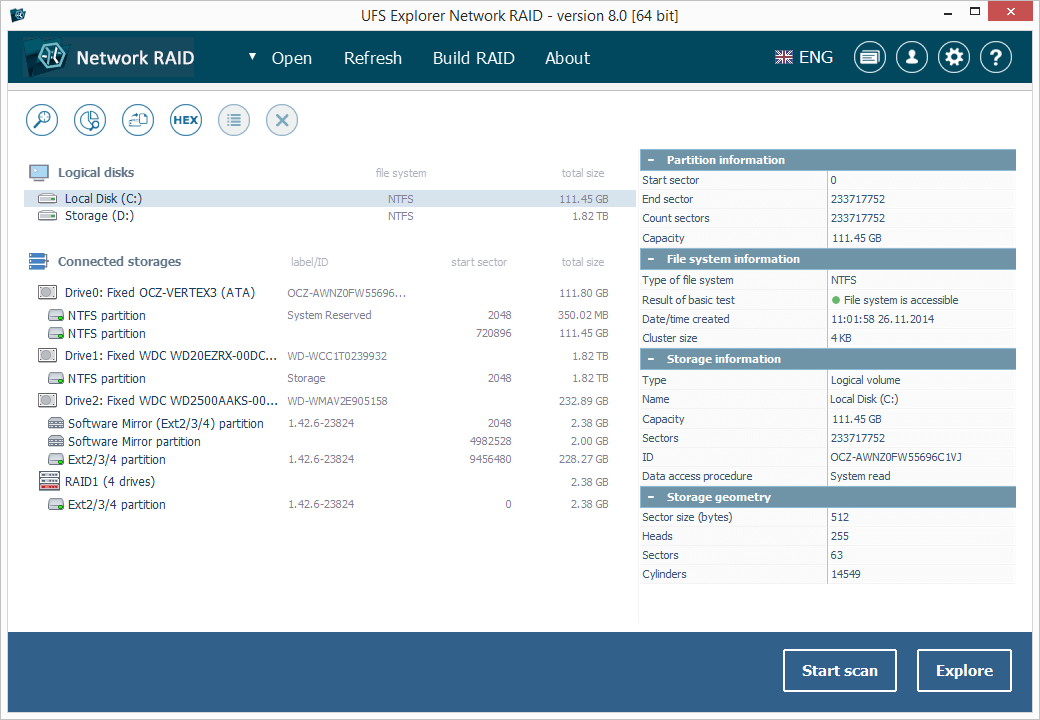
The main window (version 8): logical disks at the top, connected storages below, including a four-drive RAID1 with an Ext2/3/4 partition, and the selected partition's details on the right.
Features
Network Agent: share a remote PC's drives with a key
UFS Explorer Network RAID connects to remote drives through a Network Agent. On the remote computer you choose Open, then "Access to local drives via Agent", note the shared key it shows and press Start. On the workstation you choose "Network device via Agent", pick the remote computer by name or IP address, enter the key and select the disk. Each remote disk is added this way, one at a time, and then appears in the storage tree.

On the remote PC: the Network Agent window with its shared key, Renew key and Start buttons (version 7.6, from SysDev's manual).
iSCSI initiator and iSCSI target in one program
UFS Explorer Network RAID works as an iSCSI initiator, so it can open iSCSI targets on the network: SAN servers, a NAS running in iSCSI mode, DeepSpar DDI hardware or other UFS Explorer copies. It is also an iSCSI target: a rebuilt RAID or a single drive can be shared to any iSCSI client, such as the Windows iSCSI Initiator or Linux iscsiadm. A common trick is to share the reconstructed NAS volume back to Windows as a local disk with a drive letter and copy files with File Explorer. In the trial, the target only shares volumes up to 2 TB.
Professional Recovery as a free remote data source
UFS Explorer Network RAID can use UFS Explorer Professional Recovery on a remote machine as its data source. Professional Recovery's trial is fully functional apart from saving, so it can sit on the machine with the drives, bring its hardware-level tools such as DeepSpar DDI and extra HBA support, and pass the drives to Network RAID. The saving, and the only license, happen on the Network RAID side.
The complete RAID Recovery engine underneath
UFS Explorer Network RAID inherits every specification of UFS Explorer RAID Recovery: automatic assembly from mdadm, LVM, Btrfs-RAID, Storage Spaces, dynamic disks, Apple Software RAID and hardware metadata; NAS layouts from Synology (including SHR), QNAP, Buffalo, Drobo and more; RAID 0, 1, 1E, 3, 5, 6, 7, nested levels and ZFS RAID-Z1/Z2/Z3; the manual RAID Builder; and adaptive rebuilds from bad-sector maps. File recovery covers NTFS, ReFS, FAT, exFAT, APFS, HFS+, Ext2/3/4, XFS, Btrfs, ZFS and UFS.
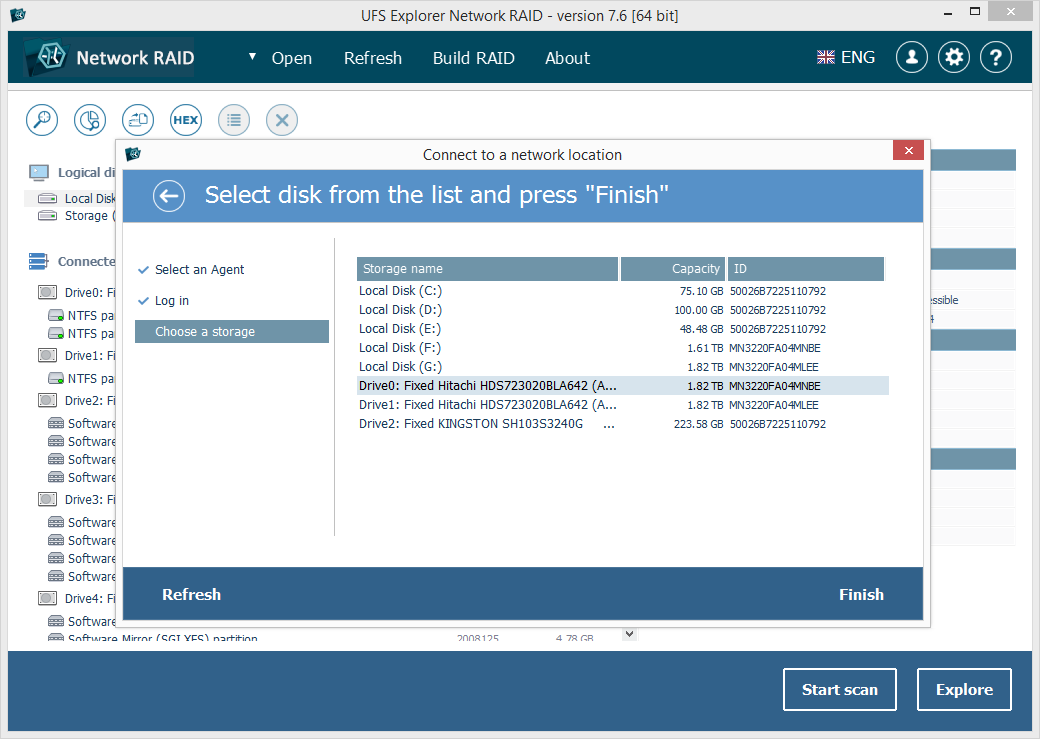
On the workstation: the "Connect to a network location" wizard after logging in to the agent, listing the remote PC's volumes and drives to choose from.
Benefits
You stop fighting hardware limits. Without network access, a large array means buying more HBAs, building a bigger enclosure or imaging every drive and carrying the images to one place. With Network RAID, the drives stay in the machines that can power and read them, and only the data travels.
The licensing helps too. A shop with three bench PCs needs one Network RAID license, not three, because the machines that only share drives stay unlicensed. And because Professional Recovery's trial can act as the remote source, you get its specialist hardware support on that machine without paying for a second, much pricier product.
Real-World Uses
- A 24-bay storage server with no spare chassis: split the drives across two or three PCs on a gigabit switch, share them through Network Agents, and assemble the array on the workstation.
- Drives from a Linux NAS read on Linux, recovered on Windows: a Linux machine shares the disks, while the Windows workstation does the assembly and saving.
- A failing member on a DeepSpar-equipped bench: run Professional Recovery's trial on the machine with the imaging hardware and feed its output to Network RAID.
- Handing a rebuilt volume to another tool: share the assembled RAID as an iSCSI target and mount it on another computer with the standard iSCSI initiator.
Who It's For, and Who Should Skip It
It fits data recovery technicians, IT departments and MSPs that see large arrays, keep several bench machines, or need to share reconstructed volumes over iSCSI. You should be comfortable with RAID parameters and basic networking.
Skip it if:
- All your drives fit in one PC. UFS Explorer RAID Recovery ($149.95 list) does the same recovery locally.
- You have a single failed disk. UFS Explorer Standard Recovery starts at $69.95.
- You need LUKS or VeraCrypt decryption, F2FS or forensic image formats. Those are only in SysDev's Professional family.
- You want to recover over the internet. The product is built and documented for a local network.
Usage Guide
- Install on the workstation. Download ufsxnci.exe and install it on the system disk of the machine that will save the data, never on a drive you're recovering.
- Install on each remote machine. Put UFS Explorer Network RAID (or Professional Recovery's trial) on every computer that holds member drives, using that machine's own operating system build. No license is needed there.
- Start the agents. On each remote machine choose Open, then "Access to local drives via Agent", note the shared key and press Start.
- Connect the remote drives. On the workstation choose Open, then "Network device via Agent", select the computer by name or IP, enter the key and pick the disk. Repeat for each drive.
- Assemble. If the RAID metadata is readable, the array is built automatically; otherwise use Build RAID and enter level, order, stripe size and offset. Use a placeholder for a missing member.
- Recover. Browse or scan the assembled volume, then save files to a local destination disk, or share the volume as an iSCSI target.
- Activate the workstation copy with your registration code to lift the 768 KB and 2 TB limits.

The remote disk (Trivium::Drive0, 1.82 TB) now sits at the bottom of the storage tree with its NTFS partitions, listed as "Cached (Remote storage)" in the details panel.
Where it falls short
- Network speed sets the pace. A full scan reads every sector over the LAN, so a 1 Gbit link is much slower than local SAS on a large array; SysDev itself recommends 10 Gbit for the closest match to local speed.
- One drive at a time. Each remote disk is connected through the agent wizard separately, which takes a while on a large array.
- Technical setup. You need the remote PCs on the same network, the agents running and, when metadata is lost, the RAID parameters. It isn't a one-click tool.
- Per-platform licensing. The licensed workstation must match the license's operating system; a Windows license doesn't cover a Linux workstation.
- Classic-family limits. No LUKS, VeraCrypt or F2FS support.
What Users Say
Network RAID is a niche tool, and we couldn't find independent hands-on reviews of this edition. Its RAID engine is the one in UFS Explorer RAID Recovery, and the review sites that rate "UFS Explorer" in general mostly belong to companies selling competing recovery software, so they aren't quoted here. What we can show are customer notes from SysDev's testimonials page about the UFS Explorer family, written by IT staff, the kind of buyer Network RAID is aimed at.
From SysDev's testimonials page (vendor-published, UFS Explorer in general)
Martin P. Posch, Head of IT, COMMEND INTERNATIONAL GMBH: "It seems that all files could be recoverd because of your great program and your fantastic support."
Mike Brydon, Colorworld, about a NAS failure: "I had a Buffalo Terastation fail on me yesteday. I spent all of last night trying to rescue it but to no avail. This morning I bought your UFS Explorer Professional Recovery, plugged the drives into a spare PC and within minutes I was retrieving my data."
Andre Bauer, EPC-Firmengruppe: "i need a tool to read ext2, ext3 and raiserfs filesystems on windows machines and recover fat and ntfs disks from user workstations (recover crashed disks or deleted files) ... all with one product ... very good."
Bret Miller: "Awesome product, easy order/download/activation process, and worked like a charm."
What this adds up to: customers credit the UFS Explorer engine with reading NAS and Linux file systems from Windows and with responsive support. None of these quotes is about the network features, so the trial is the only real way to judge how Network RAID behaves on your network and your array.
Comparisons
Network RAID vs UFS Explorer RAID Recovery
Same RAID engine, NAS recognition, RAID Builder, adaptive reconstruction and file system support. Network RAID adds the Network Agent, the iSCSI initiator and target, the UDP protocol and the Professional Recovery agent workflow, and its trial adds a 2 TB cap on the iSCSI server. The price difference is $80 at list ($229.95 vs $149.95 for Personal).
Network RAID vs UFS Explorer Professional Recovery
Professional Recovery ($699.95, Commercial license only) is SysDev's forensic-grade product with one license for Windows, macOS and Linux, LUKS and VeraCrypt decryption, E01/AFF4 images and deeper hardware tools. Network RAID is per-platform and far cheaper, and it can borrow Professional Recovery's hardware access through the free trial acting as a remote agent.
Editions and Pricing
| License |
Price |
Computers |
Allowed use |
| Personal | $229.95 | 1 | One individual, no for-profit services |
| Commercial | $484.95 | 1 | A company, commercial work |
| Corporate | $839.95 | Up to 10 | An organization's own machines, non-profit use |
Each license covers one operating system, is perpetual and includes 360 days of free updates. The Buy Now button on this page is the Windows Personal license. Note the Personal license terms: a recovery business offering paid services needs the Commercial license.
FAQs
Do the remote computers need their own UFS Explorer Network RAID license?
No. With UFS Explorer Network RAID, only the copy that saves recovered files needs a license. Remote machines that only share their drives, running Network RAID or Professional Recovery, can stay on the free trial.
Can the remote machine run Linux while the workstation runs Windows?
Yes. UFS Explorer Network RAID is built for mixed setups: a Linux machine can share drives from a Linux-based NAS while the Windows workstation assembles the RAID and recovers the data.
Does UFS Explorer Network RAID work over the internet?
UFS Explorer Network RAID is designed and documented for a local network, with the remote computer chosen by name or IP address. SysDev doesn't describe recovery across the internet.
Is the license lifetime?
UFS Explorer Network RAID is licensed perpetually, so the version you buy keeps working, with free updates for 360 days. The order is set up to renew the update period every 12 months; switch the renewal off if you don't want later versions.
What can I test before buying?
Everything except large saves. The UFS Explorer Network RAID trial has no time limit and allows remote connections, RAID assembly, scanning, preview and disk imaging; saving is capped at 768 KB per file and the iSCSI server at 2 TB volumes.
Can I upgrade from UFS Explorer RAID Recovery?
SysDev has a Software Upgrade Policy and swaps a license when someone ordered the wrong edition by mistake. If you already own RAID Recovery, contact SysDev about moving to Network RAID before buying a second license.
System Requirements
- Windows 7 SP1 or later, 32-bit or 64-bit, for this license
- Minimum 32 MB RAM and 30 MB disk space; 8 GB RAM and 4 logical cores recommended
- A local network between the workstation and the machines holding drives; 10 Gbit gives the closest to local speed
- UFS Explorer (Network RAID or Professional Recovery trial) on each remote machine
Conclusion
UFS Explorer Network RAID is worth $229.95 for one kind of buyer: someone who recovers arrays too big, or too awkward, to wire into a single computer. The reason to buy it is that one license turns every PC on your bench into a drive host, with iSCSI sharing on top. The reason not to is that most home and small-office arrays fit on one machine, and then UFS Explorer RAID Recovery does the same job for less. Try the trial across your machines; if the remote drives connect and the array assembles, the license is the only thing left.
Download Free TrialBuy Now