UFS Explorer Professional Recovery: a Recovery Lab's Workbench, Priced Like One
UFS Explorer Professional Recovery is SysDev Laboratories' expert-level data recovery and forensics toolkit for Windows, macOS and Linux, aimed at recovery engineers and investigators rather than home users. It costs $670.68 on the order page (a one-seat Commercial license, $699.95 on the vendor's own store) and handles what the cheaper UFS Explorer editions can't: LUKS, VeraCrypt and WD hardware-encrypted drives, VMware VMFS datastores, E01/AFF4 forensic images, enterprise drives with 520-byte sectors and manual RAID analysis in a full hex editor.
If your problem is a deleted folder or a NAS that stopped booting, this is the wrong product, and SysDev says so itself. It earns its price when the case is the one other tools give up on: a degraded array from an unknown controller, an encrypted Linux server, a drive that will only survive one more read.
Quick facts
- Version: 10.23, released October 29, 2026
- Developer: SysDev Laboratories (the company behind UFS Explorer, Recovery Explorer and Raise Data Recovery)
- Platforms: Windows 7 SP1 and later, macOS 11 and later, Linux with X11 (GLIBC 2.23 or newer)
- Price: $670.68 on the order page; $699.95 for one seat on the vendor's store, up to $4,749.95 for 30 seats
- License: perpetual, with 360 days of free updates; renewing the update period is optional
- Licensing system: Thales Sentinel, as a cloud ("online") license by default, or machine-locked or USB dongle on request
- Trial: no time limit; everything works except saving files over 768 KB, iSCSI volumes over 2 TB and saving from some hex dialogs
- Refunds: only when a function that the trial couldn't test fails because of a software error SysDev can't fix within 7 days
What we checked: Windows installer ufsxpci.exe (87.6 MB, file version 10.23.0.7982, signed by SysDev Laboratories UK Limited) downloaded from the vendor, the license terms and seat prices on the vendor's order page, and the product name and price on the order page ($670.68, "UFS Explorer Professional Recovery for Windows - Commercial License (1 year of updates)"), all on November 4, 2026. We didn't run a recovery, decrypt a volume or test the Mac and Linux builds.
Before you buy: check the license wording
SysDev now sells Professional Recovery as one license for all three operating systems, managed through Thales Sentinel. The item on our order page, though, is still named "for Windows - Commercial License". If you need it on a Mac or a Linux box as well, ask SysDev support before you pay whether a key from this order activates there too. If you only work on Windows, nothing changes.
Run the free trial on your actual case first. SysDev's refund policy rejects a request from anyone who didn't test the trial, and the trial already shows you the full file tree, decrypted volumes and previews, so you'll know before you pay whether your data is there.
Download Free TrialBuy Now
Overview
SysDev splits UFS Explorer into two families. The Classic editions (Standard Recovery, RAID Recovery, Network RAID) are licensed per operating system and built so a careful non-specialist can follow a wizard to their files. The Professional family, Professional Recovery and the time-limited Technician edition, shares one engine but exposes everything: sector-level parameters, imaging controls, metadata overrides and an editable hex view of every disk.
Professional Recovery covers the whole lab workflow in one program. You image the failing drive with a write blocker, scan the copy, assemble the array, decrypt the volume, inspect structures by hand when automation fails, and extract files with an HTML report that carries their hashes. Development is active: SysDev shipped seven releases in 2026 alone, from 10.18 in January to 10.23 in late October, and the developer posts each changelog on the HDD Guru technicians' forum.

Scan settings for a 465 GB drive: full-range scan, the file system families to look for (Ext, XFS, ReiserFS, JFS and Btrfs ticked here), file name encodings and the IntelliRAW option. Screenshot from SysDev's manual, taken in version 7.6; the current interface looks much the same.
Features
Decrypts almost anything you have the key for
UFS Explorer Professional Recovery opens encrypted storage inside the program, so the original operating system never has to boot or open the volume first. You type the password, passphrase or recovery key, and the software decrypts on the fly for every later step. The list is the longest in the UFS range:
- Software encryption: LUKS and LUKS2, BitLocker and BitLocker To Go, FileVault 2 and APFS encryption, VeraCrypt and TrueCrypt, OpenBSD BIO, eCryptFS (including encrypted shares on Synology, QNAP, Asustor and TerraMaster NAS), and encrypted OpenZFS volumes since version 10.20
- Encrypted containers: encrypted VMDK files, macOS encrypted DMG images and sparsebundles
- WD hardware encryption: USB bridge chips JMicron JMS561 (WD MyBook and MyCloud), JMS538, Symwave SW6316, Initio 1607E and Oxford OXUF943SE
Version 10.21 added hardware-assisted AES decryption (AES-NI) on x86, which speeds up work on large encrypted drives. Without the key it can't help you: this is decryption, not password cracking.
Imaging built for drives that are dying
UFS Explorer Professional Recovery's imager goes well past a plain sector copy. On-demand (read-once) imaging writes each sector into a sparse image the first time anything reads it, so a weak drive is never read twice. File-system-map imaging copies only occupied space, which saves hours on a large, mostly empty volume. Imaging also produces entropy maps next to the bad-block map, so you can see where encrypted or compressed data sits.
For labs with hardware imagers, it talks to DeepSpar Disk Imager over the DDI protocol and loads MRT Data Explorer task files and defect maps, and it can write and read EnCase E01/Ex01 and AFF4 forensic images with their hashes.
RAID reconstruction from automatic to fully manual
UFS Explorer Professional Recovery includes every RAID function of UFS Explorer RAID Recovery and adds the tools for cases where metadata is gone. It recognizes:
- Standard levels: RAID 0, 1, 1E, 3, 5, 6 and 7, and nested RAID 10, 50, 51, 60 and 61
- Hardware metadata: DDF1 (LSI, Dell, Intel), DDF2 (Adaptec), Silicon Image, JMicron, Intel Matrix, HighPoint RocketRAID variants, ASMedia ASM1xxxR, OWC SoftRAID and older Oxford controllers such as LaCie Quadra (the last two new in 10.23)
- Software RAID: Linux mdadm, LVM and LVM2, Windows NT LDM and Storage Spaces, Apple Software RAID, Core Storage and APFS Fusion Drive
- Proprietary layouts: Drobo BeyondRAID, Synology SHR and RAID-F1, Btrfs-RAID and ZFS RAID-Z, Z2 and Z3
When nothing is detected, the RAID Builder lets you set the level, parity distribution, stripe size and drive order by hand, with a placeholder for a missing disk. Adaptive reconstruction uses bad-block maps from the member images to fill gaps from parity, and Reverse RAID splits an assembled array back into components to check your parameters. An iSCSI target and initiator can share an assembled volume with another machine.
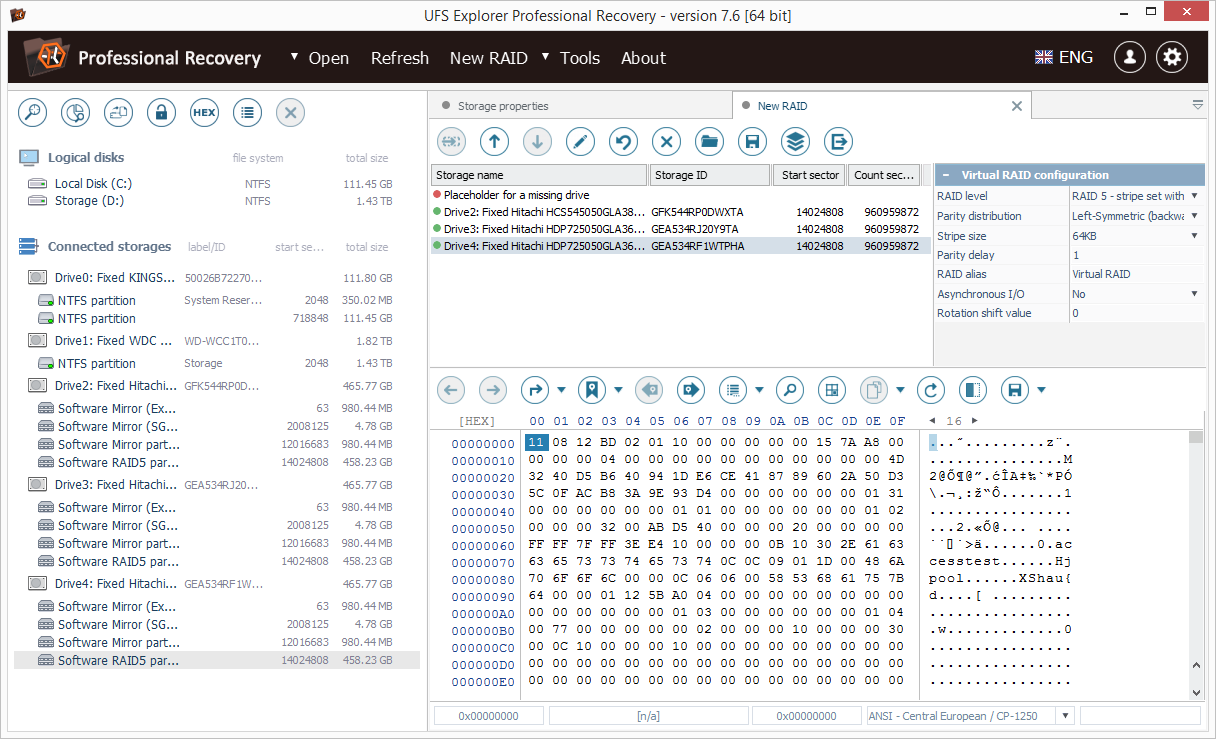
Building a RAID 5 by hand: three drives plus a "Placeholder for a missing drive", with the level, parity distribution (Left-Symmetric), 64 KB stripe and parity delay set on the right and the assembled array's first sectors in the hex view below (manual screenshot, version 7.6).
A hex editor that does RAID math
UFS Explorer Professional Recovery has a full hexadecimal editor, not just a viewer, so you can repair a boot sector or a superblock on an image directly. Around it sit the analysis tools a technician uses to work out a damaged array by hand: a data interpreter, color highlighting of known file system and RAID structures, a parity calculator, XOR between regions, byte-by-byte comparison of two storages, parallel search across several disks, and reverse address translation, which tells you which file a given physical sector belongs to.
It also handles SAS and SCSI drives with 520, 524 or 528-byte sectors from enterprise arrays through sector size mutation, something none of the Classic editions do.
File systems from NTFS to NetWare
UFS Explorer Professional Recovery reads and scans:
- Windows: FAT, FAT32, exFAT, NTFS, ReFS and ReFS3, including volumes with Microsoft Data Deduplication
- macOS: APFS (including encrypted) and HFS+, plus old HFS read-only
- Linux: Ext2/3/4, XFS, JFS, ReiserFS, Btrfs and F2FS
- BSD and Solaris: UFS, UFS2, Adaptec UFS, big-endian UFS and ZFS
- VMware: VMFS and VMFS6, opening virtual machines inside a datastore without extracting the disk files first
- Legacy and optical: Novell NWFS, NSS and NSS64, HPFS (read-only), ISO 9660/Joliet and UDF
For ZFS, APFS and ReFS3 it can open the file system at an earlier transaction (checkpoint), which can bring back recently deleted files without a full scan. Disk images it opens include VMDK, VHD/VHDX, QCOW2, VDI, Parallels HDD, DMG and sparsebundle, E01/Ex01, AFF4, DeepSpar DDI, R-Studio RDR and Veeam VBK backups (experimental since 10.17).
Benefits
- One tool instead of four. Imaging, RAID, decryption and hex analysis share one case, so you don't export an image from one program and reopen it in another.
- Fewer reads of a failing drive. Read-once imaging and map-based imaging mean the patient drive spends less time spinning.
- A product that keeps up. Releases come every month or two and add support for new storage, such as OWC SoftRAID metadata, encrypted OpenZFS and Veeam VBK backups in 2026.
Real-World Uses
- A LUKS-encrypted Linux server with a dead controller. Image the member disks, let the software detect the mdadm array, enter the LUKS passphrase and copy the files off an Ext4 or XFS volume without booting the server.
- A corrupted VMware ESXi datastore. Open the VMFS6 volume and browse the files inside each virtual machine's disk directly, rather than restoring every VMDK first.
- A forensic acquisition. Image a suspect drive through a hardware write blocker to E01, then examine and report on it with hashes for each extracted file.
- A SAN shelf of 520-byte-sector SAS drives. Mutate the sector size so the array's data lines up, then rebuild it.
Who It's For, and Who Should Skip It
Buy it if you run a recovery service, an IT department that handles its own server failures, or forensic casework, and you meet encrypted, virtualized or enterprise storage often enough to justify $670. Familiarity with RAID geometry and file system structures is expected; the interface assumes you know what a stripe size is.
Skip it if you're recovering your own files. For deleted files, a formatted drive or a single failed disk, UFS Explorer Standard Recovery at $69.95 does the job. For a dead home NAS or a simple RAID 5, UFS Explorer RAID Recovery at about $150 includes the same automatic RAID detection. If you need encryption and RAID tools on a budget, SysDev's own Recovery Explorer Professional ($209.95 for one OS) covers LUKS, VeraCrypt and BitLocker with a friendlier interface. And if you need SAN plugins (Dell EqualLogic, HPE 3PAR, NetApp E-series) or raw ATA/SCSI commands, you need UFS Explorer Technician instead.
Usage Guide
- Install it on a different drive from the one you're recovering. On Windows, run ufsxpci.exe and start the program as a local administrator, since physical drives are only visible with admin rights. On Linux, extract the archive and run the install script with sudo; on macOS, use the macOS download from the same page.
- Decline Windows' "initialize disk" prompt when you attach a drive from another system. Accepting it writes to the disk.
- Image a failing drive first. Use the disk imager (read-once mode for a weak drive), then do all further work on the image.
- Open what you have from the left pane, or use Open for a disk image, chunked image files or a device by name.
- For an array, let automatic detection assemble it, or click New RAID, add components in order, insert a placeholder for a missing member and set level, stripe size and parity until the file system shows as accessible.
- Decrypt an encrypted volume from its context menu by entering the key.
- Scan if the file system is damaged: choose the file system families to look for and whether to include IntelliRAW signature results. Scans can be saved and resumed.
- Check, then copy. Preview files in the built-in viewers, tick what you need with "Define permanent selection", run "Evaluate size and test", and save to another drive.
- Activate with the "Software Activation and License" button in the top right once you've confirmed the trial finds your data.
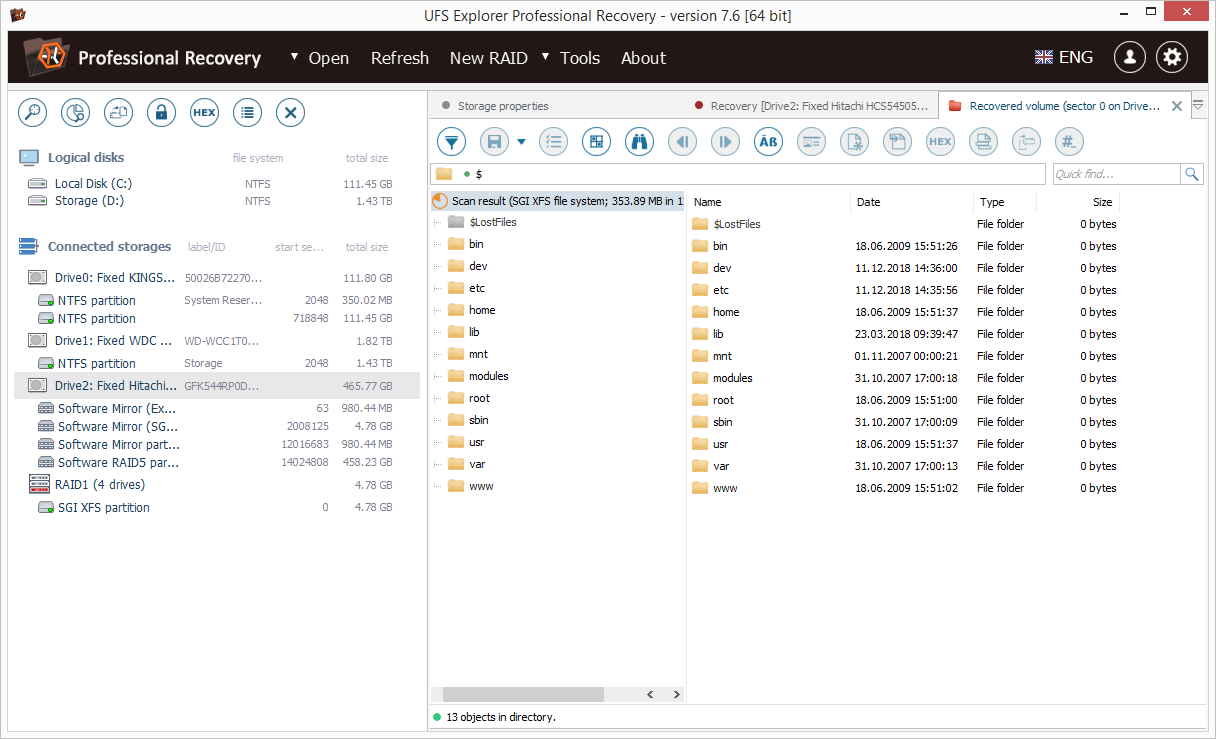
A finished scan of an SGI XFS volume on a RAID 1 of four drives: the recovered Linux folder tree (bin, etc, home, var, www) plus a $LostFiles folder, ready to select and save (manual screenshot, version 7.6).
Where it falls short
- The price is a business expense. At $670 to $700 for one seat it costs about ten times Standard Recovery, and HDD Guru members compare it unfavorably with R-Studio Technician's price.
- Strict licensing. Thales Sentinel binds the license to its activation; the default is an online (cloud) license, and offline use needs a machine-locked key or a USB dongle at £130 each. That's more friction than the Classic editions' simple registration code.
- The update period ends. After 360 days you keep the last version released in your period; newer versions need a paid renewal. In a field where file system support changes monthly, plan for that cost.
- No hardware-level fixes. It can't repair a drive that doesn't spin or isn't detected (one HDD Guru member listed it among the tools that didn't detect a WD drive whose board was overheating), and SAN plugins and raw ATA/SCSI commands are reserved for the Technician edition.
- Strict refund terms. SysDev refunds only when you tested the trial and a function the trial couldn't exercise then fails because of a software error SysDev can't fix within 7 days. Buying the wrong edition gets you an exchange, not your money back.
- Older screenshots. The manual's screenshots still show the version 7 and 8 interface, so the current layout differs in details.
What Users Say
Professional Recovery has almost no ratings on consumer review sites: AlternativeTo has one user comment, and Trustpilot has no page for ufsexplorer.com. The most useful opinions come from data recovery technicians on the HDD Guru forums, where SysDev's developer posts each release, and those are frank about both the power and the price.
Recovery professionals on HDD Guru (June 2026)
A small IT company asked which edition to buy for a failing BitLocker drive that other tools couldn't open. SWAN reported that "UFS explorer has correctly identified partition (353GB) and has decrypted volume as well," but complained that "Product SKU's are confusing as developer has cleverly distributed main features in different version & ensured that no single product will be having all functions."
ccc, of datasave.ro, answered: "UFS Explorer Professional is enough for what you need." SWAN's reply was blunt: "Its too too costly for anyone," adding that "R-studio Technician is costing $80 while UFS pro $700."
Arch Stanton (Joep, disktuna.com) disagreed: "Solve one complex RAID case or some NAS case that can not be done with some other tool and it already paid for itself." He also pointed cost-conscious buyers to the cheaper edition: "for RAID cases you can use UFS RAID, commercial license is 219 Euros."
On updates, pepe noted that "you can use the sw version latest to your support period unlimited even after the support expired, you only need to buy new if you need the new features." And northwind (northwind.gr) summed up the regulars' view: "UFS Explorer pays for itself 5x in a year. If you know what you're doing, that is."
The developer's July 2026 release post on the same thread lists the 10.21 changes, including hardware AES decryption and a video player for checking recovered files.
Customer stories on the vendor's site
SysDev publishes these itself, so read them as hand-picked. One names this edition directly. Mike Brydon of Colorworld wrote: "I had a Buffalo Terastation fail on me yesteday. I spent all of last night trying to rescue it but to no avail. This morning I bought your UFS Explorer Professional Recovery, plugged the drives into a spare PC and within minutes I was retrieving my data."
Another, from a user identified as Sparky of Neologic Systems, describes the kind of case the Professional tools are for: "I had a corrupted XFS RAID 1 volume. I spent 3 days trying to unravel the data. I tried 11 different file recovery tools under Windows and Linux. But no other tool could even find a partition map. Your product had it totally figured out within 5 minutes."
AlternativeTo
The only user comment, from asiabobkova in March 2017, reads: "A helpful tool for those who work in the sphere of data recovery. Plenty of functions, great performance."
The recurring themes: technicians trust it for RAID, NAS and encrypted cases other tools can't read, and value how often new storage support arrives. The complaints are about money and packaging: the jump from the Classic editions to $700, features split between Professional and Technician, and the need to renew for new versions. Nobody in these sources calls it easy, and the people who praise it most add "if you know what you're doing".
Comparisons
Professional Recovery vs. Technician vs. RAID Recovery
UFS Explorer Technician runs the same engine and adds raw SCSI/ATA commands, automatic SAN plugins (Dell EqualLogic, HPE MSA and 3PAR, IBM DS3, NetApp E-series), QNAP QuTS hero QZFS, NetApp WAFL, AIX JFS, VxFS, QNAP Qtier and secure wiping. It's sold as a time-limited license only: $469.95 for 3 months up to $2,129.95 for 3 years. Professional Recovery is the perpetual option without those hardware and SAN extras.
UFS Explorer RAID Recovery ($149.95 per operating system on the vendor's store) shares the automatic RAID and NAS detection and the RAID Builder, and covers most home and small-office arrays. It lacks the Professional encryption list (LUKS, VeraCrypt, eCryptFS, WD bridge chips), VMFS, F2FS, forensic E01/AFF4 images, the hex editor with parity tools, non-standard sector sizes and the advanced imaging modes.
Editions and Pricing
| License |
Seats |
Term |
Price |
| Professional Recovery, Commercial (order page) | 1 | Perpetual, 1 year of updates | $670.68 |
| Professional Recovery, Commercial (vendor store) | 1 | Perpetual, 360 days of updates | $699.95 |
| Professional Recovery (vendor store) | up to 3 | Perpetual, 360 days of updates | $1,189.95 |
| Professional Recovery (vendor store) | up to 10 | Perpetual, 360 days of updates | $2,369.95 |
| Professional Recovery (vendor store) | up to 30 | Perpetual, 360 days of updates | $4,749.95 |
The license never expires. Renewing the update period automatically is an opt-in choice on the order page, not the default. "Seats" means computers using the software at the same time; a machine-locked offline license comes with one or more spare workstations.
FAQs
Does one UFS Explorer Professional Recovery license work on Windows, Mac and Linux?
Under SysDev's current licensing, yes: one Professional Recovery license activates on all three systems, unlike the Classic editions. The item on our order page is still labelled "for Windows", so confirm with SysDev before buying if you need the Mac or Linux build.
What happens to UFS Explorer Professional Recovery after the update period?
UFS Explorer Professional Recovery keeps working forever on the last version released within your 360 days. Only newer versions need a paid renewal, and HDD Guru users who run expired licenses simply avoid installing later builds.
Can UFS Explorer Professional Recovery crack a forgotten BitLocker or LUKS password?
No. UFS Explorer Professional Recovery decrypts volumes only when you supply the password, passphrase, recovery key or key file. It saves you from booting the original system, not from needing the key.
Does UFS Explorer Professional Recovery need an internet connection?
The default Sentinel license is an online (cloud) license. SysDev can issue an offline, machine-locked license on request, or a Sentinel USB token at extra cost (£130 per token, excluding VAT) for a license you carry between machines.
Can I upgrade from UFS Explorer RAID Recovery to Professional Recovery?
SysDev has an upgrade page and a Software Upgrade Policy that lets you replace a license ordered by mistake. Ask SysDev for the current upgrade price from your edition before paying full price.
System Requirements
- Windows: 7 SP1 and later
- macOS: 11 and later
- Linux: most modern distributions with an X11 desktop and GLIBC 2.23 or newer
- Minimum: 64 MB RAM and 100 MB free disk space
- Recommended: 16 GB RAM, 4 logical cores, 64-bit operating system
- Rights: administrator (Windows) or root (Linux) access to read physical drives
- Free space on a separate drive, at least as large as the data or image you're recovering
Conclusion
UFS Explorer Professional Recovery is worth $670 if storage failures are part of your job. The reason to buy it is breadth in one program: read-once imaging, manual RAID reconstruction with parity tools, decryption from LUKS to WD bridge chips, VMFS and forensic images, all from a developer who ships fixes every month or two. Technicians on HDD Guru argue about the price, not about whether it works.
The reason not to buy it is just as clear. For your own deleted files or a home NAS, UFS Explorer Standard Recovery or RAID Recovery cost a fraction of this and do the same job with less to learn. Whichever you choose, run the trial on your actual drives first: it shows every recoverable file before you pay, and SysDev's refund terms assume you did.
Download Free TrialBuy Now