Recovery Explorer Professional for Mac: APFS, FileVault, Fusion Drive and RAID Recovery on macOS
Recovery Explorer Professional for Mac is a $209.95 macOS app from SysDev Laboratories for difficult data recovery: encrypted APFS and FileVault 2 volumes, Fusion Drives, Apple Software RAID, NAS and RAID disks, and drives from Windows or Linux machines. It runs natively on Apple Silicon and Intel Macs with macOS 11 or later, and it's built for technicians, IT staff and experienced Mac users.
Most Mac recovery apps stop at a deleted file on a healthy APFS disk. This one is for the jobs after that: an external SSD whose encrypted APFS container no longer mounts, a Mac mini's Fusion Drive split apart, a client's BitLocker USB stick that has to be read on your Mac, or the disks of a dead RAID enclosure.
Quick facts
- Version: 10.23, released October 29, 2026
- Developer: SysDev Laboratories (also makes UFS Explorer)
- macOS: 11 Big Sur or later, Apple Silicon (arm64) and Intel (x86-64)
- Price: $209.95, Personal license, on the order page
- License: perpetual, for macOS only; free updates for 360 days
- Trial: full scanning and preview; saving is capped at 768 KB per file
- Download: a 47 MB zip containing a code-signed installer app
- What we checked: the macOS download (47,022,030 bytes, a code-signed Install Recovery Explorer Professional app built October 29, 2026) from SysDev, and the order page's $209.95 price and unticked $104.95 yearly renewal box, both on November 4, 2026. We didn't run a recovery on a Mac.
Before you buy: SIP and the one-OS license
To read a Mac's internal drives at a low level, SysDev says you must start the app with administrator rights and, on macOS 10.13 and later, disable System Integrity Protection (SIP) first. That's a Recovery-mode change many people aren't comfortable making, so test with the trial before paying. External drives and disk images are the easier case. The license runs only the macOS build; Windows and Linux need separate licenses.
Download Free Trial
Buy Now
Overview
SysDev sells Recovery Explorer in three editions (Standard, RAID and Professional) and three builds (Windows, macOS, Linux). On a Mac, the Professional edition is the one that understands Apple's storage stack beyond plain APFS and HFS+: Core Storage, Fusion Drive, Apple Software RAID, encrypted APFS and FileVault 2, and DMG images. It also opens the file systems your Mac can't, such as NTFS with BitLocker, Ext4, XFS, Btrfs, ZFS and VMware VMFS, which makes a Mac a workable recovery station for disks from any machine.
The app never writes to the source. You browse or scan, preview, then copy the files you want to another disk.
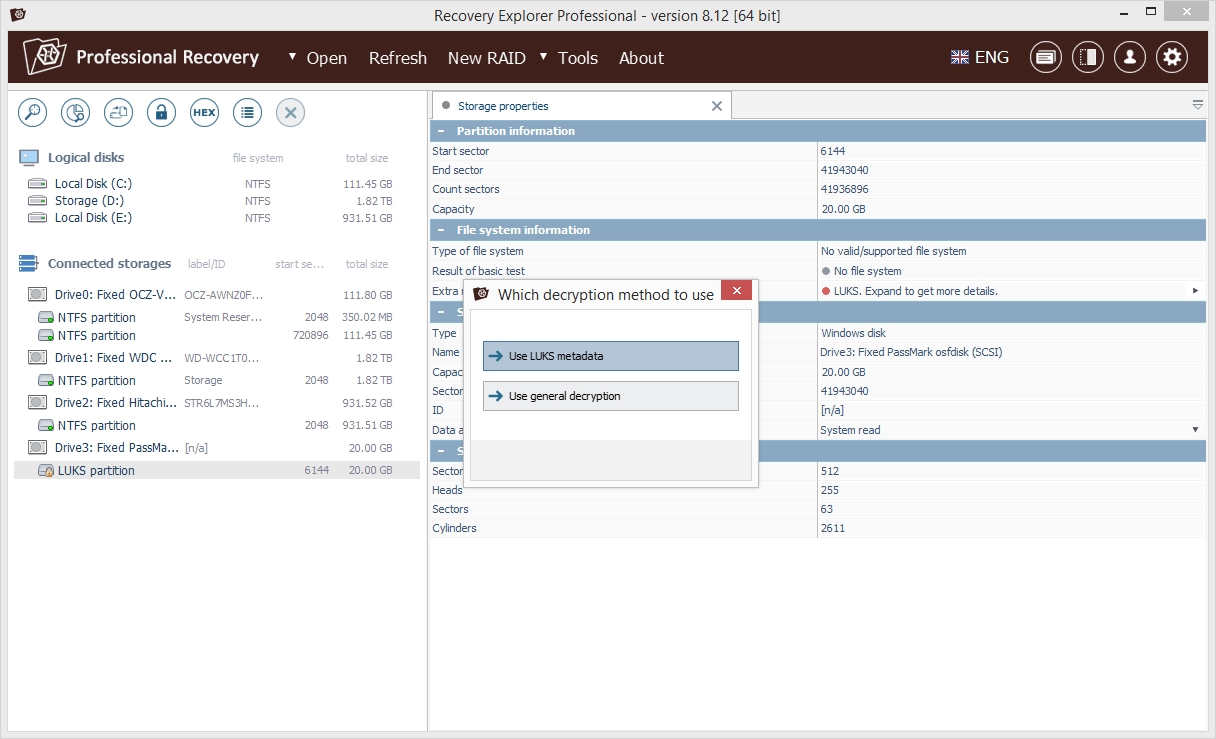
When it finds an encrypted partition (LUKS here), the app asks whether to use the volume's metadata or a general decryption method (version 8.12, Windows build shown).
Features
Encrypted APFS and FileVault 2 opened with your password
Recovery Explorer Professional decrypts encrypted APFS and FileVault 2 volumes, encrypted DMG images and Core Storage, as well as BitLocker, VeraCrypt, TrueCrypt, LUKS 1/2 and eCryptFS, once you give it the password or key. It reads the decrypted data on the fly, so you can recover from an encrypted container that macOS refuses to open because its structures are damaged.
Apple's multi-disk storage: Fusion Drive, Core Storage and Software RAID
Recovery Explorer Professional reassembles Fusion Drives (the SSD plus hard-disk pair in older iMacs and Mac minis), Core Storage volumes and Apple Software RAID sets from their member disks. Beyond Apple's formats it handles mdadm, LVM, Windows Storage Spaces and Dynamic Disks, Synology Hybrid RAID, Drobo BeyondRAID, ZFS RAID-Z and Btrfs-RAID, plus RAID 0, 1E, 3, 4, 5, 6 and nested 10, 50, 60 and 50E, with a manual builder for arrays it can't detect.
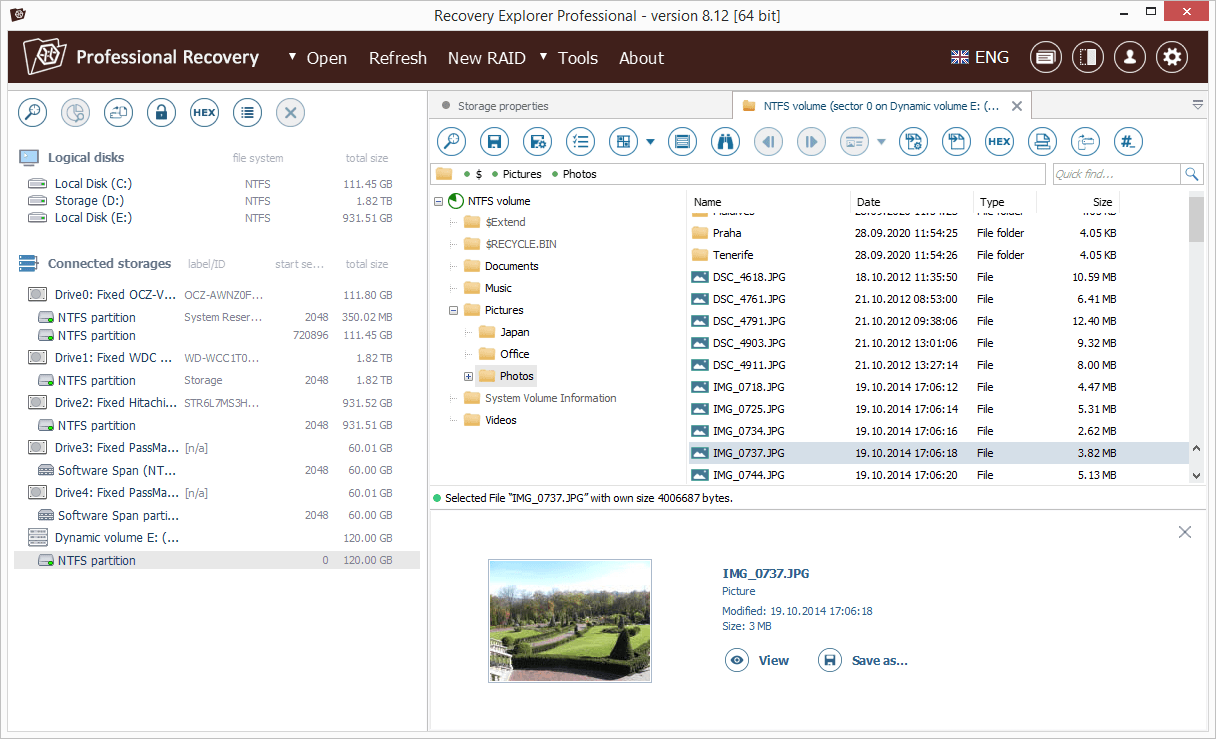
A volume spanned across two drives, assembled and browsed folder by folder with a picture preview at the bottom (version 8.12, Windows build).
Disks from Windows and Linux machines, read on a Mac
Recovery Explorer Professional recovers from NTFS, FAT, exFAT, ReFS, Ext2/3/4, XFS, JFS, ReiserFS, F2FS, UFS/UFS2, ZFS and VMware VMFS, alongside APFS and HFS+, and can still copy files from old HFS, HPFS and Novell NetWare volumes. A Mac technician can take in a PC's disk or a NAS drive without keeping a Windows machine around.
Virtual machines and disk images
Recovery Explorer Professional opens Parallels, VMware, VirtualBox, Hyper-V and QEMU disks, Apple DMG images, EnCase E01/Ex01, DeepSpar and R-Studio images. That covers a Parallels Desktop Windows VM whose files you need without starting it, or a VM disk sitting inside a damaged APFS volume.
Hex tools, safe reading and scan control
Recovery Explorer Professional adds a hex viewer and editor, parity calculator, XOR, data comparison and reverse address translation for manual work; a configurable read procedure with timeouts, on-demand imaging and a S.M.A.R.T. monitor for weak drives; and scans you can narrow to chosen file system families, pause, save and resume. Version 10.23 also added per-volume time zone settings and user-defined file signatures in its extension checker.

The data size evaluation shows how many files and folders are recoverable and how much space they need before you start copying (version 8.12, Windows build).
Benefits
- Native on Apple Silicon. No Rosetta and no Windows virtual machine for recovery work.
- Apple formats handled properly. APFS containers, encrypted volumes and Fusion pairs are read from their own structures, not through macOS.
- One Mac for every client disk. PC, Linux and NAS disks open in the same window as Mac ones.
- Estimates before you copy. The size evaluation tells you how big a destination disk you need.
Real-World Uses
- An external SSD formatted as encrypted APFS shows up in Disk Utility but won't mount. You enter the password in the app and copy the files out.
- A 2015 iMac's Fusion Drive was split after a failed macOS install. The app reunites the SSD and hard disk virtually and recovers the user folder.
- A photographer's two-disk Apple Software RAID 0 lost one disk's partition table. The app rebuilds the stripe and lists the photo library.
- A client hands you a BitLocker-encrypted USB drive from a Windows laptop. You read it on your Mac with their recovery key.
- A Drobo or Synology unit failed; you connect its disks to a USB dock and recover from the reassembled volume.
Who It's For, and Who Should Skip It
It's for Mac-based repair shops, IT staff supporting Mac fleets, video and photo professionals with RAID or encrypted external drives, and experienced users who are willing to toggle SIP when needed.
Skip it if you just emptied the Trash on an unencrypted APFS disk; Recovery Explorer Standard for Mac costs $47.95 and covers that. If your storage is an unencrypted RAID set or Fusion Drive, the $94.95 RAID edition is enough. If you aren't comfortable disabling SIP for internal drives, consider whether the disk can be removed or connected in Target Disk Mode first, or use a recovery service. And if you need one license for macOS, Windows and Linux together, UFS Explorer Professional Recovery is SysDev's product for that.
Usage Guide
- Download the zip, open it, and run Install Recovery Explorer Professional. The signed installer puts the app on your Mac.
- For an internal drive, disable SIP from macOS Recovery (Terminal:
csrutil disable), restart, and turn it back on with csrutil enable when you're done. External drives usually don't need this.
- Launch the app with an administrator account. Connected drives, partitions and any detected Fusion Drive or RAID sets appear on the left.
- For an encrypted volume, choose the decryption method and enter the password or key. For an array that wasn't detected, build it with New RAID.
- Open the volume and browse it, or start a scan limited to APFS and HFS+ (or the file systems you expect).
- Check the size evaluation, select the files and save them to a separate drive. Enter your registration code under Software Activation and License to lift the trial's 768 KB limit.
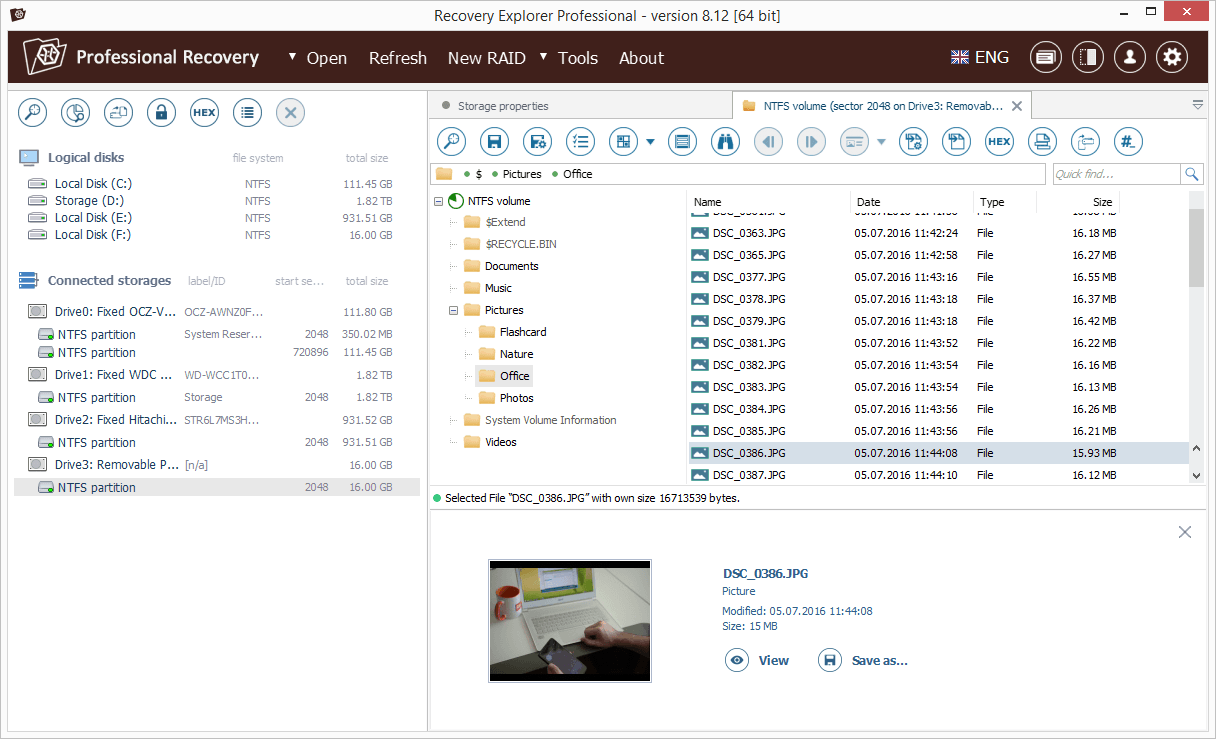
Browsing the Pictures folder of a removable drive with a preview of the selected photo (version 8.12, Windows build).
Where it falls short
Watch out for
- SIP must be disabled for low-level access to internal drives on modern macOS, according to SysDev's FAQ.
- Fusion Drive recovery wasn't perfect in testing: DataRecoveryDigest found the files from the root folder damaged after reconstruction.
- Scans can be slow; reviewers noted that it sometimes needed a long disk scan when other tools didn't.
- The interface is dense, and the screenshots SysDev publishes show the Windows build, so expect a few Windows-style conventions.
- File search and marking are more limited than in some competitors.
What reviewers found
DataRecoveryDigest test of version 9.11 (2023), rated 4.9
Verdict: "The other exceptional professional data recovery program that showed the second-best results in our data recovery tests and feature evaluation. It has a very convenient user interface, a quite good file previewer, and excellent data recovery parameters and performance."
Apple storage results: "The Mac APFS Fusion drive was immediately found and reconstructed. All file and folders were found and successfully recovered, except files from the root folder. They appeared damaged." And: "The Mac RAID 0 was immediately found and correctly reconstructed." For a damaged APFS partition, the review says it was found with "all original files and folders with correct names" but that a "Long disk scan was required."
Cons it listed: "Limited file search and mark capabilities. The program sometimes required a long disk scan when other programs didn't. Poor localization support. The program showed the worst score for data recovery from a memory card with a deleted exFAT file system."
That's the only detailed independent test we found, and it doesn't say which operating system it ran on. Review sites such as Trustpilot, Capterra and G2 have no user reviews of the Mac build.
Comparisons
Which Recovery Explorer edition does a Mac user need?
Standard ($47.95) recovers deleted and formatted files from single APFS, HFS+, NTFS, FAT and Linux volumes, with spanned Apple Software RAID. RAID ($94.95) adds standard and nested RAID levels, APFS Fusion Drive, Synology Hybrid RAID and Btrfs-RAID. Professional ($209.95) is the only one that decrypts FileVault 2, encrypted APFS and BitLocker, and it adds Core Storage, ZFS RAID-Z, Drobo BeyondRAID, VMFS, Parallels disks and the hex editor. SysDev lets you upgrade later for the price difference.
Recovery Explorer Professional vs. UFS Explorer Professional Recovery on a Mac
UFS Explorer Professional Recovery ($699.95) is the expert tool: one license covers macOS, Windows and Linux, it uses Thales Sentinel licensing, and it adds features such as AFF4 images and Microsoft Data Deduplication. For a Mac shop doing everyday encrypted and RAID recoveries, Recovery Explorer Professional is the cheaper fit.
Editions and Pricing
| Edition (macOS) | Price | Decrypts FileVault / APFS | RAID and Fusion Drive |
|---|
| Recovery Explorer Standard | $47.95 | No | Spanned Apple Software RAID only |
| Recovery Explorer RAID | $94.95 | No | Standard and nested levels, Fusion Drive, Synology Hybrid RAID |
| Recovery Explorer Professional | $209.95 | Yes | Adds Core Storage, ZFS RAID-Z, Drobo BeyondRAID |
Prices are the Personal licenses for macOS. The Professional license is perpetual with 360 days of updates; the order page also offers optional automatic renewal of updates for $104.95 a year, unticked by default. Commercial (one company computer) and Corporate (up to 10 computers, non-profit or educational) licenses are also sold.
FAQs
Does Recovery Explorer Professional run natively on M1, M2, M3 and M4 Macs?
Yes. Recovery Explorer Professional for macOS supports Apple Silicon (arm64) as well as Intel Macs, on macOS 11 or later.
Do I have to disable SIP to use Recovery Explorer Professional?
For low-level access to physical drives, yes: SysDev says SIP must be disabled on macOS 10.13 and later. You can turn it back on after the recovery.
Can Recovery Explorer Professional recover an encrypted APFS drive if I forgot the password?
No. Recovery Explorer Professional needs the password or key to decrypt encrypted APFS or FileVault 2; it doesn't crack passwords.
Can Recovery Explorer Professional read a Windows BitLocker drive on a Mac?
Yes. Recovery Explorer Professional for macOS decrypts BitLocker volumes when you supply the password or recovery key, and reads NTFS, exFAT and ReFS.
Can I move my Mac license to a Windows PC?
No. Recovery Explorer Professional licenses are valid for one operating system; using it on Windows or Linux means buying another license.
What happens after 360 days of updates?
The app keeps working on the last version released in your update period. New versions after that need a paid renewal, offered at checkout as an optional $104.95 yearly charge.
How do I activate Recovery Explorer Professional after buying?
You receive a registration code by email, usually within 15 to 45 minutes, and enter it with your name in the Software Activation and License tab of the trial you already installed.
System Requirements
- macOS 11 Big Sur or later
- Apple Silicon or Intel Mac
- At least 1 GB RAM; 2 GB and 4 CPU cores recommended
- 20 MB of disk space for the app, more than 1 GB recommended for temporary files
- Administrator account; SIP disabled for low-level access to internal drives
- A separate drive to save recovered files to
Conclusion
Recovery Explorer Professional for Mac is worth $209.95 if you recover data on a Mac and regularly meet encrypted APFS or FileVault volumes, Fusion Drives, RAID enclosures or disks from Windows and Linux machines. Its main strength is that it handles all of these natively on Apple Silicon at a fraction of a lab tool's price.
Its main drawback is friction: internal drives need SIP turned off, scans can be slow, and the license won't follow you to another operating system. For simple deleted-file jobs, Standard is the smarter buy. Run the trial first; if the files preview correctly, the license will let you save them.
Download Free Trial
Buy Now