Raise Data Recovery: A Four-Step File Recovery Wizard for Windows, Mac and Linux
Raise Data Recovery is a $34.95 file recovery program from SysDev Laboratories (the makers of UFS Explorer) that brings back deleted and lost files from hard drives, SSDs, USB sticks and memory cards. It's built for home users who want a guided wizard instead of a technician's toolbox, and one license works on Windows, macOS and Linux.
You emptied the Recycle Bin a day too early, formatted the wrong memory card, or a USB drive suddenly asks to be formatted. Raise walks you through four screens: pick the drive, let it scan, tick the files you want, choose where to save them. It never writes to the drive it's scanning.
Quick facts
- Version: 10.23, released October 29, 2026
- Developer: SysDev Laboratories
- Runs on: Windows XP SP3 to Windows 11, macOS 11 and later (Intel and Apple Silicon), Debian Linux 6.0 or compatible and later
- File systems: FAT, exFAT, NTFS, ReFS, HFS+, APFS, Ext2/3/4, XFS, JFS, ReiserFS, UFS
- RAID: rebuilds Windows dynamic disks, Apple Software RAID, Linux LVM and mdadm RAID automatically
- Price: $34.95 for a lifetime Personal license with 30 days of free updates (Short-Term Support), or $49.95 with 360 days of updates (Long-Term Support). Both are one-time payments.
- Free trial: no time limit. Raw-recovered files save at any size, but files found by a file system scan save only up to 256 KB each.
- What we checked: the Windows installer (raisedr.exe, 18.8 MB, file version 10.23.0.7982) downloaded from SysDev, and the $34.95 one-time price for the Short-Term Support license on the order page, both on November 4, 2026. We didn't run a recovery with it.
Before you buy
- The $34.95 license gets 30 days of updates. It keeps working forever, but new versions released after the first month won't activate with your code. If you want a year of updates, the $49.95 Long-Term Support license is the one to pick on raisedr.com.
- Personal use only. The Personal license is for non-commercial use. A technician or business needs one of SysDev's other products.
- Newer Macs: external drives only. On Macs with the T2 chip or Apple Silicon, Raise can recover from external drives but not from the Mac's built-in drive.
- Phones are out. It can't recover from the internal memory of phones and tablets, only from storage your computer sees as a drive.
Download Free TrialBuy Now
Overview
SysDev Laboratories is best known for UFS Explorer, a family of recovery tools that data recovery labs use. Raise Data Recovery is its consumer product: the same scanning engine for the common file systems, wrapped in a wizard that explains each step in a side panel and links to short FAQs.
Each step is one screen. Step 1 lists your drives as logical volumes, physical disks and complex (RAID) storages. Step 2 scans and counts photos, documents, videos and archives as it finds them. Step 3 shows the results as a folder tree with a preview pane. Step 4 asks where to save, and colors each target drive by whether your selection fits on it.
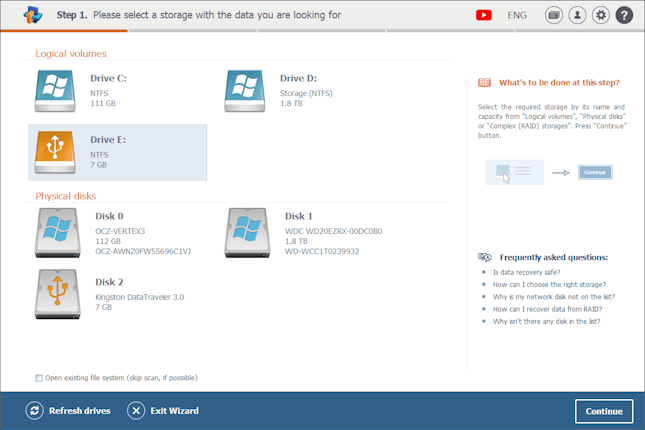
Step 1: choosing the storage. Logical volumes are at the top, physical disks below, and the help panel sits on the right.
Features
Two kinds of scan
Raise Data Recovery offers a Deep Scan, recommended after formatting or serious file system damage, and a faster This file system only scan for recently deleted files on a healthy drive. Deep Scan also searches for files by their signatures (raw recovery), which finds photos and documents even when the folder structure is gone. If the volume is intact, "Open existing file system" skips the scan and shows its current contents straight away.
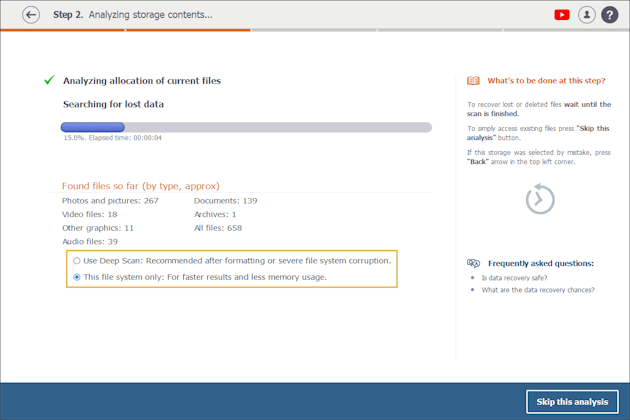
Step 2: the scan counts files by type as it runs, and you choose between Deep Scan and the faster file-system-only scan.
Windows, Mac and Linux drives on any of the three
Raise Data Recovery reads NTFS, exFAT, FAT and ReFS from Windows, HFS+ and APFS from Macs, and Ext2 to Ext4, XFS, JFS and ReiserFS from Linux. That matters when the dead drive came from a different computer: a Mac's external disk can be recovered on a Windows PC, and the other way round.
Folder tree, file-type folders and preview
Raise Data Recovery rebuilds the original folders where it can and also sorts every find into Documents, Photos and pictures, Video files, Archives and other type folders. Deleted files have their names in a different color, files that lost their folder land in $LostFiles, and signature-found files go to Extra found. A preview pane shows photos, documents and video before you save, and a search box finds files by name or extension.
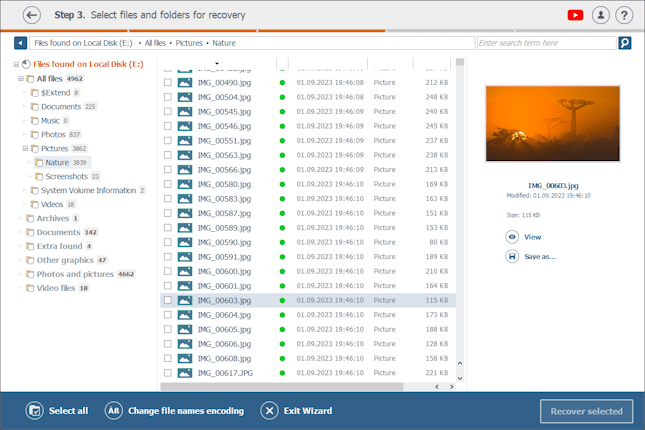
Step 3: found files in their original folders and in type folders, with a photo previewed on the right.
Simple RAID and NAS drives
Raise Data Recovery detects RAID metadata and assembles Windows dynamic disks, Apple Software RAID, Linux LVM and mdadm arrays, which covers the disks from many home NAS boxes. You take the drives out of the NAS, connect them to the computer, and pick the assembled array under Complex (RAID) storages. If the RAID metadata itself is gone, SysDev points you to its RAID products instead.
Read-only and careful about where you save
Raise Data Recovery never writes to the drive it scans. At the save step, target drives are colored blue (everything fits), violet (each file fits, but not all of them) or gray (some files may not fit), which steers you away from saving onto the drive you're recovering from.
Benefits
- A professional engine at a home price. The scanning comes from the company whose UFS Explorer tools are used by recovery labs.
- One purchase for a mixed household. The license activates on Windows, macOS or Linux, so it isn't tied to the computer you bought it for.
- Nothing to learn. The help panel on each screen answers the question you're likely to have at that moment.
- You know before you pay. The trial runs the full scan and preview, so you see exactly which files are recoverable.
Real-World Uses
- The emptied Recycle Bin. A folder of tax documents is gone from an NTFS drive. A file-system-only scan finds it in its original place with the old name.
- The formatted camera card. An SD card was formatted in the camera before the photos were copied. Deep Scan finds the pictures by signature.
- A Mac drive on a Windows PC. An external APFS drive stopped mounting on a Mac. Plugged into a Windows laptop running Raise, its files can still be read and copied off.
- A two-disk home NAS. The NAS box died but the disks are fine. Connected to a PC, Raise assembles the Linux mdadm array and lets you copy the shares.
Who It's For, and Who Should Skip It
Raise Data Recovery is for home users with a common data loss on a working drive: deleted files, a formatted partition, a drive that won't mount, or the disks from a simple NAS. It suits people who want a guided process and a low one-time price.
Skip it if you recover data for clients or at work (the license is personal and non-commercial), if your RAID is a hardware array with lost settings, or if the drive clicks, isn't detected or has physical damage. That last case is for a recovery lab, since scanning a failing drive can make things worse. Skip it too if you need encrypted volumes such as BitLocker or VeraCrypt opened: SysDev's Recovery Explorer Professional handles those.
Usage Guide
- Download the installer for your system and install it on a different drive from the one you lost data on.
- Start Raise Data Recovery. In step 1, choose the volume your files were on. If you don't see it, pick the whole physical disk. Click Continue.
- In step 2, choose Deep Scan after formatting or corruption, or the file-system-only scan for recent deletions. Wait for it to finish.
- In step 3, browse All files or the type folders, preview what you find, and tick the files and folders you want. Check $LostFiles and Extra found if something is missing.
- Click Recover selected. In step 4, pick a blue target drive that isn't the source, then click Start recovery.
- If the files are larger than the trial allows, the program offers to buy a license at this step. Enter the code and save.
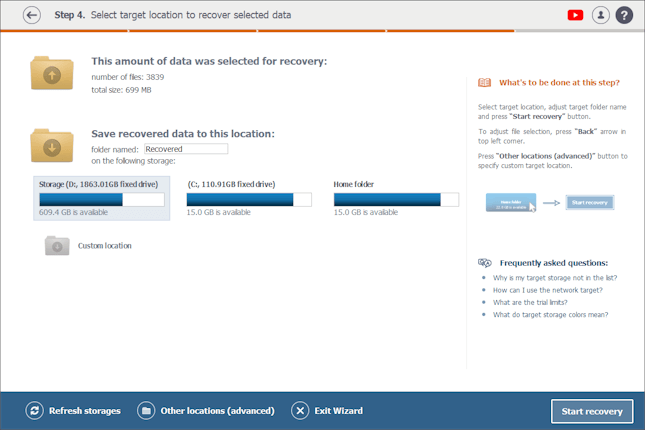
Step 4: 3,839 files (699 MB) selected, with each target drive's free space shown as a bar.
Where it falls short
- Slow on big drives. A deep scan reads the whole volume, so a multi-terabyte drive takes hours, and scan results can't be saved to resume later.
- Few power tools. Data Recovery Digest lists no disk imaging, no S.M.A.R.T. monitoring and weak file search and marking as its weak points.
- Lost names after heavy damage. Files found only by signature come back with numbers instead of names and without their folders.
- A short update window on the cheaper license. After 30 days, a newer version means buying again.
What Users Say
Data Recovery Digest (independent test, 2023 edition)
Data Recovery Digest tests recovery programs on prepared drives. Its summary of Raise Data Recovery:
"A program with an excellent wizard interface (first/second best), average localization and demo restrictions, a very good file previewer, average recovery features (except its file system set), and the second-best score for file recovery performance."
On the strong side, it names "An excellent file system set (all file systems for Windows and Mac and most popular file systems for Linux), a very good file previewer, and a very good recovery performance for emptied Bin as well as deleted and damaged partitions."
On the weak side: "Insufficient localization support (only 9 interface languages), no disk imaging support, poor file search and mark capabilities, and no S.M.A.R.T. monitoring." In its NTFS test of files deleted without the Recycle Bin, "All files and the entire original folder structure were found in their original places and successfully recovered, except 1 avi file from the root folder."
Rating on the vendor's site
- raisedr.com: 4.2 out of 5 from 83 ratings, collected on the vendor's own site.
Taken together: the praise is for the wizard, the previewer and solid results on ordinary deletions and lost partitions, and the criticism is about missing extras such as disk imaging and drive health checks, not about failed recoveries. Independent reviews are few, so the trial matters more than usual.
Comparisons
Raise Data Recovery vs Recovery Explorer Standard
Raise Data Recovery and Recovery Explorer Standard come from the same company and recover from the same kinds of drives. Raise is the wizard: four fixed steps and one license for all three operating systems, from $34.95. Recovery Explorer Standard ($47.95 per platform) has a classic explorer-style window with more manual control, disk imaging and S.M.A.R.T. checks, and a separate license for each operating system. Choose Raise if you want to be guided, Recovery Explorer if you want to drive.
Short-Term vs Long-Term Support
The two Raise Data Recovery licenses activate exactly the same program and both last forever. The only difference is how long new versions are free: 30 days for $34.95, or 360 days for $49.95. For a one-time rescue, the cheaper one is enough. If you'll keep it around for the next accident, the extra $15 buys a year of updates.
Editions and Pricing
| License | Price | Use | Free updates | Saving limit |
|---|
| Trial | Free | Testing | - | 256 KB per file (raw finds unlimited) |
| Personal, Short-Term Support | $34.95 | Personal, non-commercial | 30 days | None |
| Personal, Long-Term Support | $49.95 | Personal, non-commercial | 360 days | None |
The Buy Now buttons on this page are for the $34.95 Short-Term Support license.
FAQs
Can I use one Raise Data Recovery license on both my PC and my Mac?
Raise Data Recovery licenses are cross-platform: the license can be activated under any of the supported systems, Windows, macOS or Linux. It's a personal license, so check the license agreement before installing on more than one machine.
What happens when the Raise Data Recovery update period ends?
Raise Data Recovery keeps working with the version you have. Versions released after your 30-day or 360-day support period won't activate with your old code, so SysDev suggests keeping a backup copy of the installer you're licensed for.
Can Raise Data Recovery recover the internal drive of an M1 or M2 Mac?
Raise Data Recovery can't recover from the built-in drive of a Mac with Apple Silicon or a T2 security chip. It works with external drives on those Macs. On older Macs running High Sierra or later, recovering the system drive means turning off System Integrity Protection or connecting the drive to another computer.
Why doesn't Raise Data Recovery see my network drive?
Raise Data Recovery works with drives attached to the computer, not with network shares. To recover from a NAS, take its drives out and connect them to the computer directly, and Raise will assemble a supported RAID by itself.
Does Raise Data Recovery work on SSDs?
Raise Data Recovery scans SSDs like any other drive. On SSDs with TRIM enabled, though, deleted files are often erased by the drive itself soon after deletion, so the chances are lower than on a hard drive or memory card.
Why do some files recovered by Raise Data Recovery have numbers instead of names?
Raise Data Recovery names files from the file system's records. When those records are gone and a file is found only by its content, it's saved under a number in the Extra found folder.
System Requirements
- Windows XP SP3, Vista, 7, 8, 8.1, 10 or 11
- macOS 11 or later, Intel or Apple Silicon
- Debian Linux 6.0 or compatible, or later
- Intel-compatible 32-bit or 64-bit processor, AMD64 or Apple Silicon
- 1 GB of RAM and 20 MB of disk space for the program, installed on a drive other than the one you're recovering
Conclusion
Raise Data Recovery is worth $34.95 for a home user with an everyday data loss. You get a recovery engine from a company that builds tools for recovery labs, a wizard that's hard to get wrong, and a license that follows you across Windows, macOS and Linux. The reason to look elsewhere is scope: it's personal-use only, it has no disk imaging or drive health checks, and the cheaper license stops getting updates after a month. Run the trial, check the preview, and buy only when you can see your files.
Download Free TrialBuy Now