Short answer: buy Recovery Explorer RAID (for Windows) ($94.95) if your NAS or RAID disks are healthy and the array just needs putting back together: it has the same recovery engine, a Wizard mode, and costs about $51 less. Buy UFS Explorer RAID Recovery for Windows ($145.75 at checkout) if a member disk has bad sectors, the array is a Drobo or a ZFS RAID-Z pool, the volume is BitLocker-encrypted, or you do this for a living. Both come from SysDev Laboratories, both save files up to 768 KB free, and the free trials will tell you which one your disks need before you pay.
At a glance
| Fact |
Recovery Explorer RAID |
UFS Explorer RAID Recovery |
| Personal license (Windows) | $94.95 at checkout | $145.75 at checkout ($149.95 list) |
| Commercial / Corporate license | $209.95 / $349.95 | $259.95 / $469.95 |
| License terms | Perpetual, one operating system, 360 days of free updates | Perpetual, one operating system, 360 days of free updates |
| Current version | 10.23 (October 29, 2026) | 10.23 (October 29, 2026) |
| Other platforms | macOS and Linux, $94.95 each | macOS ($145.75) and Linux |
| Oldest Windows supported | Windows XP SP3 | Windows 7 SP1 (plus Windows on ARM builds) |
| Free trial | No time limit, saves files up to 768 KB | No time limit, saves files up to 768 KB |
| Wizard mode | ✓ | ✗ |
| Synology SHR, Btrfs-RAID, QNAP, WD, Storage Spaces | ✓ | ✓ |
| Drobo BeyondRAID, ZFS RAID-Z | ✗ | ✓ |
| Bad-sector maps and adaptive rebuild of degraded arrays | ✗ | ✓ |
| BitLocker and encrypted APFS | ✗ | ✓ |
| Installer size (Windows) | 20.6 MB | 21.3 MB |
| Best for | A home or small-office NAS with healthy disks | Failing disks, unusual arrays, encrypted volumes, paid recovery work |
What we checked
- Both products' order pages, the price each charges at checkout for a Windows Personal license, and SysDev's list prices for the Commercial and Corporate licenses.
- SysDev's own feature-by-feature table of the two RAID editions (26 yes/no rows), its version logs and both product pages.
- The Windows installers on SysDev's server: 20.6 MB for Recovery Explorer RAID and 21.3 MB for UFS Explorer RAID Recovery.
- The refund and upgrade policies, the trial limits and the system requirements on SysDev's sites.
- User reviews: SysDev's testimonials page and recovery technicians on the HDD Guru forums.
- What we checked: checkout prices of $94.95 and $145.75, both version 10.23, and both installers' sizes, all on November 3, 2026.
We compared features, prices, licenses and trials. We didn't run a recovery on a failed array with either program, so this page doesn't rate recovery speed or success rates.
Two brands, one engine: why SysDev sells both
UFS Explorer RAID Recovery and Recovery Explorer RAID are the same company's RAID tools aimed at two kinds of buyer. SysDev Laboratories says the two "use the same reliable recovery engine and share core recovery functions, differing mainly in usability, flexibility and professional capabilities." Both reached version 10.23 on October 29, 2026, with the same list of changes (OWC SoftRAID metadata, older Oxford controllers such as LaCie Quadra, XFS and FAT32 fixes, HTML and RTF previews).
UFS Explorer is SysDev's line for technicians and data recovery labs. Recovery Explorer wraps the engine in a simpler interface with a step-by-step Wizard mode and drops the tools for damaged hardware. So the real question isn't which program is "better" at recovery. It's whether your case needs the extra tools that the $51 difference buys.
Recovery Explorer RAID: the one most home NAS owners need
Recovery Explorer RAID (for Windows) costs $94.95 at checkout for a perpetual Personal license with 360 days of updates. It runs on Windows XP SP3 through Windows 11 and Windows Server, and the same product is sold for Mac and Linux at the same price. Best for: a Synology, QNAP or WD box that died, or a software RAID that stopped mounting, when the disks themselves still read cleanly.
Recovery Explorer RAID reads the RAID metadata on each connected disk and rebuilds the array virtually, without writing to the disks. It handles RAID 0, 1, 5, 6 and nested 10, 50 and 60, Synology Hybrid RAID, Btrfs-RAID, Linux mdadm and LVM (thin provisioning included), Windows Storage Spaces and Dynamic Disks, and Apple Fusion Drive. When the metadata is gone, a manual RAID builder takes the disk order, stripe size and parity layout, with a placeholder for a missing disk. It reads NTFS, ReFS, exFAT, APFS, HFS+, Ext4, XFS and Btrfs, so the Linux volumes inside a NAS open on a Windows PC.
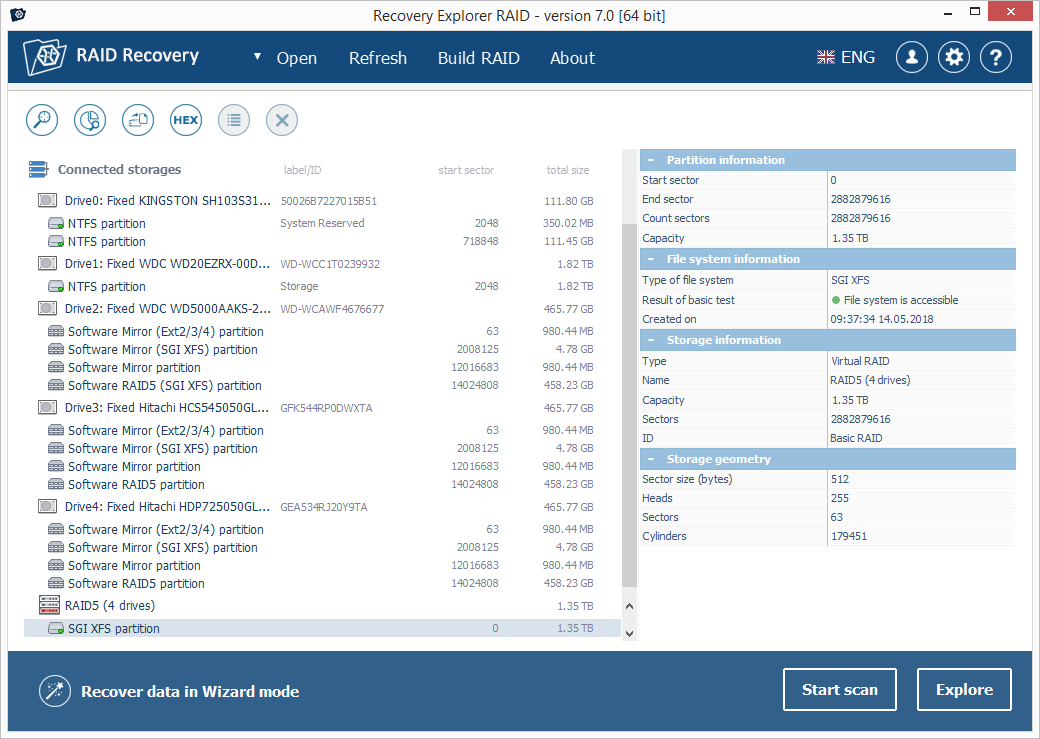
Recovery Explorer RAID's main window (version 7.0 on SysDev's product page): the drives' Software Mirror and RAID5 partitions, the 1.35 TB "RAID5 (4 drives)" assembled from them with an accessible SGI XFS file system, and the "Recover data in Wizard mode" button at the bottom left.
The Wizard mode is the main thing it has that UFS Explorer doesn't. It walks you through choosing the storage, scanning and saving, one prompt at a time. Where it falls short is damaged hardware: SysDev's own comparison calls its toolkit for problem drives "very limited", with no configurable read retries, no bad-sector maps and no adaptive rebuild of a degraded array. It also can't open encrypted volumes, ZFS volumes or Drobo BeyondRAID packs.
What we like
- $94.95, about a third less than UFS Explorer RAID Recovery
- Wizard mode for people who've never rebuilt an array
- The same RAID engine, NAS layouts and file systems for the common cases
- Still runs on Windows XP SP3 and 32-bit PCs
- Full price counts toward UFS Explorer if you upgrade within 30 days
Watch out for
- Few tools for disks with bad sectors
- No Drobo BeyondRAID, ZFS RAID-Z or ZFS volumes
- No BitLocker, LUKS or FileVault support (that needs Recovery Explorer Professional)
- The vendor's screenshots still show version 7.0
- Very few independent reviews
What users say about Recovery Explorer RAID
Independent reviews of Recovery Explorer RAID are scarce: most write-ups online come from sites that sell a competing recovery tool. Its product page on r-explorer.com shows an average of 4.4 out of 5 from 73 ratings, collected by SysDev itself. Because it shares UFS Explorer's engine, the user stories in the next section say more about what the recovery itself can do.
Download Recovery Explorer RAID Free TrialBuy Recovery Explorer RAID
UFS Explorer RAID Recovery: for failing disks and unusual arrays
UFS Explorer RAID Recovery for Windows costs $145.75 at checkout ($149.95 list) for a perpetual Personal license with 360 days of updates. It runs on Windows 7 SP1 and later, 32-bit or 64-bit, with separate builds for Windows on ARM. The macOS version costs the same, and a Linux build is sold too. Best for: a degraded array with a weak disk, a Drobo, a TrueNAS ZFS pool, a BitLocker-encrypted volume, or recovery work for clients.
UFS Explorer RAID Recovery does everything Recovery Explorer RAID does and adds the tools for hard cases. Its built-in disk imager makes several passes over a weak disk with configurable timeouts, block sizes and retries, and writes a bad-sector map as it goes. When you build the array from those images, the adaptive reconstruction uses parity (RAID 5, 6 and nested levels) or the mirror copy (RAID 1, 10) to fill in the blocks the imager couldn't read, instead of leaving holes in your files. It also has assistant tools for Drobo BeyondRAID, support for ZFS RAID-Z1, Z2 and Z3, and opens BitLocker and encrypted APFS volumes when you have the password.
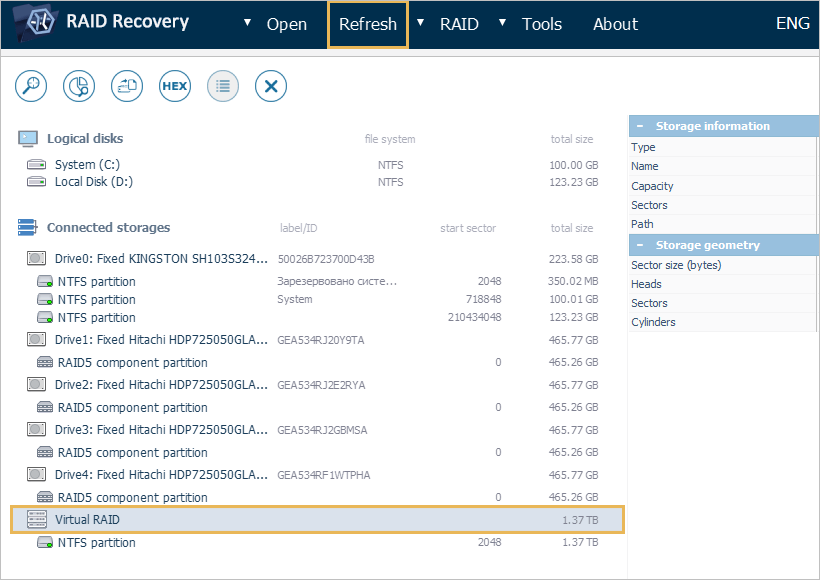
UFS Explorer RAID Recovery's main window from SysDev's user manual: four Hitachi drives each holding a RAID5 component partition, and the 1.37 TB "Virtual RAID" with an NTFS partition assembled from them. The orange boxes are the manual's own highlights of the Refresh menu and the new array.
The RAID Builder is the same idea as Recovery Explorer's, with more analysis tools around it: entropy reports per disk, a grid of the RAID pattern and a synced hex viewer, for working out the disk order when no metadata survives. It can also drive DeepSpar USB Stabilizer and Guardonix hardware during imaging, which matters to labs and to nobody else. The price you pay for all this is an interface built for people who know what a stripe size and a parity delay are, and no wizard.
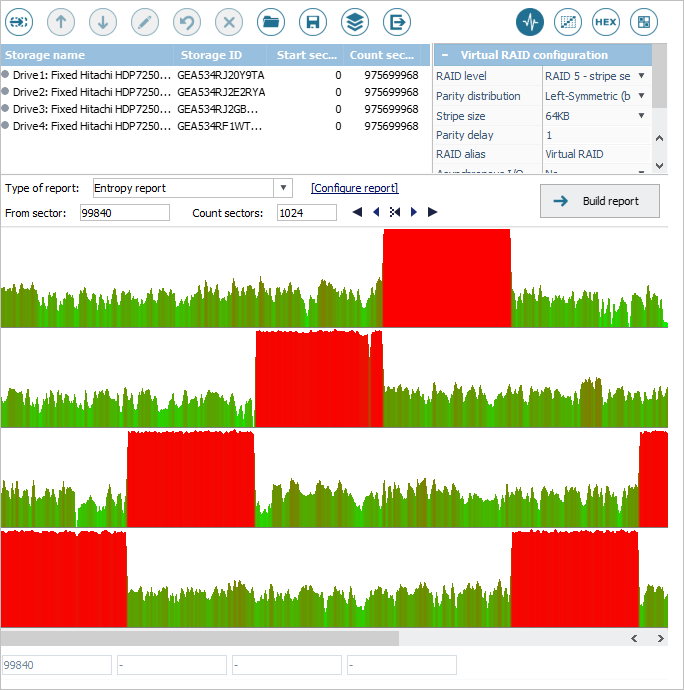
The RAID Builder in UFS Explorer's user manual: four drives set up as a RAID 5 with left-symmetric parity and a 64 KB stripe, and an entropy report below with one row per drive. The red blocks mark where each disk holds dense data, which helps put the drives in the right order.
What we like
- Bad-sector maps and adaptive rebuilds of degraded arrays
- Drobo BeyondRAID, ZFS RAID-Z and ZFS volumes
- BitLocker and encrypted APFS
- Configurable read retries and a multi-pass disk imager
- Windows on ARM builds
Watch out for
- $51 more than Recovery Explorer RAID for the same core recovery
- No Wizard mode, and an interface aimed at technicians
- Its product page lists Windows 7 SP1 or later, so old XP and Vista PCs are out
- Commercial use costs $259.95, not $149.95
What users say about UFS Explorer
SysDev's testimonials page is hand-picked and covers UFS Explorer in general, but its RAID stories are specific. Scott Pynn: "I tried software from several other vendors, but only yours was able to correctly rebuild the re-initialized RAID-5 array and the ext3 filesystem, and then recover the lost files." Sparky, Neologic Systems: "I had a corrupted XFS RAID 1 volume. I spent 3 days trying to unravel the data. I tried 11 different file recovery tools under Windows and Linux. But no other tool could even find a partition map. Your product had it totally figured out within 5 minutes."
Recovery technicians on the HDD Guru forums are more guarded. When a home user said Buffalo's support had pointed them to UFS Explorer for a corrupted RAID 5, northwind replied: "I believe Buffalo's suggestion was a little irresponsible. It isn't as simple as "plug the disks into a machine and run ufs and there you go"." The point stands for both programs: an array that won't assemble on its own needs someone who can work out the disk order and stripe size.
Download UFS Explorer RAID Recovery Free TrialBuy UFS Explorer RAID Recovery
RAID and NAS support: a tie for the common arrays
For a standard RAID or a mainstream NAS, Recovery Explorer RAID and UFS Explorer RAID Recovery support the same layouts. SysDev's comparison table gives both a tick for RAID 0, 1, 5 and 6, nested RAID 10, 50 and 60, automatic detection, the manual builder, Btrfs-RAID, Synology SHR and OpenBSD softraid, and NAS boxes from Synology, QNAP, WD My Cloud, Asustor, TerraMaster and Buffalo. The file system list is identical too, apart from ZFS: NTFS, ReFS, FAT, exFAT, APFS, HFS+, Ext2/3/4, XFS, Btrfs, JFS and ReiserFS.
The differences are at the edges. Only UFS Explorer RAID Recovery handles Drobo BeyondRAID, ZFS RAID-Z (the layout TrueNAS uses) and simple or striped ZFS volumes, and only UFS Explorer recognizes "certain data protection devices". If your box is a Drobo or runs ZFS, the choice is made for you.
Features ticked in SysDev's comparison table (out of 26 yes/no rows)
UFS Explorer RAID Recovery26
Counted from SysDev's "RAID editions compared" page on November 3, 2026. Seven of the ten missing ticks are tools for damaged drives, encrypted volumes or lab hardware, not everyday RAID support.
Damaged drives: UFS Explorer RAID Recovery wins clearly
UFS Explorer RAID Recovery is the one to buy when any member disk is failing. In SysDev's table, Recovery Explorer RAID gets a cross for configurable read retries, defect (bad-sector) maps, adaptive degraded RAID recovery, DeepSpar imaging control and "use of disk images instead of original media", and its built-in disk imager is rated "Basic" against UFS Explorer's "Advanced". Both monitor a drive's S.M.A.R.T. data.
This matters because RAID failures rarely come one at a time. A RAID 5 that lost one disk and has a second one throwing read errors can't be rebuilt from parity alone, unless the software knows exactly which blocks on the weak disk are bad. That's what UFS Explorer's imager and bad-sector maps are for. Recovery Explorer RAID will simply read whatever the weak disk returns.
A clicking disk or one that isn't detected at all is a job for a lab with clean-room equipment, whichever program you own. Software can only work with sectors the drive can still read.
Ease of use: Recovery Explorer RAID is friendlier
Recovery Explorer RAID is the easier program, mainly because of its Wizard mode. SysDev rates its ease of use "High (optional wizard-based mode)" and its audience "Home users, average skills", against "Moderate (more advanced controls)" and "Technical users, IT specialists" for UFS Explorer RAID Recovery. Both screens look alike, since the main window, storage list and Explore and Start scan buttons are shared. The wizard is the difference: it asks one question at a time instead of showing you every tool at once.
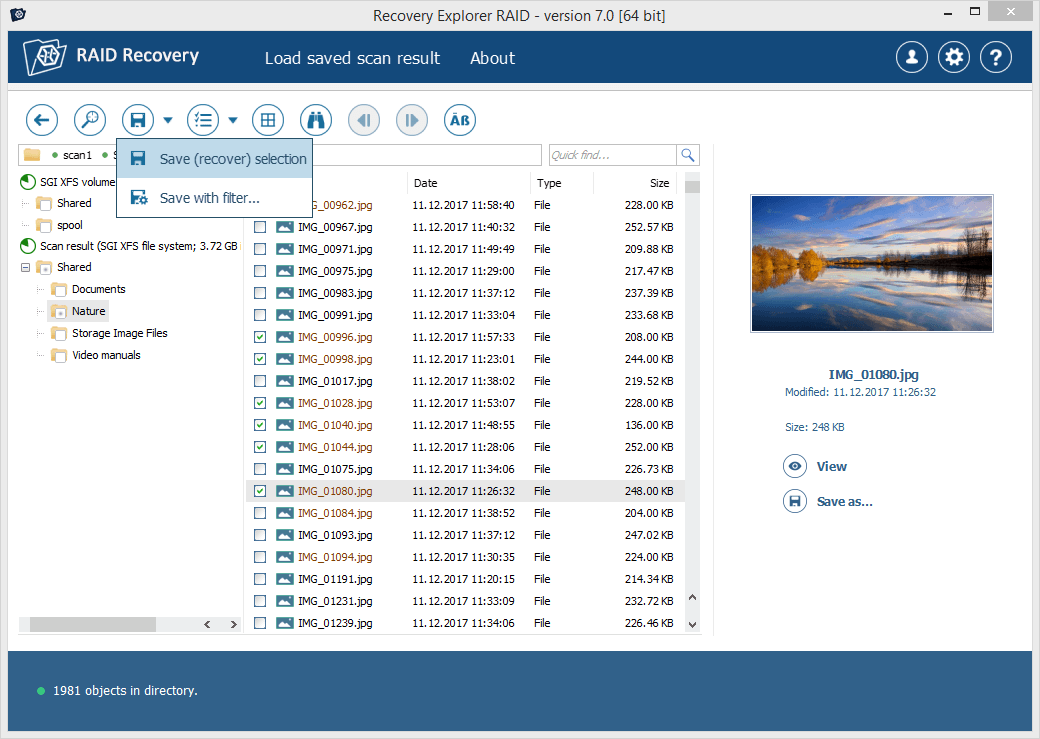
Recovery Explorer RAID's scan results (version 7.0 on SysDev's product page): a Nature folder of JPG photos from an SGI XFS volume, several ticked, a preview of the highlighted picture on the right, and the "Save (recover) selection" and "Save with filter" commands open.
Neither program makes RAID recovery foolproof. If the array assembles on its own, both take you from disks to files in a few clicks. If it doesn't, both hand you the same RAID builder and expect you to know your disk order and stripe size.
Price and licensing: Recovery Explorer RAID costs about a third less
Recovery Explorer RAID is $50.80 cheaper at checkout for a Windows Personal license, and the gap grows for business licenses. The license terms are otherwise the same: perpetual, one operating system per license (32-bit and 64-bit Windows count as one), 360 days of free updates, and a registration code by email that activates the trial you already installed.
Price of each license for Windows (USD)
Recovery Explorer RAID, Personal (at checkout)$94.95
UFS Explorer RAID Recovery, Personal (at checkout)$145.75
Recovery Explorer RAID, Commercial$209.95
UFS Explorer RAID Recovery, Commercial$259.95
Recovery Explorer RAID, Corporate (up to 10 PCs)$349.95
UFS Explorer RAID Recovery, Corporate (up to 10 PCs)$469.95
Personal prices at checkout and Commercial and Corporate list prices on SysDev's order pages, checked on November 3, 2026.
The Personal license of both is for home use and non-commercial use at work. Recovering data for paying customers needs the Commercial license, which covers one computer. Each license covers one operating system, so a Mac owner buys the Mac version, not the Windows one.
There's also an upgrade path. SysDev's upgrade policy credits what you paid for Recovery Explorer RAID toward UFS Explorer RAID Recovery: the full price within 30 days of purchase, then 85% within six months, 75% within nine, 65% within a year and 50% after that. So starting with Recovery Explorer RAID costs little if you later find you need more.
Trial and refunds: the same on both
Both trials are identical and generous: no time limit, full RAID assembly, scanning and previews, with saving limited to files up to 768 KB each. You can install both trials side by side and point them at the same disks. The refund policy is the same strict SysDev policy for both: a refund only when the paid version fails because of a software bug SysDev can't fix within 7 days, and only if you tried the trial first. "It didn't find my files" isn't covered, which is why the trial step isn't optional.
Which should you choose?
| Your situation |
Pick |
Why |
| Synology, QNAP or WD NAS died, disks healthy | Recovery Explorer RAID | Same NAS layouts and file systems, $51 less, Wizard mode |
| Storage Spaces pool or mdadm array stopped mounting | Recovery Explorer RAID | Both detect these automatically |
| One disk failed and another has read errors | UFS Explorer RAID Recovery | Bad-sector maps and adaptive rebuilds fill the gaps |
| Drobo, or a TrueNAS ZFS pool | UFS Explorer RAID Recovery | Recovery Explorer RAID doesn't support BeyondRAID or ZFS |
| BitLocker-encrypted RAID volume | UFS Explorer RAID Recovery | Recovery Explorer RAID can't open encrypted volumes |
| You recover data for clients | UFS Explorer RAID Recovery (Commercial) | Imaging control and the tools labs use |
| Old spare PC on Windows XP or Vista | Recovery Explorer RAID | Recovery Explorer RAID supports XP SP3, UFS Explorer lists Windows 7 SP1 or later |
| On a Mac | Recovery Explorer RAID for Mac | $94.95, with Apple Software RAID, Fusion Drive and SoftRAID support |
Our pick for most readers is Recovery Explorer RAID. Most people searching for this are holding the disks of a home or small-office NAS that stopped working, and for that job the two programs do the same thing. Skip Recovery Explorer RAID if any disk is failing, if it's a Drobo or ZFS box, or if the volume is encrypted. Skip UFS Explorer RAID Recovery if your disks are healthy and the trial of Recovery Explorer RAID already shows your files: the extra $51 buys tools you won't use. If you need encryption support but not the damaged-drive tools, Recovery Explorer Professional is the other option in the family. For single-disk recovery and other brands, see our best data recovery software roundup.
What commonly goes wrong
- Letting the NAS "repair" the array first. A NAS offering to rebuild or initialize a degraded array can overwrite exactly what you want back. Take the disks out and read them first.
- Buying before the trial shows your files. SysDev won't refund a license because your files weren't found. Find a photo or video bigger than 768 KB in the results and open its preview: a clean preview means the RAID settings are right.
- Scanning a weak disk over and over. Every read stresses a failing drive. Image it once (UFS Explorer's imager is built for this), then work from the image.
- Saving to the wrong place. Recovered files must go to a separate disk at least as big as the data, never back onto the array.
- Two dead disks in a RAID 5. No software can rebuild a RAID 5 with two members missing, or a RAID 6 with three. That's a limit both programs share.
FAQs
Is UFS Explorer RAID Recovery better than Recovery Explorer RAID?
UFS Explorer RAID Recovery has more features, but it isn't better at recovering a healthy array. Both use SysDev's same recovery engine and support the same common RAID levels, NAS layouts and file systems. UFS Explorer adds tools for failing disks, Drobo, ZFS and encrypted volumes.
Can I upgrade from Recovery Explorer RAID to UFS Explorer RAID Recovery later?
Yes. SysDev credits the full price of Recovery Explorer RAID toward UFS Explorer RAID Recovery within 30 days of purchase, and 85% to 50% of it after that, depending on how long you've had the license.
Which one can recover a Drobo or a TrueNAS ZFS pool?
Only UFS Explorer RAID Recovery. It has assistant tools for Drobo BeyondRAID and supports ZFS RAID-Z1, Z2 and Z3. Recovery Explorer RAID supports neither (in that family, Recovery Explorer Professional adds them).
Can Recovery Explorer RAID open a BitLocker-encrypted array?
No. Recovery Explorer RAID has no support for encrypted storage. UFS Explorer RAID Recovery opens BitLocker and encrypted APFS volumes when you supply the password or recovery key, and Recovery Explorer Professional adds BitLocker, LUKS, VeraCrypt and FileVault 2.
Can I try both programs before buying?
Yes. Recovery Explorer RAID and UFS Explorer RAID Recovery both have free trials with no time limit that assemble the array, scan and preview everything, and save files up to 768 KB. Install both on the same PC and compare what each finds on your disks.
Does one license cover Windows and Mac?
No. A license for either program covers one operating system. The Mac versions are sold separately: Recovery Explorer RAID for Mac at $94.95 and UFS Explorer RAID Recovery for macOS at $145.75 at checkout.
Which one should a data recovery business buy?
A business should buy UFS Explorer RAID Recovery with a Commercial license ($259.95). The Personal licenses of both programs exclude paid recovery work, and UFS Explorer's imaging control, bad-sector maps and DeepSpar support are the tools a service needs.
Do I need the original NAS or RAID controller?
No. Recovery Explorer RAID and UFS Explorer RAID Recovery read the RAID metadata from the disks themselves and assemble the array on your PC, so a dead NAS or controller doesn't matter. You do need a way to connect every disk, such as SATA ports or USB adapters.