DMDE Express: One Year of Full DMDE Data Recovery for $20
DMDE Express is a $20 one-year license for DMDE, a portable data recovery tool and disk editor for Windows, macOS, Linux or DOS: it lets you recover your own deleted or lost files in bulk, whole folders with their original structure, on one PC, for personal use. It's a one-time charge, not an auto-renewing subscription.
You've formatted the wrong SD card, or an external drive suddenly shows up as RAW. DMDE's free edition can already find your files and bring them back, but only 4,000 at a time from one folder, and without the folder tree. Express is the cheapest way to lift that limit for a single rescue job.
Quick facts
- Version: 4.4.4.842 (February 5, 2026) for Windows, Linux and DOS, 4.4.6 for macOS. A 4.5.0 beta came out September 24, 2026.
- Developer: DMDE Software (developed by Dmitry Sidorov since 2006)
- Runs on: Windows (64-bit and 32-bit), macOS, Linux and DOS, without installation
- This license: 1 year, 1 PC, 1 OS family, personal non-commercial use only
- Price: $20, paid once. It doesn't renew automatically.
- File systems: NTFS, FAT12/16/32, exFAT, ReFS, Ext2/3/4, HFS+/HFSX, APFS, Btrfs
- Free edition: recovers up to 4,000 files from one folder per request, as many times as you like, without the folder tree
- Refunds: only for licenses that haven't been activated, within 30 days
What we checked: DMDE Express (1-Year) - 1 OS Family on the order page at $20.00 as a one-time charge with no renewal, and the 2.5 MB Windows 64-bit download from dmde.com, whose dmde.exe reports file version 4.4.4.842, on October 29, 2026. We didn't run a recovery or activate a license.
Before you buy
- Run the free edition first. DMDE's own pre-purchase notice: recover the files you need with the free version and check they open. A license recovers exactly the same files, only all at once and with their folders. It can't fix files that are already broken or overwritten.
- Activated licenses aren't refunded because a recovery didn't work. Unactivated licenses can be refunded within 30 days.
- Personal files only. Express is for non-commercial use. Recovering your company's drives needs Standard, and recovering other people's data for money needs Professional.
- Pick the OS family carefully. The license locks to Windows, macOS, Linux or DOS the first time you activate it, and can't be switched later.
Download Free EditionBuy Now ($20)
Overview
DMDE (DM Disk Editor and Data Recovery Software) built its reputation among technicians as the tool that still works when friendlier programs give up. It's a single small program: you unzip it and run it, with nothing installed on the disk you're trying to save.
The important thing to understand about Express is what you're paying for. The free edition and Express use the same scanning engine and find the same files. The difference is the recovery step: the free edition copies out up to 4,000 files from the folder you're looking at, while Express recovers everything you tick, nested folders included, in one go. If your lost data is a single folder of a few hundred photos, free may be all you need. If it's a whole drive of family photos, music and documents spread across hundreds of folders, Express saves you days of clicking.
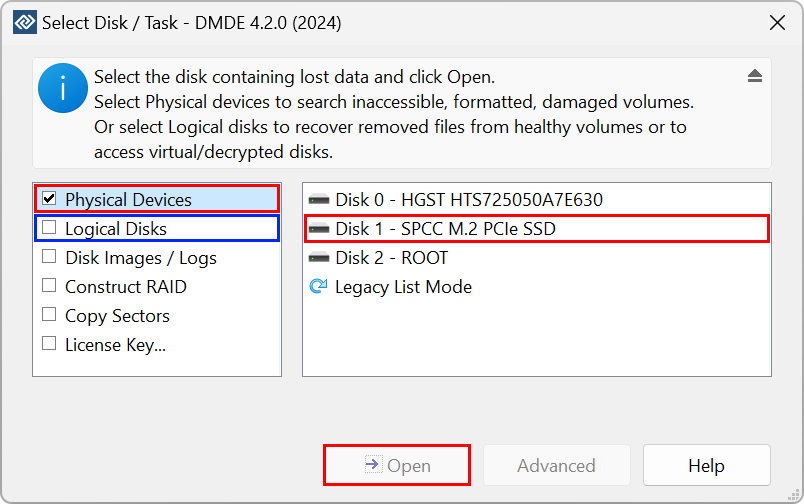
DMDE's starting window (version 4.2.0 shown): Physical Devices for formatted or damaged drives, Logical Disks for files deleted from a healthy volume, plus disk images, RAID construction, sector copying and the License Key entry.
Features
Bulk recovery of whole folders
DMDE Express recovers all the files and folders you select in one operation, with nested subfolders and original names where the file system still has them. That's the one feature the license adds over the free edition, and it's the one that matters when the lost data is a whole drive rather than a handful of files.
Recovery after deletion, formatting and file system damage
DMDE Express rebuilds the directory structure after complex damage such as formatting or a failed partition manager operation, and finds data quickly without a full scan when the damage is minor. When the file system is beyond repair, it falls back to raw recovery by file signatures, which brings back known file types without their names. The source disk isn't modified during normal recovery.
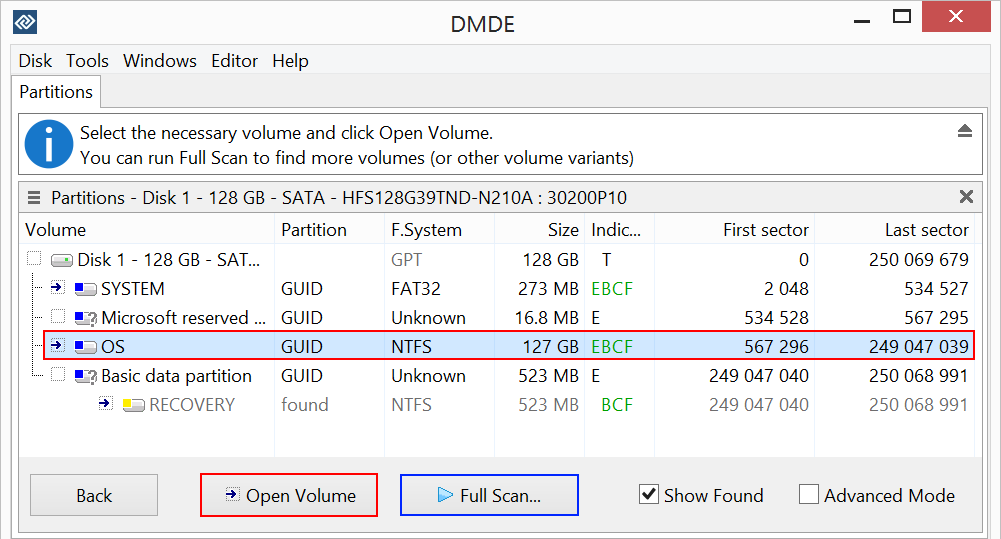
The partitions on a 128 GB disk: the NTFS OS volume is selected, and a RECOVERY partition marked "found" is listed below it. Open Volume browses a partition, Full Scan searches for more.
Lost partitions, RAID and failing drives
DMDE Express includes the same toolkit as the other editions: a partition manager that finds and restores deleted partitions from boot sectors and superblocks, a RAID constructor that rebuilds RAID 0, 1, 4, 5, 6 and JBOD arrays virtually from the disks or their images, and disk imaging and cloning that handles bad sectors. On a failing drive you can copy it to an image first and recover from the copy.
Any file system from any computer
DMDE Express reads NTFS, FAT, exFAT, ReFS, Ext2/3/4, HFS+, APFS and Btrfs whatever system it runs on, so a Windows license can recover a Mac's APFS drive or a Linux NAS disk. The "1 OS Family" in the name only limits which system DMDE itself runs on, not which drives it can read.
A disk editor for advanced users
DMDE Express also carries the disk editor DMDE is named after: view and edit MBR, GPT, boot sectors and file tables with templates, and use the cluster map to see which files occupy given sectors. Most home users will never open it, and that's fine.
Benefits
The appeal is simple: a one-off rescue for the price of a takeaway meal. Many consumer recovery tools let you scan for free and then ask for a monthly or yearly subscription before you can save anything. DMDE lets you prove the recovery works in the free edition first, and then charges $20 once for the convenience of getting everything back with its folders. There's no renewal to cancel afterwards.
Real-World Uses
- A formatted camera card: recover a wedding or holiday shoot from an SD card that was wiped by mistake, with every folder the camera created.
- An external drive that went RAW: scan the physical device, find the lost NTFS or exFAT partition, and copy its whole folder tree to a new disk.
- A Windows reinstall over the wrong disk: run Full Scan to find the deleted partitions and restore your documents from them.
- A home NAS that won't mount: rebuild the array virtually from its disks and copy your own files off, as long as you're recovering your own household data.
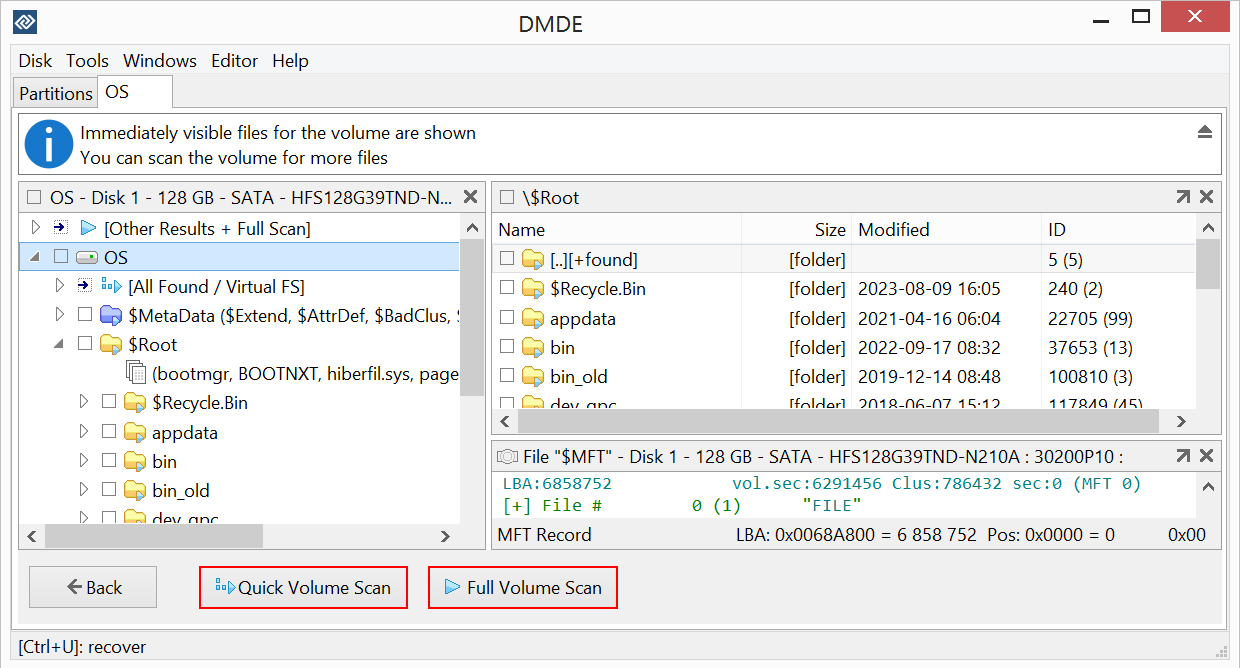
An opened volume: the folder tree on the left, the root folder's contents on the right, an MFT record below, and the Quick Volume Scan and Full Volume Scan buttons.
Who It's For, and Who Should Skip It
DMDE Express is for someone with one data loss to fix: a home user who has tested the free edition, seen the files open, and wants them all back with their folders without paying for a perpetual license they'll rarely use. DMDE itself recommends Express for "one-time or rare users".
Skip it if you expect to recover data more than once. Standard costs $48 once, with lifetime updates, which Digital Trends worked out as the price of 2.4 years of Express. Skip it if the drive belongs to a business, since Express doesn't allow business use. Skip it if you want a guided, modern program: reviewers agree DMDE has a steep learning curve, and friendlier tools exist at higher prices. And no software can bring back files deleted from a TRIM-enabled SSD, so don't buy any license for that.
Usage Guide
- Download and run. Download DMDE for your system, extract the files to a different disk from the one you're recovering, and run DMDE as Administrator. Don't install or copy anything onto the affected disk.
- Choose the disk. Select Physical Devices for a formatted, damaged or inaccessible drive, or Logical Disks for files deleted from a healthy volume, then click Open.
- Open or scan. If your partition appears, open it and run a Quick Volume Scan or Full Volume Scan. If it doesn't, run Full Scan to search for lost partitions and open the one it finds.
- Test in the free edition. Recover a few important files to another disk and check they open.
- Buy and activate. Enter the license key DMDE emails you, activate online (or manually with a code if the PC is offline), choosing the OS family you'll keep using.
- Recover everything. Tick the folders you need, click Recover and save them to a different disk.
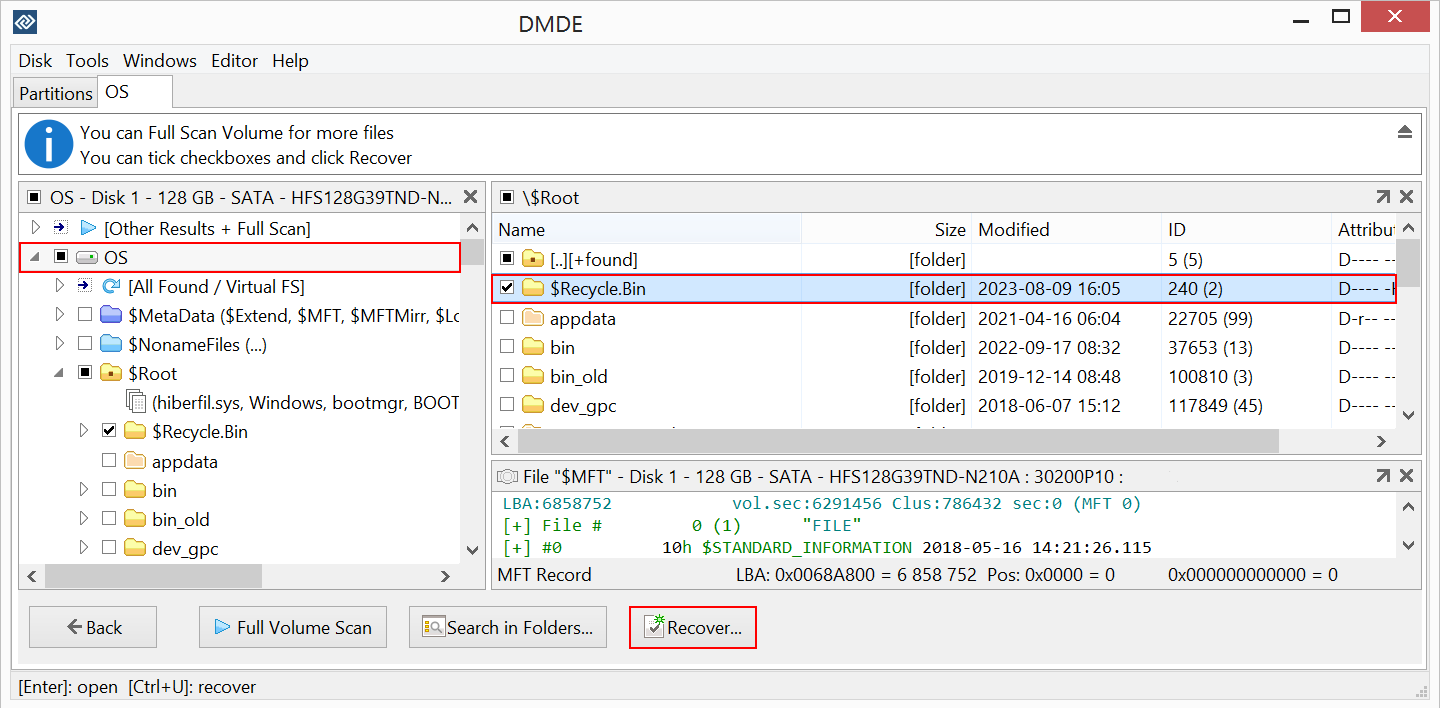
Recovering: the OS volume and its $Recycle.Bin folder ticked, and the Recover button at the bottom.
Where it falls short
- An old-fashioned, technical interface. TechRadar wrote that DMDE's interface is "stuck in the '90s" and that "you'll need to spend a few days learning your way around its menu-based navigation."
- SSDs, overwritten and encrypted data. On modern SSD or SMR disks, DMDE itself warns that recovery is often impossible, as it is after ransomware encryption.
- Raw recovery loses names. Files found only by signature come back without original names or folders, and DMDE's signature list doesn't cover every file type.
- Activation confusion. DMDE's FAQ and at least one 1-star review show buyers running it unactivated, so it still behaves like the free edition. Check the About box shows your license after activating.
- The year runs out. After expiry, the license terms let you keep running DMDE only on the computer where it was activated, without support, reactivation or guaranteed functionality.
- Support is by email only. Digital Trends waited more than a day for a reply.
What Users Say
TechRadar: 4 out of 5
Krishi Chowdhary's review (last updated April 23, 2026) judged DMDE largely on the $20 yearly price. In his test he deleted a music folder from an NTFS hard drive, emptied the Recycle Bin, and "within a minute, the files appeared in my chosen destination in perfect condition."
"DMDE is one of the most value-for-money data recovery software solutions we have tested. At an annual cost of $20, you get advanced scanning features that support all common and even customizable file formats across systems like Windows, macOS, Linux, and DOS."
His reasons to buy include "Cheap annual plans", "Can recover lost partitions" and "One of the best RAID reconstructors". His reasons to avoid: "Old-looking interface" and "Steep learning curve".
Digital Trends: tested on hard drive, SSD and a damaged USB stick
Alan Truly (November 2024) listed DMDE at $20 and tested the free edition first: it restored 55 top-level files with names but skipped the subfolders. After upgrading to Professional, "DMDE recovered every file and folder intact except for the first letter of the folder names." His summary: "HDD performance was as good as the leading data recovery software, but at a budget price." Deleted SSD files weren't recoverable, which he expected.
On Express itself he was blunt about the value: "While the $20 Express subscription sounds like a great deal, a Standard lifetime license with ongoing updates costs just $48. The Standard version is equivalent to 2.4 years of Express, so it's a good bargain."
Verdict: "DMDE offers an excellent free data recovery app with a low-cost upgrade to unlock more features, making this a great choice for tech-savvy users to restore lost files." Cons: "Not as user-friendly as competitors" and "Support is via email".
User reviews on dmde.com: 4.8 out of 5 from 161 reviews
DMDE publishes reviews whatever their rating and replies to the critical ones. Two buyers mention the $20 one-year license directly.
Ais (5 stars, June 2025): "After successfully recovering a few thousand files using the free tier (I think it was 4000 per copy), I decided to make things easier and bought a 1-year license for just $20. In the end, I managed to recover about 99% of my photos and videos—along with the original folder structure."
James (5 stars, August 2026): "It's not for the faint of heart inexperienced user but a nessesary tool in the arsenal for data recovery professionals. Hats off to DDME and thank you. Well worth $20 to recover my files."
Leo (5 stars, July 2026): "It detected the three partitions I accidentally deleted while trying to back up my data, preserved the folder structure when restoring the data to another hard drive, and thus recovered 99.9% of the data I thought was lost."
Jo (5 stars, June 2025): "It was a bit clunky to use, and took a bit of poking and prodding, but nothing a Youtube tutorial and trial and error couldn't fix."
Ana (4 stars, June 2026): "I accidentally deleted a folder on my external drive and this program recovered it. I gave it four stars though since the images it recovered weren't able to be opened."
michael b (1 star, June 2025): "i tried using this on my failed ssd and it struggled and locked up at about 12% scanned of 240gb ssd." DMDE replied that without contact details it couldn't find out which version he used or what happened.
Trustpilot: 3.8 out of 5 from 5 reviews
DMDE's Trustpilot page is small, and its text was read through a summarizer, so these are summaries rather than quotes.
Roman (5 stars, October 2026) recovered 1 TB from a hard drive after almost giving up, and praised the support team's quick, helpful replies. Martin (5 stars, March 2026) recovered a 103 GB Apple Photos library from a SanDisk drive that another tool couldn't, for just over £15.
The one 1-star review, from Ricardo Pirtti (April 2026), is about the Express edition: he called the monthly Express plan a scam, saying it still showed invalid-license messages and the free edition's limits. DMDE replied that paid licenses, Express included, have no file or folder limits, that those limits apply only when the program is running unactivated, and asked for his order details to sort it out.
The pattern is consistent: DMDE recovers more, and keeps folder structure better, than many better-known tools, and buyers who chose Express were happy with what $20 got them. The complaints are the dated, technical interface, failing SSDs, and confusion about whether a license is actually active. None of the reviewers regretted the price.
Comparisons
Express vs the free edition
DMDE Express and the free edition find exactly the same files. Express adds bulk recovery of everything you select with the folder tree, and permission for nothing else: it's still personal use only. If your files fit in one folder and fewer than 4,000 at a time, the free edition does the job.
Express vs Standard
DMDE Standard ($48) recovers the same way, but never expires, includes lifetime updates, allows use for your organization's own data and gets volume discounts. Express ($20) covers one year, personal files only, with no volume discounts. If you might need DMDE again in a third year, Standard is the cheaper choice.
Editions and Pricing
| Edition |
Price |
License term |
Whose data |
What it adds |
| Free |
$0 |
Unlimited |
Non-commercial |
Up to 4,000 files from one folder per request |
| Express, 1 OS Family (this license) |
$20 |
1 year, paid once |
Your personal files |
Bulk folder recovery, 1 PC |
| Standard, 1 OS Family |
$48 |
Perpetual |
Also your organization's |
Lifetime updates, volume discounts |
| Professional, 1 OS Family |
$95 |
Perpetual |
Also your clients' |
Commercial recovery, portable activation, pro features |
| Professional, All OS Families |
$133 |
Perpetual |
Also your clients' |
Windows, macOS, Linux and DOS |
Prices from dmde.com, with $20 confirmed on the order page on October 29, 2026. Volume discounts don't apply to Express.
FAQs
Does DMDE Express renew automatically after a year?
No. DMDE Express is a one-time purchase of a time-limited license: you pay $20 once and nothing is charged again. If you need DMDE after the year, you buy another license or upgrade.
What happens to DMDE Express when the year is up?
DMDE Express can keep running after expiry only on the computer where it was activated, and the developer no longer provides support, reactivation or guaranteed functionality. Plan to finish your recovery within the year.
Can DMDE Express recover more files than the free edition?
No. DMDE's paid editions recover exactly the files the free edition can. Express recovers all of them at once with their directory structure, instead of 4,000 files from one folder at a time.
Can I use DMDE Express for my small business?
No. DMDE Express is licensed for personal, non-commercial use only, and business users may not use it. DMDE Standard covers a company's own data, and Professional is needed to recover data for clients.
Can I upgrade DMDE Express to Standard later?
Yes. DMDE offers upgrade and change options, with discounts, in your DMDE account. DMDE doesn't run promotional sales, so the listed price is the usual price.
Can DMDE Express recover a Mac or Linux drive on Windows?
Yes. DMDE Express on Windows can read APFS, HFS+, Ext4 and Btrfs drives, since file system support doesn't depend on the host system. The 1 OS Family license only limits which system DMDE runs on.
Can I move DMDE Express to a new computer?
Yes, if the original PC is replaced or upgraded, the license can be transferred. DMDE Express is for one PC at a time, and activations are automatically blocked after more than three hardware changes in 12 months, though you can ask DMDE for a manual review.
My license key doesn't seem to work. What should I check?
DMDE asks you to use an original, unmodified copy downloaded again from dmde.com, enter the key and activate it. If the key email never arrived, check your spam folder or request the key again from DMDE.
System Requirements
- Operating system: Windows 64-bit or 32-bit (GUI or console), macOS, Linux 64-bit, or DOS, matching your OS family license
- Download size: about 2.5 MB for Windows 64-bit
- Rights: administrator rights to access the disks
- Storage: a separate disk with enough space for the recovered files
- Activation: online, or manual with an activation code from another device when the PC is offline
Conclusion
DMDE Express is worth $20 if you have one personal data loss to fix and the free edition has already shown your files open. Independent testers rank DMDE's recovery with the leading tools, and Express gets you everything back with its folders for a single payment that never renews. The main reason not to buy it is if you'll need recovery again: Standard costs $48 once and never expires, so by the third year it's the cheaper license. And because activated licenses aren't refunded, test with the free edition on the actual drive before you pay.
Download Free EditionBuy Now ($20)