Short answer
All four DMDE editions use the same recovery engine and find exactly the same files. What you pay for is how many files you can save at once, how long the license lasts and whose data you may recover. Start with the free edition. If the files you need fit in one folder, under 4,000 at a time, it may be all you need. For one personal rescue with lots of folders, buy DMDE Express ($20, one year).
Buy DMDE Standard ($48, perpetual) if you'll need it again or the drive belongs to your business. Buy DMDE Professional ($95) only if you recover other people's data for money.
At a glance
| Fact | Free | Express | Standard | Professional |
|---|
| Price at checkout | $0 | $20, paid once | $48, paid once | $95 (1 OS family) or $133 (all OS families) |
| License term | Unlimited | 1 year | Perpetual, lifetime updates | Perpetual, lifetime updates |
| Whose data | Non-commercial use only | Your personal files only | Yours and your organization's own | Also your clients' |
| Files saved per recovery | Up to 4,000, from the open folder only | No limit | No limit | No limit |
| Whole folder trees in one go | ✗ | ✓ | ✓ | ✓ |
| Partition undelete, RAID constructor, disk imaging, disk editor | ✓ | ✓ | ✓ | ✓ |
| Volume discounts (2+ copies) | - | ✗ | ✓ 20% to 80% | ✓ 20% to 80% |
| Portable activation on a USB stick | - | ✗ | ✗ | ✓ |
| Reports, E01 images, resumable disk copying | ✗ | ✗ | ✗ | ✓ |
How we compared the editions
- We read DMDE's edition table, its feature list, the license agreement (EULA) and the refund policy on dmde.com, so every difference in this article comes from the developer's own terms.
- We opened the order page for each edition we list and noted the price and the product name shown at checkout.
- We checked the current downloads and the change log: version 4.4.4.842 (February 5, 2026) for Windows, Linux and DOS, 4.4.6 for macOS, and a 4.5.0 beta from September 24, 2026.
- We read the independent reviews from TechRadar and Digital Trends and the user reviews on dmde.com.
- What we checked: DMDE Express (1-Year) - 1 OS Family at $20, DMDE Standard - 1 OS Family at $48 and DMDE Professional - 1 OS Family at $95 on the order page, each as a one-time charge, and the download page listing version 4.4.4.842, on November 12, 2026.
We compared licenses, features and prices. We didn't run a recovery or activate a license, so the free edition's behavior described here comes from DMDE's documentation and from reviewers who tested it.
The one thing all four editions share
DMDE's paid editions can't recover a single file the free edition can't. DMDE says so plainly in its FAQ: if a file can't be recovered in the free edition, or comes out damaged, the same happens in the paid versions. The difference is only that paid versions save everything you tick at once, nested folders included.
That makes buying DMDE unusually low-risk, as long as you do it in the right order. Download the free edition, scan the drive, open the folder tree and save a handful of the files you care about to a different disk. If they open, a license gets you the rest. If they don't, no edition will help, and you've spent nothing.
The free edition also keeps every tool that matters for a hard case: the simple partition manager that can undelete a lost partition, the RAID constructor, disk imaging and cloning with bad-sector handling, and the disk editor. Unlike many recovery programs, DMDE doesn't hold back the deep scan or the RAID rebuild as a paid upgrade.
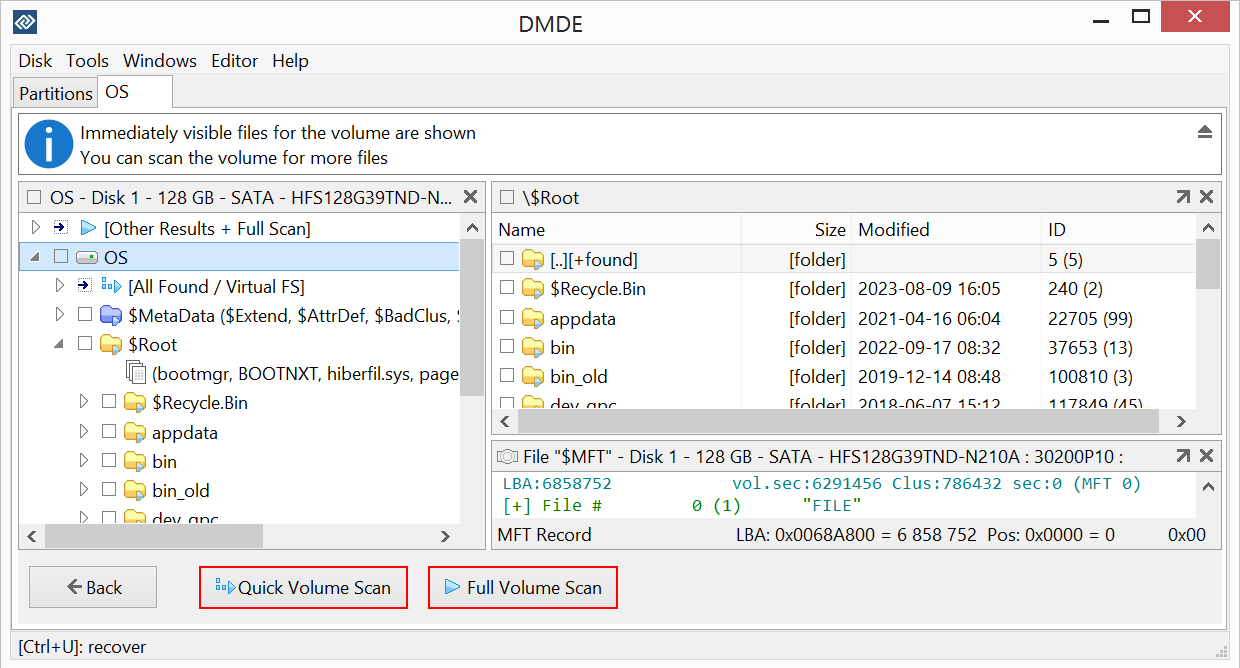
An opened NTFS volume in DMDE: the folder tree on the left, the contents of the root folder on the right, and the Quick Volume Scan and Full Volume Scan buttons. The free edition shows this full tree too.
DMDE Free Edition: enough for one folder at a time
DMDE Free Edition is the same download as every paid edition, running without a license key.
- Price: $0
- Runs on: Windows (64-bit and 32-bit), macOS, Linux and DOS, without installation
- Limit: up to 4,000 files per recovery, only from the folder open in the file panel, with no limit on how many times you repeat it
- Best for: one folder of photos or documents, testing whether your files are recoverable, and putting a lost partition back
DMDE Free Edition is more generous than most free tiers, which cap you at a size (1 GB or 2 GB) or let you save nothing at all. You can recover as many files as you like, as long as you do it folder by folder and no more than 4,000 at a time. TechRadar counted that among DMDE's strengths: a "Very generous (almost unlimited) free plan".
The catch is the folder structure. A free recovery saves only the files visible in the open folder, without subfolders. A camera card with three folders is a few minutes' work. A whole external drive with a thousand nested folders is days of clicking, and you rebuild the structure yourself. Digital Trends saw exactly this in its test: the free edition restored 55 top-level files with their names but skipped the subfolders.
One licensing point catches businesses out: the free edition is for non-commercial use only. A company recovering its own server data needs at least Standard.
What we like
- Same scan and same results as the paid editions
- No size cap, only a per-folder limit you can repeat
- Partition undelete, RAID constructor and disk imaging included
Watch out for
- No nested folders, so a full drive takes a very long time
- Non-commercial use only
- The same dated, technical interface as the paid editions
Download DMDE Free Edition
DMDE Express: one year, one rescue, $20
DMDE Express (1-Year) - 1 OS Family
- Price: $20 at checkout, a one-time charge that doesn't renew
- License: 1 year, 1 PC, 1 OS family, personal non-commercial use
- Adds over Free: recover everything you select at once, with its folder tree
- Best for: one personal data loss on a big drive
DMDE Express is the cheapest way to get your files back with their folders. You pay $20 once, activate it, tick the whole drive or a top-level folder and click Recover. DMDE recommends it for "one-time or rare users", and that's the right way to think about it: a one-off rescue license, not a tool you keep.
Express has three limits. It's for personal files only, and the EULA says business users may not use it at all. It lasts one year, after which DMDE keeps running only on the computer where it was activated, without support, reactivation or guaranteed functionality. And volume discounts don't apply, so two PCs mean two full-price licenses.
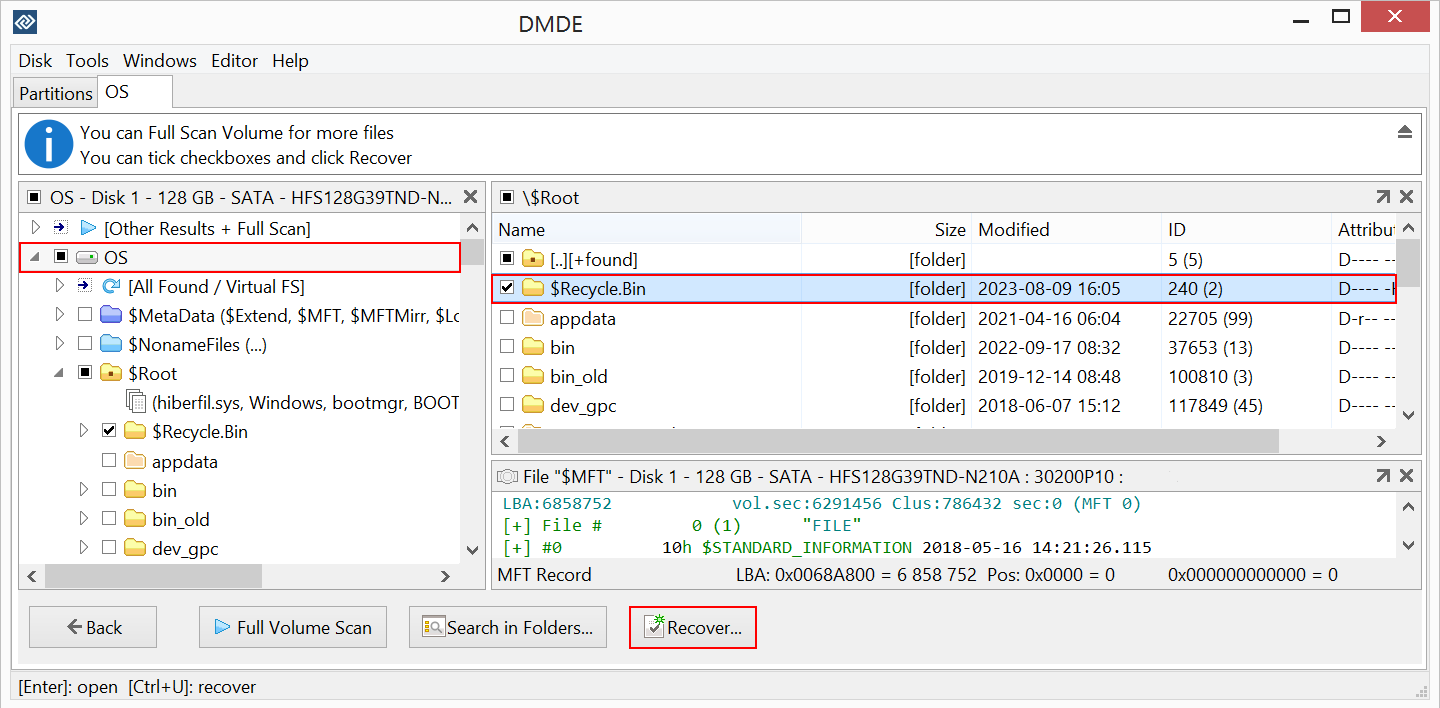
Choosing what to recover: the $Recycle.Bin folder is ticked in both panels and the Recover button sits at the bottom. With a license, ticking a parent folder saves everything under it.
What we like
- $20 once, with nothing to cancel later
- Full recovery with folder structure, the one thing Free lacks
- Same disk, partition and RAID tools as the other editions
Watch out for
- Expires after a year
- Personal use only, not for a small business
- Three years of Express ($60) costs more than Standard ($48)
What buyers say about DMDE Express
Ais (5 stars, June 2025, on dmde.com): "After successfully recovering a few thousand files using the free tier (I think it was 4000 per copy), I decided to make things easier and bought a 1-year license for just $20. In the end, I managed to recover about 99% of my photos and videos—along with the original folder structure."
James (5 stars, August 2026, on dmde.com): "It's not for the faint of heart inexperienced user but a nessesary tool in the arsenal for data recovery professionals. Hats off to DDME and thank you. Well worth $20 to recover my files."
Download DMDE Free EditionBuy DMDE Express ($20)
DMDE Standard: perpetual, and allowed at work
DMDE Standard - 1 OS Family
- Price: $48 at checkout, one-time
- License: perpetual with lifetime updates, 1 PC, 1 OS family
- Whose data: your own and your organization's, not clients'
- Best for: home users who want DMDE on hand, and businesses recovering their own drives
DMDE Standard recovers exactly like Express but never expires, includes lifetime updates and covers your company's own data. It's also the first edition with volume discounts: 20% off for 2 to 4 copies, 50% for 5 to 9, 70% for 10 to 19 and 80% for 20 or more. An IT department that wants DMDE on several machines pays far less per seat than the $48 list price.
The line Standard can't cross is other people's data. The EULA says businesses that offer data recovery services to third parties may not use Standard. A repair shop recovering a customer's laptop, even once, needs Professional.
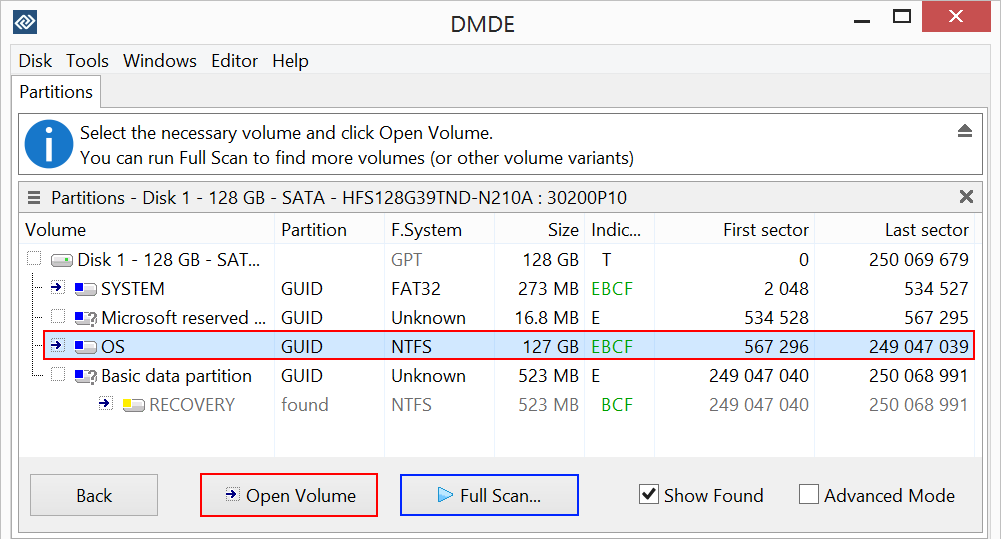
The Partitions window for a 128 GB disk. The NTFS OS volume is selected, and a RECOVERY partition marked "found" is listed below it. Open Volume browses a partition, and Full Scan searches for more.
What we like
- Pay once, keep it, get every update
- Covers internal business use
- Volume discounts of up to 80%
Watch out for
- Not for recovering clients' data
- Tied to one PC (the license can move if that PC is replaced)
- One OS family, chosen at first activation
What reviewers say about DMDE Standard's value
Digital Trends (Alan Truly, November 2024): "While the $20 Express subscription sounds like a great deal, a Standard lifetime license with ongoing updates costs just $48. The Standard version is equivalent to 2.4 years of Express, so it's a good bargain."
Leo (5 stars, July 2026, on dmde.com): "It detected the three partitions I accidentally deleted while trying to back up my data, preserved the folder structure when restoring the data to another hard drive, and thus recovered 99.9% of the data I thought was lost."
Download DMDE Free EditionBuy DMDE Standard ($48)
DMDE Professional: for recovering other people's data
DMDE Professional - 1 OS Family
- Price: $95 at checkout for 1 OS family. An All OS Families license is $133 on dmde.com.
- License: perpetual with lifetime updates, commercial recovery allowed
- Adds over Standard: clients' data, portable activation, one-time remote activations and the Pro features below
- Best for: repair shops, IT service providers and data recovery specialists
DMDE Professional is the only edition you may use to recover data for clients. Its other additions are aimed at people doing that every week:
- Portable activation: associate the license with a USB pen drive and use it on different computers, one at a time, without reactivating.
- One-time activations: 5 a month per license, for remote use on client computers.
- Reports and exports: data recovery reports with logs and file checksums, and a file list export to HTML (beta).
- Imaging tools: read support for E01 disk images, and logs that let you resume a disk copy or copy a failing disk in several passes.
- Deeper control: custom I/O handler scripts with I/O error logging, recovery of NTFS alternate data streams, and DMA mode in DOS.
A home user gains nothing from these that changes the result. The scan, the found files and the folder structure are identical to Standard.
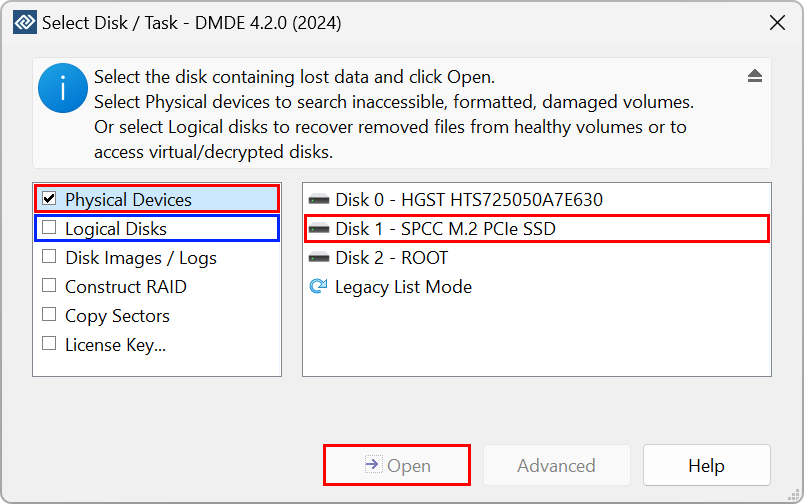
DMDE's starting window (version 4.2.0 shown): Physical Devices, Logical Disks, Disk Images / Logs, Construct RAID, Copy Sectors and License Key, with three disks listed on the right.
What we like
- Commercial recovery is licensed
- Portable license that moves between bench machines
- Logged, resumable imaging for failing drives
Watch out for
- Nearly double Standard's price for features home users won't touch
- The $95 license is still locked to one OS family
- Same dated interface and email-only support
What reviewers say about DMDE's recovery
Digital Trends upgraded to Professional during its test: "This time, DMDE recovered every file and folder intact except for the first letter of the folder names." Its conclusion: "HDD performance was as good as the leading data recovery software, but at a budget price."
TechRadar (Krishi Chowdhary, 4 out of 5): "However, it's DMDE's RAID reconstructor that sets it apart from other recovery software on the market." Among its reasons to avoid: "Old-looking interface" and "Steep learning curve".
Download DMDE Free EditionBuy DMDE Professional ($95)
Express vs Standard: when does $48 beat $20?
DMDE Standard is the better buy as soon as you expect to use DMDE in a third year, or at work. Express lasts one year and doesn't renew itself, so each later rescue means another $20. Standard costs $48 once.
What DMDE costs you over time (USD, one PC)
DMDE Express, one year$20
DMDE Express, bought again in a second year$40
DMDE Express, bought again in a third year$60
DMDE Standard, perpetual$48
Order page prices checked on November 12, 2026. Express totals assume you buy a new one-year license each time you need it.
For one rescue, Express wins by $28. If you buy it a second time, you've paid $40 and own nothing. By a third year, Standard would have been $12 cheaper. Most people only lose data now and then, so the honest test is this: will you remember where DMDE is the next time a drive fails? If yes, buy Standard now.
Standard vs Professional: who counts as a client?
DMDE Professional is required the moment someone else's data is involved and you're paid for the work. The EULA allows Standard for "personal use and internal business use only", and permits commercial use, "including providing Data Recovery Services", only under Professional. Recovering your own company's file server is internal use: Standard. Recovering a customer's drive in a computer shop is a service: Professional.
The portable activation is the other practical difference. Standard is assigned to one PC and can move only if that PC is replaced or upgraded. Professional can live on a USB stick and travel between bench machines.
1 OS Family or All OS Families?
For nearly everyone, a 1 OS Family license is enough, because DMDE's file system support doesn't depend on the system it runs on. A Windows copy reads NTFS, FAT, exFAT and ReFS, but also a Mac's APFS or HFS+ drive and a Linux Ext4 or Btrfs disk. The OS family only decides which version of DMDE you can run: Windows, macOS, Linux or DOS. It's fixed at first activation and can't be changed.
All OS Families ($133, Professional only) is for technicians who boot client machines from a Linux or DOS stick as well as using DMDE on Windows.
Which should you choose?
| Your situation | Pick | Why |
|---|
| A few hundred photos in one folder | Free | Under 4,000 files from one folder is exactly what Free allows |
| A partition vanished but its contents are intact | Free first | The free partition manager can put it back; buy only if you must copy files off |
| A whole formatted or RAW personal drive | Express | Saves the full folder tree for $20 |
| You want a recovery tool on hand for next time | Standard | Perpetual, with updates, cheaper than Express by the third year |
| Your company's own drives | Standard | Free and Express don't allow business use |
| Customers' drives, for a fee | Professional | The only edition licensed for data recovery services |
Who should skip each one. Skip Express if the drive belongs to a business or you'll need DMDE again in a few years. Skip Standard if you only ever recover your own files once. Skip Professional unless you're paid to recover data: it finds nothing Standard doesn't. And skip DMDE entirely if you want a guided, modern program and are willing to pay more for it. Both independent reviews say the interface is hard going for beginners.
What commonly goes wrong
- Buying before testing. DMDE doesn't refund activated licenses because a recovery failed. Unactivated licenses can be refunded within 30 days, so test with the free edition first.
- Running the copy unactivated. A 1-star Trustpilot review (April 2026) came from an Express buyer who still saw the free edition's limits. DMDE replied that paid licenses have no such limits and the program was running unactivated. After entering the key, check the About box shows your edition.
- Activating on the wrong system. A 1 OS Family license locks to the first OS you activate on. Activate it where you'll actually run DMDE.
- Expecting miracles on an SSD. TRIM erases deleted blocks on most SSDs, and DMDE warns that recovery is often impossible on modern SSD and SMR disks. Digital Trends found deleted SSD files by name, but none were recoverable.
- Saving to the same drive. Always recover to a different disk, or you overwrite what you're trying to save.

DMDE's Manual Activation dialog, for activating a paid edition on a PC without internet: you open the activation page or scan the QR code on another device and paste the code it returns.
FAQs
Is DMDE free edition really free, or does it ask for money at the end?
DMDE Free Edition is genuinely free for non-commercial use: it scans and saves up to 4,000 files from the open folder per recovery, as often as you like. It asks for a license only when you try to save more than that at once or include subfolders.
Can DMDE Express or Standard recover more files than the free version?
No. DMDE's paid editions recover exactly the same files as the free edition. They save all of them at once with their folder structure, instead of one folder at a time.
Does DMDE Express renew automatically?
No. DMDE Express is a one-time $20 payment for a one-year license, and nothing is charged again. After the year, DMDE keeps running only on the computer where it was activated, without support or reactivation.
Can I upgrade DMDE Express to Standard later?
Yes. DMDE lists upgrade and change options, with discounts, in your DMDE account. DMDE doesn't run promotional sales, so the listed price is the usual price.
Is DMDE Standard enough for a small IT business?
DMDE Standard is enough for your own company's drives, but not for customers' data. Recovering data for third parties as a service requires DMDE Professional under the license agreement.
Can a Windows license of DMDE recover a Mac or Linux drive?
Yes. DMDE on Windows reads APFS, HFS+, Ext2/3/4 and Btrfs as well as Windows file systems. The 1 OS Family license limits only which system DMDE runs on, not which drives it can read.
Can I use one DMDE license on two computers?
Not at the same time. Each DMDE license copy runs on one PC, and a license can move when that PC is replaced. Professional adds portable activation for use on different computers one at a time. For two PCs at once, buy two copies of Standard or Professional, which gets a 20% discount.
Will DMDE recover files from my SSD?
Often not. DMDE warns that on modern SSDs with TRIM, deleted data is usually erased by the drive itself. No edition changes that, so check in the free edition whether your files are still there.
Conclusion
Choose your DMDE edition by license, not by features: the recovery is identical in all four. Start with the free edition and save a few files to prove they open. If you're recovering your own data once, DMDE Express at $20 is the best value in data recovery. If you'll want DMDE again, or it's a business drive, DMDE Standard at $48 is the one to own. DMDE Professional is for people who are paid to recover data. The reason to look elsewhere is the interface, which is technical and dated in every edition.
Download DMDE Free EditionBuy DMDE Express ($20)Buy DMDE Standard ($48)