DMDE Professional: The Data Recovery License for Recovering Other People's Files
DMDE Professional is a $95 one-time license for DMDE, a portable data recovery tool and disk editor for Windows, macOS, Linux or DOS: it recovers deleted files, formatted drives and lost partitions, rebuilds RAID arrays virtually, and is the DMDE edition that allows recovering clients' data commercially.
DMDE has a reputation among technicians as the tool that works when friendlier programs give up: it often brings back the original folder tree, not just a heap of renamed files. The free edition already does the recovery. What you buy is the right to restore everything in one go, and with Professional, the right to do it for paying customers on more than one computer.
Quick facts
- Version: 4.4.4.842 (February 5, 2026) for Windows, Linux and DOS, 4.4.6 for macOS. A 4.5.0 beta came out September 24, 2026.
- Developer: DMDE Software
- Runs on: Windows (64-bit and 32-bit), macOS, Linux and DOS, without installation
- This license: 1 OS Family, locked to Windows, macOS, Linux or DOS at first activation
- Price: $95, one-time, with lifetime updates. All OS Families costs $133.
- File systems: NTFS, FAT12/16/32, exFAT, ReFS, Ext2/3/4, HFS+/HFSX, APFS, Btrfs
- Free edition: recovers up to 4,000 files from one folder per request, as many times as you like, without the folder tree
- Refunds: only for licenses that haven't been activated, within 30 days
What we checked: DMDE Professional - 1 OS Family on the order page at $95.00, and the 2.5 MB Windows 64-bit download of version 4.4.4.842 from dmde.com, on October 26, 2026. We didn't run a recovery or test the Professional-only features.
Before you buy
- Test with the free edition first. DMDE's own advice: recover the files you need with the free version and check they open correctly. A paid license recovers exactly the same files, just all at once and with their folders. If they're corrupted in the free edition, a license won't fix them.
- Activated licenses aren't refunded just because the recovery didn't work, so test before you activate.
- Pick the right OS family. A 1 OS Family license is fixed to the first system you activate it on. If you recover on both Windows and a Mac or Linux boot stick, buy All OS Families ($133).
- Recovering only your own files? DMDE Standard ($48) does the same recovery. Professional is for client work and its extra pro tools.
Download Free EditionBuy Now ($95)
Overview
DMDE (DM Disk Editor and Data Recovery Software) runs straight from the folder you unzip it to. It opens on a Select Disk window: pick a physical device to search a formatted or damaged drive, or a logical disk to find files deleted from a healthy one. You can also open disk images, construct a RAID, or copy sectors from a failing drive.
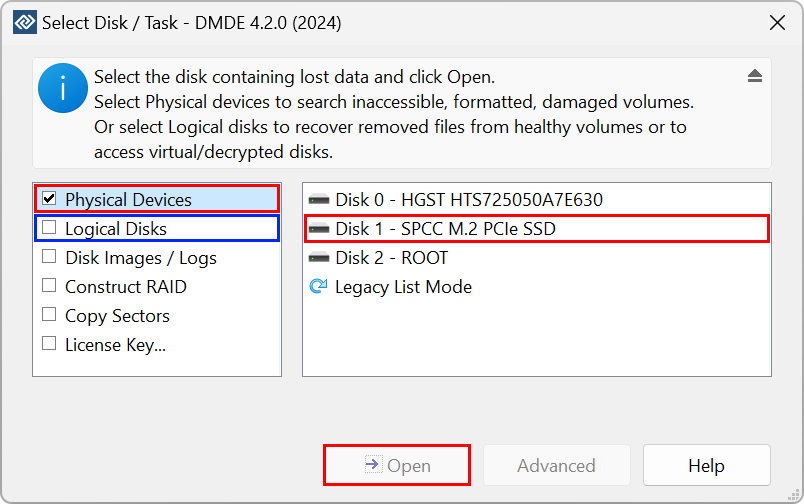
DMDE's starting window (version 4.2.0): choose Physical Devices or Logical Disks, or open disk images, construct a RAID or copy sectors, then select the disk.
From there DMDE lists the partitions it finds, including ones it has rediscovered, and you open a volume to browse its files much like Explorer. Behind that simple flow are thorough search algorithms that reconstruct the directory structure after formatting or partition manager accidents, plus raw recovery by file signatures for when the file system is beyond repair.
Features
Recover files with their folder tree
DMDE Professional recovers deleted files and data from formatted drives, lost partitions and corrupted file systems, and restores whole folders with nested subfolders and original names where the file system allows. It finds data quickly without a full scan when damage is minor, runs a full scan when it isn't, and recovers by file signature as a last resort. The source disk isn't modified during normal recovery.
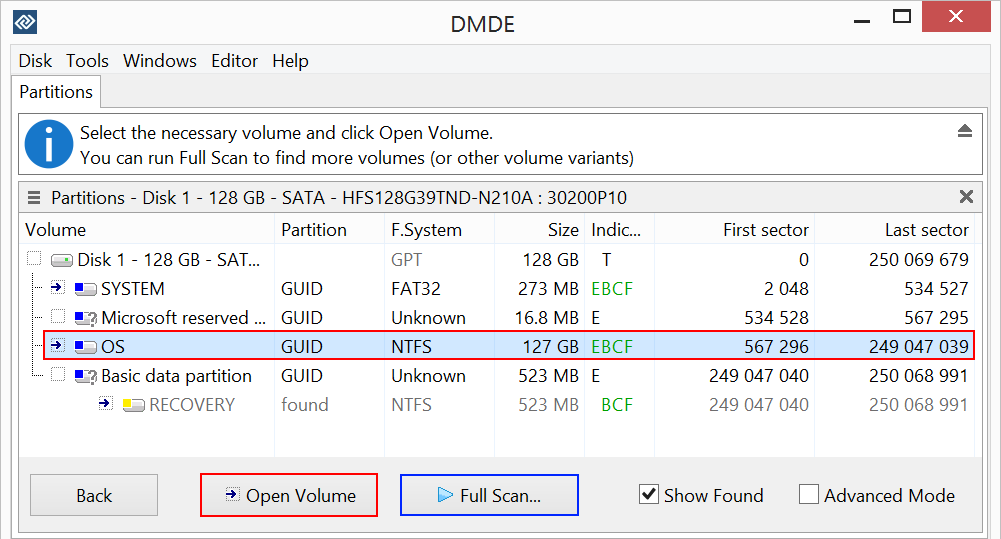
The partitions on a 128 GB disk, including a RECOVERY partition marked "found", with Open Volume and Full Scan buttons.
Lost partitions, RAID and disk images
DMDE Professional's partition manager finds and restores deleted partitions from boot sectors, superblocks and their backups. Its RAID constructor rebuilds RAID 0, 1, 4, 5 and 6, JBOD and custom striping virtually from the disks or their images, with automatic detection of the RAID configuration. You can also create disk images and clones, write images back, and handle bad sectors while copying.
What Professional adds
- Commercial use: recovering clients' data is allowed only in Professional.
- Portable activation: tie the license to a USB pen drive and use it on different computers, one at a time, without reactivating.
- One-time activations for remote use on client computers, 5 a month per license.
- Recovery reports with logs and file checksums, and an HTML export of the file list.
- Forensic and lab features: read support for E01 disk images, logs that let you resume disk copying and copy sectors in several passes, customizable I/O handler scripts with error logging, NTFS alternate data streams, and DMA mode in DOS.
A disk editor for the hard cases
DMDE Professional includes the disk editor DMDE is named after: view and edit MBR, GPT, boot sectors, file tables and directory entries with templates, find which files occupy given sectors on the cluster map, and copy, delete or repair NTFS files and folders bypassing the NTFS driver. It locks the volume automatically while writing on current Windows versions.
Benefits
For a technician, the appeal is cost per job. Many recovery suites charge per technician per year, or forbid client work on their consumer licenses. DMDE Professional is $95 once, with lifetime updates, and its portable activation lets you carry it between bench machines on a pen drive. The recovery reports and checksums give a client something to sign off on, and E01 support means you can work from forensic images instead of the customer's fragile original.
Real-World Uses
- A computer repair shop recovers a customer's formatted external drive, hands over the files with a checksum report, and charges for the job, which the Professional license allows.
- An IT department images a failing server disk with resumable multi-pass copying, then recovers from the image rather than the dying drive.
- A NAS failure: rebuild a RAID 5 virtually from the disks of a dead NAS and copy the data off without rebuilding the array physically.
- Remote support: use one of the monthly one-time activations to run a recovery on a client's own PC.
- Mixed platforms: recover a Linux Ext4 or Mac APFS disk from a Windows PC, since file system support doesn't depend on the host OS.
Who It's For, and Who Should Skip It
DMDE Professional is for repair shops, IT departments, service centers and data recovery specialists, and for the family "tech person" who recovers drives for friends and wants the portable key.
Skip it if you're recovering your own files: the free edition may be enough, Express costs $20 for a year, and Standard ($48, perpetual) covers personal and company use for your own needs. Skip DMDE altogether if you want a guided, modern interface: reviewers agree it has a steep learning curve, and friendlier programs exist at higher prices. And no software can bring back files from a TRIM-enabled SSD after deletion, as Digital Trends confirmed.
Usage Guide
- Download and run. Download DMDE for your system, extract the files and run DMDE as Administrator. Don't install or copy anything onto the disk you're recovering from.
- Choose the disk. Select Physical Devices for a formatted or damaged drive, or Logical Disks for files deleted from a healthy volume, and click Open.
- Open or scan. If the partition appears, open it and run a Quick Volume Scan or Full Volume Scan. If not, run Full Scan to find lost partitions, then open the one it finds.
- Test in the free edition. Recover a few important files to another disk and check they open.
- Activate and recover. Enter your license key, tick the folders you need and click Recover, saving them to a different disk.
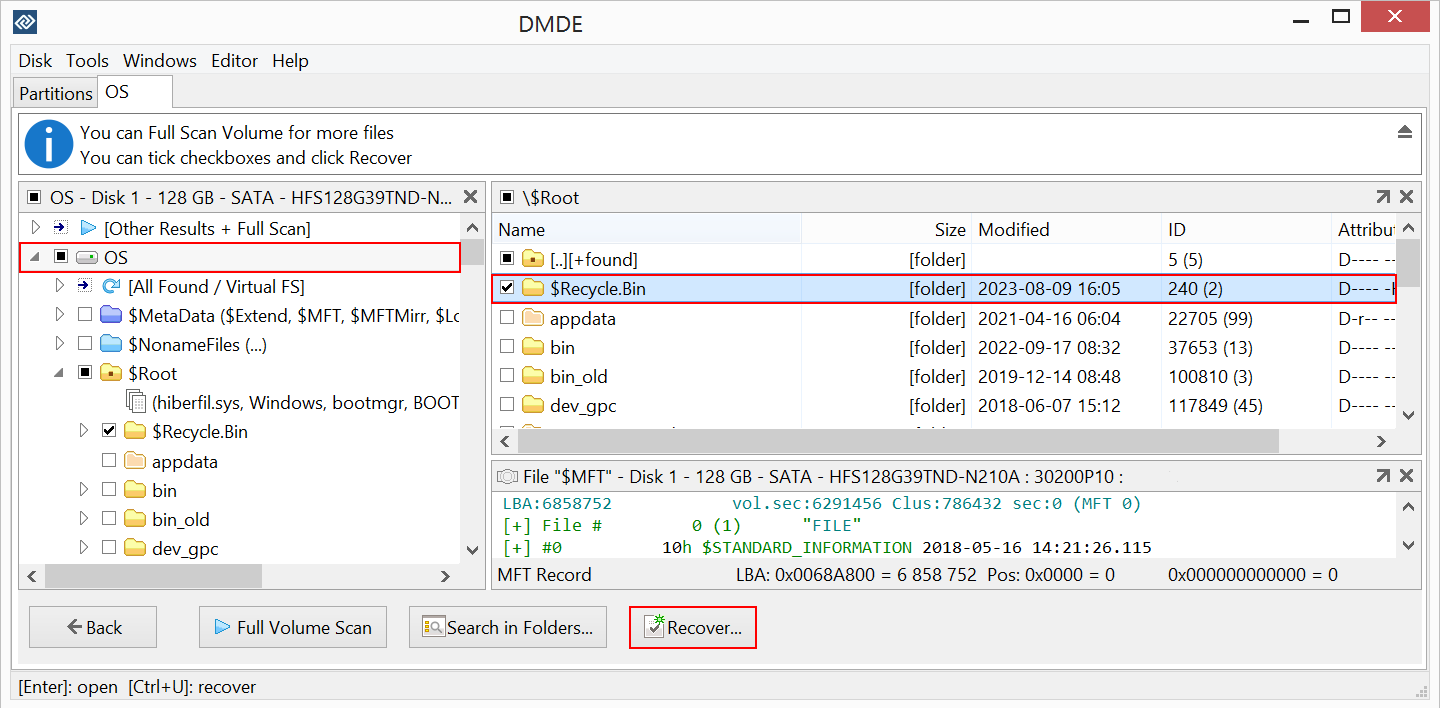
Recovering: the volume's folder tree on the left, the $Recycle.Bin folder ticked on the right, an MFT record shown below, and the Recover button at the bottom.
Where it falls short
- An old-fashioned, technical interface. TechRadar wrote that it "seems to be stuck in the '90s" and that "it can take you a few days to get the hang of" it. Digital Trends found it "not as user-friendly as competitors".
- SSDs and overwritten data. On modern SSD or SMR disks, DMDE itself warns that recovery is often impossible, as it is after ransomware encryption.
- Raw recovery loses names. When files can only be found by signature, they come back without original names or folders, and DMDE's built-in signature list doesn't cover every file type.
- Support is by email only, and Digital Trends waited more than a day for a reply.
- The disk editor can do damage. In edit mode any byte on the drive can be changed, so leave it alone unless you know what you're doing.
What Users Say
TechRadar: 4 out of 5
Krishi Chowdhary tested DMDE for TechRadar by recovering a deleted folder of 22 music and image files from an NTFS hard drive. His reasons to buy: "Cheap annual plans", "Can recover lost partitions", "Very generous (almost unlimited) free plan", "Can recognize custom file signatures" and "One of the best RAID reconstructors". His reasons to avoid: "Old-looking interface" and "Steep learning curve".
"However, it's DMDE's RAID reconstructor that sets it apart from other recovery software on the market." And on scanning: "DMDE's quick scan is much faster than some other recovery software."
Digital Trends: tested on hard drive, SSD and a damaged USB stick
Alan Truly (November 2024) upgraded to Professional during his test: "This time, DMDE recovered every file and folder intact except for the first letter of the folder names." His conclusion: "HDD performance was as good as the leading data recovery software, but at a budget price." Deleted files on an SSD weren't recoverable, which he expected.
His verdict: "DMDE offers an excellent free data recovery app with a low-cost upgrade to unlock more features, making this a great choice for tech-savvy users to restore lost files." Cons: "Not as user-friendly as competitors" and "Support is via email".
User reviews on dmde.com: 4.8 out of 5 from 161 reviews
DMDE publishes reviews whatever their rating and replies to the critical ones.
Andy, USA (5 stars): "I had a 12TB WD external suddenly lose its partition. I tried a couple of other well-known solutions, and they were hugely disappointing. At best, they could copy over files that had lost their names and directory structure, and often, they didn't work at all (especially the MP4 files). As a last ditch attempt, on the recommendation of someone on YouTube, I tried DMDE. It found my partition, even its name, and its entire directory structure and contents intact."
Betty, Great Britain (5 stars): "The only one I could find that doesn't crash when I plug my faulty drive in. Even when the drive disconnects itself mid-operation, the program automatically resumes when it's reconnected."
James (5 stars, August 2026): "It's not for the faint of heart inexperienced user but a nessesary tool in the arsenal for data recovery professionals."
Ana (4 stars, June 2026): "I accidentally deleted a folder on my external drive and this program recovered it. I gave it four stars though since the images it recovered weren't able to be opened."
Trustpilot: 3.8 out of 5 from 5 recent reviews
DMDE's Trustpilot page is small. These excerpts were read through a summarizer, so treat the wording as close but not guaranteed exact.
Roman (5 stars, October 2026): "DMDE helped me recover 1 TB of my HDD, even though I'd almost given up hope. Huge thanks to the support team, they responded quickly, were genuinely helpful."
David Brown DJ Helios (5 stars, December 2025): "The software seems complex, but is easy to adapt to and learn, the help files provide a cornucopia of information."
Ricardo Pirtti (1 star, April 2026) called the monthly Express plan "a scam", saying it was still limited to 4,000 files with no folder recovery. DMDE replied that paid licenses have no such limits and that this happens when a license isn't activated.
The pattern across reviews is consistent: DMDE recovers more, and keeps folder structure better, than many better-known tools, it handles failing drives gracefully, and it's cheap. The recurring complaints are the dated, technical interface and the learning curve, plus confusion about whether a license is actually activated. For the professionals Professional is aimed at, the interface matters less than the results.
Comparisons
Professional vs Standard
DMDE Standard ($48) and Professional ($95) recover the same files in the same way, with bulk folder recovery and lifetime updates. Professional adds permission to recover clients' data, the portable and one-time activations for using one license on several computers, and the lab features: reports with checksums, E01 images, resumable multi-pass copying, I/O scripts, NTFS streams and DOS DMA mode.
1 OS Family vs All OS Families
A 1 OS Family license ($95) is fixed to Windows, Linux, macOS or DOS at first activation and can't be switched later. All OS Families ($133) runs on all four, which helps if you boot client machines from a Linux or DOS stick as well as using Windows.
Editions and Pricing
| Edition |
Price |
License term |
Whose data |
What it adds |
| Free |
$0 |
Unlimited |
Any |
Up to 4,000 files from one folder per request |
| Express |
$20 |
1 year |
Your personal files |
Bulk folder recovery, 1 PC |
| Standard |
$48 |
Perpetual |
Yours and your organization's |
Lifetime updates, volume discounts |
| Professional, 1 OS Family (this license) |
$95 |
Perpetual |
Also your clients' |
Commercial recovery, portable activation, pro features |
| Professional, All OS Families |
$133 |
Perpetual |
Also your clients' |
Windows, macOS, Linux and DOS |
Prices from dmde.com, with $95 confirmed on the order page on October 26, 2026. Standard and Professional get volume discounts of 20% for 2 to 4 copies, rising to 80% for 20 or more.
FAQs
Can DMDE Professional recover more files than the free edition?
No. DMDE's paid editions recover exactly the files the free edition can. A license lets you recover all of them in one go with their directory structure, instead of 4,000 files from one folder at a time.
Can I use one DMDE Professional license on several computers?
Yes, one at a time. DMDE Professional's portable activation ties the license to a USB pen drive so you can use it on different PCs without reactivating, and you get 5 one-time activations a month for remote use. Running copies simultaneously needs more licenses.
Can I get a refund on DMDE if my files don't come back?
DMDE refunds licenses that haven't been activated, within 30 days. Activated licenses aren't refunded because a recovery failed, only where consumer law requires it or the software doesn't work as described.
Can DMDE recover files from a Mac or Linux drive on Windows?
Yes. DMDE's file system support doesn't depend on the host system, so the Windows version can recover APFS, HFS+, Ext4 or Btrfs drives. The 1 OS Family license only limits which system DMDE itself runs on.
Does DMDE repair the damaged drive?
No. DMDE is data recovery software, not a file system repair tool: it copies files to another disk and doesn't write to the damaged one. Repair tools like chkdsk can delete data, so recover first.
Do I need to install DMDE?
No. DMDE runs as soon as you extract the download, and uninstalling means deleting its folder, which helps when you mustn't write anything to the system you're recovering.
Can I upgrade from DMDE Standard to Professional later?
Yes. Upgrade and change options, with discounts, are available in your DMDE account. DMDE doesn't run promotional sales, so the listed price is the usual price.
System Requirements
- Operating system: Windows 64-bit or 32-bit (GUI or console), macOS, Linux 64-bit, or DOS, matching your OS family license
- Download size: about 2.5 MB for Windows 64-bit
- Rights: administrator rights to access the disks
- Storage: a separate disk with enough space for the recovered files
Conclusion
DMDE Professional is worth $95 if you recover data for other people. Independent testers rank DMDE's recovery with the leading tools, its RAID reconstructor is among the best, and Professional adds the commercial license, portable activation and lab features a repair shop needs, for a one-time price with lifetime updates. The main reason not to buy it is if the files are your own: Standard does the same recovery for half the price. And because activated licenses aren't refunded, run the free edition on the actual drive first and only buy once you've seen your files open.
Download Free EditionBuy Now ($95)