Hasleo Data Recovery Professional: Windows File Recovery for a One-Time $49
Hasleo Data Recovery Professional is a $49 one-time Windows tool that recovers deleted and lost files from hard drives, SSDs, USB drives and memory cards, with no recovery cap. It suits home office and small business users who deleted or formatted something they need back and would rather pay once than subscribe.
A free edition recovers up to 2 GB, so a small job may cost you nothing. It doesn't cover BitLocker drives, though: that takes the Ultimate edition.
Quick facts
- Version: 6.8, released January 8, 2026
- Developer: Hasleo Software
- Runs on: Windows 11, 10, 8, 7, Vista, XP and Windows Server 2003 or later
- File systems: FAT 12/16/32, exFAT, NTFS and HFS+
- Price: $49 once for 1 PC, with lifetime free upgrades
- Free edition: 2 GB of recovered data for home users; the trial of paid editions recovers several files
- Refunds: up to 30 days, for technical problems that support can't solve
- What we checked: trial installer file version 6.8 (16.1 MB) downloaded from the vendor and checkout price $49 on November 6, 2026. We read the version from the file's properties and didn't run a recovery
Download Free TrialBuy Now
Before you buy
- Scan before you pay. The scan and preview tell you what's recoverable, and the license is only needed at the recovery step. Preview a few files first, since a listed file isn't always intact.
- Stop using the drive. Every new write can overwrite what you want back, so install the program on a different drive and recover to a different drive.
- Professional doesn't do BitLocker. For a BitLocker drive you need Ultimate or Technician, or the separate Hasleo BitLocker Data Recovery.
- The free Home license is restricted. It's only for Windows Home editions, and it won't work on Windows Pro.
- A physically failing drive needs a lab. If it clicks or won't spin, software won't save it, and repeated scans can make things worse.
Overview
You emptied the Recycle Bin, formatted the wrong USB stick, or a partition turned RAW overnight. Hasleo Data Recovery starts with one question: what kind of loss is it? You pick Deleted File Recovery, Deep Scan Recovery, or BitLocker Data Recovery, choose the drive, and let it scan.
Results appear in a tree like File Explorer, with filters for images, audio, video, archives and email, and a preview panel. Hasleo has kept this product updated: version 6.8 added WinPE media compatible with Windows UEFI CA 2023.
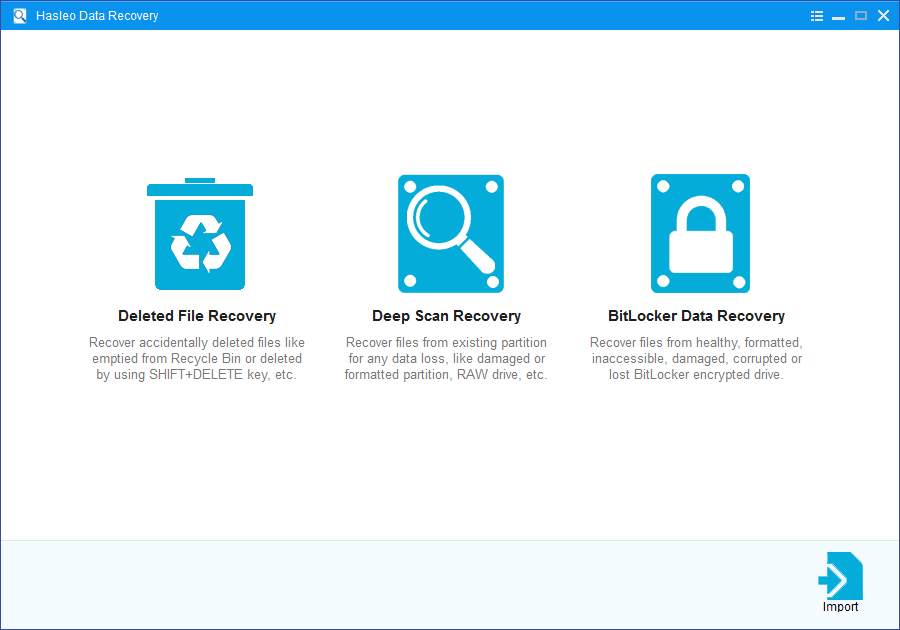
The opening screen: Deleted File, Deep Scan or BitLocker recovery.
Features
Deleted File Recovery
Hasleo Data Recovery finds files you emptied from the Recycle Bin or removed with SHIFT+DELETE. This is the quick mode, for when the drive itself is healthy.
Deep Scan Recovery
Hasleo Data Recovery Deep Scan goes after harder losses: deleted, corrupted or formatted partitions and RAW drives. It takes longer, and it's the mode to use after a format.
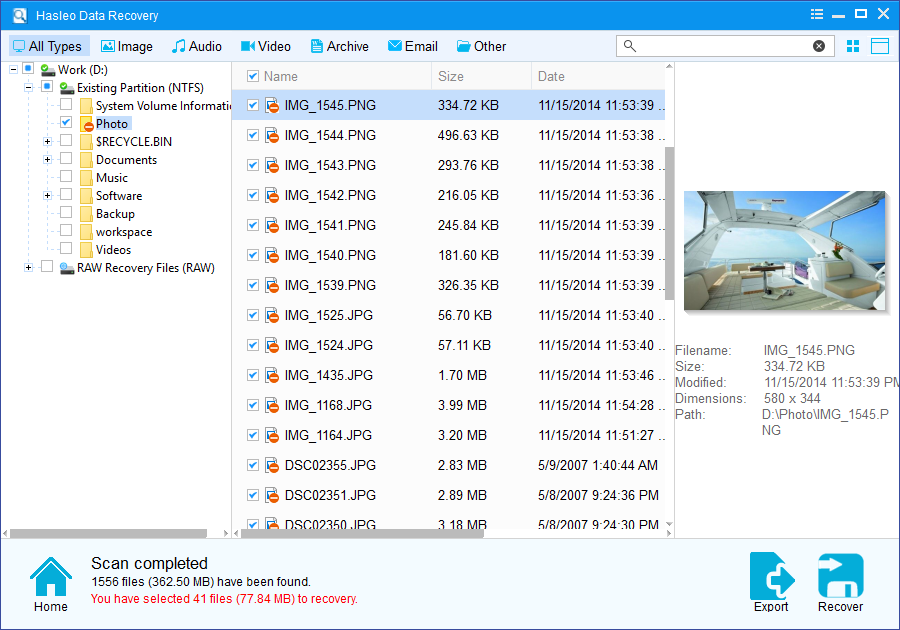
Scan results: folder tree, file list, type filters and a preview of the selected photo.
Wide device and file type support
Hasleo Data Recovery reads hard drives, external disks, SSDs, USB and SD cards, and dynamic disk volumes. The file type list includes photo RAW formats such as CR2 and NEF, video such as MP4 and MOV, email stores such as PST, and documents.
WinPE boot media for a dead Windows
Hasleo Data Recovery Professional creates WinPE bootable media, so you can recover files from a PC that won't start. The free edition doesn't include this.
Save a scan and come back
Hasleo Data Recovery exports and imports scan results, so a long Deep Scan doesn't have to run twice.
Benefits
- You pay once. Many rivals in this category charge yearly, while this license includes lifetime upgrades.
- There's no cap on Professional. After the free 2 GB, a $49 license recovers as much as the scan finds.
- You can use it at work. Professional permits business use, which the free edition doesn't.
Real-World Uses
- A camera card formatted by mistake. You run Deep Scan on the card and filter by image type.
- A Windows update ate a partition. The drive shows as RAW, so you scan it and recover to another disk.
- A PC that won't boot. You make the WinPE media on another computer and pull your documents off.
- A shop laptop. Staff deleted a project folder, and you recover it under a license that allows business use.
Who It's For, and Who Should Skip It
Buy it if you have more than 2 GB to recover, you run Windows Enterprise or Server, you need WinPE media, or it's a business machine. It's also a fair buy if you want a recovery tool on hand for years.
Skip it if your loss is under 2 GB on a home PC, because the free edition may do the job. Skip it if the data is on a BitLocker drive, or if you run a recovery service, which is what Technician is for. Mac owners need a different tool, since there's no Mac version.
Usage Guide
- Download the trial and install it on a drive other than the one with the lost files.
- Choose a recovery mode that fits the loss.
- Select the drive or partition and click Scan.
- Browse and preview the results, using the filter and search to find what you need.
- Tick the files and click Recover, saving them to a different drive.
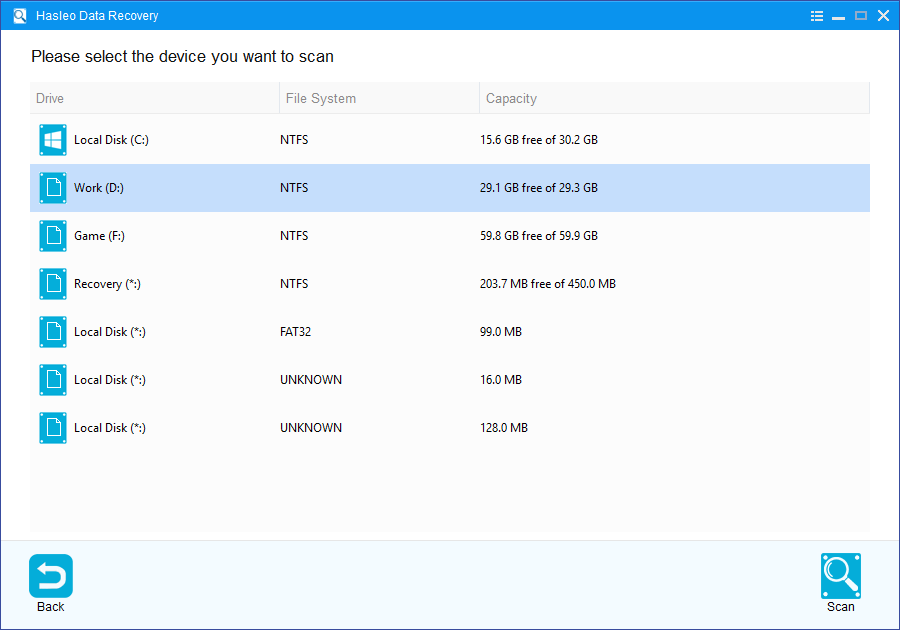
Choosing the drive or partition to scan.
Where it falls short
- No recovery tool gets everything. A buyer in September 2026 reported that all his recovered files were 0 bytes, and Hasleo agreed to refund him. That's why previewing before you pay matters.
- WinPE may not see your drives. One user's rescue USB listed only itself. WinPE can lack the storage drivers for your hardware, and you may have to add them.
- The free edition has catches. It leaves out Windows Ultimate, Enterprise and Server, and unlimited free recovery means sharing the product online and asking for a 1-year Home key, with no technical support.
- Independent test results are scarce. We found no lab comparison measuring its recovery rate, so try it on your own data before relying on it.
What Users Say
Hasleo Data Recovery has little independent coverage. These comments come from SourceForge and Hasleo's own forum.
Hasleo forum: praise and frustration
"Man, that's a bummer, because I really like your software!" and later "Honestly, all your software is great." ricardogroto, September 2026, after a free Home license closed the program on his non-Home Windows.
"Buying the Professional version for $49 is a bit steep for me, since my currency here in Brazil (BRL) is weak" ricardogroto, September 2026
Hasleo forum: problems
"I recovered the data (videos, documents, etc.—none of which were encrypted or otherwise blocked); however, I subsequently discovered that all the recovered files were 0 bytes in size and therefore unusable." masmox, September 2026. Hasleo's reply: "we'll refund you as soon as possible."
"I have created a WindowsPE USB installation but when booting the PC I wish to recover the deleted files form the only drive that is listed is the USB that I am booting from." graeme_moody, November 2021
SourceForge
SourceForge has no user reviews yet. Its product summary says the "straightforward workflow and file preview feature make it easy to identify and restore important data without a steep learning curve", and suggests that for "more advanced needs or larger-scale recovery operations" users look at paid or professional-grade alternatives. We read this summary through a page reader.
The pattern: support replies fast and refunds real failures, people like the interface, and results vary with the damage, as with any recovery tool.
Comparisons
Hasleo Data Recovery vs Hasleo BitLocker Data Recovery
Hasleo Data Recovery Professional covers normal drives. Hasleo BitLocker Data Recovery covers only BitLocker drives, at $149. If you might need both, Ultimate does both for $169.
Hasleo Data Recovery vs Windows File Recovery
Microsoft's Windows File Recovery is free, but it runs from the command line. Hasleo gives you a preview before you restore, and a rescue disk for a PC that won't start.
Editions and Pricing
| Edition | Price | PCs | Recovery | Adds |
|---|
| Free | $0 | Not stated | 2 GB | Deleted file and Deep Scan for home users, not on Windows Ultimate, Enterprise or Server |
| Professional (this listing) | $49 at checkout | 1 PC | Unlimited | All Windows editions, WinPE media, business use, lifetime upgrades and support |
| Ultimate | $169 at checkout | 2 PCs | Unlimited | BitLocker recovery with password or 48-digit key |
| Technician | $299 at checkout | Unlimited | Unlimited | Providing recovery services to clients |
FAQs
Does Hasleo Data Recovery Professional recover BitLocker drives?
Hasleo Data Recovery Professional doesn't support BitLocker drives. Ultimate and Technician do, and they need the password or the 48-digit recovery key.
Will the free Hasleo Data Recovery Home key work on Windows Pro?
Hasleo Data Recovery's complimentary Home key works only on Windows Home editions. A forum user on a higher edition saw the program close itself after entering the key, and Hasleo confirmed the restriction in September 2026.
Does Hasleo Data Recovery get the 2 GB limit removed for free?
Hasleo Data Recovery on Windows Home can recover unlimited data for free after you share the product on social media and email the link, which earns a 1-year Home license. Email and chat shares don't count.
Can Hasleo Data Recovery recover from a Mac drive?
Hasleo Data Recovery reads HFS+ volumes, but it runs only on Windows, so connect the drive to a PC. APFS isn't on its file system list.
Is a Hasleo Data Recovery license tied to one PC?
Hasleo Data Recovery Professional covers one PC. Forum threads show users asking Hasleo to reset a license, so contact support if you replace your computer.
Can I get a refund if Hasleo Data Recovery doesn't find my files?
Hasleo Data Recovery falls under Hasleo's policy of up to 30 days, which needs a technical reason. A forum buyer whose files came back at 0 bytes was refunded, but a change of mind isn't covered.
System Requirements
- Windows 11, 10, 8, 7, Vista or XP, or Windows Server 2003 or later
- 1 GHz Intel Pentium or compatible processor
- 256 MB of RAM, 1024 MB recommended
- 100 MB of free disk space
Conclusion
Hasleo Data Recovery Professional is worth $49 if the scan shows your files and previews them properly. The one reason to buy it is unlimited recovery with lifetime upgrades for one payment, where many rivals charge a subscription. The main reason not to is unproven performance: there's no independent lab test, so let the free scan convince you, and pick another tool if your drive is BitLocker-encrypted or physically failing.
Download Free TrialBuy Now