Hasleo Backup Suite Enterprise: One Site License for Up to 500 Windows PCs and Servers
Hasleo Backup Suite Enterprise is a $799.95 one-time site license for Hasleo's Windows backup, restore and cloning program, covering up to 500 PCs and servers of one organization at one physical location, with free lifetime upgrades. Every machine gets the full Server edition: system imaging, cloning, Universal Restore, Windows Server and ReFS support and a PXE server for network restores.
Buying Hasleo one machine at a time adds up fast once a business has a server and a room of desktops: Professional is $64.95 per PC with lifetime upgrades and Server is $199.95 per server. Enterprise replaces all of those with one license for the whole office, as long as everything sits at the same site.
Quick facts
- Version: 6.0.2.0, released October 30, 2026
- Developer: Hasleo Software
- License: site license, up to 500 PCs and servers, same organization, same physical location, business use
- Price: $799.95 one-time with free lifetime upgrades (Hasleo's store lists it as down from $999.95)
- Features: everything in the Server edition, including Windows Server editions, ReFS and the PXE server
- Runs on: Windows Server 2008 and later, Windows Vista through Windows 11, on x86, x64 and ARM64
- Free trial: 15 days with every feature, and a license key turns the trial into the full version
- Refunds: 30-day money-back guarantee, limited to technical problems support can't fix
What we checked: the 42.0 MB trial installer from the vendor, file version 6.0.2.0 dated October 30, 2026, and Hasleo Backup Suite Enterprise + Lifetime Free Upgrades at $799.95 on the order page, on November 23, 2026. We didn't deploy it across a network of machines.
Download Free TrialBuy Enterprise License ($799.95)
Overview
Enterprise isn't a different program. Hasleo ships one installer for every edition, and the license key decides what it can do; the Enterprise key gives each machine the Server edition's features and lets you use the key on as many as 500 computers at one site. Each PC or server runs its own copy with its own backup tasks, and there's no central console tying them together, so think of it as a volume license rather than a managed backup platform.
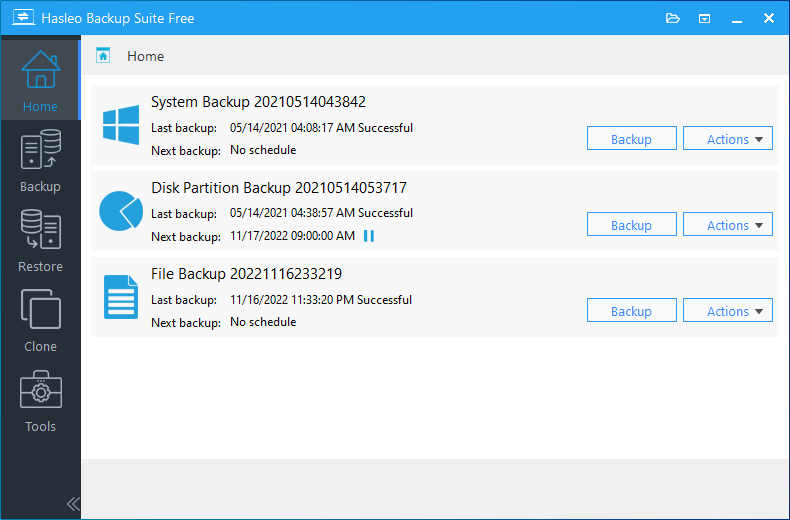
The Home screen on one machine, with a system backup, a disk partition backup and a file backup task and their last and next run times. The vendor's screenshot shows the Free edition's title bar; Enterprise uses the same window.
Features
Image every desktop and server on site
Hasleo Backup Suite Enterprise backs up each machine's Windows system (it selects every partition needed to boot), whole disks, partitions, or chosen files and folders with deduplication. Backups are full, incremental or differential, can be compressed, encrypted with AES 128 or 256 and split, and go to local disks, USB drives or a network share or NAS. Servers are covered too, including ReFS volumes up to version 3.14.
Restore any machine, even onto new hardware
Hasleo Backup Suite Enterprise restores a whole system, a disk, a partition or single files from an image, and its Universal Restore makes a Windows image boot on different hardware, handy when a replacement PC isn't the same model. Delta Restore writes back only changed blocks, BitLocker encryption is kept on restore, and an image can be mounted as a drive to copy out a few files.
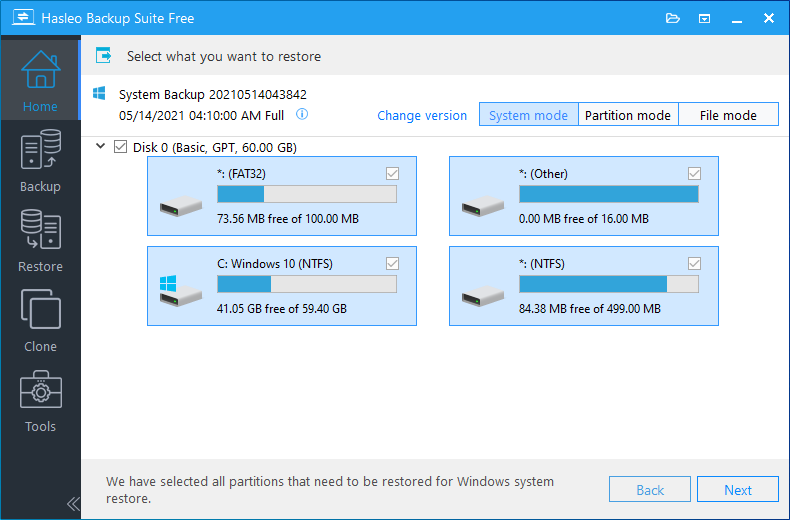
Restoring a System Backup: the four partitions on Disk 0 needed for a Windows system restore are selected, with System, Partition and File mode buttons and a Change version link at the top.
Network-boot restores with the PXE server
Hasleo Backup Suite Enterprise includes the PXE server from the Server edition. One machine builds a WinPE recovery image and serves it on the local network, and any PC set to boot from the network loads Hasleo's recovery environment, where you restore its disk or partition backup. Hasleo's own guide suggests it for restoring many systems over a LAN. It uses DHCP and TFTP, works within one subnet unless you set up DHCP relay or proxyDHCP, and clients may need Secure Boot turned off.
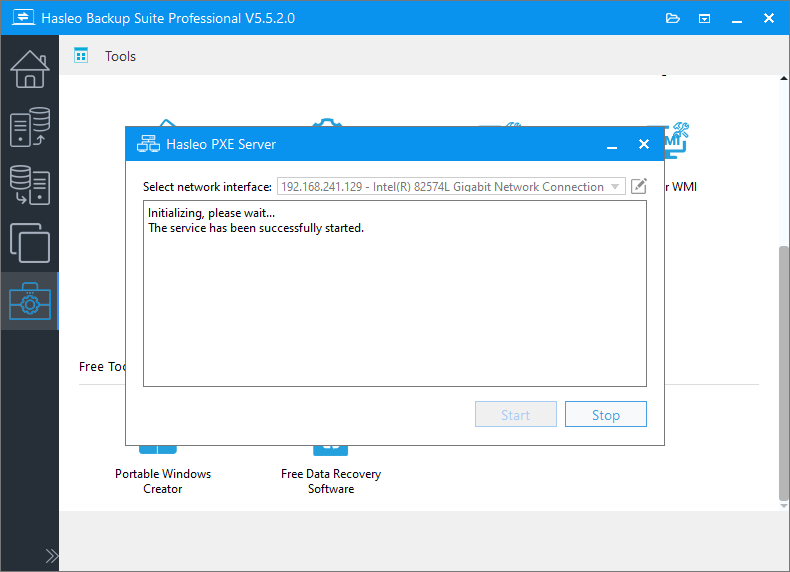
The Hasleo PXE Server window: a network interface is chosen and the log reports that the service has started, with the Stop button available.
Clone to new drives, script the backups
Hasleo Backup Suite Enterprise clones a system, disk or partition to a new SSD or larger drive without reinstalling Windows, with Delta Clone for quick repeat clones and MBR/GPT conversion. The command-line tool, BackupCmdUI.exe, starts saved backup tasks from scripts or remote management tools, and saved tasks can be exported and imported between machines.
Schedules, alerts and image protection
Hasleo Backup Suite Enterprise runs each machine's backups on a timetable or on events such as start-up or a USB drive being connected, with retention that merges or deletes old versions and email notifications that now support Gmail and Microsoft OAuth. Version 6.0.2.0 (October 30, 2026) added backup image protection, templates for email notifications and backup filters, which help when you set up the same job on many PCs, and automatic deletion of old versions when the destination fills up.
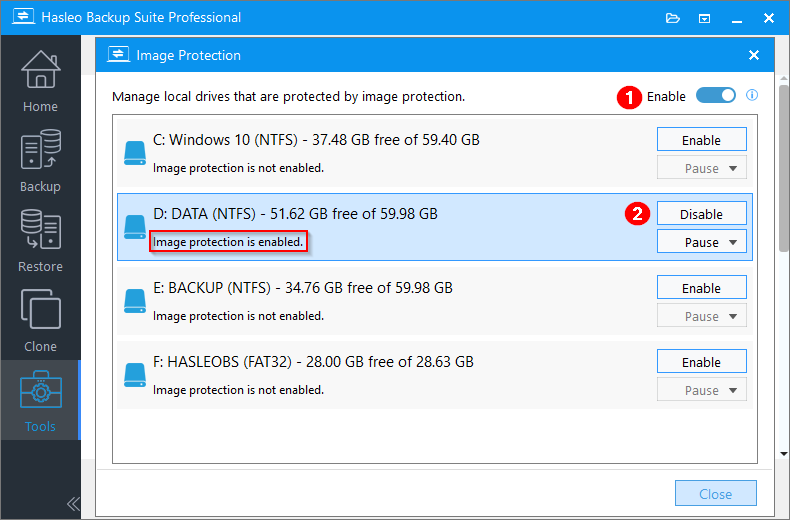
The Image Protection dialog with protection enabled on drive D: DATA and the other drives still off. The screenshot shows the Professional edition's title bar.
Benefits
The benefit is arithmetic. $799.95 once covers every Windows machine at the site, servers included, with all future versions. That's the price of four Server licenses, or about twelve Professional licenses with lifetime upgrades, and at a 50-PC office it works out to about $16 per machine, once. There's no per-seat counting as the office grows, no yearly renewal, and the engine underneath is the one TechRadar found among the fastest of nearly twenty backup apps.
Real-World Uses
- A 30-desk office images every PC nightly to a NAS share and its file server to a second disk, all under one license.
- A school computer lab: after a bad update, PCs boot from the network through the PXE server and get their images restored, with no USB sticks passed around.
- A hardware refresh: IT clones each old drive to a new SSD, or restores images onto new models with Universal Restore.
- Standard jobs everywhere: one backup task with a filter and email template is exported and imported onto each new machine, and a script starts it with the command-line tool.
Who It's For, and Who Should Skip It
Hasleo Backup Suite Enterprise is for small and mid-sized organizations with many Windows PCs and a few servers in one building, run by an IT person who's happy to set up each machine and wants local image backups without a subscription.
Skip it if you have fewer than about a dozen PCs or four servers: separate Professional ($64.95) or Server ($199.95) licenses cost less. Skip it if your machines are spread across branch offices or home workers, since the license covers one physical location. And skip Hasleo if you need a central console to deploy, monitor and report on backups across the fleet, cloud storage, or application-aware backup of Exchange, SQL Server or virtual machines: Hasleo offers none of these, and a managed endpoint backup product fits that job better.
Usage Guide
- Trial first. Install the 15-day trial (Windows 7 / Server 2008 R2 or later; a separate installer covers Vista and Server 2008, and another ARM64) on a representative PC and a server.
- Activate. Enter the Enterprise license key in each installed copy; no reinstall is needed.
- Build a standard job. Create a System Backup to your NAS share with options, schedule, filter and email templates, then export the task from Tools.
- Roll it out. Install Hasleo on each machine, enter the key and import the task file.
- Prepare recovery. Make a WinPE emergency disk, and on one machine set up the PXE server so others can network-boot into recovery.
- Test. Restore one PC from the network and mount a few images to check files before you rely on them.
Before you buy
- Check the site rule. The license covers computers "within the same organization at the same site". A second office needs its own license.
- Licenses aren't transferable once installed and registered, per Hasleo's store terms.
- Refunds are limited. Hasleo's 30-day guarantee covers technical problems its support can't fix, not a change of mind, so trial it on your own hardware, including a PXE boot if you plan to use one.
- Prices exclude VAT on Hasleo's store, and lifetime upgrades are included.
Where it falls short
- No management console. You set up, update and check every machine one by one; email notifications are the only alerting.
- Not built for larger businesses. TechRadar wrote that "the lack of responsive support or high-end features means this app is not suitable for medium or large businesses."
- Support by email and forum only, with no stated response time or priority support for the site license.
- PXE stays on one subnet without DHCP relay or proxyDHCP, and accepts only .inf drivers for WinPE.
- Frequent fix releases. The 2026 change log shows bug fixes every few weeks, so plan how you'll keep many copies updated.
What Users Say
Published reviews test the free edition, which shares Enterprise's backup and restore engine; we found none that covers the site license itself.
TechRadar
Mike Jennings reviewed Hasleo Backup Suite Free (published September 13, 2024): "A rock-solid free backup tool that pairs good features with impressive speed." Reasons to buy: "Free", "Good speeds", "Solid features". Reasons to avoid: "Few high-end options", "Other apps are even faster", "Limited support".
"Its Media file average time of six minutes and six seconds is one of the best we've recorded," he wrote, and "While Hasleo does look a little archaic, it's easy to use, even for beginners." His fit: "ideal for home users and sole traders who need core backup functionality".
Dave's Computer Tips
John Durso's three-part comparison with Aomei (January 2023) concluded: "Hasleo is a free full-featured imaging and backup solution that is being actively developed." He found "Aomei to be a little more refined than Hasleo. But Hasleo is catching up quickly."
Trustpilot: 4.1 out of 5 from 35 reviews
Hasleo Software's Trustpilot reviews cover all its products:
Jon (5 stars, November 2026), "As good as Macrium in most all the ways that matter": "backups and restores were all good, reasonably fast in both"
Robert (5 stars, September 2026), "Great support": "I've been using Hasleo backup software for about 6 months now and love both the software"
Simon (5 stars, July 2026), "Happy Hasleo user here": "I have been using the Hasleo Backup suite now for about a year."
Clay Zaccaglini (4 stars, July 2026), "Fails to estimate sizes, not smart backup": "It will make you do backup, fill up your disk after hours of waiting"
Users agree Hasleo is fast and dependable at imaging, with helpful support; the doubts are about scale and polish: no warning when a target is too small, and, for a site license, no console to manage it all.
Comparisons
Enterprise vs Server
Same features: Windows Server support, ReFS and the PXE server. Server ($199.95) covers one server; Enterprise ($799.95) covers up to 500 PCs and servers at one site. With more than four machines to protect, Enterprise costs less.
Enterprise vs Professional
Professional ($64.95 with lifetime upgrades, $49.95 without) is one desktop PC with business use and the command line, but no Windows Server, ReFS or PXE server. Thirteen Professional licenses with lifetime upgrades already cost more than Enterprise.
Editions and Pricing
| Edition |
Price |
Machines |
Windows Server |
Notes |
| Home |
$34.95 |
1 PC |
No |
Home use only |
| Professional |
$49.95, or $64.95 with lifetime upgrades |
1 PC |
No |
Business use, command line |
| Server |
$199.95 |
1 server |
Yes |
ReFS, PXE server, lifetime upgrades included |
| Enterprise (this license) |
$799.95 |
Up to 500 PCs and servers at one site |
Yes |
Server features, lifetime upgrades included |
Prices from Hasleo's store excluding VAT. The $799.95 for the Enterprise license was confirmed on the order page on November 23, 2026.
FAQs
Does the Hasleo Backup Suite Enterprise license cover a second office?
No. Hasleo Backup Suite Enterprise covers up to 500 computers at one physical location within the same organization. Machines at another site need their own license.
Does Hasleo Backup Suite Enterprise include servers?
Yes. Hasleo Backup Suite Enterprise counts PCs and servers together toward the 500 limit, and every copy has the Server edition's Windows Server, ReFS and PXE features.
Can I manage Hasleo Backup Suite Enterprise from one console?
No. Hasleo Backup Suite Enterprise has no central console; each machine runs its own copy. Exported task files, the command-line tool and email notifications help you standardize and monitor jobs.
Do I have to reinstall Hasleo Backup Suite after buying Enterprise?
No. Enter the license key in an installed trial or free copy of Hasleo Backup Suite and it becomes the full version immediately.
Does Hasleo Backup Suite Enterprise run on Windows on ARM laptops?
Yes. Hasleo Backup Suite runs natively on ARM64 Windows 10 and 11 as well as x86 and x64, with a separate ARM64 installer.
Can I get a refund on Hasleo Backup Suite Enterprise?
Hasleo offers up to 30 days' money back, but only for technical problems its support team can't resolve, not for a change of mind. Use the 15-day trial on your own machines first.
System Requirements
- Operating system: Windows Server 2008 or later, or Windows Vista or later, 32-bit or 64-bit; ARM64 on Windows 10 and 11
- Processor: 1 GHz or faster Intel Pentium-compatible or ARM64
- Memory: 1 GB RAM, 2 GB recommended
- Disk: 500 MB free space per machine, plus room for backup images
- Devices: HDD, SSD, USB, Thunderbolt and dynamic disks
- File systems: FAT12/16/32, exFAT, NTFS and ReFS 3.14 or earlier, others sector by sector
Conclusion
Hasleo Backup Suite Enterprise is worth $799.95 for a single-site business with more than a dozen Windows PCs or four servers that wants fast local imaging for all of them, paid once. The reason to buy it is the price per machine: the full Server feature set, PXE restores and lifetime upgrades for every computer in the building. The reason not to is management: with no console, no cloud target and support by email, it suits a hands-on IT person, not a large or multi-site fleet. Trial it on a typical PC and a server, and test a PXE restore, before you buy.
Download Free TrialBuy Enterprise License ($799.95)