Hasleo Disk Clone Professional: Move Windows to a New SSD for a One-Time $39.95
Hasleo Disk Clone Professional is a $39.95 one-time Windows tool that clones Windows, a whole disk or a single partition to another drive without reinstalling anything. It suits people upgrading to a bigger SSD and small businesses that want cloning with no backup software attached.
A free edition does the core cloning on home PCs. Professional adds Delta Clone, a bootable WinPE disk, ARM64, ReFS, Windows Server and business use, with lifetime upgrades.
Quick facts
- Version: 5.9.2.0, released September 30, 2026
- Developer: Hasleo Software
- Runs on: Windows Vista or Server 2008 and later, x86, x64 and ARM64
- File systems: FAT12/16/32, exFAT, NTFS and ReFS, others sector by sector
- Price: $39.95 once for 1 PC or server, with lifetime free upgrades
- Free edition: yes, for home users on x86/x64
- Refunds: up to 30 days, for technical problems that support can't solve
- What we checked: free installer file version 5.9.2.0 (32.2 MB) downloaded from the vendor and checkout price $39.95 on November 6, 2026. We read the version from the file's properties and didn't clone a disk
Download Free EditionBuy Now
Before you buy
- Try the free edition first. System, disk and partition cloning are all in it, so a one-off SSD swap on a home PC may cost you nothing.
- Check whether Backup Suite makes more sense. Hasleo Backup Suite includes these cloning features plus backup, and Home costs $34.95, though only for home use.
- Double-check the target disk. A clone overwrites it. A reviewer on AlternativeTo says Hasleo's overwrite warnings "may be lacking".
- USB targets have limits. Hasleo says cloning Windows to a USB drive is a paid feature, and it doesn't guarantee that the clone boots from USB.
Overview
Buying a bigger SSD is easy, and moving Windows onto it is the awkward part. Disk Clone opens with three choices, System Clone, Disk Clone and Partition Clone. System Clone picks the partitions Windows needs and copies them to the new drive, with your settings, drivers and applications intact.
It's the older of Hasleo's two cloning tools. Hasleo has said it released Disk Clone before Backup Suite's backup features were complete, and that it has no plans to discontinue it. The change log backs that up, with several releases in 2026.
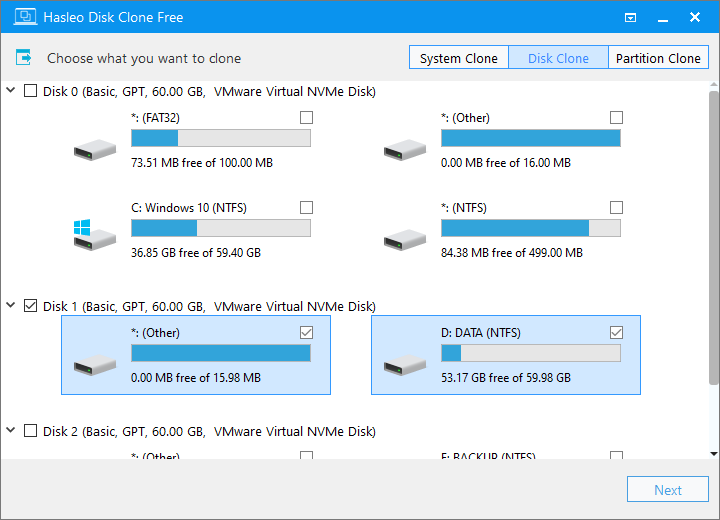
Choosing what to clone. Hasleo's screenshots show the Free edition.
Features
System, disk and partition clones
Hasleo Disk Clone Professional migrates Windows to another disk, makes an identical copy of a whole disk, or copies one partition to another location. All three work without reinstalling Windows or your applications.
Delta Clone
Hasleo Disk Clone Professional can copy only the blocks that changed, so repeat clones to the same drive finish much faster. The free edition does full clones only.
Resize and move partitions as you clone
Hasleo Disk Clone Professional lets you change partition size and position on the target, set the alignment, and clone sector by sector. That helps when the new disk is a different size.
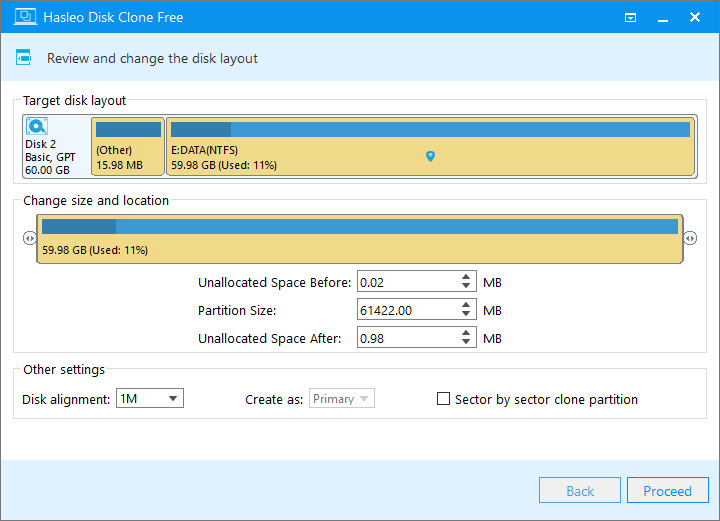
Adjusting the target layout: size, location, alignment and sector-by-sector option.
MBR to GPT conversion
Hasleo Disk Clone Professional converts MBR to GPT, or GPT to MBR, during a clone, while keeping Windows bootable. That's handy when you move an old system to UEFI.
Bootable WinPE disk
Hasleo Disk Clone Professional builds a WinPE disk so you can clone outside Windows. The free edition doesn't include it.
ARM64, ReFS and Server support
Hasleo Disk Clone Professional adds native Windows ARM64, ReFS volumes, and the Education, Enterprise and Server editions of Windows, none of which the free edition covers.
Benefits
- It's a single-purpose tool. There's no backup scheduler to learn if you only want to clone.
- It costs once. Lifetime upgrades come with the $39.95 license.
- It covers business use. The free edition doesn't, which is the main reason a small office would pay.
Real-World Uses
- A laptop SSD upgrade. You connect the new drive by USB adapter, run System Clone, and swap the drives.
- Moving a server. You clone a Windows Server disk to bigger storage.
- A Surface or other ARM laptop. You clone with the native ARM64 build.
- Keeping a spare drive current. Delta Clone refreshes it quickly each week.
Who It's For, and Who Should Skip It
Buy it if you clone at work, on Windows Enterprise, Education or Server, or on an ARM64 PC, or if you want Delta Clone and a WinPE disk without paying for a backup suite.
Skip it if you're doing one clone at home, since the free edition covers that. Skip it if you also need backups, because Hasleo Backup Suite covers both jobs. There's no Mac or Linux version.
Usage Guide
- Install the free edition, and activate a license if you bought one. Connect the new drive.
- Choose System Clone, Disk Clone or Partition Clone and select the source.
- Select the destination disk.
- Adjust the partition size, location and alignment if you need to, then click Proceed.
- Wait for it to finish. Then swap the drives, or change the boot order, and boot from the clone.
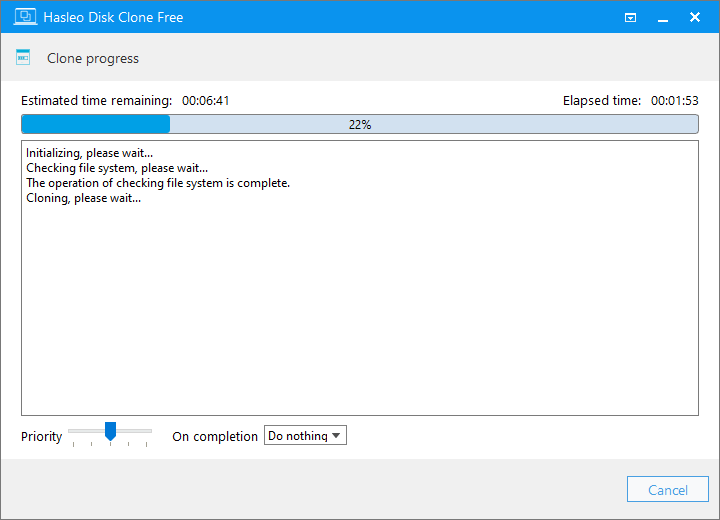
The clone in progress, with time remaining, priority and an on-completion setting.
Where it falls short
- API errors happen. Hasleo's forum has several "Failed to run system API" threads about failed clones.
- A clone can stall. One user's system clone to a smaller disk stopped at around 40% overnight in 2023.
- It's a narrow buy. For $5 less, Backup Suite Home V6 clones too, if the PC is a home PC.
- No independent lab test. We found none, and the longest "reviews" online come from rival vendors, so we left those out.
What Users Say
Disk Clone has a few public comments, on AlternativeTo and Hasleo's forum.
AlternativeTo
"Hasleo does great clones, however, their warning system on overwrites in general may be lacking." TBayAreaPat, 5 stars, May 14, 2023, edited December 3, 2024
"I have now used Hasleo Disk Clone several times and it is the best, fastest and simplest clone software" Guest, 5 stars, January 1, 2023. AlternativeTo doesn't count this new-account review in its rating.
Hasleo forum
"Used Hasleo Disk Clone to clone a 512GB SSD to an internal M2 SSD. It worked. The M2 drive now boots, but the 2.5" SSD won't any longer." Pampa, January 2026. Hasleo replied that cloning doesn't modify the source drive.
"I have a VM with a disk I cannot get to shrink because of unmovable files, I created a new smaller disk and tried to use disk clone "system clone" to clone everything to the new smaller disk as a workaround. It got to around 40% pretty quick and then stopped working" rae_it, February 2023
The pattern: fans praise speed and simplicity, and the complaints are the unusual-case failures that every cloning tool collects.
Comparisons
Hasleo Disk Clone vs Hasleo Backup Suite
Hasleo Backup Suite has the same system, disk and partition cloning plus imaging, schedules and restore. Disk Clone Professional at $39.95 includes lifetime upgrades and business use. Backup Suite Home V6 is $34.95 for home use, without lifetime upgrades. Backup Suite Professional with lifetime upgrades is $64.95. If you want cloning alone at work, Disk Clone is the cheaper route.
Editions and Pricing
| Edition | Price | Computers | Adds |
|---|
| Free | $0 | Not stated | System, disk and partition clone, x86/x64, home users |
| Professional (this listing) | $39.95 at checkout | 1 PC or server | Delta Clone, WinPE disk, ARM64, ReFS, Server, business use, lifetime upgrades |
| Enterprise | $199.95 on the vendor's store | 200 PCs and servers, same site | Site license |
FAQs
Is Hasleo Disk Clone really free?
Hasleo Disk Clone has a free edition for home users, with system, disk and partition cloning. It leaves out Delta Clone, the WinPE disk, ARM64, ReFS, and the Education, Enterprise and Server editions of Windows.
Can Hasleo Disk Clone clone to a smaller SSD?
Hasleo Disk Clone lets you resize partitions on the target, so a smaller disk can work when the used data fits. One forum user's clone to a smaller disk did stall, so have a backup.
Can Hasleo Disk Clone clone Windows to a USB enclosure?
Hasleo Disk Clone can clone a system to a drive in a USB enclosure, but Hasleo says this is a paid feature and doesn't guarantee the clone boots from USB. Swapping the drive inside the PC afterward is the normal plan.
Does Hasleo Disk Clone change the source drive?
Hasleo Disk Clone doesn't modify the source drive, according to Hasleo's support staff. One forum user reported a source SSD that wouldn't boot afterward, so keep both drives until you've tested the new one.
Will Hasleo Disk Clone be discontinued?
Hasleo Disk Clone remains on sale and in active development, and Hasleo said in 2023 it had no plans to drop it, even though Backup Suite shares its features.
Can I get a refund on Hasleo Disk Clone?
Hasleo Disk Clone falls under Hasleo's policy of up to 30 days, which covers technical faults support can't fix. A change of mind isn't covered, so try the free edition first.
System Requirements
- Windows Vista or Server 2008 or later, 32-bit or 64-bit, on Intel Pentium-compatible or ARM64 processors
- Supported devices: HDD, SSD, external HDD, Thunderbolt and dynamic disks
Conclusion
Hasleo Disk Clone Professional is worth $39.95 for business use, or for Delta Clone and a boot disk without a backup suite. The one reason to buy it is licensed cloning with lifetime upgrades at a low one-time price. The main reason not to is that home users get core cloning free, and anyone who also wants backups is better off with Hasleo Backup Suite.
Download Free EditionBuy Now