Short answer: you can move Windows 11 to a new SSD for free with Hasleo Disk Clone's free edition, whose System Clone copies Windows, your programs and settings to the new drive on a home PC; NIUBI Partition Editor's free edition also clones a disk. Connect the SSD, clone, then make it the boot drive.
If you'd rather pay for an easier, guided job with a bootable rescue disk, EaseUS Disk Copy Pro costs $19.90 for a month (enough for one clone) or $59.90 lifetime. EaseUS Partition Master Professional is the better buy if you also need to resize partitions, and EaseUS Todo PCTrans Professional is for moving to a whole new PC rather than a new drive.
At a glance
| Tool | Cheapest way to do one clone | License you keep | Clones Windows to a new SSD | Bootable rescue disk | Money back |
|---|
| Hasleo Disk Clone Free / Professional | Free (home use) | $39.95, lifetime upgrades | ✓ (Free and Pro) | Pro only | 30 days, technical problems |
| NIUBI Partition Editor Free / Professional | Free (home use) | $39 (2 PCs) | ✓ (Free and Pro) | Pro only | 90 days, conditional |
| EaseUS Disk Copy Pro | $19.90 for a month | $59.90 lifetime | ✓ (demo plans only) | ✓ | 30 days |
| EaseUS Partition Master Professional | $19.95 for a month (2 PCs) | $69.95 lifetime (2 PCs) | ✓ | ✓ | 30 days, if it can't solve the problem |
| AOMEI Cloner Professional | $39.95 a year | $59.95 lifetime | ✓ (trial simulates only) | ✓ | 90 days |
| DoYourClone for Windows | $49 a year (2 PCs) | Yearly license only | ✓ | ✓ | 30 days |
What we checked
- Which free editions really clone a Windows system disk, from each vendor's own edition comparison and download pages.
- The price in US dollars of every plan on the order pages, including the cheapest way to pay for a single clone.
- Each tool's current version and its clone options (system clone, sector-by-sector, SSD alignment, resizing the target).
- The vendors' help pages and real complaints in user reviews for what goes wrong after a clone.
What we checked: checkout prices of $39.95 (Hasleo Disk Clone Professional), $59.95 (AOMEI Cloner Professional, lifetime) and $49.00 (DoYourClone for Windows, 1 year), EaseUS's order pages at $19.90, $39.90 and $59.90 for Disk Copy Pro and $49.95, $59.95 and $69.95 for Todo PCTrans Pro, and Hasleo Disk Clone version 5.9.2.0 on its download page, all on November 20, 2026. We compared features, prices and the vendors' instructions, and didn't clone a drive ourselves.
Before you start
- Check the size. The new SSD must hold everything that's actually used on the old drive. A half-empty 1 TB hard drive fits on a 500 GB SSD; a full one doesn't. Empty the Recycle Bin and move big video folders off first if it's tight.
- Connect the new SSD. In a desktop, use a free M.2 slot or SATA port. In a laptop with one slot, put the new SSD in a USB enclosure or adapter for the clone, then swap it inside afterward.
- Back up anything you can't lose. Cloning reads the old drive and erases the new one. If you pick the wrong target, the data on it is gone. Our best backup software for Windows 11 guide covers the tools.
- Save your BitLocker recovery key. Windows 11 often turns on device encryption by default. Keep the 48-digit recovery key (it's in your Microsoft account) in case the PC asks for it after the swap.
- Plug in the laptop. A clone can take an hour or more, and a power cut in the middle can leave the new drive unbootable.
The free way: clone with Hasleo Disk Clone Free
Hasleo Disk Clone's free edition includes System Clone, the mode that copies only the partitions Windows needs to start, with your programs and settings, onto the new SSD. It's free for home use on standard x86/x64 PCs; Hasleo's Professional edition adds Delta Clone (copying only changed blocks on repeat clones), a WinPE boot disk, ARM64 support and business use.
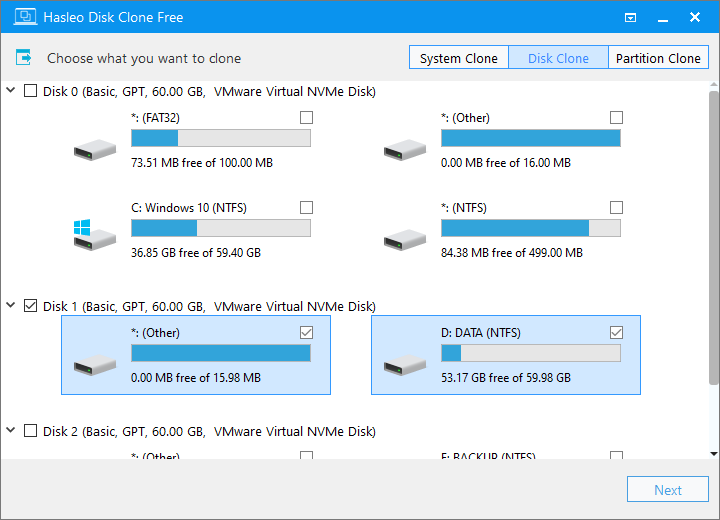
Hasleo Disk Clone Free's first screen: the System Clone, Disk Clone and Partition Clone tabs at the top, and the disks and partitions to choose from below.
- Download and install Hasleo Disk Clone, and connect the new SSD.
- Choose System Clone. Hasleo selects the Windows partitions on your current drive automatically.
- Pick the new SSD as the destination. Double-check its size and model, since everything on it will be erased.
- If the layout screen offers it, let it resize the partitions to fill the new drive and keep the alignment option for an SSD.
- Start the clone and wait for it to finish. Don't use the old drive heavily in the meantime.
- Shut down, then either swap the drives or choose the new SSD as the first boot device in the BIOS/UEFI setup (usually F2, F12 or Del at startup).
Two other free routes work too. NIUBI Partition Editor Free includes disk cloning that copies Windows at the file-system level, also free for home use. And Windows' own Backup and Restore (Windows 7) can make a system image that you restore onto the new SSD from a recovery USB, as long as the new drive is at least as large as the old one. The last free option is a clean install of Windows 11 on the new SSD and copying your files back, which takes longest but leaves no old clutter behind.
Download Hasleo Disk Clone FreeBuy Hasleo Disk Clone Professional
When it's worth paying
A paid tool earns its price when the free route doesn't fit: the PC is a work machine (the free editions are for home use), you want a bootable USB to clone a PC that no longer starts, you're cloning a drive that's failing and need sector-by-sector options, or you just want clearer steps and someone to contact if it goes wrong.
EaseUS Disk Copy Pro
EaseUS Disk Copy Pro: the simplest guided clone
- Price: $19.90 a month, $39.90 a year or $59.90 lifetime for 1 PC
- Version: 7.9.0
- Runs on: Windows 11, 10, 8.1, 8 and 7
- Trial: a demo that plans a clone but won't run it without a license
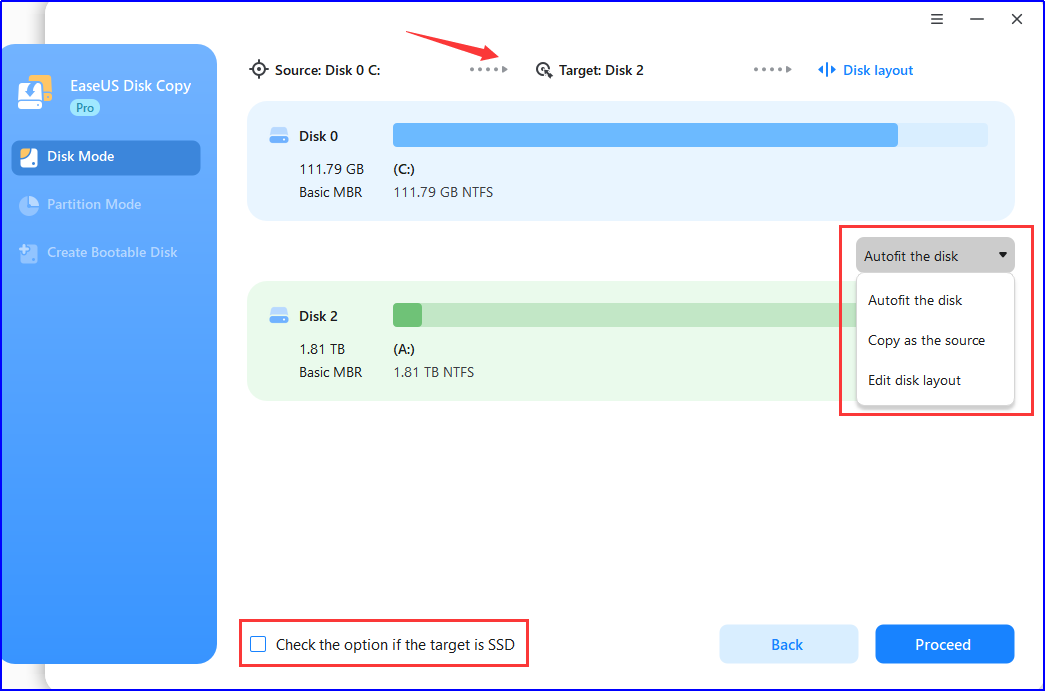
EaseUS Disk Copy's disk layout step: the 111.79 GB source above, the 1.81 TB target below, the Autofit / Copy as the source / Edit disk layout choices and the "target is SSD" check box (an earlier version's window).
EaseUS Disk Copy Pro does one job in three steps: choose the source, choose the target, check the layout. It handles HDD to SSD, SATA to NVMe and NVMe to NVMe, resizes partitions when the new drive is bigger or smaller, has a check box to optimize for an SSD target, and keeps the boot data so Windows starts from the copy. You can keep working while it copies. The Create Bootable Disk option writes a WinPE USB stick, so you can clone a PC whose Windows no longer boots.
Version 7 added disk images: you can save a disk to a file and restore it later, which helps on a laptop with one drive slot and no USB adapter. The catches: the free download is only a demo, older free versions still confuse search results, and a few buyers report a cloned drive that wouldn't start and paid remote help to finish. For a single job, the $19.90 monthly plan cancelled afterward is the cheapest way in.
What we like
- Three-step wizard with clear disk names and sizes
- WinPE bootable disk for a PC that won't start
- Image-to-file mode for single-slot laptops
Watch out for
- The download is a demo, not a free version
- Monthly and yearly plans renew automatically
- Some users needed paid help when the clone wouldn't boot
ConsumingTech (Mat Diekhake, Disk Copy Pro 6.0): "I thought EaseUS Disk Copy Pro was easy to use and understand in general." His complaint: "if I needed to go back a step, there was no navigation for it."
Trustpilot (EaseUS company page, 4.9 out of 5 from 39,743 reviews across all products): B Tomlinson (April 16, 2026): "Everything copied over perfectly and everything is in the same place."
EaseUS's Black Friday code BF2026 cuts Disk Copy Pro to $27.93 for a year and $41.93 lifetime until December 2, 2026; the regular prices above apply after that.
Download EaseUS Disk Copy DemoBuy EaseUS Disk Copy Pro
EaseUS Partition Master Professional
EaseUS Partition Master Professional includes the same kind of OS migration (Clone/Migrate OS) plus everything you might need around it: extending C: into the extra space after the move, converting the system disk from MBR to GPT for UEFI, and a WinPE boot disk. Its $69.95 lifetime license covers two PCs, against $59.90 for one PC with Disk Copy, so it's the better value if you'll also resize partitions. We compare it with other partition tools in Best Partition Manager for Windows 11. Black Friday code BF2026 brings it to $14.98 a year until December 2, 2026.
Download EaseUS Partition Master TrialBuy EaseUS Partition Master Pro
AOMEI Cloner Professional
AOMEI Cloner Professional: dedicated cloner with a 90-day refund
- Price: $59.95 lifetime or $39.95 a year, for 1 computer
- Version: 6.1.0, released October 27, 2026
- Runs on: Windows 11, 10, 8.1, 8 and 7, and Windows Server 2008 R2 to 2022
- Trial: previews and simulates; the actual clone needs a license

AOMEI Cloner's System Clone Confirmation: the source system partitions above, the destination disk below, and the SSD Alignment and Sector-by-Sector Clone check boxes.
AOMEI Cloner Professional is the cloning engine from AOMEI Backupper as a small program of its own: System Clone, Disk Clone (including one disk to several), Partition Clone and Bootable Media. It also runs on Windows Server, which the EaseUS and Hasleo home editions don't, and AOMEI's 90-day money-back guarantee is the longest here. Two warnings: several Trustpilot reviewers were surprised that the "free" download asks for payment to clone the system drive, and AOMEI's Backupper update servers were compromised in 2026, so download Cloner only from AOMEI's own site.
Download AOMEI ClonerBuy AOMEI Cloner Professional
DoYourClone for Windows
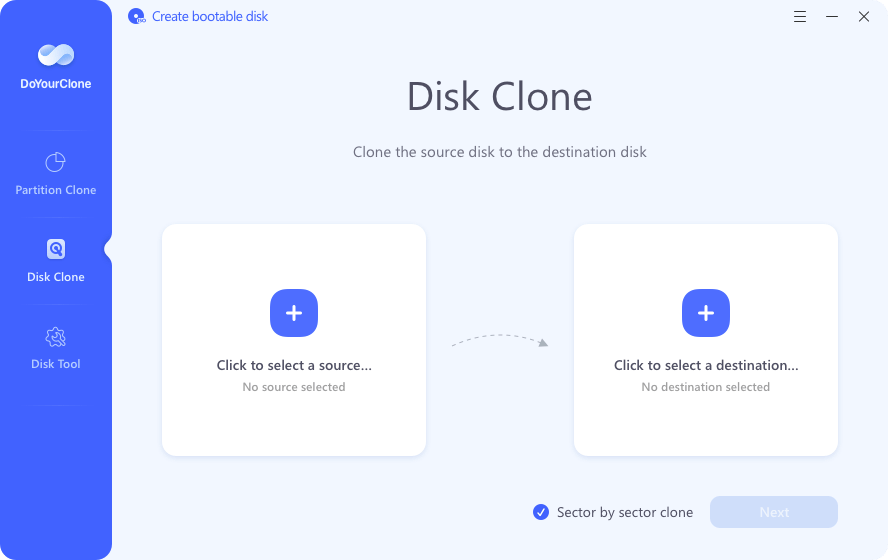
DoYourClone's Disk Clone screen: pick a source and a destination, with the Sector by sector clone box ticked by default.
DoYourClone for Windows is a plain disk and partition cloner with a bootable-disk builder, $49 for a 1-year license that covers 2 PCs. It runs on Windows Server too. It has the fewest independent reviews of any tool here (DoYourData's Trustpilot page shows 3.2 out of 5 from 7 reviews), and to clone onto a smaller SSD you have to untick its sector-by-sector option, which is on by default. Choose it only if the 2-PC yearly license suits you better than the alternatives.
Download DoYourClone TrialBuy DoYourClone for Windows
Price compared
Cheapest way to pay for one clone (USD)
Hasleo Disk Clone Free or NIUBI Partition Editor Free (home use)$0
EaseUS Disk Copy Pro (1 month)$19.90
EaseUS Partition Master Pro (1 month, 2 PCs)$19.95
NIUBI Partition Editor Pro (2 PCs, for work use)$39.00
AOMEI Cloner Professional (1 year)$39.95
Hasleo Disk Clone Professional (lifetime)$39.95
DoYourClone for Windows (1 year, 2 PCs)$49.00
Order-page prices checked on November 20, 2026 (NIUBI on November 7, 2026). Monthly and yearly plans renew automatically unless you cancel.
License you keep, with free upgrades (USD)
Hasleo Disk Clone Professional (1 PC)$39.95
EaseUS Disk Copy Pro (1 PC)$59.90
AOMEI Cloner Professional (1 PC)$59.95
NIUBI Partition Editor Pro, lifetime upgrades (2 PCs)$69.00
EaseUS Partition Master Pro (2 PCs)$69.95
DoYourClone for Windows is sold as a 1-year license only.
After the clone: make Windows start from the SSD
- Set the boot drive. Swap the drives, or open the BIOS/UEFI setup and put the new SSD (or "Windows Boot Manager" on it) first in the boot order. A UEFI PC needs a GPT disk; an older Legacy/CSM PC needs MBR, so keep the same style as the old drive unless you're switching the firmware mode.
- Check C:. Open File Explorer and confirm C: is the new SSD's full size. If there's unallocated space left after it, extend C: with Disk Management or a partition manager.
- Check TRIM and alignment. Windows turns on TRIM for SSDs automatically; the "SSD alignment" or "Optimize for SSD" boxes in the cloners make sure partitions start on the right boundary.
- Keep the old drive for a week. Once you're sure everything works, wipe it or use it for backups.
Moving to a new PC instead of a new drive?
Cloning copies a whole drive into the same PC. If you've bought a new computer that already has Windows 11, EaseUS Todo PCTrans Professional is the right tool: it copies installed programs, files, user accounts and settings from the old PC to the new one over the network, a cable or a backup file. It costs $49.95 for a month, $59.95 a year or $69.95 lifetime, for 2 PCs, and its free mode moves up to 2 GB of files and 5 programs. BF2026 brings the yearly plan to $17.98 until December 2, 2026.

EaseUS Todo PCTrans Pro's Data Transfer screen: choose "This is Old PC" on the computer you're leaving and "This is New PC" on the new one.
Download EaseUS Todo PCTransBuy EaseUS Todo PCTrans Pro
Which should you choose?
| Your situation | Pick | Why |
|---|
| Home PC, one-off SSD upgrade | Hasleo Disk Clone Free | System Clone at no cost |
| You want the most guided, simplest steps | EaseUS Disk Copy Pro | Three-step wizard, $19.90 for one month |
| You'll also resize partitions or convert to GPT | EaseUS Partition Master Pro | Migrate OS plus partition tools, 2 PCs |
| Work PC or Windows Server | AOMEI Cloner Professional | Business use and Server support, 90-day refund |
| You clone drives regularly | Hasleo Disk Clone Professional | $39.95 lifetime with Delta Clone and WinPE |
| New PC, not a new drive | EaseUS Todo PCTrans Pro | Moves programs and settings between PCs |
What commonly goes wrong
- Picking the wrong target. Every cloner erases the destination, and one Hasleo user found its overwrite warnings lacking, so read the disk names and sizes twice.
- The new SSD won't boot. Usually the boot order or firmware mode: set the new drive first, and match UEFI with GPT or Legacy with MBR. An older PC may need its firmware settings changed to match the disk.
- The old drive stops booting. After a clone, both drives may carry the same Windows. Remove or wipe the old one once the new one works rather than booting between them.
- Cloning to a smaller SSD with sector-by-sector on. A sector copy needs a target at least as large as the source. Untick it (DoYourClone ticks it by default) so the tool copies only used space.
- "Free" that isn't. EaseUS Disk Copy and AOMEI Cloner downloads plan a clone but ask for a license to run it; Hasleo Disk Clone Free and NIUBI Free don't.
- A failing old drive. If the old disk has bad sectors, a clone can stall partway, as one Hasleo user saw at around 40%. Copy your important files off first.
FAQs
Can I move Windows 11 to a new SSD for free?
Yes. Hasleo Disk Clone's free edition includes System Clone for home PCs, and NIUBI Partition Editor's free edition clones a disk with Windows on it. Windows' Backup and Restore (Windows 7) system image also works if the new SSD is at least as large as the old drive.
Do I need to reinstall Windows 11 after cloning to an SSD?
No. A system clone with Hasleo Disk Clone, EaseUS Disk Copy Pro or AOMEI Cloner copies Windows, your programs and settings, so the new SSD starts exactly like the old drive once it's set as the boot drive. Windows' activation is tied to the PC, not the drive, so it stays activated.
Can I clone a larger hard drive to a smaller SSD?
Yes, as long as the files actually used on the old drive fit on the SSD. EaseUS Disk Copy Pro, Hasleo Disk Clone and AOMEI Cloner resize partitions to fit; turn off sector-by-sector cloning, which needs a target at least as large as the source.
Is EaseUS Disk Copy free?
No. EaseUS Disk Copy Pro's download is a demo that plans a clone but asks for a license to run it. The cheapest way to use it for one clone is the $19.90 monthly plan, cancelled afterward; the lifetime license is $59.90.
How do I clone an SSD in a laptop with only one M.2 slot?
Put the new SSD in a USB enclosure or adapter, clone to it over USB, then swap it into the slot. EaseUS Disk Copy Pro can also save the old drive as an image file and restore it later, so both drives don't have to be connected at the same time.
What's the difference between cloning and EaseUS Todo PCTrans?
Cloning copies a whole drive, Windows included, onto a new drive in the same PC. EaseUS Todo PCTrans Professional moves installed programs, files and settings from an old PC to a new PC that already has its own Windows.
Will BitLocker cause problems when I move to a new SSD?
BitLocker may ask for the recovery key the first time the PC starts from the new SSD. Save the 48-digit key from your Microsoft account before you clone, and the PC will start normally once you enter it.
Conclusion
Start free: on a home PC, Hasleo Disk Clone's free System Clone moves Windows 11 to a new SSD without paying anything. If you want the simplest guided steps, a bootable rescue disk and support behind you, EaseUS Disk Copy Pro is our pick, at $19.90 for one month or $59.90 lifetime. Whatever you use, back up first, double-check the target disk, and keep the old drive until the new one has started cleanly.
Download EaseUS Disk Copy DemoBuy EaseUS Disk Copy Pro