EaseUS Partition Master Professional: Resize, Clone and Convert Windows Disks Without Starting Over
EaseUS Partition Master Professional is a Windows partition manager that resizes and merges partitions, extends a full C drive, moves Windows to a new SSD and converts a system disk from MBR to GPT without wiping it. One license covers 2 PCs and costs $49.95 a year, $19.95 a month, or $69.95 for a lifetime license.
The usual reason people reach for it: the C drive is red in File Explorer, there's plenty of free space on D, and Windows' own Disk Management refuses to move it across. Or you've bought a bigger NVMe drive and don't want to spend a weekend reinstalling Windows and every program. Partition Master lets you line up those jobs on a disk map, check the result, and run them in one go.
Quick facts
- Developer: EaseUS (Chengdu Yiwo Tech Development Co., Ltd.), also the maker of Data Recovery Wizard, Todo Backup and Disk Copy
- Version: 20.11, released September 24, 2026
- Platform: Windows 11, 10, 8.1, 8, 7 and Vista; not for Windows Server (that's the Server edition); a separate Mac product exists
- Price: $49.95 a year, $19.95 a month, or $69.95 lifetime, each for 2 PCs; verified students get 40% off
- Trial: the trial download lets you set up and preview operations, but it won't apply any of them until you enter a license key
- Guarantee: 30-day money-back if the software can't solve your problem
- File systems: NTFS, FAT12/16/32, exFAT, ReFS and EXT2/3/4 (EXT with a reduced set of operations)
- What we checked: the download from EaseUS's server (a 2.6 MB signed web installer, epm_trial_installer.exe, that fetches the full program), the version history showing 20.11 of September 24, 2026, the Free/Pro feature table on the product page, and the yearly plan at $49.95 and the lifetime license at $69.95 on the order page, all on November 19, 2026. We didn't resize or clone a disk ourselves.
Before you buy
The "trial" doesn't do any real work. EaseUS Partition Master's trial lets you queue a resize or a clone and see the planned layout, then asks for a license code when you press Execute. That's the most common complaint in its 1-star reviews. If all you need is a basic resize or format, the separate Free edition does apply those; the Professional license is for OS migration, disk cloning, system-disk MBR-to-GPT conversion and the WinPE rescue disk. And back up anything you can't lose first: changing partitions always carries some risk if the power fails or a disk has bad sectors.
Download Free TrialBuy Now
Overview
Partition Master has been EaseUS's partition tool for well over a decade, and version 20 is a long way from the old single-window disk list. The left sidebar now splits the work into Partition Manager, Disk Clone, Disk Converter, Partition Recovery, Bootable Media, Toolkit and a Discovery page of smaller utilities. You pick a disk on the map, choose what to do with it, and each change goes into a "Task in Queue" list instead of running immediately. Nothing touches the disk until you press Execute, and you can undo queued steps before then.
EaseUS updates it often. In 2026, version 20.0 (March) added one-click partitioning and full exFAT support, 20.2 (April) added drivers to WinPE boot media and exFAT partition recovery, 20.5 (June) added a disk space cleanup section for junk files, leftover app files and Windows update residue, 20.9 (September 2) redesigned the Diagnosis page, and 20.11 (September 24) added an erase option that wipes only the free space on a disk, also inside WinPE.
Features
Extend the C drive from space that isn't next to it
EaseUS Partition Master Professional can grow your C drive with free space taken from any other partition, even one that isn't adjacent, or from a second disk. Windows Disk Management only extends a volume into unallocated space directly behind it, which is why its "Extend Volume" option is so often greyed out. Partition Master moves the partitions in between for you, and its Allocate Space option shifts free space from D to C in one step. Resize/Move lets you drag a partition's edges on a bar, and Pro can resize several partitions at once and merge partitions that aren't side by side.
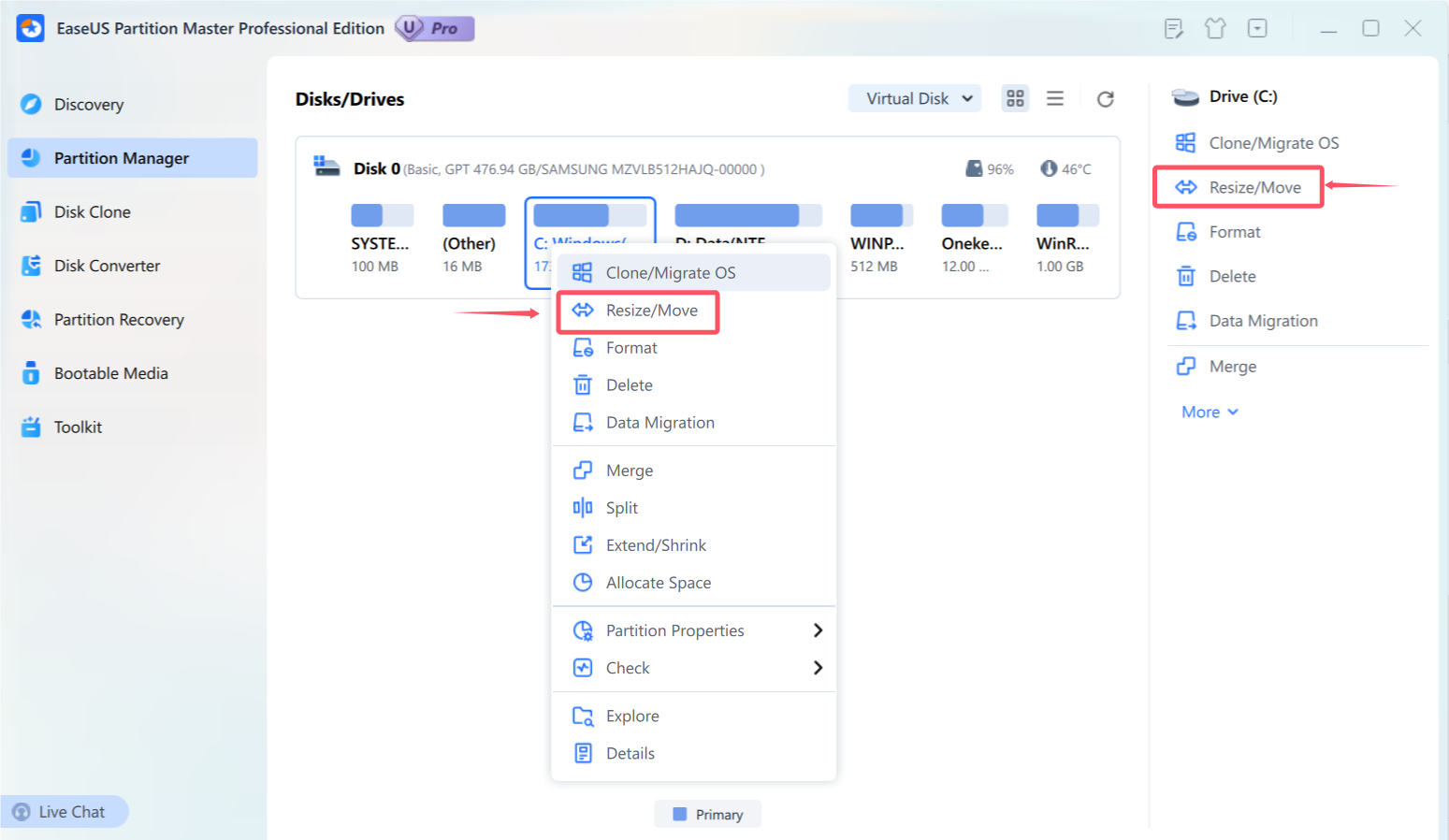
The Partition Manager view: right-click a partition on the disk map for Resize/Move, Merge, Split, Extend/Shrink and Allocate Space (red markings are from EaseUS's guide).
Move Windows to a new SSD without reinstalling
EaseUS Partition Master's Disk Clone section offers four modes. Migrate OS copies only Windows, the boot partitions and installed programs, so it fits a small SSD while your personal files stay on the old drive. Clone OS Disk copies the whole system disk, Clone Data Disk copies a non-system disk, and Clone Partition copies one partition to another. In the free edition only partition cloning works; disk cloning and OS migration need Pro.
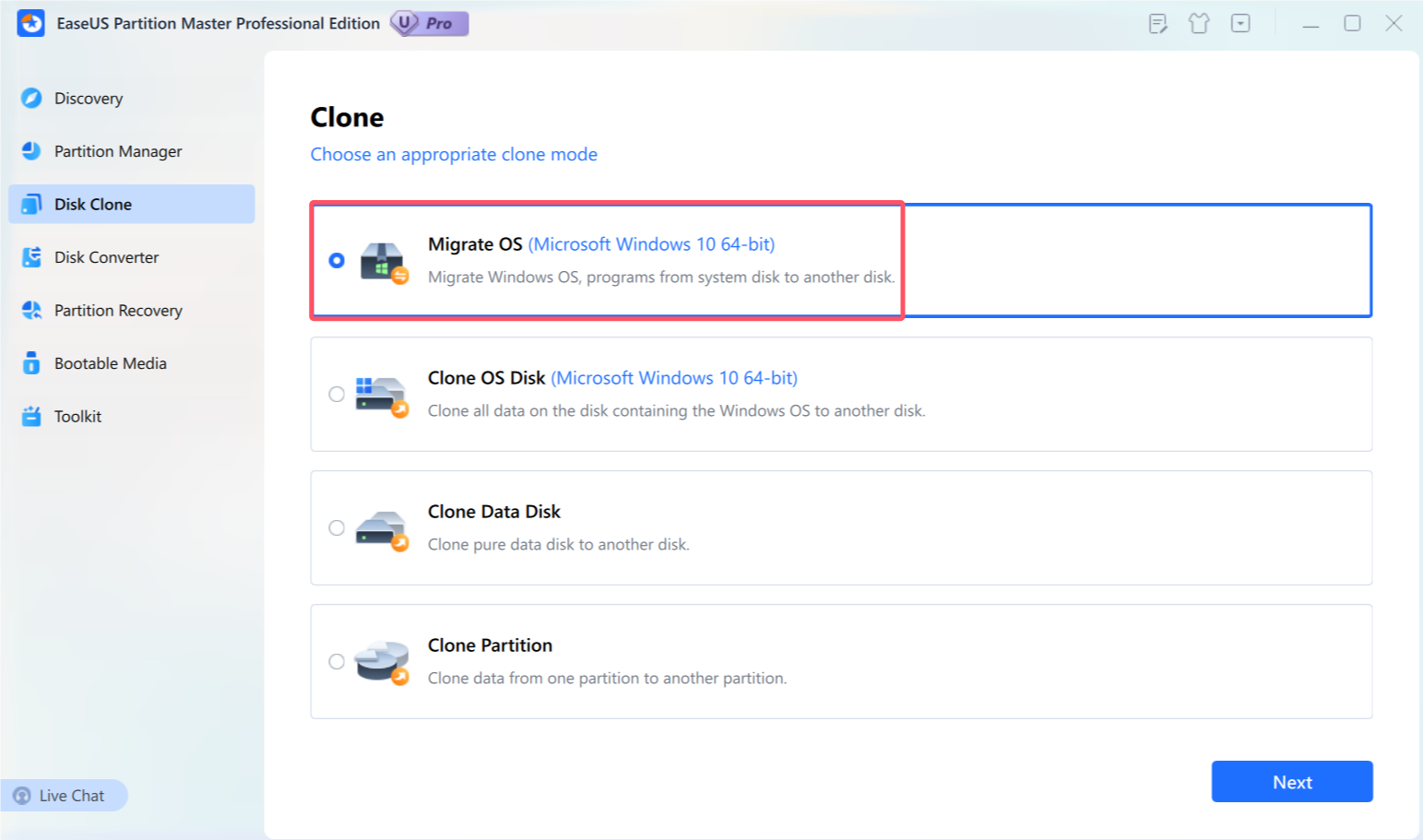
The Clone screen with its four modes; Migrate OS is selected for a Windows 10 64-bit system.
Convert a system disk from MBR to GPT, and other conversions
EaseUS Partition Master Professional converts the disk Windows runs from between MBR and GPT without deleting anything, which is what an older PC needs before switching to UEFI boot for Windows 11. GPT also removes MBR's four-primary-partition limit and its 2 TB ceiling. The Disk Converter also switches dynamic disks to basic, FAT to NTFS and back, FAT to exFAT, and primary partitions to logical. Data-disk MBR/GPT conversion and FAT/NTFS conversion are in the free edition too; the system-disk and dynamic-disk conversions are Pro only, as is changing a partition's cluster size.
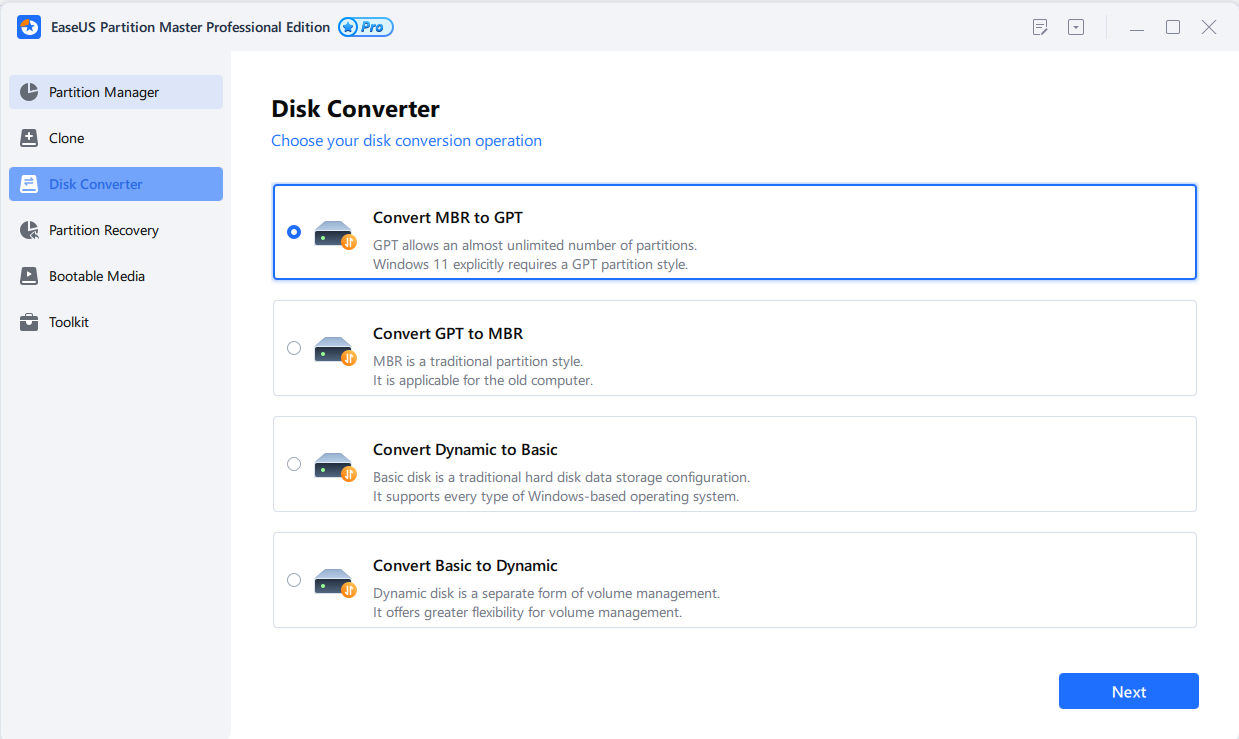
Disk Converter: MBR to GPT and back, dynamic to basic and back, FAT to NTFS, NTFS to FAT and FAT to exFAT.
A rescue disk for a PC that won't start
EaseUS Partition Master Professional builds a WinPE bootable USB stick, CD/DVD or ISO, or adds a "PreOS" entry to your PC's boot menu, so you can run the program without starting Windows. From there it can repair boot problems and rebuild the BCD/UEFI boot entries, reset a forgotten local or domain Windows password, and copy files off a system that no longer boots. Since version 20.2 you can add drivers when you build the media, which helps on PCs with unusual storage controllers. The WinPE creator is a Pro feature.
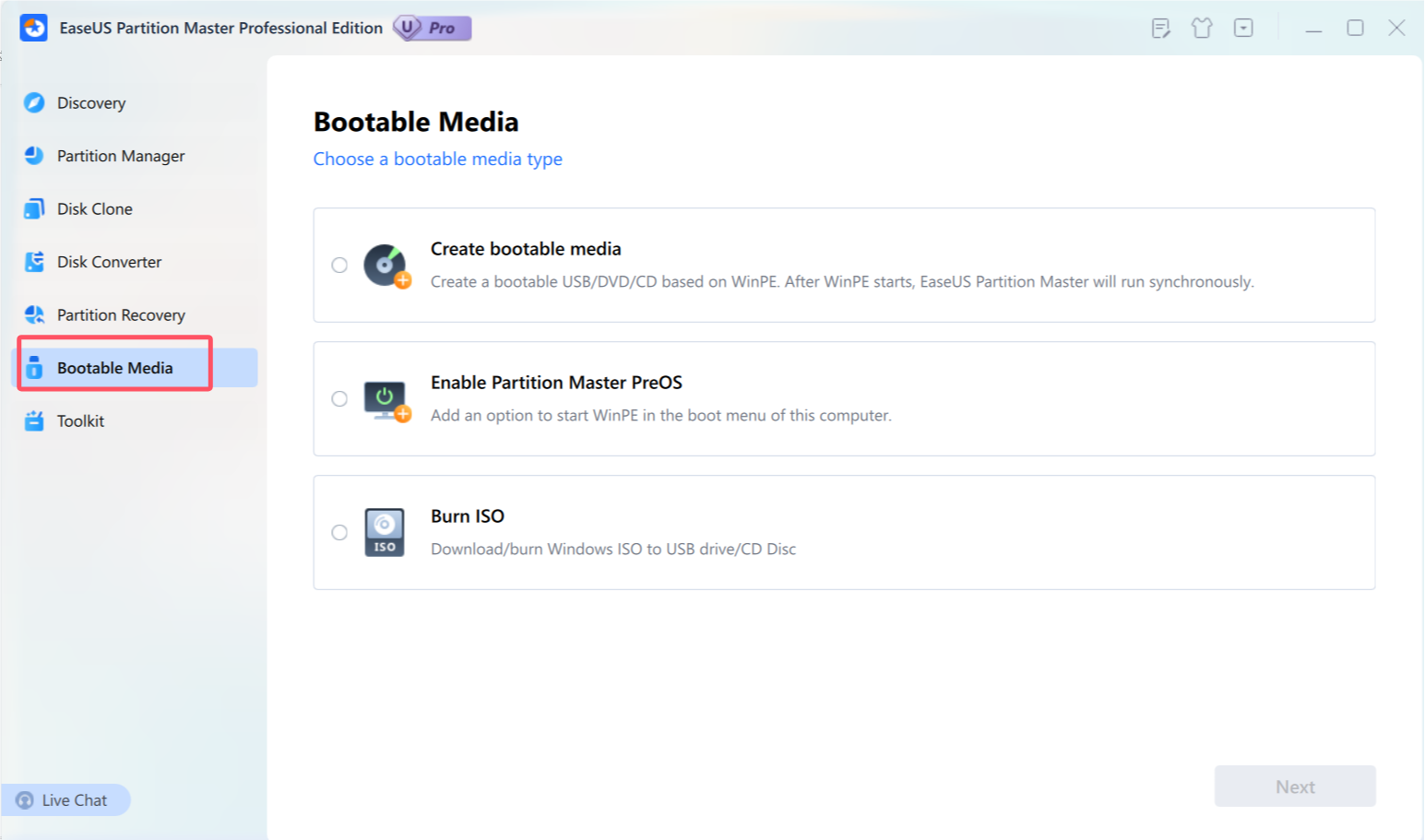
Bootable Media: create a WinPE USB/DVD/CD, add a PreOS entry to the boot menu, or download and burn a Windows ISO.
Partition recovery, BitLocker, health checks and wiping
EaseUS Partition Master also scans a disk for partitions lost after a bad Windows update, an accidental deletion or a damaged partition table, and brings them back (exFAT partitions since version 20.2). It resizes BitLocker-encrypted partitions without decrypting them and can retrieve a partition's BitLocker key. The Toolkit and Discovery pages add a surface test and file system check, S.M.A.R.T. health and temperature, a read/write speed test, a space analyzer, 4K alignment for SSDs, low-level formatting, a write-protection switch and disk wiping, now including free-space-only wiping.
Benefits
- You keep your Windows install. A clone or OS migration moves the system, programs and settings, so a drive upgrade takes an evening rather than a weekend of reinstalling and re-activating software.
- You see the result before anything changes. Every operation sits in the queue with the new layout drawn on the disk map, and you can undo it before you press Execute.
- One purchase covers two PCs, so a desktop and a laptop, or your PC and a family member's, share the license.
Real-World Uses
- The full C drive: a laptop has a 120 GB C partition at 98% and 300 GB free on D. Allocate Space moves 80 GB from D to C, Windows restarts once into boot mode to finish, and the files on D stay where they were.
- The SSD upgrade: you plug a 2 TB NVMe drive into a USB enclosure, run Clone OS Disk with autofit, then swap the drives and boot from the new one.
- The Windows 11 upgrade: an older PC's system disk is MBR, so Windows 11 setup won't pass. Converting it to GPT in place, then switching the firmware to UEFI, gets past the check without reinstalling.
- The PC that won't boot: after a failed update you start from the WinPE USB stick, rebuild the boot records, and copy your documents to an external drive first.
Who It's For, and Who Should Skip It
Partition Master Professional suits Windows home users and small offices who need to upgrade a drive, fix a cramped C partition or get a PC ready for Windows 11, and who want a guided tool instead of command lines. It's also handy to keep around as a rescue disk.
Skip it if you only need to shrink or format a partition once: the Free edition, or Windows Disk Management, already does that. Skip it on Windows Server, where you need EaseUS's Server or Unlimited edition. If you mainly want to clone drives and nothing else, a dedicated cloning tool such as EaseUS Disk Copy Pro costs less per year. And if you're comfortable with the command line, Windows already includes free tools (diskpart and MBR2GPT) that cover some of the same ground.
Usage Guide
- Install: run the small installer from EaseUS; it downloads the full program. To activate, click Activate in the top-right corner and paste your license code.
- Back up first: close other programs and back up important files, especially before touching the system disk.
- Extend a partition: in Partition Manager, right-click the partition, choose Resize/Move, drag its edge into the unallocated space, and click OK. The step joins the Task in Queue list.
- Clone or migrate: open Disk Clone, pick a mode, choose the source and the target disk, and check the layout. Cloning erases the target disk, and the program warns you before it does.
- Run it: click Execute Task(s), then Apply. If a partition is locked by Windows (the C drive usually is), the program restarts into its boot mode to finish the job; don't switch the PC off while it runs.
- Make the rescue disk: in Bootable Media, choose Create bootable media and a USB stick, or add PreOS to the boot menu.
Where it falls short
- BitLocker partitions can only be resized from their right edge, and EaseUS itself recommends decrypting the disk before resizing it.
- Dynamic disks: dynamic volumes also resize only from the right edge, and converting a dynamic disk to basic works only for simple and mirrored volumes, not spanned or striped ones.
- MBR-to-GPT can fail when the system disk already has four primary partitions, or when the system and boot partitions sit on different disks.
- Linux partitions (EXT2/3/4) get only create, delete, format, resize and sector-mode copy.
- Disk size: the guide lists support from 2 GB up to 16 TB per disk.
- Sales prompts: several reviewers complain that the free edition keeps showing upgrade offers, and a few say license activation on a new PC needed a call to support.
What Users Say
EaseUS as a company has a TrustScore of 4.9 out of 5 from 39,743 Trustpilot reviews, across all its products, with 93% five-star and 5% one-star. Many of the five-star reviews thank a named support agent rather than describe the software, so we've picked out the ones that are clearly about Partition Master. The Trustpilot excerpts below are short, exact extracts; we read them through a summarizing tool because Trustpilot blocks direct downloads.
Independent review: TechRepublic
Andy Wolber reviewed Partition Master Professional for TechRepublic on August 9, 2022. His summary: "With EaseUS Partition Master, a well-designed interface helps make technical partition management tasks easy to manage." On cloning: "EaseUS Partition Master makes this migration process simple, with a very clear, step-by-step approach." He also liked the warning before a clone wipes the target: "While experienced IT professionals likely don't need this notice, this information can be invaluable for people who might be less familiar with how a drive cloning process works."
His pricing advice still matches the current price list: "The best value for most people will be a lifetime license at $69.95, which provides one license for two PCs." He added that the free edition handles many partition tasks, "but you'll need to pay if you want to migrate your OS to a HDD/SSD, create bootable WinPE media or transfer files, apps and settings to a new disk or computer."
Trustpilot: what happy users say
- Derek Knight (5 stars, November 16, 2026), "Reliable and Versatile Partition Management with Excellent Customer Service as well, 5 stars!": "EaseUS Partition Master has helped me many times with all sorts of tasks"
- Ole S. (5 stars, April 28, 2026), on Partition Master Professional: "I use it when I get a new disk, and need to safely clone the old to a new disk,"
- Steve Marsh (5 stars, March 16, 2026), "Jesse was super helpful": "I bought a new pc and used the software to clone my M.2 to a new larger M.2."
- WK (5 stars, May 29, 2026), "Prompt customer service by Alex": "Partition Master is a wonderful program and the clone backup saved me hours of hard drive rebuilding."
- Jon Pretzel (5 stars, October 28, 2026): "I have been a licensed user of EaseUS Partition Master since 2018"
Trustpilot: the complaints
- Larry Johnson (1 star, September 8, 2026), "Don't pay for products use the Free version", about Todo Backup and Partition Master: "When I went to install on the new PC and tried to register my software I was told my registration was already used." and "This policy is too restrictive."
- Steve Whitlock (1 star, December 26, 2025), "They gave me the old bait and switch…", a lifetime Partition Master Pro owner: "Even their version 19 doesn't do what it says it will."
- Mike Gibson (2 stars, November 20, 2025), "They're a bit dodgy", about the checkout basket: "Yes, you can remove from the basket but when it says £0, you assume you don't need to."
- Brian Ward (2 stars, February 19, 2024), "Free version is no longer free.": "always pops up the sales page."
- Walter Miller (1 star, July 9, 2024), about Partition Master Professional 17.8: "I will put my money on Macrium Reflect."
The pattern is consistent. People who use it for what it's built for, extending C, cloning to a bigger SSD, praise how easy it is and how quickly support answers on live chat. The complaints are mostly about the business side: the trial and free edition pushing upgrades, license activation when moving to a new PC (EaseUS says it resets the code on request), and items to untick at checkout. A smaller group reports clones or boot media that didn't work, which is a reminder to keep a backup before any disk operation.
Comparisons
Free edition vs Professional
Both run the same program; a license key turns on the Pro features. From EaseUS's own feature table:
| Task | Free | Professional |
|---|
| Create, delete, format, wipe, 4K align | Yes | Yes |
| Resize one partition, merge adjacent ones | Yes | Yes |
| Extend C from another disk, allocate space, merge non-adjacent | No | Yes |
| Clone a partition | Yes | Yes |
| Clone a disk, migrate OS to SSD | No | Yes |
| MBR/GPT on a data disk, FAT32/NTFS | Yes | Yes |
| MBR/GPT on the system disk, dynamic to basic, cluster size | No | Yes |
| BitLocker partition management | No | Yes |
| Check file system, surface test, rebuild MBR | Yes | Yes |
| WinPE boot USB, boot repair, PreOS | No | Yes |
Partition Master Professional vs Windows Disk Management
Windows' built-in Disk Management is free and fine for creating, formatting and shrinking partitions. It can only extend a partition into unallocated space right after it, can't move partitions, and doesn't clone disks or migrate Windows. Partition Master Pro is worth paying for when you hit one of those walls.
Partition Master Professional vs EaseUS Disk Copy Pro
Disk Copy Pro does one thing, cloning disks and partitions, for $39.90 a year on one PC. Partition Master Pro clones too, but adds all the partition and conversion tools and covers two PCs for $49.95 a year. If you'll only ever clone, Disk Copy is the cheaper pick; if you also need to fix partitions, Partition Master does both.
Editions and Pricing
The Professional prices below are from EaseUS's order page on November 19, 2026, in US dollars. Each plan covers 2 PCs, and monthly and yearly plans renew automatically until you cancel.
| Plan | Price | Updates | PCs |
|---|
| Monthly | $19.95 a month (list $29.95) | While subscribed | 2 |
| Yearly | $49.95 a year | While subscribed | 2 |
| Lifetime | $69.95 once (list $79.95) | Lifetime free upgrades | 2 |
| Student (verified) | $17.97 / $29.97 / $41.97 | Same as above | 2 |
The lifetime license costs only $20 more than one year, so unless you need the tool for a single job, it's the better buy. For a single job, the monthly plan is the cheapest way in; just cancel it afterwards. EaseUS also sells Server (Windows Server, 2 PCs), Unlimited (any number of PCs and servers in one company) and Technician (for paid service work) editions, plus a free edition. Payment is by credit card, PayPal or wire transfer.
FAQs
Can I move my EaseUS Partition Master license to a new computer?
Yes. EaseUS Partition Master licenses aren't tied to one machine forever: when you replace a PC, contact EaseUS by email or live chat and they reset the license code so you can activate it on the new one. Several Trustpilot reviewers mention having to do exactly that.
Will EaseUS Partition Master's Migrate OS move only Windows or my whole C drive?
EaseUS Partition Master's Migrate OS copies the whole system and boot partitions so the new drive starts properly. Since C is usually the system partition, everything on C goes along, including files you saved there.
Does EaseUS Partition Master need to restart Windows?
Sometimes. EaseUS Partition Master applies most changes while Windows runs, but when a partition is in use by Windows or another program, such as the C drive, it restarts into a boot mode to finish. Closing other programs first reduces the chance of that.
What happens if the power fails during a resize?
EaseUS Partition Master has a power-off protection feature that, according to EaseUS, protects disk sectors and rolls changes back after a sudden power loss. No tool can promise that for every case, so keep a backup and use a laptop on mains power.
Can EaseUS Partition Master Professional be used on Windows Server?
No. EaseUS Partition Master Professional is for desktop and laptop Windows; Windows Server needs the Server edition, and a company that wants it on many machines needs Unlimited.
Can I get a refund for EaseUS Partition Master?
EaseUS Partition Master comes with a 30-day money-back guarantee when the software can't solve your problem, and subscriptions can be cancelled at any time. Some Trustpilot reviewers report trouble getting a refund, so try the free edition first if you're unsure.
Is there a Mac version of EaseUS Partition Master?
EaseUS sells a separate Partition Master for Mac. This Professional license is for Windows only.
System Requirements
- Windows: 11, 10, 8.1, 8, 7 or Vista (Server needs the Server edition)
- Processor: x86 or compatible, 500 MHz or faster
- Memory: 1.5 GB RAM or more
- Disks: IDE, SATA, eSATA, SCSI, FireWire, SATA/M.2/NVMe SSDs, USB drives, memory cards and hardware RAID, from 2 GB to 16 TB
- File systems: NTFS, FAT12/16/32, exFAT, ReFS, EXT2/3/4
- Download: 2.6 MB web installer that downloads the full program
Conclusion
EaseUS Partition Master Professional is worth buying if you have a real disk job in front of you: a C drive that's out of room, a move to a bigger SSD, or an MBR disk standing between you and Windows 11. It takes the fear out of those jobs with a clear queue-then-execute workflow, and the $69.95 lifetime license for two PCs is the sensible plan for most people. The main reason to hold back is that the trial can't prove it works on your PC before you pay, and EaseUS pushes upgrades hard. If your task is a simple resize, try the Free edition first; if you need cloning, OS migration or a rescue disk, Pro is the one to get.
Download Free TrialBuy Now