EaseUS MobiSaver for Android: Recover Contacts, Messages and Photos from an Android Phone
EaseUS MobiSaver for Android is a Windows program that scans a connected Android phone, its SD card and Google Drive for deleted contacts, text messages, photos, videos, documents and WhatsApp chats, and saves what it finds to your PC. It costs $39.95 a year or $59.95 for a lifetime license for one phone, but it's an older tool: a full scan of the phone's internal memory needs a rooted phone, and the newest version is from March 2024.
The situation it's built for is familiar: you cleared a message thread by mistake, a factory reset took your contacts with it, or a broken phone still holds photos you never backed up. Plug the phone into the PC, let MobiSaver scan, and it shows what it can still read. Whether it finds anything on a current phone is the real question, so read the next box before you spend money.
Quick facts
- Developer: EaseUS (CHENGDU YIWO Tech Development Co., Ltd.), the maker of Data Recovery Wizard
- Version: 7.0.0, the newest installer EaseUS offers, dated March 20, 2024
- Runs on: a Windows 11, 10, 8.1, 8 or 7 PC; there's no Mac version
- Phones: Android 4.0 or later; EaseUS says over 6,000 phones and tablets from Samsung, Google, Motorola, OnePlus, Huawei, Sony, LG and others
- Sources: internal memory, the SD card in the phone, and Google Drive
- Price: $39.95 a year or $59.95 lifetime for 1 PC and 1 device; $79.95 lifetime for 5 devices
- Guarantee: 30 days, for technical problems EaseUS support can't solve (not for a change of mind)
- What we checked: the newest installer on EaseUS's download center, MobiSaverForAndroid7.0.0_free.exe (181,484,192 bytes, file version 7.0.0, dated March 20, 2024), the 1.6 MB web installer behind the Free Trial button, EaseUS's own guide on rooting, and the three plans on the order page on November 19, 2026. We didn't run a scan on a phone ourselves.
Before you buy: root, and age
EaseUS MobiSaver for Android needs root for a full scan of internal memory. The product page says it recovers "without root", but EaseUS's own guide to rooting says the desktop program "allows you to fully scan and restore Android internal memory data in only 3 steps after rooting", and points people who won't root to a different product, the MobiSaver phone app. Rooting a phone can void its warranty, as EaseUS itself warns. Without root, its best chances are the SD card and Google Drive, not long-deleted files in the phone's memory.
It also shows its age. The newest version is from March 2024, the product page's examples are a Samsung Galaxy S3 and an HTC phone, and the screenshots show a Nexus 6. Run the free download on your own phone first and buy only if the scan lists the files you want. Several Trustpilot reviewers who bought first and found nothing were refused refunds.
Download Free TrialBuy Now
Overview
MobiSaver for Android is EaseUS's desktop Android recovery tool, sold next to the iPhone edition of MobiSaver. It runs on the PC, recognizes the phone when you plug it in, analyzes it and then lists what it found by category: contacts, messages, gallery photos, videos, audio and documents, with a count of found items next to each.
Deleted items appear in orange next to the ones still on the phone, and a switch hides everything except the deleted ones. You tick what you want and save it to a folder on the PC. Recovered contacts can be exported as CSV, HTML or VCF, and messages as HTML for reading or printing.
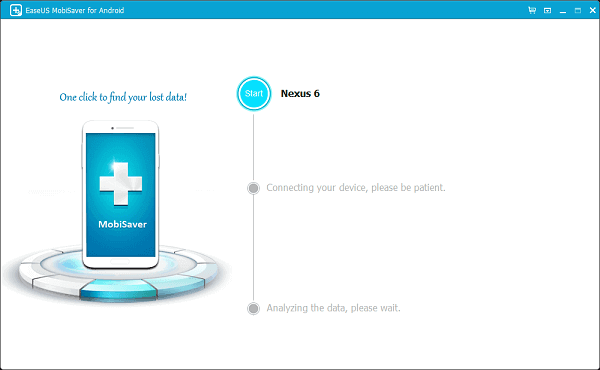
The start screen with a Nexus 6 connected (EaseUS's own guide screenshot, from an older version).
Features
Contacts, messages, photos, videos, audio and documents
EaseUS MobiSaver for Android looks for contacts, SMS, photos, videos, music and voice memos, notes, documents, and WhatsApp and WhatsApp Business messages. Each category shows found and total items, and the right-hand pane previews the selected contact, message or picture before you save anything.

A scan in progress: contacts listed with deleted entries in orange, and the categories with their counts on the left.
Three places to look: phone memory, SD card and Google Drive
EaseUS MobiSaver for Android scans the phone's internal memory, the memory card inside the phone, and your Google Drive. The SD card and Google Drive are where it has the best chance without root; the internal-memory scan for permanently deleted files is the part that needs a rooted phone.
Save to the PC and export in common formats
EaseUS MobiSaver for Android saves recovered files to any folder on your PC rather than back onto the phone, so it doesn't overwrite what you're still trying to recover. Contacts can go out as CSV (for Excel or Google Contacts), HTML or VCF, and messages as HTML pages you can read or print.
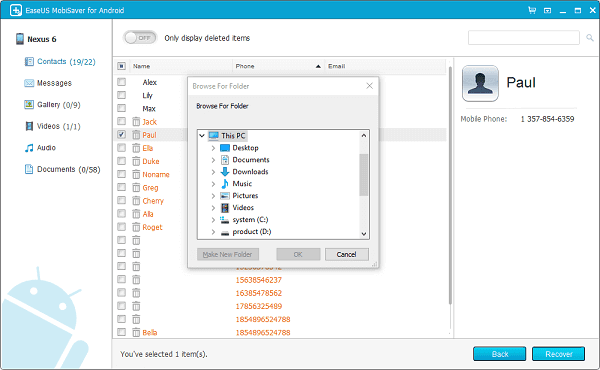
Choosing a folder on the PC for the selected contact, with "Only display deleted items" at the top.
Who It's For, and Who Should Skip It
It suits people with an older or already rooted Android phone, people whose lost photos were on the SD card, and anyone who wants their contacts and messages pulled into files on a Windows PC. The 5-device lifetime license is reasonable for a family with several older phones.
Skip it if you have a recent phone you can't or won't root and the files were deleted from internal memory: check Google Photos' trash, your Google account's contacts and your phone's own backup first, since they're free and often have the file. Skip it too if you use a Mac, since there's no Mac version.
Usage Guide
- Stop using the phone as soon as you notice the loss, so new data doesn't overwrite what you want back.
- Click Download Free Trial to open EaseUS's product page, and use its Free Trial button. It's a small web installer that fetches the program onto your Windows PC.
- Launch EaseUS MobiSaver for Android and connect the phone with its USB cable. It recognizes the device and starts connecting.
- Let it analyze and scan the phone. This can take a while on a phone with a lot of storage.
- Pick a category on the left, switch on "Only display deleted items" if you only want what was lost, and preview the items.
- Tick the items, click Recover and choose a folder on the PC. Don't save them onto the phone until you have everything back.
Where it falls short
- The "without root" claim is narrower than it sounds. Several Trustpilot buyers say they only learned about the root requirement after installing or buying.
- No updates since March 2024. Recent Android versions and phones aren't named anywhere on EaseUS's pages.
- Scans can find nothing. One 2024 reviewer's Sony Xperia 1 II scan turned up no documents or pictures at all.
- The free download doesn't say what it will recover. EaseUS doesn't publish the free edition's limits, and one reviewer says it recovered nothing without a purchase.
- Refunds are for technical faults only, and only after EaseUS support has tried to help.
What Users Say
Independent reviews of the Android edition are scarce. EaseUS as a whole scores 4.9 out of 5 from about 39,700 Trustpilot reviews, almost all about other products; the reviews that name MobiSaver tell a different story, and most of them are about the Android edition.
Trustpilot: complaints
These are excerpts from the reviews.
Игор С, 1 star, "Keep away" (August 2024): "Just both EaseUS MobiSaver for Android, phone is connected, cannot find even one document picture or etc..." The phone was a Sony Xperia 1 II.
Mr Donald Bacon, 1 star, "Not free!" (January 2024): "EaseUS MobiSaver For Android claims to be a free trial, but cannot recover anything without purchase."
WILLOW HUNTER, 1 star (June 2023): "I got the mobisaver version on my PC and it was supposed to be straightforward and done in a few clicks". The reviewer says that after an hour of setup the program asked for the phone to be rooted.
Mike, 1 star, "No longer a trusted company" (October 2021): "I discovered it is a requirement to ROOT the phone before using Mobi Saver." The reviewer says the refund was refused.
Fabio Ground, 1 star (October 2019): "Their EaseUS MobiSaver for Android did NOT work at all."
Trustpilot: praise
Aron Finch, 5 stars (November 2025): "Easeus Mobisaver software is awesome. It provided me with preview what data can be recovered." The reviewer used it to get back documents lost in a factory reset.
Mister C., 4 stars, "I appreciate this software" (February 2023): praises the contact recovery but adds "I am unable to find the "root" setting, in my Android device, to permit the software's access to the hard drive."
Softonic and EaseUS's own page
Softonic rates the free edition 4.2 out of 5 from 9 user ratings, listing "Smooth data recovery process" and "Data can be backed up on PC" as pros and "Larger storages will take longer to scan" as the con.
Customer reviews on EaseUS's product page: Sarah: "Thank you so much for helping me retrieving tons of precious pictures and contacts from my Samsung S3! It's the best software for Android data recovery!" Luis: "I formatted my HTC phone and lost so many important files. Thanks to mobisaver I get all the lost files back!" Summy: "I used your product to recover my photos from a broken Samsung smartphone. Thanks so much!"
The pattern is clear. Happy users praise the preview and the contact and photo recovery, often on older phones, and the vendor's own testimonials date from the Galaxy S3 era. The complaints are consistent and recent: the root requirement surprised buyers, scans on newer phones found little or nothing, and refunds were refused.
Comparisons
MobiSaver for Android (desktop) vs the MobiSaver phone app
The desktop program runs on Windows and does the full internal-memory scan after rooting. The MobiSaver app on Google Play runs on the phone itself, and EaseUS recommends it for recovering recently deleted files without root once its Backup and Restore feature is turned on. If you won't root, try the app first.
MobiSaver for Android vs EaseUS Data Recovery Wizard
For photos and videos on a removable SD card, EaseUS's own guide suggests taking the card out and scanning it in a card reader with Data Recovery Wizard, which needs no root. EaseUS also sells the two together at $50 off ($89.90 a year or $179.90 lifetime).
MobiSaver for Android vs MobiSaver (iPhone)
The iPhone edition is a separate product with its own license; it reads iPhones and iTunes backups, and doesn't need a jailbreak.
Editions and Pricing
| Plan | Price | Term | License |
|---|
| Yearly | $39.95 | 1 year of upgrades, cancel anytime | 1 PC, 1 Android device |
| Lifetime Upgrades | $59.95 | One-time payment | 1 PC, 1 Android device |
| Lifetime Upgrades | $79.95 | One-time payment | 1 PC, 5 Android devices |
All plans include 24/7 technical support, prices exclude VAT, and the license arrives by email. The Buy Now button opens the order page with all three plans. A Technician edition for businesses that recover data for clients covers an unlimited number of Android devices.
FAQs
Do I have to root my phone to use EaseUS MobiSaver for Android?
EaseUS MobiSaver for Android needs root for a full scan of the phone's internal memory, according to EaseUS's own rooting guide. Without root it's limited mainly to the SD card and Google Drive.
Does EaseUS MobiSaver for Android work with Android 14, 15 or 16?
EaseUS only states Android 4.0 and later, and the newest version is from March 2024, so recent Android versions aren't specifically supported. Test the free download on your phone first.
Can EaseUS MobiSaver for Android recover deleted WhatsApp messages?
EaseUS MobiSaver for Android lists WhatsApp and WhatsApp Business messages among the data it recovers, subject to the same root requirement for the phone's internal memory.
Is there a Mac version of EaseUS MobiSaver for Android?
No. EaseUS MobiSaver for Android runs only on Windows. EaseUS's Mac edition of MobiSaver is for iPhones.
Can I get a refund if EaseUS MobiSaver for Android finds nothing?
EaseUS MobiSaver for Android has a 30-day money-back guarantee, but EaseUS refunds only technical problems its support can't fix, after you let support try. Run the free scan before buying so you don't have to rely on it.
Can I use one EaseUS MobiSaver for Android license on two phones?
The $39.95 yearly and $59.95 lifetime licenses cover one PC and one Android device. For up to five phones, the $79.95 lifetime license covers them on one PC.
System Requirements
- A PC with Windows 11, 10, 8.1, 8 or 7
- An Android phone or tablet running Android 4.0 or later, and its USB cable
- Root access for a full scan of the phone's internal memory
- Internet connection for the web installer and for Google Drive scans
- Interface languages: English, German and French
Conclusion
EaseUS MobiSaver for Android is a straightforward tool from a known recovery vendor, with a clear preview, PC-side saving and fair prices ($39.95 a year, $59.95 for life). The one reason to buy it is a rooted or older phone, or lost files on an SD card, where its scan can find what the phone's own tools can't. The main reason not to is that on a modern, unrooted phone it often can't reach deleted data at all, and it hasn't been updated since March 2024. Treat the free scan as the deciding test: buy only if it already shows the files you're after.
Download Free TrialBuy Now