EaseUS Data Recovery Wizard for Mac: Get Back Deleted, Formatted and Lost Files on macOS
EaseUS Data Recovery Wizard for Mac is a Mac app that finds and restores files you deleted, emptied from the Trash or lost to a formatted, corrupted or missing volume, on the Mac's own drive and on external disks, USB sticks and SD cards. It runs on macOS 10.9 through macOS 27, and a license for one Mac costs $119.95 with a year of updates (one-time payment, no renewal).
You emptied the Trash and then remembered the folder you needed. Or a camera card now says it needs formatting, or an external drive shows up in Disk Utility with no usable volume. That's the moment this app is built for: point it at the drive, let it scan, preview what it found and save the files somewhere safe.
Quick facts
- Developer: EaseUS (CHENGDU YIWO Tech Development Co., Ltd.), founded in 2004
- Version: 20.9.0, released September 2026, which added macOS 27 support
- Platform: macOS 10.9 Mavericks to macOS 27, Intel and Apple silicon (M1, M2, M3) Macs and T2 Macs; the Windows version is a separate product
- File systems: APFS, HFS+, HFS X, exFAT, NTFS, FAT16 and FAT32
- Price: $89.95 with 1 month of updates, $119.95 with 1 year of updates, $169.95 with lifetime updates; each is one license for one Mac, paid once
- Trial: scans and previews everything it finds, but can't save files; the separate Free edition saves up to 2 GB
- Guarantee: 30-day money-back guarantee if the software can't solve your problem
- What we checked: the trial installer from EaseUS's download server (datarecovery_trial_Setup_20261118.dmg, 4,808,555 bytes, a small downloader that fetches the app), the release notes listing version 20.9.0 for September 2026, and the three plans on the order page: $89.95, $119.95 and $169.95 in US dollars, each labeled "no auto-renewal", on November 19, 2026. We didn't run a recovery on a damaged drive.
Download Free TrialBuy Now
Overview
EaseUS has sold Data Recovery Wizard for Mac for more than a decade, and it's one of the best-known do-it-yourself recovery apps on the platform. The workflow is the same three steps it has always been: choose a location, scan, then filter, preview and recover. What has changed is the engine underneath. Recent releases added faster lost-partition discovery (19.6, November 2025), Time Machine snapshot parsing and better APFS recovery on the system drive (20.6, June 2026), fragmented photo and video rebuilding for SD cards (20.4 and 20.7) and automatic file repair when a preview fails (20.8).
The sidebar shows where it can look: the Mac's internal volumes, SD cards, iCloud, and an Unbootable Mac mode, plus extra tools for video repair, disk backup images and creating a macOS installer.
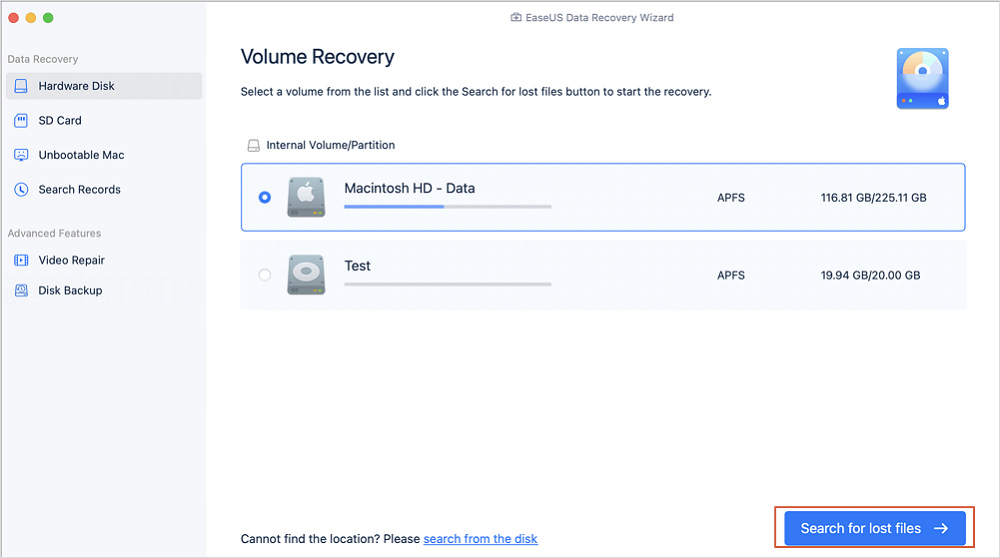
Volume Recovery: the Mac's APFS and exFAT volumes, with Hardware Disk, SD Card, iCloud and Unbootable Mac in the sidebar and the Search for lost files button.
Features
Deleted, formatted and lost-volume recovery
EaseUS Data Recovery Wizard for Mac recovers files after deletion, an emptied Trash, formatting, a lost or repartitioned volume, a virus attack, a system crash or a bad macOS restore. A quick scan lists recently deleted files first, and a deep scan then reads the whole volume for more. Files whose names and folders survived come back with them; files found only by their content (RAW recovery) come back with generated names, which is why a big scan can list thousands of files called things like FILE001.JPG.
Results sorted by type, with filter and search
EaseUS Data Recovery Wizard for Mac groups what it finds into Pictures, Videos, Documents, Audio, Archives, Emails, Unsaved Files, Browser Bookmarks and Others, or by the original folder path. You can filter by size and type, search by name or extension, and save the scan results so you don't have to rescan the drive later.
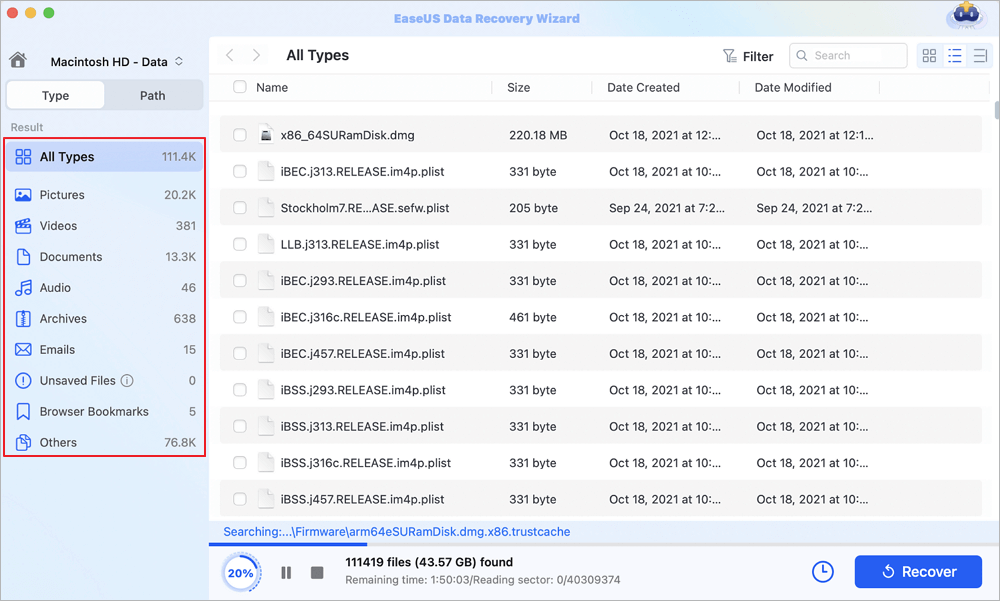
A scan of Macintosh HD - Data at 20%: 111,419 files (43.57 GB) found so far, sorted into Pictures, Videos, Documents, Emails and other types.
Preview before you recover
EaseUS Data Recovery Wizard for Mac opens photos, videos and documents in a preview window while the scan is still running, so you can check a file is intact before you pay or save it. Since version 20.8 it suggests similar files and tries an automatic repair when a preview fails.
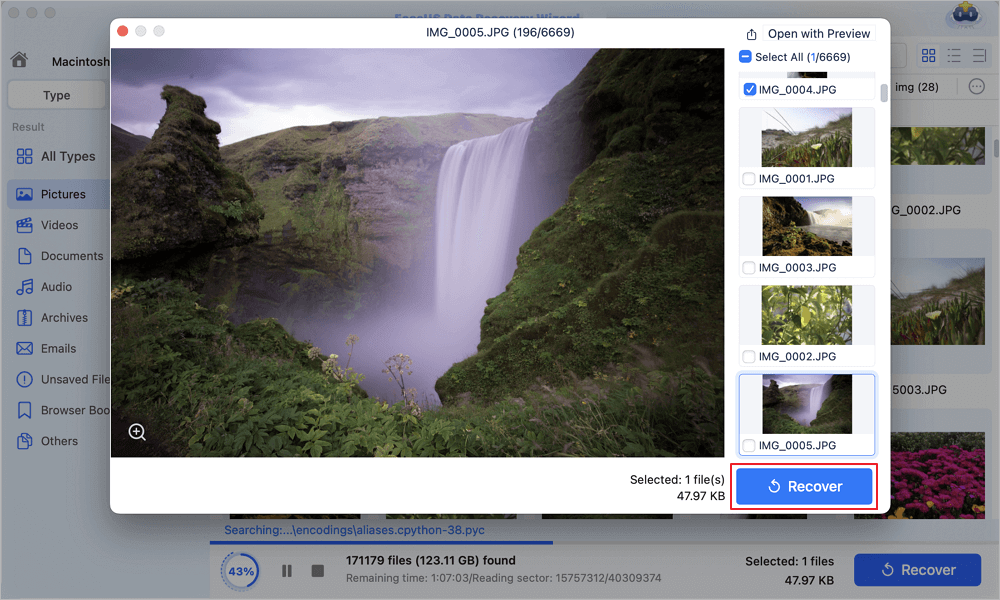
Previewing a found JPG (196 of 6,669 pictures) with thumbnails of the others and the Recover button.
A bootable USB drive for a Mac that won't start
EaseUS Data Recovery Wizard for Mac Pro can build a bootable USB drive, so you can start a Mac whose macOS no longer boots and copy its files to another disk. This is a Pro feature; the Free edition doesn't have it.
Backups, disk images and cloud saving
EaseUS Data Recovery Wizard for Mac Pro recovers files from Time Machine and iTunes backups, can save an image of a failing disk and scan the image instead of the drive, and can send recovered files straight to Dropbox, Google Drive, OneDrive or iCloud as well as another drive.
SD card and camera footage rebuilding
EaseUS Data Recovery Wizard for Mac Pro includes SD card recovery (not in the Free edition) and three rebuilding engines EaseUS calls SDR, DVR and SSR: they find lost SD card partitions, reassemble video fragments from cameras, drones and action cams so the clips play, and rebuild fragmented photos from cards and USB drives that have been filled and erased many times. It also repairs corrupt videos and pictures.
Benefits
- You see before you pay. The trial shows exactly which files it can find and lets you open them, so you only buy once you know your files are there.
- No subscription. Unlike most EaseUS products, the Mac plans are one-time payments; the shorter plans only limit how long you get new versions.
- Non-technical. There's no command line and no partition-table jargon: you pick a drive and press one button.
- A person to call. Paid users get free one-on-one remote help, which matters when a recovery isn't going to plan.
Real-World Uses
- The emptied Trash. You cleared the Trash to free space and a project folder went with it. A scan of the Mac's data volume lists the deleted files by folder.
- The wrong disk erased. You formatted an external drive in Disk Utility, picking the wrong one. A deep scan of that drive finds the files from the old volume.
- The drone or camera card. An SD card shows as unreadable, or clips play as broken files. SD card recovery and the video rebuilding engine try to put the footage back together.
- The Mac that won't boot. After a failed update, macOS won't start. A bootable USB from another Mac lets you copy the documents off before anyone reinstalls.
Who It's For, and Who Should Skip It
EaseUS Data Recovery Wizard for Mac fits home users and small offices who lost files to a mistake or a software problem and want to get them back themselves, on a drive that still works and still shows up in Disk Utility.
Skip it if the drive clicks, isn't detected at all or has been dropped: no software helps there, and running scans on a dying disk can make things worse, so a recovery lab is the right call. If you only lost a few small files, try the Free edition first, which saves up to 2 GB. If you recover data for clients, the Pro license doesn't allow that; EaseUS sells a separate Technician edition ($299) for service providers. And if you're on Windows, you need Data Recovery Wizard for Windows instead.
Usage Guide
- Install on a different drive than the one you lost files from if you can. Download the trial (a small .dmg downloader), open it and let it install the app.
- Choose the location. Pick the volume under Hardware Disk, or SD Card, iCloud or Unbootable Mac, and click Search for lost files.
- Let the scan run. The quick scan results appear first; the deep scan keeps adding files. You can pause or stop it at any point.
- Filter and preview. Use the Type or Path tabs, the filter and search box, and open files to check they're intact.
- Activate and recover. Enter your license code, tick the files you want and click Recover. Save them to a different drive, never back onto the one you're recovering from.
Before you buy
- Stop using the drive. Every new file written to it can overwrite what you want back. Don't install apps or download the trial onto it.
- Run the trial first. The trial is the real test: if the preview opens your files, the paid version will save them. If the files you need aren't in the results, paying won't change that.
- Pick the plan by how long you'll use it. For a one-off rescue, the $89.95 plan does the same recovery as the others; it just stops getting new versions after a month.
- Trial vs Free edition. They are different downloads. The trial can't save anything; the Free edition saves 500 MB, rising to 2 GB after you share it on social media, and doesn't cover SD cards.
Where it falls short
- Deep scans are slow. EaseUS's own FAQ gives 10 to 12 hours for a healthy 1 TB hard drive, and reviewers say the same.
- Unmounted or undetected drives. If Disk Utility can't see the drive, the app can't either; EaseUS says to mount it in Disk Utility first.
- Generic file names. Files found by RAW recovery lose their names and folders, so sorting a large photo library afterwards takes time.
- No guarantee. Overwritten files are gone, and reviews include people who paid and got unreadable images back. The 30-day guarantee only applies when the software can't solve your issue, and some buyers on Trustpilot say refunds were refused.
- Heavy upselling. The site and app push upgrades and bundles hard, and some reviewers complain about the constant prompts.
What Users Say
EaseUS's Mac app isn't sold on the Mac App Store, so there's no App Store rating to go by. Reviews are spread across EaseUS's own pages, Trustpilot (which rates the company as a whole, mostly for its Windows products) and a few independent sites. Here's what they say, positive and negative.
Trustpilot (EaseUS as a company)
EaseUS has a TrustScore of 4.9 out of 5 from 39,743 reviews, with 5% one-star. The reviews that name the Mac app are positive:
- "EaseUS Data Recovery Wizard for Mac was a lifesaver!" — Tania Allen, 5 stars, March 2026
- "I accidentally formatted a Mac drive in MS-DOS and EASEUS managed to recover everything!" — Stefano GUDC, 5 stars, February 2026
- "Customer services immediately swapped it for the Mac Version with no fuss (thanks Webber)." — Matt Jamie, 5 stars, June 2026
The low-rated reviews are mostly about money and results rather than the Mac app specifically:
- "It says Free trial all over the website, but you download it and NOTHING works until you pay to upgrade" — Jay Bones, 1 star, September 2026
- "The software did not recover any viewable images at all." — James Young, 2 stars, September 2026
- "I requested a full refund within the period." — Pedro Henrique f, 1 star, November 2026
Independent reviews
Appleosophy (Chris Grainger, April 2022, tested on a 2019 MacBook Pro with macOS Monterey) called the app "trustworthy and stable", but warned that for a 1 TB drive "a recovery can take up to 10 – 12 hours" and that "there are some issues which require specialist attention to be fixed."
TheSweetBits tested the Free edition on photos: "we easily recovered 90% of all lost photographs." and "We completed the scan for a 256GB SSD within 5 minutes." It also reported a downside: "The utility encountered terrible stability issues when handling multiple user requests."
TechRepublic's Jesus Vigo, in an older review quoted on EaseUS's Mac page, wrote: "The simple-to-use scanning engine that's built in to EaseUS' product is both effective and fast, while offering full support for OS X Mavericks too." The same page quotes The Guardian's Chris Wiles: "EaseUS Data Recovery Wizard can be quite slow in some operations, and it didn't always locate the correct files in our tests. It's packed with features and very configurable, though, and well worth having around just in case of accidents."
Customer comments on EaseUS's order page
EaseUS's order page shows a 4.8/5 rating and a handful of short comments, picked by EaseUS and signed with first names only:
- "Unexpectedly revived .heic files from my broken SSD. Preview feature let me cherry-pick 2,300 vacation photos. Wedding memories saved!" — Clarke L.
- "Yearly subscriptions are predatory. EaseUS' one-time payment model won me over. Recovered Fusion Drive data better." — Carlos Rodriguez
The pattern: people like how easy it is, the preview, and the support staff who walk them through a recovery. The complaints are about long deep scans, results that don't open, the trial that can't save anything, constant upgrade prompts and refunds that were refused. The Trustpilot texts above came to us through a summarizing tool, so they are short excerpts of longer reviews.
Comparisons
Free vs Pro vs Technician
The Free edition is the same scanner with a 2 GB recovery cap and no SD card recovery, Time Machine or iTunes backup recovery, bootable USB, cloud saving, video repair or remote help. Pro, the edition on this page, removes the cap and adds all of those. Technician ($299) adds unlimited use within one company and lets you offer recovery as a service to clients.
Mac vs Windows
EaseUS Data Recovery Wizard for Mac and the Windows version are separate products with separate licenses. If you need both, EaseUS sells a Windows and Mac bundle at $153.93 a year (auto-renewing) or $223.93 with lifetime updates, and a Mac recovery plus NTFS for Mac bundle at $104.93 a year or $153.93 lifetime.
Editions and Pricing
| Plan (Pro, 1 Mac) | Price | Free upgrades | Renewal | Student price |
|---|
| One-Month | $89.95 | 1 month | None, one-time payment | $53.97 |
| One-Year | $119.95 | 1 year | None, one-time payment | $71.97 |
| Lifetime Upgrades | $169.95 | Lifetime | None, one-time payment | $101.97 |
All three plans recover an unlimited amount of data and include free remote help; they differ only in how long you get new versions. The Buy Now button opens EaseUS's order page, where you choose the plan. Student prices need verified student status. Every plan has a 30-day money-back guarantee.
FAQs
Does EaseUS Data Recovery Wizard for Mac renew automatically?
No. EaseUS Data Recovery Wizard for Mac's One-Month, One-Year and Lifetime plans are one-time payments, listed at checkout as "no auto-renewal". The plans differ in how long you get free upgrades. Only the Windows and Mac bundles on the same page auto-renew.
Does it work on Apple silicon Macs and macOS 27?
Yes. EaseUS Data Recovery Wizard for Mac supports M1, M2 and M3 Macs and T2-chip Macs, and version 20.9.0 (September 2026) added macOS 27. It still runs on older Macs back to OS X 10.9 Mavericks.
Can I move my license to a new Mac?
Yes. An EaseUS Data Recovery Wizard for Mac license covers one Mac at a time, and EaseUS resets the code for free if you change computers: reset it in your EaseUS account or ask support by email or live chat.
Will the trial tell me whether my files can be recovered?
Mostly, yes. The EaseUS Data Recovery Wizard for Mac trial runs the full scan and opens previews, so a file that previews correctly can be saved after you activate. A file that's missing from the results or won't preview isn't likely to come back after you pay either.
Can it recover files from an iPhone?
Not from the phone itself. EaseUS Data Recovery Wizard for Mac can recover iTunes backups stored on the Mac and files from iCloud, but recovering data directly from an iPhone or Android phone is EaseUS MobiSaver, a different product.
Can I get a refund if it doesn't find my files?
EaseUS Data Recovery Wizard for Mac comes with a 30-day money-back guarantee that EaseUS applies when the software can't help with your problem; it isn't a no-questions-asked refund. Contact EaseUS support within 30 days of purchase.
How do I pay, and when do I get the license?
EaseUS accepts credit cards, PayPal and wire transfer for Data Recovery Wizard for Mac. With a card or PayPal, the license code arrives by email within a few minutes.
System Requirements
- macOS: macOS 27, 26, 15, 14, 13, 12, 11 Big Sur, 10.15 Catalina, 10.14, 10.13, 10.12, and OS X 10.11 to 10.9
- Mac: Intel or Apple silicon (M1, M2, M3), including T2-chip Macs
- CPU: 1 GHz or faster
- Disk space: 32 MB for the app, plus a separate drive to save recovered files to
- File systems: APFS, HFS+, HFS X, exFAT, NTFS, FAT16, FAT32
- Devices: Mac internal drives (HDD, SSD, Fusion Drive), external drives, USB drives, SD, microSD, CF and other memory cards, digital cameras, camcorders and music players
Conclusion
EaseUS Data Recovery Wizard for Mac is worth buying when the trial's preview shows your files, the drive still works and you'd rather not pay a lab. It's easy to use, supports everything from Mavericks to macOS 27, and its Mac plans are refreshingly free of auto-renewal. For a one-time rescue, the $89.95 plan does the same recovery as the $119.95 one.
The one reason to buy it: the preview tells you exactly what you'll get before you pay. The main reason not to: it's expensive for a few lost files, deep scans take hours, and the money-back guarantee is conditional. Try the Free edition's 2 GB first if your loss is small, and go to a lab if the drive itself is failing.
Download Free TrialBuy Now