EaseUS Data Recovery Wizard Technician: One Recovery License for a Whole Office or Repair Bench
EaseUS Data Recovery Wizard Technician is the business license of EaseUS's Windows data recovery program, for IT departments, repair shops and service providers who recover files on many machines or for paying clients. It costs $299 a year for 10 PCs, $399 a year for 99 computers, or $799 once for 99 computers with lifetime upgrades (prices on November 19, 2026, before VAT).
If you fix computers for a living, the same request comes in every week: a customer deleted the wrong folder, formatted the wrong card, or brings a laptop that no longer boots. A one-PC consumer license doesn't cover that work. The Technician license does, and it adds bootable recovery for dead systems and offline activation for machines that must stay off the internet.
Quick facts
- Developer: EaseUS (CHENGDU YIWO Tech Development Co., Ltd.), founded in 2004
- Version: 21.0.0, released October 2026 (the same program as the Pro edition)
- Platform: Windows 11, 10, 8 and 7, and Windows Server 2003 to 2022
- License: Standard covers 10 PCs, Premium covers 99 computers; use for your clients is allowed
- Price: $299 a year (Standard), $399 a year (Premium), $799 lifetime (Premium), VAT excluded
- Renewal: the 1-year plans renew every year until you cancel
- Trial: the same free trial as Pro: it scans and previews, and saving files needs a license
- Refunds: within 30 days, on technical grounds only
- What we checked: the Try it Free links on the Technician page serve the same 2.8 MB web installer as the Pro trial (drw_tr_installer.100000.exe), which downloads the program during setup; the version history lists 21.0.0 as the October 2026 release; the order page showed $299 (struck $399), $399 (struck $499) and $799, with "Renews yearly. Cancel Anytime." on both 1-year plans, on November 19, 2026. We didn't test NAS or WinPE recovery ourselves.
Before you buy
- The yearly plans auto-renew. Unlike the Pro licenses, Standard 1-Year and Premium 1-Year renew each year until you cancel. Put the date in your calendar if you only need one season.
- The struck-through prices point to a sale. On November 19, 2026 the yearly plans were shown $100 below their listed $399 and $499. Check the order page for the price on the day you buy.
- Refunds are for technical failures only. EaseUS won't refund a license that did its job or that you no longer want, and asks you to work with its support team first. Run the trial on a real job before you pay.
Download Free TrialBuy Now
Overview
Data Recovery Wizard Technician isn't a different program from the Pro edition: it's the same recovery engine with a multi-machine, commercial license and a few tools aimed at people who recover data as a job. It finds files lost to deletion, formatting, RAW drives, lost partitions and virus damage on hard drives, SSDs, USB drives and memory cards, shows results while it scans, and previews files before recovery. EaseUS updates it every month or two; version 21.0 (October 2026) added a Recovery Assistant that uses on-device AI to hide duplicate and nonessential results, which EaseUS says cut the files to review by about 65% in its testing.
What the Technician page adds on top: remote NAS recovery, RAID recovery, WinPE bootable recovery for PCs that won't start, unattended recovery of large drives, offline activation, and the right to recover data for your customers. EaseUS's own pages also list NAS and RAID recovery for Pro, so the clearest differences are the license terms, bootable recovery and offline activation.
Features
One license for 10 or 99 machines, including client work
EaseUS Data Recovery Wizard Technician can be installed and activated on many systems under one license: 10 PCs with Standard, 99 computers with Premium. EaseUS sells it to companies and service providers explicitly so they can offer data recovery to their clients, which a Pro license (one computer) doesn't allow for. A license code arrives by email right after payment, and EaseUS resets it if you retire a machine.
Recover from a NAS without pulling its drives
EaseUS Data Recovery Wizard Technician connects to a NAS over the network (SSH), so you don't have to take the disks out and rebuild the RAID on a workbench. Under NAS & Linux it lists the NAS servers it finds; you pick one, enable SSH on the NAS, enter a user name and password, and scan. EaseUS lists QNAP, Synology, LaCie, I-O Data, Buffalo, D-Link, Seagate, Western Digital and Thecus units set up as a single drive or RAID 0, 1, 5 or 6.
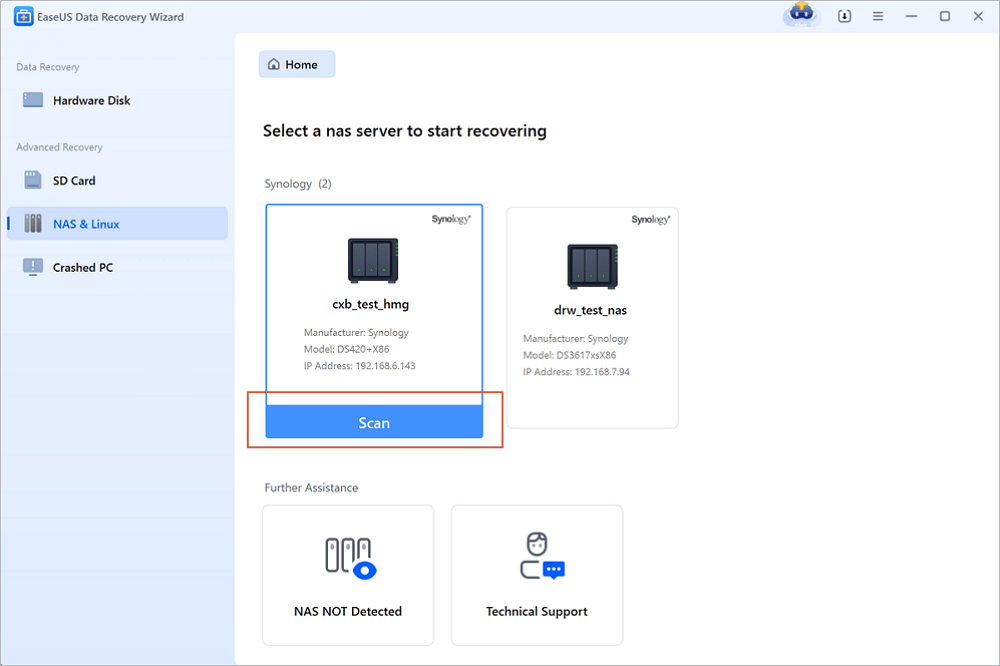
The NAS & Linux screen with two Synology servers found on the network (model and IP address shown) and a Scan button. The title bar reads EaseUS Data Recovery Wizard, without an edition label.
Rescue files from PCs that won't boot
EaseUS Data Recovery Wizard Technician lists PE recovery: you create a WinPE bootable USB drive (or CD/DVD) on a working PC, boot the dead machine from it through the BIOS boot menu, and scan its drives from there. It's meant for boot failures, blue or black screens and Windows repair loops. Creating the bootable drive erases the USB stick, so use an empty one.
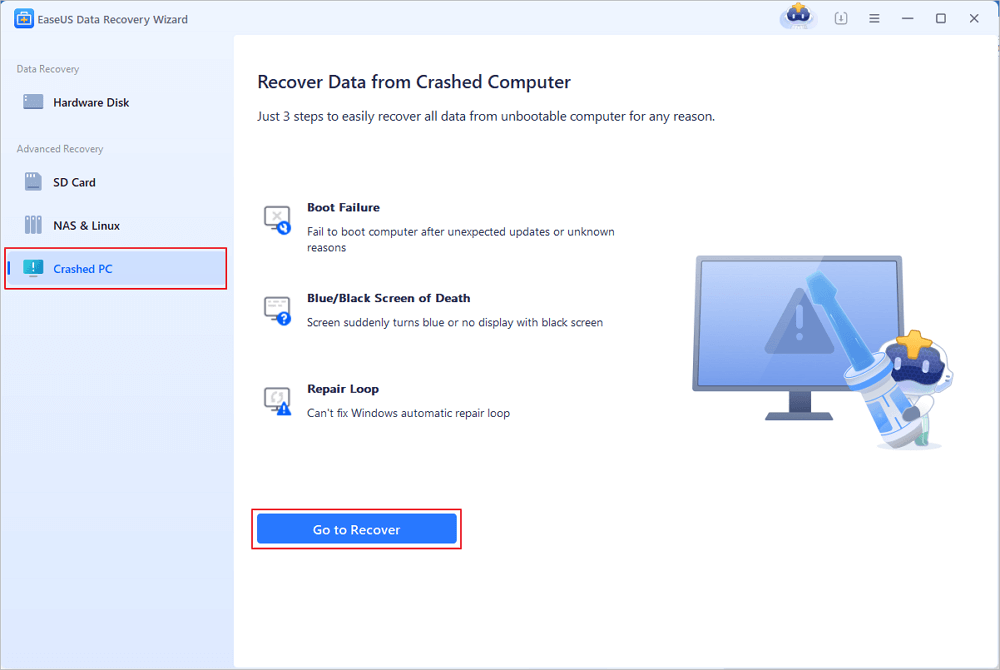
Crashed PC Rescue: the start screen for boot failures, blue or black screens and repair loops, with NAS & Linux and RAID in the sidebar.
Offline activation for sensitive systems
EaseUS Data Recovery Wizard Technician can be activated and used without an internet connection, which EaseUS offers so that commercial or confidential data never leaves an isolated machine. Scans are read-only and don't change the source drive.
Unattended scans of large drives
EaseUS Data Recovery Wizard Technician can scan a large drive and recover automatically, so a multi-terabyte job can run overnight without someone at the keyboard. Results can be filtered by type, size and date and searched by name, and repaired or rebuilt files land in a Reconstructed folder.
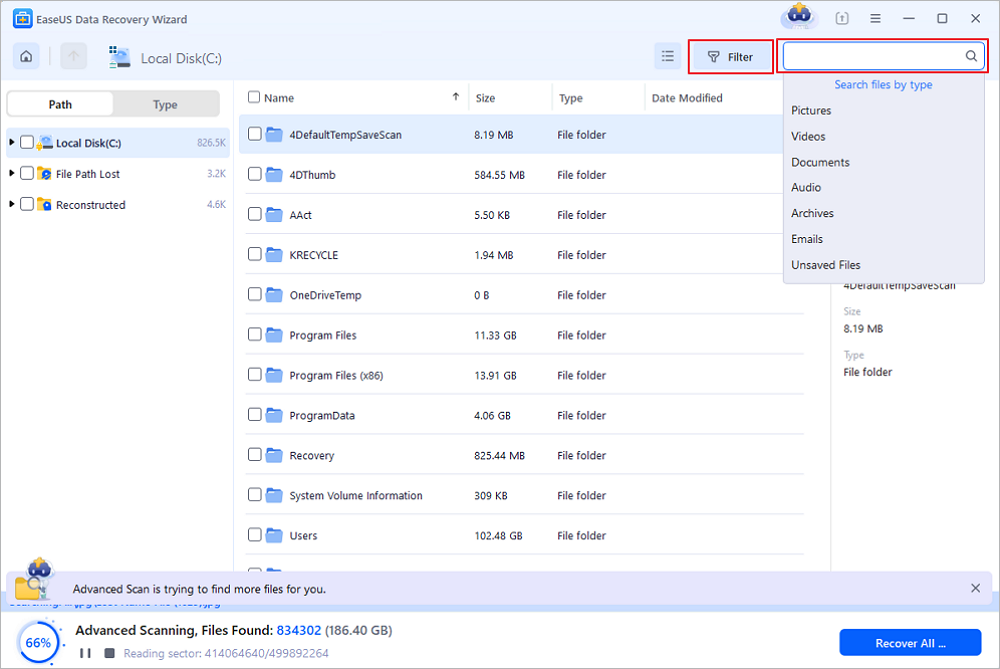
An advanced scan of drive C at 66%, 834,302 files found, with the File Path Lost and Reconstructed folders and the search-by-type menu open.
Benefits
- One purchase covers the bench. At $299 a year for 10 PCs, each machine costs less than a one-month Pro license.
- Customers can see results before they commit. The preview lets you show a client which files are intact before you quote a price.
- Fewer reasons to open hardware. NAS over SSH and WinPE boot media cover many jobs that used to mean pulling drives.
Real-World Uses
- The walk-in repair shop. A customer's laptop is stuck in a Windows repair loop. Boot it from the WinPE USB, copy the Documents and Pictures folders to an external drive, then reinstall Windows.
- The office NAS. Someone deleted a project share on the Synology. Connect over SSH from a Windows PC, scan the volume, and restore the folder to another location without shutting the NAS down.
- The IT department. Twenty laptops in the field, one license on the 99-computer plan, and the program installed on whichever machine has the problem.
- The air-gapped workstation. A lab PC that may not touch the internet lost a data folder. Activate offline and recover on the spot.
Who It's For, and Who Should Skip It
Technician is for repair technicians, MSPs, IT administrators and small data recovery services who recover files on several machines or for other people, and who want bootable recovery and offline activation in the same tool.
- Skip it for your own PC. One person with one computer pays far less for the Pro edition, or nothing for the 2 GB Free edition.
- Skip it for lab-grade work. Specialists who rebuild unusual RAID layouts by hand, work in a hex editor or image drives with failing heads use dedicated forensic and lab tools.
- Skip it for Mac-only shops. This license is for the Windows program; EaseUS sells the Mac edition separately.
Usage Guide
- Install on a healthy drive. Download the trial (a small web installer), install it on a disk other than the one you're recovering, and activate with your Technician code, online or offline.
- Local drive: pick the drive or partition on the home screen and click Search for Lost Data; check the File Path Lost and Reconstructed folders as results come in.
- NAS: open NAS & Linux, choose the server, enable SSH on the NAS (on Synology: Control Panel, Terminal & SNMP), enter the account details and click Connect Now.
- Dead PC: open Crashed PC Rescue, create the bootable USB on a working machine, set the broken PC to boot from USB in the BIOS, and scan its drives.
- Recover the files you previewed to a different disk, never back to the source.
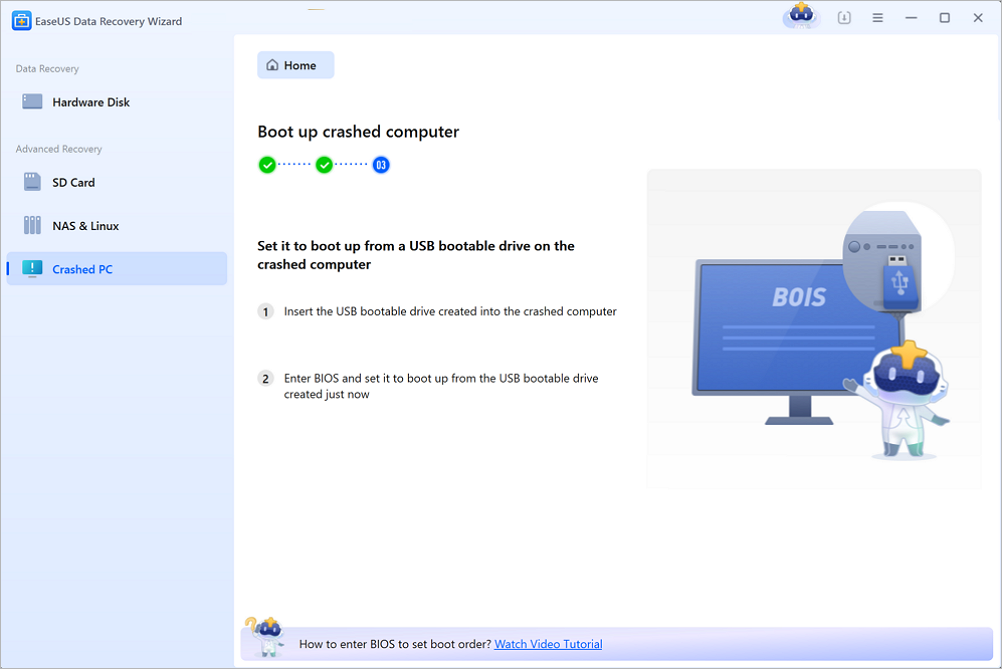
Step 3 of Crashed PC Rescue: insert the bootable USB into the crashed computer and set the BIOS to boot from it.
Where it falls short
- NAS recovery needs SSH and the right account. If SSH is off or the account lacks root permissions, the connection fails; the program then shows how to enable SSH. One EaseUS customer quoted on its NAS page needed a remote session with support to get past an SSH problem.
- Overwritten data comes back broken. The most common complaint about Data Recovery Wizard on Trustpilot is files that were found but recovered corrupt. Previews tell you before you promise a client anything.
- Big drives are slow. EaseUS's own estimate is 10 to 12 hours for a healthy 1 TB hard drive.
- The Technician page's tech specs are dated. It still lists 32 MB of disk space and 128 MB of RAM, while the current program asks for 200 MB and 1 GB.
Tip: protect the customer's drive
Never save recovered files back to the drive you scanned: EaseUS warns that any write can overwrite the data you're after. Bring an empty external disk to every job, and when a drive shows signs of failing, image it first (the program scans DMG, VHD and VHDX images since version 20.0) and work on the copy.
What Users Say
There are very few reviews of the Technician license itself, because it runs the same program as Pro. The reviews below are about Data Recovery Wizard in general. Trustpilot shows EaseUS at 4.9 out of 5 from 39,743 reviews on November 19, 2026, for all its products together, and Capterra shows Data Recovery Wizard at 4.6 out of 5 from 414 reviews. Trustpilot quotes are short excerpts, as shown.
TechRadar on the recovery engine
TechRadar's review of the Pro edition (by Krishi Chowdhary, last updated April 23, 2026) concludes: "Performance is solid with reasonable CPU usage, though pricing is slightly on the higher side." Its pros include "Allows automatic recoveries" and "Supports 1,000+ file formats and 2,000+ device types"; its cons are "On the expensive side" and "Free scanning capabilities are not the best".
Trustpilot
- "I had an issue with an existing EaseUS Data Recovery license that was originally activated on a previous PC." (S.Sufian, 5 stars, "Excellent Customer Support and Quick License Resolution", November 10, 2026)
- "The software is excellent, offering fast and accurate file recovery while clearly showing exactly where each file is located." (유진 정, 5 stars, November 12, 2026)
- "As a longtime customer (since 2014!) of their Data Recovery Wizard software, I just contacted their Customer Service chat" (Fabio "Cubo" Castelvetri, 5 stars, "Longtime customer gets up-to-date service", October 20, 2026)
- "every single recovered file was corrupted and completely unusable." (Thiago Gaspar, 1 star, February 4, 2026)
- "Recovery is extreme slow, when seeking help from the support team" (Kishan Trivedi, 2 stars, "Extreme slow Recovery", December 31, 2025)
Quoted by EaseUS on its NAS recovery page
"When all data recovery apps fail EaseUS seems to be the only one that can easily recover data from a NAS. I initially had a problem connecting to my NAS to recover due to some sort of SSH problem and their ticketing system queued me for a remote session. Tech was knowledgeable and was able to correct the problem quickly." (a Trustpilot review, as quoted by EaseUS)
Users praise the easy workflow and especially the support team, which comes up again and again for license transfers and tricky connections. The complaints are about corrupted results on overwritten data, slow scans and price.
Comparisons
Technician vs Pro
Both run the same Windows program. Pro costs $69.95 a month, $99.95 a year or $149.95 lifetime, covers one computer (two with the lifetime license), never renews on its own, and is meant for your own files. Technician covers 10 or 99 machines, allows recovery for clients, and lists WinPE bootable recovery and offline activation; its yearly plans renew automatically. If you'd need more than two Pro licenses in a year, or you charge for recovery, Technician is the right license.
Editions and Pricing
Prices on the order page on November 19, 2026, in US dollars, VAT excluded:
| Plan | Price | Computers | Upgrades | Billing |
|---|
| Standard 1-Year | $299.00 (listed $399.00) | 10 PCs | 1 year | Renews yearly, cancel anytime |
| Premium 1-Year | $399.00 (listed $499.00) | 99 computers | 1 year | Renews yearly, cancel anytime |
| Premium Lifetime | $799.00 | 99 computers | Lifetime | One-time payment |
All three include free remote assistance. EaseUS takes credit cards, PayPal and wire transfer, and businesses with a VAT exemption can enter their exemption ID at checkout.
FAQs
Can I use EaseUS Data Recovery Wizard Technician to recover data for paying customers?
Yes. EaseUS sells Data Recovery Wizard Technician to companies and service providers so they can offer data recovery to their clients, within the 10- or 99-computer limit of the plan.
What's the difference between Technician Standard and Premium?
EaseUS Data Recovery Wizard Technician Standard and Premium differ in the number of machines: Standard covers 10 PCs, Premium covers 99 computers. Only Premium is also sold as a lifetime license.
Does the EaseUS Data Recovery Wizard Technician license renew automatically?
The 1-year Technician plans renew every year until you cancel, and EaseUS lets you cancel at any time. The Premium Lifetime plan is a single payment.
Can I test EaseUS Data Recovery Wizard Technician before buying?
Yes, with the free trial, which is the same download as for Pro. It scans and previews files on your real cases, but saving them needs a license, so judge the result by the preview.
Why won't a file recovered by EaseUS Data Recovery Wizard open?
EaseUS Data Recovery Wizard stores two parts of each file: its directory entry (name, date, size) and its content. If the directory entry is damaged, the file can come back with its name but unreadable; EaseUS suggests trying its RAW recovery results instead, which rebuild files from their content.
Does EaseUS offer help with difficult cases?
EaseUS Data Recovery Wizard Technician comes with free remote assistance, live chat and free phone support on weekdays. For cases the software can't solve, EaseUS also sells a one-on-one manual recovery service.
System Requirements
- Windows 11, 10, 8 or 7, or Windows Server 2022, 2019, 2016, 2012, 2008 or 2003
- 32-bit or 64-bit processor, at least 1 GB of RAM, 200 MB of free disk space
- NAS recovery: a Windows PC on the same network and SSH access to the NAS
- Bootable recovery: an empty USB drive (it's erased when the boot media is created)
Conclusion
EaseUS Data Recovery Wizard Technician is worth it for a repair shop, MSP or IT team that recovers files on several machines or for clients. The Standard plan at $299 a year for 10 PCs costs less than three Pro yearly licenses and adds the right to do client work, WinPE recovery for dead PCs and offline activation, on top of an engine TechRadar rates well for ease and speed.
The main reason not to buy it is that you don't need it: for your own computer, the Pro edition does the same recovery for far less. Also note that the yearly plans renew automatically and that refunds are for technical failures only, so test your typical jobs in the trial first.
Download Free TrialBuy Now