EaseUS MobiSaver Pro: iPhone and iPad Data Recovery for Windows
EaseUS MobiSaver Pro is a Windows program that recovers deleted or lost photos, messages, contacts, notes and WhatsApp, LINE and Kik chats from an iPhone, iPad or iPod touch, or from its iTunes or iCloud backup. It costs $79.95 a year ($59.95 for one month, $99.95 for a lifetime license), covers up to 5 iOS devices on one PC, and has a free edition that shows you what it can find first.
You deleted a message thread you needed, a phone update went wrong, or the iPhone with your photos is broken and all you have is an old backup on the PC. MobiSaver plugs into exactly that moment: connect the device or point it at the backup, pick the kinds of data you want, and it lists what it can still read. Before you pay, though, check the dates below, because this program hasn't had a new release in a while.
Quick facts
- Developer: EaseUS (CHENGDU YIWO Tech Development Co., Ltd.), the maker of Data Recovery Wizard and Todo Backup
- Version: 8.0.3, the newest installer EaseUS offers, dated October 12, 2023
- Platform: Windows 11, 10, 8.1, 8 and 7; the Mac edition is sold separately at the same prices
- Devices: iPhone, iPad and iPod touch; EaseUS's device lists go up to the iPhone 15 and iOS 17
- Price: $59.95 a month, $79.95 a year or $99.95 for lifetime upgrades, each for 1 PC and up to 5 iOS devices
- Free edition: recovers 1 photo or video and 5 contacts per recovery; Pro removes the limits
- Guarantee: 30 days, for technical problems EaseUS support can't solve (not for a change of mind)
- What we checked: the newest installer on EaseUS's download center, MobiSaver8.0.3_free.exe (154,862,832 bytes, file version 8.0.3, dated October 12, 2023), the 1.5 MB web installer behind the Free Trial button, the device and iOS lists on EaseUS's product, German product and manual pages, and the three plans on the order page on November 19, 2026. We didn't run a recovery on an iPhone ourselves.
Before you buy
EaseUS MobiSaver hasn't been updated since October 2023. EaseUS's own pages name the iPhone 15 and iOS 17 as the newest supported device and system, and the online manual still lists iOS 12 and the iPhone 13. Nothing on EaseUS's site mentions iOS 18, iOS 26 or the iPhone 16 and 17. It may still work with a newer phone, but nobody promises it. Run the free edition on your own device first: if the scan lists the files you're after, the paid license is worth considering; if it can't connect or finds nothing, don't buy. EaseUS refunds only for technical problems its support can't fix, and you'll be asked to let support try first.
Download Free TrialBuy Now
Overview
MobiSaver is one of the oldest iPhone recovery tools around: EaseUS was already selling it in 2013, when it advertised it as the first iPhone recovery program to support iOS 7. The current 8.x generation has a cleaner blue-and-white interface with a sidebar of recovery modes: Recover from iOS device, Recover from iTunes Backup and Recover from iCloud, plus separate entries for WhatsApp, LINE and Kik.
Every mode works the same way. You choose a source, tick the data types you care about, wait for the scan, then browse and preview the results before saving them. Found items go to a folder on your PC, and a few types (photos, videos, music and contacts) can go straight back onto the device.
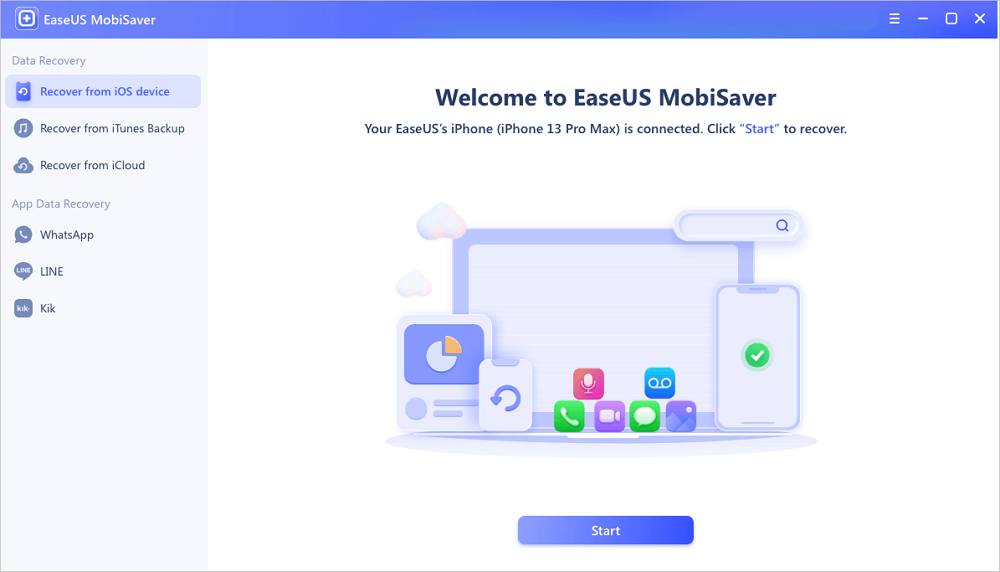
The start screen with an iPhone 13 Pro Max connected, and the three recovery modes and three chat apps in the sidebar.
Features
Scan the iPhone or iPad itself
EaseUS MobiSaver reads a connected iPhone, iPad or iPod touch over USB once you enter the passcode and tap Trust. You pick categories from a grid: photos, videos, music and app media, messages, call history, contacts and voicemail, notes, voice memos, Safari bookmarks and history, calendar and reminders, and WhatsApp, LINE, Kik and app documents. Fewer categories means a shorter scan.

Choosing what to look for: photos and videos, SMS and call logs, memos, and third-party apps.
Pull data out of an iTunes backup
EaseUS MobiSaver lists every iTunes (Finder) backup on the PC with its name, device model, iOS version and backup date, and can open a backup stored in another folder too. Encrypted backups work if you know the backup password. This is the mode to use when the phone is lost, stolen or dead: the backup is all you need, and you can pick individual messages or photos out of it instead of restoring the whole thing over your current phone.

The iTunes backup list, showing each backup's device model, iOS version and date.
Recover from an iCloud backup (by resetting the phone)
EaseUS MobiSaver's iCloud mode doesn't download your iCloud backup to the PC. Instead it walks you through erasing the connected iPhone, restoring it from the iCloud backup during setup, and then scanning the restored phone. You have to turn off Find My iPhone and type 123456 to confirm the reset. It works, but anything on the phone that isn't in that backup is wiped, so back the phone up first.

The iCloud mode's confirmation: "This will erase all data and reset all settings."
WhatsApp, LINE and Kik chats with attachments
EaseUS MobiSaver has a separate entry for each of these three chat apps. You choose whether to read the chats from the device's storage or from an iTunes backup, and it lists the conversations with their photos, audio and video attachments. Other messengers (Telegram, Signal, WeChat, Viber) aren't covered.

App data recovery for Kik: read the chats from the device or from an iTunes backup.
Preview, then save to the PC or back to the phone
EaseUS MobiSaver shows every found item with a count per category, and messages appear as chat bubbles so you can check you have the right thread before saving. Recover to PC works for every category. Recover to Device only handles photos, photo videos, videos, music and contacts; for messages, notes, call history and the rest you save to the PC, and EaseUS points you to its separate MobiMover tool to move them onto a phone.

Scan results with item counts, and the dialog listing which categories can go back to the device.
Benefits
- You see the result before paying. The free edition runs the same scan and preview, so you know whether your files are there.
- Selective recovery. Restoring a whole backup through iTunes overwrites what's on your phone now; MobiSaver lets you pull out one chat or one album.
- Five devices per license. A family's iPhones and an iPad are covered by one plan on one PC.
- Lifetime option. $99.95 once costs only $20 more than one year of the annual plan.
Real-World Uses
- A lost or broken iPhone: open last month's iTunes backup on the PC and save the photos and contacts as files, with no phone needed.
- A deleted WhatsApp chat: scan the phone or its backup for WhatsApp and save the conversation with its attachments.
- Moving off an old iPad: extract notes, voice memos and Safari bookmarks from an old iPad's backup before you sell it.
- Checking an encrypted backup: enter the backup password and browse what an encrypted iTunes backup actually contains.
Who It's For, and Who Should Skip It
It suits Windows users with an iPhone up to the 15 generation who have lost something and especially those who have an iTunes backup to dig through. Small repair shops that recover data for several customers' devices are the other natural fit, as Macworld noted.
Skip it if you have an iPhone 16 or 17 on iOS 18 or 26 and the free scan doesn't recognize it; if you only need to restore a recent iCloud backup (iPhone setup does that for free); or if you use a Mac (buy the Mac edition instead). If the data was never backed up and was deleted long ago, no iPhone tool can promise much, so let the free scan decide.
Usage Guide
- Click Download Free Trial to open EaseUS's product page, and use its Free Trial button for Windows. It's a small web installer that fetches the program; install it on the PC, not on the phone.
- connect the iPhone with a USB cable, enter its passcode and tap Trust.
- Choose a mode in the sidebar: iOS device, iTunes backup, iCloud, or one of the chat apps, then click Start.
- Tick the data types you need and click Next. Enter the backup password if the backup is encrypted.
- Wait for the scan to finish, preview the results, tick what you want and click Recover to PC (or Recover to Device for photos, videos, music and contacts).
- To remove the free limits, click Activate in the top corner and enter the license code from the order email.
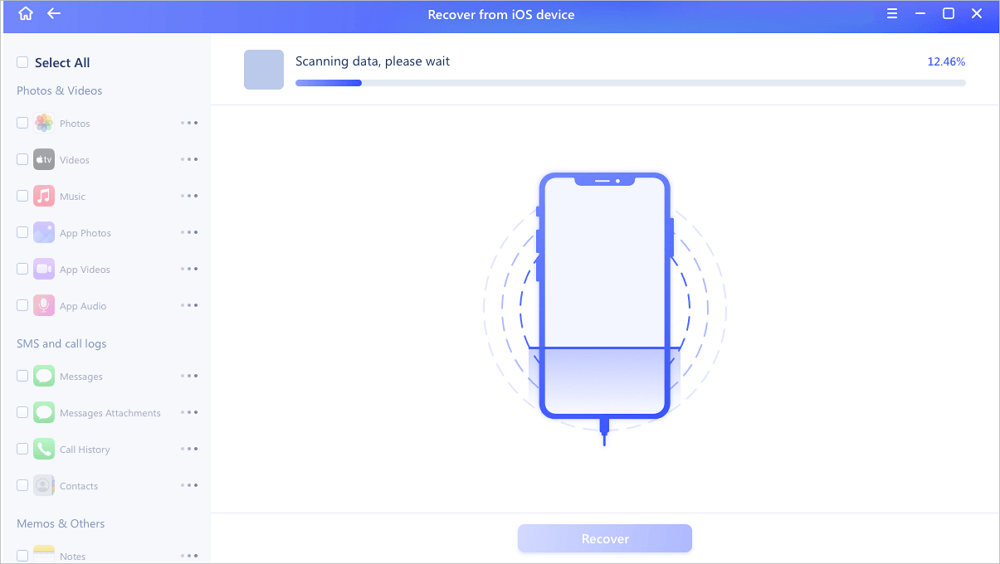
A device scan in progress, with the categories filling in on the left.
Tips
- Stop using the phone as soon as you notice the loss. New photos and messages can overwrite what you want back.
- Make a fresh backup of the phone before trying the iCloud mode, since it erases the device.
- Pick only the categories you need: a full scan of a large phone can take a long time.
- Save recovered files to the PC first, check them, and only then copy them back to the phone.
Where it falls short
- Slow scans with a misleading progress bar. Macworld's reviewer saw an estimate of two hours drop to about 35 minutes, and the bar sat at 100% while the scan kept running.
- The iCloud mode wipes the phone. There's no way to browse an iCloud backup without resetting the device.
- Only some data goes back to the phone. Messages, notes and call history can only be saved to the PC.
- Refunds are hard to get. EaseUS refunds only on technical grounds after its support has tried to help, and Trustpilot has reviews from MobiSaver buyers whose refund requests were turned down.
- A free edition that's mostly a preview. One photo or video and five contacts per recovery is enough to test, not to recover a camera roll.
What Users Say
Independent reviews of MobiSaver are few, and the most detailed one, from Macworld, tested the Mac edition, which shares the Windows version's features and prices. On Trustpilot, EaseUS as a company scores 4.9 out of 5 from about 39,700 reviews, but most are about other EaseUS products; the ones that mention MobiSaver are much more mixed.
Macworld (Lloyd Coombes, August 2024, 4 out of 5)
"It's expensive and a little slow, but EaseUS Mobisaver is a great recovery app – it's just tailored more to businesses than it is to the everyday consumer."
"By allowing that laser focus, Mobisaver is able to recover a huge number of content types, from messages, WhatsApp, and Safari Bookmarks, all the way to deleted Reminders or Calendar appointments."
"I was a little worried when it told me my phone would take 2 hours to scan, but thankfully that soon dropped to around 35 minutes."
"EaseUS Mobisaver finishes its initial scan, then takes more time to scan—and shows 100% completion while it keeps running. As a result, there's no way to tell how long it'll take, and more than once I thought the app had crashed."
In Macworld's roundup of iPhone recovery apps (January 2025), the same writer listed the pros as "Impressively stable Mac app", "Great recovery potential" and "The free option could be ideal", and the single con as "Expensive".
Trustpilot reviews that mention MobiSaver
These are excerpts; the Trustpilot reviews don't always say whether the buyer used the iPhone or the Android edition.
Aron Finch, 5 stars (November 2025): "Easeus Mobisaver software is awesome. It provided me with preview what data can be recovered."
Sean, 5 stars (August 2022): "Frank over at EaseUS helped out in less than 5 minutes resolve my issue with a license activation error."
cesare, 1 star, "The money-back guarantee is just fake." (February 2024): "The product didn't recover any of my data, so I have asked for a refund". The reviewer says the refund was refused under EaseUS's refund policy.
Quoted on EaseUS's product page
CNET Download.com: "EaseUS MobiSaver Free helps you get back lost files on your iOS device,It's a nice backup to your existing iTunes backup, especially considering how fickle iTunes can be."
ZDNet: "EaseUS MobiSaver is pretty easy to use, and I've heard back from people who have used them to recover data."
Kim (customer review): "I tried to upgrade iOS 10, and suddenly my iPhone crashed. I searched and found your iOS recovery tool, it works well, and all that to get back.."
Elberta (customer review): "It was really helpful. I downloaded a free version at first, it scanned my data. Easy steps I upgraded it to the full version and got the license immediately."
The pattern is consistent: people like the clear interface, the range of data types and the preview, and reviewers praise its stability. The complaints are the price for a one-off job, slow scans, and buyers who found nothing and then couldn't get their money back. Several of the positive quotes date from the iOS 10 era, so they say little about how it handles a current iPhone.
Comparisons
MobiSaver Pro vs MobiSaver Free
Both editions scan the device, iTunes backups and iCloud backups and show the same preview. Free saves one photo or video and five contacts per recovery; Pro has no limits and includes upgrades for the plan's term and technical support.
MobiSaver vs restoring a backup with Apple's own tools
iTunes, Finder and iPhone setup restore a whole backup over the phone, replacing what's on it now, and can't open a backup to show you what's inside. MobiSaver reads the backup on the PC and lets you save single items without touching the phone. If a full restore of the latest backup is all you need, Apple's tools do it for free.
MobiSaver Pro vs MobiSaver Technician
The Technician edition is for businesses and IT providers that recover data for clients: EaseUS sells it for recovering data from many customers' iPhones and iPads without paying per job. Pro covers up to 5 devices.
Editions and Pricing
| Edition | Price | Term | Devices | Upgrades |
|---|
| Free | $0 | No limit (1 photo or video and 5 contacts per recovery) | Any | n/a |
| Pro Monthly | $59.95 | 1 month, auto-renews | Up to 5 iOS devices, 1 PC | 1 month |
| Pro Annual | $79.95 | 1 year, auto-renews | Up to 5 iOS devices, 1 PC | 1 year |
| Pro Lifetime Upgrades | $99.95 | One-time payment | Up to 5 iOS devices, 1 PC | Lifetime |
All three paid plans are on one order page, prices exclude VAT, and the license code arrives by email right after payment. You can cancel the monthly and annual plans at any time. The Buy Now button opens that order page, where you pick the plan.
FAQs
Does EaseUS MobiSaver work with the iPhone 16, iPhone 17 and iOS 26?
EaseUS MobiSaver's device lists end at the iPhone 15 and iOS 17, and the newest installer is from October 2023, so newer models and iOS versions aren't officially supported. Try the free edition on your phone before buying.
Can EaseUS MobiSaver recover data without a backup?
EaseUS MobiSaver can scan the connected device directly, without any backup, and lists what it can still read. How much deleted data that finds depends on the phone and how long ago the data was deleted, which is why the free preview matters.
Do I need to jailbreak my iPhone to use EaseUS MobiSaver?
No. EaseUS MobiSaver connects to an ordinary iPhone over USB once you enter the passcode and tap Trust on the phone.
Can I move the EaseUS MobiSaver license to a new computer?
Yes. An EaseUS MobiSaver license is for one computer at a time, and EaseUS resets the license code by email or live chat when you change PCs, without a new purchase.
Can I get a refund if EaseUS MobiSaver doesn't find my files?
EaseUS MobiSaver comes with a 30-day money-back guarantee, but EaseUS refunds only for technical problems its support can't solve, after you let support try. A change of mind or a scan that the free edition already showed wouldn't help isn't covered.
Is there a Mac version of EaseUS MobiSaver?
Yes, EaseUS MobiSaver for Mac is a separate product with the same features and the same three plans. A Windows license doesn't activate the Mac edition.
What happens when the EaseUS MobiSaver annual plan ends?
The EaseUS MobiSaver annual plan renews automatically each year unless you cancel it. The lifetime license is a single payment that includes all future upgrades.
System Requirements
- Windows 11, 10, 8.1, 8 or 7
- 1 GB of RAM (2 GB recommended) and a 500 MHz or faster processor
- 200 MB of free disk space, plus room for the recovered files
- An iPhone, iPad or iPod touch and its USB cable, or an iTunes backup on the PC
- Internet connection for the web installer and for the iCloud mode
Conclusion
EaseUS MobiSaver Pro is a stable, easy recovery tool with one real strength: it opens iTunes backups and an iPhone's own storage and lets you save just the messages, photos or chats you need. That makes it worth $79.95 (or $99.95 for lifetime) only after the free scan has shown your files. The reason for caution is age: no release since October 2023 and no stated support past the iPhone 15 and iOS 17, plus a refund policy that won't help if it simply finds nothing. Owners of older iPhones and anyone with a backup to mine should try it; owners of the newest iPhones should test carefully before paying.
Download Free TrialBuy Now