At a glance
| EaseUS Partition Master Pro | AOMEI Partition Assistant Pro | NIUBI Partition Editor Pro | DiskGenius Professional | MiniTool Partition Wizard Free |
|---|
| Price | $49.95 a year or $69.95 lifetime | $59.95 lifetime | $39 (1 year of upgrades), $69 lifetime | $129.90 lifetime, $99.90 one year | Free |
| PCs per license | 2 | 2 | 2 | 1 | Home use |
| Extend C: from non-adjacent space | ✓ | ✓ | ✓ | ✓ | ✓ |
| Move Windows to a new SSD | ✓ | ✓ | ✓ | ✓ | ✗ (Pro) |
| Convert MBR to GPT without data loss | ✓ (system disk too) | ✓ (system disk too) | Data disks only | ✓ (MBR and GPT both ways) | Data disks only |
| Recover lost partitions | ✓ | ✓ | ✗ | ✓ (with file recovery) | ✗ (Pro) |
| Trial | Previews, can't apply | Demo previews Pro jobs | Virtual Mode, can't apply | Free edition does most partition work | Free |
| Money back | 30 days, if it can't solve your problem | 90 days | 90 days, conditional | 30 days, conditional | n/a |
| Current version | 20.11 (September 2026) | 10.12.2 (October 2026) | 10.3.6 (October 2026) | 6.2.0.1829 (June 2026) | 13.9 (July 2026) |
How we picked
- We looked at every partition manager listed on this site that's still sold and updated for Windows 11, and kept the ones that do the common jobs: extend a full C: drive, resize and merge partitions, and move Windows to a new SSD.
- We read each order page for the price in US dollars and the license terms (term, number of PCs, upgrades), and each vendor's refund policy.
- We checked each product's current version on its vendor's changelog or download page, and what the trial or free edition actually lets you do.
- We collected expert reviews (TechRepublic, TechRadar) and user reviews (Trustpilot, AlternativeTo), including the complaints.
What we checked: checkout prices of $59.95 (AOMEI Partition Assistant Professional, 2 PCs, lifetime) and $129.90 (DiskGenius Professional, lifetime) and EaseUS's order page at $19.95 a month, $49.95 a year and $69.95 lifetime, the current versions on AOMEI's, DiskGenius's, MiniTool's and EaseUS's own pages, all on November 20, 2026, and NIUBI's checkout at $39, $49 and $69 on November 7, 2026. We compared features, prices, trials and published reviews, and didn't resize or clone a disk ourselves.
Try the free way first: Windows' Disk Management
Windows 11's own Disk Management (right-click Start, then Disk Management) shrinks, extends, formats and deletes partitions for free. Its limit is the one most people hit: Extend Volume only uses unallocated space directly to the right of the partition. If a recovery partition or your D: drive sits between C: and the free space, the option is greyed out, and Disk Management can't move partitions to fix that.
Windows also includes MBR2GPT, a command-line tool that converts the system disk from MBR to GPT without deleting it, which you need before switching a PC to UEFI boot. It's free but unforgiving, and it refuses disks with more than three partitions.
The free editions below fill those gaps without paying. MiniTool Partition Wizard Free Edition, AOMEI Partition Assistant Standard, NIUBI Partition Editor Free and EaseUS Partition Master Free all move and resize partitions, so a blocked C: drive can usually be extended at no cost. What most of them hold back is moving Windows to a new SSD and converting the system disk to GPT. NIUBI's Free Edition is the exception for the SSD job: it clones a disk, Windows included, at no cost for home use. Back up first whichever tool you use: a power cut in the middle of a partition move can leave a disk unreadable.
EaseUS Partition Master Professional
EaseUS Partition Master Professional: best for most people
- Price: $19.95 a month, $49.95 a year or $69.95 lifetime, each for 2 PCs
- Version: 20.11, released September 24, 2026
- Runs on: Windows 11, 10, 8.1, 8, 7 and Vista (not Windows Server)
- Trial: lines up operations and shows the result, but applying them needs a license
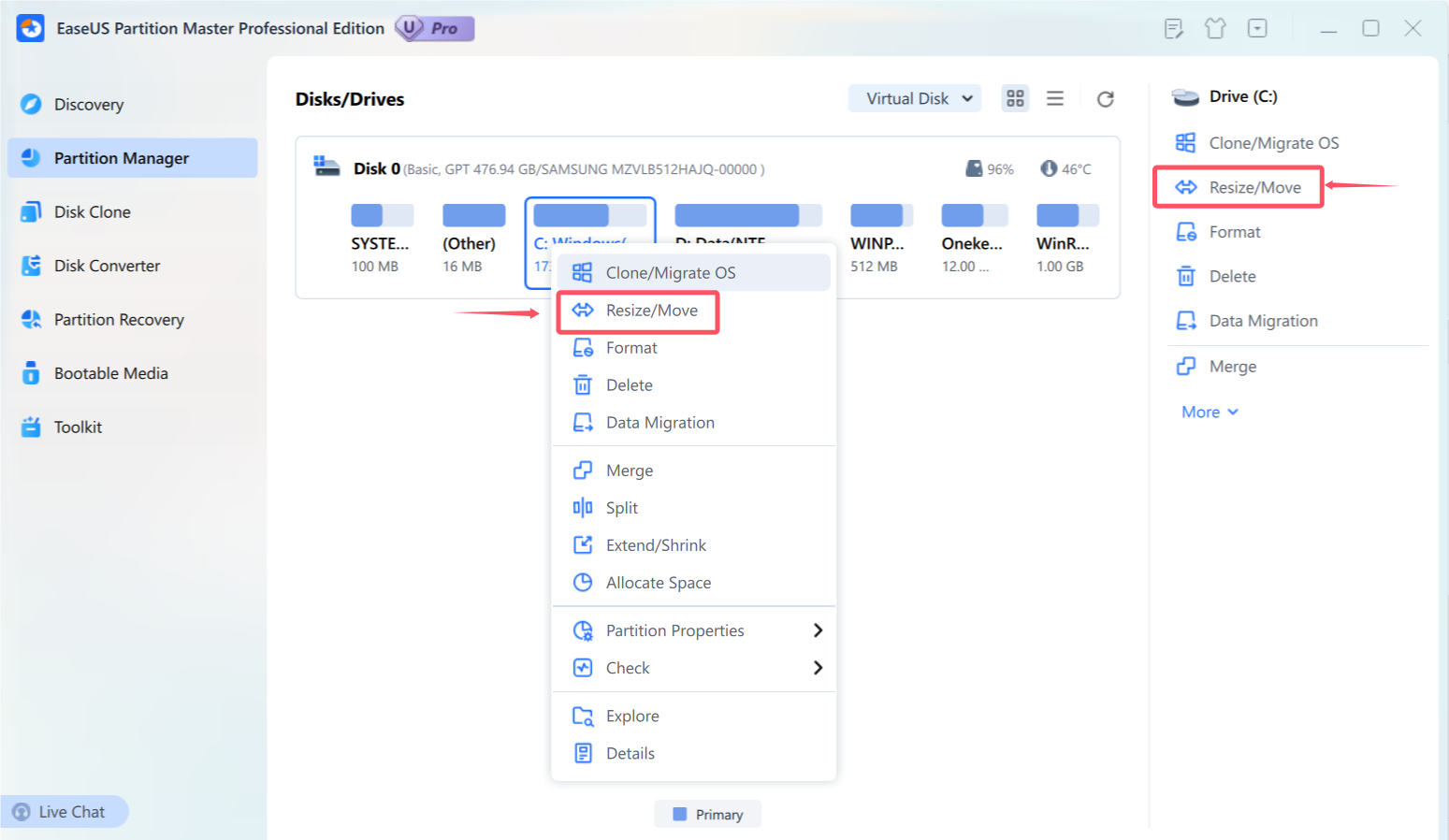
EaseUS Partition Master's Partition Manager: right-click a partition for Clone/Migrate OS, Resize/Move, Merge, Split, Extend/Shrink and Allocate Space (red markings are from EaseUS's guide).
EaseUS Partition Master Professional is the friendliest tool here for the classic job: a red C: drive with free space stuck on D:. Its Allocate Space option moves free space from one partition to another in a single step, and it can grow C: from space that isn't next to it, or merge partitions that aren't side by side. Every change goes into a queue that you check on a disk map before pressing Execute.
The Pro license is what you pay for when you're upgrading a drive: Migrate OS moves Windows to a new SSD without a reinstall, Disk Converter turns a system disk from MBR to GPT, and the WinPE Bootable Media lets you fix partitions on a PC that won't start. EaseUS updates it often; version 20.11 added an option to wipe only the free space on a disk.
Know two things before buying. The trial doesn't apply anything, which is the most common complaint in its 1-star reviews, so try the separate Free edition for a basic resize. And the guide lists support for disks up to 16 TB, with BitLocker partitions resizable only from their right edge.
What we like
- Clear, queue-based interface
- Allocate Space moves free space in one step
- Migrate OS, system-disk GPT conversion and WinPE media
- Lifetime license covers 2 PCs
Watch out for
- Trial can't apply any change
- Monthly and yearly plans renew automatically
- Upgrade prompts in the free edition
- Limited handling of BitLocker and dynamic disks
What reviewers say
TechRepublic (Andy Wolber): "With EaseUS Partition Master, a well-designed interface helps make technical partition management tasks easy to manage." On pricing: "The best value for most people will be a lifetime license at $69.95, which provides one license for two PCs."
Trustpilot (EaseUS company page, 4.9 out of 5 from 39,743 reviews across all products): Steve Marsh (March 16, 2026): "I bought a new pc and used the software to clone my M.2 to a new larger M.2."
EaseUS's Black Friday code BF2026 takes the yearly plan to $14.98 and the lifetime license to $41.97 until December 2, 2026. After that, the regular prices above apply.
Download EaseUS Partition Master TrialBuy EaseUS Partition Master Pro
AOMEI Partition Assistant Professional
AOMEI Partition Assistant Professional: best one-time price for 2 PCs
- Price: $59.95 once for 2 PCs with lifetime upgrades
- Version: 10.12.2, released October 19, 2026
- Runs on: Windows 11, 10, 8.1, 8 and 7, 32- and 64-bit
- Trial: free demo; 90-day money-back guarantee

AOMEI Partition Assistant's main window with the Clone menu open: Migrate OS, Clone Disk and Clone Partition.
AOMEI Partition Assistant Professional covers the same ground as EaseUS for less: resize, move and merge partitions, extend C: from other partitions, migrate Windows to an SSD, and convert disks between MBR and GPT. The window looks like Disk Management with far more options, and nothing changes until you click Apply. The $59.95 lifetime license covers two PCs, and AOMEI's 90-day guarantee is the longest here.
Users complain about two things: the demo lets you get nearly to the end before asking for a license, and long operations can't be cancelled once they start. AOMEI is also the company whose Backupper update servers were compromised in 2026; Partition Assistant 10.12.2 (October 19, 2026) strengthened the security of its own update service. We compare AOMEI's Standard, Professional, Server and Technician editions in detail in AOMEI Partition Assistant Editions Compared.
What we like
- $59.95 once for 2 PCs, with lifetime upgrades
- 90-day money-back guarantee
- Free Standard edition for basic resizing
Watch out for
- Demo asks for payment late in the process
- No cancel button on long operations
- Support quality varies, per reviewers
Trustpilot (4.9 out of 5 from 3,178 reviews): Aijaz Siddiqui (October 30, 2026): "AOMEI helped me move a recovery partition to combine two partitions into one". JustADude (October 26, 2026) liked that "The software actually did what it promised!" but complained of being asked for "like 50$ when reaching 99% of progress bar".
A 1-star reviewer (October 29, 2026): "There is also no button to cancel a process to stop it".
Download AOMEI Partition Assistant DemoBuy AOMEI Partition Assistant Pro
NIUBI Partition Editor Professional Edition
NIUBI Partition Editor Professional Edition: lowest paid price
- Price: $39 once for 2 PCs with a year of upgrades; $49 with 2 years, $69 with lifetime upgrades
- Version: 10.3.6, updated October 30, 2026
- Runs on: Windows 11, 10, 8, 7, Vista and XP (not Windows Server)
- Trial: Virtual Mode shows the result but can't change a real disk
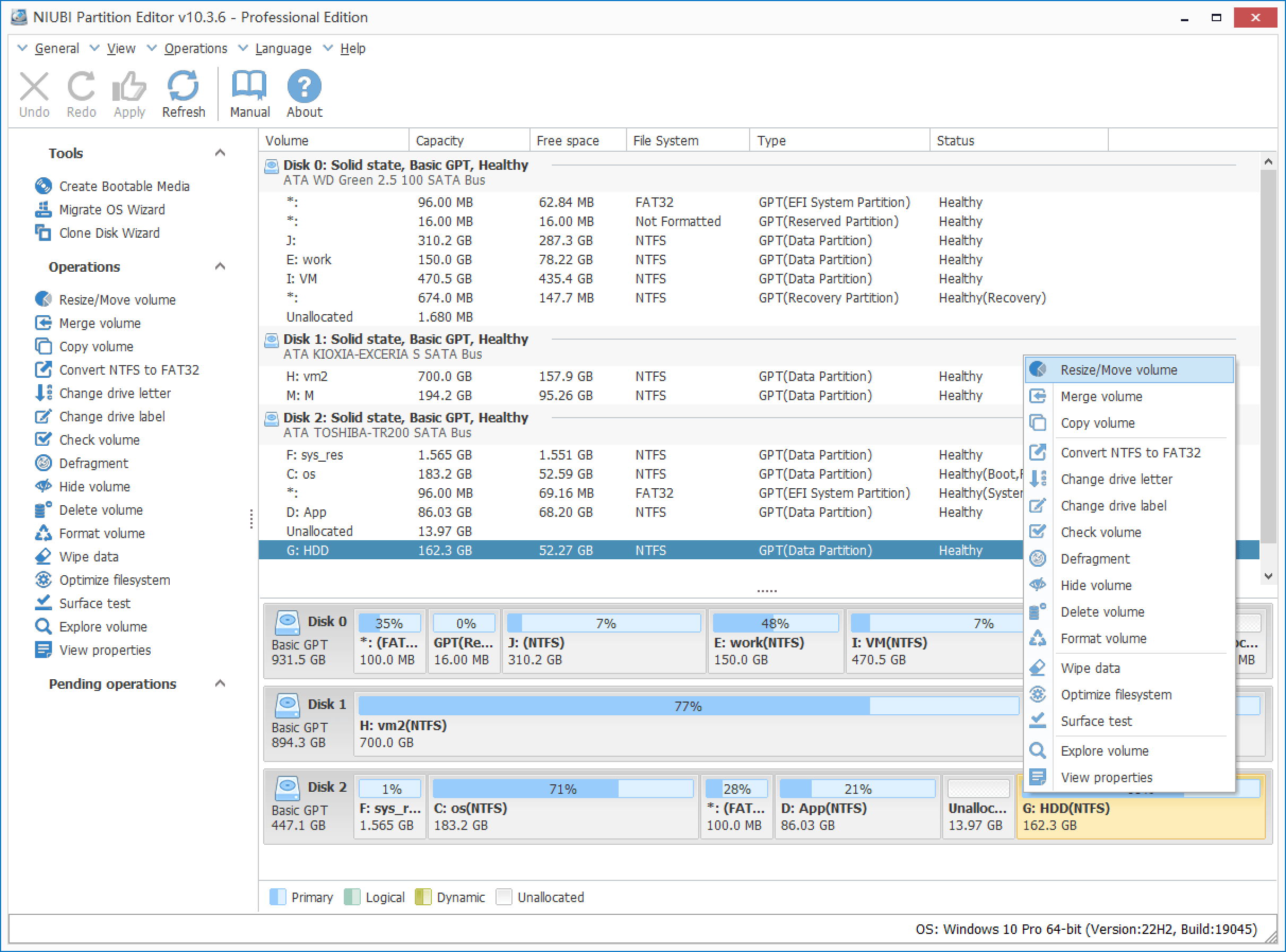
NIUBI Partition Editor 10.3.6 Professional with three disks loaded: the Tools list holds the bootable media, OS migration and clone wizards, and the right-click menu starts with Resize/Move volume.
NIUBI Partition Editor Professional is built around one idea: resizing partitions safely. Its 1-Second Rollback returns a disk to its earlier state if an operation fails, and Hot-Resize grows partitions without a reboot in many cases. It also migrates Windows to an SSD, clones disks and builds bootable media, and at 12.4 MB it's the smallest download here.
The free route is strong too: the Free Edition makes real changes on a home PC, including resizing and disk cloning, so you can fix a full C: drive at no cost. Professional adds the bootable media builder, 1-Second Rollback and the right to use it at work. Limits: the converter can't change an MBR disk that holds the system partition, so it's no help for a switch to UEFI, rollback only covers failures it detects, and the 90-day guarantee applies only when support can't fix a problem.
What we like
- $39 once for 2 PCs
- Rollback and Hot-Resize for safer, faster resizing
- Free Edition makes real changes at home
Watch out for
- Can't convert the system disk to GPT
- No partition or file recovery
- Little progress feedback on long jobs, per reviewers
Trustpilot (4.4 out of 5 from 155 reviews): Paul (April 11, 2026): "Worked great to move recovery partition so I could expand Windows OS partition." Richard Thomas (September 12, 2026): "It does what it says on the tin and is easier to navigate than some 'other' partition tools."
On the critical side, one buyer said a resize looked stuck with no sign of how long it would take, and an AlternativeTo user reported losing a partition during a shrink.
Download NIUBI Partition Editor TrialBuy NIUBI Partition Editor Pro
DiskGenius Professional
DiskGenius Professional: best when you also need recovery
- Price: $129.90 lifetime or $99.90 for one year, for 1 PC, with no automatic renewal
- Version: 6.2.0.1829, released June 8, 2026
- Runs on: Windows 11, 10, 8 and 7, 32- and 64-bit
- Free edition: same installer; does most partition work and previews recovered files
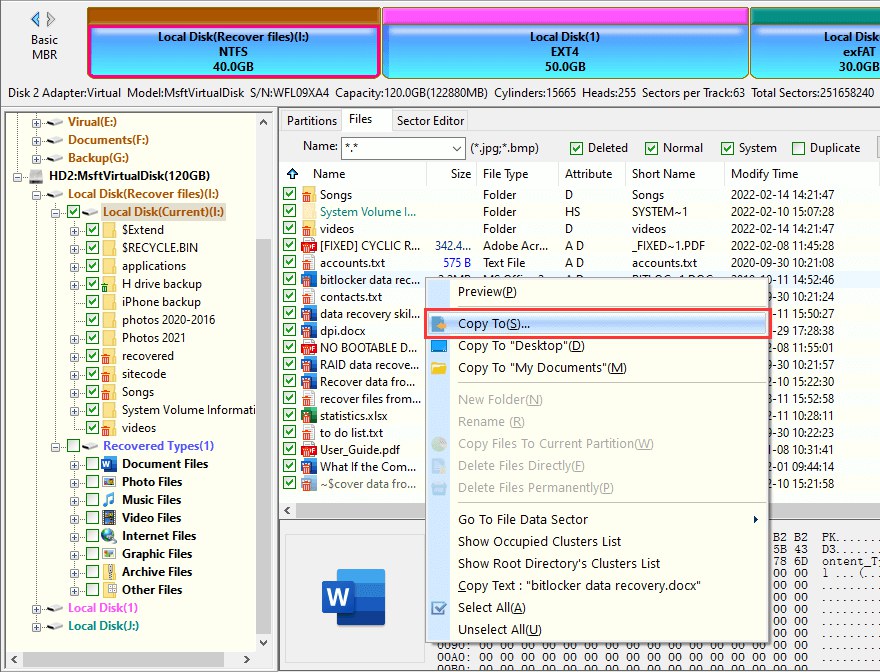
DiskGenius Professional with a recovered partition open: the partition bar at the top, the disk tree on the left and the file list with the Copy To menu.
DiskGenius Professional is a disk toolkit more than a partition manager. Alongside resizing, splitting, cloning and moving Windows to an SSD, it finds lost partitions and deleted files, reads NTFS, FAT32, exFAT, ReFS and Linux EXT4/3/2, opens BitLocker volumes and virtual disks, and rebuilds RAID 0, 1, 5 and other arrays. If your problem is a partition that's turned RAW or vanished, rather than one that's too small, this is the tool here that addresses it.
The free edition already does most partition jobs, so the Pro license is mainly for recovery (copying out large files, writing a found partition table back) and advanced work such as converting a dynamic disk to basic. The cost is a dense, old-school interface; TechRadar found it confusing, and one Trustpilot reviewer found the drives listed differently from their names in Windows while cloning. At $129.90 for one PC, it's the priciest option here for pure partitioning.
What we like
- Partition manager, data recovery and cloning in one
- Free edition handles most partition work
- No subscription or automatic renewal
Watch out for
- Dense, technical interface
- 1 PC per license, $129.90 lifetime
- Mixed results on badly damaged drives
TechRadar (Christian Cawley, 4 out of 5): "While the user interface is lacking and leads to some confusion, the functionality on offer in Eassos DiskGenius is considerable."
Trustpilot (3.8 out of 5 from 51 reviews): Balint (April 2026): "A much more comprehensive version of Disk Management basically. Very good, would recommend."
For recovering a lost partition step by step for free first, see our guide How to Recover a Lost Partition or RAW Drive.
Download DiskGeniusBuy DiskGenius Professional
MiniTool Partition Wizard Free Edition
MiniTool Partition Wizard Free Edition: best free partition manager
- Price: free for home use
- Version: 13.9, released July 7, 2026
- Runs on: Windows 11, 10, 8.1, 8 and 7
- Not included: moving Windows to an SSD, copying a system disk, partition recovery and bootable media (Pro only)

MiniTool Partition Wizard with Extend Partition highlighted in the left panel. MiniTool's help page shows the Pro Ultimate 12 window; the Free edition uses the same layout.
MiniTool Partition Wizard Free Edition is the one to try before you pay anything. It moves, resizes, extends, merges and splits partitions without deleting data, and Extend Partition takes free space from another partition on the same disk, which is exactly what Disk Management can't do. It also converts FAT32 to NTFS and data disks between MBR and GPT, analyzes disk space, checks file systems and surface-tests drives, and manages BitLocker.
The free edition stops where an SSD upgrade starts: moving Windows to an SSD, copying a system disk, converting the system disk to GPT, recovering partitions and building WinPE media all need MiniTool's paid Pro edition, which isn't listed on this site. For those jobs, one of the paid tools above is the better buy.
What we like
- Free resize, extend, merge and split
- Space analyzer, surface test and benchmark included
Watch out for
- No OS migration or system-disk conversion
- Home use only
Download MiniTool Partition Wizard Free
Price and ratings compared
Price of a license you keep (USD)
NIUBI Partition Editor Pro (2 PCs, 1 year of upgrades)$39
AOMEI Partition Assistant Pro (2 PCs, lifetime upgrades)$59.95
EaseUS Partition Master Pro (2 PCs, lifetime upgrades)$69.95
DiskGenius Professional (1 PC, lifetime)$129.90
Order-page prices checked on November 20, 2026 (NIUBI on November 7, 2026). MiniTool Partition Wizard Free costs nothing.
Trustpilot rating (out of 5)
EaseUS (39,743 reviews, all products)4.9
AOMEI Partition Assistant (3,178 reviews)4.9
NIUBI Partition Editor (155 reviews)4.4
DiskGenius (51 reviews)3.8
Ratings as shown on Trustpilot when each product was last researched. EaseUS's score covers all its products, and many 5-star reviews thank support agents rather than rate the software.
Which should you choose?
| Your situation | Pick | Why |
|---|
| C: is full and free space is on D: | MiniTool Partition Wizard Free or NIUBI Free first | Both extend C: from another partition at no cost |
| You're moving Windows to a new SSD | EaseUS Partition Master Pro | Migrate OS with the clearest steps; $69.95 lifetime for 2 PCs |
| Same jobs, lower one-time price | AOMEI Partition Assistant Pro | $59.95 once, 90-day money back |
| You want the cheapest paid license | NIUBI Partition Editor Pro | $39 for 2 PCs, with rollback protection |
| A partition vanished or turned RAW | DiskGenius Professional | Partition and file recovery in the same tool |
| You're switching the PC to UEFI | EaseUS or AOMEI | Both convert the system disk to GPT without data loss; NIUBI and MiniTool Free convert data disks only |
Who should skip each one: skip EaseUS if you only need one free resize. Skip AOMEI if the 2026 compromise of its Backupper update servers worries you. Skip NIUBI if you need to convert the system disk to GPT. Skip DiskGenius if you've never touched a partition before. Skip MiniTool Free if your goal is a new SSD.
What commonly goes wrong
- No backup before the move. The vendors recommend it for a reason: a power cut or a bad sector in the middle of a resize can wreck the disk. Image the drive first.
- The recovery partition is in the way. On many Windows 11 PCs, a small recovery partition sits right after C:. Move it (or the free space) with a partition manager rather than deleting it.
- BitLocker. Encrypted partitions are limited: EaseUS resizes them only from the right edge and suggests decrypting first. Suspend or turn off BitLocker before big changes, and keep your recovery key handy.
- Buying for the trial. EaseUS's and NIUBI's trials don't apply changes, and AOMEI's demo asks for a license late. Check that your exact job is in the free edition before assuming it is.
- Converting the wrong disk. System-disk MBR-to-GPT conversion also means switching the firmware to UEFI afterward, or the PC won't boot.
More tools are in our File & Disk Management category.
FAQs
What is the best free partition manager for Windows 11?
MiniTool Partition Wizard Free Edition is the best free choice for resizing, extending, merging and splitting partitions, and NIUBI Partition Editor Free also makes real changes on a home PC. NIUBI's Free Edition can also clone a disk to a new SSD; MiniTool's free version can't, and EaseUS Partition Master Professional makes that job the simplest.
Why is Extend Volume greyed out in Windows 11?
Extend Volume is greyed out because Windows Disk Management can only extend a partition into unallocated space directly to its right. A partition manager such as EaseUS Partition Master, MiniTool Partition Wizard Free or NIUBI Partition Editor can move the partitions in between, or take space from D: directly, without deleting anything.
Can I resize the C: drive without losing data?
Yes. EaseUS Partition Master, AOMEI Partition Assistant, NIUBI Partition Editor, DiskGenius and MiniTool Partition Wizard all resize and extend C: without deleting files. The risk comes from interruptions such as a power cut, so back up first and keep a laptop plugged in.
Is EaseUS Partition Master Pro worth paying for?
EaseUS Partition Master Professional is worth it if you're moving Windows to a new SSD, converting the system disk to GPT or need its bootable media; the $69.95 lifetime license covers two PCs. For a one-off resize, its Free edition or MiniTool Partition Wizard Free is enough.
Which partition manager can convert MBR to GPT without data loss?
EaseUS Partition Master Professional and AOMEI Partition Assistant Professional convert the system disk from MBR to GPT without data loss, and DiskGenius converts disks between MBR and GPT. NIUBI Partition Editor and MiniTool Partition Wizard Free convert data disks only, and Windows' free MBR2GPT command-line tool handles system disks with up to three partitions.
Do partition managers work with BitLocker?
Partly. EaseUS Partition Master resizes BitLocker partitions only from their right edge, MiniTool Partition Wizard Free resizes unlocked BitLocker drives, and DiskGenius opens BitLocker volumes for recovery. The safest approach is to suspend BitLocker before resizing and keep the recovery key at hand.
Can a partition manager recover a deleted partition?
DiskGenius Professional, EaseUS Partition Master Professional and AOMEI Partition Assistant Professional include partition recovery, and DiskGenius goes furthest, with file recovery from lost and RAW partitions. NIUBI Partition Editor and MiniTool Partition Wizard Free don't recover partitions.