DiskGenius Professional: Partition Manager, Data Recovery and Disk Cloning for Windows
DiskGenius Professional is a $129.90 lifetime license (one PC) for a Windows disk toolkit that recovers deleted files and lost partitions, resizes and converts partitions, clones disks and moves Windows to a new SSD. It's for home power users and PC technicians on Windows 11, 10, 8 or 7, and a one-year license costs $99.90. The free edition uses the same installer, so you can scan a drive and see what's recoverable before you pay anything.
The usual moment you need it: a partition has turned RAW, a drive shows up as "unallocated", or you've just bought an SSD and don't want to reinstall Windows. DiskGenius handles all three in one window, and the Professional license is what lets you actually copy out large recovered files and write a found partition table back to the disk.
Quick facts
- Version: 6.2.0.1829, released June 8, 2026
- Developer: EASSOS (the product was called PartitionGuru until it was renamed DiskGenius)
- Platform: Windows 11, 10, 8 and 7, 32-bit and 64-bit; Windows XP needs an older version
- Price: $129.90 lifetime (1 PC) or $99.90 for one year, one-time payments with no automatic renewal
- Free edition: scans and previews files of any size, but copies only small recovered files
- Refund: 30-day conditional refund for technical problems the support team can't fix
- What we checked: installer DGEngSetup6201829.exe (63.9 MB, file version 6.2.0, digitally signed by Qinhuangdao Yizhishu Software Development Co., Ltd.) downloaded from the vendor, and checkout prices of $129.90 for the lifetime license and $99.90 for the one-year license on November 15, 2026. We didn't run a recovery on a failed drive.
Download Free TrialBuy Lifetime LicenseBuy One-Year License
Overview
DiskGenius looks like an old-school disk utility, and it works like one. The top of the window is a colored bar for each partition on the selected disk, the left pane is a tree of every disk and volume (including virtual disks and RAID members), and the right pane switches between Partitions, Files and a Sector Editor. Nearly everything is a right-click away.
What sets it apart from most partition managers is how deep the recovery side goes. It reads NTFS, FAT32, exFAT, ReFS and the Linux EXT4/3/2 file systems, opens BitLocker volumes, loads VMware, VirtualBox, Parallels and Hyper-V virtual disks without starting the VM, and rebuilds RAID 0, 1, 10, 4, 5, 6 and JBOD arrays from their member disks. The free edition does most of the partition work outright. Professional removes the file-size cap on recovery and turns on the write operations: saving a recovered partition table, converting a dynamic disk to basic, editing sectors and working on several disks at once.
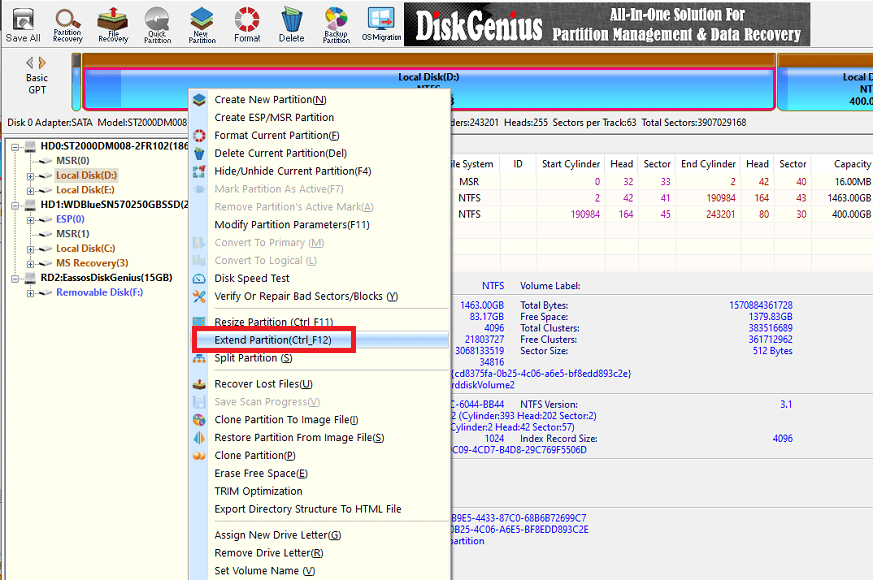
The DiskGenius main window with a partition's right-click menu open: resize, extend and split, Disk Speed Test, bad sector checks, cloning, image backup and TRIM Optimization.
Features
Recover deleted files and formatted or RAW drives
DiskGenius recovers files after deletion, formatting, a RAW partition, a virus or a Windows crash, from internal and external hard drives, SSDs, SD cards, USB flash drives and virtual disks. Results appear while the scan runs, sorted into the original folder tree plus a "Recovered Types" list for files found by their signature. You preview a file (photos, documents, the raw hex) before you copy it, which shows whether it's intact. The Professional license copies files of any size; the free edition stops at small files.
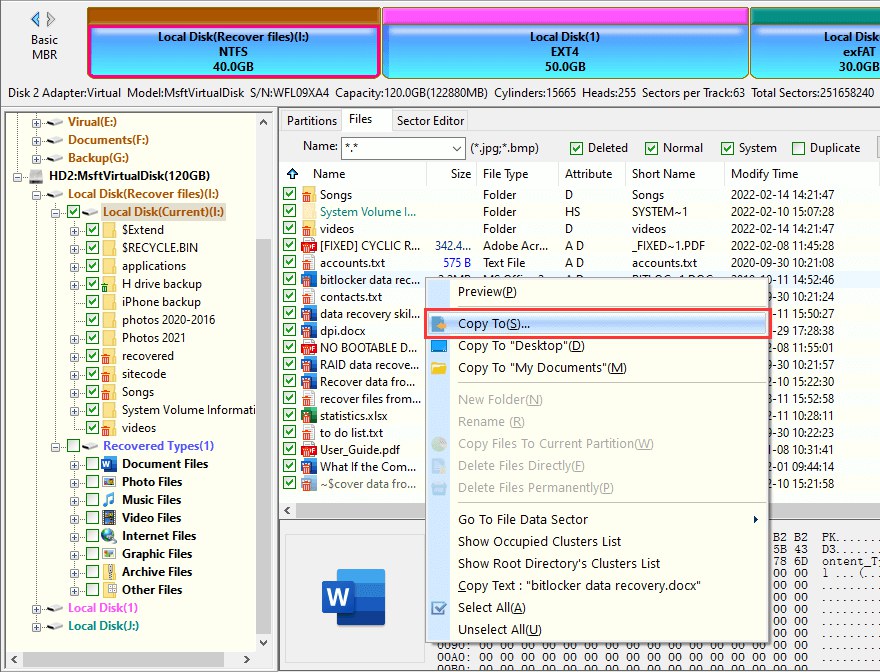
Recovered files on an NTFS partition, with deleted items marked, a Word file previewed at the bottom and the right-click "Copy To" command that saves them to another drive.
Find lost partitions and write them back
DiskGenius searches a disk for deleted or lost partitions and shows each one it finds with its files, so you can check it's the right volume before keeping it. With Professional, it saves the rebuilt partition table to the disk and the volume comes back with its drive letter and files in place, with no copying. The free edition shows the partitions but can't save the table. It also checks and repairs partition table errors and rebuilds the MBR.
Resize, split and convert partitions without wiping them
DiskGenius extends, shrinks, splits and moves partitions, adds unallocated space to a volume, converts disks between MBR and GPT and partitions between primary and logical, assigns drive letters, hides volumes and checks 4K alignment. These work in the free edition. Converting a dynamic disk back to basic without deleting its volumes needs Professional. Version 6.2 added a TRIM Optimization option when formatting and a Windows Boot Repair and Conversion tool.
Clone disks and move Windows to a new SSD
DiskGenius clones a whole disk or one partition by files, sector by sector, or by file system layout, and its System Migration moves Windows, apps and files to another HDD, SSD or USB drive, including a smaller one, without reinstalling. Since version 6.2 it TRIMs the target before cloning. It can also virtualize the running Windows into a VMware or VirtualBox virtual machine. Professional clones or migrates several disks in one job; the free edition does one at a time.
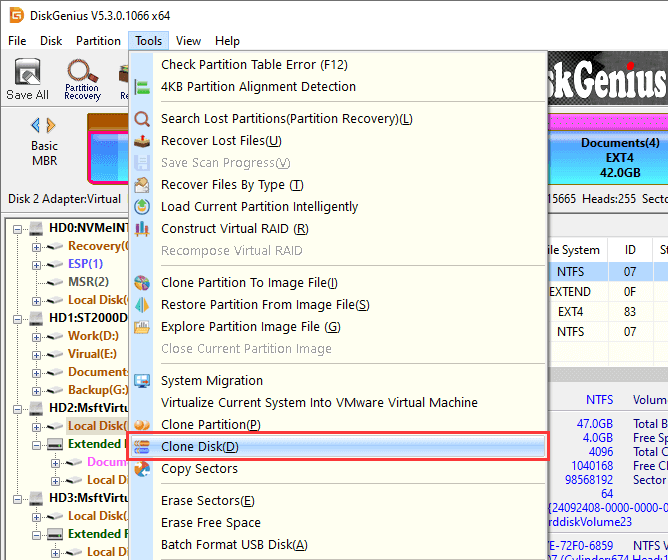
The Tools menu in DiskGenius Professional 6.0: partition recovery, file recovery by type, Construct Virtual RAID, disk images, System Migration, Clone Disk, sector erasing and the WinPE bootable USB builder.
Back up partitions and disks to image files
DiskGenius backs up a partition or a whole disk (with its boot data) to an image file, by files, by sectors or by file system layout, and restores it to the original or another disk. Incremental partition backups are unlimited in Professional, while the free edition keeps a limited number of restore points. You can also open an image file to pull out single files.
RAID, BitLocker, EXT4 and virtual disks from Windows
DiskGenius rebuilds a virtual RAID from the member disks of a failed array (RAID 0, 1, 10, 4, 5, 6 and JBOD) and recovers from it, opens BitLocker volumes, reads and writes EXT4/3/2 and LVM2 Linux volumes in Windows, recovers from Storage Spaces pools, and writes files into VMDK, VHD, VHDX and VDI virtual disks without running the VM. Professional also converts virtual disks between VMDK, VDI, VHD and HDD formats. The free edition only previews or copies small files from these sources.
Disk health, wiping and a hex sector editor
DiskGenius reads S.M.A.R.T. data, scans and repairs bad sectors (showing the read speed during the scan since 6.2), runs a Disk Speed Test, wipes disks, partitions and free space (including the BMB21-2019 standard), and builds a WinPE bootable USB so you can work on a PC that won't start. The built-in sector editor shows raw disk data in hex; Professional can edit and copy sectors, the free edition is read only.
Benefits
- One tool instead of three. Recovery, partitioning and cloning usually mean three products and three licenses. Here one $129.90 license covers them all.
- You see the result before you pay. The free edition runs the full scan and preview, so you know whether your files are recoverable before buying.
- No subscription. Both licenses sold at checkout are one-time payments with no automatic renewal, and the lifetime license includes free version updates.
- It reaches places Windows can't. EXT4 drives from a Linux box or NAS, BitLocker volumes, virtual machine disks and broken RAID arrays all open from a normal Windows PC.
Real-World Uses
- A drive turned RAW after a power cut. Instead of formatting it as Windows suggests, you search for the lost partition, check its files, and save the partition table back so the drive opens again.
- Upgrading a laptop to an SSD. System Migration copies Windows to the new, smaller SSD while you keep working, and TRIM is applied to the target first.
- A failed NAS. You pull the disks, connect them to a Windows PC, rebuild the RAID 5 array as a virtual RAID and copy the shares off.
- A PC that won't boot. You make a WinPE USB stick on a working PC, boot the broken one from it and copy the files out or repair the boot setup.
- A technician's bench. Bad sector scans, S.M.A.R.T. checks, secure wipes of retired drives and sector-level work on several disks at once.
Who It's For, and Who Should Skip It
Buy it if you're comfortable with disks and partitions and want one Windows tool that both recovers data and manages drives, or if you look after other people's PCs. The lifetime license is good value if you'll use it more than once, and the one-year license suits a single big job (a failed drive, a RAID rebuild) where you want time to finish.
Skip it if you use a Mac or Linux as your main system (there's no version for them), if you only need to resize a partition or clone a drive (the free edition already does that, no license needed), or if you want a guided, wizard-style recovery app: DiskGenius exposes a lot of low-level options in one dense window, and a wrong click in a partition tool can cost data. A simpler single-purpose recovery program is a better fit for an occasional user.
Usage Guide
- Install it on a different drive from the one you're recovering, so the install doesn't overwrite lost files. Download the installer (or the portable ZIP) and run it. It starts as the free edition.
- Pick the disk or partition in the left tree. To recover files, choose Recover Lost Files (or File Recovery on the toolbar); for a vanished partition, choose Partition Recovery.
- Let the scan run and browse the results as they appear. Double-click a file, or use Preview, to check it opens correctly.
- Buy and register if files are larger than the free limit: enter the license code in the same installation, with no reinstall.
- Copy files to another drive with right-click, Copy To. For a found partition, save the partition table instead.
- For a new SSD, open Tools, System Migration, pick the target disk, set the partition sizes and start.
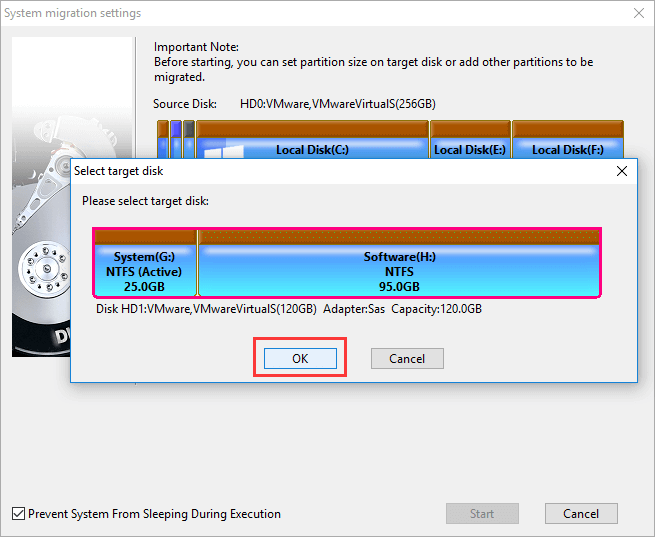
System Migration settings in DiskGenius: choosing the target disk for the Windows partitions, with an option to keep the PC from sleeping during the copy.
Before you buy
- Run the free edition's scan first. If your files show up and preview correctly, the license will copy them; if they don't, buying won't change the scan.
- The refund is conditional: EASSOS reviews requests case by case and generally refuses them for a change of mind, after the license has been activated and used, or before you've let support try to fix the problem.
- Each license is for one PC. One-month, Family (5 PCs) and Technician (20 PCs) licenses are sold separately on the vendor's own store.
Where it falls short
- The interface is dense. TechRadar called the "Copy To" recovery command "slightly jarring", and several users say cloning is easy to get wrong: one Trustpilot reviewer found the drives listed differently from their names in Windows.
- Scan results aren't always easy to judge. TechRadar found it hard to tell complete from incomplete files in the list, so use the preview.
- Badly damaged drives are hit and miss. One Trustpilot reviewer recovered only 200 GB from a damaged 4 TB disk, and no software can bring back data that's been overwritten or is on a physically failing drive.
- Windows only, and the current version no longer runs on Windows XP.
What Users Say
TechRadar (Christian Cawley, June 2021, 4 out of 5)
TechRadar tested recovery on an unmountable 16 GB SanDisk USB drive; the scan finished in under 10 minutes. Its verdict:
"While the user interface is lacking and leads to some confusion, the functionality on offer in Eassos DiskGenius is considerable."
"The recovery process is efficient, although the Copy To command is slightly jarring."
"DiskGenius is a real jack of all trades with disk utilities, partition management, data recovery and backup and restore all in one software package"
Trustpilot (3.8 out of 5 from 51 reviews)
The diskgenius.com profile is unclaimed, and opinion is split between cloning fans and disappointed recovery buyers:
"A much more comprehensive version of Disk Management basically. Very good, would recommend." (Balint, "Very good", 5 stars, April 2026)
"All of these either wanted a paid subscription, install bloatware, and/or would not work over a USB connection." (PS, "Cloning a disk drive", 5 stars, August 2026, on the other tools tried before DiskGenius)
"Many thanks finally software that gets the job done!" (Jones, "Windows 11 migration worked perfectly but only without hot migration", 5 stars, March 2026)
"It only discovered 200GB of files on a damaged 4TB hard drive." (Tom Rowe, 1 star, April 2026)
"Unfortunately, diskgenius listed the harddrives differently than they were named on the computer." (Anthony Peterson, "Diskgenius Cloing Requires Full Recovery", 1 star, January 2026)
"Free version showed the files I needed to recover, so I paid for a month of the license." (Andrew Apfelbaum, "Misleading free version", 1 star, May 2026)
AlternativeTo (3.8 out of 5 from 6 ratings)
"It's free version has a ton of features, very well coded, and no annoying bloatware like Easeus." (ibay770, November 2024)
"LOVE its uncommon features, such as its ability to unlock BitLocker encryption." (CuriousBean, October 2024)
"it simply wrote back the partition table. No need to copy the data before having it as it was before." (msori, October 2024)
"I advise the average person to avoid this program.. especially if cloning." (TBayAreaPat, August 2022)
On the vendor's site
"My hard disk was attacked by a virus and one of the EXT4 partition was lost. DiskGenius quickly retrieves the lost partition and all files inside it!" (Alison, on the DiskGenius Professional page)
The pattern: people praise how much the free edition does, the partition-table recovery that brings a volume back in place, and the BitLocker and EXT4 support. The complaints are about the technical interface, cloning mistakes, and recoveries from badly damaged drives that found less than hoped. Scan with the free edition before paying, and the last complaint mostly takes care of itself.
Comparisons
DiskGenius Free vs Professional
| Task | Free | Professional |
|---|
| Copy recovered files | Small files only | Any size |
| Restore a lost partition | Preview, can't save the table | Writes the table back |
| RAID, BitLocker, EXT4, Storage Spaces | Preview, small files only | Copy any size |
| Dynamic disk to basic | Not available | Without wiping volumes |
| Incremental backup | Limited restore points | Full |
| Clone, wipe, bad-sector repair | One disk at a time | Several disks |
| Sector editing | Read only | Edit and copy sectors |
DiskGenius vs a dedicated recovery app
EASSOS also makes CuteRecovery, a recovery-only program ($69.95 lifetime) with a simpler scan-and-recover screen. DiskGenius costs more but adds the partition manager, cloning, backup and the RAID, BitLocker and EXT4 support. If you only need to undelete files from a normal Windows drive and want the easiest path, the single-purpose tool is enough; if you also manage disks, DiskGenius replaces several tools.
Editions and Pricing
All Professional licenses include the same features and are one-time payments. Each Buy button orders that license.
| License | Price | PCs | Term | Buy |
|---|
| Lifetime Personal | $129.90 | 1 | Lifetime, free updates, priority remote assistance | Buy Lifetime |
| One-Year | $99.90 | 1 | One year from activation, no renewal | Buy One-Year |
| One-Month | $69.90 | 1 | One month from activation | Vendor store |
| Lifetime Family | $299.90 | 5 | Lifetime | Vendor store |
| Lifetime Technician | $699.90 | 20 | Lifetime | Vendor store |
FAQs
Is DiskGenius the same program as PartitionGuru?
Yes. DiskGenius is PartitionGuru renamed; the last PartitionGuru release was version 4.9.5.508. EASSOS says original PartitionGuru users can upgrade to DiskGenius Professional with the same license information, plus registration on one more PC.
Do I need to reinstall DiskGenius after buying a license?
No. DiskGenius Free and Professional use the same installer. You enter the license code in the copy you already have, and the license code arrives by email right after payment.
What happens when the DiskGenius one-year license ends?
The DiskGenius one-year license doesn't renew automatically. It's valid for a year after activation, and after that the Professional features stop until you buy a new license. The lifetime license has no end date and includes free updates.
Can DiskGenius recover files from a PC that won't boot?
Yes. DiskGenius creates a WinPE bootable USB drive on a working Windows PC; you boot the broken computer from it and run recovery or copy files from there.
Does DiskGenius work on a Mac or Linux?
No. DiskGenius runs only on Windows. It can, however, read and recover Linux EXT4/3/2 and LVM2 volumes when you connect those drives to a Windows PC.
Can I get a refund if DiskGenius doesn't find my files?
Only in some cases. DiskGenius refunds are reviewed case by case within 30 days, and requests are generally refused for a change of mind, after the license has been activated and used, or without first giving support a chance to troubleshoot. Running the free scan before buying is the safer way to find out.
Is there a portable version of DiskGenius?
Yes. Besides the installer, the DiskGenius download page offers 64-bit and 32-bit portable ZIP builds, which run without installation, for example from a USB stick.
System Requirements
- Windows 11, 10, 8 or 7, 32-bit or 64-bit (an older version is offered for Windows XP)
- About 64 MB for the installer
- A second drive to save recovered files to
Conclusion
DiskGenius Professional is worth $129.90 if you're a Windows power user or technician who wants recovery, partitioning, cloning and backup in one tool, especially for the jobs other tools can't do from Windows: writing a lost partition table back, rebuilding a RAID array, or pulling files off BitLocker and EXT4 drives. The one reason to buy it is that range. The main reason not to is the interface, which assumes you know what you're doing; occasional users who only need to undelete a few files will be happier with a simpler app. Either way, run the free scan first: it tells you for nothing whether the license will get your files back.
Download Free TrialBuy Lifetime LicenseBuy One-Year License