CuteRecovery: Step-by-Step Data Recovery for Windows Drives, USB Sticks and Memory Cards
CuteRecovery (formerly EassosRecovery) is a $69.95 Windows data recovery program, a lifetime license for one or two PCs, that brings back deleted files, formatted or RAW partitions and lost partitions through a simple four-button wizard. It's aimed at home users rather than technicians, and a 30-day license costs $39.95 if you only have one job to do. The trial scans and previews for free, so you see what's recoverable before you pay.
You emptied the Recycle Bin a day too soon, Windows says a USB stick "needs to be formatted", or a camera card suddenly shows as RAW. CuteRecovery is built for exactly these moments: pick what happened, pick the drive, wait for the scan, tick the files and recover them to another drive.
Quick facts
- Version: 4.6.0.473, updated December 13, 2024
- Developer: EASSOS, the maker of DiskGenius
- Platform: Windows 10, 8.1, 8, 7, Vista and XP, plus Windows Server 2003 to 2019
- File systems: NTFS, FAT16, FAT32 and exFAT
- Price: $69.95 lifetime or $39.95 for 30 days, each for 1-2 PCs, one-time payments
- Trial: scans and previews; the separate CuteRecovery Free recovers up to 1 GB
- Refund: 30-day conditional refund for technical problems support can't solve
- What we checked: installer CRSetup460473_eng.exe (59.1 MB, file version 4.6.0, digitally signed by Qinhuangdao Yizhishu Software Development Co., Ltd.) downloaded from the vendor, and checkout prices of $69.95 for the lifetime license and $39.95 for the 30-day license on November 15, 2026. We didn't run a recovery ourselves.
Download Free TrialBuy Lifetime LicenseBuy 30-Day License
Overview
CuteRecovery is the simpler of EASSOS's two Windows recovery tools. Its sibling DiskGenius packs recovery into a full partition manager with a dense, technical window; CuteRecovery strips that away and opens on four big choices. Behind them is the same kind of scanning engine: it reads what's left of the file system to rebuild folders and names, and also searches the raw data for more than 550 known file formats, so it can find files whose names are gone.
The rename from EassosRecovery changed nothing but the name. Version 4.6 added recovery of EFS-encrypted files (with thumbnail and full-size preview), restores Recycle Bin files to their original path, names recovered Office documents automatically, and improved recovery on FAT32 and exFAT drives.

CuteRecovery's start screen (version 4.5 shown): Recover Files From Partition, Recover Files From Disk, Recover Deleted Files and Recover Lost Partitions.
Features
Undelete files, even after Shift+Delete or an emptied Recycle Bin
CuteRecovery's Recover Deleted Files mode finds files removed with Shift+Delete, emptied from the Recycle Bin, or lost in a failed cut-and-paste. Because a deleted file's entry often survives, results usually come back with their original names and folders, which makes the list easy to work through.
Recover formatted, RAW and inaccessible partitions
CuteRecovery's Recover Files From Partition mode scans a volume that was formatted, turned RAW, or won't open, and rebuilds its folder tree. An "Extra Search for Known File Types" option adds a signature scan for files the folder structure no longer points to, and you can limit it to the file types you need.

Choosing the partition to scan: CuteRecovery shows the file system, cluster size and used space, with the Extra Search for Known File Types option and a Load Progress button for a saved scan.
Scan a whole disk and find lost partitions
CuteRecovery's Recover Files From Disk mode scans an entire drive, which helps when a USB stick was repartitioned or a disk is damaged. Recover Lost Partitions searches for partitions that were deleted, resized, merged or lost after a bad system restore, then lets you copy their files out.
Preview before you recover, and recover during the scan
CuteRecovery previews photos, documents, PDF, video, audio and text files with a double-click, and shows the raw hex next to the thumbnail, so you can check a file is intact before you pay or copy it. Files appear while the scan runs, so you can stop as soon as you see what you need, and a long scan can be saved and loaded again later.

A partition scan at 45%: found photos already listed in their original folders, with a thumbnail and hex view of the selected file at the bottom.
Read-only scanning across common devices
CuteRecovery only reads the source drive, so the scan doesn't overwrite what you're trying to save. It works on desktop and laptop hard drives, external drives, USB flash drives, memory cards and digital cameras, recovering documents, photos (including camera RAW formats such as CR2 and NEF), video, audio, archives and email files.
Benefits
- Nothing to learn. Four plain-language choices and a Next button; no partition maps or sector editors to get lost in.
- Proof before payment. The scan and preview are free, so you only buy if your files are there and open correctly.
- Cheap for a one-off. The $39.95 30-day license covers a single rescue; the $69.95 lifetime license costs less than one visit to many repair shops and includes free updates.
- Two PCs per license. Both licenses sold at checkout cover one or two computers.
Real-World Uses
- Holiday photos deleted from an SD card. Put the card in a reader, run Recover Files From Partition with the extra file-type search, and preview the JPEGs and RAW files before saving them.
- A USB stick Windows wants to format. Say no to Windows, scan the RAW stick in CuteRecovery and copy the folders to your PC.
- An emptied Recycle Bin. Recover Deleted Files brings back the documents with their names, straight to their original path if you want.
- A reinstall wiped the wrong partition. Recover Lost Partitions finds the old volume and lets you copy its files out.
Who It's For, and Who Should Skip It
Buy it if you're an ordinary Windows user facing a common data loss (deleted files, a formatted or RAW drive, a missing partition) and you want a guided tool rather than a technician's toolbox.
Skip it if you're on a Mac, if your files sit on a Linux EXT4 drive, a BitLocker volume, a RAID array or a virtual machine disk (CuteRecovery handles NTFS, FAT and exFAT only; DiskGenius covers those), or if you want to put the partition table back so the volume reappears in place rather than copying files off. If the drive clicks or isn't detected at all, no software will help: that's a job for a recovery lab.
Usage Guide
- Install it on a different drive from the one you're recovering, so the installer can't overwrite lost files.
- Choose a mode on the start screen that matches what happened.
- Select the partition or disk and decide whether to add the Extra Search for Known File Types, then click Next.
- Browse the results by folder or by file type as the scan runs, and double-click files to preview them.
- Register with the license code from your order email if you're using the trial.
- Tick the files and click Recover, saving them to another drive.
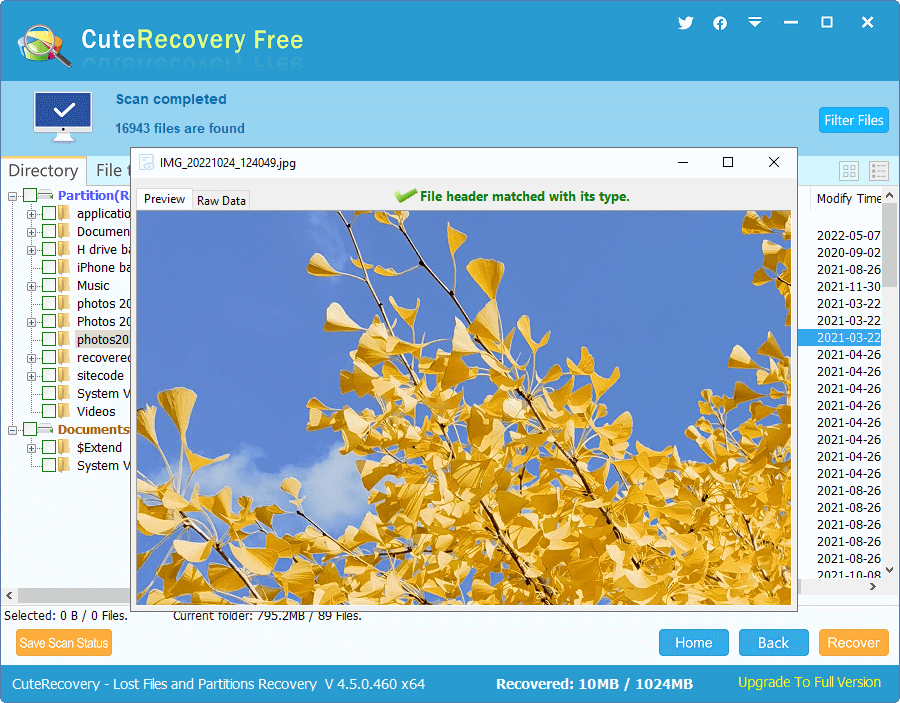
CuteRecovery Free after a finished scan (16,943 files found), previewing a recovered JPEG; the status bar shows the free edition's 1,024 MB allowance.
Before you buy
- If you have less than 1 GB to get back, try the separate CuteRecovery Free download first: it can recover that much without a license.
- The refund is conditional. EASSOS generally refuses refunds for a change of mind, and expects you to let support troubleshoot first, so judge recoverability from the preview before you buy.
- Family (3-10 PCs, $199.95) and Business (30 PCs, $499.95) licenses are sold only on the vendor's own store.
Where it falls short
- Windows 11 isn't on EASSOS's list. The supported systems stop at Windows 10 and Server 2019, and the last update was December 2024.
- Common file systems only. No EXT4, HFS+, APFS, BitLocker or RAID support.
- Overwritten data is gone. Files written over after the loss, and SSDs where TRIM has already cleared deleted blocks, usually can't be recovered by any program.
- Little independent testing. Unlike its sibling DiskGenius, CuteRecovery has almost no reviews from independent sites.
What Users Say
On the vendor's site
Independent reviews of CuteRecovery are scarce; the comments below come from EASSOS's own product pages.
"I used the data recovery tool to recover some files from a disk which had a corrupted directory, and I could not access any user accounts. CuteRecovery worked like a dream and I have all my files back. What an excellent product." (Richard)
"Your software is the best tool to get back lost files and photos. With simple clicks, I recovered almost 100GB files from my external hard disk which got formatted in Disk Management. Thanks a lot!" (Susana)
"CuteRecovery is excellent! It worked great and recovered all lost data from a RAW partition on my Windows 10 PC. Plus, the pre-recovery preview of lost data is really helpful." (Brandon)
"All of my photos and documents were recovered in the same folder and file names as they were originally. The program worked perfectly. You have my vote." (Carl, on CuteRecovery Free)
These are hand-picked by the vendor, so read them as examples of what the program is meant to do. The themes match its design: recovery from RAW and formatted drives, original folder names kept, and the preview. For an independent view of the same company's recovery engine, see the reviews on our DiskGenius page.
Comparisons
CuteRecovery vs DiskGenius Professional
EASSOS itself pitches CuteRecovery at home users and DiskGenius at technicians and data recovery pros. The difference in practice:
| | CuteRecovery | DiskGenius Professional |
|---|
| Lifetime price | $69.95 (1-2 PCs) | $129.90 (1 PC) |
| Interface | Step-by-step wizard | Full disk utility window |
| File systems | NTFS, FAT, exFAT | Adds ReFS, EXT4/3/2, BitLocker |
| RAID and virtual disks | No | Yes |
| Partition tools, cloning, backup | No | Yes |
| Free edition recovers | Up to 1 GB | Small files only |
Editions and Pricing
Every license includes the full program, free updates and email support. Each Buy button orders that license.
| License | Price | PCs | Term | Buy |
|---|
| Lifetime | $69.95 | 1-2 | Lifetime | Buy Lifetime |
| 30-Day | $39.95 | 1-2 | 30 days | Buy 30-Day |
| Family | $199.95 | 3-10 | Lifetime | Vendor store |
| Business | $499.95 | 30 | Lifetime | Vendor store |
FAQs
Is CuteRecovery the same as EassosRecovery?
Yes. EASSOS renamed EassosRecovery to CuteRecovery and says nothing else changed; CuteRecovery Free was likewise EassosRecovery Free.
What's the difference between the CuteRecovery trial and CuteRecovery Free?
CuteRecovery's trial is the full program unregistered: it scans and previews, and a license code turns on recovery. CuteRecovery Free is a separate download with the same features that recovers up to 1 GB of data at no cost.
What happens when the CuteRecovery 30-day license runs out?
The CuteRecovery 30-day license is valid for 30 days and doesn't renew automatically, so there's no subscription to cancel. Files you recover in that time stay yours; for later jobs you'd buy another license, so the lifetime license is the better deal if you expect to need it again.
Can CuteRecovery recover files from a phone?
CuteRecovery recovers from a phone's removable SD card when you put it in a card reader, but not from a phone's internal memory, which Windows doesn't see as a drive.
Does CuteRecovery work on a Mac?
No. CuteRecovery runs only on Windows and reads NTFS, FAT and exFAT drives, so it can't recover a Mac's APFS or HFS+ disk.
How quickly do I get the CuteRecovery license code?
The CuteRecovery license code is emailed automatically within minutes of payment. If it doesn't arrive, check the spam folder or contact EASSOS support with the order ID.
Is there a student discount on CuteRecovery?
Yes. EASSOS offers students, teachers and staff at educational institutions a 20% discount on its products; you ask its support team for the coupon code.
System Requirements
- Windows 10, 8.1, 8, 7, Vista or XP; Windows Server 2003, 2008, 2012, 2016 or 2019
- NTFS, FAT16, FAT32 or exFAT source drives
- About 60 MB for the installer, plus a second drive to save recovered files to
Conclusion
CuteRecovery is worth it for a home user with an everyday data loss on a Windows drive, USB stick or memory card who wants a guided tool and a fair price: $39.95 for a single rescue, $69.95 to keep it. The one reason to buy it is that the wizard makes recovery hard to get wrong, and the free preview tells you up front whether it will work. The main reason not to is its narrow reach: no Windows 11 on the official list, no Linux, BitLocker or RAID, and few independent reviews. If any of that matters to you, the same company's DiskGenius Professional covers it.
Download Free TrialBuy Lifetime LicenseBuy 30-Day License