Isoo Backup: Simple Windows System Image Backup with a Restore Option Before Windows Starts
Isoo Backup is a $29.95 Windows backup program (lifetime license, one PC) that saves your whole system drive to an image file and puts Windows back to an earlier time point when it crashes, slows down or won't boot. It's for home and small-office users who want a system backup without learning a full backup suite, and it comes with a 15-day fully working trial.
The idea is the old "factory restore" button, but with your own setup in it: back up once Windows, your programs and settings are how you like them, add incremental backups now and then, and when something breaks you pick a time point and restore it, from inside Windows or from a menu that appears before Windows loads.
Quick facts
- Version: 4.15.1.900, updated August 18, 2026
- Developer: EASSOS, the maker of DiskGenius (Isoo Backup is built on the same disk engine)
- Platform: Windows 10, 8, 7, Vista and XP, PCs and servers; MBR and GPT disks, BIOS and UEFI
- Price: $29.95, one-time, for one computer, with free lifetime updates
- Trial: 15 days, fully functional
- What we checked: installer IsooBackupSetup4151900.exe (29 MB, file version 4.15.1, digitally signed by Qinhuangdao Yizhishu Software Development Co., Ltd.) downloaded from the vendor, and a checkout price of $29.95 on November 15, 2026. We didn't run a backup and restore ourselves.
Download Free TrialBuy Now
Overview
Isoo Backup opens on two buttons, Backup and Restore, and that's most of the program. Backup copies the system partition, the system reserved partition and, on GPT disks, the EFI partition into a single image file. Restore lists every time point you've saved and writes the one you choose back. Everything else (compression, a password, incremental mode, excluded folders) sits behind an Options button, already set to sensible defaults.
EASSOS keeps updating it for new hardware rather than adding features. Version 4.15 added support for the Microsoft UEFI CA 2023 certificate, which newer Secure Boot PCs use, and the previous releases added Intel Core Ultra (Meteor Lake and Arrow Lake) platforms and Intel RST VMD storage controllers.
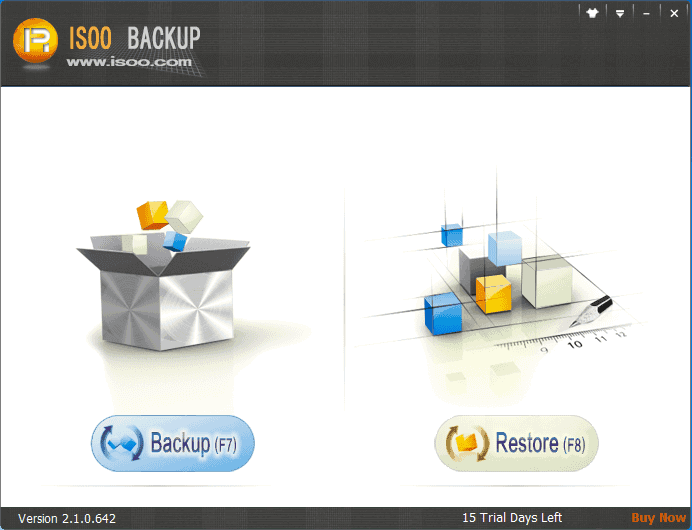
Isoo Backup's main window, from the vendor's manual (an older version 2.1 trial shown): one button to back up, one to restore.
Features
Whole-system image backup while you work
Isoo Backup saves Windows, installed programs, settings, boot files and your files on the system drive into one image. It uses Windows Volume Shadow Copy, so the backup runs in the background without a reboot, and it automatically leaves out files Windows doesn't need (you can add or remove exclusions). It can even force a backup after Windows was shut down improperly.
Full and incremental backups with time points
Isoo Backup makes a full backup first, then incremental backups that store only what changed, which saves time and space. Each backup becomes a time point with a remark, and you can restore any of them or delete the last one.
Compression, password, splitting and a hidden backup partition
Isoo Backup lets you choose the compression level (and how many CPU threads it uses), set a password on the image, split it into smaller files, and hide the backup file. Besides an external drive, it can save the image to a new partition it carves out of free space during the backup, without touching existing data, and hide that partition.
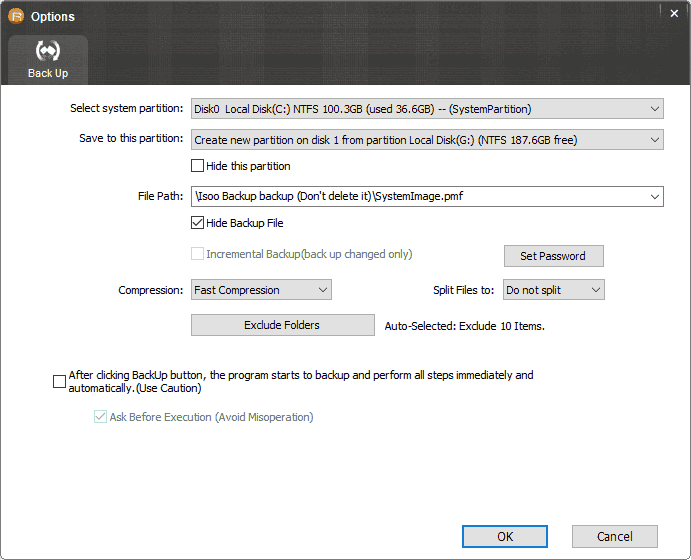
The backup Options dialog: the system partition, a new hidden partition as the destination, incremental backup, Set Password, compression, file splitting and folder exclusions.
Restore even when Windows won't boot
Isoo Backup gives you three ways back: restore from inside Windows, press a key (F3 by default, which you can change) as the PC starts to open Isoo Backup before Windows loads, or boot from a USB drive the program makes for emergencies. It can also install its restore environment to a hidden partition opened with F11, and repair that entry if it gets damaged.
Partition backup and UEFI/GPT support
Isoo Backup also backs up any non-system partition to an image, so a data drive can be restored after accidental deletion, formatting or corruption. It works on MBR and GPT disks and on UEFI computers, backing up the EFI partition with Windows and restoring the partition GUID so the PC starts normally.
Benefits
- A broken Windows becomes a restore, not a reinstall. Restoring an image brings back every program and setting, which a fresh install doesn't.
- Nothing to learn. Two buttons and a wizard; the defaults are chosen for your disk.
- Cheap and permanent. $29.95 once, with free updates, against yearly subscriptions for many backup suites.
Real-World Uses
- A fresh PC set up just right. Take a full backup once everything is installed, and you can return to that state whenever Windows gets slow or cluttered.
- Before a risky change. An incremental backup before a big Windows update or a new driver gives you an undo point.
- Malware or a blue screen. Press the restore key at startup and roll back to last week's time point without booting Windows.
- A family PC. The pre-boot restore option lets a less technical user get the computer back without a rescue disk.
Who It's For, and Who Should Skip It
Buy it if you want a simple, inexpensive way to image your Windows system drive and restore it, including from a pre-boot menu, and you don't need anything else.
Skip it if you want file-and-folder backup, cloud storage, scheduled backups of documents, or disk cloning: Isoo Backup images partitions and nothing more. DiskGenius, from the same company, adds cloning and disk imaging to a full partition toolkit, and dedicated backup suites cover files and the cloud. Mac users have no version.
Usage Guide
- Download and install Isoo Backup, then launch it. The trial runs for 15 days with every feature.
- Click Backup, check the destination (an external drive, or the new hidden partition it proposes), and open Options if you want a password, incremental mode or a different compression.
- Click Start and wait for the image to finish. The boot option for pre-Windows restore is installed by default.
- Make the USB rescue drive from the main menu, in case the disk's boot area itself is damaged later.
- To restore, click Restore (or press the boot key at startup), pick a time point, confirm and start.
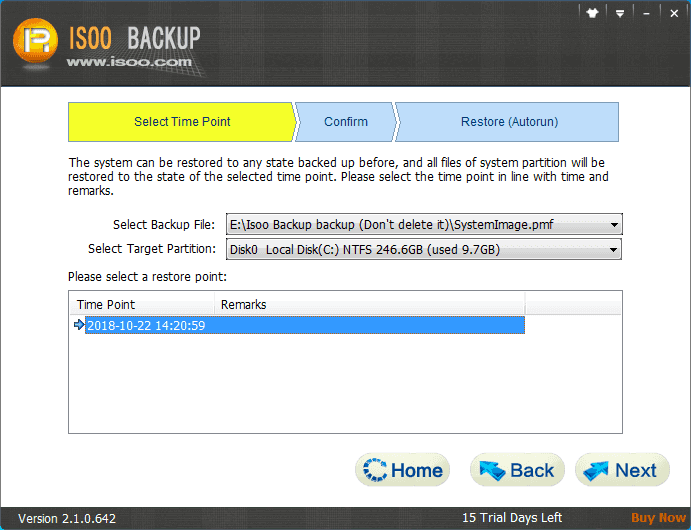
The restore wizard (version 2.1 shown): choose the backup file and target partition, then the time point to restore.
Before you buy
- Use the full 15-day trial to make a backup and test a restore on your own PC; that's the best way to know it works with your hardware.
- Keep at least one copy of the image on an external drive. A backup on a hidden partition of the same disk won't survive that disk failing.
- The license is for one computer. EASSOS offers a 30-day money-back guarantee, but its refund policy excludes a change of mind and expects you to contact support first.
Where it falls short
- No scheduler, cloud or file-level backup. You start each backup yourself, and it works in partitions, not folders.
- Dated documentation. The vendor's manual and screenshots still show version 2.1, and the site names Windows 10 as its newest system, even though recent releases target current Intel hardware and Secure Boot certificates.
- No 32-bit UEFI Secure Boot any more, and hardware from before 2004 needs the old version 2.2.0.661.
- Almost no independent reviews. The only user comments are on the vendor's own site.
What Users Say
On the vendor's site
Isoo Backup has no reviews on the major review sites; these comments come from isoo.com:
"Isoo brings peace of mind to me and all users who are not proficient in computer skills. It is so easy to use that I can back up Windows 10 through very simple steps." (Lancaster)
"This is the right backup software I've been looking for. The backup process is speedy and the image is smaller compared with other backup software." (Benny)
"Super application. It can backup laptop system to a single image file quickly and easily. I will always use this software." (Claude)
They're chosen by the vendor, so treat them as a description of the intended experience: easy, quick, and small images. The 15-day trial is the honest way to judge it.
Comparisons
Isoo Backup vs Windows' own System Image Backup
Windows still includes the old "Backup and Restore (Windows 7)" system image tool for free. Isoo Backup adds what it lacks: incremental time points, compression, a password, a backup partition it creates for you, and a restore option that opens before Windows loads.
Isoo Backup vs DiskGenius Professional
DiskGenius ($129.90 lifetime) images and restores partitions and disks too, and adds cloning, Windows migration, partition management and data recovery. Isoo Backup costs a quarter as much and does one job with a simpler wizard and the pre-boot restore menu. Pick Isoo for a set-and-forget system restore point, DiskGenius if you also manage or move disks.
Editions and Pricing
| License | Price | Computers | Includes |
|---|
| Isoo Backup (lifetime) | $29.95 | 1 | Free lifetime updates and technical support |
FAQs
Does the Isoo Backup trial have any limits?
No. The Isoo Backup trial is fully functional for 15 days, and you can register it with a license code during or after the trial without reinstalling.
Can Isoo Backup restore Windows to a new, larger disk?
Isoo Backup restores a time point to a target partition you select in the restore wizard. For moving Windows to a new SSD, a cloning or migration tool (such as DiskGenius's System Migration) is the more direct route.
Does Isoo Backup work on UEFI computers with Secure Boot?
Yes. Isoo Backup supports GPT disks on UEFI computers, backs up the EFI partition, and since version 4.15 supports the Microsoft UEFI CA 2023 Secure Boot certificate. It no longer supports 32-bit UEFI Secure Boot.
How do I remove the Isoo Backup boot entry?
Use "Uninstall Isoo Backup" from the program's main menu and choose to uninstall its boot options. If a "Press F11" prompt remains after uninstalling, the program has a function to rebuild the master boot record and clear it.
How fast is Isoo Backup's support?
Isoo Backup support guarantees a reply within 2 business days and usually answers within 24 hours, for both trial and registered users.
Is there a student discount?
Yes. EASSOS gives students, teachers and education staff a 20% discount on its products; ask its support team for the coupon code.
System Requirements
- Windows 10, 8, 7, Vista or XP, on PCs and servers
- MBR or GPT disks, BIOS or UEFI (64-bit for Secure Boot)
- Hardware from 2004 or later (older PCs need version 2.2.0.661)
- About 29 MB for the installer, plus space for the backup image
Conclusion
Isoo Backup is worth $29.95 if what you want is a no-fuss system restore point for one Windows PC, with the extra safety of restoring from a menu before Windows starts. The one reason to buy it is how little it asks of you: two buttons, sensible defaults, and a rollback that works even when Windows doesn't. The main reason not to is how narrow it is, with no scheduling, file backup or cloud, and documentation that hasn't kept pace with the program. Run the 15-day trial through a real backup and restore before you pay.
Download Free TrialBuy Now