At a glance
| Fact | Standard | Professional | Server | Unlimited | Technician |
|---|
| Price | Free | $59.95 once at checkout | $249 once at checkout | $599 once at checkout | $799 once at checkout |
| Yearly plan on AOMEI's store | - | $49.95 a year | $169 a year | $399 a year | $599 a year |
| Machines per license | Home PCs | 2 PCs | 2 computers | Unlimited, one company | Unlimited, many companies |
| Windows 11, 10, 8.1, 8, 7 | ✓ | ✓ | ✓ | ✓ | ✓ |
| Windows Server 2012 to 2025 | ✗ | ✗ | ✓ | ✓ | ✓ |
| Business use | ✗ | ✓ | ✓ | ✓ | ✓ |
| Billable work for clients | ✗ | ✗ | ✗ | ✗ | ✓ |
| Resize, move, merge, format | ✓ | ✓ | ✓ | ✓ | ✓ |
| Allocate Free Space, split partition | ✗ | ✓ | ✓ | ✓ | ✓ |
| Migrate OS, clone system disk | ✗ | ✓ | ✓ | ✓ | ✓ |
| Convert system disk MBR/GPT | ✗ | ✓ | ✓ | ✓ | ✓ |
| Dynamic disks | ✗ | ✓ | ✓ | ✓ | ✓ |
| Recover lost partitions and files | ✗ | ✓ | ✓ | ✓ | ✓ |
| Portable version on USB | ✗ | ✗ | ✗ | ✓ | ✓ |
| Trial | Free for good | Demo simulates jobs | Demo simulates jobs | Demo simulates jobs | Demo simulates jobs |
How we compared them
- We read AOMEI's edition comparison table row by row: 46 rows of features and license terms across the five editions.
- We put each paid edition's lifetime license in the cart and noted the price and the product name the order page showed.
- We noted the yearly prices on AOMEI's own store and worked out when the lifetime plan pays for itself.
- We downloaded the free Standard installer and read its file version and signature, and checked the changelog for the latest release.
- We read recent Trustpilot reviews of AOMEI's partition software, the good and the bad.
What we checked: order page prices of $59.95 (Professional, 2 PCs), $249 (Server, 2 servers), $599 (Unlimited) and $799 (Technician), all lifetime with upgrades, the Standard installer at file version 10.12.2 (71.83 MB, signed by AOMEI International Network Limited), and the 10.12.2 changelog entry dated October 19, 2026, all on November 16, 2026. We compared features, licenses and prices, and didn't resize or migrate a real disk with any edition.
AOMEI Partition Assistant Professional: the one most home users need
- Price: $59.95 once at checkout, lifetime upgrades, 2 PCs
- Runs on: Windows 11, 10, 8.1, 8 and 7, 32-bit and 64-bit
- Best for: moving Windows to an SSD, fixing a full C: drive, getting a PC ready for Windows 11
AOMEI Partition Assistant Professional is where the system-level jobs start. It migrates a running Windows install to an SSD or a bigger hard drive, clones the system disk, converts a system disk between MBR and GPT without wiping it, and moves free space straight from D: to C: with Allocate Free Space. Those are the jobs that bring most people to a partition manager, and the free Standard edition can't do any of them.

The Clone menu in AOMEI Partition Assistant, with Migrate OS at the top. The paid editions share this window.
Pro also adds split partition, dynamic disk management, App Mover for shifting installed programs to another drive, recovery of lost partitions and deleted files, boot repair, bootable media and a Windows password reset. Changes queue in a pending list and nothing touches the disk until you click Apply. At $59.95 for two PCs with lifetime upgrades, it is also the cheapest way to get all of AOMEI's partition tools except the portable USB build. The lifetime plan costs only $10 more than AOMEI's $49.95 yearly plan, and a Family Lifetime plan covers 5 PCs.
What we like
- Every disk tool in the range for $59.95, once
- Moves Windows to an SSD without a reinstall
- Converts a system disk to GPT in place for Windows 11
- Business use is allowed on its 2 PCs
Watch out for
- No Windows Server support
- The demo only simulates jobs, so you pay before a real run
- Long jobs can't always be cancelled midway
Download Professional DemoBuy AOMEI Partition Assistant Professional
AOMEI Partition Assistant Server: for one or two Windows Servers
- Price: $249 once at checkout, lifetime upgrades, 2 servers or PCs
- Runs on: Windows Server 2025, 2022, 2019, 2016 and 2012, plus Windows 11 to 7
- Best for: a small business with a server or two that has run out of space on C:
AOMEI Partition Assistant Server has the same tools as Professional. What the extra $189 buys is permission to install on Windows Server. That matters because Windows Server's Disk Management can only extend a volume into unallocated space right next to it, so a full C: with a D: partition beside it is a dead end there. Server also handles dynamic volumes, including simple, spanned, striped, mirrored and RAID-5 ones, and converts a dynamic disk back to basic without deleting its data.

AOMEI Partition Assistant Server Edition with a dynamic disk in the disk map. Dynamic Disk Manager is in the right-hand menu.
Two servers is a tight limit. If you look after three or more, compare it with Unlimited before you buy: two Server licenses already cost $498 against Unlimited's $599, which also covers every PC in the company.
What we like
- Extends a server's C: drive without a rebuild
- Resizes dynamic volumes, including RAID-5
- One-off price with lifetime upgrades
Watch out for
- Only 2 machines per license
- Virtual servers rarely need it, since the hypervisor can grow the disk
- System jobs restart the server into PreOS mode, so plan a maintenance window
Download Server DemoBuy AOMEI Partition Assistant Server
AOMEI Partition Assistant Unlimited: one license for a whole company
- Price: $599 once at checkout, lifetime upgrades
- Covers: unlimited PCs and servers inside one company
- Best for: IT departments rolling out SSDs or preparing a fleet for Windows 11
AOMEI Partition Assistant Unlimited is a site license: one company can activate it on as many Windows PCs and servers as it owns. It adds one feature the cheaper editions lack, Create Portable Version, which puts the program on a USB stick so a technician can fix a PC without installing anything on it. Otherwise the tools are the ones Server has.
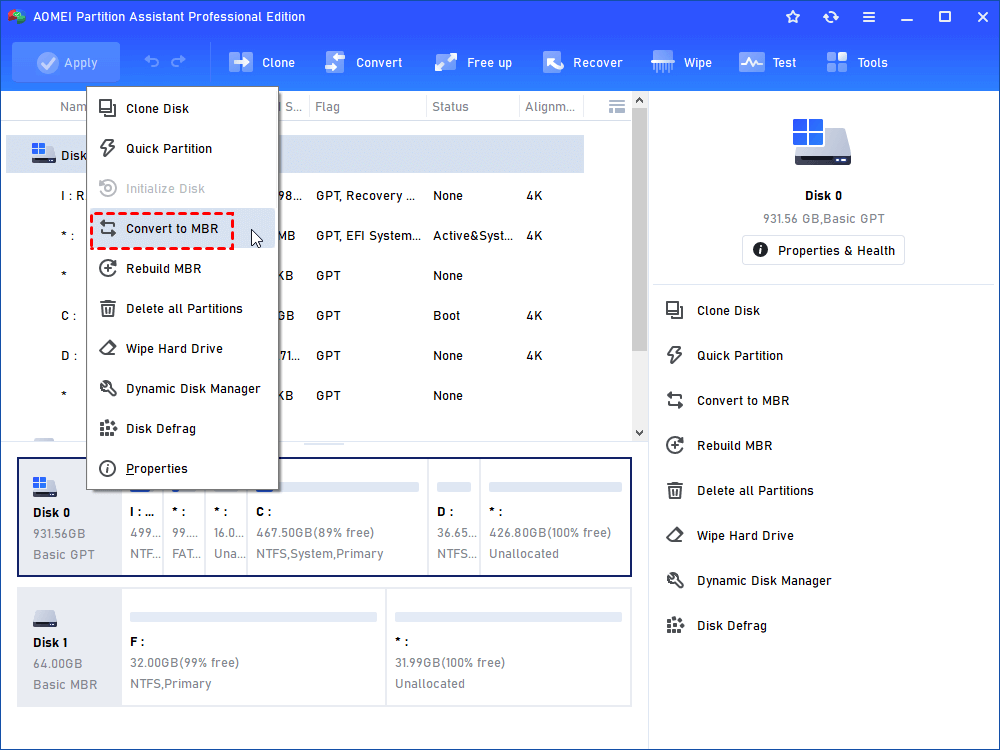
Converting a whole disk from the disk menu, shown in the Professional Edition window. Unlimited has the same menu.
The sums are simple. Unlimited costs the same as about ten Professional licenses (20 PCs) or two and a half Server licenses (5 servers). Below that, buy the smaller editions. "One company" is the catch: an IT firm working on its customers' machines is outside this license and needs Technician.
What we like
- No seat counting, desktops and servers alike
- Portable version for desk-side fixes
- Lifetime plan is cheaper than the $399 yearly plan after two years
Watch out for
- No central console: jobs still run one machine at a time
- Not for client work, even in a small IT business
- Too much for a handful of machines
Download Unlimited DemoBuy AOMEI Partition Assistant Unlimited
AOMEI Partition Assistant Technician: the only edition for paid client work
- Price: $799 once at checkout, lifetime upgrades
- Covers: unlimited PCs and servers across multiple companies, with billable technical services
- Best for: PC repair shops, freelance technicians and MSPs
AOMEI Partition Assistant Technician is the only edition whose license lets you use it on other people's machines and charge for it. AOMEI's comparison table gives "Provide Billable Technical Services" to Technician alone. It has the same tools as Unlimited, including the portable USB version, and the license stretches across separate companies and locations. That also suits a group with several subsidiaries.

The Technician Edition's Tools menu, with Create Portable Version, bootable media, Windows To Go and password reset.
The extra $200 over Unlimited is the price of staying inside the license when you bill clients. If every machine you touch belongs to your own employer, that $200 buys nothing.
What we like
- Licensed for billable client work
- Unlimited machines across many companies
- Portable USB build leaves nothing on the client's PC
Watch out for
- $799 needs regular paid jobs to pay off
- Same tools as Unlimited, so a single company gains nothing
- Few independent reviews of this edition itself
Download Technician DemoBuy AOMEI Partition Assistant Technician
AOMEI Partition Assistant Standard: free, and enough for simple jobs
- Price: free for personal and home use
- Runs on: Windows 11, 10, 8.1, 8 and 7, with a separate ARM64 build
- Best for: resizing or merging data partitions at home
AOMEI Partition Assistant Standard resizes, moves, merges, creates, deletes and formats partitions, clones a data disk, converts a data disk between MBR and GPT, rebuilds the MBR, checks disk health and cleans out junk and duplicate files. If your C: drive sits right before free space, that is often all you need. What it can't do is the system work: no Migrate OS, no system disk conversion, no Allocate Free Space, no recovery tools and no Windows Server. Paid features show a small PRO badge in the menu, so you see the limit before you hit it.
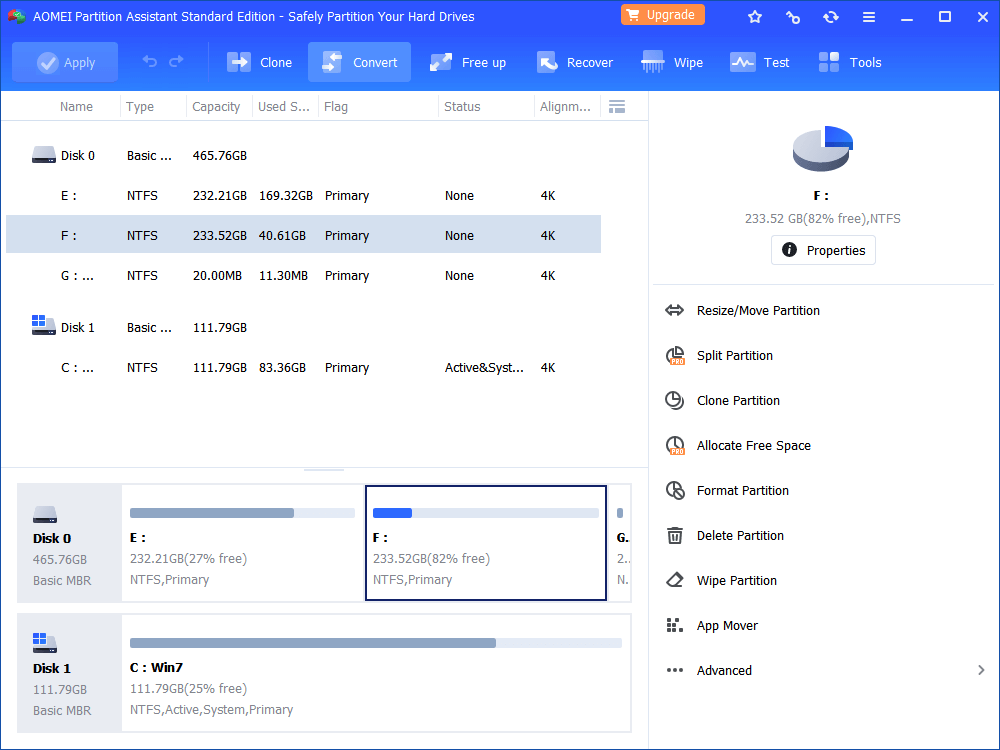
AOMEI Partition Assistant Standard Edition. Split Partition and Allocate Free Space carry a PRO badge in the right-hand menu.
What we like
- Free, with the same interface as the paid editions
- Enough for most data-partition resizes
- ARM64 build for Windows on ARM laptops
Watch out for
- Home use only
- Can't move Windows to an SSD or convert a system disk
- Upgrade prompts throughout the window
Download AOMEI Partition Assistant Standard
Price and licensing: lifetime beats yearly for anyone who keeps it
AOMEI Partition Assistant's lifetime plans pay for themselves within two years on every edition. The order page sells the lifetime license of each paid edition, while AOMEI's own store defaults to a yearly plan that renews automatically.
Lifetime license price at checkout (USD)
Professional (2 PCs)$59.95
Unlimited (one company)$599
Technician (many companies)$799
Order page prices checked on November 16, 2026. Standard is free.
Two years of the yearly plan vs the lifetime plan (USD)
Professional: yearly x 2$99.90
Professional: lifetime$59.95
Unlimited: yearly x 2$798
Technician: yearly x 2$1,198
Yearly prices from AOMEI's store, which lists them before VAT. Lifetime prices from the order page, November 16, 2026.
Every plan comes with AOMEI's 90-day money-back guarantee, which the vendor calls unconditional, though support may ask why you want a refund. Since the demos only simulate a job, that guarantee is your real trial: buy, run the job you need, and ask for a refund within 90 days if it fails.
Features: the real split is Standard vs everything else
AOMEI Partition Assistant's feature list has one big step, from the free Standard to Professional, and then almost none. Of the 46 rows in AOMEI's comparison table, Professional, Server, Unlimited and Technician share every disk feature except one: only Unlimited and Technician create a portable version. Everything else that separates the paid editions is licensing: Windows Server, the number of machines, and whether you may bill for the work.
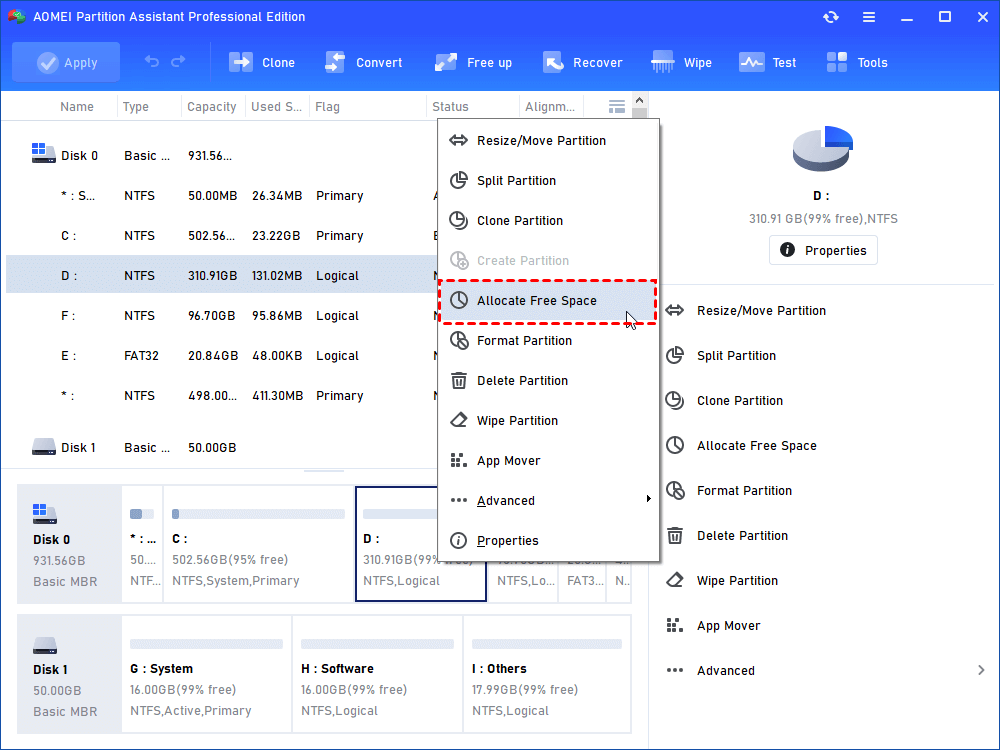
Allocate Free Space in the partition menu, the usual fix for a full C: drive. Standard shows it with a PRO badge.
Which should you choose?
| Your situation | Pick | Why |
|---|
| Resize a data partition on a home PC | Standard | Free, and resizing next to free space is included |
| Move Windows to an SSD, or C: is full and D: has space | Professional | Migrate OS and Allocate Free Space start here, for $59.95 |
| Convert a system disk to GPT for Windows 11 | Professional | System disk conversion isn't in Standard |
| One or two physical Windows Servers | Server | Only the Server edition and up install on Windows Server |
| Three or more servers, or a company full of PCs | Unlimited | Cheaper than 3 Server licenses and covers every PC too |
| You fix customers' PCs for money | Technician | The only license that allows billable work |
Who should skip each one:
- Skip Professional if your job is a simple resize next to free space, since Standard or Windows Disk Management already does it.
- Skip Server if your servers are virtual machines whose disks you can grow from the hypervisor.
- Skip Unlimited if you have fewer than about 20 PCs or 5 servers, where the smaller editions cost less.
- Skip Technician unless you bill clients: Unlimited has the same tools for $200 less.
- Skip all of them on a Mac, since every edition is Windows-only.
What commonly goes wrong
- No backup before a partition job. A power cut during a move can damage a volume whatever the tool. Back up first and use a UPS on servers.
- Buying after the demo "worked". The demos only simulate jobs. One Trustpilot reviewer was asked to pay at nearly the last step, so assume paid features need a license from the start.
- Long jobs on the clock. A 1-star reviewer described a job of almost 80 minutes with no estimated time at first and no way to cancel. Run big moves out of hours.
- Picking Unlimited for client work. Unlimited stops at one company. Technician is the only license for paid support.
- Update security. Attackers tampered with update servers for AOMEI Backupper in 2026. The reports don't name Partition Assistant, and version 10.12.2 lists strengthened security for its update services, but a company rolling it out should still review the vendor.
What users say
Trustpilot: 4.9 out of 5 from 3,209 reviews
The score covers all of AOMEI's partition software on diskpart.com, and 93% of the reviews are 5-star against 2% 1-star. Few reviewers say which edition they own. Text read through a summarizer.
- Kritsana Toeykhao, 5 stars, November 16, 2026: "Excellent software! The interface is user-friendly, easy to understand, and very efficient."
- Piotr Gałkowski, 5 stars, November 8, 2026: "I was able to successfully activate the latest version of AOMEI Partition Assistant Professional"
- Eeyore, November 4, 2026, about a replacement server: "Licence registration issue on replacement server resolved by Owen (Tan) very quickly"
- Christoph Lampert, 4 stars, November 2, 2026, on support: "The problem was first not resolved. It was not understood!"
- A 1-star reviewer signed Windows, October 29, 2026: "It started an operation that was going to take almost 80 minutes, and didn't even give me an estimated time"
The pattern: people say it does what Windows' own tools can't, and license moves to new hardware are quick. The complaints are about long jobs, paying late in a demo run, and support answers on harder cases.
FAQs
Is AOMEI Partition Assistant Standard really free?
Yes. AOMEI Partition Assistant Standard is free for personal and home use on Windows 11, 10, 8.1, 8 and 7, with no time limit. It doesn't cover business use, Windows Server or system-level jobs such as Migrate OS.
Which AOMEI Partition Assistant edition can move Windows to an SSD?
AOMEI Partition Assistant Professional and every edition above it can migrate a running Windows install to an SSD. The free Standard edition clones only data disks and partitions.
Can I use AOMEI Partition Assistant Professional at work?
Yes. AOMEI's comparison table marks AOMEI Partition Assistant Professional for business use on its 2 PCs. It can't be installed on Windows Server, which needs the Server edition or higher.
What is the difference between AOMEI Partition Assistant Unlimited and Technician?
AOMEI Partition Assistant Unlimited covers unlimited machines inside one company for $599. Technician, at $799, covers machines across many companies and is the only edition licensed for billable technical services. The tools are the same.
Does AOMEI Partition Assistant Server work on Windows Server 2025?
Yes. AOMEI Partition Assistant Server, Unlimited and Technician support Windows Server 2025, 2022, 2019, 2016 and 2012. Professional and Standard don't install on Windows Server.
Is the lifetime license better than the yearly plan?
For most buyers, yes. Two years of the yearly plan costs more than the lifetime license on every edition: $99.90 against $59.95 for Professional and $798 against $599 for Unlimited, and the lifetime plans include upgrades.
Can I try a paid AOMEI Partition Assistant edition before buying?
Partly. Each paid edition has a demo that shows every function and simulates jobs, but it won't apply changes to your disks. AOMEI's 90-day money-back guarantee covers a real run after you buy.
Does AOMEI Partition Assistant run on a Mac?
No. Every AOMEI Partition Assistant edition is Windows-only. AOMEI sells a separate NTFS for Mac tool, but it reads and writes NTFS drives rather than managing partitions.