AOMEI Partition Assistant Server: Resize and Manage Disks on Windows Server
AOMEI Partition Assistant Server is a $249 one-time partition manager for Windows Server, licensed for 2 servers, that extends a full system drive, resizes dynamic volumes, converts disks between MBR and GPT, and moves the OS to an SSD. It suits small IT teams who look after a server or two.
Windows Server's own Disk Management can only extend a volume into unallocated space right next to it. That limit is what usually sends admins looking for a tool like this, because a full C: drive with a D: drive beside it is a dead end there.
Quick facts
- Version: 10.12.2, released October 19, 2026
- Developer: AOMEI
- Platform: Windows Server 2025, 2022, 2019, 2016 and 2012 (R2), plus Windows 11, 10, 8.1, 8 and 7
- Price: $249 once for 2 servers, with lifetime upgrades
- Trial: demo that simulates operations
- Guarantee: 90 days money back, unconditional per the vendor
What we checked: demo installer version 10.12.2 (72 MB, digitally signed by AOMEI International Network Limited), and the order page, which showed $249 for 2 servers with lifetime upgrades, on November 6, 2026. We didn't resize a volume on a real server, so we can't speak to speed or reliability.
Download Free TrialBuy Now
Before you buy
- The demo won't change your disks. It lets you see every function and simulate operations, so you can check your layout is supported, but not finish a job.
- Check the vendor's store price too. AOMEI's own page advertised the same plan for $199 with a discount on the day we checked, against the $249 order page here.
- Take a full backup and plan a window. System-drive jobs can restart the server into PreOS mode, so treat them as maintenance.
- Two servers only. For more, the Server Ultimate plan covers unlimited servers.
- About the AOMEI Backupper attack. Attackers tampered with AOMEI's Backupper update servers in 2026. The reports we read don't name Partition Assistant, and version 10.12.2 lists stronger update security, but a server admin will want to weigh that.
Overview
The window has a toolbar of job groups (Clone, Convert, Free up, Recover, Wipe, Test, Tools) above a table of partitions and a graphical disk map, with a list of actions for the selected disk on the right. Nothing touches the disk until you click Apply, so you can queue several changes, review them and undo them first.

The Server Edition window, with a dynamic disk in the disk map.
Features
Extends a server's C: drive without moving data by hand
AOMEI Partition Assistant Server resizes, moves, merges and splits partitions, including BitLocker-encrypted ones. Allocate Free Space shifts spare room directly from one partition to another, and the Extend Partition Wizard grows a partition from free space on the same disk without a reboot.
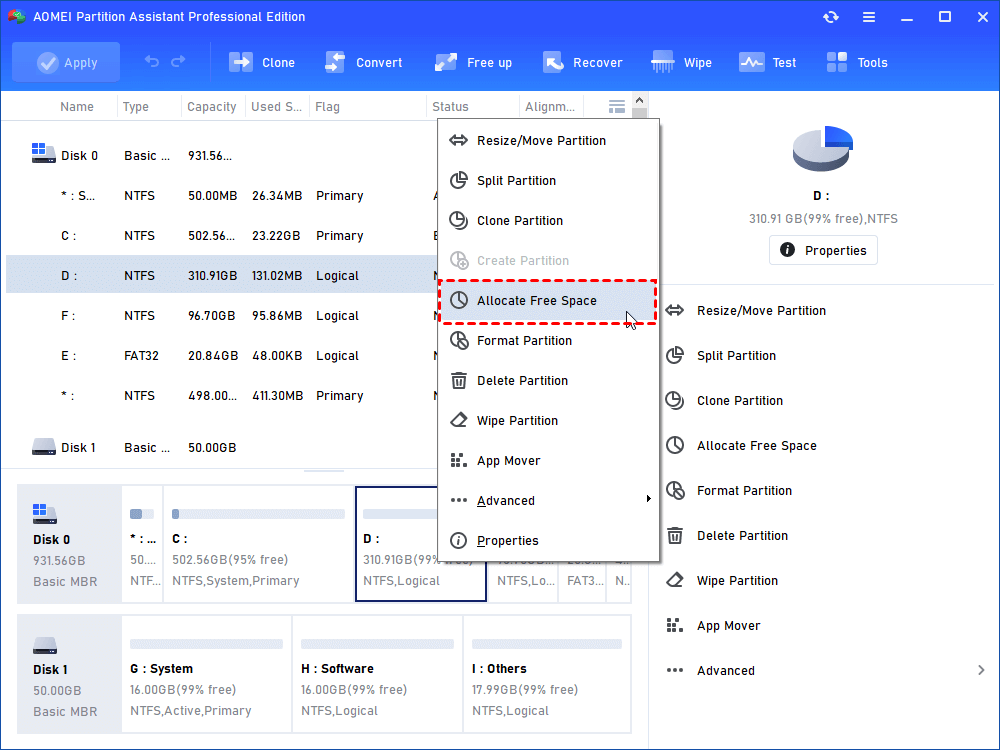
Allocate Free Space in the partition menu. This vendor screenshot shows the Professional edition, and the Server edition has the same menu.
Manages dynamic disks, including RAID-5 volumes
AOMEI Partition Assistant Server has a Dynamic Disk Manager that resizes, moves, extends and shrinks simple, spanned, striped, mirrored and RAID-5 volumes. It also converts dynamic disks back to basic without deleting them, which Disk Management can't do with data in place.
Converts disks and file systems in place
AOMEI Partition Assistant Server converts a data or system disk between MBR and GPT, converts between NTFS and FAT32, and switches partitions between primary and logical. MBR to GPT matters when a disk over 2 TB shows only part of its capacity.
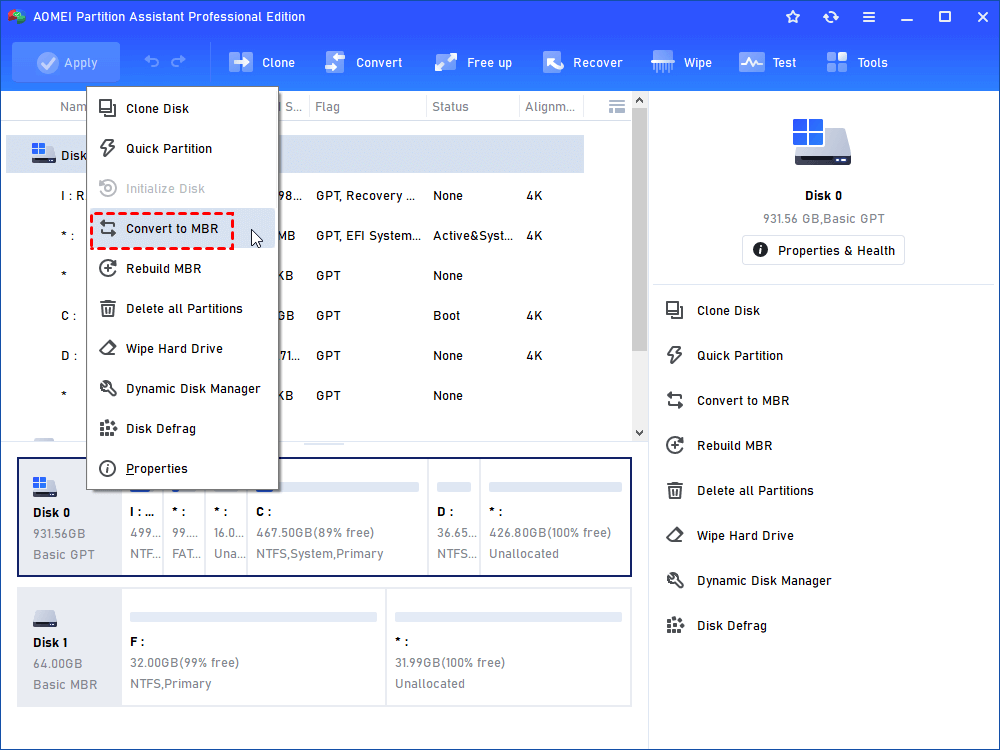
Converting a disk from the disk menu, shown in the Professional edition.
Moves the OS to a new disk
AOMEI Partition Assistant Server migrates the system to an SSD or another hard drive and clones disks and partitions while the server runs, with 4K alignment for SSDs. Windows To Go Creator makes a portable system on USB.
Repairs and checks disks
AOMEI Partition Assistant Server rebuilds the MBR, checks for bad sectors and disk health, tests disk speed, and builds bootable media so you can fix partitions when Windows won't start.
Benefits
- Less downtime than a rebuild. Growing C: in a maintenance window beats reinstalling a server.
- A safety net in the workflow. The pending queue gives you a last look before anything is written.
- One-off cost. The lifetime plan has no yearly bill.
- Works on both servers and PCs. You don't need a second tool for the admin's own desktop.
Real-World Uses
- Clearing a low disk space warning on a server's C: drive by borrowing from D:.
- Growing a mirrored or RAID-5 dynamic volume on an older file server.
- Moving Windows Server from ageing hard drives to SSDs.
- Converting a large data disk to GPT so the server sees its full capacity.
Who It's For, and Who Should Skip It
AOMEI Partition Assistant Server fits small businesses and IT admins who run one or two Windows Servers and need disk changes without a rebuild.
Skip it if your servers are virtual and you can grow disks from the hypervisor, since Disk Management may then be enough. Skip it if you run more than two servers across a company: PA Unlimited is priced for that. Consultants billing clients need the Technician edition. Linux servers need a different tool.
Usage Guide
- Back up the server first.
- Install the program and enter your license code.
- Select the partition and choose Resize/Move or Allocate Free Space.
- Set the new size and check the result in the disk map.
- Click Apply, then Proceed.
- If the job involves the system partition, expect a restart into PreOS mode and let it finish.
Where it falls short
- Long jobs have little feedback. A 1-star Trustpilot reviewer described an operation of almost 80 minutes with no estimated time at first.
- Some file systems can't be resized. ReFS, Ext and BitLocker volumes may need create, delete, format, move or clone instead, per the vendor's support table.
- A power cut is still dangerous. One during a partition move can damage a volume, so use a UPS.
- Fixes keep coming for cloning errors. Version 10.12.1 fixed an error code 32 during disk clone in some environments.
What Users Say
Trustpilot: 4.9 out of 5 from 3,179 reviews
The score covers all Partition Assistant editions on diskpart.com, with 1,798 reviews in the past 12 months. Trustpilot notes the company hasn't recently invited reviews and hasn't replied to negative ones. Few reviewers say which edition they use.
- Eeyore, November 4, 2026: "Licence registration issue on replacement server resolved by Owen (Tan) very quickly following initial contact."
- Mr Customer, July 8, 2026: "This software did what Microsoft is unable to"
- Edilberto Pinto, November 2, 2026: "I was looking for software to agregate 2 partitions and AOMEI did it in a very simple way."
- Ioannis Kastrisios, September 14, 2026: "I needed to reset my license after a hardware upgrade, and Lanry Lucky helped me in no time."
- A 1-star reviewer signed Windows, October 29, 2026: "It started an operation that was going to take almost 80 minutes, and didn't even give me an estimated time"
- Christoph Lampert, 4 stars, November 2, 2026, on support: "The problem was first not resolved. It was not understood!"
The pattern: it does what built-in Windows tools can't, and license resets for replaced hardware are quick. Complaints are about long jobs and harder support cases.
Comparisons
AOMEI Partition Assistant Server vs Windows Disk Management
Disk Management is free and handles adjacent extends and shrinks. Partition Assistant Server adds moving partitions, taking space from a neighboring partition, dynamic volume resizing, in-place conversions and OS migration.
Server vs Unlimited edition
Server covers 2 servers. Unlimited has the same tools but covers every PC and server in one company for $599. If you have more than a handful of machines, the Unlimited license pays for itself.
Editions and Pricing
| Plan | Price | License | Best for |
|---|
| Server Yearly | $169 a year at the vendor store | 2 servers, auto-renews | A one-off project |
| Server Lifetime (this listing) | $249 once | 2 servers, lifetime upgrades | Small sites |
| Server Ultimate Lifetime | $549 once at checkout | Unlimited servers in one company | Server-only fleets |
| Unlimited Lifetime | $599 once | Unlimited PCs and servers in one company | Whole companies |
FAQs
Does AOMEI Partition Assistant Server work on Windows Server 2025?
Yes. AOMEI Partition Assistant Server lists Windows Server 2025, 2022, 2019, 2016 and 2012 (R2) and also runs on Windows 11, 10, 8.1, 8 and 7.
Can AOMEI Partition Assistant Server resize a BitLocker partition?
AOMEI Partition Assistant Server's product page says it can extend or shrink BitLocker-encrypted partitions, while its file system table says partitions of those types may be limited to create, delete, format, move and clone. Test this in the demo on your own layout first.
How many servers does an AOMEI Partition Assistant Server license cover?
AOMEI Partition Assistant Server's lifetime plan covers 2 servers. Server Ultimate covers unlimited servers in one company.
Can AOMEI Partition Assistant Server be used for paid client work?
No. AOMEI's comparison reserves billable technical services for the Technician edition.
Can I move an AOMEI Partition Assistant license to a replacement server?
AOMEI support resets licenses for replaced hardware. Trustpilot reviewers report it being done quickly, including one on a replacement server.
Can I get a refund on AOMEI Partition Assistant Server?
Yes. AOMEI offers a 90-day unconditional money-back guarantee and may ask why you want the refund.
System Requirements
- Windows Server 2025, 2022, 2019, 2016, 2012 and 2012 R2
- Windows 11, 10, 8.1, 8 and 7
- File systems: NTFS, FAT32, FAT16, FAT12, exFAT, ReFS, Ext2, Ext3, Ext4 (some can't be resized)
- 72 MB download
Conclusion
Verdict: AOMEI Partition Assistant Server is worth $249 if you run one or two physical Windows Servers and keep hitting Disk Management's limits. One saved rebuild covers the cost.
The one reason to buy it is resizing system and dynamic volumes without rebuilding. The main reason not to is that virtual servers rarely need it, and AOMEI's own site sometimes sells it for less.
Download Free TrialBuy Now