AOMEI Cyber Backup: Central Backup for VMware, Hyper-V, SQL Server and Windows
AOMEI Cyber Backup is a web-console backup system for small and mid-sized businesses that protects VMware ESXi and Hyper-V virtual machines, Microsoft SQL Server databases and Windows PCs and servers from one place. The plan sold here is a $1,999 perpetual license for unlimited virtual machines; a free edition covers a handful of machines, and a 30-day Premium trial lets you test every feature.
Quick facts
- Version: 4.6.3, released October 23, 2026
- Developer: AOMEI
- Protects: VMware vSphere/ESXi/vCenter 6.0 to 8.0, Hyper-V, SQL Server 2005 to 2025, Windows 7 to 11, Windows Server 2008 to 2025
- Console: installed on Windows or Windows Server (Ubuntu 20.04 for VM backup only), managed in a browser
- This plan: Perpetual / Unlimited VMs, $1,999 once
- Free edition: 3 Hyper-V VMs, 3 VMware VMs, unlimited free-ESXi VMs, 3 SQL databases, 3 PCs, 1 server
- Trial: 30-day Premium trial
- Guarantee: 90 days money back
What we checked: the Premium trial installer, file version 4.6.3.0 (239 MB, validly signed by AOMEI International Network Limited), AOMEI's changelog, edition table and pricing page, and the order page, which showed $1,999 for the Perpetual Unlimited VMs plan on November 15, 2026. We didn't set up the console or back up a VM ourselves.
Download Free TrialBuy Perpetual Unlimited VMs
Before you buy
- This license covers virtual machines. The Unlimited VMs plan licenses VMware and Hyper-V VMs on any number of hosts. SQL databases, physical PCs and physical servers are licensed separately in AOMEI's own store.
- Start with the free edition or the trial. If you run three VMs or fewer per hypervisor, or only free ESXi hosts, the free edition may be all you need.
- Count your VMs. AOMEI's yearly per-VM price is $99 (minimum 5), so the perpetual unlimited plan pays off for larger VM estates.
- AOMEI's update servers were compromised in 2026. Attackers used AOMEI Backupper's update and notification features to plant malware between April and July 2026, BleepingComputer reported. Cyber Backup wasn't named, but weigh it for software with access to your hypervisors and databases.
Overview
AOMEI Cyber Backup runs as a service with a browser console. The left menu holds Overview, Backup Task, Source Device (Agents, VMware, Hyper-V, Microsoft SQL Server, Windows), Target Storage, Backup Management and Settings. You add a vCenter or ESXi host, a Hyper-V host, a SQL Server or Windows machines as sources, add storage targets, then create backup tasks with schedules and retention rules. Everything is watched from the same console, which is the main difference from AOMEI's per-machine Backupper products.
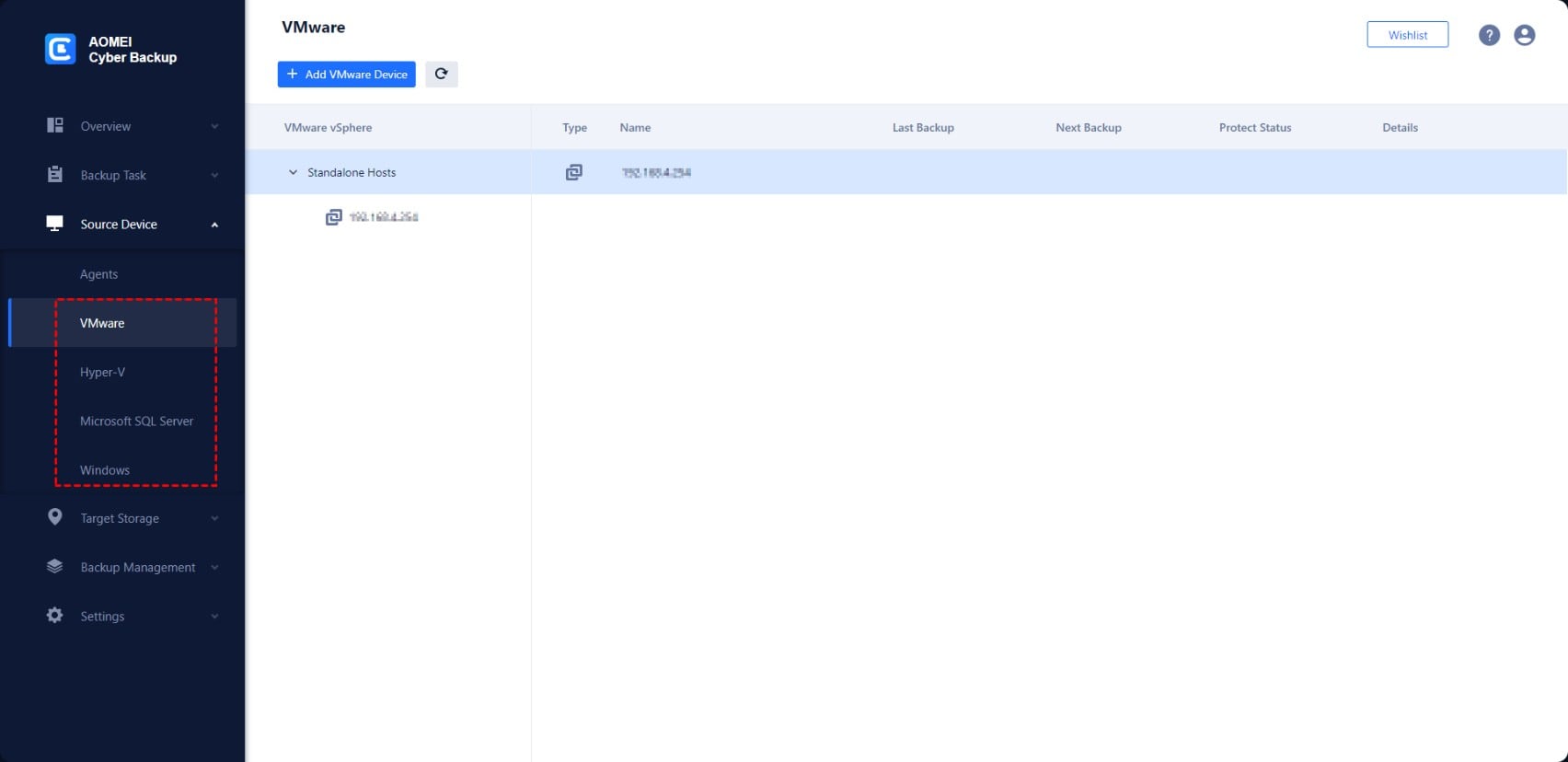
The web console's Source Device section: VMware, Hyper-V, Microsoft SQL Server and Windows, here with a standalone ESXi host added.
Features
Agentless VMware ESXi and vCenter backup
AOMEI Cyber Backup backs up VMware VMs through the ESXi host or vCenter without installing anything inside the guests, with full, incremental and differential backups on daily, weekly or monthly schedules. Since version 4.6.0, an ESXi job interrupted by a network drop or restart resumes where it stopped, and connectivity to ESXi and vCenter is checked before a job starts.
Hyper-V backup with instant recovery
AOMEI Cyber Backup protects Hyper-V VMs on Windows Server 2012 R2 to 2025 and Hyper-V Server. Since version 4.2.0 Hyper-V backup uses an agent on the host instead of the earlier agentless mode. Version 4.3.0 added restoring single files or folders from Hyper-V backups, and 4.4.0 added instant recovery of a Hyper-V VM, which can later be migrated to another server.
SQL Server databases, centrally
AOMEI Cyber Backup backs up multiple remote SQL Server databases, on physical or virtual machines, from one console, from SQL Server 2005 Express up to SQL Server 2025, and restores a database to a new server for migration. SQL backup needs the console on Windows; the Linux console doesn't support it.
Windows PCs and servers, including P2V
AOMEI Cyber Backup backs up disks, partitions, systems and files on Windows PCs and servers through an agent, restores to different hardware, and can restore a physical machine's backup into a virtual machine (P2V).
Retention, monitoring and ransomware defenses
AOMEI Cyber Backup applies retention rules that delete outdated versions automatically, sends email notifications, shows a monitor center and error alerts, and supports role-based accounts for team members. Backups can go to local disks, external drives, NAS or network shares and Amazon S3, with backup encryption and, according to AOMEI, immutable backups that ransomware can't change.
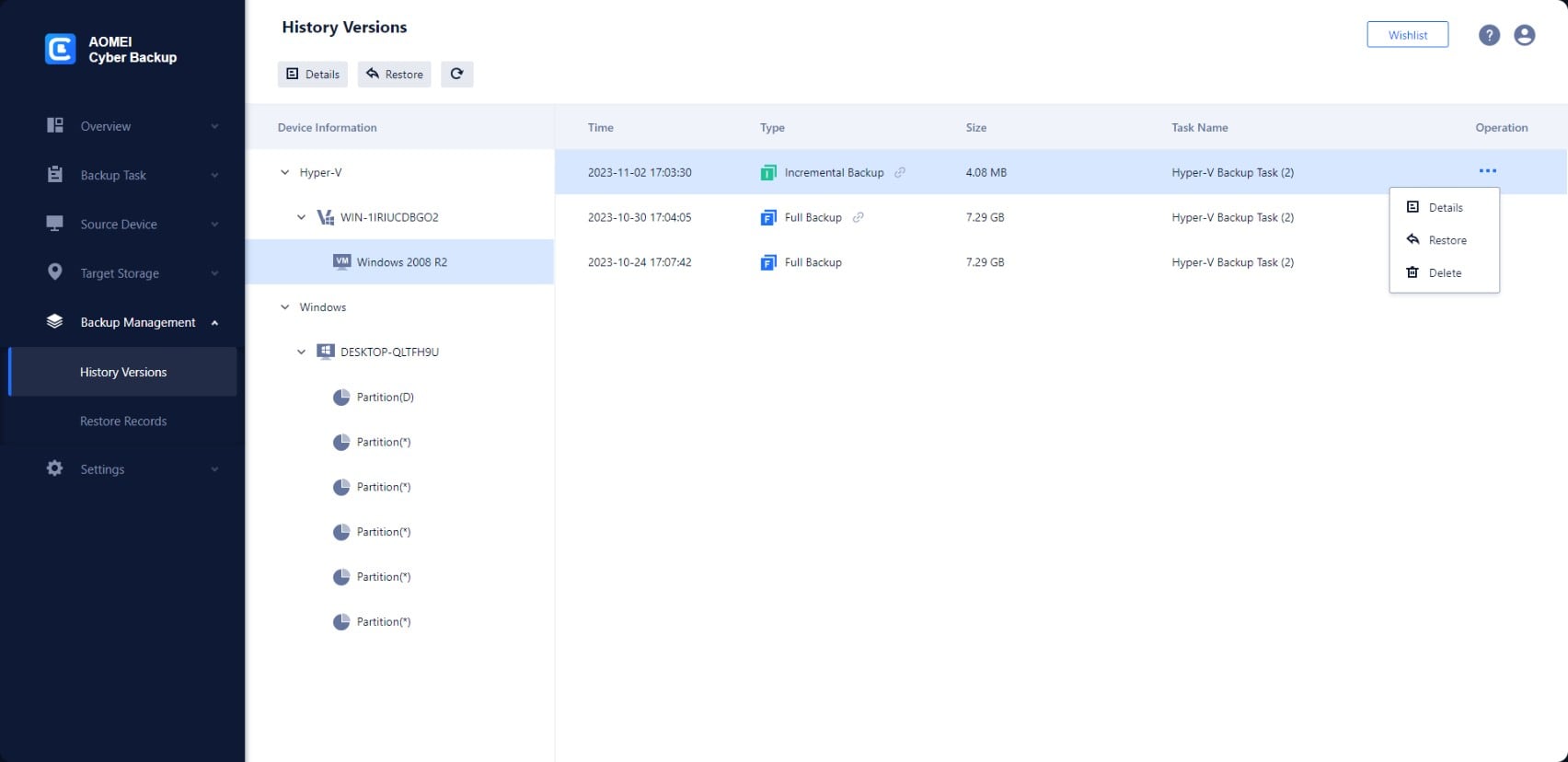
Backup Management, History Versions: full and incremental backups of a Hyper-V VM, each with Details, Restore and Delete.
Benefits
- One console for VMs, databases and Windows. No separate tools per workload.
- A free tier that's actually usable for a small lab or a single free ESXi host.
- Pay once. The perpetual plan avoids yearly per-VM fees.
- Simpler than enterprise suites. Setup is adding hosts, storage and a schedule.
Real-World Uses
- Nightly incremental backups of 40 VMs on a vCenter cluster to a NAS, with a copy to Amazon S3.
- Bringing a failed Hyper-V VM back up quickly with instant recovery, then migrating it to another host.
- Scheduled SQL Server database backups for an accounting system, restorable to a new server.
- Pulling a single deleted folder out of last night's Hyper-V backup without restoring the VM.
- Converting an ageing physical server into a VM through P2V restore.
Who It's For, and Who Should Skip It
AOMEI Cyber Backup fits small and mid-sized businesses and MSPs running VMware or Hyper-V that want central, scheduled VM backup without the price or complexity of the big enterprise suites, and are happy with a Windows-hosted console.
Skip it if you only have a few physical PCs (AOMEI Backupper is simpler and cheaper), if you run Proxmox, Nutanix, KVM or cloud workloads it doesn't list, or if you need Linux-native backup beyond VMs. Large estates with strict compliance requirements will want a vendor with longer enterprise track records and published third-party testing. And if AOMEI's 2026 update-server breach is a deal-breaker for software with access to your hypervisors, that's a sound reason to look elsewhere.
Usage Guide
- Download the trial from the vendor and install it on a Windows machine or Windows Server that can reach your hosts. Open the console in a browser and sign in.
- Under Source Device, add your vCenter or ESXi host, Hyper-V host, SQL Server or Windows agents.
- Under Target Storage, add a local disk, NAS or network share, or Amazon S3.
- Create a Backup Task: pick the VMs or databases, the target, the backup type, a schedule and a retention rule.
- Turn on email notifications and check the monitor center after the first run.
- Test a restore from Backup Management > History Versions, including a single-file and an instant recovery.
- Enter your license once you're satisfied; licenses can be unassigned from one VM and assigned to another.
Where it falls short
- A steady stream of ESXi fixes. Releases 4.5.0 to 4.6.3 fixed failed ESXi full backups when CBT can't be enabled, restore failures from mismatched disk configurations, several ESXi error codes, tasks stuck waiting or unresponsive, and scheduled tasks that didn't run. Test on your own hosts.
- The Linux console is limited. Installed on Ubuntu, it backs up VMs only: no SQL, PC or server backup.
- Hyper-V is no longer agentless. Version 4.2.0 moved Hyper-V to agent-based backup and dropped agentless support.
- Licensing is split by workload. This plan covers VMs; databases and physical machines cost extra.
- Few independent reviews. Most published praise comes from AOMEI's own sites.
What Users Say
AOMEI Cyber Backup has little independent coverage; most "reviews" online are AOMEI's own pages or coupon sites. What we could find:
Trustpilot: AOMEI (aomeitech.com), 4.8 out of 5 from 786 reviews
Ratings cover all AOMEI products, 85% five stars and 11% one star, and mostly praise fast support:
- Orestis Michail Fronistas, November 13, 2026, 5 stars: "Prompt response to my enquiry, fast an excellent service and support"
- Fred, November 9, 2026, 5 stars: "My problems were answered quickly and the customer service person, Kamlee Kamlee, solved my problem."
- Andreas Lange, August 19, 2025, 1 star, titled "AOMEI Cyber Backup for VMware on Linux BUGGY": "There is no actual Version and Version 2.3 has massive bugs in the VM Snapshots." That was an old Linux build; the changelog has had many ESXi fixes since.
The pattern: responsive support, with VMware reliability the area to test yourself. Run the free edition or the trial against your own hosts before you commit $1,999.
Comparisons
Free vs Premium
Free allows 3 Hyper-V VMs, 3 VMware ESXi VMs, unlimited VMs on free ESXi, 3 SQL databases, 3 PCs and 1 server, with support on workdays. Premium lifts these to your license's limits and adds 24/7 support.
AOMEI Cyber Backup vs AOMEI Backupper Technician Plus
Backupper Technician Plus ($999 lifetime) images unlimited physical PCs and servers but is managed machine by machine and has no host-level VM or SQL backup. Cyber Backup is the central, VM- and database-aware product.
Editions and Pricing
| Plan | Price | Covers | Term | Buy |
|---|
| Free | $0 | 3 VMs per hypervisor, 3 SQL DBs, 3 PCs, 1 server | No time limit | Free download |
| Perpetual / Unlimited VMs | $1,999 once | Unlimited VMware and Hyper-V VMs | Perpetual | Buy Unlimited VMs |
The paid price is from the order page on November 15, 2026. AOMEI's own store also sells yearly plans (per VM from $99, minimum 5, or unlimited VMs at $999 a year) and per-workload licenses for SQL databases, PCs and servers.
FAQs
Does the AOMEI Cyber Backup Unlimited VMs plan cover SQL Server and physical servers?
No. AOMEI Cyber Backup licenses each workload type separately: the Unlimited VMs plan covers VMware and Hyper-V virtual machines on any number of hosts, while SQL databases, Windows PCs and Windows servers have their own licenses.
Can AOMEI Cyber Backup back up free VMware ESXi?
Yes. AOMEI Cyber Backup's free edition backs up unlimited VMs on free ESXi hosts, and version 4.6.1 improved stability for VMs on VMware ESXi Free Edition.
Can I move an AOMEI Cyber Backup license from one VM to another?
Yes. AOMEI says you can unassign a VM license and assign it to another VM.
Can AOMEI Cyber Backup run on Linux?
Partly. AOMEI Cyber Backup can be installed on Ubuntu 20.04, but on Linux it backs up virtual machines only; SQL, PC and server backup need the Windows installation.
Is there a discount for schools or non-profits?
Yes. AOMEI runs educational and non-commercial license programs for AOMEI Cyber Backup and offers coupons for bulk orders through its sales team.
Can I get a refund on AOMEI Cyber Backup?
Yes. AOMEI offers a 90-day unconditional money-back guarantee on AOMEI Cyber Backup.
System Requirements
- Console: Windows 11, 10, 8.1, 8, 7; Windows Server 2008 R2 to 2025; or Ubuntu 20.04 LTS (VM backup only)
- VMware vSphere, ESXi and vCenter 6.0, 6.5, 6.7, 7.0 and 8.0
- Hyper-V on Windows 8 to 11, Windows Server 2012 R2 to 2025, Hyper-V Server 2012 R2 to 2019
- Microsoft SQL Server 2005 to 2025
- Physical: Windows 7 to 11, Windows Server 2008 to 2025
- 239 MB download
Conclusion
Verdict: AOMEI Cyber Backup is a practical, low-cost way for a small or mid-sized business to back up VMware and Hyper-V VMs, SQL Server and Windows from one console, and the $1,999 perpetual Unlimited VMs plan suits a growing VM estate that should never hit a license count or a yearly renewal. The one reason to buy it is central VM backup with instant recovery at a fraction of enterprise-suite prices. The reasons to be careful: independent testing is scarce, recent releases are full of ESXi fixes, and AOMEI's update infrastructure was breached in 2026. Prove it on your own hosts with the free edition or trial before you buy.
Download Free TrialBuy Perpetual Unlimited VMs