AnyViewer Professional: Remote Desktop Access for Windows, Mac and Phones
AnyViewer Professional is a $42.96 a year remote desktop plan for one user that controls Windows PCs from another computer or a phone, with unattended access, privacy mode and faster file transfer. It suits home users, small offices and anyone who supports family or staff from a distance.
The free plan is generous enough that many people never need to pay, so the real question is whether you need Pro's extra devices and privacy mode. Before you install it, read the security warning below on the 2026 attack on AOMEI's update servers.
Quick facts
- Version: 5.8.1 for Windows, released October 19, 2026
- Developer: AOMEI
- Platforms: Windows, macOS, iOS and Android
- Price: $42.96 a year
- Free plan: yes, with lower limits
- Encryption: ECC 256-bit end-to-end, per the vendor
What we checked: Windows installer version 5.8.1 (65 MB, digitally signed by AOMEI International Network Limited), the plan limits on the vendor's pricing page, and the order page, which showed $42.96 for Professional 1 Year, on November 6, 2026. We didn't run a remote session, so we can't speak to connection quality from our own use.
Security warning: AnyViewer's maker was hacked
Attackers compromised the servers of AOMEI, the company behind AnyViewer, and used AOMEI Backupper's update and notification features to put a backdoor on some users' PCs between April and July 2026, BleepingComputer reported on October 19, 2026. That report and AOMEI's own statement cover Backupper and don't name AnyViewer, but other security coverage says AnyViewer uses the same update mechanism and was affected too. Whether AnyViewer was hit is unresolved, and AOMEI has not confirmed how the attackers got in.
Remote access software can see and control your PC, so this matters more here than for most programs. If you've been running an older AnyViewer, update to 5.8.1 from the vendor's site and run a full antivirus scan. If AOMEI Backupper is on the same PC, follow AOMEI's published steps for it as well, including the AOMEI Security Scanner and a Windows password change. If this is for a business, ask your security team before you roll it out.
Download Free TrialBuy Now
Before you buy
- Try the free plan first. It covers 3 logged-in devices and 2 simultaneous sessions, which is plenty for helping one relative.
- It's a yearly bill. The vendor also sells 3- and 6-year plans at a discount, then bills $42.96 a year afterwards.
- Mac is a step behind. The Mac build is version 3.6.1 and lacks some Windows features.
- No Linux. The vendor's downloads cover Windows, macOS, iOS and Android only.
Overview
AnyViewer opens with two sides: Accept Control, showing your device ID and a temporary security code, and Start Control, where you type a partner's ID. Sign in to an account and your own devices appear in a My Devices list, where one click starts a session with no code. A toolbar in the session window gives you screen, image, keyboard, file and privacy options.

The Connection screen, from an older 4.x help page. The partner ID box can start a remote session or a file transfer.
Features
Connects to your own PCs in one click, even with nobody there
AnyViewer Professional lets you log in on up to 10 devices and control any of them with one click and no code, so you can reach an office PC from home with no one at the desk. Pro also keeps up to 100 devices on your connected list, using a security code for those you don't own.
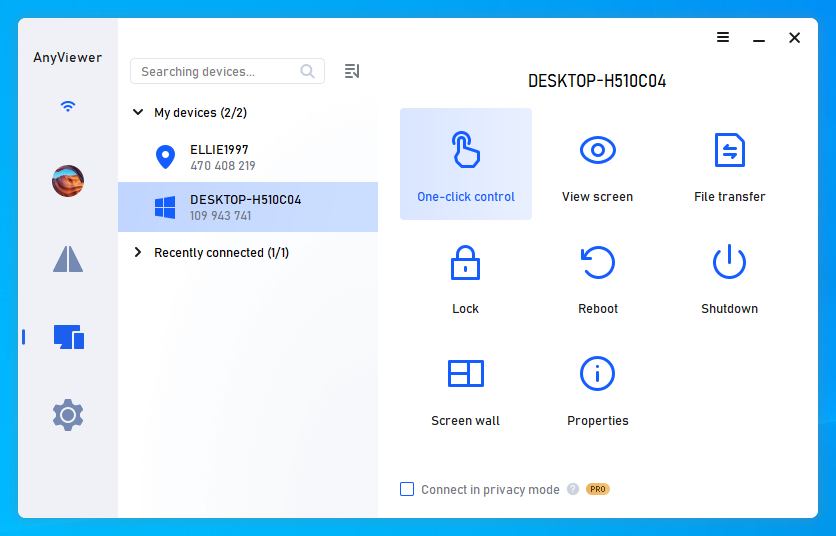
My devices, with One-click control, View screen, File transfer, Lock, Reboot and Shutdown.
Blacks out the remote screen with privacy mode
AnyViewer Professional's privacy mode blanks the far monitor and disables its keyboard and mouse, so nobody in the room sees what you're doing. It's a paid feature, and only applies to devices logged in to the same account.
Moves files between devices
AnyViewer Professional transfers files at up to 10 MB/s over 5 threads, with no limit on file count and a 1 TB cap per file. Version 5.8.0 added drag and drop between your own Windows devices.
Runs several sessions at once
AnyViewer Professional removes the free plan's limit of 2 simultaneous sessions. Multiple remote screens can sit in tabs or separate windows.
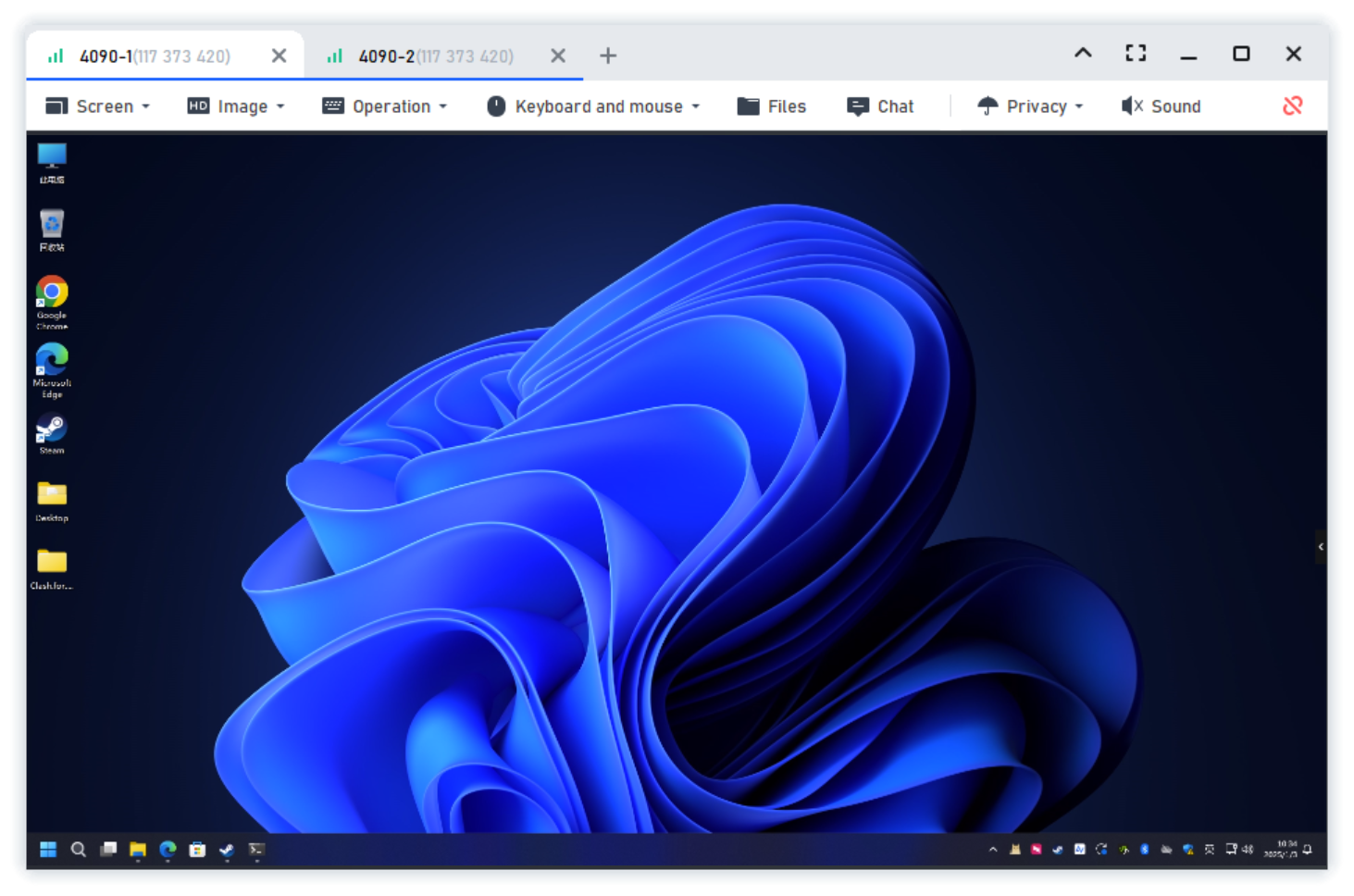
A session window with tabs for two remote computers.
Adds screens and mirrors them
AnyViewer 5.7.0 added Extend Screen, which turns another PC, tablet or phone into a second display, and Mirror Screen for presentations. Version 5.6.0 added virtual screens on the remote device.
Controls phones too
AnyViewer works on iOS and Android as well, and can mirror those screens to a computer in real time.
Benefits
- Help people without driving over. A code and a click replaces a phone call of instructions.
- Reach your own PC from anywhere. Unattended access means nobody needs to be there.
- Cheap for what it does. About $3.58 a month.
- Peer-to-peer sessions. The vendor says session data doesn't pass through its servers.
Real-World Uses
- Fixing an elderly parent's PC from another state.
- Getting to a shop or church office computer from home.
- Supporting a handful of staff PCs at a small business.
- Grabbing a forgotten file from your home PC while traveling.
- Using a spare tablet as a second screen.
Who It's For, and Who Should Skip It
AnyViewer Professional fits individuals who manage more than 3 of their own devices, or who need privacy mode or faster file transfer.
Skip it if you only help a relative now and then: the free plan will do. Companies with several technicians need Enterprise at $199 a year, which adds users, groups, permissions and mass deployment. Skip it for Linux machines. And if the 2026 incident rules AOMEI out for software that can take over your PC, look at another remote tool.
Usage Guide
- Download AnyViewer from the vendor's site and install it on both devices.
- Create an account and sign in on your own devices.
- Pick a PC in My devices and click One-click control.
- To help someone else, ask for their device ID and enter it under Start Control, then have them accept or give you the security code.
- Turn on two-factor authentication for your account.
Where it falls short
- Connections aren't always steady. A 2-star Trustpilot reviewer reports drops and freezes. Version 5.8.1 says it improved stability "in certain regions".
- Mac gaps. MacHow2 reports drag-and-drop file transfer doesn't work on Macs, and keyboard shortcuts were inconsistent.
- Screen wall is small on this plan. Professional allows one wall of 2 devices, and Enterprise goes up to 24.
- It's an account product. One-click control only works among devices logged in to your account.
- Trust. See the security note above.
What Users Say
Trustpilot: 4.7 out of 5 from 685 reviews
Trustpilot notes the company hasn't recently invited reviews and hasn't replied to negative ones. Most reviewers are home users helping family or reaching a second site.
- Rich, 5 stars, October 1, 2026: "I use it to help my 96 year old father-in-law who lives 140 miles in another state."
- Sergio Torres, 5 stars, February 11, 2026: "It's incredibly easy to use, yet still powerful enough to handle everything I need for remote support."
- Edi Weber, 4 stars, October 12, 2026: "The free version is highly useful for providing occasional PC assistance to an elderly relative."
- Sundarampillai, 5 stars, November 10, 2025: "Brilliant connectivity / remote control software at reasonable pricing."
- Mark Nazarchyk, 5 stars, November 4, 2026: "It works and meets my needs for remote access to my church computer."
- Alan Sean, 2 stars, October 5, 2026: "Connections are slow, they drop or freeze, disconnect then reconnect, or connect with no display."
MacHow2: Nick Mead, score 80
He calls it "one of the better options available for Mac right now" and writes that "the actual remote access experience is fast, smooth, and reliable." His complaints: "Mac version lacks some Windows features", "UI isn't the most modern" and "Free plan has limits on speed and transfers".
The pattern: people like the easy setup and the price, especially for family support. Complaints center on connection drops.
Comparisons
AnyViewer Free vs Professional
| Limit | Free | Professional |
|---|
| Logged-in devices | 3 | 10 |
| Connected devices list | 10 | 100 |
| Simultaneous sessions | 2 | Unlimited |
| File transfer | Standard | 10 MB/s, 1 TB per file |
| Privacy mode | No | Yes |
| Ultra-high image quality | No | Yes |
Editions and Pricing
| Plan | Price | Users | Best for |
|---|
| Free | $0 | 1 | Occasional help |
| Professional Yearly (this listing) | $42.96 a year | 1 | Individuals |
| Professional 3 Years | $103 for 3 years at the vendor store | 1 | Long-term individuals |
| Professional 6 Years | $167.54 for 6 years at the vendor store | 1 | Long-term individuals |
| Enterprise Yearly | $199 a year | 30 | Companies and IT teams |
FAQs
Is AnyViewer safe to use after the AOMEI attack?
AnyViewer 5.8.1 is the version to use, and our installer was validly signed by AOMEI. AOMEI says only Backupper showed anomalies, while researchers said AnyViewer shared the update path. Nobody has published a full account, so sensitive businesses should make their own call.
Can AnyViewer control a PC from an iPhone?
Yes. AnyViewer has iOS and Android apps that control a Windows PC from a phone.
Does AnyViewer work on Linux?
No. AnyViewer's downloads cover Windows, macOS, iOS and Android.
Does AnyViewer send my session through its servers?
AOMEI says every AnyViewer connection is peer-to-peer and encrypted with ECC 256-bit end-to-end encryption, so session data doesn't pass through its servers.
System Requirements
- Windows (32-bit and 64-bit installers available)
- macOS, using the separate 3.6.1 build
- iOS and Android apps
- 65 MB download for Windows
Conclusion
Verdict: on features alone, AnyViewer Professional is good value at $42.96 a year, and the free plan is good enough that you should start there.
The one reason to pay is more logged-in devices plus privacy mode for less than a coffee a month. The main reason not to is trust: software with full control of your PC comes from a vendor whose update servers were abused in 2026, and connections aren't always steady.
Download Free TrialBuy Now