FoneTool Professional: Back Up and Move iPhone Data from a Windows PC
FoneTool Professional is a $39.95 one-year Windows program for backing up, transferring and managing iPhone and iPad data, licensed for 5 PCs and unlimited devices. It suits people who want an alternative to iTunes or iCloud for moving photos, music and messages.
If you've ever fought with iTunes to copy a few albums, or run out of iCloud space, that's the problem this solves. There's a free edition that does a lot of the same work, so start there.
Quick facts
- Version: 4.3.0
- Developer: AOMEI
- Platform: Windows 11, 10, 8.1, 8 and 7. No Mac version
- Devices: iPhone, iPad and iPod touch, up to iOS 27 per the vendor
- Price: $39.95 for 1 year, 5 PCs and unlimited devices
- Free edition: yes
- Guarantee: 90 days money back, unconditional per the vendor
What we checked: installer version 4.3.0 (193 MB, digitally signed by AOMEI International Network Limited), and the order page, which showed $39.95 for 1 year on 5 PCs, on November 6, 2026. We didn't connect an iPhone, so we can't speak to transfer speed or reliability.
Download Free TrialBuy Now
Before you buy
- Try the free edition first. The same installer runs it, and the vendor's pages say backup and transfer of photos, music, videos, contacts and messages are free.
- Compare the Lifetime plan. AOMEI's store sells a lifetime plan for $59.95, so a second year costs more than buying that once.
- Check your music after a transfer. One SourceForge reviewer reported most songs missing from their iPhone after a PC-to-iPhone copy.
- Unlocking is a separate product. FoneTool Unlocker and FoneTool Repair Pro are sold separately.
Overview
The left side has My Devices, Phone Backup, Backup History, Phone Transfer and Toolbox. Phone Backup asks whether you want Selective or Full Backup, and Phone Transfer offers iPhone to PC, PC to iPhone and iPhone to iPhone. Each job is a few clicks once the phone is plugged in and you've tapped Trust on it.
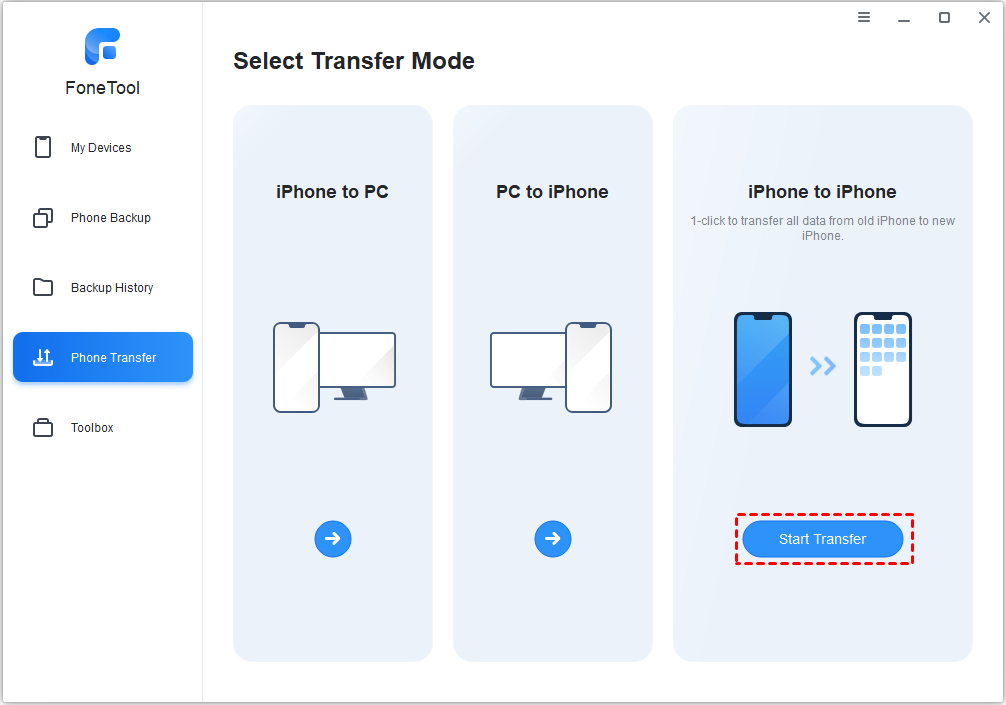
The Phone Transfer screen offers three directions.
Features
Backs up a whole iPhone, or just part of it
FoneTool Professional runs a one-click Full Backup of photos, messages, settings and app data, or a Selective Backup of the categories you pick. Backups can go to your PC, an external hard drive, SSD, USB drive or NAS, and a full backup can be encrypted.
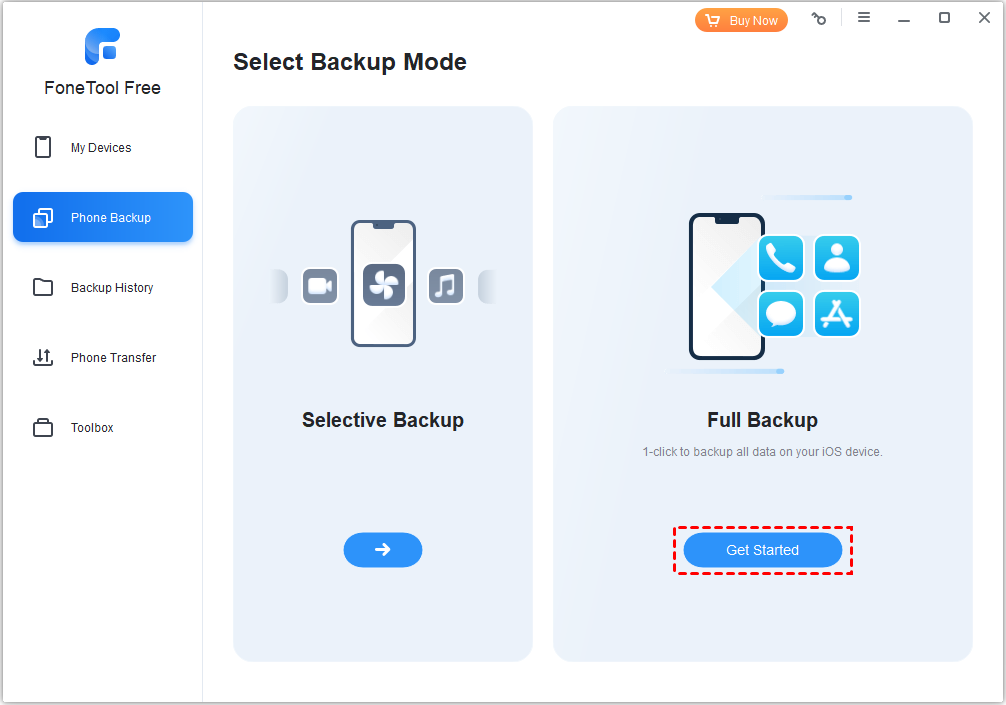
Selective or Full Backup, shown in the free edition.
Moves files both ways between iPhone and PC
FoneTool Professional copies photos, music, videos, contacts and messages from iPhone to PC to free up storage, or from PC to iPhone without an iTunes sync. The store lists unlimited file transfers as a Pro benefit.
Copies an old iPhone to a new one
FoneTool Professional has a one-click iPhone to iPhone transfer for moving everything to a new phone. It suits people who'd rather not use iCloud or who don't have enough cloud space.
Backs up WhatsApp
FoneTool Professional backs up, exports and transfers WhatsApp chats, photos, videos and attachments between iPhone and computer.
Tidies up photos and HEIC files
FoneTool Professional's Toolbox finds duplicate and similar photos and lets you delete or move them. It also batch converts HEIC images for Windows, makes ringtones and manages iCloud data.
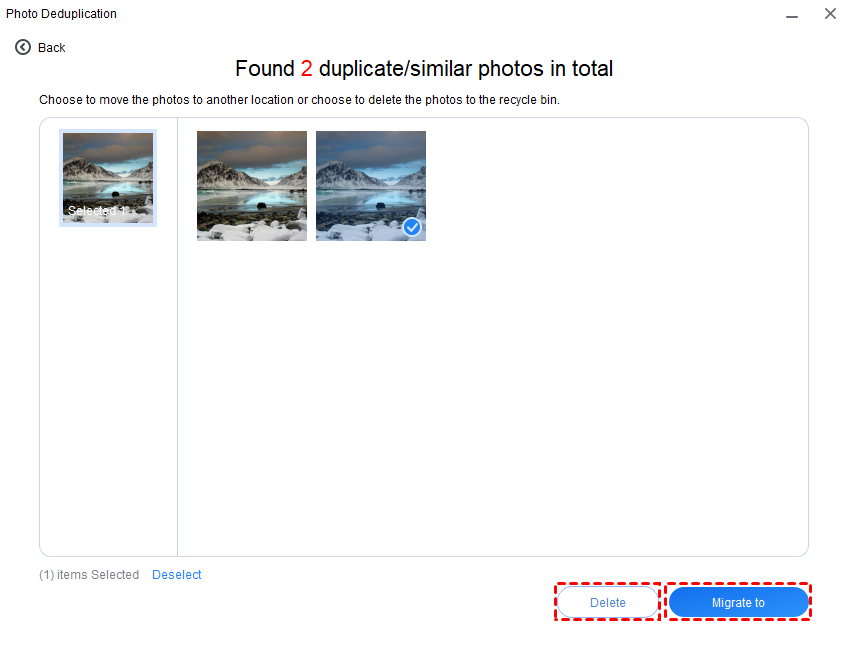
Photo Deduplication shows similar photos, with Delete and Migrate buttons.
Repairs iOS problems and erases devices
FoneTool Professional fixes iOS system issues without data loss, according to the vendor's store, and securely erases an iPhone before you sell it. The iOS System Repair screen also covers upgrade, downgrade, recovery mode and reset.

iOS System Repair, with iOS Upgrade/Downgrade, Recovery Mode and Reset Device.
Benefits
- No iTunes sync. You choose what moves.
- Backups you can hold. Your data sits on a drive you own, not in a paid cloud plan.
- More room on the phone. Move videos off and free up storage.
- Covers the household. Unlimited devices on up to 5 PCs.
Real-World Uses
- Moving to a new iPhone without paying for extra iCloud storage.
- Copying years of photos to an external drive and clearing the phone.
- Loading MP3s to an iPhone from a PC.
- Saving WhatsApp chats before replacing a phone.
- Erasing an old iPhone before selling it.
Who It's For, and Who Should Skip It
FoneTool Professional fits Windows users with iPhones who want local backups and easy transfers, especially a family with several devices.
Skip it if you use a Mac: there's no Mac version here. Skip it if iCloud already works for you and you have the space. Android-only users need something else, though the FoneTool mobile app moves data between Android and iPhone. If you only want a one-off transfer, the free edition may do everything you need.
Usage Guide
- Download FoneTool from the vendor and install it.
- Connect the iPhone by USB and tap Trust on the phone.
- Enter your license code if you've bought one.
- Choose Phone Backup, then Full or Selective Backup.
- Pick a storage location and click Start Backup.
- Use Backup History to restore, or Phone Transfer to move files.
Where it falls short
- Transfers can come up short. Lester F. on SourceForge moved 45 songs and found only four on the phone, and said repeated tries failed too.
- License glitches. Trustpilot reviewers mention activation failures and a lifetime license showing as expired after an update, though support fixed them.
- Windows only, and at 193 MB the installer is big for this kind of tool.
- Confusing product line. FoneTool Unlocker, FoneTool Repair and AOMEI FoneBackup are sold or named separately, so check what you're buying.
What Users Say
Trustpilot: 4.8 out of 5 from 114 reviews
89% are 5-star and 4% are 1-star, with 68 reviews in the past 12 months. Trustpilot says the company hasn't recently invited customers to review, so this may not be representative. Many reviews are about support.
- Paul Coveney, 5 stars, February 4, 2026: "Easy to use once you get the hang of it."
- Michael, 5 stars, July 3, 2026: "FoneTool support reply to my issue was quick and accurate."
- kacper, 5 stars, July 13, 2026: "I had an issue where my lifetime license suddenly showed as expired after an update."
- Rainer, 5 stars, August 7, 2026: "there were issues with the registration (lifetime license)."
- Stephen Barge, 4 stars, August 19, 2026: "Early days but everything working ok."
SourceForge: 2.0 out of 5 from 1 review
Lester F., July 2023: "I transferred 45 songs but only find four." He liked the "Simple interface" but said "If it actually worked it would be a great product." That review is one person on an older version.
The pattern: reviewers find it easy and praise fast support, while the complaints are about license activation and the occasional failed transfer.
Comparisons
FoneTool Professional vs iTunes and iCloud
iTunes and iCloud are free up to a point, and iCloud runs by itself in the background. FoneTool gives you selective backup, a choice of storage location and no sync overwriting your files. It doesn't run automatically on the phone the way iCloud does.
Editions and Pricing
| Plan | Price | License | Best for |
|---|
| Free | $0 | Basic use | Occasional backups |
| Pro Yearly (this listing) | $39.95 for 1 year | Unlimited devices, 5 PCs, 1 year of upgrades | A one-off move |
| Pro Lifetime | $59.95 once at the vendor store | Unlimited devices, 5 PCs, lifetime upgrades | Long-term use |
| Repair Pro Yearly | $39.95 for 1 year at the vendor store | 5 iOS devices, 1 PC | iOS repair only |
| Unlocker Pro Yearly | $29.95 for 1 year at the vendor store | 5 iOS devices, 1 PC | A separate product |
FAQs
Does FoneTool work on a Mac?
No. FoneTool runs on Windows 11, 10, 8.1, 8 and 7, and there's no Mac version of the desktop program.
Does FoneTool support the latest iPhone?
AOMEI says FoneTool supports iOS 27 and the iPhone 18 range. Its help pages list older devices back to the iPhone 4s.
Can FoneTool back up to an external drive?
Yes. FoneTool can save backups to an external hard drive, SSD, USB drive or NAS as well as the PC.
How many devices does a FoneTool Professional license cover?
FoneTool Professional covers unlimited iOS devices on up to 5 PCs.
What happens when FoneTool Professional's year ends?
AOMEI says a 1-Year License includes free upgrades for one year. Check on the order page how renewal works before you buy.
Can I get a refund on FoneTool Professional?
Yes. AOMEI offers a 90-day unconditional money-back guarantee and may ask for the reason.
System Requirements
- Windows 11, 10, 8.1, 8 or 7
- 1 GHz x86 or compatible CPU
- 256 MB of RAM
- 300 MB of disk space
- iPhone, iPad or iPod touch with a USB cable
Conclusion
Verdict: FoneTool Professional is a fair buy at $39.95 if the free edition runs out for you and you only need it for a year. For longer use, the vendor's $59.95 lifetime plan is better value, and for a single backup, the free edition is the place to stop.
The one reason to buy it is getting local iPhone backups and easy transfers without iTunes, on all your devices. The main reason not to is that the free edition already covers many of the same jobs, and you should check any transfer you care about.
Download Free TrialBuy Now