AOMEI Backupper Server: Image Backup, Bare-Metal Restore and Cloning for One Windows Server
AOMEI Backupper Server is a backup and disaster-recovery program for a single Windows Server machine (2025 back to 2012 and SBS 2011), at $299 once with lifetime upgrades or $149 a year. It suits a small business with one file or application server that needs scheduled system images, bare-metal restore and disk cloning, without the cost of an enterprise backup suite.
Read the security warning below first: earlier in 2026 attackers tampered with AOMEI's update servers, and a server that ran AOMEI Backupper before version 8.5.1 should be checked.
Quick facts
- Version: 8.5.1, released October 19, 2026
- Developer: AOMEI
- Platform: Windows Server 2025, 2022, 2019, 2016, 2012 (including R2) and SBS 2011, plus Windows 11, 10, 8.1, 8 and 7
- License: 1 server (or PC), business use
- Price: $299 once with lifetime upgrades, or $149 a year
- Not included: Hyper-V/VMware VM backup, SQL Server database backup, central console
- Trial: 30 days
- Guarantee: 90 days money back
What we checked: the Server trial installer, file version 8.5.1.0 (200 MB, validly signed by AOMEI International Network Limited), AOMEI's changelog and security notes, and the order page, which showed $299 for the lifetime 1-server license and $149 for the yearly license, on November 15, 2026. We didn't run a backup or a bare-metal restore on a server ourselves.
Security warning: AOMEI's update servers were hacked
Between April and July 2026, attackers briefly altered two configuration files on AOMEI's servers so that AOMEI Backupper's update and notification features downloaded and ran malware, BleepingComputer reported on October 19, 2026. ManageEngine, Google's Threat Intelligence Group and Mandiant traced it to a group that installed a downloader and a backdoor at organizations in the United States, Australia, India, Singapore, Spain and Switzerland, in IT services, telecoms and higher education.
Version 8.5.1 switches off automatic in-app updates and promotional pop-ups, stops using the old update domain, and refuses configuration files that fail a signature check. That stops new infections; it doesn't clean a machine that was already hit.
If a server ran AOMEI Backupper before 8.5.1: run AOMEI's Security Scanner from its site, update to 8.5.1 from the vendor's site, run a full scan with your security software, and change the Windows and domain account passwords used on that server.
Download Free TrialBuy Lifetime (1 Server)Buy Yearly (1 Server)
Before you buy
- It images the machine, not your VMs or databases. There's no agentless Hyper-V or VMware backup and no SQL Server database backup. AOMEI sells those in AOMEI Cyber Backup.
- One license, one server. Two servers need two licenses, and once you have several servers and many PCs, Technician Plus ($699 a year, unlimited PCs and servers) can cost less.
- Test your rescue media. PCWorld's November 2026 test of version 8.5 found the Windows PE USB drive Backupper made wasn't recognized as bootable. For a server, prove the bare-metal path before you need it.
- Updates are manual now. Automatic in-app updating is switched off in 8.5.1, so check the vendor's site for new builds.
Overview
AOMEI Backupper Server is the same program as the desktop editions, licensed and supported for Windows Server. The left-hand menu reads Home, Backup, Sync, Clone, Tools; each opens a page of tiles, and a backup is a source, a destination, a schedule and a Start button. A Windows admin who has never used it can set up a nightly server image in a few minutes, which is the product's main appeal next to Windows Server Backup's bare interface.
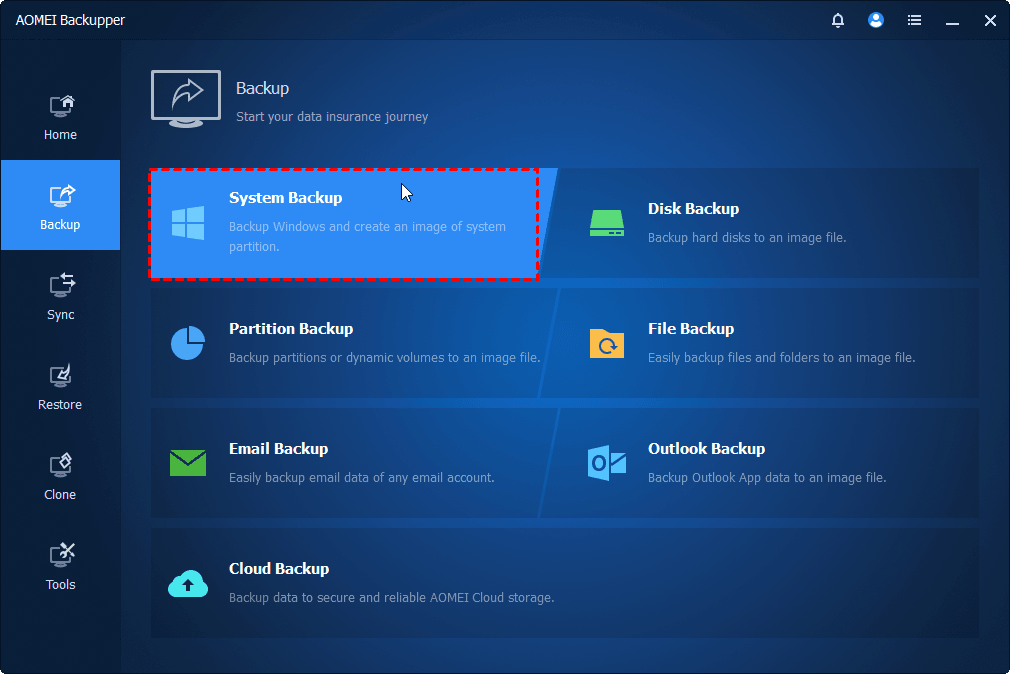
The Backup page of a paid edition: System, Disk, Partition, File, Outlook and Email Backup.
Features
Images a whole server, selected volumes or a file share
AOMEI Backupper Server creates a system image of the server, images whole disks or chosen partitions, or backs up files and folders, for example a file server's shared folders. Images can go to local or external disks, USB drives, a NAS or network share, or AOMEI Cloud, and can be compressed, split, encrypted and checked for integrity.
Runs on schedules and cleans up old images
AOMEI Backupper Server runs jobs daily, by interval, weekly, monthly, once, or on event triggers and USB plug-in. Incremental and differential backups keep the nightly job short, and a backup scheme deletes old images by count or age so the backup disk doesn't fill.
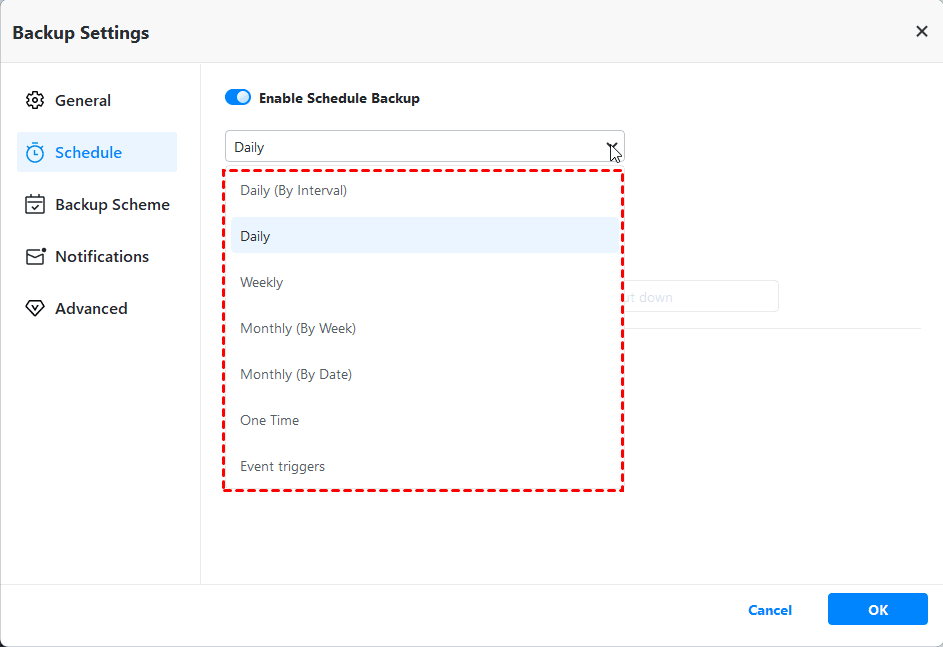
Backup Settings: the schedule options, with Backup Scheme, Notifications and Advanced in the side menu.
Restores to bare metal or different hardware
AOMEI Backupper Server restores a server image to a blank disk from bootable media, and its Universal Restore option puts that image on a machine with different hardware or moves a physical server into a virtual machine (P2V). When only a few files are lost, you can restore those files from a system or disk image without restoring the whole volume.
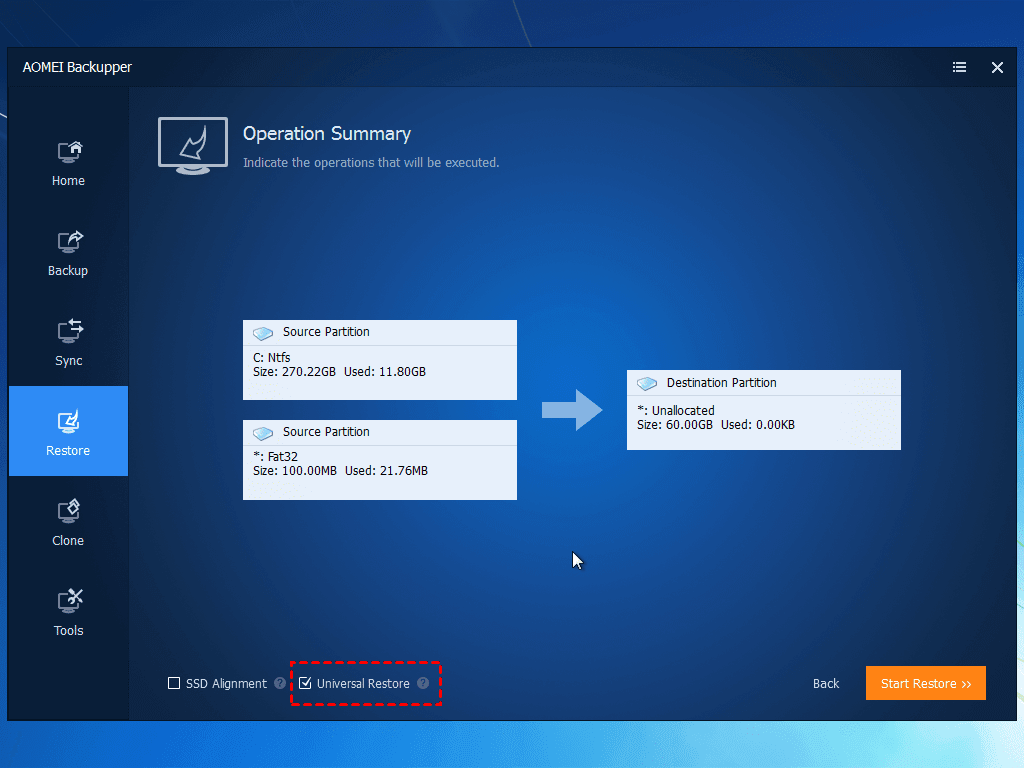
The last step of a system restore, showing the source partitions, the target layout and the Universal Restore check box.
Clones a server's system to new disks
AOMEI Backupper Server has System, Disk and Partition Clone, including from the command line. It's the quick way to move an ageing server's Windows install to an SSD or a larger disk without reinstalling Windows Server and its roles.
Mirrors shares in real time
AOMEI Backupper Server's Real-Time Sync copies new and changed files to a second location as they change, and Two-Way and Mirror Sync keep two folders identical. That gives a file server a live second copy between nightly images.
Scriptable, with alerts and a PXE boot tool
AOMEI Backupper Server has a command-line utility for backup, restore and clone, pre- and post-backup commands, email notifications and NAS management, and the PXE Boot Tool for starting LAN machines from the network.
Benefits
- Bare-metal recovery without an enterprise budget. One server, $299 once.
- Easier than Windows Server Backup. Schedules, retention, sync and cloning sit in one plain interface.
- Hardware freedom. A dead server's image can come back on whatever replacement you can get.
- Works on the office PCs too. The license is per machine, Server or desktop, so a spare can be covered by the same product.
Real-World Uses
- A nightly incremental image of a small company's Windows Server 2022 file server to a NAS, with a weekly full.
- Restoring a failed server's system image onto a new machine with a different RAID controller using Universal Restore.
- Moving Windows Server from ageing hard drives to SSDs without rebuilding roles and shares.
- Real-time sync of the accounts share to a second disk so the latest edits are never more than a few minutes old.
- Turning an old physical server into a virtual machine through a P2V restore.
Who It's For, and Who Should Skip It
AOMEI Backupper Server fits small and mid-sized businesses with one or a few physical Windows Servers, run by someone who wants images and a tested way back without learning an enterprise backup suite.
Skip it if your servers are mostly Hyper-V or VMware guests you want backed up at the host level, or if SQL Server databases need their own backups: AOMEI Cyber Backup, Veeam and similar products are built for that. Skip it too if you need one console to watch many machines, since each copy is managed on its own server. And if the 2026 update-server attack rules AOMEI out for software with full disk access on your servers, that's a reasonable call.
Usage Guide
- Download the Server trial from the vendor and install it on the server. Enter your license code after buying.
- Open Backup > System Backup. The system and boot partitions are selected for you.
- Pick a destination off the server, such as a NAS or network share. You type a network path, for example \\192.168.1.105\Backups.
- In Backup Settings, set the schedule, a backup scheme for retention, and email notifications.
- Click Start Backup, then add a File Backup or Real-Time Sync job for busy shares.
- Go to Tools > Create Bootable Media, make a USB stick, and boot the server (or an identical test machine) from it.
- Practise a restore once, ideally to a spare disk or VM with Universal Restore ticked.
Where it falls short
- Boot media is the weak point. PCWorld only got a working USB stick by writing Backupper's ISO with Rufus and lowering the PC's boot security settings, and called it "a long-running issue with the program". On a server, a restore that can't boot is the worst time to find out.
- No application awareness. No SQL Server, Exchange or VM-level backup in this edition.
- Small interface gaps. PCWorld found you can't create a new folder while choosing a destination, and network locations must be typed in.
- Error codes in the changelog. 8.5.0 fixed several backup, clone and restore errors (4098, 4107, 215) and failures backing up to mapped network drives "in some environments".
- Support is email-based. MSPoweruser found no chat or phone line for urgent problems.
What Users Say
Independent reviews test AOMEI Backupper as a whole, usually the Professional edition, which runs the same engine as Server.
PCWorld: Jon L. Jacobi, Backupper Professional 8.5, November 6, 2026
"The Windows version of Backupper Professional performed both quickly and without error this time around in nearly every task. Imaging, file backup, and sync to both local, network, and online proceeded apace given the bandwidth available on each medium." His summary: "Backupper is a very good performer and super reliable with most tasks — but, geez, Aomei, fix the darn boot media!"
On the business line he lists "Server for $150 with support for various Windows server operating systems". His cons: "Doesn't support third-party online storage services", "Doesn't let you create new folders when defining a backup destination" and "Boot disk creation remains problematic".
MSPoweruser: Dennis Otieno, 8 out of 10
"The tool offers a quick and easy way to backup, sync, restore, and clone your data." Against that: "the tool's reliability is a bit shaky. I received Windows Defender Firewall warnings when backing up files to the cloud. It also failed to detect my external hard drive during cloning." On support: "I tested the response time and got a reply within one hour," but "there are no options for chat and phone support for urgent issues."
Trustpilot: 4.9 out of 5 from 2,597 reviews (ubackup.com)
93% five-star and 3% one-star. Recent reviews are mostly short thanks for support staff.
- John Browning, October 9, 2026: "I got a fast service response and fix. These guys are on the ball and I love using the backer upper."
- FAIROOZ BANNA, October 13, 2026: "Excellent support from Mr. Lanry Lucky! The customer service was outstanding, and his support was truly appreciated."
- Soukiwi Fun, October 22, 2026: "I saw this back up file with .afi file extension from 2018 in my old computer."
The pattern: an easy program with responsive email support, held back by rescue media that too often won't boot and a few rough edges in the interface.
Comparisons
AOMEI Backupper Server vs Technician Plus
Both run on Windows Server. Server covers one machine for $149 a year or $299 once. Technician Plus ($699 a year, $999 lifetime) covers unlimited PCs and servers in a company and adds AOMEI Image Deploy, a portable version and the right to sell technical service. With three or more servers plus office PCs to protect, Technician Plus usually wins.
AOMEI Backupper Server vs AOMEI Cyber Backup
Backupper Server is installed and run on each server. AOMEI Cyber Backup is a web console that backs up Windows machines, Hyper-V and VMware VMs and SQL Server databases centrally. Choose Server for one physical machine; choose Cyber Backup for virtual hosts and databases.
Editions and Pricing
| Plan | Price | Machines | Term | Buy |
|---|
| Server Lifetime | $299 once | 1 server | Lifetime use and upgrades | Buy Lifetime |
| Server Yearly | $149 a year | 1 server | Renews yearly, cancel anytime | Buy Yearly |
Prices are from the order page on November 15, 2026. AOMEI Cloud storage for Backupper is an extra $19.95 a year for 1 TB. The lifetime plan pays for itself against the yearly one in a little over two years.
FAQs
Which Windows Server versions does AOMEI Backupper Server support?
AOMEI Backupper Server supports Windows Server 2025, 2022, 2019, 2016, 2012 and SBS 2011, including R2 releases, and also runs on Windows 11, 10, 8.1, 8 and 7.
Can AOMEI Backupper Server back up Hyper-V virtual machines or SQL Server?
Not as such. AOMEI Backupper Server images disks and files on the machine it runs on, so you can install it inside a VM, but it has no host-level VM backup and no SQL database backup. AOMEI Cyber Backup covers both.
Can I move an AOMEI Backupper Server license to a new server?
Only when the old one is retired. AOMEI's license terms say the Server license can't be resold or passed on, but it can move to a replacement computer when the original stops working or falls into disuse.
Is AOMEI Backupper Server safe to install after the 2026 attack?
AOMEI Backupper Server 8.5.1 is the version AOMEI says closes the update path the attackers used, and our trial download was validly signed by AOMEI. AOMEI hasn't explained how its servers were breached, so treat it like any privileged software: download it only from AOMEI's site, update by hand, and watch the vendor's security notes.
What happens when a yearly AOMEI Backupper Server license ends?
The yearly AOMEI Backupper Server plan renews automatically until you cancel, and includes new versions while it's active. The lifetime plan is a one-time purchase with free upgrades to later versions.
Can I get a refund on AOMEI Backupper Server?
Yes. AOMEI gives a 90-day unconditional money-back guarantee on its paid Backupper editions.
System Requirements
- Windows Server 2025, 2022, 2019, 2016, 2012 or SBS 2011 (including R2), or Windows 11, 10, 8.1, 8 or 7
- File systems: NTFS, FAT32, FAT16, EXT2, EXT3 and others
- Storage: internal and external HDD or SSD, USB flash drive, CD/DVD, NAS and hardware RAID
- 200 MB download
Conclusion
Verdict: for one physical Windows Server, AOMEI Backupper Server is a capable and affordable imaging tool at $299 once, with bare-metal and dissimilar-hardware restore, cloning and real-time sync in an interface anyone on the team can run. The reason to buy it is getting real server disaster recovery for the price of a single license. The reasons to hesitate are just as concrete: it doesn't back up VMs or databases, its rescue media needs testing, and AOMEI's own update servers were used to plant malware on business machines in 2026. If you buy, start on 8.5.1, keep updates manual, and run a test restore before you count on it.
Download Free TrialBuy Lifetime (1 Server)Buy Yearly (1 Server)