AOMEI Partition Assistant Technician: A Partition Toolkit Licensed for Client Work
AOMEI Partition Assistant Technician is a $799 one-time Windows partition toolkit for IT service providers. One license covers unlimited PCs and servers across multiple companies and, unlike every cheaper edition, allows billable work for your clients.
If you're a freelance technician or an MSP, this is the only Partition Assistant license that lets you use the tool on a customer's machine and charge for it. Everyone else should look at a cheaper edition.
Quick facts
- Version: 10.12.2, released October 19, 2026
- Developer: AOMEI
- Platform: Windows 11, 10, 8.1, 8 and 7, and Windows Server 2025, 2022, 2019, 2016 and 2012
- Price: $799 once, with lifetime upgrades
- License: unlimited PCs and servers, multiple companies, billable services
- Trial: demo that simulates operations
- Guarantee: 90 days money back, unconditional per the vendor
What we checked: demo installer version 10.12.2 (72 MB, digitally signed by AOMEI International Network Limited), and the order page, which showed $799 for the lifetime license, on November 6, 2026. We didn't run a job on a real disk or a portable build, so we can't speak to speed or reliability.
Download Free TrialBuy Now
Before you buy
- Price it against your jobs. AOMEI also sells a $599 yearly plan, but the $799 lifetime plan pays off in under two years.
- The demo simulates only. Test it for hardware and layout compatibility, then use the 90-day guarantee as the real trial.
- Think about your clients. Attackers tampered with AOMEI's Backupper update servers in 2026. The reports we read don't name Partition Assistant, and version 10.12.2 lists stronger update security, but if you run tools on client systems you'll want to review that yourself.
Overview
The toolbar groups jobs into Clone, Convert, Free up, Recover, Wipe, Test and Tools, with a partition table and disk map below. Technician has the full feature set of Partition Assistant, and the difference from the other editions is what the license lets you do. The Tools menu is where you'll start: it holds bootable media, Windows To Go, password reset and the portable build.

The Technician Edition's Tools menu, with Create Portable Version highlighted.
Features
Lets you bill clients for the work
AOMEI Partition Assistant Technician is licensed to provide billable technical support to unlimited clients. Professional, Server and Unlimited licenses don't include that right, so it's the reason this edition exists.
Covers multiple companies and locations
AOMEI Partition Assistant Technician activates on unlimited PCs and servers across multiple companies, with no extra charge for more branches. That also suits a business with several separate subsidiaries.
Travels with you on a USB stick
AOMEI Partition Assistant Technician creates a portable version on USB, so you can walk up to a client's PC and run it without installing anything. Bootable media covers the PCs that won't start.
Fixes the disk jobs clients actually call about
AOMEI Partition Assistant Technician extends a full C: drive with Allocate Free Space, migrates Windows to an SSD, clones disks, converts between MBR and GPT, and manages dynamic volumes up to RAID-5 on Windows Server.
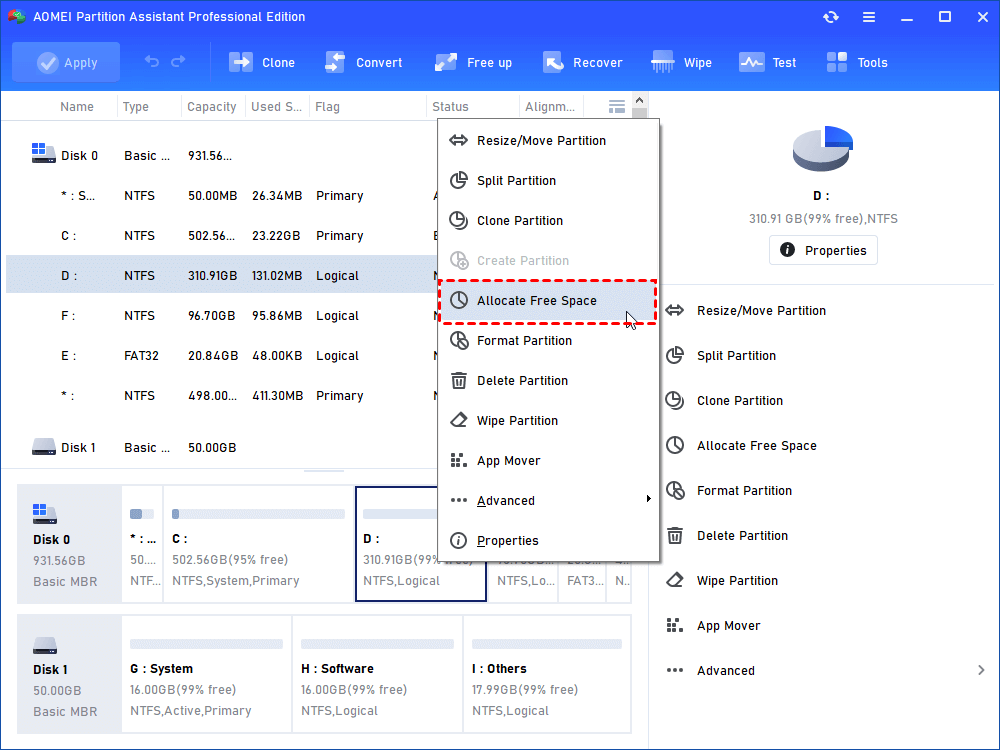
Allocate Free Space in the partition menu, shown in the Professional edition's window.
Rescues machines that won't boot
AOMEI Partition Assistant Technician rebuilds the MBR, repairs boot problems, recovers lost partitions and files, and resets forgotten Windows passwords from its own tools. Integrate to Recovery Environment adds it to the Windows boot menu.
Clears out disks for resale or disposal
AOMEI Partition Assistant Technician wipes disks and partitions and shreds files, useful when a client retires hardware.
Benefits
- Stay inside the license. You can charge for the work without breaching terms.
- One toolkit for desktops and servers. Your kit covers both.
- Nothing left behind. The portable build leaves no install on the client's PC.
- A one-off cost. It can be written off against a few jobs.
Real-World Uses
- A repair shop moving customers' Windows installs to new SSDs.
- An MSP extending C: on client servers during a maintenance window.
- Recovering a lost partition on a small business PC.
- Converting client PCs to GPT ahead of Windows 11 upgrades.
- Resetting a forgotten local Windows password on a client's machine.
Who It's For, and Who Should Skip It
AOMEI Partition Assistant Technician fits MSPs, freelance IT technicians, PC repair shops and groups with several separate companies.
Skip it if all your machines belong to one company: Unlimited costs $200 less for the same tools. Skip it if you only fix your own PCs: Professional is $59.95. And if your work is mostly backup and imaging, AOMEI Backupper Technician is the closer fit, though you should read about its 2026 update server attack first.
Usage Guide
- Install the program on your own PC and enter the license code.
- Open Tools and choose Create Portable Version, then pick your USB drive.
- Make bootable media too, for PCs that won't start.
- At the client's PC, confirm a backup exists, then run the program from USB.
- Pick the job, check the pending operations, and click Apply, then Proceed.
Where it falls short
- The price assumes regular work. $799 is hard to justify for occasional jobs.
- Few independent reviews. We found no independent test of this edition, only of Partition Assistant in general.
- Long jobs can be a surprise. One Trustpilot reviewer saw an operation of almost 80 minutes and couldn't cancel it, which matters on a client's clock.
- Support is by email, and one reviewer's first answer missed the problem.
What Users Say
Trustpilot: 4.9 out of 5 from 3,179 reviews
The score covers all Partition Assistant editions on diskpart.com, and most reviewers don't name theirs. Trustpilot notes the company hasn't recently invited reviews and hasn't replied to negative ones.
- Mr Customer, July 8, 2026: "This software did what Microsoft is unable to"
- Edilberto Pinto, November 2, 2026: "I was looking for software to agregate 2 partitions and AOMEI did it in a very simple way."
- A 1-star reviewer signed Windows, October 29, 2026: "It started an operation that was going to take almost 80 minutes, and didn't even give me an estimated time"
- Christoph Lampert, 4 stars, November 2, 2026: "The problem was first not resolved. It was not understood!"
Vendor's customer quotes
An IT Engineer quoted on AOMEI's page says: "I have used the program a couple of times to reduce the D: drive's volume and increase the C: drive." Since it's from the vendor, read it as marketing.
The pattern: the tool is well liked for real disk work. Slow jobs and first-line support are the usual complaints.
Comparisons
Technician vs Unlimited
Both cover unlimited computers and create a portable version. Unlimited is $599 and stops at one company. Technician is $799 and adds multiple companies and paid services. If you bill clients, the $200 difference isn't optional.
Editions and Pricing
| Plan | Price | License | Best for |
|---|
| Technician Yearly | $599 a year | Unlimited, multiple companies, auto-renews | Testing the business case |
| Technician Lifetime (this listing) | $799 once | Unlimited, multiple companies, paid services | MSPs and repair shops |
| Unlimited Lifetime | $599 once | Unlimited, one company | Single companies |
| Professional Lifetime | $59.95 once | 2 PCs | Home users |
AOMEI also bundles Technician with AOMEI Backupper Technician Plus for $899 on its own store.
FAQs
Do I need AOMEI Partition Assistant Technician to work on client PCs?
Yes, if you're charging for it. AOMEI's comparison gives only AOMEI Partition Assistant Technician the right to provide billable technical services.
Is AOMEI Partition Assistant Technician portable?
AOMEI Partition Assistant Technician can build a portable copy on a USB drive from its Tools menu, so you don't install it on each client's PC.
Does AOMEI Partition Assistant Technician work on Windows Server?
Yes. AOMEI Partition Assistant Technician covers Windows Server 2025, 2022, 2019, 2016 and 2012 and Windows 11, 10, 8.1, 8 and 7.
Can I rebrand AOMEI Partition Assistant Technician for my company?
The vendor pages we read don't offer rebranding, so assume it runs under AOMEI's name and ask its sales team if that matters.
Can I get a refund on AOMEI Partition Assistant Technician?
Yes. AOMEI offers a 90-day unconditional money-back guarantee and may ask why you want the refund.
System Requirements
- Windows 11, 10, 8.1, 8 or 7
- Windows Server 2025, 2022, 2019, 2016 or 2012
- 72 MB download, plus a USB drive for the portable version
Conclusion
Verdict: AOMEI Partition Assistant Technician is worth $799 for anyone who bills for disk work, and pointless for anyone who doesn't. It's the only edition that allows it, and the toolset is broad enough to replace several utilities in a technician's bag.
The one reason to buy it is the right to use it on paying clients' machines from a USB stick. The main reason not to is that if all your machines belong to one company, Unlimited gives you the same tools for $200 less.
Download Free TrialBuy Now