NIUBI Partition Editor Professional: Fix a Full C Drive Without Reinstalling Windows
NIUBI Partition Editor Professional Edition is a $39 Windows partition manager for home and office PCs: it resizes, moves, merges and clones partitions without wiping your data, and one license covers 2 PCs. It runs on Windows 11, 10, 8, 7, Vista and XP, and not on Windows Server.
The usual reason to buy it is a red C: bar. Windows Disk Management can only extend a drive into unallocated space sitting directly to its right, so with a D: drive in the way, "Extend Volume" stays gray. NIUBI lets you shrink D:, slide the free space next to C:, and grow C: with your files and programs where they are.
Quick facts
- Version: 10.3.6, updated October 30, 2026
- Developer: Chongqing NIUBI Technology Co., Ltd., China
- Platforms: Windows 11/10/8/7/Vista/XP, 32 and 64 bit
- Price: $39 one-time at checkout, with a year of free version upgrades
- License: perpetual, activates on up to 2 PCs
- Trial: Virtual Mode preview, can't change real disks
- Guarantee: 90 days, conditional (see below)
What we checked: installer NPE_pro.exe downloaded from the vendor, file version 10.3.6, 12.4 MB, with NIUBI Technology Co., Ltd. in its properties, and checkout prices of $39.00, $49.00 and $69.00 for the three upgrade terms, all on November 7, 2026. We didn't resize or clone a live disk.
Before you buy
- The trial can't finish the job. It lets you line up every operation and see the result on screen, but it won't change a real disk. If you buy, you can activate that same trial and carry on with your pending operations.
- Home users should try the Free Edition first. It makes real changes on a home PC for non-commercial use, so you can see the tool work on your own disk before paying anything.
- Pro won't activate on Windows Server. Servers need the Server or Enterprise Edition.
- The 90-day guarantee isn't a change-of-mind refund. It applies when you hit a problem, send the details and screenshots to support, and the product still can't solve it.
- Two activations, and they stay used. Uninstalling doesn't free one up.
Download Free TrialBuy Now
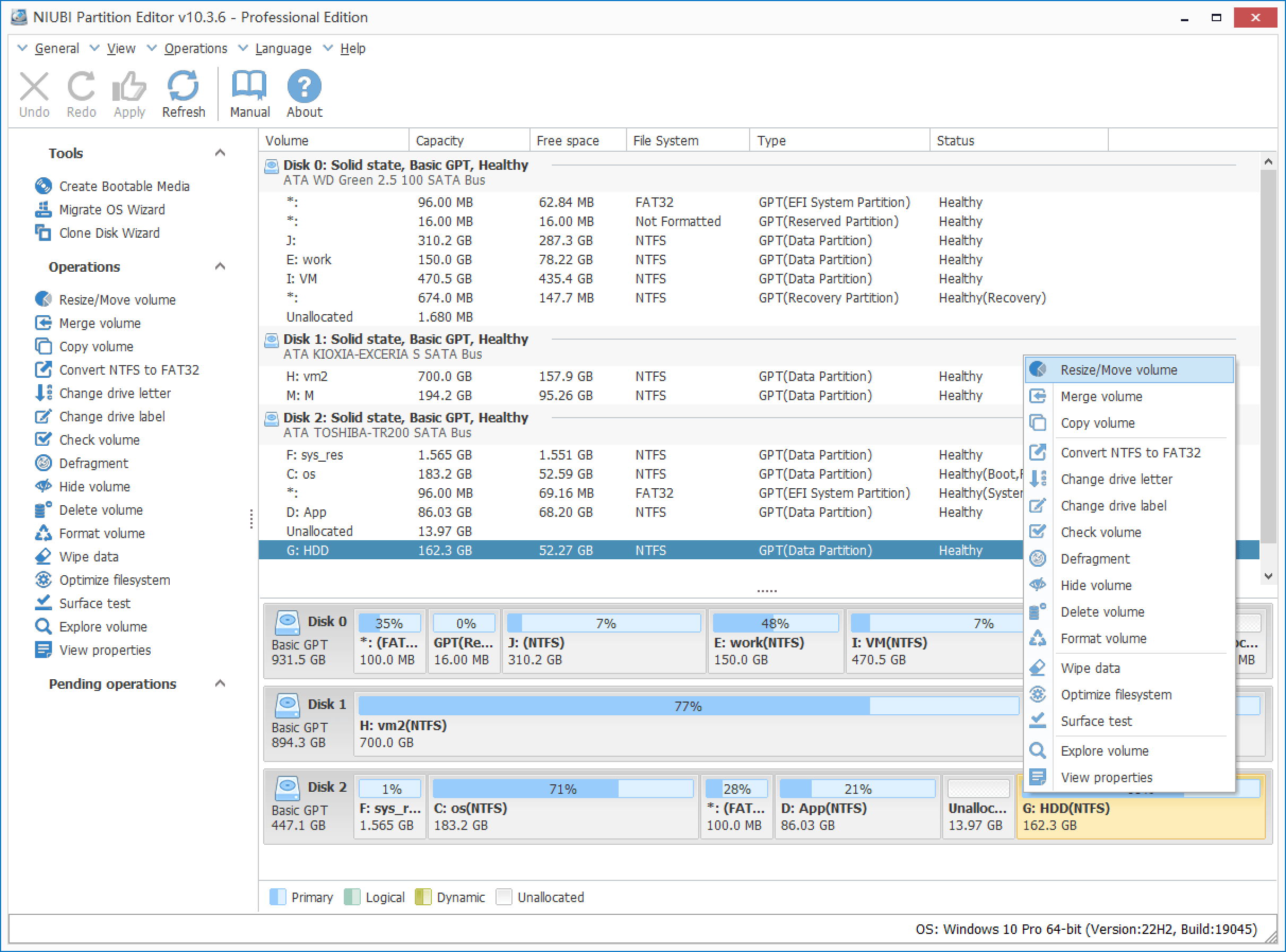
NIUBI Partition Editor 10.3.6 Professional Edition with three disks loaded. The Tools list holds the bootable media, OS migration and clone wizards, and the right-click menu shows Resize/Move volume at the top.
Overview
The layout is plain and familiar if you've seen Disk Management: a list of volumes at the top, a colored disk map below, and every operation in a sidebar. You drag a partition's edges on the map, watch the plan build up in a Pending Operations list, and nothing touches the disk until you click Apply.
The Professional Edition is the same toolkit as the Free Edition with two additions that matter: the bootable media builder and 1-Second Rollback. It also gives you the right to use it at work, which the Free Edition doesn't.
Features
Grow C: by borrowing space from another drive
NIUBI Partition Editor shrinks a volume from either side and hands that unallocated space to its neighbor. Move a partition out of the way and non-adjacent space can reach C: too. Two adjacent partitions can also be merged into one in a few clicks.
A plan you can undo before it happens
NIUBI Partition Editor works in Virtual Mode: each operation joins a pending list with Undo and Redo, and the disk stays as it was until you confirm. Once a job is running, Cancel-at-Will lets you stop it at any point of progress.
1-Second Rollback when something goes wrong
NIUBI Partition Editor snapshots the partition layout at start-up and watches the job after you click Apply. If it detects an error it can't handle, or a hardware problem such as a power cut, it reverts the disk to its earlier state on its own. You can't use that snapshot as a separate recovery tool, and you'll only see it work when something fails.
Clone a disk or move Windows to an SSD
NIUBI Partition Editor's Clone Disk Wizard copies at the file-system level, not sector by sector, and the target can be a different size from the source. When it's larger, you resize each partition during the wizard, so the extra space doesn't end up stranded at the end of the disk. A separate Migrate OS Wizard sits in the same Tools list for moving Windows.

The clone preview in an older 7.2.2 Professional window: partitions from a 120 GB disk laid out larger across a 512 GB target, with "Clone disk (0 to 1)" waiting in Pending Operations.
Disk conversions without reformatting
NIUBI Partition Editor converts an MBR data disk to GPT, NTFS to FAT32, logical drives to primary and back, and a dynamic disk to basic, all without deleting your files.
Maintenance and data-erasing tools in one app
NIUBI Partition Editor also scans for bad sectors, checks and repairs file systems, defragments, hides volumes, sets a disk read-only and wipes a disk, partition or free space so deleted files can't be recovered. A portable ZIP version is on the download page, and the bootable media wizard builds an ISO you can burn to CD, DVD or USB.

The Surface Test window, ready to scan a selected disk area for bad sectors, with green and red marking good and damaged blocks. Captured from an older version.
Benefits
- You keep your setup. A full C: drive stops being a reinstall weekend and becomes a short job.
- No yearly bill. The license is perpetual, and you keep using your version after the upgrade period ends.
- A second PC is included. At $39 for two, a desktop and a laptop cost $19.50 each.
- A small download. The installer is about 12 MB, and NIUBI says it carries no bundled extras.
Real-World Uses
- Windows Update has run out of room. Your laptop came with a small C: and a large D:. You shrink D:, shift it right, and add the space to C: for the next feature update.
- The recovery partition is in the way. It sits between C: and the unallocated space, so Windows won't extend. You move it aside and C: can grow.
- Swapping a small SSD for a 2 TB one. You clone the old disk to the new one and stretch C: during the wizard.
- An old drive is going to a new owner. You wipe it with one of the built-in erase algorithms so its files can't be recovered.
- A small office PC needs fixing. The Free Edition's license doesn't cover business use, so Pro is the cheapest license that does.
Who It's For, and Who Should Skip It
Buy it if you run one or two Windows PCs, need to resize or merge partitions at work, or want rollback protection and a boot disk for jobs on your system drive.
Skip it if the machine runs Windows Server, because the key won't activate there: one Trustpilot reviewer found this out after buying. Skip it too if you use Windows at home and don't need a boot disk, since the Free Edition does the partition work itself. Mac and Linux users can't use it at all; GParted is the usual free option. And if you rebuild machines constantly, the two-activation limit will get in your way.
Usage Guide
- Download the trial, run the installer and start NIUBI Partition Editor. Your disks appear in the list and on the map.
- Close open programs and files on the partitions you plan to change. This raises the chance the job can run inside Windows.
- Right-click the drive next to C: and choose Resize/Move Volume. Drag its left edge to the right, so the free space lands beside C:.
- Right-click C:, choose Resize/Move Volume and drag its right edge across the unallocated space.
- Check the Pending Operations list. Use Undo for anything you don't want.
- Click Activate on the toolbar and paste your license key if you're on the trial. No new download is needed.
- Click Apply. An operation that needs a restart reboots the PC into a black pre-boot screen, finishes there and returns you to Windows.
Where it falls short
- Some jobs still need a reboot. NIUBI's Hot-Resize reduces restarts, but it can't avoid them all.
- Rollback isn't a backup. It only reverts failures it detects, and NIUBI itself still suggests backing up first. One AlternativeTo user reports losing a partition during a shrink.
- Long jobs give little feedback. A Trustpilot buyer resizing partitions said the job looked stuck for a while, with no sign of how long it would take.
- Virtual machines can misbehave. A reviewer running Windows under Oracle VM reports that the guest stopped booting after a partition change.
- Your MBR system disk stays MBR. The manual says the converter can't handle a disk holding the system partition, so only data disks qualify.
- The "30% to 300% faster" claim is NIUBI's own. We found no independent benchmark for it.
What Users Say
Most public feedback lives on Trustpilot, where NIUBI's site has a TrustScore of 4.4 from 155 reviews: 81% five-star, 8% four-star, 3% three-star, 2% two-star and 6% one-star. NIUBI answers many of the complaints in public. SourceForge and Slashdot list the product with no ratings.
Praise from PC users on Trustpilot
"able to expand my C drive whereby i have stuck with this problem for a while" Hendra, May 25, 2026, 5 stars
"Worked great to move recovery partition so I could expand Windows OS partition." Paul, April 11, 2026, 5 stars
"The software worked like magic. I was able to use it without losing any data" Tepa, June 12, 2026, 5 stars
"Moved partition and succesfully expanded C without restare" Giacomo, April 6, 2026, 5 stars
"It does what it says on the tin and is easier to navigate than some 'other' partition tools." Richard Thomas, September 12, 2026, 5 stars
"Great product, a lot of tool in one app" Alessandro Paparatti, March 18, 2026, 5 stars
Mixed views on speed
"Works as advertised. Seems much faster than other competitors." Bruno, September 26, 2026, 4 stars
Another reviewer, under the title "it works too slowly not like the others.", gave it 3 stars in February 2025.
Complaints on Trustpilot
"I reformat and redesign my setup all the time unfortunately with limits to PC licenses" Neil Hallen, March 15, 2026, 1 star. NIUBI replied that Professional activates on two computers and that it can clear records on request.
"When I changed the partition, the machine wouldn't boot anymore." Marco, January 20, 2026, 2 stars, running Windows in Oracle VM.
"It didn't do anything." Justin, February 6, 2026, 1 star. He paid about $40 and says the paid features never appeared. NIUBI asked for a screenshot and pointed to its refund guarantee.
"useless software and cant refund totally is a scam" yit sing, March 14, 2026, 1 star. NIUBI says it explained a dynamic-to-basic conversion issue and heard nothing back.
"Pretends to be free, only telling you to buy after wasting tons of time setting up. Disgusting business practice." Johan, September 26, 2022, 1 star. NIUBI replied that he'd downloaded the wrong edition. The trials and the Free Edition sit side by side on its download page, so check which one you're taking.
"Doesn't do what is promissed. Impossible to boot windows from an external SSD!!!" André Van Meenen, January 6, 2019, 2 stars
Other sites
On AlternativeTo, Hoek Hoek wrote: "I was looking for alternative to EaseUS Partition Master and MiniTool PartitionWizard for home use without bundleware". DjoleDzele posted the opposite experience in August 2026: "well turns out the second partition that i was left shrinking got totally destroyed".
Beebom's 2018 review, labeled as sponsored by NIUBI, recommended it and listed one con: "Only available for Windows".
The pattern is clear enough. Most buyers came with one specific job, usually a full C: drive, and it worked the first time. The complaints cluster around activation limits, the trial not being able to apply changes, and refunds that have to go through support first. The rare reports of data or boot trouble are a good reason to take a backup, however calm the interface looks.
Comparisons
Professional vs. Free Edition
The Free Edition shares the partition tools but leaves out the bootable media builder and 1-Second Rollback, and it's for non-commercial home use only. Pay for Pro if you need the boot disk, want the rollback safety net on a system drive, or are using it at work.
Professional vs. Windows Disk Management
Disk Management is free and already installed, and it's enough if the free space sits right after the drive you're growing. It can't move partitions, so otherwise you'd have to delete the drive in the way. Check it first: if "Extend Volume" isn't gray, you may not need anything else.
Editions and Pricing
All paid editions are one-time purchases with perpetual licenses. They differ in where they run, how many machines they cover and how long free version upgrades last.
| Edition | Price at checkout | Runs on | License covers | Free upgrades |
|---|
| Free | $0 | Windows PCs | Home, non-commercial use | Not applicable |
| Professional | $39 | Windows PCs | 2 PCs | 1 year |
| Professional plus 2 years | $49 | Windows PCs | 2 PCs | 2 years |
| Professional plus lifetime | $69 | Windows PCs | 2 PCs | All future versions |
| Server | $139 | Windows Server and PCs | 2 servers | 1 year |
| Enterprise | $399 | Windows Server and PCs | Unlimited, one organization | 1 year |
| Technician | $699 | Windows Server and PCs | One technician, paid client work | All future versions |
Pick the lifetime term if you expect to keep this PC for years, because keys from one major version may not carry to the next. Prices are before any tax that applies at checkout.
Buy with 1 Year of Upgrades ($39)Buy with 2 Years ($49)Buy with Lifetime Upgrades ($69)
FAQs
Can I move my NIUBI Partition Editor Professional license to a new PC?
NIUBI Partition Editor Professional doesn't transfer by itself: the license agreement rules out moving a registered copy, and the FAQ says uninstalling won't free an activation. With a dead PC, contact support with your order ID, since NIUBI has said publicly that it can clear activation records on request.
What happens to NIUBI Partition Editor when my upgrade period ends?
NIUBI Partition Editor keeps working for the version you own, with no maintenance fee. You just stop getting free moves to later versions. NIUBI's FAQ also says a key without an upgrade plan stays valid within one major series, such as 10.0 to 10.x.
Will my old NIUBI Partition Editor key work with version 10?
NIUBI Partition Editor version 10 uses a new activation system, so keys from earlier versions show as unregistered. If your license covers the release, or you have a lifetime plan, NIUBI issues a new key free on request. Otherwise you can buy a new license at 20% off or stay on your old version.
Can I upgrade from NIUBI Partition Editor Professional to Server later?
NIUBI Partition Editor licenses can be raised to a higher edition by paying the price difference on NIUBI's upgrade page. You then enter the new key through Help, Update License, without a new download.
Does NIUBI Partition Editor offer a discount for schools or charities?
NIUBI Partition Editor is 20% off in all editions for non-profits, schools and governments, according to the vendor's FAQ.
Why did my NIUBI Partition Editor order fail at checkout?
NIUBI Partition Editor orders go through PayPro Global, which can reject an order placed over a VPN, from a banned country such as Russia, or with contact details it can't verify. Turn off the VPN and check your details first. The license key then appears on the order page and in your confirmation email.
Does NIUBI Partition Editor offer phone support?
NIUBI Partition Editor support runs through 24/7 live chat, email and free remote sessions. The phone lines are for order questions only.
System Requirements
- Windows 11, 10, 8, 7, Vista or XP, 32 or 64 bit
- 16 MB of free disk space
- Not supported: Windows Server, macOS, Linux
Conclusion
NIUBI Partition Editor Professional is worth $39 if you need to fix a partition layout at work or want a boot disk and rollback protection for a system drive. The two-PC license and one-time price are fair, and the feedback from buyers who came with a full C: drive is strongly positive.
The main reason not to buy it is that you may not have to. For a home PC, try the Free Edition first, because the paid trial can't show you a real result and the refund depends on support failing to fix your problem. Whichever you use, back up before you click Apply.
Download Free TrialBuy Now