NIUBI Partition Editor Server: Extend a Full C Drive on Windows Server Without Rebuilding It
NIUBI Partition Editor Server Edition is a $139 partition manager for Windows Server 2025 back to 2008: it extends a full C: drive, moves and merges volumes, and clones disks with the data left in place. One perpetual license activates on up to 2 servers, and it suits small and mid-sized organizations.
Servers tend to hit this problem at the worst time. C: was sized years ago, updates and logs filled it, and D: sits right next to it with plenty of room. Disk Management shrinks D:, but the freed space lands on the wrong side, so "Extend Volume" stays gray unless you delete D:. NIUBI moves that space across to C: instead.
Quick facts
- Version: 10.3.6, updated October 30, 2026
- Developer: Chongqing NIUBI Technology Co., Ltd., China
- Platforms: Windows Server 2025/2022/2019/2016/2012/2008, plus Windows 11/10/8/7/Vista/XP
- Storage: HDDs and SSDs, hardware RAID, VMware and Hyper-V virtual machines
- Price: $139 one-time at checkout, with a year of free version upgrades
- License: perpetual, activates on up to 2 servers
- Trial: Virtual Mode preview, can't change real disks
What we checked: installer NPE_server.exe downloaded from the vendor, file version 10.3.6, 12.5 MB, with NIUBI Technology Co., Ltd. in its properties, and checkout prices of $139.00, $169.00 and $219.00 for the three upgrade terms, all on November 7, 2026. We didn't resize a production server.
Before you buy
- You can't test a real resize first. The trial plans every step and shows the outcome, but it won't write to a disk, and the Free Edition doesn't run on Windows Server. Use the trial to confirm your layout works and whether a step will need a restart.
- Count your servers. A key activates on 2 machines, and uninstalling doesn't give an activation back. Five or more servers make Enterprise the cheaper license.
- The 90-day guarantee has a condition. A refund follows when you report a problem with details and screenshots, and support can't solve it. It isn't a change-of-mind refund.
- Take a backup or a clone first. NIUBI recommends it too, whatever the rollback feature promises.
Download Free TrialBuy Now
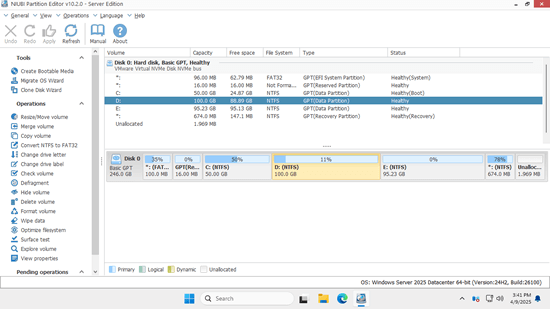
The Server Edition window on Windows Server 2025 Datacenter in a VMware virtual machine, from version 10.2.0. The vendor publishes this one at 550 pixels wide.
Overview
A server partition job carries two risks a desktop job doesn't: downtime and the cost of a mistake. NIUBI's Server Edition is built around those two. It does as much as it can while Windows stays up, it tells you in advance which steps will need a restart, and it tries to back out by itself when a job fails.
The program is a 12.5 MB installer, or a portable ZIP if you'd rather not install anything on the server. There's nothing to subscribe to and no maintenance contract.
Features
See which steps need a reboot before you commit
NIUBI Partition Editor Server marks each pending operation with a symbol showing whether it can finish inside Windows or needs a restart. With that known in advance, you can decide to run it now or hold it for the maintenance window.
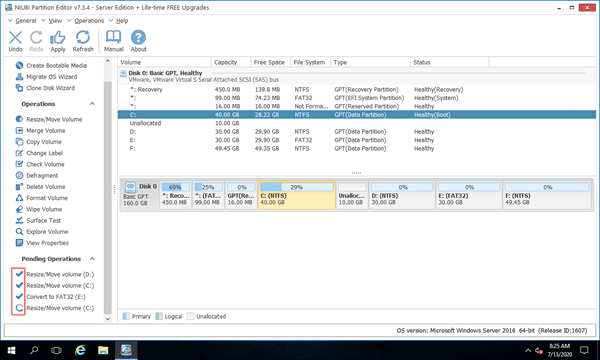
Pending operations in an older 7.3.4 Server window on Windows Server 2016. The marks beside each line show which can run in Windows and which needs a restart.
Hot-Resize keeps more jobs online
NIUBI Partition Editor Server moves many resize jobs into the running system through Hot-Resize, so users stay connected. Closing other programs and open files on the affected drive before you start improves your odds. A locked partition can still force a restart into a pre-boot screen, and the server then returns to the login screen by itself.
Hot Clone for a ready-to-boot spare disk
NIUBI Partition Editor Server clones disks and partitions in Windows without taking the server down. You can clone the system disk before risky work, or on a schedule you run by hand, and boot from the copy if the original fails.
Rollback and cancel for failed jobs
NIUBI Partition Editor Server's 1-Second Rollback reverts the disks to their earlier state when it detects a power failure or a known error mid-job. Cancel-at-Will lets you stop an operation at any point of progress, even when you only realize partway through that you picked the wrong volume.
Works with RAID and virtual disks
NIUBI Partition Editor Server supports all types of hardware RAID arrays and VMware or Hyper-V virtual machines, along with ordinary HDDs and SSDs, so you don't have to break a mirror or rebuild an array to resize a volume.
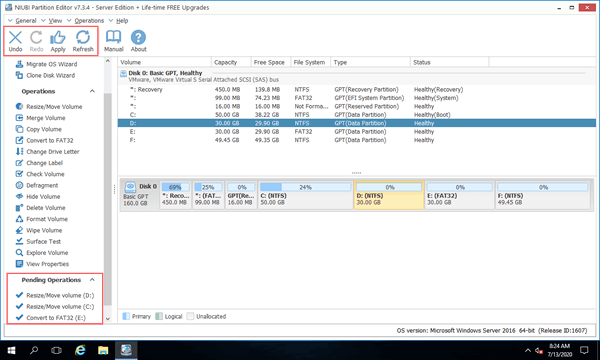
Virtual Mode in an older 7.3.4 Server window: three operations queued in the bottom-left list, with Undo and Apply highlighted at the top. Nothing has reached the disk yet.
Boot media for a server that won't start
NIUBI Partition Editor Server builds a bootable CD, DVD or USB drive, so you can manage partitions with no operating system running. This is the route for a machine that's failed or locked down.
Benefits
- No restore marathon. The alternative to resizing is backing up, recreating partitions and restoring, and verifying it all afterwards.
- Better planning. You find out about restarts while you can still schedule them.
- A fixed cost. The price is one payment for two servers, with no yearly renewal.
Real-World Uses
- C: is full on a file server. You shrink D: from the left, give the space to C:, and keep the shares where they are.
- A VM ran out of system space. You add capacity to the virtual disk, then use NIUBI to move the partition in the way and hand the new space to C:.
- Replacing an aging drive set. You hot-clone to a larger array and spread the extra capacity across the volumes.
- Tidying a server before an upgrade. You convert a data disk from MBR to GPT, then merge leftover partitions.
- A retiring server. You wipe its disks with the built-in erase algorithms before it leaves the building.
Who It's For, and Who Should Skip It
Buy it if you look after one to four Windows Servers and have no spare day for a rebuild. It suits a small business, a school or a single admin who needs this job done perhaps a few times a year.
Skip it on a Windows PC-only network, where the $39 Professional Edition covers you, or if your free space already sits right after the volume you're growing, because Disk Management can do that for free. Larger estates should compare Enterprise. If you charge clients for this work, neither license covers it, and you need the Technician Edition.
Usage Guide
- Take a backup, or clone the system disk. Then download the trial and run it on the server, or unpack the portable ZIP.
- Close running programs and open files on the drives involved, then start NIUBI Partition Editor.
- Right-click D:, choose Resize/Move Volume and drag the left edge to the right. Unallocated space now sits behind C:.
- Right-click C:, choose Resize/Move Volume and drag its right edge across that space.
- Read the marks beside each pending operation. If one needs a restart, click Undo, or wait until your maintenance window.
- On the trial, click Activate and paste your key. Your plan carries over.
- Click Apply and leave the job to finish. Large drives with many files take longer, because those files have to move.
Where it falls short
- A restart can't always be avoided. NIUBI says Hot-Resize reduces the chance of a reboot, not that it removes it.
- Progress is hard to judge. A buyer resizing partitions on Server 2019 said the job looked stuck for a while and gave no idea of how long it would take.
- System disks stay MBR. The converter handles data disks only, which also limits anyone trying to get past MBR's 2 TB ceiling on the boot disk.
- Older small-business servers are a risk. One reviewer reports that cloning and drive letter changes failed on Windows SBS 2008, so test your own platform in the trial.
- It's run by hand. This is an interactive tool for one machine at a time, so don't expect fleet-wide automation from it.
- The headline speed claim is unproven. "30% to 300% faster" comes from NIUBI, with no independent test behind it.
What Users Say
Trustpilot is the main public source: NIUBI's site holds a TrustScore of 4.4 from 155 reviews, with 81% five-star and 6% one-star. Many reviewers are server admins, and NIUBI replies to many of the complaints.
Server admins who got it done
"Worked like a charm, got server running better, Thanks" Ivan, October 12, 2026, 5 stars
"Installed NIUBI on my Dell WS 2019 all went as expected" David, August 1, 2026, 5 stars. His review adds a caution about how long the resize seemed to sit without visible movement.
"It worked on PCs and servers first time, real easy to use." Paul, February 10, 2026, 5 stars
Jeff Goodwin (March 12, 2026, 5 stars) moved free space from a neighboring partition to a server's full C: drive, and Joe of Little League (February 10, 2026, 5 stars) resized C: and D: on Server 2022 under the title "Works as advertised".
General praise
"Used it before at previous employer and knew it was a better solution than what they were using" Sam, October 29, 2026, 5 stars
"Works as advertised. Seems much faster than other competitors." Bruno, September 26, 2026, 4 stars
Criticism
"The application was advertised as a server partition management tool (Win 2019 etc.)" Simon, December 5, 2022, 3 stars. He bought Pro and was told it doesn't work on that OS, which is why the edition matters.
"I try to use it on Windows SBS 2008. It don't work." Octavian Burcu, November 9, 2020, 1 star
"Couldn't solve my issue. Asked for a refund and never received an answer" Marcelo Ardissone, November 14, 2018, 1 star. NIUBI replied that it had no record of the request and pointed him to live chat.
"When I changed the partition, the machine wouldn't boot anymore." Marco, January 20, 2026, 2 stars, on Windows inside Oracle VM.
Elsewhere
On AlternativeTo, DjoleDzele wrote in August 2026: "well turns out the second partition that i was left shrinking got totally destroyed". One report isn't a pattern, but it's the failure every admin fears.
Admins mostly praise the same thing: it fixed one stuck C: drive quickly. The complaints come from buying the wrong edition, older platforms and virtual machines outside VMware and Hyper-V, plus refunds that need support involved first.
Comparisons
Server Edition vs. Disk Management
Disk Management is built into Windows Server, and it can extend a volume only into space directly on its right. If D: is in the way, you have to delete D: first, and a logical drive leaves "Extend Volume" gray even then. NIUBI moves the partition instead, keeping the data on it.
Server Edition vs. Enterprise Edition
Both have the same tools. Server costs $139 for 2 servers and Enterprise $399 for unlimited machines in one organization. Two Server keys ($278) cover four servers, and a third ($417) passes the Enterprise price, so Enterprise wins from five servers up.
Editions and Pricing
Each term is a one-time purchase with a perpetual license, and only the length of free version upgrades changes.
| Edition | Price at checkout | License covers | Free upgrades |
|---|
| Professional (no Server support) | $39 | 2 PCs | 1 year |
| Server | $139 | 2 servers | 1 year |
| Server plus 2 years | $169 | 2 servers | 2 years |
| Server plus lifetime | $219 | 2 servers | All future versions |
| Enterprise | $399 | Unlimited, one organization | 1 year |
| Technician | $699 | One technician, paid client work | All future versions |
Prices are before any tax that applies at checkout. PayPro Global lets a business enter a VAT exemption ID on the order page, under Business purchase.
Buy with 1 Year of Upgrades ($139)Buy with 2 Years ($169)Buy with Lifetime Upgrades ($219)
FAQs
Does NIUBI Partition Editor Server work on Windows Server 2025?
NIUBI Partition Editor Server supports Windows Server 2025 along with 2022, 2019, 2016, 2012 and 2008. The vendor's own screenshots show it running on Server 2025 Datacenter.
Can I install NIUBI Partition Editor Server on a Windows PC?
NIUBI Partition Editor Server runs on Windows 11, 10, 8, 7, Vista and XP as well as servers, and one key covers any 2 machines of either kind.
Can I run NIUBI Partition Editor without installing it on the server?
NIUBI Partition Editor Server comes as a portable ZIP of about 8.45 MB, so you can run it without installing. You can also build boot media and work outside Windows.
How long does NIUBI Partition Editor take to resize a server partition?
NIUBI Partition Editor's run time depends on how many files must move. Shrinking D: from the left shifts its start, so every file on that drive moves to a new location, and a busy data drive takes much longer than an empty one.
What happens to NIUBI Partition Editor Server after the upgrade year?
NIUBI Partition Editor Server keeps working with no maintenance fee. Support by live chat and email stays free, and you'd pay only to move past what your key covers.
Can I move from NIUBI Partition Editor Server to Enterprise later?
NIUBI Partition Editor lets you raise an edition by paying the price difference on its upgrade page. You then enter the new key in Help, Update License, with no new download.
Will a version 9 key work with NIUBI Partition Editor 10?
NIUBI Partition Editor 10 has a new activation system, so older keys show as unregistered. Lifetime and in-period owners get a replacement key free on request, and others can buy at 20% off or stay on version 9.
System Requirements
- Windows Server 2025, 2022, 2019, 2016, 2012 or 2008, or Windows 11, 10, 8, 7, Vista or XP
- 32 or 64 bit, with 16 MB of free disk space
- Hardware RAID, VMware and Hyper-V virtual machines supported
Conclusion
NIUBI Partition Editor Server is worth $139 for a small organization with a full C: drive and no appetite for a rebuild. One saved evening of backup and restore work pays for it, and knowing which steps need a restart before you commit is its most useful touch.
The main reason to hold back is that you can't see it work on a server before paying. Confirm your layout in the trial, and take a clone or backup before Apply. With five or more servers, go straight to Enterprise.
Download Free TrialBuy Now