NIUBI Partition Editor Enterprise: One Partition License for Every PC and Server You Own
NIUBI Partition Editor Enterprise Edition is a $399 one-time license that lets one organization use the NIUBI partition manager on unlimited Windows PCs and servers, at any location. It's aimed at IT departments that resize, clone and convert disks often enough that per-machine keys become a nuisance.
The program is the same as the Server Edition. What you're buying is the license: nobody has to count activations, ask which site a machine belongs to, or stop to buy another key when a laptop in another office runs out of room on C:.
Quick facts
- Version: 10.3.6, updated October 30, 2026
- Developer: Chongqing NIUBI Technology Co., Ltd., China
- Platforms: Windows Server 2025 to 2008 and Windows 11 to XP
- Price: $399 one-time at checkout, with a year of free version upgrades
- License: perpetual, unlimited PCs and servers in one organization
- Trial: Virtual Mode preview, can't change real disks
- Support: 24/7 live chat, email and free remote sessions
What we checked: installer NPE_enterprise.exe downloaded from the vendor, file version 10.3.6, 12.5 MB, with NIUBI Technology Co., Ltd. in its properties, and checkout prices of $399.00, $439.00 and $499.00 for the three upgrade terms, all on November 7, 2026. We didn't test a multi-site rollout.
Before you buy
- It covers your own machines only. Fixing computers for paying clients needs the Technician Edition.
- Do the math first. With four servers or fewer, two Server keys at $139 each cost less. PCs only? Three Professional keys cover six PCs for $117.
- The trial can't apply changes. It previews the result only. A pilot on a real disk has to wait until you hold a key.
- The 90-day guarantee has a condition. A refund follows when support can't solve a reported problem, not when plans change.
Download Free TrialBuy Now
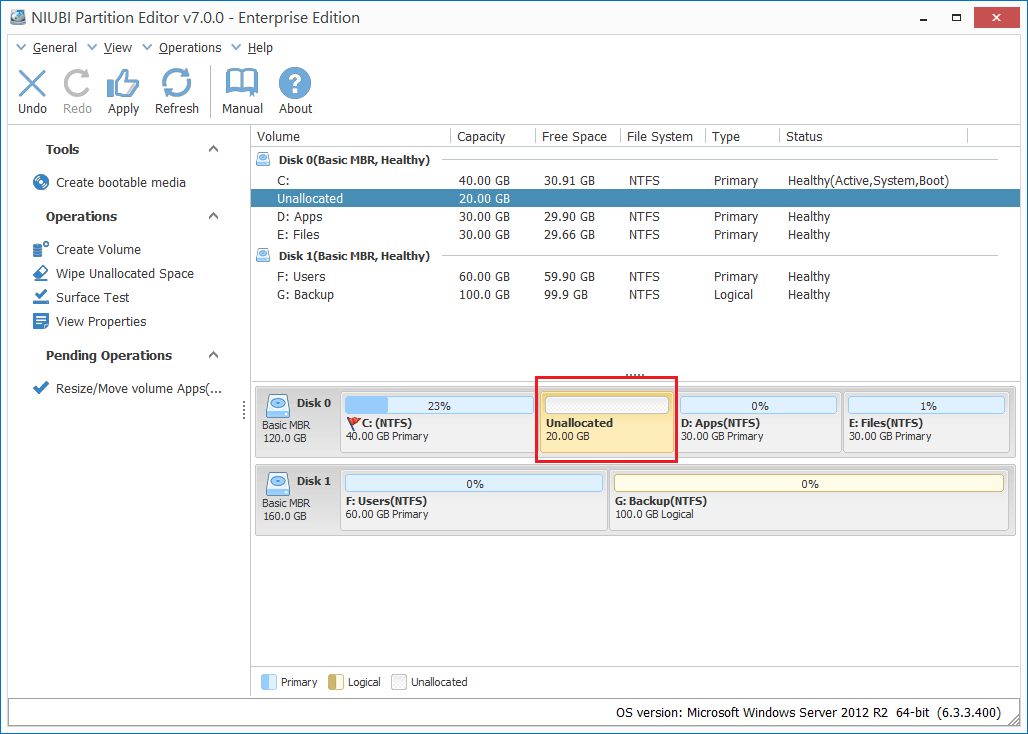
A real Enterprise Edition window, from the older 7.0.0 release on Windows Server 2012 R2. D: has been shrunk, leaving 20 GB of unallocated space beside C:, with the red box added by NIUBI.
Overview
Most partition tools are sold per machine, and that works until disks become routine. An IT team that images laptops, swaps SSDs and grows virtual servers will run into activation limits sooner or later. Enterprise removes the count altogether, and the key works across every office the organization has.
Functionally, you get the same safety features as the cheaper editions, and the same plain interface. There's no extra management layer. Each technician runs it on the machine in front of them.
Features
Unlimited activations inside your organization
NIUBI Partition Editor Enterprise can be registered on any number of PCs and servers your organization owns, wherever they are. The Professional and Server keys stop at two machines and don't release an activation after an uninstall, so a fleet with regular turnover is where this license earns its price.
One toolkit for desktops and servers
NIUBI Partition Editor Enterprise runs on Windows Server and client Windows alike, so your team learns one procedure. The same steps for shrinking D: and growing C: apply to a Windows 11 laptop and a Server 2022 host.
A portable copy for the help desk
NIUBI Partition Editor Enterprise comes as a portable ZIP of about 8.45 MB as well as an installer. A technician can keep it on a USB stick and run it where software shouldn't be installed. The bootable media wizard covers machines that won't start.
Disk migrations across mixed hardware
NIUBI Partition Editor Enterprise clones at the file-system level to a disk of a different size, in Windows and without interrupting a server. It works with hardware RAID arrays and with VMware and Hyper-V virtual machines, which helps during refresh projects.
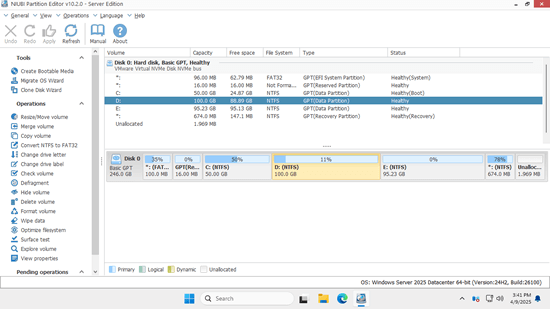
The same interface on Windows Server 2025 in a VMware virtual machine. This window is the sibling Server Edition, version 10.2.0, which shares its tools with Enterprise.
Safeguards for shared systems
NIUBI Partition Editor Enterprise queues work in Virtual Mode, allows Cancel-at-Will during a job and reverts through 1-Second Rollback when it detects an error or power failure. For a team, the pending list also doubles as a quick peer check before someone clicks Apply.
Decommissioning and disk health
NIUBI Partition Editor Enterprise wipes disks, partitions and free space with simple and military-level algorithms, runs surface tests for bad sectors and repairs file system errors, which covers routine checks and end-of-life handling without a second tool.
Benefits
- No license admin. Nobody tracks which key went on which machine.
- A one-time budget line. It's a single purchase, with no annual maintenance fee.
- Faster response. A technician fixes the problem now, without waiting for a purchase order.
- Less risk of under-licensing. Your team can't exceed a limit that doesn't exist.
Real-World Uses
- An SSD refresh for 200 laptops. Technicians clone each old disk to the larger replacement and resize partitions as they go.
- A virtual server estate. Admins grow VM disks in VMware or Hyper-V, then shift partitions so C: can take the new space.
- Branch offices without local IT. A remote admin uses the portable copy over a remote session to solve a full C: drive.
- A school district. The IT team qualifies for the 20% education discount and covers staff PCs and classroom servers with one key.
- Disk disposal. Retired machines are wiped with the same tool before they're recycled.
Who It's For, and Who Should Skip It
Buy it if your organization has five or more Windows Servers, or a mix of servers and many PCs where someone handles disks every month.
Skip it if you only need one job on one or two machines, since the Server or Professional Edition does the identical work for far less. MSPs and repair shops should skip it too: Enterprise doesn't cover work for clients. And if you need scheduled, scripted or console-driven disk changes across a fleet, this isn't that kind of tool.
Usage Guide
- Download the Enterprise trial or portable ZIP and try your usual layouts in Virtual Mode.
- After purchase, keep the license key from the order page and confirmation email somewhere your team can reach.
- On each machine, click Activate on the toolbar and paste the key. The trial converts with no new download.
- Back up the machine, close programs on the affected drives, and queue your operations.
- Check the mark beside each pending operation to see if it needs a restart, and schedule accordingly.
- Click Apply. For a restart job, the machine boots to a black pre-boot screen, finishes and returns by itself.
- Build a bootable USB once and keep it in the team's toolkit for machines that won't start.
Where it falls short
- No central console. It's a hands-on tool, run one machine at a time.
- Few independent reviews of this edition. Public feedback rarely names the edition used, and most reviewers bought it for a single job.
- Restarts remain possible. Hot-Resize reduces reboots, without ruling them out.
- Oracle VM users should test first. NIUBI names VMware and Hyper-V as supported, and one reviewer reports a guest under Oracle VM that wouldn't boot after a change.
- MBR system disks can't be converted. The GPT converter handles data disks only, so a boot-disk conversion needs another route.
- Rollback covers what it detects. NIUBI still suggests a backup before any job.
What Users Say
NIUBI's site scores 4.4 on Trustpilot from 155 reviews across all editions, with 81% five-star and 6% one-star. These comments come from people using it in work settings, though most don't say which edition they bought.
From work environments
"Used it before at previous employer and knew it was a better solution than what they were using" Sam, October 29, 2026, 5 stars
"This utility saved hours of toil when we discovered a drive was misconfigured to MBR." John, May 14, 2026, 5 stars
"It worked on PCs and servers first time, real easy to use." Paul, February 10, 2026, 5 stars
"Worked like a charm, got server running better, Thanks" Ivan, October 12, 2026, 5 stars
Ease of use
"easy installation and easy to understand did the drive/partition changes as requested" Cal, June 7, 2026, 5 stars
"The tool works great. I was able to partition the drive with no issues." Khaled Aboumerhi, September 7, 2026, 5 stars
"It does what it says on the tin and is easier to navigate than some 'other' partition tools." Richard Thomas, September 12, 2026, 5 stars
Complaints worth reading
"I try to use it on Windows SBS 2008. It don't work." Octavian Burcu, November 9, 2020, 1 star
"Couldn't solve my issue. Asked for a refund and never received an answer" Marcelo Ardissone, November 14, 2018, 1 star. NIUBI replied that it had no record of a refund request.
Smith (December 5, 2022, 1 star, title "Waste of money") wrote: "I cloned a NVMe 1TB drive to a 2TB NVMe drive." He says he couldn't merge the unused space afterwards, despite hours of troubleshooting. NIUBI replied.
"When I changed the partition, the machine wouldn't boot anymore." Marco, January 20, 2026, 2 stars, on Oracle VM.
The reviews show a tool that's liked for doing one job quickly and clearly. They say little about large rollouts, so treat the Enterprise case as a licensing decision, and pilot it on your own hardware before a big project.
Comparisons
Enterprise vs. Server Edition
Server is the same software at $139 for 2 servers. Stacking keys costs $278 for four servers and $417 for six, so Enterprise pulls ahead from the fifth server, and much sooner if PCs share the same pool.
Enterprise vs. Technician Edition
Both run on PCs and servers. Enterprise is limited to your own organization. Technician, at $699, lets one technician provide paid services to unlimited clients and includes lifetime upgrades. Technician Ultimate, at $799, extends that to all technicians in one company. It can't be resold.
Editions and Pricing
All are one-time purchases with perpetual licenses. The three Enterprise terms differ only in how long free version upgrades last.
| Edition | Price at checkout | License covers | Free upgrades |
|---|
| Server | $139 | 2 servers | 1 year |
| Enterprise | $399 | Unlimited, one organization | 1 year |
| Enterprise plus 2 years | $439 | Unlimited, one organization | 2 years |
| Enterprise plus lifetime | $499 | Unlimited, one organization | All future versions |
| Technician | $699 | One technician, paid client work | All future versions |
| Technician Ultimate | $799 | All technicians in one company, paid client work | All future versions |
For a tool you'll keep on many machines for years, the $100 lifetime step is the sensible one: version 10 showed that a major release can require new keys. Prices are before any tax that applies at checkout.
Buy with 1 Year of Upgrades ($399)Buy with 2 Years ($439)Buy with Lifetime Upgrades ($499)
FAQs
Does the NIUBI Partition Editor Enterprise license cover several office locations?
NIUBI Partition Editor Enterprise covers all PCs and servers in one organization, regardless of location, so branch offices and remote sites are included.
Can a repair shop use NIUBI Partition Editor Enterprise on customer computers?
NIUBI Partition Editor Enterprise isn't meant for that, because the license stays within your own organization. Paid work for clients falls under the Technician Edition.
Does NIUBI Partition Editor Enterprise have a discount for schools or government?
NIUBI Partition Editor is 20% off for non-profits, schools and governments in all editions, according to the vendor's FAQ. That puts Enterprise near $319 before tax.
Can my company buy NIUBI Partition Editor Enterprise with a purchase order?
NIUBI Partition Editor is sold through PayPro Global, and its FAQ lists wire transfer and purchase orders among the payment methods, along with cards and PayPal. An invoice comes with the confirmation email.
Can we upgrade from NIUBI Partition Editor Server to Enterprise?
NIUBI Partition Editor lets you pay the price difference on its upgrade page, then enter the new key in Help, Update License, with no new download.
Do our old NIUBI Partition Editor keys work with version 10?
NIUBI Partition Editor 10 has a new activation system, so keys from earlier versions show as unregistered. Lifetime and in-period licenses get a free replacement key on request with an order ID or purchase email.
What support comes with NIUBI Partition Editor Enterprise?
NIUBI Partition Editor includes free live chat, email and remote support for technical problems. Phone lines handle order questions only.
System Requirements
- Windows Server 2025, 2022, 2019, 2016, 2012 or 2008, or Windows 11, 10, 8, 7, Vista or XP
- 32 or 64 bit, with 16 MB of free disk space
- Hardware RAID, VMware and Hyper-V virtual machines supported
Conclusion
NIUBI Partition Editor Enterprise is worth $399 once you pass four servers, or whenever your team handles disks across many PCs and servers. The one reason to buy it is that the license problem goes away for good at a fixed price.
The main reason not to is that it adds no features: a small site pays much more for the same program, and larger teams get no central management. Pilot the Server or trial version on your own layouts, take the lifetime term if you commit, and keep backing up first.
Download Free TrialBuy Now