EaseUS Disk Copy Pro: Clone a Windows Drive to a New SSD and Boot Straight From It
EaseUS Disk Copy Pro is a Windows disk cloning program that copies a whole drive, or one partition, to another disk so you can swap in a bigger or faster SSD without reinstalling Windows. The Home license for one PC costs $39.90 a year, $19.90 a month, or $59.90 for a lifetime license.
You've bought a 1 TB NVMe drive to replace the 256 GB one that's always full, or an SSD to rescue an old laptop from a slow hard disk. Reinstalling Windows, every program and every setting would take a weekend. Disk Copy makes the new drive an exact working copy of the old one, so you swap them and carry on.
Quick facts
- Developer: EaseUS (Chengdu Yiwo Tech Development Co., Ltd.), also the maker of Partition Master, Todo Backup and Data Recovery Wizard
- Version: 7.9.0
- Platform: Windows 11, 10, 8.1, 8 and 7; Windows Server needs a Business license; no Mac version
- Price: $39.90 a year, $19.90 a month, or $59.90 lifetime for one PC; 2-PC and Business plans cost more
- Trial: the free download is a demo that lets you plan a clone but won't run it until you enter a license key
- Guarantee: 30-day money-back
- Download: 93.5 MB
- What we checked: the demo installer from EaseUS's download server (98,024,512 bytes, file version 7.9.0, digitally signed by Chengdu Yiwo Tech Development Co., Ltd.), the Home, 2-PC and Business plans on the buy page, and the yearly Home plan at $39.90 on the order page, all on November 19, 2026. We didn't clone a drive ourselves.
Before you buy
Disk Copy isn't free, even though older versions were and search results still call it that. The download is a demo: you can pick the source and target disks and lay out the clone, but it stops when you press Proceed and asks for a license key. Creating the WinPE boot disk needs a paid license too. The cheapest way to do a single clone is the $19.90 monthly plan, cancelled afterwards. And cloning erases everything on the target disk, so double-check which drive you pick.
Download Free TrialBuy Now
Overview
EaseUS released the first Disk Copy in 2005, as a free bootable tool for copying one hard disk to another. Today's Disk Copy Pro is a paid Windows program with a three-step wizard: select source, select target, disk layout. It clones whole disks or single partitions, handles HDD to SSD, SATA to NVMe and NVMe to NVMe, adjusts partition sizes when the new drive is bigger or smaller, and keeps the boot data so the new drive starts Windows.
Version 7.0, announced in January 2026, moved it beyond disk-to-disk copying: it can now save a disk as an image file and restore it later, so you don't need both drives connected at the same time. It also restores to and clones from VHD and VHDX virtual disks, restores selected partitions from an image, and can move an operating system other than the one that's running, which helps on dual-boot PCs. The current build is 7.9.0.
Features
Disk clone in three steps
EaseUS Disk Copy Pro's Disk Mode clones an entire drive: you choose the source disk, then the target, and the wizard shows both disks with their sizes and device names so you can tell the Samsung 250 GB from the Samsung 500 GB. A Partition Mode copies a single partition instead, and only that partition on the target is overwritten. You can keep using the PC while it clones, since the copy runs in the background.
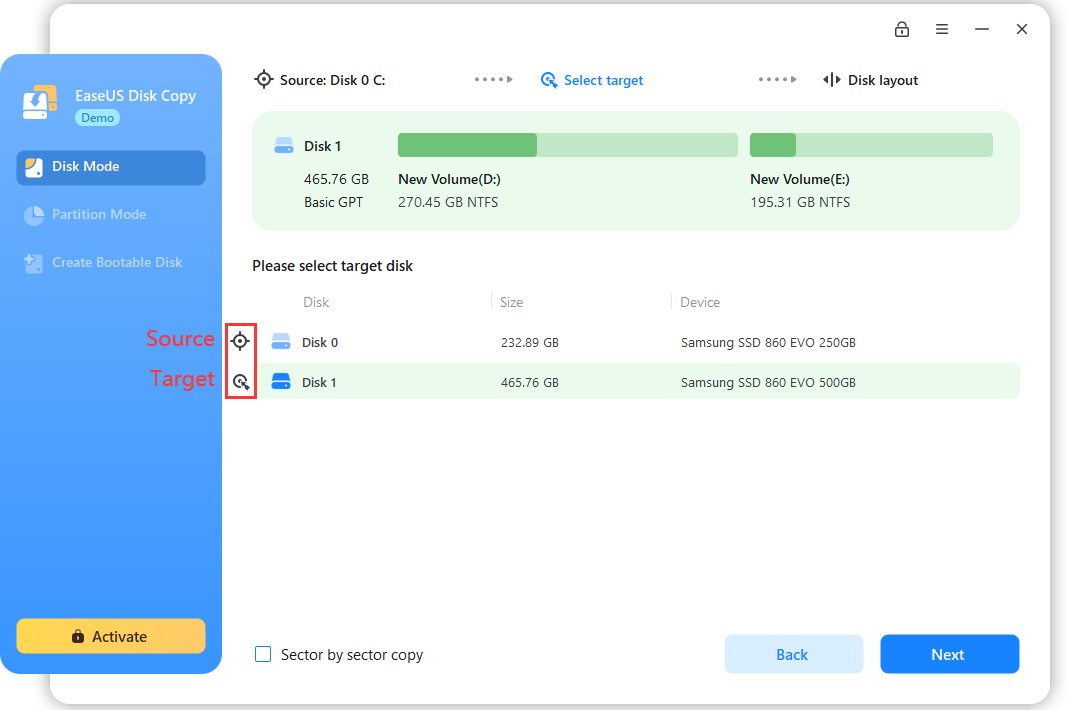
Disk Mode, target step: Disk 0 (250 GB) is the source and Disk 1 (500 GB) the target. The Demo badge and Activate button show this is the unlicensed download; the window is from an earlier version's guide.
Fits the new drive, bigger or smaller
EaseUS Disk Copy Pro gives you three layouts for the target disk. Autofit the disk resizes the partitions to use the new drive's space, Copy as the source keeps the old sizes and leaves the rest unallocated, and Edit disk layout lets you size partitions by hand. That last one also lets you clone to a smaller SSD, as long as the data fits: a 2 TB disk with 600 GB in use can go onto a 1 TB SSD. Partitions are aligned to 4K automatically for SSD speed.
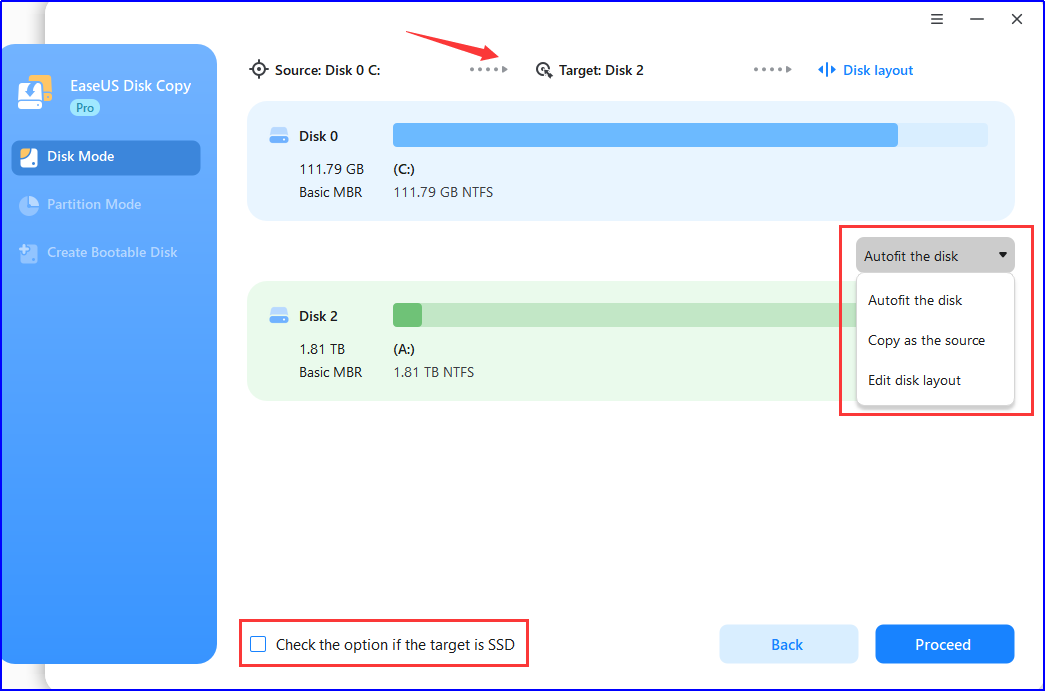
The disk layout step: the source (111.79 GB) above, the 1.81 TB target below, and the three layout choices in the drop-down (earlier version's window).
Sector-by-sector copies for failing drives
EaseUS Disk Copy Pro's Sector by sector copy option copies every sector, used or not, for an exact replica. It's the mode to use when a drive is dying: Disk Copy skips bad sectors instead of stopping on them, so you save as much of the readable data as possible before the disk gives out. The target must be at least as large as the source in this mode. BitLocker-encrypted drives can be cloned without decrypting them first, and Disk Copy asks whether to keep BitLocker on the copy.
One-click OS migration
EaseUS Disk Copy Pro notices when you connect a new drive and offers to move Windows to it. Accept, and it migrates the operating system with your programs and settings, so the new drive boots as your old system. Any partitions you already made on the new disk are removed. On the same PC, Windows usually stays activated after the move; on a different PC it may ask to be activated again.
Disk images and a WinPE boot disk
EaseUS Disk Copy Pro can save a disk as a compressed image file instead of cloning it straight to another drive ("Save as an image file" in Disk Mode), then restore that image to a physical disk later. For a PC that won't start, or a system disk you'd rather not clone while Windows runs, Create Bootable Disk builds a WinPE USB stick, CD/DVD or ISO with Disk Copy on it, and you can add drivers for unusual storage controllers.
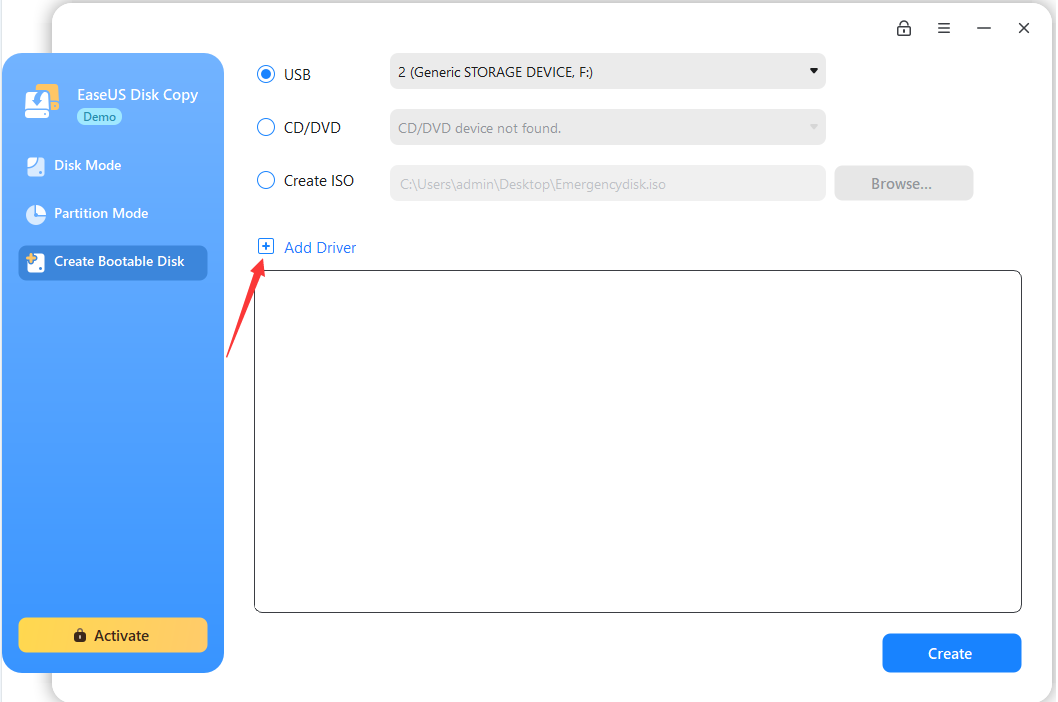
Create Bootable Disk: write WinPE to a USB drive, a CD/DVD or an ISO file, with an Add Driver option (earlier version's window).
Benefits
- No reinstall: Windows, programs, licenses and settings arrive on the new drive as they were, which saves hours on any PC that's been in use for a while.
- Less to learn: it does one job, so there are fewer screens than in an all-round partition manager or backup suite.
- A way off a dying disk: bad-sector skipping gives you a chance to copy a failing drive before it stops responding.
Real-World Uses
- Laptop HDD to SSD: put the SSD in a USB enclosure, clone with Autofit, then swap the drives. The laptop starts from the SSD with everything in place.
- Bigger NVMe drive: on a desktop with two M.2 slots, clone the 256 GB system SSD to a new 2 TB one and change the boot drive in the firmware.
- Clicking hard disk: run a sector-by-sector copy to a healthy drive before the old one fails completely.
- New PC, old setup: clone the old drive and fit it in the new computer; expect to reactivate Windows and update drivers on different hardware.
Who It's For, and Who Should Skip It
Disk Copy Pro suits home users replacing or upgrading one PC's drive who want a guided clone and nothing else. The monthly plan makes sense for a one-off upgrade, the lifetime plan for anyone who swaps drives every year or two.
Skip it if you also need to resize, merge or convert partitions: EaseUS Partition Master Professional clones too and covers two PCs for $10 more a year. Skip it if you want scheduled backups; a backup program such as EaseUS Todo Backup does that, Disk Copy doesn't. Mac owners need a different tool altogether. And IT staff cloning many machines, servers or RAID arrays need a Business license, not Home.
Usage Guide
- Install and activate: run the installer from EaseUS. When the activation window appears, enter your 25-digit license code; close it to look around in demo mode.
- Connect the new drive: in a free SATA or M.2 slot, or through a USB adapter or enclosure on a laptop with one slot. USB only affects speed, not the copy.
- Check both drives in Disk Management or File Explorer, and note their sizes so you pick the right target.
- Clone: in Disk Mode, select the source disk, click Next, select the target disk, then choose Autofit, Copy as the source or Edit disk layout and click Proceed. Confirm that the target's data will be erased.
- Wait it out: don't disconnect either disk or shut the PC down until it finishes.
- Swap and boot: install the new drive (or pick it as the boot device), start the PC, and check that Windows, your files and activation are all there before wiping the old disk.
Where it falls short
- Boot failures do happen. A few buyers report that the cloned drive or the new PC wouldn't start, and that EaseUS offered paid remote help to finish the job.
- Home is one PC only, not servers. Cloning several disks at once, network batch cloning, Windows Server, virtual machines and RAID, and unlimited disk capacity are Business features.
- No going back mid-wizard was a complaint in ConsumingTech's review of version 6.0.
- The listed file systems are FAT12, FAT16, FAT32 and NTFS; for anything else, use sector-by-sector mode.
- No backups on a schedule, and no Mac version.
What Users Say
There's little independent writing about Disk Copy itself, and EaseUS's Trustpilot rating, 4.9 out of 5 from 39,743 reviews, covers every EaseUS product, with 93% five-star and 5% one-star. Below are the reviews that clearly concern Disk Copy. The Trustpilot excerpts are short, exact extracts; we read them through a summarizing tool because Trustpilot blocks direct downloads.
Independent review: ConsumingTech
Mat Diekhake tested Disk Copy Pro 6.0 for ConsumingTech (published October 1, 2024, last updated August 23, 2026). His verdict: "I thought EaseUS Disk Copy Pro was easy to use and understand in general." He also liked the built-in rescue disk: "I liked the inclusion of being able to create a bootable disk."
His one complaint was navigation: "One issue I had with Disk Mode was that if I needed to go back a step, there was no navigation for it." and "I wished for better navigation to go back at times, but I could also get out of these situations by selecting one of the options available on the screen."
Trustpilot: when it works
- B Tomlinson (5 stars, April 16, 2026), "Very Impressed": "I have just used EaseUS Disk Copy to clone my entire computer onto a new SSD in a new updated computer," and "Everything copied over perfectly and everything is in the same place."
- DJ (5 stars, May 9, 2026), "I can honestly say it would be foolish not to purchase this service!": "I had purchased the EaseUS Disk Copy to clone an SSD to a new, larger SSD for my computer."
Trustpilot: the complaints
- WMX (1 star, June 27, 2025), "Fake Free Trial", about EaseUS Disk Copy: "Downloaded it for the supposedly free trial, but I can do absolutely nothing to freely try the product." and "If you don't intend to provide a free trial, don't promote it as such."
- Ed Healy (1 star, April 12, 2025), "The Disk Clone software worked OK. The website did not.": "I had to buy a one-month subscription to activate the product."
- Bruce Kubski (1 star, November 18, 2025), about Disk Copy Pro: "Upon transfer new PC would not boot." and "Contacted tech support and they wanted $200 to do transfer."
- customer (1 star, July 16, 2026): "Disc copy couldn't even copy a standard laptop disc to a new one." and "Don't waste money as i did."
- Paul Darby (1 star, March 8, 2026), "Purchased disk copy software in error": "so refunds are most impossible to attain."
The picture is mixed. People whose clone went through describe exactly what you'd hope for: swap the drive, boot, everything in its place. The 1-star reviews fall into two groups: buyers who expected a free tool or a working trial and found a demo that won't clone, and a smaller number whose clone or new PC didn't boot. The first is avoidable now that you know; the second is why you keep the old drive untouched until the new one has started properly.
Comparisons
Disk Copy Pro vs EaseUS Partition Master Professional
Both clone disks and migrate Windows. Disk Copy costs $39.90 a year for one PC and does only cloning and imaging. Partition Master Professional costs $49.95 a year for two PCs and adds resizing, merging, MBR-to-GPT conversion and boot repair. If there's any chance you'll also need to fix partitions, Partition Master is better value; for a pure drive swap, Disk Copy is simpler and cheaper.
Home vs Business
Home covers personal use on one (or two) non-server PCs with standard support. Business licenses cover 20 or 99 devices or unlimited use within a company, run on Windows Server 2008 to 2022, virtual machines and hardware RAID, clone to several targets at once and over the network, remove the disk capacity limit and come with priority support. Only the Unlimited Business license allows paid service work for outside clients.
Editions and Pricing
Prices from EaseUS's buy page on November 19, 2026, in US dollars. Monthly and yearly plans renew automatically until cancelled.
| Plan | Price | Devices | Updates |
|---|
| Home, monthly | $19.90 a month | 1 PC | While subscribed |
| Home, annual | $39.90 a year | 1 PC | While subscribed |
| Home, lifetime | $59.90 once (list $69.95) | 1 PC | Lifetime free upgrades |
| Home for 2 PCs | $29.90 a month, $59.90 lifetime, or $89.90 lifetime with upgrades | 2 PCs | The $59.90 plan charges for major upgrades |
| Business | $99 a year (20 devices), $199 a year (99 devices), $599 a year (unlimited) | 20, 99 or unlimited | 2- and 3-year terms also sold |
The Home lifetime license costs $20 more than one year, so it's the better buy if you'll clone again. Verified students get 40% off Home ($11.94 a month, $23.94 a year, $35.94 lifetime).
FAQs
Is EaseUS Disk Copy free?
No. EaseUS Disk Copy is free to download, but the download is a demo that can plan a clone without carrying it out. Any real clone, and the WinPE boot disk, needs a paid license, the cheapest being $19.90 for one month.
Can EaseUS Disk Copy clone to a smaller SSD?
Yes, as long as the data fits. EaseUS Disk Copy shrinks the partitions to suit the smaller drive with Autofit or Edit disk layout, so you don't need to shrink anything beforehand. Sector-by-sector mode is the exception: there the target must be at least as large as the source.
How long does EaseUS Disk Copy take to clone a 1 TB drive?
EaseUS Disk Copy's speed depends mostly on the drives and how much data is on them. EaseUS says an HDD-to-HDD clone usually takes several hours, while a 1 TB clone between modern NVMe SSDs often finishes in under an hour. A USB adapter slows it down but doesn't affect the copy.
Do I need to reactivate Windows after cloning with EaseUS Disk Copy?
Usually not on the same PC: a drive cloned with EaseUS Disk Copy normally keeps Windows activated. Moving the clone into a different computer can trigger reactivation, depending on your Windows license and the new hardware.
Can I use EaseUS Disk Copy Pro on Windows Server?
No. The EaseUS Disk Copy Pro (Home) license is for non-server Windows only. Windows Server 2008 to 2022 needs one of the Business licenses.
Can EaseUS Disk Copy clone a BitLocker drive?
Yes. EaseUS Disk Copy clones BitLocker-encrypted partitions without removing the encryption first and asks whether to keep BitLocker on the target. Have your BitLocker recovery key at hand before you change drives.
What if EaseUS Disk Copy doesn't work for me?
EaseUS Disk Copy is sold with a 30-day money-back guarantee, and subscriptions can be cancelled at any time. A couple of Trustpilot reviewers say getting a refund was hard, so keep the conversation with support in writing.
System Requirements
- Windows: 11, 10, 8.1, 8 or 7 (Home license); Windows Server with a Business license
- Processor: 800 MHz or faster
- Memory: 1 GB RAM or more
- Disk space: 1 GB free
- Drives: IDE, SATA, eSATA, SCSI, FireWire and SAS hard disks, SATA, M.2, NVMe and PCIe SSDs, USB flash drives, SD cards and hardware RAID
- For the boot disk: a USB drive or a CD/DVD burner
Conclusion
EaseUS Disk Copy Pro is a sensible buy for one specific job: moving a Windows PC onto a new drive without reinstalling anything. The wizard is short, the layout options handle bigger and smaller SSDs, and the $19.90 monthly plan makes a one-off upgrade cheap. The main reason to hesitate is that the "trial" can't show you a working clone before you pay, and a few buyers ended up with a drive that wouldn't boot, so keep the old disk untouched until the new one starts. If you might also need to resize or convert partitions, Partition Master Professional is the better value; if you just want the drive swapped, Disk Copy does it with less fuss.
Download Free TrialBuy Now