DoYourClone for Windows: Move to a New SSD Without Reinstalling Windows
DoYourClone for Windows is a $49 per year disk cloning tool that copies a whole disk or a single partition to another drive, including from an old HDD to a new SSD. It is for people upgrading a PC, making a bootable backup, or rescuing data from a machine that no longer starts.
A new SSD is cheap. Reinstalling Windows, every program and every setting is not. Cloning copies the whole thing across, so you swap the drive and carry on.
Quick facts
- Version: 3.2
- Developer: DoYourData
- Platforms: Windows 11, 10, 8.1, 8, 7, Vista and Windows Server 2008 to 2025
- Clone modes: Disk Clone and Partition Clone
- Price: $49.00 for the 1 Year License, which covers 2 PCs
- Trial: free download
- Guarantee: 30 days, money back
- What we checked: installer version 3.2 (77 MB) downloaded from the vendor and checkout price $49.00, both on November 9, 2026. We did not clone a system disk.
Before you buy
- Cloning overwrites the destination. Anything on the target drive is replaced, so double-check which disk you pick.
- A bootable result needs the right steps. To boot from the copy, follow the bootable clone procedure rather than a plain data clone.
- Sector-by-sector needs an equal or larger target. To clone onto a smaller disk, leave that option unticked, and make sure the data fits.
Download Free TrialBuy Now
Overview
DoYourClone has three tabs: Partition Clone, Disk Clone and Disk Tool, plus a Create bootable disk link at the top. Cloning is a matter of choosing a source, choosing a destination, reviewing the disk layout and pressing Clone.
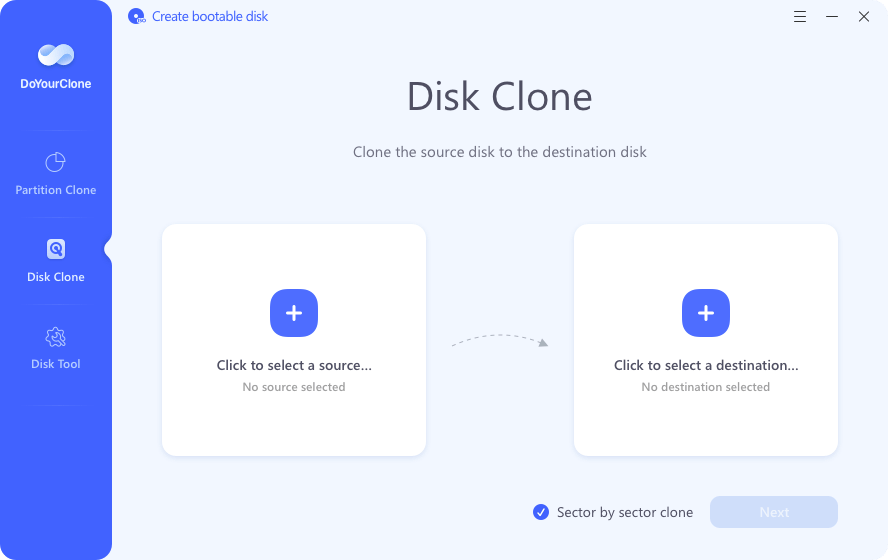
The Disk Clone screen, with source and destination boxes and the sector by sector checkbox.
Features
Disk Clone and Partition Clone
DoYourClone copies an entire disk or a single partition to another disk, partition or external device, including unallocated space. HDDs and SSDs (SATA, NVMe and M.2), USB drives, external disks and RAID are supported.
Cloning to a smaller drive
DoYourClone can put a large disk onto a smaller one if the data fits. In the layout step you choose 1:1 sector-by-sector, existing data only, or auto-fit, and there is an option optimized for SSD destinations.
Sector-by-sector for failing drives
DoYourClone keeps going when it meets bad sectors in sector-by-sector mode, rather than stopping. That makes it useful for copying what you can from a drive that is starting to fail.
Bootable clones and a WinPE disk
DoYourClone can make an external clone that boots a PC. It can also create a WinPE boot disk on USB, CD/DVD or an external drive, so you can export data from a computer that will not start.
Disk Tool for basic maintenance
DoYourClone includes a Disk Tool tab with Repair, Rename, Format and Eject for local and removable drives.
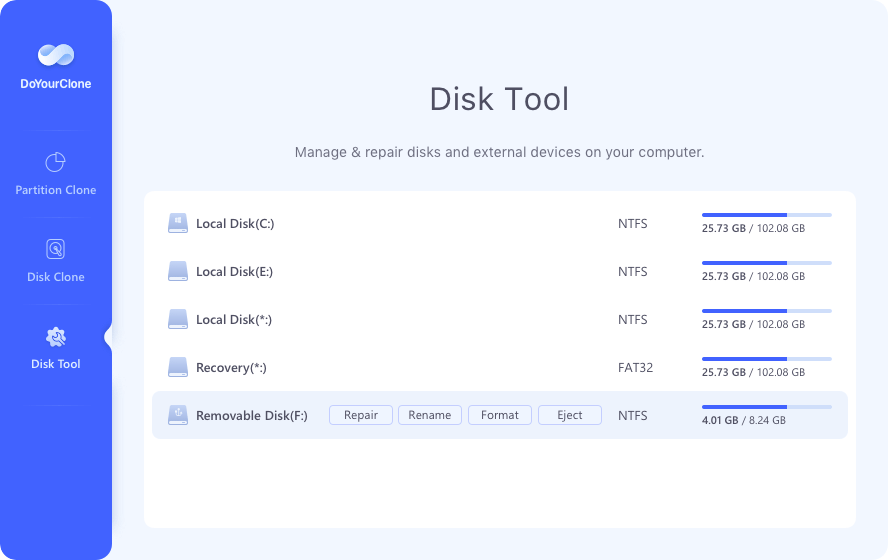
The Disk Tool tab with Repair, Rename, Format and Eject buttons on a removable disk.
Benefits
The practical win is time: a working system moves to new hardware in one operation. The WinPE disk also gives you a way out when a PC will not boot, and a single license covers a second computer.
Real-World Uses
- Upgrading a laptop from a hard drive to an SSD with Windows and programs intact.
- Keeping a bootable external copy of a work PC as a fallback.
- Pulling data from a crashed desktop using the WinPE boot disk.
- Copying what can still be read from a drive with growing bad sectors.
Who It's For, and Who Should Skip It
Good fit: home users and small offices with an occasional disk upgrade, who want a simple source-and-destination workflow.
Skip it if you want scheduled incremental backups, since this tool is built for copies made on demand, or if you clone only once and are comfortable with a free utility. Companies and service providers need the Enterprise license, and Mac users need the separate Mac version.
Usage Guide
- Install the program and open it. To activate, click the Activate icon and enter your license code, with any VPN turned off.
- Choose Disk Clone or Partition Clone.
- Select the source and the destination, and tick Sector by sector if you need it.
- Click Next, edit the disk layout, then click Clone.
- Check the data on the destination. To boot from it, follow the bootable clone steps.
Where it falls short
- A Trustpilot reviewer reports that the Mac Enterprise version failed to copy a system disk, so run a test before relying on it for an important drive.
- There is no outside benchmark of its speed or reliability.
- Scheduled and incremental backups are not among its listed features, so plan on full copies.
What Users Say
Reviews of DoYourClone are few, and most of them appear on the vendor's own page.
Trustpilot: 3.2 out of 5 from 7 reviews, for DoYourData as a company
“The clone software works like a charm.” Frank Jones, 4 stars, October 2026
“the software failed to make a copy of my system disk.” Theodore Ivanov, 1 star, August 2025, on DoYourClone Enterprise for Mac
Customers quoted on the vendor's page
“I want to make a bootable clone for my Windows 10 PC, this clone software is very easy-to-use. I just need to select the PC's disk and the external disk, it quickly make a bootable clone of my PC to the external hard drive.” Rick Mo
“I tested 5 clone programs and most of them can't complete the clone on my old Windows 7 PC. Only this one can help me clone the data from my Windows 7 PC to my Windows 11 laptop.” Kivitova
“DoYourClone is pretty simple to use. The SSD clone is great for me.” Mark
Simple operation is the recurring compliment. The one detailed complaint concerns a failed system disk copy on the Mac edition.
Editions and Pricing
| Edition | Price | Term | PCs |
|---|
| Standard 1 Month | $29.00 | 1 month | 2 |
| Standard 1 Year | $49.00 | 1 year | 2 |
| Standard Lifetime | $59.00 | Lifetime | 2 |
| Enterprise Lifetime | $199.00 | Lifetime | Unlimited, business and client use |
FAQs
Can DoYourClone clone Windows to a new SSD?
DoYourClone can clone an HDD or SSD to a new SATA, NVMe or M.2 SSD, including the Windows system disk, using its bootable clone procedure.
Can DoYourClone clone a larger disk to a smaller one?
DoYourClone can clone to a smaller disk if the data fits and you leave sector-by-sector cloning off.
Can I run DoYourClone on a PC that will not start?
DoYourClone can build a WinPE boot disk on USB, CD/DVD or an external drive, which lets you start the PC and copy data off it.
Can I move my DoYourClone license to a new computer?
DoYourClone lets you transfer the license code to a new computer after you sell or donate the old one.
Is there a Mac version of DoYourClone?
DoYourClone has a separate Mac version with its own license, so a Windows license will not activate it.
System Requirements
- Windows 11, 10, 8.1, 8, 7 or Vista, or Windows Server 2008 to 2025
- x86 CPU
- At least 128 MB of RAM
- At least 100 MB of free disk space
- Network connection for activation
Conclusion
A solid low-cost choice for an occasional disk upgrade. DoYourClone covers the jobs most people need, from HDD-to-SSD moves to a WinPE rescue disk, with very little to learn. The reason to buy it is that simple workflow, plus sector-by-sector copying for a failing drive. The main reason not to is that scheduled backups are not among its listed features. Since lifetime is only $10 more than a year at $49, the $59 plan is the one to get.
Download Free TrialBuy Now