Do Your Data Recovery for iPhone: Scan an iPhone or iTunes Backup for Lost Data
Do Your Data Recovery for iPhone is a $59 lifetime Windows program that scans a connected iPhone, iPad or iPod touch, or an iTunes backup, for deleted photos, messages, chats and more. It suits someone who has lost data and wants to see what can be found before paying, though its published compatibility list stops at iOS 16 and iPhone 14.
You open Messages and the conversation is gone, or a factory reset took the photos with it. The free scan tells you whether anything is left to get back, and that is the part worth trying first.
Quick facts
- Version: 7.3 for Windows (a Mac version, 7.2, is sold separately at the same price)
- Developer: DoYourData
- Platforms: Windows 11, 10, 8.1, 8, 7 and Windows Server
- Listed devices: iOS 11 to 16, iPhone 6 to iPhone 14, iPad, iPod touch 4 to 6
- Sources: the iOS device or an iTunes backup
- Price: $59.00 for the Lifetime License, which covers 2 PCs
- Trial: scanning and preview are free, and saving needs a license
- Guarantee: 30 days, money back
- What we checked: installer file version 7.3 (37 MB) downloaded from the vendor and checkout price $59.00, both on November 9, 2026. We did not scan a device or recover any data.
Before you buy
- Run the free scan on your own iPhone first. The compatibility list ends at iOS 16 and iPhone 14, and newer models and iOS releases are not named. If the scan cannot read your phone or shows nothing useful, there is no reason to pay.
- Stop using the phone. New data can overwrite what you hope to recover, so scan as soon as you can.
- Check Recently Deleted and your iCloud backups first. Those are free, and they often have what you lost.
Download Free TrialBuy Now
Overview
The program has a left-hand strip with iDevice, iTunes and More Tools. Connect a device, press Scan, and the results fill a category tree with counts of deleted items next to totals, plus a preview pane. A filter limits the list to deleted items only.
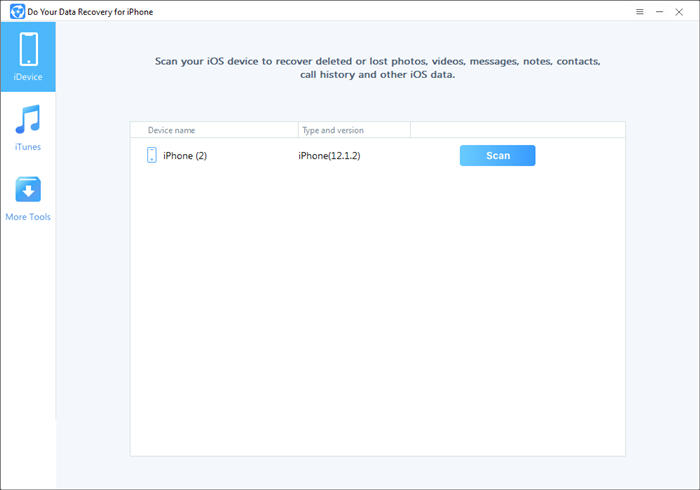
The start screen with a connected iPhone. The vendor's screenshots were taken on iOS 12, an older release.
Features
Recovery straight from the device
Do Your Data Recovery for iPhone scans a connected iPhone, iPad or iPod touch for existing and deleted items. The vendor pitches it for deletion, failed upgrades, jailbreak trouble and factory resets.
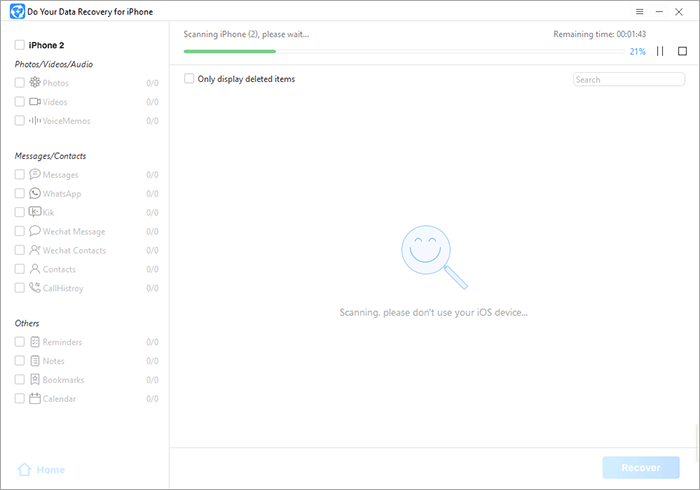
A scan in progress at 21 percent, with the data categories listed on the left.
Recovery from an iTunes backup
Do Your Data Recovery for iPhone can extract items from an iTunes backup on your PC, which helps when the phone is lost, stolen or too damaged to connect.
Preview by category before saving
Do Your Data Recovery for iPhone sorts results into photos, videos, voice memos, messages, WhatsApp, Kik, WeChat, contacts, call history, reminders, notes, bookmarks and calendar, with a filter for deleted items.
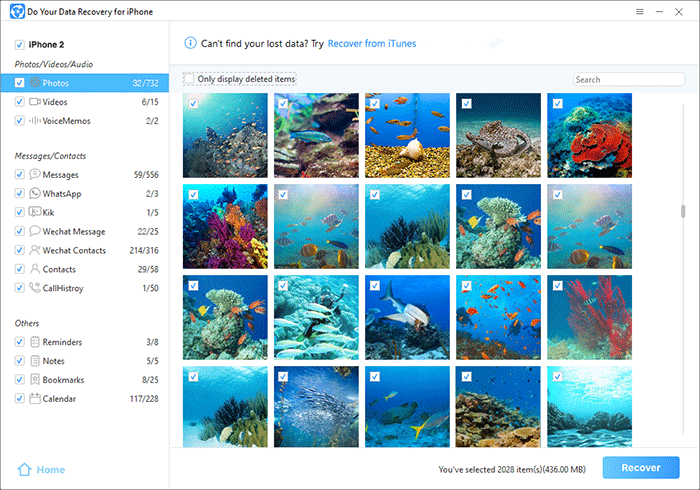
Scan results showing photo thumbnails, category counts and the Recover button.
Benefits
You find out whether recovery is possible before spending anything, and one lifetime payment covers later losses on your other devices too. Because the iTunes route needs no phone at all, an old backup on a PC can still pay off after the handset has gone.
Real-World Uses
- Pulling photos out of an iTunes backup after a phone was stolen.
- Looking for a deleted WhatsApp thread on an iPhone that still connects.
- Retrieving notes and contacts from an older iPad before passing it on.
- Checking an old iPhone on iOS 15 or 16 for photos deleted before it went into a drawer.
Who It's For, and Who Should Skip It
Good fit: owners of an iPhone 14 or earlier on iOS 16 or below, and anyone with an iTunes backup on a Windows PC.
Skip it if you own a current iPhone on a newer iOS release, unless the free scan shows it works, and if your files were never backed up and the phone was reset, since modern iPhone encryption makes that a poor bet for any tool. Mac owners should buy the separate Mac version.
Usage Guide
- Download and install the program on a Windows PC.
- Connect the device by cable and let it appear in the list, or switch to iTunes to choose a backup.
- Press Scan and leave the phone alone until it finishes.
- Tick Only display deleted items if the list is long, and preview what was found.
- Buy a license only if the preview shows what you need, then press Recover.
Where it falls short
- The published compatibility list stops at iOS 16 and iPhone 14 although the installer dates from January 2026, so support for later phones is unknown until you scan.
- The vendor still names iPhone 14 as the latest model, and its screenshots show iOS 12.
- Deleted data on recent iPhones is often unrecoverable by any software, so the claim of recovering from “all data loss situations” is broader than what is realistic.
- There are no independent reviews of this product to set against the vendor's own quotes.
What Users Say
Feedback is thin: the only named comments on this product are on the vendor's page.
Quoted on the vendor's page
“A great iPhone data recovery tool. Just download it, install it and run it to scan my damaged iPhone 13, it quickly find all the photos and messages, videos, chat histories.” Thomas
“Highly Recommend! I thought the erased data on my iPhone was lost forever till found this iPhone recovery software. It found all my deleted WhatsApp messages and some of the images.” Lotus
“As the name suggests, Do Your Data Recovery for iPhone is an application designed to help you recover a wide variety of data that has been deleted or that it is inaccessible for different reasons.” Softpedia
Trustpilot: 3.2 out of 5 from 7 reviews, for DoYourData as a company
“Now every time my virus program scans, it picks up every file in Do Your Data Recovery, as infected.” John Ozga, 1 star, May 2026, on the desktop recovery program
“You have a great product, a superb customer service team.” Hans & Kathryn, 5 stars, May 2025, on the Mac recovery program
Editions and Pricing
| Edition | Price | Term | Devices |
|---|
| Windows Lifetime | $59.00 | Lifetime | 2 PCs |
| Mac Lifetime | $59.00 | Lifetime | 2 Macs |
FAQs
Does Do Your Data Recovery for iPhone work with iOS 17 or later?
Do Your Data Recovery for iPhone lists iOS 11 through 16 as supported, so later releases are not confirmed. The free scan is the way to find out on your own phone.
Can Do Your Data Recovery for iPhone recover data without the phone?
Do Your Data Recovery for iPhone can read an iTunes backup stored on your PC, so a lost or broken phone is no barrier if a backup exists.
Is the Do Your Data Recovery for iPhone scan really free?
Do Your Data Recovery for iPhone scans and previews for free, and asks for a license only when you save the results.
Does Do Your Data Recovery for iPhone have a Mac version?
Do Your Data Recovery for iPhone has a separate Mac version at the same $59 price, at version 7.2 and listed for up to macOS 14 Sonoma.
Is Do Your Data Recovery for iPhone a subscription?
Do Your Data Recovery for iPhone is sold only as a Lifetime License, with free updates and use on 2 PCs.
System Requirements
- Windows 11, 10, 8.1, 8 or 7, or Windows Server
- iOS 11 to 16 on the listed iPhone, iPad and iPod touch models
- A USB cable for the device, or an iTunes backup on the PC
Conclusion
Worth a free scan, and worth $59 only if that scan shows your files. Do Your Data Recovery for iPhone is a reasonable one-time purchase for iPhone 14 and earlier and for iTunes backups, and the preview before payment is the reason to try it. The main reason to look elsewhere is a compatibility list that has not moved past iOS 16, which matters if you own a recent iPhone.
Download Free TrialBuy Now