iCare Data Recovery Pro: Get Files Back from Deleted, Formatted and RAW Drives on Windows
iCare Data Recovery Pro is a Windows program that recovers deleted files, files from formatted or damaged drives, and data from drives that suddenly show up as RAW or "not formatted". It works on hard drives, external drives, USB sticks and memory cards, and the Home license costs $69.99 a year for one PC. You can scan, preview photos and Office files, and recover up to 1 GB for free before you pay anything.
If you've just emptied the Recycle Bin, quick-formatted the wrong USB stick, or plugged in a camera card that Windows now wants to format, this is the kind of tool you reach for. The most important rule comes first, though: stop writing to that drive until you've run the scan.
Quick facts
- Developer: iCare Recovery
- Version: 9.0.1.2
- Platform: Windows 11, 10, 8.1, 8, 7, Vista and XP, plus Windows Server 2003 to 2022. No Mac version.
- Drives: internal and external hard drives, USB flash drives, SD and microSD cards, other memory cards
- File systems: FAT, FAT32, exFAT and NTFS, including BitLocker-encrypted drives (you need the unlock key)
- Price: $69.99 a year for one PC (Home License), renews automatically and can be cancelled anytime
- Free trial: full scanning and preview, with up to 1 GB of files recovered before you buy
- Refund: 15 days, but only in specific cases (see "Before you buy")
- What we checked: the trial installer (icarepro.zip, 6.81 MB, containing iCare Data Recovery Pro file version 9.0.1.2) downloaded from the vendor and the Home License price of $69.99 for one year on the order page, both on November 2, 2026. We didn't run a recovery on a damaged drive.
Before you buy
iCare's 15-day money-back guarantee is not a "change your mind" refund. It covers buying the wrong product, being charged twice, or a critical technical problem that support can't fix within 5 days. A refund is refused if you misunderstood the product description, and the Unlimited License has no refund at all. So treat the free trial as your test: if the files you need show up in the scan and preview properly, the paid version will recover them.
The Home License is a yearly subscription that renews automatically when you pay by card or PayPal. If you only need one rescue, cancel the renewal in your customer account after you've recovered your files.
Download Free TrialBuy Now
Overview
iCare Recovery has been making Windows recovery tools since 2009, and iCare Data Recovery Pro is its main paid product. The program opens on a single screen with three recovery modes, each aimed at a different kind of data loss. You pick a mode, pick the drive, wait for the scan, then browse what it found and save the files you want to a different drive.
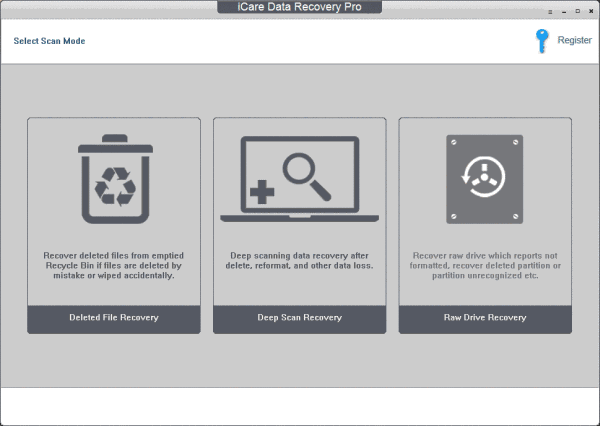
The iCare Data Recovery Pro start screen: Deleted File Recovery, Deep Scan Recovery and Raw Drive Recovery, with the Register button at the top right.
It's a plain, old-fashioned interface, and that's not a bad thing here. There's nothing to configure before a scan, which matters when you're stressed about lost files.
Features
Recover files emptied from the Recycle Bin
iCare Data Recovery Pro's Deleted File Recovery mode is the fast option for files you deleted by mistake, or wiped with Shift+Delete or an emptied Recycle Bin. It's the first mode to try when the drive itself still works normally.
Deep scan formatted and damaged drives
iCare Data Recovery Pro's Deep Scan Recovery reads every block on the drive to find files after a format, a reformat, a virus attack, a Windows reinstall or a crash. It's also the mode iCare recommends for getting back original file names and folder structure.
A deep scan takes time. iCare's own estimates are about 4 minutes for a 16 GB card, 20 minutes for 128 GB and an hour for 1 TB, and much longer on a failing disk.
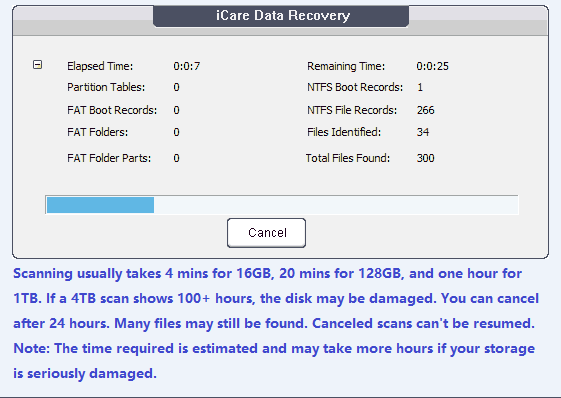
A scan in progress, counting NTFS boot and file records and the total files found, with iCare's note on typical scan times.
Rescue RAW drives and lost partitions
iCare Data Recovery Pro's Raw Drive Recovery mode is for a drive or card that Windows reports as "not formatted", shows as RAW or 0 bytes, or where CHKDSK says it isn't available for RAW drives. It also finds deleted partitions and partitions Windows no longer recognizes, and it can recover from a disk with a damaged MBR once you connect that disk to a working PC.
Suggested partitions, ranked for you
After a deep or RAW scan, iCare Data Recovery Pro lists every partition it reconstructed, with a High / Medium suggestion and how many files and folders match. You open the top suggestion first, and if your files aren't there, go back and try the next one.
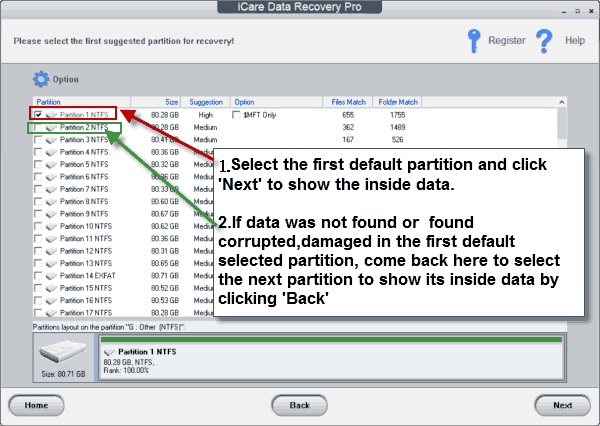
The partition list after a scan: Partition 1 NTFS is marked High with 655 files matched, the rest Medium, with the vendor's arrows explaining which to open first.
Preview photos and documents before saving
iCare Data Recovery Pro shows found files in a folder tree with name, size, type and dates, and lets you preview photos and Office documents (Word, Excel, PowerPoint) before you recover them. There's a Find File search, a thumbnail view, and Select All for bulk saves. Videos and other file types can't be previewed.
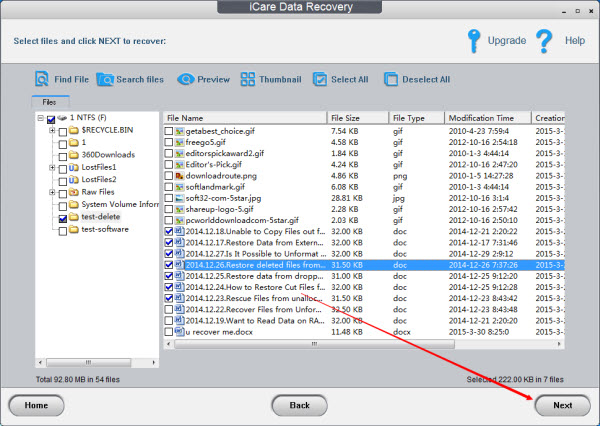
Choosing files to save: the folder tree on the left (including LostFiles and Raw Files folders), checked documents on the right, and the Find File, Preview and Thumbnail tools across the top.
800+ file types and BitLocker drives
iCare Data Recovery Pro recognizes more than 800 file types, including Office files, images, videos, audio and email, and it can recover from BitLocker-encrypted drives when you have the unlock key. It also includes a BitLocker repair option.
Benefits
- You know before you pay. The trial scans everything and lets you preview and save up to 1 GB, so you only buy once you've seen your files.
- One tool for most everyday disasters. Deletion, formatting and a RAW card are three different problems, and the three modes cover all of them.
- Light on the PC. It runs on hardware as old as a 1 GHz CPU with 256 MB of RAM, so you can use an old laptop as the recovery machine.
- Cheaper than a lab. A recovery service charges for each job. For a logically damaged drive (not a clicking one), $69.99 is a fraction of that.
Real-World Uses
- The camera card that says "format this disk". Raw Drive Recovery reads the card instead, and you preview the photos before saving them to your PC.
- The wrong USB stick, quick-formatted. Deep Scan Recovery finds the old files, often with their names and folders.
- A deleted project folder after the Recycle Bin was emptied. Deleted File Recovery is the quick first try.
- An external drive that lost its partition after a failed resize or a partition tool mishap. The partition list shows the old partition so you can copy its files off.
- A PC that won't boot. Take the drive out, connect it to another Windows PC with a USB adapter, and scan it there.
Who It's For, and Who Should Skip It
It's a good fit if you're on Windows, you've lost files to deletion, formatting or a RAW drive, and you want a simple tool you can test for free first. It suits home users and small offices that need one recovery now and then.
Skip it if:
- You use a Mac, or your drive is formatted as APFS, HFS+ or a Linux file system. iCare only supports FAT, FAT32, exFAT and NTFS.
- You just need recently deleted files from a working drive. iCare's own iCare Data Recovery Free has unlimited deleted-file recovery and costs nothing.
- Your drive is clicking, grinding or not detected at all. That's physical damage, and software scans can make it worse. A professional lab is the right call.
- You need RAID rebuilding, video previews or a modern interface. A more specialized recovery tool fits better.
Usage Guide
- Install on a different drive. Download the trial and install it on a drive other than the one you're recovering from, so the installer doesn't overwrite your lost files.
- Pick a mode. Start with Deleted File Recovery for deleted files, Deep Scan Recovery after a format, or Raw Drive Recovery for a RAW or "not formatted" drive. If one mode doesn't find your files, try the others.
- Select the drive and let the scan run. Don't cancel early: a cancelled scan can't be resumed, although iCare still shows what it found up to that point.
- Open the suggested partition (marked High, in green) and click Next to see its files. If your files aren't there, click Back and try the next partition.
- Preview, select and save the files to a different drive than the one that lost them. Never save them to the same partition.
- Register with your license code if you need more than 1 GB.
Tips
- If iCare reports not enough memory while rebuilding the file tree on a large drive, open Option, untick "Recover RAW Files" and scan again.
- If recovered folders come out empty, go back to the partition list and open another partition. The files are often in a different reconstructed partition.
- Version 9.0 and later use different license codes than older versions. If an old code doesn't work, or an old copy won't start because its digital signature expired, download the current version.
Where it falls short
- No video preview. Only photos and Office files can be previewed, so you can't tell in advance whether a recovered video will play. Large video files are the most likely to come back damaged.
- Damaged files after reuse. If you kept copying files to the drive after the loss, some recovered files will be corrupted. Nothing guarantees a 100% recovery.
- Long scans on big or failing disks. iCare says a damaged 16 TB disk can take around 48 hours, and a 4 TB scan showing 100+ hours suggests the disk itself is failing.
- Dated interface. The windows look like they're from the Windows 7 era, and the program doesn't add newer conveniences such as resumable scans.
- Few recent independent reviews. Most coverage of iCare is old or comes from sites that sell a competing product, so the free trial is your best evidence.
What Users Say
Press coverage
CNET's Rick Broida covered iCare Data Recovery in December 2010 (as quoted on iCare's review page):
"this essential utility can help you recover from accidental deletions, reformatted drives and partitions, virus attacks, and more."
iCare's store page also quotes CNET: "iCare is to rescue data from any number of common calamities, including drive failures, corrupted Master Boot Records, bad boot sectors, deleted partitions, virus attacks, and even messed-up Norton Ghost images." Both are about much older versions of the program.
Customer comments on iCare's site
"I had downloaded iCare after a severe computer failure. The software is easy to handle. With the Deep Scan Recovery function, I managed to restore almost all of the files I had lost. The iCare Recovery team react quickly and proactively. Overall I am very satisfied and can fully recommend iCare as fast and affordable to recover lost data." — Thomas, December 2015
"Your product worked like it was advertised. No problem recovering all the files from a damaged external HD." — Walker
"I downloaded the software and it worked as easily and efficiently as was told from the website ICare-Recovery.com. I found all my files as expected and had the option to recover all my list files. I would strongly recommend this software to anyone!" — Josh
These are testimonials the vendor chose to publish, so they're all positive. We couldn't find user ratings for iCare Data Recovery Pro on Trustpilot, Capterra or G2. The common theme in what is available: people find it simple to use and say Deep Scan Recovery found most of their files. The recurring criticism in other write-ups is the dated look and slow scans. That's another reason to run the free trial on your own drive before you buy.
Editions and Pricing
| Edition |
Price |
PCs and term |
Recovery limit |
| iCare Recovery Free |
Free |
Freeware |
Unlimited deleted files, daily cap on Deep Scan and RAW recovery |
| Pro trial |
Free |
Before purchase |
1 GB in all modes |
| Home License |
$69.99 a year |
1 PC, 1 year, auto-renews |
Unlimited, free tech support |
| Premium License |
$99.99 a year |
2 PCs, 1 year, home and workstation |
Unlimited, free tech support |
| Unlimited License |
$399.99 one time |
Unlimited PCs in one company, lifetime upgrades |
Unlimited, technician and IT service use allowed, no refund |
Prices are before any VAT, which is added at checkout depending on where you live. Your license code appears on the order confirmation page and is also emailed to you.
FAQs
If the iCare Data Recovery Pro trial finds my files, will the paid version recover them?
Yes. iCare says that if the trial finds a file, and for photos and Office files, if it previews properly, the registered version can restore it. You can also save up to 1 GB in the trial to check the files open.
Is iCare Data Recovery Pro a one-time purchase?
No. The Home and Premium licenses are one-year subscriptions that renew automatically when you pay by card or PayPal. You can turn off auto-renewal at any time in your customer account. Only the $399.99 Unlimited License is a one-time purchase.
Can I get a refund for iCare Data Recovery Pro if it doesn't find my files?
Not automatically. iCare's 15-day guarantee covers wrong purchases, double charges, and critical technical problems its support can't fix within 5 days, and you must work with support on the problem first. Run the trial before buying instead.
Does iCare Data Recovery Pro work on a Mac?
No. iCare Data Recovery Pro is Windows-only and reads FAT, FAT32, exFAT and NTFS drives. You can still recover an exFAT or FAT32 USB stick or camera card used on a Mac by connecting it to a Windows PC.
How long does an iCare Data Recovery Pro scan take?
iCare Data Recovery Pro takes roughly 4 minutes for a 16 GB card, 20 minutes for 128 GB and about an hour for 1 TB, by the vendor's estimates. A damaged disk can take much longer: iCare suggests letting it run for at least 12 hours before cancelling.
Can iCare Data Recovery Pro recover from a PC that won't boot?
Yes, from another computer. Connect the disk (for example with a USB-to-SATA adapter) to a working Windows PC, run iCare Data Recovery Pro there and scan it.
Why do some files recovered by iCare Data Recovery Pro not open?
Those files were partly overwritten after the data loss, usually because the drive kept being used, or Windows wrote to it during startup and shutdown. Large video files are especially prone to this. Stop using the drive as soon as you notice the loss.
My old iCare license code doesn't work. Why?
iCare Data Recovery Pro version 9.0 and later use different activation codes than earlier versions. Download the current version from iCare's site, and contact iCare support if your code still isn't accepted.
System Requirements
- Operating system: Windows 11, 10, 8.1, 8, 7, Vista or XP; Windows Server 2003, 2008, 2012, 2016, 2019 or 2022
- CPU: 1 GHz, 32-bit or 64-bit
- RAM: 256 MB (1 GB recommended)
- Disk space: 100 MB free, plus room on a separate drive for the files you recover
- File systems: FAT, FAT32, exFAT, NTFS
Conclusion
iCare Data Recovery Pro is worth $69.99 if the free trial finds your files. It's a simple, low-demand Windows tool that covers the three everyday disasters: deleted files, formatted drives and RAW cards. And it shows you what it can recover before you spend anything.
The one reason to buy it is that clear "see it, then pay" path. The main reason not to is the yearly auto-renewing license with a strict refund policy: if you only need one rescue, remember to cancel the renewal. If you're on a Mac, need video previews, or only need a few recently deleted files (try iCare Recovery Free first), look elsewhere.
Download Free TrialBuy Now