Do Your Data Recovery Pro for Windows: Get Deleted and Formatted Files Back
Do Your Data Recovery Pro is a $69 per year Windows tool that finds files lost to deletion, formatting, a lost partition or a drive that has turned RAW, and lets you preview them before you pay. It is aimed at home and office users who have no backup and need a simple three-step recovery rather than a technician's toolkit.
You emptied the Recycle Bin last week. Or Windows asked to format an external drive and you clicked yes. The files are usually still on the disk until something overwrites them, and this is the kind of program that goes looking for them.
Quick facts
- Version: 8.3
- Developer: DoYourData
- Platforms: Windows 11, 10, 8.1, 8, 7, Vista and Windows Server 2008 to 2025
- File systems: NTFS, exFAT, FAT12/16/32, ReFS, EXT2/3/4
- Price: $69.00 for the 1 Year License, which covers 2 PCs
- Trial: scanning and preview are free, saving files needs a license
- Guarantee: 30 days, money back
- What we checked: installer version 8.3 (49 MB) downloaded from the vendor and checkout price $69.00, both on November 9, 2026. We did not run a recovery on a failed drive.
Before you buy
- Stop using the affected drive. New data can overwrite what you are trying to recover, so install the program on a different drive and save recovered files elsewhere too.
- Run the free scan first. If the preview shows your files intact, buying makes sense. If it does not, you have spent nothing.
- Turn off any VPN while activating. Activation needs an internet connection, and a VPN can get in its way.
Download Free TrialBuy Now
Overview
The program has three areas in a left-hand menu: Data Recovery, Scan Records and Disk Manager. You pick a drive, scan it, then browse what was found by path or by file type. Scan Records keeps earlier results, so you can return to a long scan without running it again.
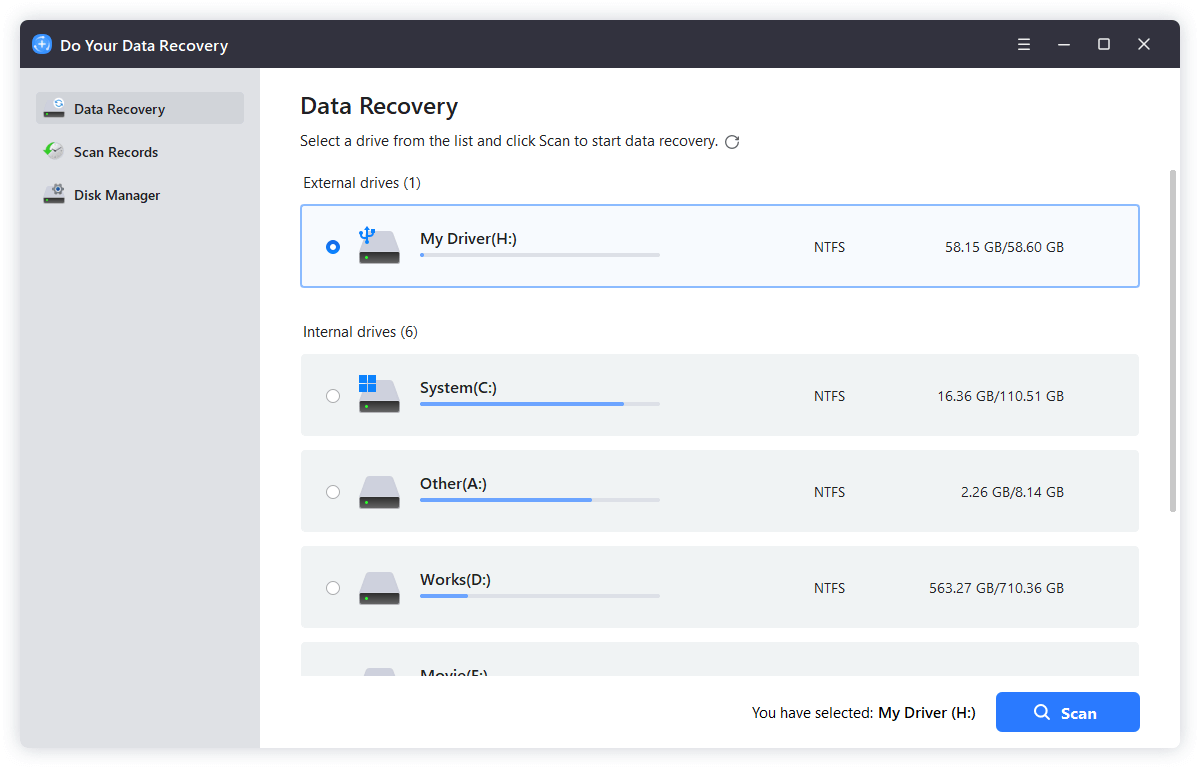
The Data Recovery screen, where you pick the external or internal drive to scan.
Features
Recovers files from the usual kinds of data loss
Do Your Data Recovery Pro handles Shift + Delete, an emptied Recycle Bin, a formatted drive, a deleted or hidden partition, and a RAW drive that Windows wants to format. It also lists recovery from encrypted disks.
Works across file types and storage devices
Do Your Data Recovery Pro searches for documents, photos including camera RAW formats such as CR2 and NEF, videos, audio, email and archives. It reads PCs and laptops, HDDs and SSDs, USB sticks, memory cards, cameras, and RAID or server disks.
Preview before you recover
Do Your Data Recovery lets you open pictures, documents and videos from the scan results before deciding. Because the preview is free, you find out whether a file is intact before you buy a license.
Read-only scanning
Do Your Data Recovery reads the source drive without writing to it, so the scan itself does not make the situation worse. Damage can still come from saving recovered files back onto that drive, which is why you should choose another destination.
Disk Manager for basic drive repairs
Do Your Data Recovery includes a Disk Manager with Rename, Format and Repair. Repair checks a drive for logical errors, and you can format an external drive for use on both Windows and macOS.

Disk Manager, with its Rename, Format and Repair buttons outlined.
Benefits
The main benefit is that you learn your odds before spending anything. Recovery tools are a distress purchase, and a free scan with a working preview turns a gamble into an informed decision. The second is simplicity: a few plain screens and no RAID-parameter dialogs to puzzle over.
Real-World Uses
- Bringing back a folder of work documents after clearing the Recycle Bin.
- Rescuing photos from a memory card that was formatted in the camera by mistake.
- Copying files off an external drive that Windows now reports as RAW or asks to format.
- Finding the contents of a partition deleted during a Windows reinstall.
Who It's For, and Who Should Skip It
Good fit: someone with logically lost files on a drive that still shows up in Windows, who wants a guided tool rather than a manual.
Skip it if the drive clicks, is not detected or has physical damage: software cannot fix that, and repeated scans can make it worse, so a recovery lab is the right call. Skip it too if you recover data for clients, since that needs the Technician license, or if you are on a Mac, which has a separate version.
Usage Guide
- Download and install the program on a drive other than the one that lost the files.
- On the Data Recovery screen, select the drive or device and click Scan.
- Choose the file types and let the scan finish. A healthy 1 TB drive takes around 6 hours.
- Preview the results by path or type and tick what you want.
- Click Activate, enter your license code, then Recover to a different drive.
Where it falls short
- The 1 Year License costs $69 against $89 for lifetime, so a one-off job costs nearly as much as permanent access.
- Current independent testing is scarce. The advertised 99.5% recovery rate has no outside confirmation.
- One Trustpilot reviewer says antivirus software began flagging the program's files, so a warning is possible.
What Users Say
Public feedback on this product is thin, so weigh the reviews below accordingly.
Trustpilot: 3.2 out of 5 from 7 reviews, for DoYourData as a company
“Now every time my virus program scans, it picks up every file in Do Your Data Recovery, as infected.” John Ozga, 1 star, May 2026
“they make it very very complicated for you to cancel your subscription.” Don Rottman, 1 star, May 2023, product not named
“DoYourData Data Recovery Software is really great, helping me recover all my data from formatted hard drive.” 田野, 5 stars, April 2016
Customers quoted on the vendor's page
“I DELETE about 5GB files from my laptop and don't have a backup. Download DoYourdata recovery software. It is pretty simple to use. After a deep scan, it finds all the deleted files.” Chris
“My PC asks me to format my WD external hard drive, I do that and all files (about 900GB) are erased. A horrible issue. Thanks to Do Your Data Recovery, just a few hours scan to get the files back.” Linda
The vendor selects these, so read them as best cases.
Reviews quoted on the vendor's page
“I love that Do Your Data Recovery Pro has no fixed limit to file recovery; it can recover every deleted file, and no matter how big the file is, it can fully recover every part of the file.” G2 reviewer
“It helps you to recover the file and important data that get lost due to various situations without the need for an expert.” HITRICKS.com
“When we tested this hard drive recovery solution, it (Do Your Data Recovery) successfully recovered 100 percent of our deleted image, document, video and audio files. Likewise, it recovered 100 percent of reformatted data, including images and documents...” Business.com
“DoYourData is a great choice for individuals who are inexperienced with data recovery. It was the only program to earn 100% in both of our Ease of Use categories (Scan and Recovery).” TopTenReviews.com
The pattern: people who got files back praise how simple it is, while the complaints are about antivirus alerts and cancelling a subscription rather than failed recoveries.
Editions and Pricing
| Edition | Price | Term | PCs | Notes |
|---|
| Free | $0 | No time limit stated | Not stated | Recovers up to 1 GB |
| Pro 1 Month | $49.00 | 1 month | 2 | Unlimited recovery |
| Pro 1 Year | $69.00 | 1 year | 2 | Unlimited recovery |
| Pro Lifetime | $89.00 | Lifetime | 2 | Unlimited recovery |
| Technician Lifetime | $499.00 | Lifetime | 100+ | Business use and client recovery work |
FAQs
Can Do Your Data Recovery Pro recover files from a formatted drive?
Do Your Data Recovery Pro can scan a formatted drive and list what is still there, provided new data has not overwritten it. The free scan and preview show you which files survive before you pay.
How many computers does the Do Your Data Recovery Pro license cover?
The Do Your Data Recovery Pro 1 Year License covers 2 PCs. Using it across more computers, or for client work, calls for the Technician license.
Is the free edition of Do Your Data Recovery enough?
The free edition of Do Your Data Recovery recovers up to 1 GB, which can be enough for a few documents or photos. Larger jobs need Pro.
Does Do Your Data Recovery work on SSDs?
Do Your Data Recovery supports SATA, M.2 and NVMe SSDs. Results on SSDs depend heavily on TRIM, which can clear deleted data quickly, so scan as soon as you notice the loss.
Can Do Your Data Recovery fix a clicking or undetected hard drive?
Do Your Data Recovery cannot repair physical damage. Its Disk Manager handles logical errors only, and a drive that clicks or does not appear needs a recovery lab.
What is the refund period for Do Your Data Recovery Pro?
Do Your Data Recovery Pro is sold with a 30-day money-back guarantee. Support is at support@doyourdata.com.
System Requirements
- Windows 11, 10, 8.1, 8, 7 or Vista, or Windows Server 2008 to 2025
- x86 CPU
- At least 128 MB of RAM
- At least 100 MB of free disk space
- Internet connection for activation
Conclusion
Worth it if the free preview shows your files. Do Your Data Recovery Pro is a straightforward, inexpensive way to get logically lost files back on Windows, and the no-cost scan removes most of the risk. The reason to buy is that preview: you see the result first. The reason to hold back is the lack of independent testing. If you expect to use it more than once, the $89 lifetime plan is a better deal than $69 for a single year.
Download Free TrialBuy Now