Hasleo BitLocker Data Recovery Professional: Get Files Back From BitLocker Drives
Hasleo BitLocker Data Recovery Professional is a $149 one-time Windows tool that recovers deleted and lost files from BitLocker-encrypted drives, including formatted, RAW, damaged or deleted ones. It suits IT staff and individuals with an encrypted drive that stopped working, as long as they still have the password or the 48-digit recovery key.
That condition is the whole deal: without the password or the key, it can't help, and neither can anything else.
Quick facts
- Version: 6.8, installer dated January 9, 2026
- Developer: Hasleo Software
- Runs on: Windows 11, 10, 8.1, 8, 7, Vista, XP and Windows Server 2003 to 2025
- File systems inside the BitLocker volume: FAT, exFAT and NTFS
- Price: $149 once for 1 PC, with lifetime upgrades and technical support
- Trial: full-featured, recovers several files
- Refunds: up to 30 days, for technical problems that support can't solve
- What we checked: trial installer file version 6.8 (24.1 MB) downloaded from the vendor and checkout price $149 on November 6, 2026. We read the version from the file's properties and didn't run a recovery
Download Free TrialBuy Now
Before you buy
- Find your password or recovery key first. If you have neither, don't buy this. Check your Microsoft account or your IT department for the key.
- Could you just unlock the drive? If the drive still opens normally with its password, you may only need a general recovery tool on the unlocked volume.
- Look at Ultimate for $20 more. Hasleo Data Recovery Ultimate does normal recovery and BitLocker recovery for $169 on 2 PCs.
- Run the trial first. It shows what can be found and lets you recover several files.
Overview
Standard recovery tools see an encrypted BitLocker drive as random noise. If the volume is damaged, formatted or deleted, Windows can't unlock it, and a normal scan finds nothing useful. Hasleo BitLocker Data Recovery first locates BitLocker volumes on the disk, asks for your password or recovery key, and then scans inside them.
It handles deleted files on a healthy BitLocker drive, formatted, RAW or failed drives, lost BitLocker partitions, and even a decryption or encryption job that failed partway.
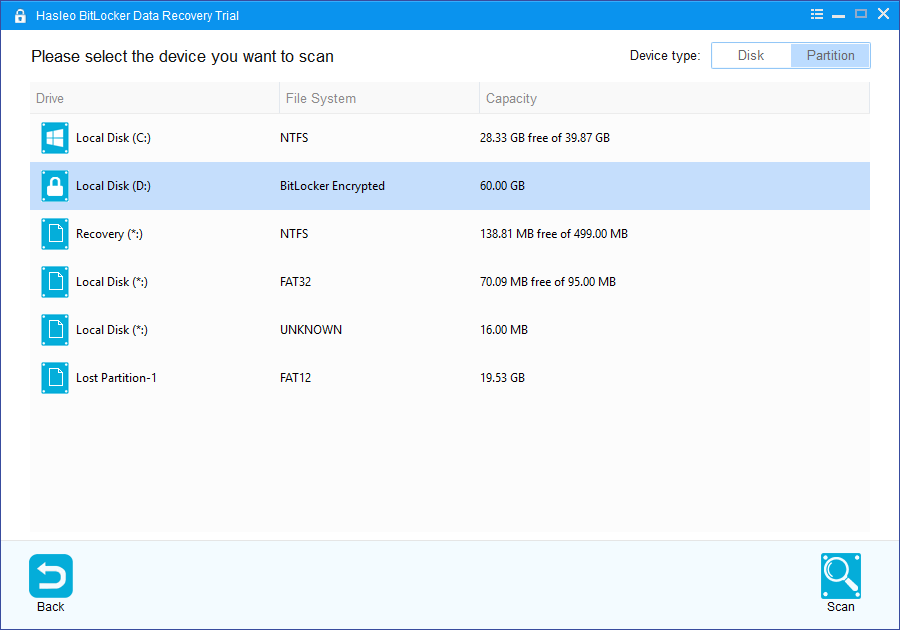
Choosing the device to scan. It can list by disk or by partition, and shows BitLocker volumes and lost partitions.
Features
Deleted and lost files on a BitLocker drive
Hasleo BitLocker Data Recovery finds files emptied from the Recycle Bin, removed with SHIFT+DELETE, or hit by a virus, on a BitLocker drive that still works.
Formatted, RAW and damaged drives
Hasleo BitLocker Data Recovery recovers from BitLocker drives that are formatted, inaccessible, failed, damaged, corrupted or RAW, as long as you have the credentials.
Deleted or lost BitLocker partitions
Hasleo BitLocker Data Recovery searches for BitLocker partitions that were deleted or lost, then ranks what it finds and shows whether your password matches each one.
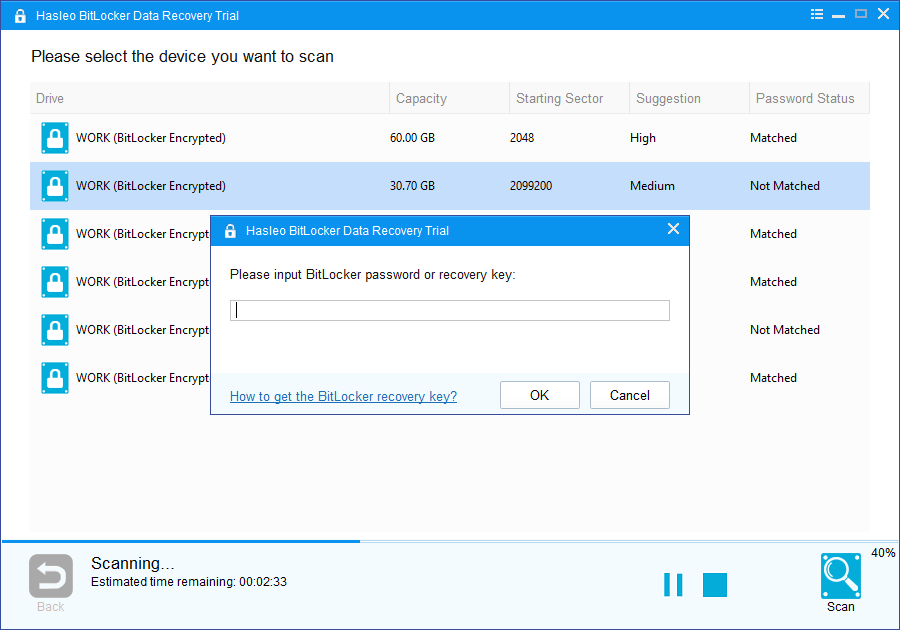
Found BitLocker partitions with their match status, and the password or recovery key prompt.
WinPE bootable media
Hasleo BitLocker Data Recovery builds a WinPE ISO or USB, so you can recover when Windows fails to start, which is common when the system drive itself is the encrypted one.
Benefits
- It answers one narrow problem. Few tools advertise recovery from a damaged BitLocker volume.
- You can keep the job in-house. Encrypted data doesn't leave the building for a recovery lab.
- Lifetime upgrades and support are included, so it stays useful as a recurring IT tool.
Real-World Uses
- BitLocker to Go on a USB stick. Someone deleted the wrong folder from an encrypted stick. You scan it and restore the folder.
- An interrupted encryption. A laptop lost power during encryption and the drive went inaccessible. You scan with the recovery key.
- A laptop that won't boot. You make WinPE media on another PC, boot from it, and copy files out.
- A deleted partition. A disk tool removed a BitLocker partition, and you search for it by disk rather than by volume.
Who It's For, and Who Should Skip It
Buy it if your lost data sits on a BitLocker drive and you hold the password or recovery key, especially on a business PC. The license allows business use.
Skip it if you have neither credential: nothing legitimate gets round BitLocker. Skip it if the drive isn't encrypted, because it won't touch normal drives and Hasleo Data Recovery Professional costs $49. Skip it too if you provide recovery as a paid service, which needs Technician, or if the drive has physically failed, which needs a lab.
Usage Guide
- Download the trial and install it on a different drive from the damaged one.
- Select the disk or partition and click Scan.
- Enter the BitLocker password or recovery key. It lists the BitLocker partitions it found; pick one and scan.
- Preview the results, using the filter and search tools.
- Activate a license, select the files and click Recover, saving them to another drive.

Scan results with folder tree, file list and a preview pane.
Where it falls short
- It only does BitLocker. Normal drives aren't covered, which makes $149 steep compared with $169 for Ultimate on 2 PCs.
- It's one PC. You can use it at work, but a technician moving between machines needs Technician at $299.
- Recovery isn't guaranteed. Hasleo notes that formatting writes data to the disk, which can overwrite the original files.
- WinPE may not see every drive. Hasleo's WinPE can lack your storage drivers, in which case you'd need to add them.
- We found no independent test. Reviews online come from rival data recovery brands, so we haven't quoted them, and there's no user review section here.
Comparisons
Hasleo BitLocker Data Recovery vs Hasleo Data Recovery Ultimate
Both recover from BitLocker drives with the same requirements, and both include WinPE media. Ultimate adds normal drive recovery and a second PC for $20 more. For most buyers, Ultimate is the better value. BitLocker Data Recovery only makes sense if you're sure you'll never need the rest and the $20 matters.
Hasleo BitLocker Data Recovery vs a recovery lab
A lab handles physical damage, at a much higher price, and your data leaves your hands. Hasleo is the first step for logical damage, when the drive still spins and you hold the key.
Editions and Pricing
| Edition | Price | PCs | Normal drives | Client services |
|---|
| BitLocker Data Recovery Professional (this listing) | $149 at checkout | 1 PC | No | No |
| Hasleo Data Recovery Ultimate | $169 at checkout | 2 PCs | Yes | No |
| Hasleo Data Recovery Technician | $299 at checkout | Unlimited | Yes | Yes |
FAQs
Can Hasleo BitLocker Data Recovery work without a recovery key?
Hasleo BitLocker Data Recovery needs the BitLocker password or the 48-digit recovery key. Without either one, the data on the drive can't be accessed or recovered.
Does Hasleo BitLocker Data Recovery work with BitLocker to Go?
Hasleo BitLocker Data Recovery works on USB flash drives and SD cards as well as hard disks, and Hasleo publishes a guide for BitLocker to Go drives.
Can Hasleo BitLocker Data Recovery recover from a failed decryption?
Hasleo BitLocker Data Recovery lists failed encryption and failed decryption among its supported data loss cases, along with drive damage and virus attacks.
Does Hasleo BitLocker Data Recovery run on Windows Server?
Hasleo BitLocker Data Recovery lists Windows Server 2003 through 2025 as supported, and its license allows business use.
Does Hasleo BitLocker Data Recovery run on a Mac?
Hasleo BitLocker Data Recovery runs only on Windows, so connect the drive to a PC or use its WinPE media.
Can I get a refund if Hasleo BitLocker Data Recovery finds nothing?
Hasleo BitLocker Data Recovery falls under Hasleo's policy of up to 30 days, which needs a technical reason. A change of mind isn't covered, so run the trial first.
System Requirements
- Windows 11, 10, 8.1, 8, 7, Vista or XP, or Windows Server 2003 to 2025
- 1 GHz Intel Pentium or compatible processor
- 256 MB of RAM, 1024 MB recommended
- 100 MB of free disk space
Conclusion
Hasleo BitLocker Data Recovery Professional is a narrow tool at a price that's hard to justify next to its sibling. The one reason to buy it is that you have a BitLocker drive in trouble, you hold the key, and the trial shows your files. The main reason not to is that Hasleo Data Recovery Ultimate does the same job plus normal recovery on 2 PCs for just $20 more.
Download Free TrialBuy Now