BitLocker Anywhere Professional for Mac: Read and Write BitLocker Drives on macOS
Hasleo BitLocker Anywhere Professional for Mac is a $19.98 one-time macOS tool that mounts, reads and writes BitLocker-encrypted drives, which macOS can't open by itself. It suits Mac users who get BitLocker USB sticks or external disks from Windows PCs at work or at home.
It also encrypts and decrypts drives with BitLocker, changes passwords, and exports recovery keys, all from the Mac. A full-featured 15-day trial lets you confirm it opens your drive first.
Quick facts
- Version: 9.9, released July 29, 2026
- Developer: Hasleo Software
- Runs on: macOS Tahoe 26 down to 10.14 Mojave, on Intel and Apple Silicon Macs
- File systems: NTFS, FAT and exFAT
- Price: $19.98 once for 1 Mac, with lifetime free upgrades
- Trial: 15 days, full features
- Refunds: up to 30 days, for technical problems that support can't solve
- What we checked: installer package (50.7 MB, dated July 29, 2026) on the vendor's server and checkout price $19.98 on November 6, 2026. We didn't install it on a Mac or mount a drive
Download Free TrialBuy Now
Before you buy
- You need the password or recovery key. This tool opens BitLocker drives you have the credentials for. It doesn't break into them.
- Expect some macOS permission steps. On Mojave and later, you must grant the app Full Disk Access. A user in January 2026 also had macOS refuse the installer until he allowed it in Privacy & Security.
- Try your exact drive during the trial. Hasleo has a help page for drives the app doesn't recognize, so don't assume yours will mount.
- The license stays on one Mac. Hasleo says you can't transfer it to another.
Overview
Plug a BitLocker drive into a Mac and macOS has no idea what to do with it, because it doesn't support BitLocker at all. For anyone moving between a Windows work laptop and a personal Mac, that means copying files through a third machine or leaving the drive unencrypted.
BitLocker Anywhere for Mac lists your drives in one window. Right-click the encrypted one, choose Mount drive, enter the password or recovery key, and it shows up in Finder like any other volume. You can tick read-only, or save the credential in your keychain.
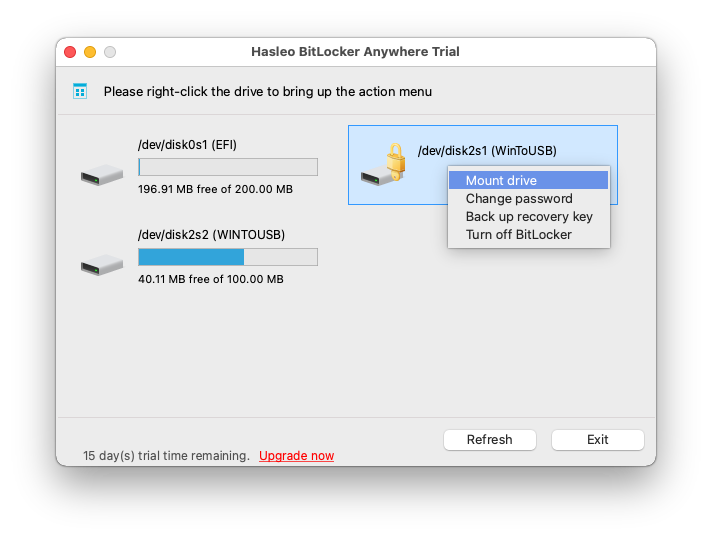
Right-click a locked drive to mount it. This trial screenshot also shows change password, back up recovery key and turn off BitLocker.
Features
Mount and access BitLocker drives
BitLocker Anywhere for Mac mounts BitLocker drives in read-write or read-only mode, and unmounts them when you're done. Once mounted, you copy files to and from the drive in Finder, as you would on a native Mac disk.
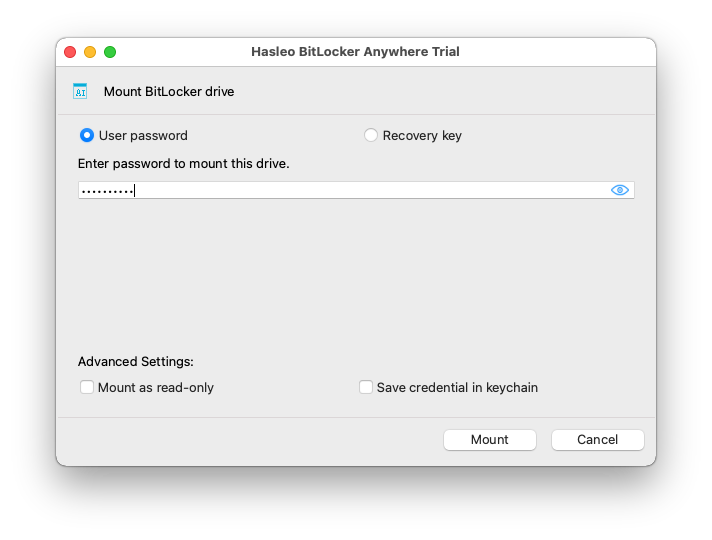
The mount dialog takes a password or recovery key, with read-only and keychain options.
Encrypt drives with BitLocker on a Mac
BitLocker Anywhere for Mac encrypts a drive using BitLocker, with AES-CBC or XTS-AES at 128-bit or 256-bit, and it can encrypt only the used space to save time. Hasleo says the result opens normally on Windows versions that support BitLocker.
Decrypt drives
BitLocker Anywhere for Mac removes BitLocker from a drive altogether, which helps if a disk is moving permanently to the Mac.
Change passwords and export keys
BitLocker Anywhere for Mac changes the password on an encrypted drive and exports its recovery key or startup key (.BEK file).
Boot Camp encryption
BitLocker Anywhere for Mac can encrypt a Boot Camp partition from macOS, according to Hasleo's guides.
Benefits
- You keep the drive encrypted. You don't have to remove BitLocker just to share files with a Mac.
- No Windows machine is needed. Password and key jobs happen on the Mac.
- It costs once. Hasleo's change log shows support added for each new macOS, including Tahoe 26, and upgrades are free.
Real-World Uses
- A work USB stick at home. Your office encrypts everything with BitLocker, and you need to open a file on your MacBook.
- A shared external disk. You and a Windows colleague pass an encrypted disk back and forth.
- A Windows laptop that died. You put its BitLocker drive in an enclosure, and pull files off from your Mac with the recovery key.
- A disk moving to the Mac for good. You decrypt it on the Mac, with no Windows PC involved.
Who It's For, and Who Should Skip It
Buy it if you regularly handle BitLocker drives on a Mac and you have the credentials. Business use comes with the Professional license.
Skip it if you only need one file once, since a borrowed Windows PC does that free, or the 15-day trial will. Skip it if you've lost both the password and the recovery key, because no tool can open the drive then. For scripting, note that the command line isn't in the Professional edition. If your drive is plain NTFS rather than BitLocker, Hasleo's free NTFS for Mac is what you want.
Usage Guide
- Download and install the package. If macOS blocks it, allow it in System Settings under Privacy & Security.
- On macOS Mojave or later, grant Full Disk Access to the app.
- Open the app, right-click the BitLocker drive and choose Mount drive.
- Enter the password or recovery key and click Mount.
- Open the drive in Finder and copy your files. Unmount it before you unplug it.
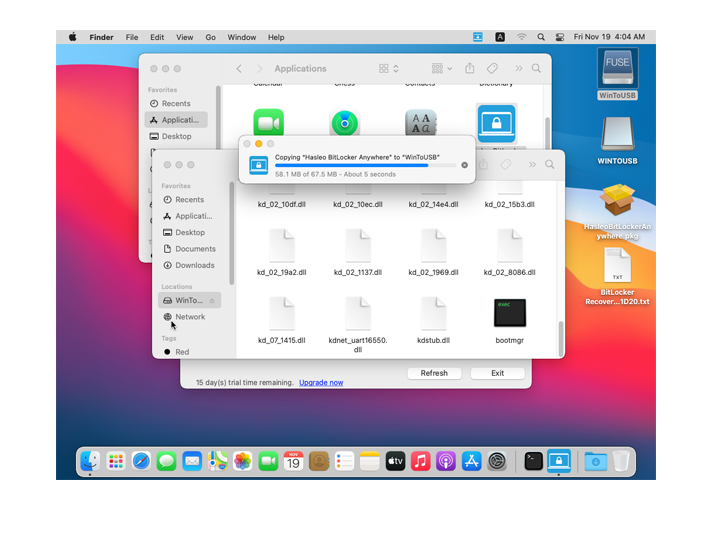
A mounted BitLocker drive in Finder, with a copy in progress.
Where it falls short
- Installing it isn't always smooth. A user on Hasleo's forum in January 2026 said macOS reported the package as "not validly signed or could not be verified by Apple". The fix was to allow it in Privacy & Security.
- Each new macOS can break things. The change log shows mount fixes after new macOS releases, such as for Sequoia in version 9.6. Expect a short wait after a major update.
- The window looks basic. It's a plain drive list, and macOS integration is limited to Finder access once mounted.
- We found no independent review. Most reviews online come from companies selling a rival BitLocker tool, so we haven't quoted them. That's why this page has no user review section.
Comparisons
BitLocker Anywhere for Mac vs a Windows PC
If you have a Windows Pro PC handy, you can decrypt or copy from the drive free. BitLocker Anywhere for Mac earns its $19.98 when the Mac is your main machine and drives keep arriving encrypted.
BitLocker Anywhere for Mac vs BitLocker Anywhere for Windows and Linux
Hasleo sells separate versions for each system, at $19.98 for Professional. A license for one doesn't cover the other, as far as the store shows, so buy the one for the machine that reads the drive.
Editions and Pricing
| Product | Price | Machines | Notes |
|---|
| For Mac Professional (this listing) | $19.98 at checkout | 1 Mac | Mount, read, write, encrypt, decrypt. No command line |
| For Windows Home | $14.98 at checkout | 1 PC | Separate product, for Windows Home |
| For Windows Professional | $19.98 at checkout | 1 PC | Separate product, business use |
| For Linux Professional | $19.98 at checkout | 1 machine | Separate product |
FAQs
Does BitLocker Anywhere for Mac work on Apple Silicon?
BitLocker Anywhere for Mac supports Intel Macs and Apple Silicon M1, M2, M3 and M4 chips, on macOS Tahoe 26 down to 10.14 Mojave.
Can BitLocker Anywhere for Mac open a drive without the password?
BitLocker Anywhere for Mac needs the BitLocker password or the recovery key. Without either one, the data can't be reached.
Does a drive encrypted on a Mac open on Windows?
BitLocker Anywhere for Mac uses an algorithm Hasleo describes as fully compatible with Windows BitLocker, so the drive opens on Windows systems that support BitLocker.
Does BitLocker Anywhere for Mac support exFAT drives?
BitLocker Anywhere for Mac handles NTFS, FAT and exFAT volumes on hard disks, SSDs, USB drives, Thunderbolt drives and SD and CF cards.
What happens when the BitLocker Anywhere for Mac trial ends?
BitLocker Anywhere for Mac needs a license after the 15 days. A drive you encrypted stays encrypted, so keep its password or recovery key, and open it on any Windows PC that supports BitLocker if you decide not to buy.
Can I get a refund if BitLocker Anywhere for Mac doesn't work?
BitLocker Anywhere for Mac falls under Hasleo's policy of up to 30 days, which covers technical faults support can't fix. A change of mind isn't covered, so use the 15-day trial first.
System Requirements
- macOS Tahoe 26 down to 10.14 Mojave, Intel or Apple Silicon
- 1 GHz CPU, 512 MB of RAM (1024 MB recommended)
- 1024 MB of free disk space
Conclusion
BitLocker Anywhere for Mac is worth $19.98 if BitLocker drives keep landing on your Mac. The one reason to buy it is simple: macOS can't read these drives, and this does, with write access too, for a small one-time price. The main reason not to is that we couldn't find a trustworthy independent review, so use the full 15-day trial on your own drive before you pay.
Download Free TrialBuy Now