BitLocker Anywhere Professional for Linux: Open BitLocker Drives on Ubuntu, Fedora and Debian
Hasleo BitLocker Anywhere Professional for Linux is a $19.98 one-time Linux tool with a graphical window for mounting, reading and writing BitLocker-encrypted drives, and for encrypting and decrypting them. It suits Linux desktop users who share encrypted drives with Windows PCs and would rather not work from the command line.
It runs on Ubuntu, Fedora, Debian, openSUSE and Red Hat Enterprise Linux, and a 15-day trial lets you test your own drive first. The free, command-line dislocker covers the basic read and write job, so the price pays for the interface and the extra tools.
Quick facts
- Version: 9.7, released May 8, 2025
- Developer: Hasleo Software
- Runs on: Ubuntu, Fedora, Debian, openSUSE, Red Hat Enterprise Linux and similar
- File systems: NTFS, FAT and exFAT
- Price: $19.98 once for 1 PC, with lifetime free upgrades
- Trial: 15 days
- Refunds: up to 30 days, for technical problems that support can't solve
- What we checked: the 26.3 MB download dated May 8, 2025 on the vendor's server, and checkout price $19.98 on November 6, 2026. We didn't install it or mount a drive
Download Free TrialBuy Now
Before you buy
- Try dislocker first if you're comfortable in a terminal. It's free, and it's packaged for Ubuntu and Debian.
- Updates run behind the other platforms. The Windows and Mac versions reached 9.9 in 2026, while Linux has stayed on 9.7 since May 2025.
- You need the password or recovery key. Without one of them, nothing opens the drive.
- Hasleo says it needs a healthy drive. For a damaged BitLocker volume, look at a recovery tool.
- The license stays on one PC. The command line version isn't included in Professional either, despite appearing on the product page.
Overview
Linux doesn't recognize BitLocker drives by default. Plug in a drive from a Windows laptop and you get a volume you can't open. The usual fix is dislocker, which decrypts to a virtual file that you then mount by hand, and that's a lot of steps for someone who just wants one folder.
BitLocker Anywhere for Linux replaces those steps with a window. You extract the download, start it from a terminal with the run.sh script in its bin folder, and right-click the drive. Once mounted, it appears under /mnt/BitLockerAnywhere/ and works like a native drive.
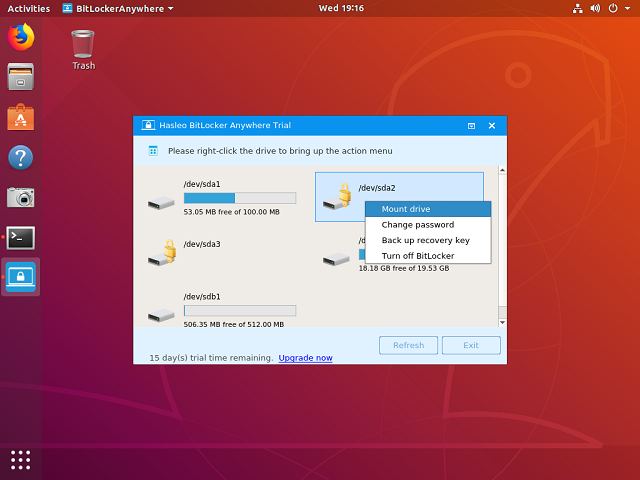
The trial on Ubuntu: right-click a locked drive to mount it, change its password, back up the key or turn off BitLocker.
Features
Mount and unmount BitLocker drives
BitLocker Anywhere for Linux mounts a BitLocker drive with its password or recovery key, in read-write or read-only mode, and unmounts it when you finish.
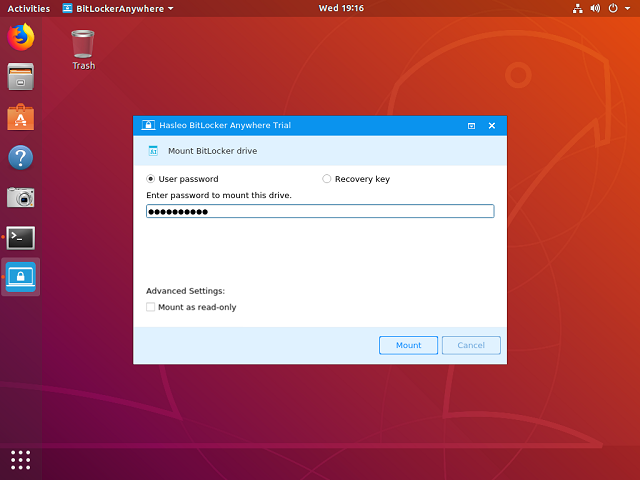
The mount dialog, with a choice of user password or recovery key and a read-only option.
Read and write like a native drive
BitLocker Anywhere for Linux gives normal file access once a drive is mounted, so you copy, edit and delete files in your file manager.
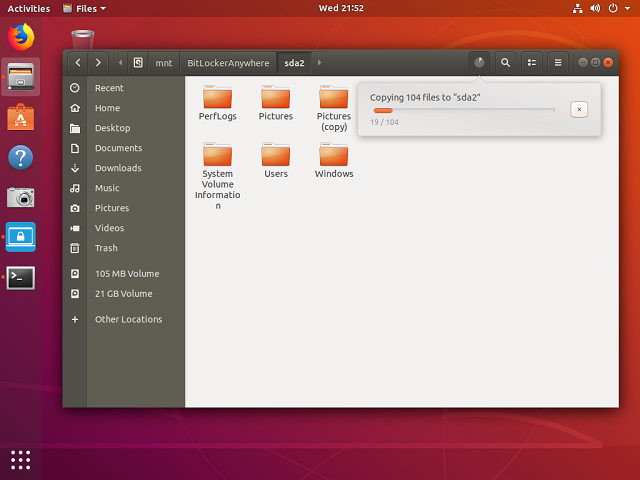
A mounted BitLocker drive in the Ubuntu file manager, with a copy in progress.
Encrypt drives from Linux
BitLocker Anywhere for Linux encrypts drives with BitLocker, with 128-bit or 256-bit strength. Hasleo calls it the first Linux software that can do this, and it means you can prepare a drive for a Windows user without leaving Linux.
Decrypt drives and change passwords
BitLocker Anywhere for Linux removes BitLocker from a drive and changes its password. Version 9.3 added fast encryption and decryption on 4K-sector disks, and passwords up to 256 characters.
Benefits
- You skip the mount commands. That's the whole point of paying over using dislocker.
- You can do more than read. Encrypting, decrypting and changing passwords go beyond dislocker's two-step mount.
- You keep BitLocker on the drive. Windows colleagues carry on using it as before.
Real-World Uses
- A dual-boot PC. Your Windows data partition is BitLocker-encrypted, and you want those files from Linux.
- A work USB stick. The office encrypts everything, and your own machine runs Fedora.
- A drive for a Windows client. You encrypt it on Linux and hand it over.
- A retiring drive. You decrypt an old BitLocker disk so it's a plain drive again.
Who It's For, and Who Should Skip It
Buy it if you want a graphical tool, you need to encrypt or decrypt from Linux, or you use it for work.
Skip it if you only need occasional read access and don't mind a terminal, because dislocker is free. Skip it for scripts on a server: the command line tool needs an edition you ask Hasleo for. Windows and Mac users want their own versions.
Usage Guide
- Download the archive and extract it.
- Open a terminal as a non-root user, go to the
bin subfolder, and run the run.sh script. - Right-click the BitLocker drive in the main window and click Mount drive.
- Enter the password or recovery key and click Mount.
- Open the drive by double-clicking it, or browse to
/mnt/BitLockerAnywhere/.
Where it falls short
- It's a plain archive. The download is a .tar.gz started from a terminal, not a .deb or .rpm package from your distro's store.
- Distro support is loosely stated. Hasleo names families of distributions, without version numbers, so test yours.
- Mounting may need a manual step. Hasleo says that on some distributions the double-click doesn't open the drive and you have to browse there yourself.
- No independent reviews. We found none, so this page has no user review section.
Comparisons
BitLocker Anywhere for Linux vs dislocker
dislocker is free and open source, and reads and writes BitLocker partitions from the command line. BitLocker Anywhere adds a window, encryption, decryption and password changes. If mounting is all you do and the terminal doesn't bother you, keep the $19.98.
Editions and Pricing
| Product | Price | Machines | Notes |
|---|
| For Linux Professional (this listing) | $19.98 at checkout | 1 PC | Mount, read, write, encrypt, decrypt. No command line |
| For Linux Home | Free gift for sharing the product | 1 PC | Private, noncommercial use, on request from Hasleo |
| For Mac Professional | $19.98 at checkout | 1 Mac | Separate product |
| For Windows Home | $14.98 at checkout | 1 PC | Separate product |
FAQs
Can I get BitLocker Anywhere for Linux for free?
BitLocker Anywhere for Linux has a Home license that Hasleo gives away if you share the product on social media and email it the link. It's for private, noncommercial home use only.
Does BitLocker Anywhere for Linux work on Ubuntu?
BitLocker Anywhere for Linux lists Ubuntu, Fedora, Debian, openSUSE and Red Hat Enterprise Linux. Hasleo's screenshots show it on Ubuntu, and it doesn't list specific versions.
Does BitLocker Anywhere for Linux support exFAT?
BitLocker Anywhere for Linux handles NTFS, FAT and exFAT volumes on hard disks, SSDs, USB drives and SD and CF cards.
Where does BitLocker Anywhere for Linux mount drives?
BitLocker Anywhere for Linux mounts drives under /mnt/BitLockerAnywhere/, followed by the device name.
Can I use BitLocker Anywhere for Linux from scripts?
BitLocker Anywhere for Linux has a command line tool, but Hasleo says it isn't available in the Professional edition. You have to contact Hasleo to buy an edition that includes it.
Can I get a refund on BitLocker Anywhere for Linux?
BitLocker Anywhere for Linux falls under Hasleo's policy of up to 30 days, which covers technical faults support can't fix. A change of mind isn't covered, so use the 15-day trial first.
System Requirements
- Ubuntu, Fedora, Debian, openSUSE or a similar distribution
- 1 GHz CPU, 512 MB of RAM (1024 MB recommended)
- 1024 MB of free disk space
Conclusion
BitLocker Anywhere for Linux is worth $19.98 if you want BitLocker in a window, or need to encrypt and decrypt from Linux. The one reason to buy it is doing those jobs with no terminal commands beyond starting it. The main reason not to is that dislocker is free for simple read and write access, and the Linux version hasn't been updated since May 2025.
Download Free TrialBuy Now