EasyUEFI Professional: Manage Boot Entries and EFI Partitions From Inside Windows
EasyUEFI Professional is a $44.95 one-time Windows tool from Hasleo Software that creates, edits, reorders and repairs UEFI and BCD boot entries, and backs up, rebuilds or moves the EFI System Partition. It suits dual-boot users, technicians and anyone staring at a PC that lost its boot entry.
You do all of this inside Windows instead of in the firmware setup screen, and when Windows won't start, it can build a WinPE rescue disk that runs the same repairs.
Quick facts
- Version: 6.4, installer dated May 28, 2026
- Developer: Hasleo Software (formerly the EasyUEFI Development Team)
- Runs on: UEFI-based Windows 7 or later, x86, x64 and ARM64
- Manages boot entries for: Windows and Linux on UEFI machines
- Price: $44.95 once for 2 PCs, with lifetime free upgrades
- Trial: 15 days, according to Hasleo's support staff
- Refunds: up to 30 days, for technical problems that support can't solve
- What we checked: installer file version 6.4.0.2 (23.2 MB) downloaded from the vendor and checkout price $44.95 on November 6, 2026. We read the version from the file's properties and didn't run the program or change a boot entry
Download Free TrialBuy Now
Before you buy
- It needs a UEFI system. EasyUEFI won't help a legacy BIOS/MBR PC. EasyBCD is the usual pick there.
- This is a boot tool, so a wrong edit can stop a PC starting. Back up your boot entries and EFI partition first, and make the WinPE disk while Windows still runs.
- Leave the system clock alone during the trial. Hasleo says changing it can end the trial early, and it won't reset the trial afterwards.
- A change of mind isn't grounds for a refund. Hasleo's policy refuses "I no longer need it" requests, so use the trial first.
Overview
Every UEFI PC keeps a list of boot entries in firmware, and Windows keeps its own list in the BCD store. When either one gets damaged, or a Linux entry disappears after a Windows update, you get a "no bootable device" message or a PC that boots the wrong system. Fixing that with the firmware menu or the bcdedit command works, but neither is friendly.
EasyUEFI puts both lists in one window, along with a map of your disks and partitions. Its opening screen offers three jobs: EFI boot options, BCD boot options and the EFI System Partition, so the same tool covers the firmware and Windows layers of the boot process.
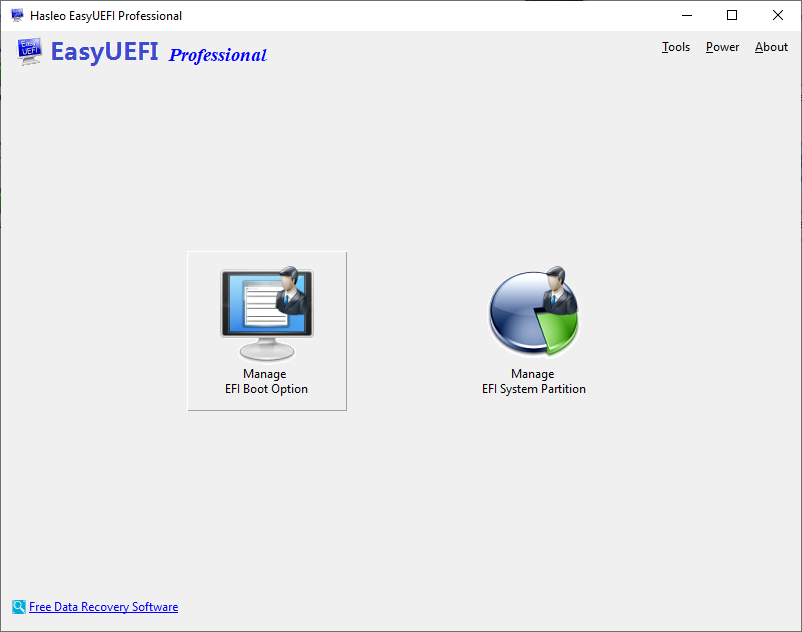
The home screen: manage EFI boot options, BCD boot options or the EFI System Partition.
Features
Full control of the UEFI boot order
EasyUEFI Professional creates, deletes, edits, cleans up, backs up and restores UEFI boot options, and changes the boot sequence, all from inside Windows. You don't have to catch the right key at startup or learn your motherboard's menu.
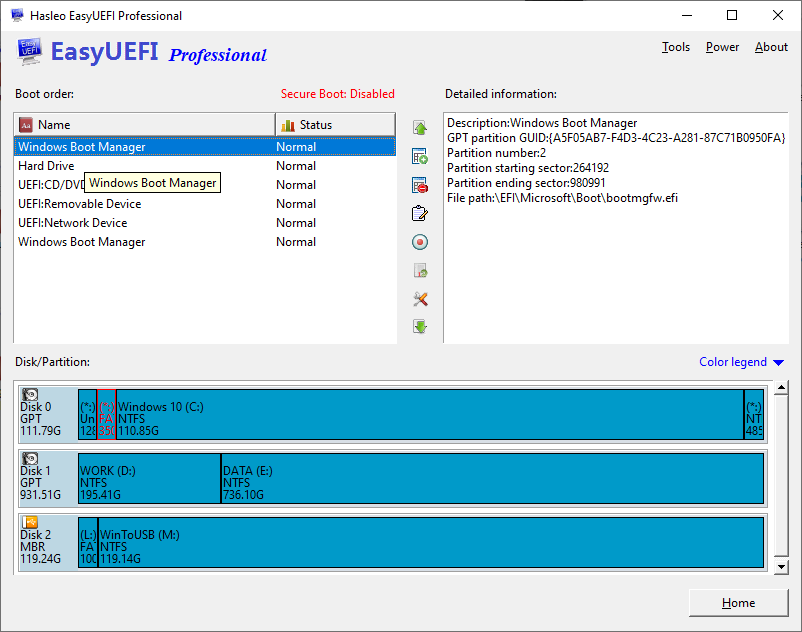
The boot order list, with details of the selected entry on the right and the disk map below.
BCD boot entries without the command line
EasyUEFI Professional manages the Windows Boot Configuration Data too: create, edit and delete BCD entries, set the default, change the display order, and back them up. Hasleo documents entries for Windows, WinPE and VHD(X) files.
EFI System Partition backup, rebuild and move
EasyUEFI Professional can back up, restore, rebuild, delete, explore, read and write the EFI System Partition, and move it to another drive. That last one matters when you retire the old disk that happens to hold the boot files.
WinPE rescue disk
EasyUEFI Professional builds a Windows PE emergency disk, so you can boot it and repair damaged or missing UEFI entries, BCD entries or the EFI partition when Windows itself won't start.
Command line use
EasyUEFI Professional also supports the command line, which helps technicians who script the same fix across several machines.
Benefits
- You see what you're changing. Each entry shows its partition and file path, which beats reading raw
bcdedit output. - You don't reboot to experiment. Order changes happen in Windows, so there's no hunting through firmware screens that differ on every board.
- You have a way back. Backups of the boot entries and EFI partition turn a risky edit into a reversible one.
Real-World Uses
- A Linux entry vanished. After a Windows update, your distro no longer appears in the boot menu. You add a new entry pointing at its EFI file.
- You're retiring an old drive. Windows lives on a new SSD, but the EFI partition is still on the old disk. You move it across before you pull the drive.
- A PC won't start. You boot the WinPE disk on it, rebuild the EFI partition, and recreate the boot entry.
- You boot a VHDX for testing. You add a BCD entry for the virtual disk rather than editing the store by hand.
Who It's For, and Who Should Skip It
Buy it if you run more than one operating system, repair PCs, or have a boot problem and want a visual tool. The 2 PC license covers a main machine and a second one, and business use is allowed.
Skip it if your PC uses legacy BIOS/MBR, since EasyUEFI only works on UEFI systems. Skip it too if you only need to change the boot order once, because your firmware setup screen does that for free. Windows Server needs the Enterprise edition.
Usage Guide
- Download and install the trial, then run it.
- To add an entry, click Manage EFI Boot Option on the home screen, then the add button beside the list.
- Pick the entry type and a description, select the target partition, and set the file path, then click OK.
- Move the new entry to the top if it should boot first.
- To register, click About, then Activate license, enter the license code from your order email, and restart EasyUEFI.

Creating an entry: type, description, target partition and file path.
Where it falls short
- Moving a boot partition isn't always one click. A forum user who moved it to an NVMe drive in September 2025 still got "No bootable device", and support's first question was whether the new entry was set as the primary one.
- The trial clock is strict. Two users on Hasleo's forum saw "The trial period has expired" about an hour after installing, once their PC clocks shifted, and Hasleo declined to reset it.
- Server support costs far more. Windows Server needs Enterprise, at $199.95 for V6 or $299.95 with lifetime upgrades on the vendor's store.
- Independent reviews are thin. We found no long hands-on test, so what follows is short comments.
What Users Say
EasyUEFI has a small trail of public opinion: AlternativeTo comments, a download-site summary, and Hasleo's own forum. Read this as a handful of voices, not a survey.
AlternativeTo
"Useful on dual boot setup when ESP (EFI system partition) of your linux distro doesn't shows up anymore" Alexandre ZANNI, 5 stars, February 19, 2023
"A fancified way to change Boot Order vs going into Bios, but it doesn't rebuild Master Boot Record (MBR)" TBayAreaPat, 4 stars, August 10, 2022
ZANNI replied: "There is UEFI in EasyUEFI, MBR is not supported by UEFI, EasyUEFI will only work with ESP (EFI boot partition)." and "Use EasyBCD instead if you are using legacy BIOS/MBR combo."
FileHorse
FileHorse's review by Michael Reynolds lists these pros: "Intuitive user interface", "Comprehensive features for managing UEFI boot options", "Multi-language support" and "Backup and restore functionality for boot configurations". Its cons are "Limited free version" and "Windows-exclusive software".
Hasleo forum
"I launched it, made sure it was working fine, and exited. Nice piece of software." sarret, May 2018, in a post that goes on to complain the trial expired after an hour.
"I just upgraded my computer and installed a new NVMe SSD. I want to move the EFI partition from the old drive to the new drive using EasyUEFI to boot directly from NVMe. However, after copying and adjusting the boot entry, the computer still reports No bootable device." TravisEdwards, September 2025
The pattern: people like it for the dual-boot rescue it was built for, and the complaints are about its limits (no MBR) and the trial, more than about what it does.
Comparisons
EasyUEFI vs EasyBCD
EasyUEFI works on the firmware boot list and the EFI partition as well as BCD. EasyBCD is what users recommend for legacy BIOS/MBR setups, which EasyUEFI doesn't touch. On a UEFI PC with a damaged EFI partition, EasyUEFI is the one that fits.
EasyUEFI vs bcdedit and firmware setup
Windows' bcdedit and your firmware setup screen are free and already there. If you know the commands, they handle plenty. EasyUEFI earns its price when you want a visual view, EFI partition backup and moves, and a WinPE rescue disk in one place.
Editions and Pricing
| Edition | Upgrades | Price | PCs | Adds |
|---|
| Professional (this listing) | Lifetime free upgrades | $44.95 at checkout | 2 PCs | Boot entries, BCD, EFI partition, WinPE, command line, business use |
| Professional V6 | V6 only | $29.95 at checkout | 2 PCs | The same features, without future major versions |
| Enterprise V6 | V6 only | $199.95 on the vendor's store | Unlimited, same site | Windows Server support |
| Enterprise | Lifetime free upgrades | $299.95 on the vendor's store | Unlimited, same site | Windows Server support |
FAQs
Does EasyUEFI work on a PC with legacy BIOS?
EasyUEFI needs a UEFI-based Windows system. On a legacy BIOS/MBR PC it has nothing to manage, and users point to EasyBCD for that setup.
Can EasyUEFI manage Linux boot entries?
EasyUEFI handles boot entries for both Windows and Linux on UEFI systems, although the program itself runs on Windows. That's why dual-boot users reach for it when a distro disappears from the boot menu.
How many PCs does an EasyUEFI Professional license cover?
EasyUEFI Professional activates on two computers, and Hasleo says you can't transfer it from one computer to another once it's registered.
Is EasyUEFI safe to use on my only PC?
EasyUEFI writes to the same boot data your PC needs to start, so a wrong change can leave it unbootable. Its backup tools and WinPE disk exist for that reason: set both up before you edit anything.
Does EasyUEFI run on ARM PCs?
EasyUEFI lists UEFI-based Windows 7 or later on x86, x64 and ARM64 processors, so ARM64 Windows laptops are covered.
Can I get a refund if EasyUEFI doesn't suit me?
EasyUEFI falls under Hasleo's policy of up to 30 days, which covers technical faults support can't fix. A change of mind or buying the wrong product isn't covered, though Hasleo says it may exchange the product.
System Requirements
- UEFI-based Windows 7 or later on x86, x64 or ARM64
- Destination systems: EFI/UEFI-based Windows or Linux
- 1024 MB of free disk space
Conclusion
EasyUEFI Professional is worth $44.95 if you deal with boot problems more than once. The one reason to buy it is having the firmware boot list, BCD and the EFI partition in a single window, with a rescue disk for when Windows won't start. The main reason not to is a PC on legacy BIOS, or a one-off boot-order change your firmware handles for free. If you'll never want a future major version, the V6 license at $29.95 saves you $15.
Download Free TrialBuy Now