BitLocker Anywhere Home: BitLocker for Windows Home Editions
Hasleo BitLocker Anywhere Home is a $14.98 one-time Windows tool that adds BitLocker drive encryption to Windows 11, 10, 8 and 7 Home, which leave that feature out. It suits home users who want the C: drive or an external drive encrypted without paying for an upgrade to Windows Pro.
It encrypts and decrypts drives, changes passwords, and exports recovery keys. The drives it encrypts use standard BitLocker, so other Windows PCs can read them with the password.
Quick facts
- Version: 9.9, released May 25, 2026
- Developer: Hasleo Software
- Runs on: Windows 7 or later on x86 and x64, Windows 10 or later on ARM64
- Encryption: AES-CBC or XTS-AES, 128-bit or 256-bit
- File systems: FAT 12/16/32, exFAT and NTFS
- Price: $14.98 once for 1 PC, with lifetime free upgrades
- Refunds: up to 30 days, for technical problems that support can't solve
- What we checked: x86/x64 installer file version 9.9.0.2 (44.1 MB) downloaded from the vendor and checkout price $14.98 on November 6, 2026. We read the version from the file's properties and didn't encrypt a drive with it
Download Free TrialBuy Now
Before you buy
- Lose the password and the recovery key, and the data is gone. Save the key somewhere other than the encrypted drive.
- The trial can't encrypt your C: drive. Hasleo confirmed this on its forum: only the paid version encrypts the Windows partition. Test it on a data drive or USB stick.
- Back up before you encrypt the system drive. Hasleo recommends it too, and you should have a USB keyboard to hand (see "Where it falls short").
- Check your device first. Many newer laptops running Windows Home already have Device Encryption, which covers the system drive for free.
- Home is for personal use, on one PC, up to 2 TB per volume. Work use or bigger volumes need Professional, at $19.98.
Overview
BitLocker ships with Windows Pro and Enterprise, but not with Windows Home. Home editions can read and write BitLocker drives, yet they can't turn BitLocker on or take it off. If your laptop gets stolen, an unencrypted drive is an open book.
BitLocker Anywhere fills that gap with a small window listing your drives. Right-click one, choose Turn on BitLocker, set a password, save the recovery key, and wait. Hasleo says the encryption is fully compatible with Microsoft's BitLocker, and it first released the product in 2018.
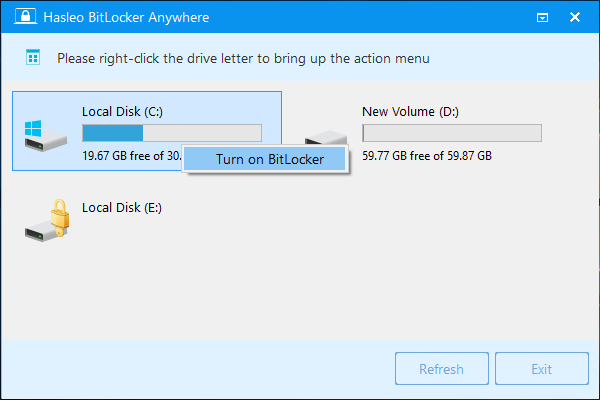
The main window: right-click a drive to turn on BitLocker.
Features
Encrypt the C: drive or data partitions
BitLocker Anywhere Home encrypts the Windows system drive and data partitions on hard disks, SSDs, USB and Thunderbolt drives and SD cards. You choose used-space-only or full-drive encryption, 128-bit or 256-bit strength, and compatible (AES-CBC) or new (XTS-AES) mode.
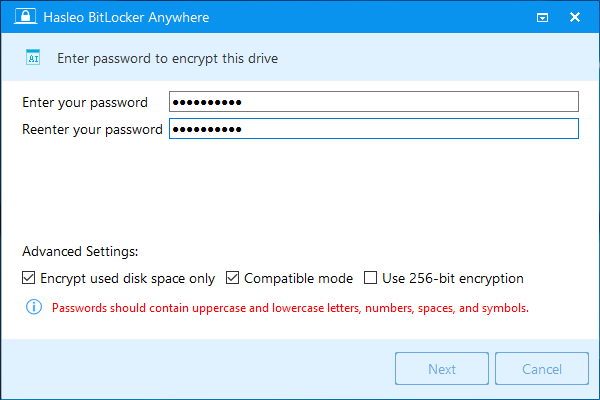
Setting the password, with used-space, compatible-mode and 256-bit options.
Decrypt drives Windows Home can't
BitLocker Anywhere Home turns BitLocker off on FAT, exFAT and NTFS drives. Windows Home can't do that by itself, which matters if a drive came from a Pro machine and you want it back to normal.
Manage passwords and keys
BitLocker Anywhere Home changes the password on an encrypted drive, and exports its recovery key and startup key (.BEK file). If you misplaced a key but can still open the drive, you can export it again.
Lock and auto-unlock
BitLocker Anywhere Home locks an encrypted drive from its window, a job that otherwise needs the manage-bde command. It also turns auto-unlock on or off, so a data drive can open by itself when you sign in.
Start Windows 7 with a password or USB key
BitLocker Anywhere Home can encrypt and start Windows 7 with a password or a startup-key USB drive, which is useful if you still keep an old PC in service.
Benefits
- You keep Windows Home. There's no edition upgrade and no reinstall.
- Your drives stay standard. An external drive encrypted here opens on other Windows PCs with the password, with no extra software.
- It costs once. Lifetime upgrades and technical support are in the price.
Real-World Uses
- A laptop that travels. You encrypt C: so a lost machine doesn't hand over your documents.
- A backup drive in a bag. You encrypt an external drive, with auto-unlock at home.
- A drive from an old work PC. You decrypt it on your Home laptop so it behaves like a normal disk.
- A forgotten key. You export the recovery key from a drive you can still open, and store it safely.
Who It's For, and Who Should Skip It
Buy it if you're on a Home edition, your PC doesn't offer Device Encryption, or you want BitLocker on external drives and full control of passwords and keys.
Skip it if you already run Windows Pro, since BitLocker is built in. Skip it for business use (that's the Professional edition), and if you want a free, audited tool and don't mind a separate format, VeraCrypt is the usual alternative. Also skip it for encrypting one folder: a full-drive tool is overkill.
Usage Guide
- Download the X86/X64 or ARM64 trial, install it and run it.
- Activate your license if you plan to encrypt C:.
- Right-click the drive and choose Turn on BitLocker.
- Enter a password, pick your encryption settings, and click Next.
- Save the recovery key away from the drive you're encrypting, then click Next.
- Wait for it to finish, without turning off the PC or removing the drive. Encrypting the system drive also involves a restart.
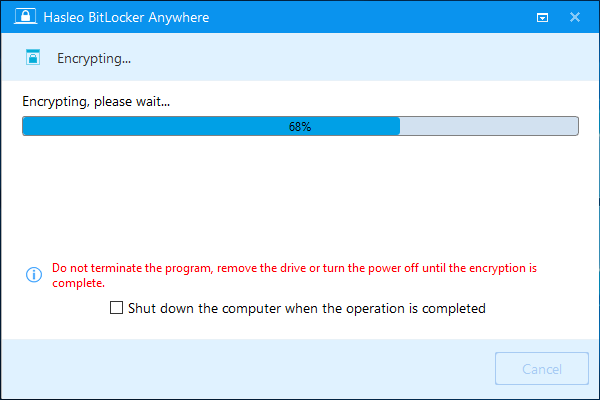
Encryption in progress. The window warns you not to end the program or remove the drive.
Where it falls short
- A keyboard problem can lock you out at startup. One buyer's laptop keyboard stopped responding at the BitLocker password screen. A USB keyboard solved it, and Hasleo refunded him and blamed a Windows bug.
- The system drive step can fail. A Windows 11 user hit a "failed to load system API" error after restarting to encrypt C:.
- Trial testing is limited. You can't try the main job, encrypting C:, before you pay.
- No command line in Home or Professional. The CLI needs a special edition you request from Hasleo.
- It's Hasleo's own implementation. Hasleo says it wrote its own version of the BitLocker algorithm, and we found no independent security audit, so you're trusting its word.
What Users Say
Independent coverage is limited. TrishTech wrote a proper review, and the rest comes from Hasleo's own forum, where people go when something's wrong, so it skews toward problems.
TrishTech (January 10, 2025)
"For users of Windows Home editions, Hasleo BitLocker Anywhere can be a life saver."
"Its ease of use and affordability make it an excellent choice for those who prioritize data security. However, users with broader professional needs may still consider the long-term benefits of upgrading to Windows Pro."
Hasleo forum: complaints
"Booted laptop and password screen appears but keyboard is totally unresponsive." Figaro, November 2018, who added after fixing it: "Product Dev and Application Mgmt leave a LOT to be desired."
"Well, no testing == no sale" hasors, March 2025, on the trial refusing to encrypt the Windows partition.
"I'm trying to encrypt C drive and after my PC reloads, I'm getting an error saying "failed to load system API"." mkors, January 2023
Hasleo forum: is it legit?
"It seems tempting as a quick and cheap alternative to upgrading to win 10 pro. But is it legit?" JackelineBogan, August 2025
"Hasleo BitLocker Anywhere is not new software. The first version of Hasleo BitLocker Anywhere was released in 2018" and "We didn't do the thing of cracking Windows, we just encrypted the disk data using the BitLocker encryption algorithm we implemented, so we don't think there's a legal issue." Hasleo support, in reply
The pattern: it does what it says for most, the price is the draw, and the risk sits in the system-drive step. Encrypting a data drive first is the low-risk way in.
Comparisons
BitLocker Anywhere vs upgrading to Windows Pro
Upgrading gives you Microsoft's own BitLocker plus Remote Desktop and Group Policy, at a much higher price. BitLocker Anywhere gives you just the encryption. If you'd use the other Pro features, upgrade.
BitLocker Anywhere vs Device Encryption
Device Encryption is free on supported Home PCs, but it only covers the system drive setup Windows chooses. BitLocker Anywhere adds passwords you pick, external drives, and decrypting.
Editions and Pricing
| Edition | Price | PCs | Limit | Use |
|---|
| Home (this listing) | $14.98 at checkout | 1 PC | Volumes up to 2 TB | Personal use only |
| Professional | $19.98 at checkout | 1 PC | Volumes over 2 TB | Home office and business |
| Enterprise | $299 on the vendor's store | Unlimited, same site | Volumes over 2 TB | Organizations |
| For Mac / For Linux Professional | $19.98 at checkout | 1 machine | Other platforms | Separate products |
FAQs
Is BitLocker Anywhere the same encryption as Microsoft BitLocker?
BitLocker Anywhere produces drives Hasleo describes as fully compatible with Microsoft's BitLocker, so a drive encrypted on Home opens on Windows Pro with the same password.
Does BitLocker Anywhere Home work on Windows 11 Home?
BitLocker Anywhere Home supports Windows 11, 10, 8.1, 8 and 7 Home and Windows 7 Professional. It also runs on Pro, Enterprise and Server editions.
Can I move my BitLocker Anywhere license to a new PC?
BitLocker Anywhere Home is licensed to one computer, and Hasleo says you can't transfer it from that computer to another.
Is BitLocker Anywhere free?
BitLocker Anywhere has a free trial but no free edition. The trial doesn't encrypt or decrypt the Windows boot partition, so you need a license for that.
What happens if I uninstall BitLocker Anywhere?
BitLocker Anywhere drives remain standard BitLocker drives, and Windows Home can still read and write them with the password. You'd lose the tool for turning BitLocker off, so decrypt first if you want a plain drive.
Does BitLocker Anywhere run on ARM laptops?
BitLocker Anywhere added native ARM64 support in version 9.9, with a separate ARM64 download for Windows 10 or later.
System Requirements
- Windows 7 or later on x86/x64, Windows 10 or later on ARM64
- 512 MB of RAM, 1024 MB recommended, and a 1 GHz processor
- 200 MB of free disk space
- Devices: hard disks, SSDs, USB and Thunderbolt drives, SD and CF cards
Conclusion
BitLocker Anywhere Home is worth $14.98 if you're on Windows Home and want BitLocker on a data or external drive, or don't have Device Encryption. The one reason to buy it is real BitLocker without paying for Windows Pro. The main reason not to is that you can't test the system-drive step first, and that's where the forum problems sit, so back up and keep a USB keyboard nearby.
Download Free TrialBuy Now