DoYourData NTFS for Mac: Write to Windows Drives on macOS
DoYourData NTFS for Mac is a $29 per year macOS driver that makes Windows-formatted NTFS drives writable, so you can copy, edit and delete files on them without reformatting. It is for Mac users who share external drives with Windows PCs, on macOS 10.13 through macOS 27.
Plug an NTFS drive into a Mac and it opens read-only: you can look but not touch. That is a nuisance when a colleague hands you a Windows-formatted disk, or when your backup drive has to work on both systems.
Quick facts
- Version: 2.6
- Developer: DoYourData
- Platforms: macOS 10.13 to macOS 27, on Intel, T2 and Apple silicon Macs
- Price: $29.00 for the 1 Year License, which covers 2 Macs
- Trial: free download
- Guarantee: 30 days, money back
- What we checked: trial disk image (7 MB) on the vendor's server, dated January 22, 2026, and checkout price $29.00 on November 9, 2026. We did not install the driver on a Mac.
Before you buy
- Apple silicon Macs need a security change. You restart into macOS Recovery, select Reduced Security and allow kernel extensions from identified developers, then restart. If your Mac is managed or you do not want to lower that setting, this is a dealbreaker.
- Formatting may be the simpler answer. If a drive holds nothing you need and has to work on both systems, exFAT works natively on Mac and Windows at no cost.
- Turn off any VPN when you activate. Activation needs a network connection.
Download Free TrialBuy Now
Overview
The window lists your NTFS disks and other disks on the left. Select one, and the right side shows its size, file system and current state, with a row of buttons above: Open, Mount or Unmount, Rename, Format, First Aid and Eject. A single Enable Writable button changes a read-only drive to read-write.
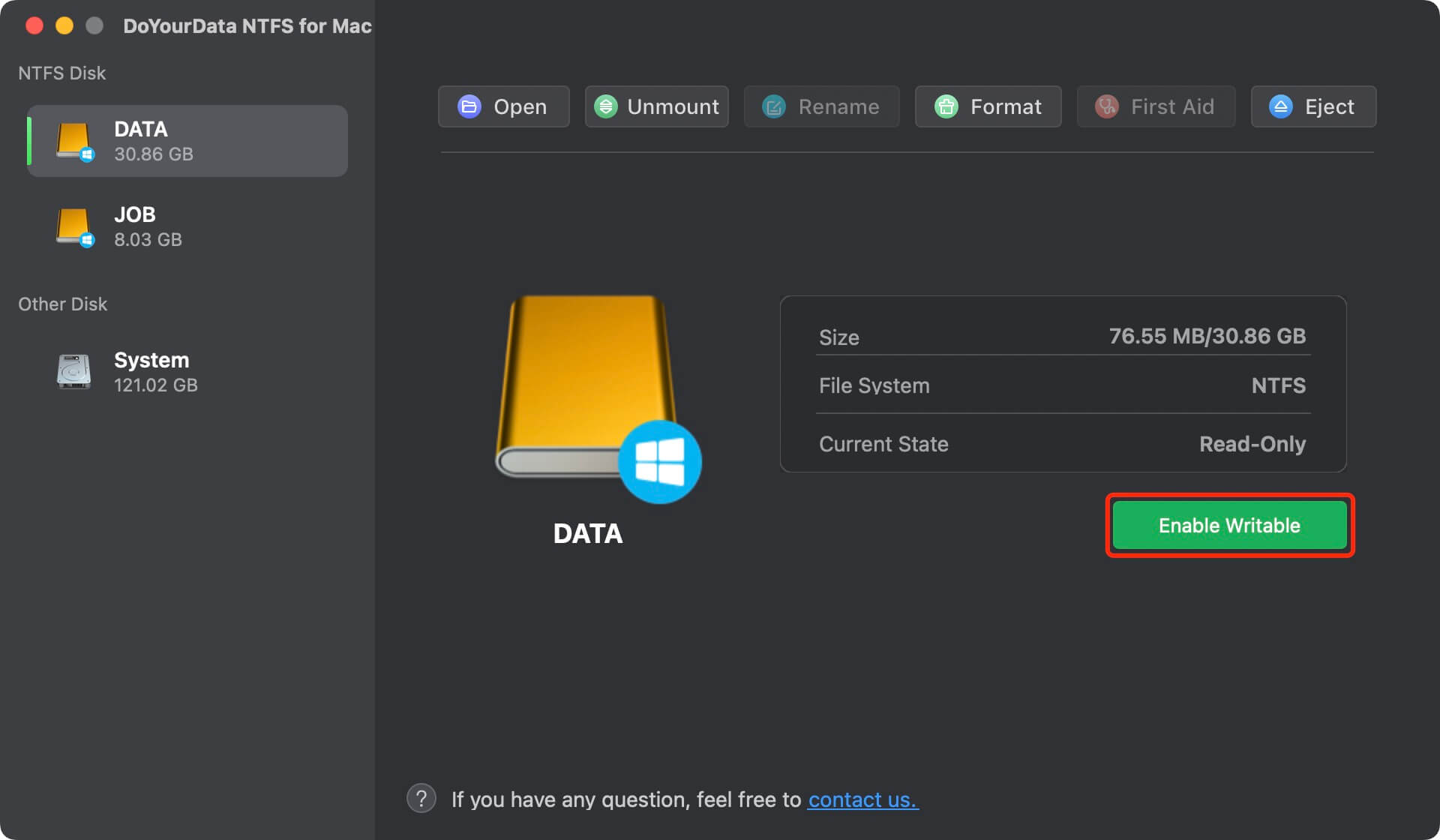
An NTFS drive in its default Read-Only state, with the Enable Writable button outlined.
Features
One-click write access to NTFS drives
DoYourData NTFS for Mac lets you add, edit, save, move, rename and delete files on an NTFS drive once you click Enable Writable, and it does not require reformatting the drive.
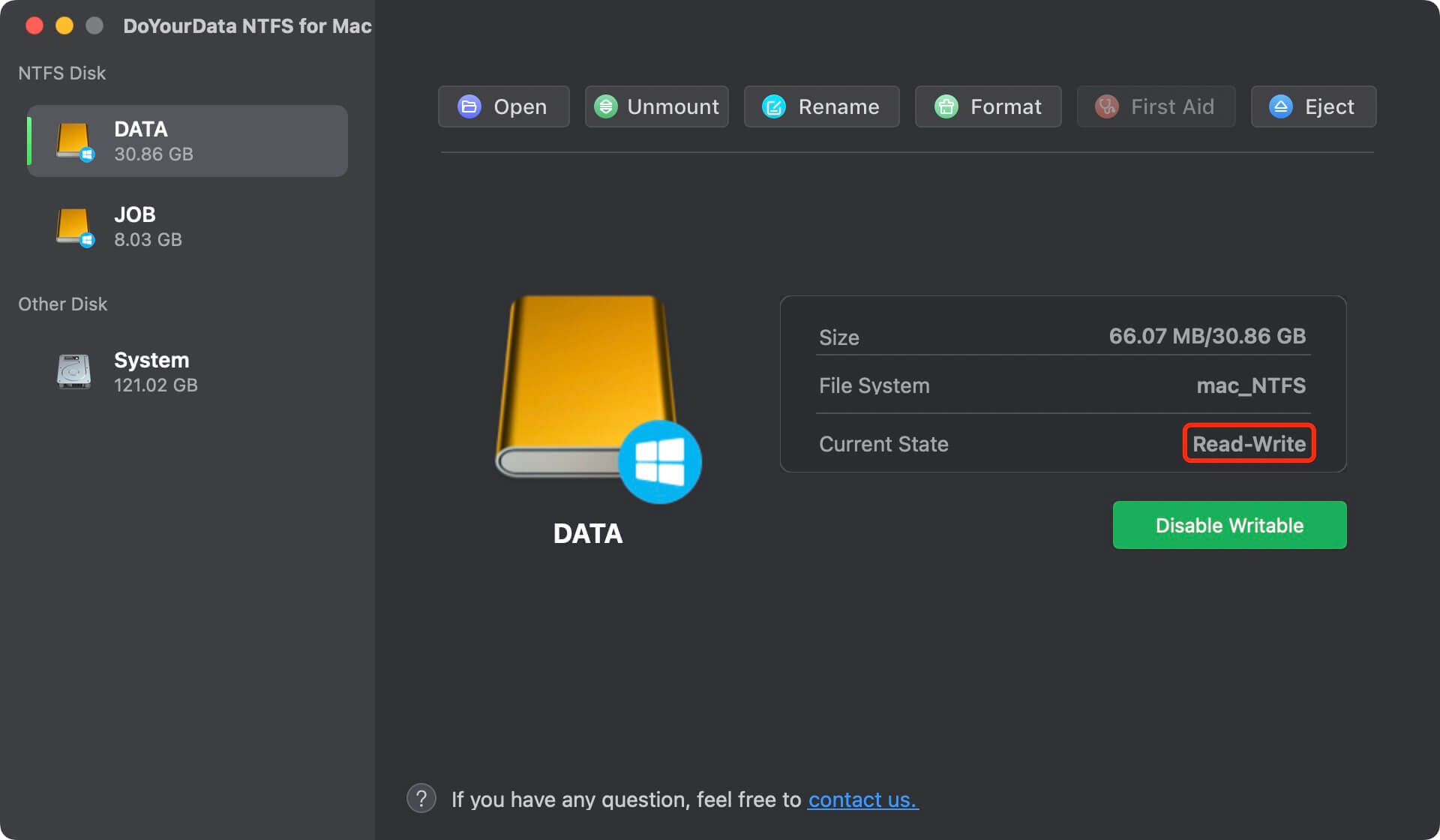
The same drive after Enable Writable, now showing Read-Write.
Mount and unmount drives
DoYourData NTFS for Mac can mount or unmount NTFS disks from its main window, which helps when an external drive is connected but does not appear in Finder.
Format and repair
DoYourData NTFS for Mac formats a drive to NTFS, or from NTFS to exFAT, Mac OS Extended or APFS. Its First Aid button checks a drive for errors and tries to fix them.
Handles non-NTFS drives too
DoYourData NTFS for Mac lists other volumes such as APFS, Mac OS Extended, exFAT and FAT32 under Other Disk, with the same open, rename, format, First Aid, mount and eject actions.
Benefits
You stop reformatting drives or emailing files to yourself just to move them between Windows and macOS. A drive can stay NTFS for the Windows PC that depends on it while being fully usable on your Mac.
Real-World Uses
- Editing documents directly on a colleague's Windows-formatted USB drive.
- Keeping one large portable SSD in NTFS for use on both a Mac and a Windows 11 PC.
- Saving video exports from a Mac to an NTFS archive drive.
- Reformatting a drive to exFAT from the same window once you have copied the data off.
Who It's For, and Who Should Skip It
Good fit: anyone who regularly moves between Macs and Windows PCs with drives that have to stay NTFS.
Skip it if your drive could simply be exFAT, since that costs nothing, or if you are on a company-managed Apple silicon Mac where Reduced Security is not allowed.
Usage Guide
- Install the program, open it from Launchpad, click Activation and enter your license code.
- On an Intel or T2 Mac, click Enable Writable, click Allow under System Preferences > Security & Privacy, restart, then click Enable Writable again.
- On an Apple silicon Mac, restart into macOS Recovery, open Startup Security Utility and choose Reduced Security with kernel extensions allowed. After restarting, click Enable Writable, click Allow under Privacy & Security, and restart once more.
- With the drive connected and selected under NTFS Disk, click Enable Writable.
- Use the drive as normal, and eject it from the app when you are done.
Where it falls short
- Lowering Apple silicon security is a real cost, and it applies to every NTFS driver that relies on a kernel extension.
- MacUpdate shows a single 1-star rating complaining that the program could not be uninstalled.
- Apart from the comments the vendor publishes, there is almost no outside feedback.
What Users Say
There is very little independent feedback on this product.
MacUpdate: 1.0 from 1 rating
“not possible to. uninstall” nextrol, October 2023, on version 2.0
Customers quoted on the vendor's page
“It works well on my M2 MacBook Pro. After downloading it, it quickly grant the write access to my WD external hard drive. No need to formatting my disk or do a driver update.” Horman
“I have a Samsung portable SSD which backed up my Windows 11 files. I use DoYourData NTFS for Mac to give write access to it and now, I can use this SSD on both Windows 11 and my MacBook Air.” Lili Lata
“An very easy-to-use tool. I also tried other NTFS for Mac tools, but most of them are very difficult to use.” Brad Kenny
The vendor picks which comments appear here.
The positive comments center on the one-click approach, and the single outside rating is about removing the app, so try uninstalling it during the guarantee period if that matters to you.
Editions and Pricing
| License | Price | Term | Macs |
|---|
| 1 Month | $15.00 | 1 month | 2 |
| 1 Year | $29.00 | 1 year | 2 |
| Lifetime | $49.00 | Lifetime | 2 |
FAQs
Does DoYourData NTFS for Mac work on Apple silicon Macs?
DoYourData NTFS for Mac supports Apple silicon, Intel and T2 Macs. On Apple silicon you must first set Reduced Security and allow kernel extensions in macOS Recovery.
Will DoYourData NTFS for Mac erase what is on my drive?
DoYourData NTFS for Mac enables writing without formatting, so your existing files stay in place. Only its Format button erases the drive.
Which macOS versions does DoYourData NTFS for Mac support?
DoYourData NTFS for Mac runs on macOS 10.13 through macOS 27, including macOS 26 Tahoe and macOS 15 Sequoia.
Can DoYourData NTFS for Mac format a drive to NTFS?
DoYourData NTFS for Mac can format a drive to NTFS, and can format an NTFS drive to exFAT, Mac OS Extended or APFS.
Does a DoYourData NTFS for Mac license work on two Macs?
The DoYourData NTFS for Mac 1 Year License covers 2 Macs.
System Requirements
- macOS 27, 26, 15, 14, 13, 12 or 11, or macOS 10.15 to 10.13
- Intel, T2 or Apple silicon Mac
- Apple silicon Macs: Reduced Security with kernel extensions allowed
- Network connection for activation
Conclusion
Good value if your drives have to stay NTFS. DoYourData NTFS for Mac does one job with almost no learning curve, and $29 is a modest price for a year of write access. The reason to buy is that one-click switch to read-write. The main reason not to is the Apple silicon security change, and exFAT remains the free answer for any drive you can reformat. If you expect to keep using it, the $49 lifetime plan pays for itself in under two years.
Download Free TrialBuy Now