Cisdem Duplicate Finder for Mac: Content-Based Duplicate Cleanup for Folders, Photos and Music
Cisdem Duplicate Finder for Mac is a $39.99 one-time-purchase utility that finds duplicate files by comparing their content, not their names, across your Mac's folders, external drives, and the Photos and Music libraries, and then removes the extra copies while keeping one original. It's for Mac owners whose disk is filling up with repeated downloads, double photo imports and copied backup folders.
Duplicates pile up quietly: the same holiday photos imported twice, "Report (1).pdf" next to "Report.pdf", a music folder copied to an external drive and back. Searching by file name misses most of them, because the copies rarely share a name. Duplicate Finder reads the files themselves, groups identical ones together, and shows you how many gigabytes you'd get back before you delete anything.
Quick facts
- Developer: Cisdem Inc.
- Version: 6.5.0 for Mac, released December 15, 2023
- Platform: macOS 10.11 El Capitan through macOS 26 Tahoe, Intel and Apple Silicon (the Windows version is a separate purchase)
- Finds: duplicate documents, images, music, videos, archives, folders and "other" files, plus similar (not identical) photos
- Scans: any folder, external drives, Photos libraries and the Music/iTunes media folder
- Price: $39.99 lifetime license for one Mac; $19.99 a year as a subscription
- Trial: free download that scans and previews everything, but won't bulk-delete the selected duplicates
- Languages: English, German, French, Italian, Spanish, Portuguese, Japanese
- Guarantee: 30-day money-back guarantee
- What we checked: the Mac installer from Cisdem (cisdem-duplicatefinder.dmg, 9.7 MB, dated December 15, 2023, the date of the 6.5.0 release notes), and the order page on November 4, 2026, which showed "Cisdem Duplicate Finder for Mac - Lifetime License" at $39.99 as a one-time purchase with no renewal. We didn't run a scan on our own files.
Before you buy
- The Mac and Windows versions have drifted apart. Cisdem's product page now leads with AI photo-quality scoring, cloud-drive scanning and GPU acceleration. Those arrived in the Windows version (5.0.x, 2026). The Mac version is still 6.5.0 from December 2023, with no Mac release since.
- The trial is a full preview. Run it first: you'll see every duplicate group and the space you'd recover, so you know exactly what the $39.99 buys before you pay.
- Don't point it at the whole system drive. Cisdem's own guide says to scan your user folder, not the internal disk, because deleting "duplicate" system files can break macOS.
Download Free TrialBuy Now
Overview
The app opens on a single round drop zone. You drag in one or more folders, drives or photo libraries, press Scan, and watch a counter of files scanned, duplicates found and space they take. When it finishes, you get a results window with tabs across the top (All, Document, Image, Music, Video, Archive, Folder, Other and Similar Image), the duplicate groups on the left and the copies in each group on the right.
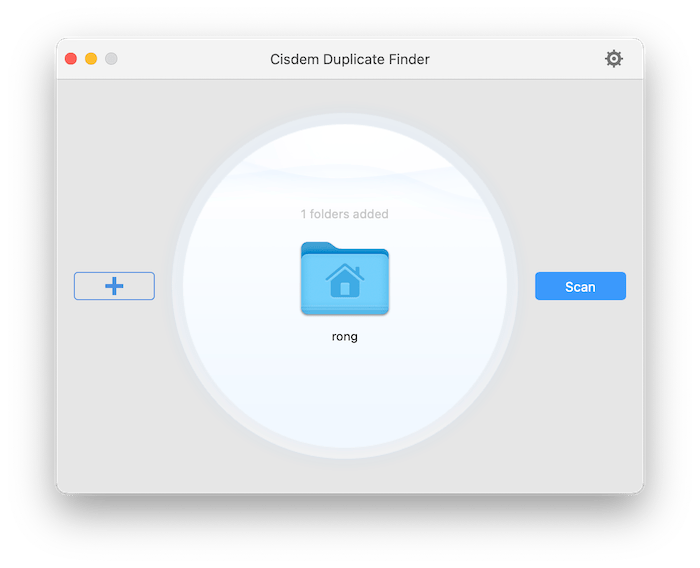
The start window with one home folder added to the drop zone, the + button to add more locations, and Scan.
In every group, Duplicate Finder ticks all copies but one, so a single click on Delete clears the lot. That default is what makes it fast; the selection rules and manual checkboxes are what make it safe.
Features
Matches by content, whatever the file is called
Cisdem Duplicate Finder compares what's inside each file, so "IMG_2041.jpg" and "beach-final.jpg" are caught as the same picture if they're byte-for-byte identical. It covers images (JPEG, PNG, HEIC and camera RAW such as CR2 and NEF), video (MP4, MOV, MKV), audio (MP3, M4A, OGG), Office files, PDFs and archives like ZIP and RAR, and it can also find whole duplicate folders.
Similar photos, kept apart from exact duplicates
Cisdem Duplicate Finder separates identical images (same format, size, resolution and content) from similar ones, such as a resized copy, a different format or an edited version. Exact duplicates are auto-selected for deletion; similar photos are never auto-selected, so you decide which shot to keep. If you do want help, Smart Select in the Similar tab picks the ones it recommends removing.
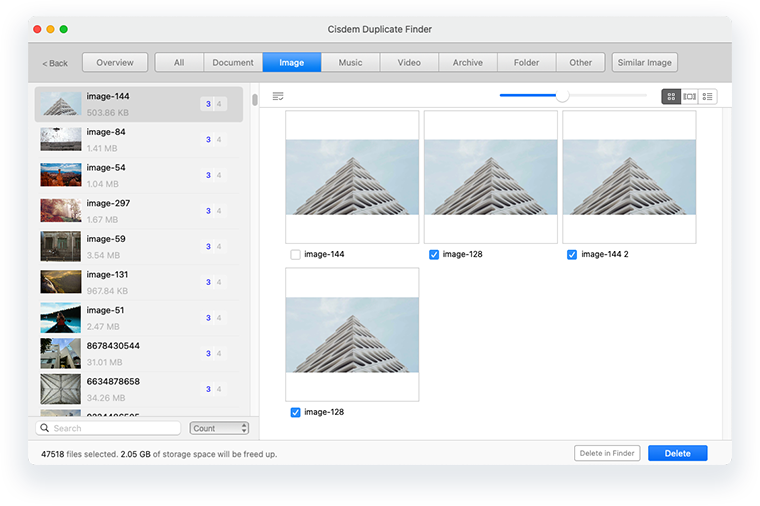
The Image tab: a group of four copies of the same photo with three ticked and one kept, and a status line reading 47,518 files selected, 2.05 GB to be freed.
Works inside the Photos and Music libraries
Cisdem Duplicate Finder can scan a Photos library (or several at once, to find copies between them) and send its deletions through the Photos app, so the library stays consistent; removed pictures land in Photos' Recently Deleted album. For music, you add the Music or iTunes Media folder and it removes the repeated tracks from disk.
Three ways to view, many ways to select
Cisdem Duplicate Finder shows each group as thumbnails, a list or an info view with full paths, and you can sort groups by name, size, count or type, or search them. Selection rules let you change which copy is kept, for example auto-selecting files with or without a certain Finder tag. An ignore list in Preferences keeps chosen files and folders out of future scans, and a size filter skips files above or below a limit you set.

The All tab with the Name / Size / Count / Type sort menu open, a five-copy photo group on the right, and 9,661 files (5.71 GB) selected for removal.
Removal you can take back
Cisdem Duplicate Finder moves duplicates to the Trash by default, and Window > Restore from Trash brings back anything you removed by mistake. Preferences offer two other removal methods: delete permanently, or move the copies to a folder you choose. A scan can be saved as a project file and reopened later, so a big cleanup doesn't have to happen in one sitting.
Benefits
- Space back without guesswork. The results tell you the gigabytes you'll recover before you delete.
- Less risk than a manual purge. One copy of every group is always left untouched by default, and Trash plus Restore covers mistakes.
- A tidier photo library. Removing doubles before they sync to iCloud saves cloud storage too.
- One payment. The lifetime license costs the same as two years of the subscription.
Real-World Uses
- A MacBook with a full SSD: scan your home folder, sort groups by size, and clear the large video and disk-image copies first.
- Merging old backups: drag in the Mac and an external backup drive together to find what exists in both places before you consolidate.
- Two Photos libraries after a migration: scan both libraries at once to remove pictures that were imported into each.
- A music collection copied too many times: scan the Media folder to drop repeated tracks, then empty the Trash so the Music app stops playing them.
Who It's For, and Who Should Skip It
It suits Mac users with years of accumulated photos, downloads and backup copies who want one tool that handles folders, external drives and the Photos library together, and who'd rather pay once than subscribe.
Skip it if your duplicates are only in Photos and you run macOS 13 Ventura or later: the Photos app's own Duplicates album merges identical pictures for free. If you're on Windows, buy the Windows edition instead; it's a separate product and currently the more actively developed one. And if you want a tool that judges which of ten similar shots is the sharpest, the Mac version doesn't do that.
Usage Guide
- Install: open the downloaded DMG and drag Cisdem Duplicate Finder to Applications, then launch it.
- Activate: click the key icon at the top right and paste your license code to turn on one-click deletion.
- Add locations: drag your user folder, an external drive or a .photoslibrary into the circle, or use the + button or File > Open.
- Adjust settings (optional): in Preferences, choose the removal method, set a minimum or maximum file size, and add folders to the ignore list.
- Scan and review: click Scan, then check the tabs. Look at Similar Image separately, since nothing there is selected for you.
- Delete and empty: click Delete, then empty the Trash (or Photos' Recently Deleted album) to actually free the space.
Where it falls short
- Space isn't freed until you empty the Trash. Deleted duplicates go to the Trash or to Recently Deleted in Photos, so your free space won't change until you empty them.
- Photos libraries can refuse deletion. Duplicate Finder can only delete from the library set as the System Photo Library. For another library, Cisdem's guide has you save the scan, switch libraries in Photos and reopen the project.
- Music needs an extra step. Songs moved to the Trash can still play from the Music app until you empty the Trash, and removing them from the library list takes a smart-playlist workaround in Cisdem's guide.
- No new Mac features since 2023. The 6.4.0 and 6.5.0 updates fixed bugs only; the newer AI photo scoring is Windows-only so far.
What Users Say
Cisdem Duplicate Finder has more independent feedback than most small Mac utilities. Most of it covers the product family as a whole (Mac and Windows), and Cisdem's support gets mentioned as often as the app.
Trustpilot: 4.9 out of 5 from 304 reviews (all Cisdem products)
87% of Cisdem's Trustpilot reviews are 5-star and 11% are 1-star. Reviews that name Duplicate Finder:
- "The duplicate finder is great. It's the best out of 6 I've tried and it works for multiple forms of media." (Brandon Lark, US, February 2026)
- "The software allowed me to eliminate all duplicates in my massive video archive." (Dmitry Ostroglyadov, NL, April 2026)
- "I needed to uninstall Cisdem Duplicate Finder from my old Mac and re-install it in my new Mac. I dropped a line of message to the Customer Support asking for assistance, and I got my problem solved within a few hours." (J M I, JP, May 2026)
- "Easy to understand and use utility; efficiently identified and allowed management of duplicate songs within iTunes." (Kevin Bourke, CA, November 2025)
- A 3-star review from Michael Voge (DE, August 2026), titled "CISDEM Duplicate File Finder has become increasingly difficult to use", says "the new interface is simply not very user-friendly" while still calling it "a very good and impressively fast program". He doesn't say which platform he uses.
Tech writers
- "Cisdem Duplicate Finder compares real file content, finds similar photos too, and reaches the Photos app and external drives. In my use the scan is solid. The thing to know before you commit: Cisdem lets the free trial find and preview duplicates, but it will not delete them for you until you buy a license, so the free run is really a paid preview." (Svitlana Varbanets, Medium)
- "This app can find and eliminate duplicate photos on Mac (including folders and the Photos app) and external storage devices. In addition, it can find duplicate videos, audio files, documents and other duplicate files." (Fossbytes staff)
- Peter Bennett of The Photo Managers picked Duplicate Finder after trying several others; Cisdem's review page sums up his verdict as a tool that did a good job finding and removing duplicates on both Windows and Mac and was quick to get started with.
Other ratings
Cisdem's review page lists G2 at 4.8, SourceForge at 4.0 and SoftwareSuggest and Product Hunt at 5.0. One G2 reviewer, Rizwan A., liked that "it can scan between my external hard drive and local folders"; that review mentions OneDrive support, which is a Windows-version feature.
The common thread: people trust the content matching and like having one original kept automatically. The complaints are about the trial's delete lock, interface changes, and license transfers to a new computer, which support usually sorts out quickly.
Comparisons
Duplicate Finder vs the Photos Duplicates album
On macOS 13 Ventura and later, Photos finds identical pictures in your library and offers to merge them, at no cost. That's enough if Photos is the only place your duplicates live. Duplicate Finder is for everything else: documents, music, video, archives, external drives, several Photos libraries at once, and similar (not identical) photos.
Mac version vs Windows version
The Windows edition (5.1.0, September 2026) has features the Mac one doesn't: AI photo-quality scoring to keep the best shot, and scanning OneDrive, Dropbox and Google Drive directly. Licenses don't cross over; each is sold separately.
Editions and Pricing
| License | 1 Mac | 2 Macs | 5 Macs | Term |
|---|
| Lifetime | $39.99 | $55.99 | $99.99 | One-time |
| Annual | $19.99 | $27.99 | $49.99 | Renews yearly |
| Business | $54.99 | $76.99 | $137.99 | One-time, for company use |
Prices from Cisdem's Mac store and the order page on November 4, 2026. The Buy Now button here opens the one-Mac lifetime license.
FAQs
Is Cisdem Duplicate Finder safe to use on my Mac?
Cisdem Duplicate Finder always leaves one copy in each group unselected, moves deletions to the Trash by default, and has a Restore from Trash command. The real risk is scanning system folders, so scan your user folder and data drives, not the whole startup disk.
Can Cisdem Duplicate Finder scan an external drive?
Cisdem Duplicate Finder scans external hard drives and SD cards like any folder, and you can add the Mac and the external drive together to find copies that exist on both.
Why didn't my free space go up after deleting duplicates?
Cisdem Duplicate Finder moves files to the Trash, or to Recently Deleted for a Photos library. Empty those, and the space is released.
Does the Mac license work on Windows too?
Cisdem Duplicate Finder for Mac and for Windows are separate products with separate licenses. The license on this page covers one Mac.
Can I move my license to a new Mac?
Cisdem Duplicate Finder licenses can be moved; several Trustpilot reviewers describe Cisdem support transferring theirs to a new computer within hours.
How can I make a large scan faster?
Cisdem Duplicate Finder scans faster if you turn off the similar-images option in its settings, so it only looks for exact duplicates. Excluding folders you don't need and setting a minimum file size also cut the work.
System Requirements
- macOS 10.11 El Capitan or later, through macOS 26 Tahoe
- Intel or Apple Silicon processor
- 512 MB RAM or more
- 50 MB free disk space for installation
Conclusion
Cisdem Duplicate Finder for Mac is worth $39.99 if your duplicates are spread across folders, drives and photo libraries and you want them gone in one pass without risking the originals. The content matching, the auto-kept original and Trash-based removal make it a careful tool rather than a blunt one. The reason to hesitate is that the Mac version hasn't gained a feature since late 2023, while the Windows version moved on to AI photo scoring. If Photos' free Duplicates album already covers you, skip it; if not, run the trial scan, and buy once you see how many gigabytes it finds.
Download Free TrialBuy Now