Cisdem Video Player for Windows: A Free Player for Almost Any File, with Optional Conversion
Cisdem Video Player for Windows is a free media player for Windows 10 and 11 that plays MKV, HEVC, AVI, 4K and most other formats with no codec packs. You pay only if you want its built-in converter, a $19.99 lifetime license. It is for people who want a clean alternative to VLC or the Windows default player.
Windows says it can't play a file, or asks you to buy a codec. Open the file here instead, and it usually just plays.
Quick facts
- Version: 3.2.0, released November 11, 2025
- Developer: Cisdem
- Platform: Windows 10 and 11, 64-bit. A separate Mac version exists.
- Plays: MP4, H.264, H.265/HEVC, MKV, AVI, MOV, WMV, TS, M2TS, AVCHD, RMVB, FLV, ISO, MP3, FLAC, DTS and more
- Resolution: up to 8K, with hardware acceleration
- Price: playback free. $19.99 lifetime for one PC at checkout adds conversion.
- Guarantee: 30-day money back on the paid license
- What we checked: installer size 68.1 MB from the vendor's download link, dated November 11, 2025, release notes and tech specs on the vendor's site, order page price $19.99 on November 6, 2026. We did not run 8K playback tests.
Download Free TrialBuy Now
Before you buy
You don't need to buy anything to watch video. Install the free player and use it for as long as you like. The $19.99 is only for converting files to other formats or device presets. If you never convert, keep your money.
Overview
Cisdem Video Player is a simple single-window player. Opened files join a playlist, and it remembers that list and your playback position. Version 3.0 in 2024 added incognito mode, a separate-window mode, a mini window and drag-to-sort playlists, while the 3.1 and 3.2 updates were maintenance. Screenshots on this page show the Mac version.

The playlist overlay and playback bar, shown in the Mac version.
Features
Plays nearly everything with no codec pack
Cisdem Video Player handles common and awkward formats alike, from MP4 and MKV to RMVB, TS, AVCHD and ISO, plus audio such as FLAC, DTS and APE. Nothing extra needs installing, which is a relief if you have ever hunted for a codec.
Smooth 4K and 8K playback
Cisdem Video Player is tuned for 1080p, 4K, 5K and 8K and uses hardware decoding to keep them smooth. As always, very high resolutions depend on your graphics hardware.
Playback control
Cisdem Video Player offers play, step forward and backward, rotate, chapter selection, in-order and loop playback, full-screen and mini windows, and an incognito mode. In Separate Mode, the video, controls and playlist become separate windows, which helps on a large or second monitor.

The Playback menu in the Mac version, with rotate, chapters, screenshots and Incognito Mode.
Subtitles, soundtracks and screenshots
Cisdem Video Player loads embedded subtitles automatically, adds external subtitle files, and matches subtitle files found in the same folder. You can switch between soundtracks in a file and capture a screenshot of any frame.
Paid conversion for your devices
Cisdem Video Player's optional license adds a Convert menu with formats such as MP4, HEVC MP4, MKV, WebM, AVI and M4V, audio formats, and presets by device maker, including Apple, Samsung, Huawei, Honor, Xiaomi, Google and Sony.
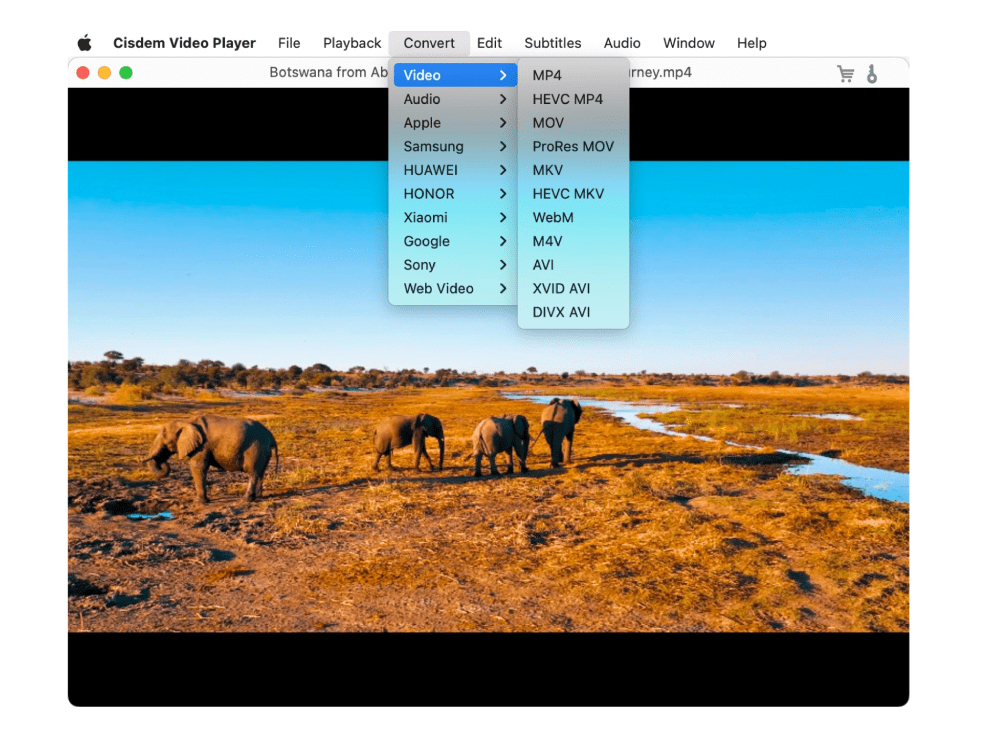
The Convert menu that the paid license adds, shown in the Mac version.
Benefits
- You can stop hunting for codec packs.
- No subscription and no fee for watching.
- Paying once for conversion costs far less than a full video suite.
- A small, plain interface means less to learn than most media players.
Real-World Uses
- You open an old RMVB or AVI file that Windows no longer plays.
- You watch a 4K MKV film with several language tracks and an external subtitle file.
- A family converts home videos to a phone preset for a trip.
- You play a long film in a mini window while you work.
Who It's For, and Who Should Skip It
Cisdem Video Player suits everyday viewers who want one player that opens everything, and who may want quick conversion now and then.
Skip it if you rely on streaming from the web, skins, an equalizer or strong library management, since reviewers miss all of these. Skip the paid license if you already own a converter or Cisdem VideoPaw. Keep VLC or a similar tool if you need network streams.
Usage Guide
- Download and run the installer, then open Cisdem Video Player.
- Drag in a video or use the File menu. It joins the playlist automatically.
- Use the bottom bar for volume, soundtrack, subtitles, playlist, screenshot and full screen.
- Add subtitle files through the Subtitles menu, or keep them in the same folder as the video.
- To convert, buy the license, register it, then choose a format from the Convert menu.
Where it falls short
Cisdem Video Player is deliberately basic. Guru99 says it "Lacks advanced audio controls and playlist management compared with more feature-rich players", and customers mention no equalizer, no skins and no way to stream from the internet. Weak library management also comes up. The update history has slowed, with the last version in November 2025 changing only the registration module, so don't expect many new features.
What Users Say
Independent write-ups
- "It is a lightweight yet capable video player for Windows 10 PC, focused on clean playback and wide format support." Guru99, whose tester adds "I liked how instantly it launched files without codec headaches or laggy buffering."
- "Lightweight design launches instantly and consumes minimal system resources during long playback sessions" Guru99, listing a con too: "Lacks advanced audio controls and playlist management compared with more feature-rich players"
SourceForge: 5.0 out of 5 from 1 review
- "Support wider formats than VLC" Albert S., June 16, 2025, who lists these cons: "Need to pay to unlock conversion" and "Weak library management"
Customers quoted on Cisdem's own site
Cisdem hosts these (22 entries for Windows), so give them less weight. They do include criticism.
- "it lacks some advanced functions I would like, like skin themes or audio equalizer settings. That said, the performance is excellent" Kyle, March 1, 2026
- "it could use a few more features, like the ability to stream videos from the internet directly" Tanner, February 16, 2026
- "Lightweight and clean design. Plays any video smoothly without hassle. I like that I can choose to pay only if I need video conversion." Susan, October 2, 2025
- "Finally a free player that just works. No ads, no bloat, just instant playback of any file." Louis, September 15, 2025
Trustpilot: 4.9 out of 5 from 304 reviews of Cisdem
This covers all Cisdem products and mostly praises support, which you may need for license questions.
- "Great product and fast customer response!" Jonas Ma, August 17, 2026
The pattern: people like the fast start, wide format support and the fact that playback is free. The complaints are the absent extras: equalizer, skins, streaming and a proper media library. Independent reviews are few, but it costs nothing to check.
Comparisons
Cisdem Video Player vs. VLC
VLC is free, open source and has network streaming, an equalizer and far more settings. Cisdem Video Player is simpler and tidier, and adds a one-time paid converter with device presets. If VLC already suits you, there is little reason to switch.
Video Player conversion vs. Cisdem VideoPaw
The $19.99 license covers converting files. VideoPaw for Windows at $69.99 adds downloading, disc ripping, recording and compression. Buy VideoPaw if you need those.
Editions and Pricing
| Plan | Price | License term | Devices |
|---|
| Free player | $0 | Unlimited | Any |
| Conversion feature | $19.99 | Lifetime | 1 PC |
| Double Pack | $27.99 | Lifetime | 2 PCs |
| Family Pack | $49.99 | Lifetime | 5 PCs |
Prices are from Cisdem's buy page, and $19.99 was confirmed on the order page. The Buy Now button here is for the 1-PC license.
FAQs
Is Cisdem Video Player for Windows really free?
Yes. Cisdem Video Player is free for playback. Only the conversion feature needs a license, so you never have to pay to watch video.
Does Cisdem Video Player need codec packs?
No. Cisdem Video Player includes what it needs and doesn't rely on third-party plugins.
Can Cisdem Video Player play DVDs or Blu-ray discs?
Cisdem lists DVD and Blu-ray ISO files as supported input, which means image files on your drive. For physical discs, test yours first with the free player.
Does Cisdem Video Player remember where I stopped?
Yes. Cisdem Video Player can remember your playlist and your playback position.
Does the Windows license of Cisdem Video Player cover a Mac?
No. The conversion license here is for Windows PCs, and the Mac version has its own buy page.
System Requirements
- Windows 10 or Windows 11, 64-bit
- 1 GHz or faster Intel or AMD processor
- 512 MB RAM or more
- 300 MB free space or more for installation
Conclusion
Cisdem Video Player for Windows is worth installing if you want a clean free player that opens nearly anything, and that decision costs nothing. The $19.99 conversion license is fair value if you often move videos to phones or other devices.
The main reason not to pay is that you only watch video. In that case, the free player is all you need, and VLC remains the stronger choice if you want streaming or deep settings.
Download Free TrialBuy Now