Cisdem PDFMaster for Windows: A Pay-Once PDF Editor with OCR, Forms and Redaction
Cisdem PDFMaster for Windows is an $89.99 one-time-purchase PDF editor for Windows 7 to 11 that edits the text and images inside a PDF, converts PDFs and scans to Word, Excel and PowerPoint with OCR, and handles forms, signatures, redaction and page work in one app. It suits home and small-office users who want most of what Acrobat Pro does without a monthly subscription.
You get a contract as a PDF, the client's name is wrong on page three, and the scanned annex can't be searched. Open it in PDFMaster, click into the paragraph and retype the name, run OCR on the annex, black out the account number with the Redact tool, sign, and save.
Quick facts
- Version: 4.5.0, released April 29, 2026
- Developer: Cisdem
- Platform: Windows 7, 8, 10 and 11, 32-bit and 64-bit. A separate Mac version exists.
- Converts to: Word (DOCX, DOC), Excel, PowerPoint, TXT, RTF, HTML, PNG and JPG
- Creates PDFs from: Word, Excel, PowerPoint, text, HTML and about 20 image formats
- Price: $89.99 one-time for one PC (personal use) at checkout. Business and annual licenses are also sold.
- Trial: 7 days with all features
- AI tools: summarize, rewrite, proofread and translate, paid with separate credits
- Guarantee: 30 days, for technical problems Cisdem can't fix
- What we checked: installer size 712 MB from Cisdem's download link, dated April 29, 2026, the same day as version 4.5.0 in the Windows release notes. Order page prices for all five licenses on November 17, 2026: $89.99 lifetime for 1 PC, $125.99 for 2 PCs, $224.99 for 5 PCs, $119.99 business and $59.99 a year. We didn't run our own editing or OCR tests.
Download Free TrialBuy Lifetime LicenseBuy Business LicenseBuy Annual License
Before you buy
- Personal vs. business: the $89.99 Lifetime License is for personal use. Cisdem sells the Business License ($119.99) for use at work. Both have the same features.
- AI costs extra: the license doesn't include the AI tools. They run on credits, which Cisdem sells at $14.99 for 50, and each run uses at least one.
- The refund is narrow: Cisdem's 30-day guarantee covers a technical problem its support can't fix. Changing your mind, buying for the wrong platform or missing a feature the product page doesn't list aren't covered, so use the 7-day trial to test your own files first.
- A big download: the installer is over 700 MB.
Overview
PDFMaster opens to a home screen with Open Files, Create PDF and six quick tools (Batch, Merge, Image to PDF, OCR, Convert and PDF to Word). Documents open in tabs. Inside a file, a ribbon of tabs groups the work: Annotate, Edit, Organize, Form, Convert, Protect and Tools, with a properties panel on the right for fonts, colors and settings. It's laid out much like Acrobat or PDFelement, so anyone who has used one of those finds their way quickly.
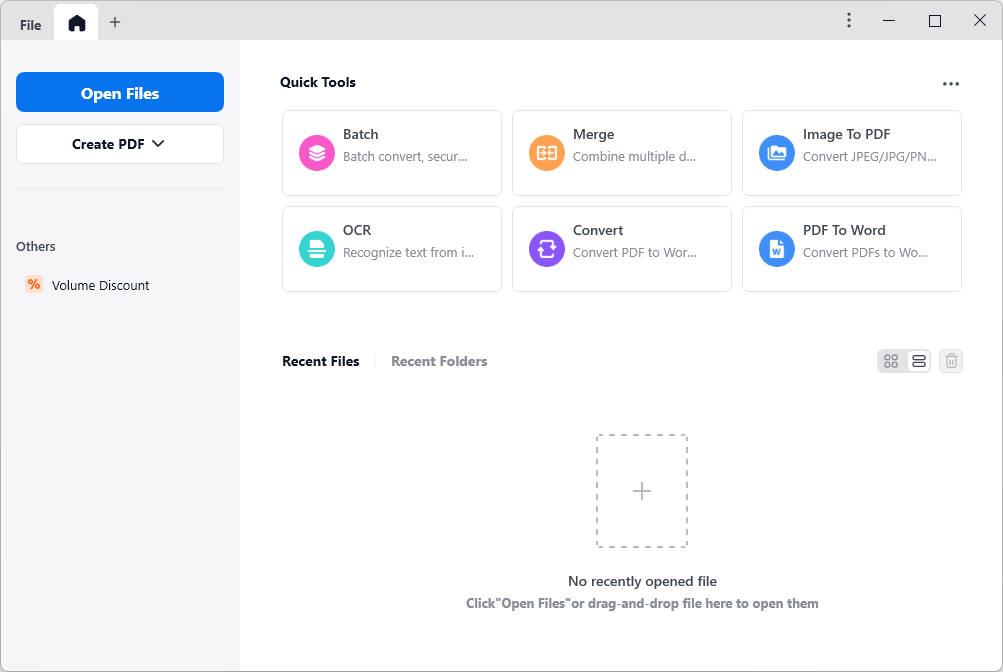
The home screen: Open Files and Create PDF on the left, quick tools for Batch, Merge, Image to PDF, OCR, Convert and PDF to Word, and the recent files list.
Features
Edit the text and images already in the PDF
Cisdem PDFMaster's Edit tab frames each block of text so you can click in and retype it, then change the font, size, color, opacity and alignment in the side panel. Images can be moved, rotated, cropped, replaced, resized or extracted, and you can add new text boxes, images and links. The same tab adds watermarks, backgrounds, headers and footers, Bates numbers and crops.

Edit mode: a selected text line with a floating format bar, and font, style, alignment and color settings in the right panel.
Convert PDFs and scans into Office files
Cisdem PDFMaster's Convert tab turns a PDF into Word, Excel, PowerPoint, images or other formats for the whole file or a page range. Choose "Keep mixed layout" or "Retain page layout", and switch on OCR for scanned pages, with automatic or manual language choice. It can also extract the text of a scan to a TXT file, make a scanned PDF searchable, or copy text from a selected area.

The To Word dialog: layout settings, the OCR switch with automatic language detection, an "Only Scanned Pages" option and the page range.
Annotate, measure and review
Cisdem PDFMaster has the usual markup tools (highlight, underline, squiggly, strikeout), text boxes, sticky notes, freehand drawing with an eraser, shapes and stamps. Its Measure tool reads distances, perimeters and areas, which helps with floor plans and technical drawings. All comments can be listed in one panel and exported or imported as an XFDF file.
Fill, create and sign forms
Cisdem PDFMaster fills interactive forms directly and lets you add text fields, check boxes, radio buttons, list boxes, combo boxes and buttons to make a flat form fillable. You can draw a signature or upload one as an image, or create or load a digital ID and apply a certificate-based digital signature.
Redact, encrypt and compare
Cisdem PDFMaster's Redact mode marks text or areas, lets you change the fill color or overlay text, repeat a mark across pages, and then applies the redaction. You can set open and permission passwords, or remove a permission password you know. The Compare tool shows two versions side by side or overlaid, comparing text, images or both.

Redact mode: a marked line with the right-click menu (Properties, Repeat Mark Across Pages, Apply Redactions) and the Apply button top right.
Pages, merging, compression and batch jobs
Cisdem PDFMaster inserts, extracts, replaces, splits, reverses, resizes and rotates pages, and merges several PDFs with page ranges. Compression has preset modes. The Batch window applies one job to many files at once: convert, OCR, compress, security, watermark, background, header and footer, Bates numbers, or removal of these.

The Batch window: the job list on the left, the file queue in the middle and the conversion settings on the right.
Reading tools and optional AI
Cisdem PDFMaster reads in single page, two page, book, read and slideshow modes, with split view, thumbnails and an editable outline. Text-to-speech reads a document aloud, and the print dialog does posters, several pages per sheet and booklets. The AI panel offers Summarize, Rewrite, Proofread and Translate on the current file, using ChatGPT and DeepSeek, at one credit or more per run.

The AI panel on the Tools tab, with the My AI Credit button and a "Start (1 credit)" button for a summary.
Benefits
- One payment: the lifetime license includes updates, so a few years of use costs less than one year of most subscription PDF editors.
- One app instead of four: editing, OCR conversion, forms and redaction are all here, so you don't juggle a free reader, an online converter and a separate signing service.
- A desktop app: you edit and convert files in an installed program instead of uploading contracts, medical forms or HR files to an online converter.
- Repetitive work goes faster: batch conversion, OCR and watermarking save real time when a folder of 50 scans lands on your desk.
Real-World Uses
- A freelancer's paperwork: fill in a client's onboarding form, add a drawn or digital signature to the contract, and send it back without printing.
- A paralegal's case file: merge the exhibits, add Bates numbers, redact account numbers and addresses, and make the scanned pages searchable.
- Reviewing plans: measure distances and areas on a floor plan, comment with shapes and notes, and export the comments for the architect.
- Reusing an old report: convert a scanned or exported PDF to Word with OCR, then edit it as a normal document.
- Sending large files: compress a batch of scanned PDFs so they fit through email limits.
Who It's For, and Who Should Skip It
Good fit: home users, freelancers and small offices on Windows who edit, convert and sign PDFs every week and would rather pay once. It's also a sensible pick for anyone who needs redaction and digital signatures but finds Acrobat Pro's yearly cost hard to justify.
Skip it if you only read and annotate PDFs now and then: the free Edge or Acrobat Reader do that. Teams that need shared cloud review, e-signature workflows with tracking, or Microsoft 365 integration are better served by Acrobat Pro or a cloud signing service. If all you need is PDF-to-Word conversion with OCR, Cisdem's own PDF Converter OCR costs less. And on an older, low-storage PC, the 700 MB-plus install is worth thinking about.
Usage Guide
- Download the installer, double-click the .exe, choose a folder and click Next, Next, Install.
- Launch Cisdem PDFMaster. The 7-day trial starts with all features. To activate a license, click the key icon or choose Enter License, paste the code and click Activate.
- To make it your default PDF app, right-click any PDF, choose Properties, click Change next to "Opens with" and pick Cisdem PDFMaster.
- Open a file with Open Files, from the recent list, or by dragging it onto the window.
- To edit, go to the Edit tab and click into the text. To convert, go to Convert, pick a format, switch on OCR for scans, and click Convert.
- For many files, use Tools > Batch, add the files, pick the job and run it.
- Save with Ctrl+S. Cisdem PDFMaster checks for updates at launch, or use Check for Updates in the menu.
Where it falls short
- OCR isn't perfect: a SourceForge reviewer found OCR accuracy on scanned documents "isn't perfect". Check converted tables and numbers before you rely on them.
- Some tools are buried: the same reviewer felt several advanced features are "a bit hidden in menus".
- Small quirks: one user noted that importing an image always prompts you to save it as a new PDF.
- Thin independent testing: there are few hands-on reviews of the Windows version by tech magazines, so the trial is your best test.
- AI is metered: heavy use of summaries or translation adds a running cost on top of the license.
What Users Say
SourceForge: 3.8 out of 5 from 4 reviews
The reviews on SourceForge cover Cisdem PDFMaster in general and don't say which platform the reviewer used. They range from very happy to very unhappy.
A biostatistician gave it 5 out of 5 in April 2026: "It's fast, intuitive, and handles large datasets in PDFs smoothly, i can search, annotate, and extract tables efficiently." The same reviewer's con: "Sometimes OCR accuracy isn't perfect with scanned documents, and several advanced features feel a bit hidden in menus."
An HR user (4 out of 5, June 2025) wrote: "Actually, I use it to edit my resume and make some fillable forms", and summed up: "It saves me much time and effort on processing my pdf document." The complaint: "When I import an image into the program, it always prompt me to save the image as a new PDF file".
Wendy W., a manager (5 out of 5, December 2024), listed "Intuitive and aesthetic interface." and "Helpful and responsive customer support." as pros.
The one negative review (1 out of 5, October 2023), from a trial user, said: "No pros. It lacks so many features." and "Waste of time, nothing else." The reviewer also said they were charged $50 after cancelling during the trial. That's one person's account.
Users quoted on Cisdem's Windows review page
These come from Cisdem's own page, so expect them to be favorable. They do show what people use it for.
Jose (October 2025), "Great for Technical PDFs": "I work with technical drawings every day, and the Measure Tool helps me confirm proportions and distances easily."
Bianca (July 2025), a paralegal: "The OCR feature is surprisingly accurate—even with older, low-resolution documents. I can edit, annotate, and export documents without needing Adobe anymore."
Duane (July 2025): "I use PDFMaster daily for contracts and invoices. The digital signature feature is a lifesaver—clean, secure, and easy to apply."
Kathryn (September 2025): "I deal with a lot of PDF forms for work—applications, agreements, and reports—and this software makes it super simple to fill them out directly without printing."
Zack (August 2025): "Cisdem's redacting tool meet the legal requirements for redaction, just as what Adobe does. What's more, it supports editing meta data, totally suit for my needs."
Product Hunt and Trustpilot
On Product Hunt, Cisdem PDFMaster has 5.0 from a single review. Bonnie Anne wrote that she uses it "to directly edit text and images within my PDFs, saving me hours compared to converting files first."
Cisdem as a company scores 4.9 out of 5 from 306 reviews on Trustpilot, though Trustpilot notes Cisdem hasn't invited reviews recently. Most recent reviews praise fast license and activation help ("within minutes my issue was resolved"). The criticism there is about other Cisdem apps, such as a 3-star review saying Duplicate Finder's new interface "is simply not very user-friendly".
The pattern: people like the all-in-one toolset, the forms, signature and measure tools, and Cisdem's support. The complaints are about OCR accuracy on poor scans, features hidden in menus, and one trial user who found it too limited. Independent reviews are few, so test your own documents during the trial.
Comparisons
Cisdem PDFMaster vs. Adobe Acrobat Pro
Cisdem PDFMaster covers the core of Acrobat Pro (editing, OCR conversion, forms, redaction, digital signatures, compare and Bates numbers) for a one-time price instead of a yearly subscription. Acrobat still leads on cloud document sharing, tracked e-signature workflows, accessibility tools, PDF/A and preflight checks, and on being the format's reference app. If your office already standardizes on Acrobat, stay there; if you're one person paying your own way, PDFMaster is much cheaper over time.
Cisdem PDFMaster vs. Cisdem PDF Converter OCR
Cisdem PDF Converter OCR ($69.99 lifetime at checkout) only converts PDFs and scans to other formats and creates PDFs. It doesn't edit text, fill forms, redact or sign. Pick it if conversion is all you need, and PDFMaster if you also edit and sign.
Windows version vs. Mac version
The Windows and Mac versions are sold separately, with separate licenses. The Cisdem PDFMaster for Mac is at version 7.5.0 and adds Mac touches such as sharing through AirDrop. The core tools (editing, OCR, forms, redaction, AI credits) are the same on both.
Editions and Pricing
| License | Price at checkout | Term | PCs and use | Buy |
|---|
| Lifetime License | $89.99 | One-time, with updates | 1 PC, personal use | Buy 1 PC |
| Lifetime License for 2 PCs | $125.99 | One-time, with updates | 2 PCs, personal use | Buy 2 PCs |
| Lifetime License for 5 PCs | $224.99 | One-time, with updates | 5 PCs, personal use | Buy 5 PCs |
| Business License | $119.99 | One-time, with updates | 1 PC, commercial use | Buy Business |
| Annual License | $59.99 a year | Renews yearly until cancelled | 1 PC | Buy Annual |
Prices as seen on the order page on November 17, 2026, in US dollars before tax. Each button orders the license in its row. The lifetime license pays for itself against the annual plan in about a year and a half. AI credits are sold separately ($14.99 for 50), and Cisdem offers 30% off to students and teachers and to owners of another Cisdem app, and volume pricing for more than 5 PCs.
FAQs
Can I use the Cisdem PDFMaster Lifetime License at work?
Cisdem PDFMaster's Lifetime License is meant for personal use. Cisdem sells the Business License for use in a commercial or business setting. The two have exactly the same features; only the usage rights differ.
Does the Cisdem PDFMaster license include the AI tools?
No. Cisdem PDFMaster's license covers the standard tools, and AI Summarize, Rewrite, Proofread and Translate use AI credits bought separately. Everything else in the app works without credits.
Does Cisdem PDFMaster still run on Windows 7?
Yes. Cisdem lists Windows 7, 8, 10 and 11, in both 32-bit and 64-bit, with 1 GB of RAM and 500 MB of free space as the minimum. That's useful for older office PCs that newer editors no longer support.
Does a Windows license of Cisdem PDFMaster also work on a Mac?
No. Cisdem PDFMaster for Windows and for Mac are separate products with separate licenses, and Cisdem may decline a refund for software bought for the wrong platform. Buy the version for the computer you'll use.
Can Cisdem PDFMaster remove a PDF password I don't know?
Cisdem PDFMaster removes a permission password (the one that blocks printing, copying or editing) when you enter it, and it can't open a file whose open password you don't have. Cisdem asks users to remove protection only from documents they're authorized to change.
What happens to Cisdem PDFMaster after the 7-day trial?
When Cisdem PDFMaster's 7-day trial ends, you need to activate a license to keep using it. Enter the code from your order through the key icon or Enter License, and the full version is activated without reinstalling.
Can I get a refund for Cisdem PDFMaster if I don't like it?
Probably not. Cisdem PDFMaster's 30-day money-back guarantee applies when there's a technical problem with the program that Cisdem's support can't solve. A change of mind, a feature not described on the product page, or an operator error are listed as reasons Cisdem may decline. Test your own files in the free trial before buying.
Does the annual Cisdem PDFMaster license renew automatically?
Yes. Cisdem PDFMaster's Annual License renews each year until you stop it, and Cisdem doesn't refund a renewal you forgot to cancel. You can switch off automatic renewal at any time before the charge in your Verifone account, or in PayPal for PayPal orders.
System Requirements
- Windows 7, Windows 8, Windows 10 or Windows 11, 32-bit or 64-bit
- 1 GHz Intel or AMD processor or faster
- 1 GB RAM or more
- 500 MB free disk space or more for installation (the installer itself is about 712 MB)
Conclusion
Cisdem PDFMaster for Windows is worth $89.99 if you work with PDFs every week and want to stop paying a subscription. The one reason to buy it is breadth for the price: text editing, OCR conversion, forms, digital signatures, redaction and batch jobs in one app that you own. The main reason not to is its thin record of independent testing and a narrow refund policy, so make full use of the 7-day trial on your own documents first. Buy the Business License if you'll use it at work, and skip it entirely if a free reader already covers what you do.
Download Free TrialBuy Lifetime LicenseBuy Business LicenseBuy Annual License