Cisdem Video Compressor for Windows: Shrink Big Videos by Percentage, Size or Settings
Cisdem Video Compressor for Windows is a $39.99 one-time-purchase app that makes video and audio files smaller, one at a time or in batches. You set a percentage, a target size, or exact codec and resolution settings. It suits anyone who needs to fit recordings into upload limits or free up disk space without learning a professional encoder.
A 10-minute 4K clip can run to gigabytes, and most mail services and many social platforms won't take it. Drag it in, pick how small it should be, check the preview, and click Start.
Quick facts
- Version: 3.0.0, released July 14, 2026
- Developer: Cisdem
- Platform: Windows 10 and 11, 64-bit. A separate Mac version exists.
- Compresses: nearly all video formats, including 4K and 8K, plus audio such as FLAC, WAV and AIFF
- Output: MP4, AVI, MKV, WMV, MOV, M4V, 3GP, WEBM, FLV, MP3, WMA
- Acceleration: Intel QSV, AMD VCE, NVIDIA NVENC
- Price: $39.99 one-time for one PC at checkout
- Trial: up to 3 files, with a watermark
- Guarantee: 30-day money back
- What we checked: installer size 87.1 MB from the vendor's download link, dated July 14, 2026, release notes and tech specs on the vendor's site, order page price $39.99 for the one-time license on November 6, 2026. We did not run our own compression tests.
Download Free TrialBuy Now
Before you buy
The Windows version has only had small updates lately: version 3.0.0 lists just bug fixes. That's fine for a stable tool, but don't expect new features soon. Also, Cisdem advertises "lossless compression", yet shrinking a video by re-encoding it always discards some detail. A good encoder makes that hard to see. Compare the preview before you commit a batch.
Overview
Cisdem Video Compressor opens to a drop area. Each file then gets a row showing its size, resolution, length and format before and after, along with a Preview button. A Percentage box applies to the whole batch, and the gear icon opens Advanced Settings for a single file. Output goes to the folder you choose.
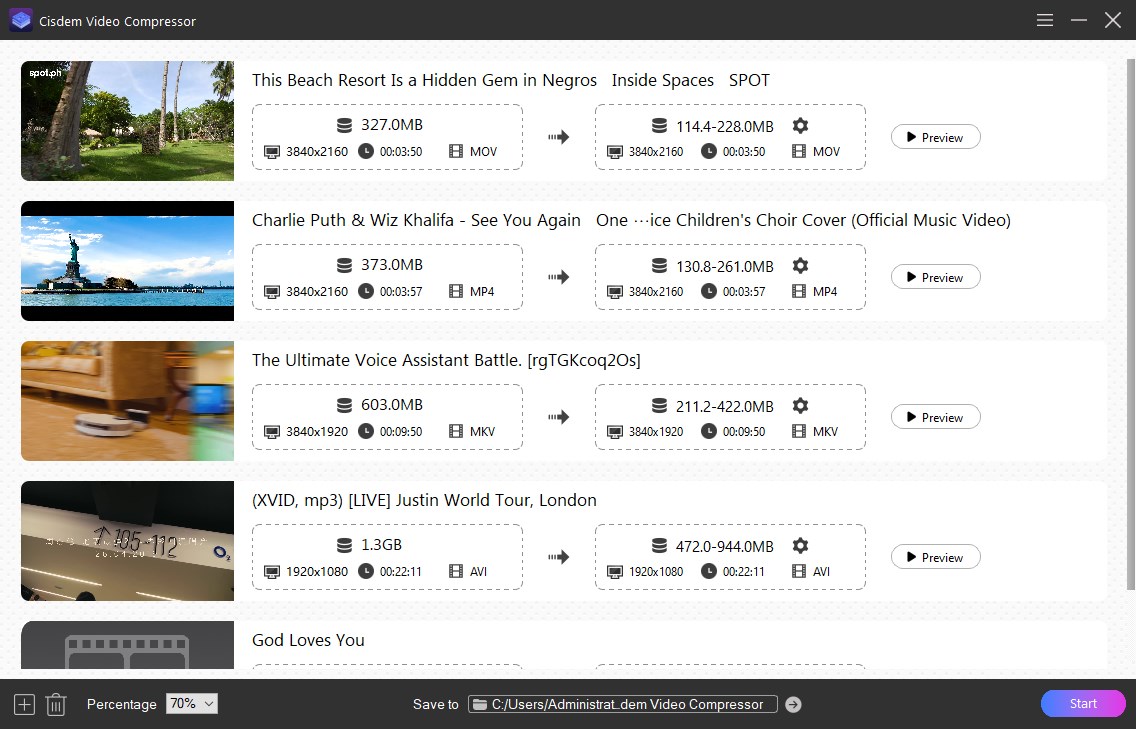
A batch at 70%. Each row shows the original size next to the estimated range, such as 1.3 GB to 472-944 MB.
Features
Compress by percentage
Cisdem Video Compressor gives you a single percentage control that takes 10% to 90% off the size. It is the quickest route and works well on a mixed batch.
Compress to a target size
Cisdem Video Compressor's size slider, which Cisdem recommends, works with two modes. Variable Bit Rate adapts to the content and gives an estimated range. Constant Bit Rate fixes the output size, which is what you want when an upload form has a hard limit.
Compress by parameters
Cisdem Video Compressor lets you switch to a more efficient codec such as H.265 or AV1, or lower the resolution, frame rate, sample rate or channels. Cutting 4K to 1080p often saves more than any other single change. High, Medium and Low quality options sit alongside these settings.
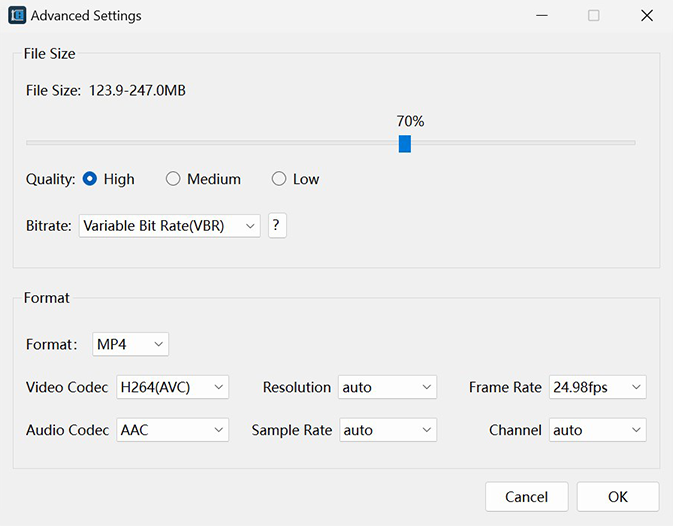
Advanced Settings: target size, quality, bit rate mode, format, codecs, resolution and frame rate.
Batch work with preview
Cisdem Video Compressor takes many files at once and has a Preview button so you can view the effect first. The built-in player also lets you check the source. On a modern graphics chip, hardware acceleration shortens the wait.
Audio too
Cisdem Video Compressor also shrinks audio files, which helps with large FLAC, WAV or AIFF albums. Output for audio is MP3 or WMA, so this is a one-way trip: keep your originals.
Benefits
- Clips fit inside email and social media limits without a trip to an online service.
- Your footage stays on your PC, which matters for private or client video.
- You don't need to understand bit rates unless you want to, yet the controls are there.
- A single run can clear many gigabytes from a full drive.
Real-World Uses
- A trainer shrinks a 1.3 GB screen recording so a team can download it.
- A student fits a video assignment under a course portal's upload limit.
- A traveller compresses a folder of GoPro 4K clips before archiving.
- A camcorder owner compresses Sony MTS files, a format some compressors skip.
- A social media manager batches a week of clips before scheduling them.
Who It's For, and Who Should Skip It
Cisdem Video Compressor suits ordinary Windows users who want a simple, dedicated compressor with enough control to hit a target.
Skip it if you are comfortable with HandBrake, which is free and very capable. Skip it if you also need trimming, as this app has no editor. If you want conversion, downloading and disc ripping as well, Cisdem VideoPaw costs more but includes compression. And it is the wrong tool for final masters: compress a copy, never your only source.
Usage Guide
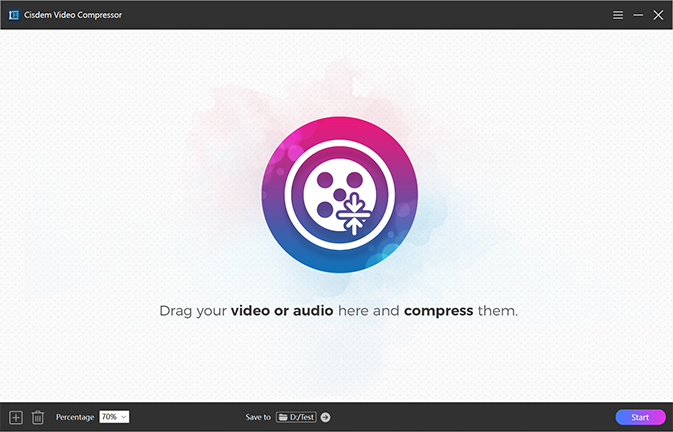
The start window. Drag in video or audio, or use the + button at the bottom left.
- Download and run the installer, then open the app.
- Drag in your videos or audio files, or click +.
- Choose a Percentage at the bottom, or click a file's gear icon for size and codec settings.
- Click Preview to check the quality.
- Set the Save to folder and click Start.
Where it falls short
There is no trimming, and cutting a clip is often the easiest way to save space. Reviewers raised this directly. The size shown with Variable Bit Rate is a range, not a promise, so use Constant Bit Rate for a hard limit. On an old PC with no supported graphics chip, it can be slow: one customer quoted on Cisdem's own site found it "a litter slow" on a ten-year-old computer. Audio output choices are few. And Cisdem's FAQ still calls the app completely free, even though output from the unlicensed version carries a watermark, which can confuse people.
What Users Say
SourceForge: 5.0 out of 5 from 2 reviews
Slashdot shows the same two reviews. Neither names a platform, and the sample is tiny.
- "I had a 1.3GB screen recording (MP4) from my online course project." and "Ran it through this compressor, and it went down to 280MB quickly." Donald M., Training Coordinator, May 13, 2026, who adds that the trial allows 3 files "but there are watermarks."
- "No obvious quality loss after shrinking" Social Media Manager, August 15, 2025, who also says: "No editing tool to trim the video, sometimes i need to cut out the redundant."
Customers quoted on Cisdem's own site
Cisdem hosts and displays these (13 entries for Windows), so give them less weight.
- "I use Cisdem Video Compressor on Windows 11 to shrink 4K recordings from my GoPro." Josh, July 10, 2025
- "This app helped me compress a 1.5GB file to just 200MB in a few clicks." Charlie, July 3, 2025
- "I've tried so many compressor tools, this is the only one that supports MTS file." Alexander, August 20, 2024
- "A really easy and useful tool, the only problem is that the speed is a litter slow. But it may be related to my machine, a ten-years-old computer." Manuel, July 30, 2024
Trustpilot: 4.9 out of 5 from 304 reviews of Cisdem
This covers all Cisdem products, and the reviews we read don't mention Video Compressor.
- "Great Customer service. They're efficient! They reply quickly and accurately" Compaore Lazare, July 20, 2026
The pattern: people like the drag-and-drop simplicity and the size reductions. The real complaints are the missing trim tool and the speed on old PCs. Independent reviews are scarce, so try your own footage in the trial.
Comparisons
Cisdem Video Compressor vs. HandBrake
HandBrake is free and open source, with more encoder options and a steeper learning curve. Cisdem Video Compressor costs money but gets you to a target size in a few clicks with a clear before-and-after view. Pay for it only if HandBrake feels like too much.
Cisdem Video Compressor vs. Cisdem VideoPaw
VideoPaw for Windows is Cisdem's $69.99 all-in-one for conversion, downloads, disc ripping, recording and compression. Video Compressor is the cheaper choice if shrinking files is all you need.
Editions and Pricing
| Plan | Price | License term | Devices |
|---|
| One-Year Subscription | $19.99 | One year | 1 PC |
| One-Time Purchase | $39.99 | Lifetime | 1 PC |
| One-Time Purchase | $55.99 | Lifetime | 2 PCs |
| One-Time Purchase | $99.99 | Lifetime | 5 PCs |
| Business License | $54.99 | One-time | 1 PC |
Prices are from Cisdem's buy page. The Buy Now button here is for the one-time 1-PC license. Cisdem offers 30% off to academic users and owners of another Cisdem product.
FAQs
Does Cisdem Video Compressor work offline?
Yes. Cisdem Video Compressor is a desktop app, so your files are processed on your PC and aren't uploaded anywhere.
What is the difference between VBR and CBR in Cisdem Video Compressor?
Variable Bit Rate adjusts to the complexity of each scene and gives an estimated size range. Constant Bit Rate sets a fixed output size, so choose it when you must stay under a limit.
Do the High, Medium and Low options change the file size in Cisdem Video Compressor?
Cisdem says the quality option doesn't affect the final file size. Size comes from your percentage or target setting.
Can Cisdem Video Compressor compress 4K video?
Yes. Cisdem lists 4K and 8K support, and its example batch shows 3840x2160 clips.
Does Cisdem Video Compressor read DVD files?
Cisdem lists DVD and Blu-ray ISO files as input on the Windows tech specs page. Copy-protected discs are a different matter, so test yours in the trial.
Does the Windows license of Cisdem Video Compressor cover a Mac?
No. The plan here covers one PC, and the Mac version has its own buy page.
System Requirements
- Windows 10 or Windows 11, 64-bit
- 1 GHz or faster Intel or AMD processor
- 512 MB RAM or more
- 100 MB or more for installation
Conclusion
Cisdem Video Compressor for Windows is worth $39.99 if you shrink videos regularly and want a clear, quick tool without learning encoder settings. Its percentage, target-size and batch controls cover almost every everyday job.
The main reason not to buy it is that HandBrake does this for free, if you can live with its learning curve. Use the 3-file trial to compare the picture on your own footage first.
Download Free TrialBuy Now